Drive - Rename

How to Rename a Drive in Vista, Windows 7, and Windows 8


   Information
This tutorial will show you how to rename a drive in Vista, Windows 7, and Windows 8. For example, a hard disk drive, USB flash drive, CD/DVD drive, etc...

   Tip
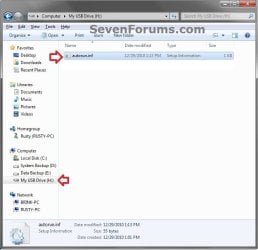
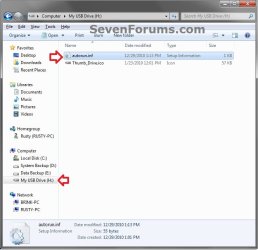
If the drive name is missing or was changed and you did not do it with the methods below, then look for a hidden (not always hidden though) autorun.inf file (OPTION TWO below) when you open the drive letter in Computer, then right click on the autorun.inf file, and click on Delete. Next, approve the deletion.

   Warning
You must be logged in as an administrator to be able to do rename a drive.


CONTENTS:

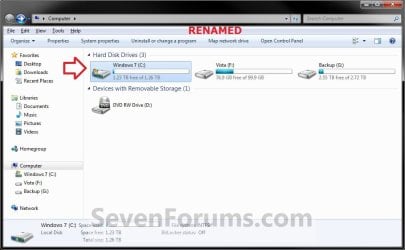
EXAMPLE: Rename a Hard Disk Drive
HDD_Default.jpg

HDD_Renamed.jpg

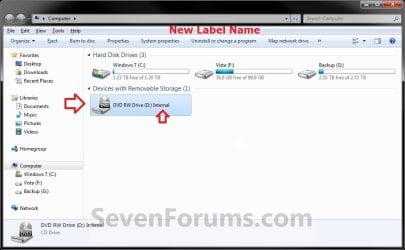
EXAMPLE: Rename a DVD Drive
NOTE: Devices with Removable Storage, such as a DVD drive, can only be renamed by adding a label at the end of the drive description using OPTION THREE below. These devices do not have a Rename option in the context menu when you right click on them in Computer or Disk Management.
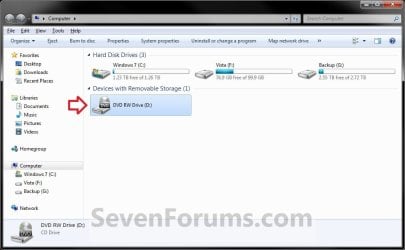
Removable_Default.jpg

Removable_Renamed.jpg


OPTION ONE

Rename a Drive in the "Computer" Window


NOTE: For Devices with Removable Storage, such as a DVD drive, that do not have a Rename option, you could use OPTION THREE below instead.
1. If you did OPTION TWO below previously, then you will need to either remove the label=new drive name entry from the autorun.inf file, or delete the autorun.inf file in the root of the drive that you want to change the name of.

2. Open the Computer window.

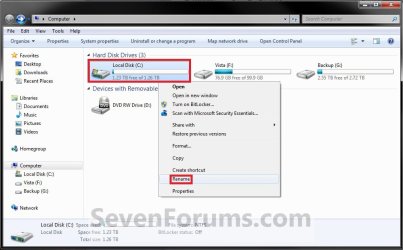
3. Select the drive you want to rename to highlight it, right click on it, and click/tap on Rename. (see screenshot below)
HDD_Step1.jpg
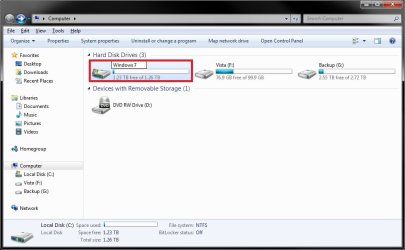
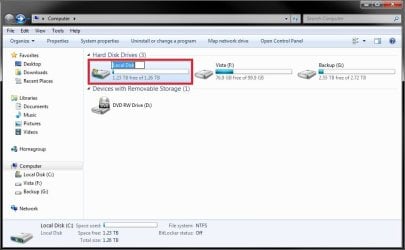
4. Type in a name you want for the drive, then press enter. (see screenshots below)
HDD_Step2A.jpg

HDD_Step2B.jpg

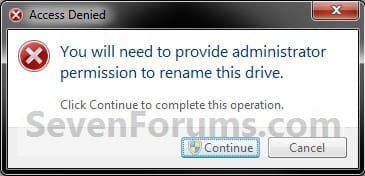
5. Click/tap on Continue. (see screenshot below)
HDD_Step3.jpg
6. If prompted by UAC, then click/tap on Yes (Windows 7/8) or Continue (Vista).

7. The selected drive is now renamed.


OPTION TWO

Change a Drive Name using an "autorun.inf" File


NOTE: While this option can be used for any drive, it is really useful for external drives like a USB flash drive.
1. Set your known file extensions to no longer be hidden.
NOTE: This way you will be able to rename the file extension in step 3 below.

2. Connect and/or open the drive that you want to change the name of.

3. In the root of the drive, right click or press and hold on an empty space, click/tap on New and Text Document, then rename this file autorun.inf and press Enter. (see screenshots below)

NOTE: If you already have an autorun.inf file in the root of this drive, then skip this step and proceed to step 4 or 5.
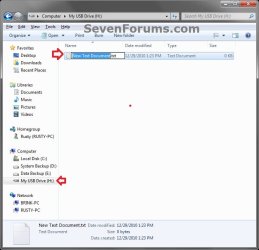
Auto_Step1.jpg

Auto_Step2.jpg

4. If this is a New autorun.inf File
A) Open the autorun.inf file, then type each line below followed by pressing enter. (see screenshot below)
NOTE: Substitute new drive name (ex: My USB Drive) with the actual name you want to use for the drive.
Code:
[autorun]
label="[B][COLOR=red]new drive [/COLOR][COLOR=red]name[/COLOR][/B]"
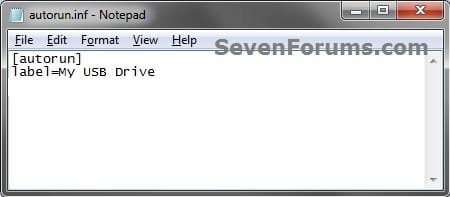
Label.jpg

B) Click on File (menu bar) and Save, then close the autorun.inf file. (see screenshot above)
5. If you already have a autorun.inf File
A) Open the autorun.inf file, then add or change the label= line below. (see screenshots below)
NOTE: Substitute new drive name (ex: My USB Drive) with the actual name you want to use for the drive.
Code:
[autorun]
[B]label="[COLOR=red]new drive name[/COLOR]"[/B]
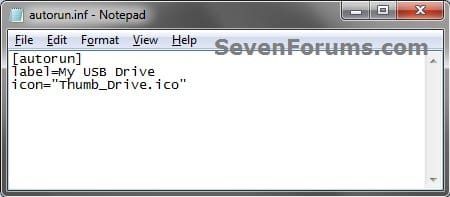
Label.jpg

TXT_file.jpg

B) Click on File (menu bar) and Save, then close the autorun.inf file. (see screenshots above)
7. If this is for an Internal or eSATA Dive
A) Restart the computer to apply.
8. If this is for an External Dive
A) Unplug and plug in the drive to apply.
9. Open the Computer window to see the changes.


   Note
To Restore the Default Name


You would just need to either option below and repeat steps 7 to 9.
  • Delete the autorun.inf and .ico file.
OR

  • Remove the label= line and save the changes if you have other lines (ex: icon=) you wish to continue using.


OPTION THREE

Rename a Drive Through Registry Editor


1. If you did OPTION TWO above previously, then you will need to either remove the label=new drive name entry from the autorun.inf file, or delete the autorun.inf file in the root of the drive that you want to change the name of.


2. Press the Windows + R keys to open the Run dialog, type regedit, and press enter.

3. If prompted by UAC, then click/tap on Yes (Windows 7/8) or Continue (Vista).

4. In regedit, navigate to the location below. (see screenshot below)

Code:
HKEY_LOCAL_MACHINE\SOFTWARE\Microsoft\Windows\CurrentVersion\Explorer
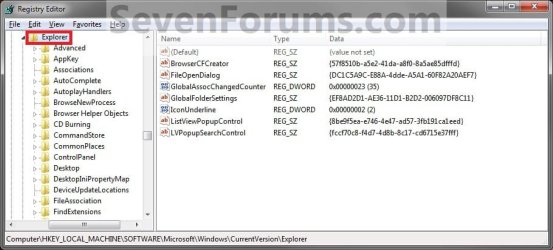
Step1.jpg
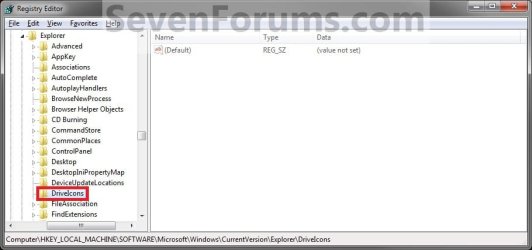
5. In the left pane, right click on Explorer, and click/tap on New and Key. Type DriveIcons and press enter.
NOTE: If you already have the DriveIcons key under Explorer, then go to step 6. (see screenshot above and below)
Step2.jpg
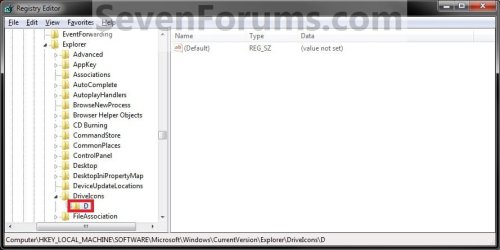
6. In the left pane, right click on DriveIcons and click/tap on New and Key. Type the drive letter (ex: D ) that you want to change the icon for and press enter.
NOTE: If you already have the drive letter (ex: D ) key under DriveIcons, then go to step 7. (see screenshot above and below)
Step3.jpg
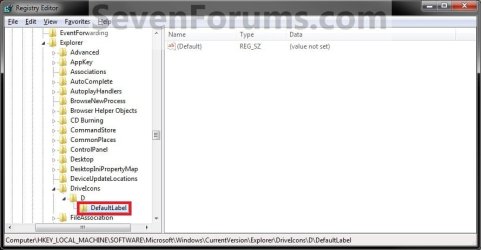
7. In the left pane, right click on the drive letter (ex: D ), and click/tap on New and Key. Type DefaultLabel and press enter.
NOTE: If you already have the DefaultLabel key under the drive letter (ex: D ), then go to step 8 or 9. (see screenshot above and below)
Step4.jpg
8. To Rename the Drive
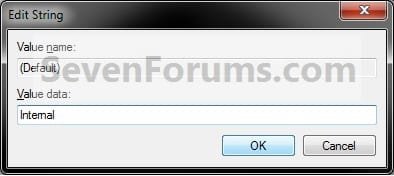
A) In the right pane of DefaultLabel, double click/tap on (Default) to modify it. (see screenshot below step 7)

B) Type in the new name (HDD) or label (DVD) you want for the drive, and click/tap on OK. (see screenshot below)
Step5.jpg
C) The registry should now look similar to this. (see screenshot below)
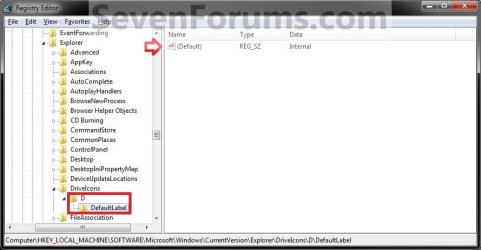
Step6.jpg
D) Go to step 10.
9. To Restore the Default Drive Name
A) Right click on the drive letter (ex: D ) from step 5 above that you want to restore, and click/tap on Delete and Yes. (see screenshot below step 6)
10. Close regedit.

11. The changes should be immediate, but in some cases you may need to restart the computer to apply the changes.


OPTION FOUR

Rename a Drive Through Disk Management


1. If you did OPTION TWO above previously, then you will need to either remove the label=new drive name entry from the autorun.inf file, or delete the autorun.inf file in the root of the drive that you want to change the name of.

2. Do step 3, 4, or 5 below for what you would like to do.

3. In Vista and Windows 7, open the Start Menu, right click on the Computer button (dark right side), click on Manage, and go to step 6 below.

4. In Windows 8, open the Power Users Tasks menu, click/tap on Disk Management, and go to step 6 below.

5. Press the Windows + R keys to open the Run dialog, type either compmgmt.msc OR diskmgmt.msc, press Enter, and go to step 6 below.

6. If prompted by UAC, then click/tap on Yes (Windows 7/8) or Continue (Vista).

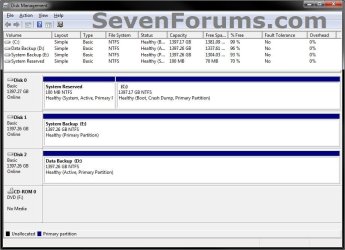
7. In the left pane of Computer Management, click/tap on Disk Management under Storage. (see screenshots below)
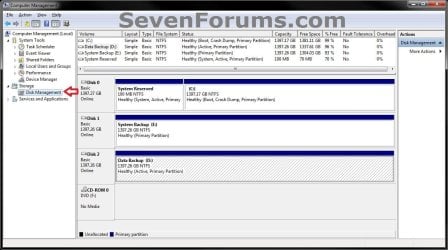
Computer_Management.jpg

Disk_Management.jpg

8. In the middle pane, right click on the drive letter that you want to rename, and click/tap on Properties. (see screenshot below)
Disk_Mangement-1.jpg
9. Under the General tab, type in the new name that you would like, and click/tap on OK. (see screenshot below)
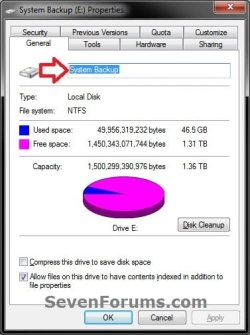
Disk_Mangement-2.jpg
10. When finished, you can close the Computer Management or Disk Management window.


OPTION FIVE

Rename a Drive using "Label" Command


NOTE: For Devices with Removable Storage, such as a DVD drive, that do not have a Rename option, you will need to use OPTION THREE above instead.
1. If you did OPTION TWO above previously, then you will need to either remove the label=new drive name entry from the autorun.inf file, or delete the autorun.inf file in the root of the drive that you want to change the name of.

2. Open an elevated command prompt.

3. Do step 4 or 5 below for what you would like to do.

4. To Directly Change Drive Name
A) In the elevated command prompt, type the command below, press Enter, and go to step 6 below. (see screenshot below)

label DriveLetter: Name

For example: label C: Windows

   Note
Substitute DriveLetter in the command with the actual drive letter you want to rename.

Substitute Name in the command with the name/label you want to rename the drive with. Leave blank if you do not want a name/label.
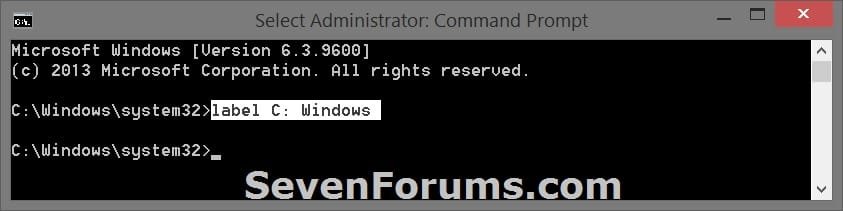


label_command-2.jpg
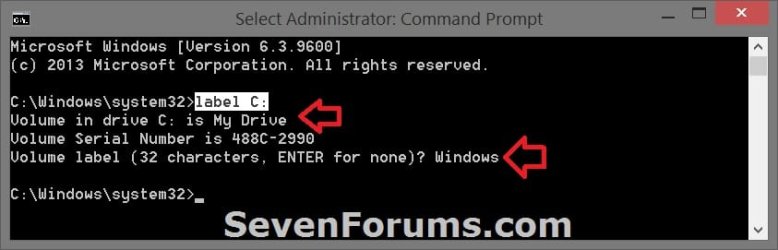
5. To See Current Drive Name and Change
A) In the elevated command prompt, type the command below, and press Enter. (see screenshot below)
label DriveLetter:

For example: label C:
   Note
Substitute DriveLetter in the command with the actual drive letter you want to rename.


B) You will see the current name/label of the drive. Type in the name/label you want to rename the drive with, press Enter, and go to step 6 below.

   Note
If you do not want a name/label for the drive, then leave this blank, and press Enter.


label_command.jpg
6. When finished, you can close the elevated command prompt if you like.


That's it,
Shawn


Attachments

  • Auto_Step3.jpg
    Auto_Step3.jpg
    99.4 KB · Views: 1
Last edited:
Hi, brink thanks for the reply.
Yes i copied both the files in the root directory and not in folder.
Regarding code box, i do not know how to do that. I have saved in a notepad, and saved the new text to autorun.inf. Should i select any other format like unicode, in the save as.
i copied a 34 pixel from some site, which is having ico extension.
when i finished and reinserted the flash drive, i got auto play and not it is auto run the icon and label. Please
 

My Computer

Computer type
PC/Desktop
Computer Manufacturer/Model Number
custom build
OS
Microsoft Windows 7 Ultimate 64-bit 7601 Multiprocessor Free Service Pack 1
CPU
Intel(R) Core(TM)2 Duo CPU E7200 @ 2.53GHz
Motherboard
To be filled by O.E.M. To be filled by O.E.M.
Memory
4.00 GB
Graphics Card(s)
NVIDIA GeForce 210
Sound Card
(1) NVIDIA High Definition Audio (2) Realtek High Definiti
Screen Resolution
1920 x 1080 x 32 bits (4294967296 colors) @ 60 Hz
Hard Drives
ST3500312CS ATA Device
That's ok. You can just post the contents of the autorun.inf file to see if there may be any issues with it.
 

My Computer

Computer type
PC/Desktop
Computer Manufacturer/Model Number
Self built custom
OS
64-bit Windows 11 Pro for Workstations
CPU
Intel i7-8700K OC'd to 5 GHz
Motherboard
ASUS ROG Maximus XI Formula Z390
Memory
64 GB (4x16GB) G.SKILL TridentZ RGB DDR4 3600 MHz
Graphics Card(s)
ASUS ROG-STRIX-GTX1080TI-O11G-GAMING
Sound Card
Integrated
Monitor(s) Displays
2 x Samsung Odyssey G7 27"
Screen Resolution
2560x1440
Hard Drives
1TB Samsung 990 PRO M.2,
4TB Samsung 990 PRO PRO M.2,
TerraMaster F8 SSD Plus NAS
PSU
Seasonic Prime Titanium 850W
Case
Thermaltake Core P3
Cooling
Corsair Hydro H115i
Keyboard
Logitech wireless K800
Mouse
Logitech MX Master 4
Internet Speed
2 Gb/s Download and 100 Mb/s Upload
Antivirus
Malwarebyte Anti-Malware Premium
Browser
Google Chrome
Other Info
Logitech Z625 speaker system,
Logitech BRIO 4K Pro webcam,
HP Color LaserJet Pro MFP M477fdn,
APC SMART-UPS RT 1000 XL - SURT1000XLI,
Galaxy S23 Plus phone
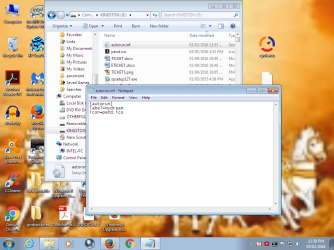
Hi, this is the auto run file
with pend.ico in the root of g drive.
 

Attachments

  • iconlabel.png
    iconlabel.png
    638.9 KB · Views: 72

My Computer

Computer type
PC/Desktop
Computer Manufacturer/Model Number
custom build
OS
Microsoft Windows 7 Ultimate 64-bit 7601 Multiprocessor Free Service Pack 1
CPU
Intel(R) Core(TM)2 Duo CPU E7200 @ 2.53GHz
Motherboard
To be filled by O.E.M. To be filled by O.E.M.
Memory
4.00 GB
Graphics Card(s)
NVIDIA GeForce 210
Sound Card
(1) NVIDIA High Definition Audio (2) Realtek High Definiti
Screen Resolution
1920 x 1080 x 32 bits (4294967296 colors) @ 60 Hz
Hard Drives
ST3500312CS ATA Device
jraju,

Test using this below for the autorun.inf file instead, then disconnect and reconnect the USB to see if this works.


[autorun]
label="mydream"
icon="pend.ico"
 

My Computer

Computer type
PC/Desktop
Computer Manufacturer/Model Number
Self built custom
OS
64-bit Windows 11 Pro for Workstations
CPU
Intel i7-8700K OC'd to 5 GHz
Motherboard
ASUS ROG Maximus XI Formula Z390
Memory
64 GB (4x16GB) G.SKILL TridentZ RGB DDR4 3600 MHz
Graphics Card(s)
ASUS ROG-STRIX-GTX1080TI-O11G-GAMING
Sound Card
Integrated
Monitor(s) Displays
2 x Samsung Odyssey G7 27"
Screen Resolution
2560x1440
Hard Drives
1TB Samsung 990 PRO M.2,
4TB Samsung 990 PRO PRO M.2,
TerraMaster F8 SSD Plus NAS
PSU
Seasonic Prime Titanium 850W
Case
Thermaltake Core P3
Cooling
Corsair Hydro H115i
Keyboard
Logitech wireless K800
Mouse
Logitech MX Master 4
Internet Speed
2 Gb/s Download and 100 Mb/s Upload
Antivirus
Malwarebyte Anti-Malware Premium
Browser
Google Chrome
Other Info
Logitech Z625 speaker system,
Logitech BRIO 4K Pro webcam,
HP Color LaserJet Pro MFP M477fdn,
APC SMART-UPS RT 1000 XL - SURT1000XLI,
Galaxy S23 Plus phone
Hi, Tried but not getting the desired result
Moreover,when i make the hidden files to be shown, i do not get any hidden folders showing in the explorer from the pen drive.It only shows autorun.inf i created and the pend.ico.
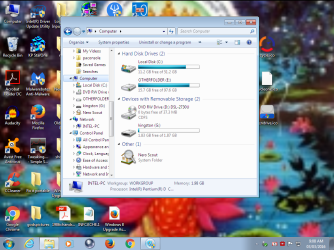
When i unplugged and again plug the pen drive, i got the following result. It shows the drives, as if i have double clicked computer in the start menu
 

Attachments

  • trialone.png
    trialone.png
    1 MB · Views: 80

My Computer

Computer type
PC/Desktop
Computer Manufacturer/Model Number
custom build
OS
Microsoft Windows 7 Ultimate 64-bit 7601 Multiprocessor Free Service Pack 1
CPU
Intel(R) Core(TM)2 Duo CPU E7200 @ 2.53GHz
Motherboard
To be filled by O.E.M. To be filled by O.E.M.
Memory
4.00 GB
Graphics Card(s)
NVIDIA GeForce 210
Sound Card
(1) NVIDIA High Definition Audio (2) Realtek High Definiti
Screen Resolution
1920 x 1080 x 32 bits (4294967296 colors) @ 60 Hz
Hard Drives
ST3500312CS ATA Device
I'm not sure why it's not working for you. Are you able to use the other options to rename and change the icon?
 

My Computer

Computer type
PC/Desktop
Computer Manufacturer/Model Number
Self built custom
OS
64-bit Windows 11 Pro for Workstations
CPU
Intel i7-8700K OC'd to 5 GHz
Motherboard
ASUS ROG Maximus XI Formula Z390
Memory
64 GB (4x16GB) G.SKILL TridentZ RGB DDR4 3600 MHz
Graphics Card(s)
ASUS ROG-STRIX-GTX1080TI-O11G-GAMING
Sound Card
Integrated
Monitor(s) Displays
2 x Samsung Odyssey G7 27"
Screen Resolution
2560x1440
Hard Drives
1TB Samsung 990 PRO M.2,
4TB Samsung 990 PRO PRO M.2,
TerraMaster F8 SSD Plus NAS
PSU
Seasonic Prime Titanium 850W
Case
Thermaltake Core P3
Cooling
Corsair Hydro H115i
Keyboard
Logitech wireless K800
Mouse
Logitech MX Master 4
Internet Speed
2 Gb/s Download and 100 Mb/s Upload
Antivirus
Malwarebyte Anti-Malware Premium
Browser
Google Chrome
Other Info
Logitech Z625 speaker system,
Logitech BRIO 4K Pro webcam,
HP Color LaserJet Pro MFP M477fdn,
APC SMART-UPS RT 1000 XL - SURT1000XLI,
Galaxy S23 Plus phone
Hi, i could only rename the icon after formatting fully , by going to the properties , general tab, in the blank place. No other way. But i could not get the icon.
autorun is not running as it should. Do i miss anything. will you try the same in your computer and post me the screen shot that it does it for you.
I tried to use save as and saved in unicode also. It does not work.
Will you try now and copy the screen shot?
 

My Computer

Computer type
PC/Desktop
Computer Manufacturer/Model Number
custom build
OS
Microsoft Windows 7 Ultimate 64-bit 7601 Multiprocessor Free Service Pack 1
CPU
Intel(R) Core(TM)2 Duo CPU E7200 @ 2.53GHz
Motherboard
To be filled by O.E.M. To be filled by O.E.M.
Memory
4.00 GB
Graphics Card(s)
NVIDIA GeForce 210
Sound Card
(1) NVIDIA High Definition Audio (2) Realtek High Definiti
Screen Resolution
1920 x 1080 x 32 bits (4294967296 colors) @ 60 Hz
Hard Drives
ST3500312CS ATA Device

My Computer

Computer type
PC/Desktop
Computer Manufacturer/Model Number
Self built custom
OS
64-bit Windows 11 Pro for Workstations
CPU
Intel i7-8700K OC'd to 5 GHz
Motherboard
ASUS ROG Maximus XI Formula Z390
Memory
64 GB (4x16GB) G.SKILL TridentZ RGB DDR4 3600 MHz
Graphics Card(s)
ASUS ROG-STRIX-GTX1080TI-O11G-GAMING
Sound Card
Integrated
Monitor(s) Displays
2 x Samsung Odyssey G7 27"
Screen Resolution
2560x1440
Hard Drives
1TB Samsung 990 PRO M.2,
4TB Samsung 990 PRO PRO M.2,
TerraMaster F8 SSD Plus NAS
PSU
Seasonic Prime Titanium 850W
Case
Thermaltake Core P3
Cooling
Corsair Hydro H115i
Keyboard
Logitech wireless K800
Mouse
Logitech MX Master 4
Internet Speed
2 Gb/s Download and 100 Mb/s Upload
Antivirus
Malwarebyte Anti-Malware Premium
Browser
Google Chrome
Other Info
Logitech Z625 speaker system,
Logitech BRIO 4K Pro webcam,
HP Color LaserJet Pro MFP M477fdn,
APC SMART-UPS RT 1000 XL - SURT1000XLI,
Galaxy S23 Plus phone
Hi, Brink Thank you so much. It worked like charm
One more question? If suppose, you have two flash drives, how to use this trick.
I think it is not allowing the pendrive to access the label or icon, but windows registry could do.
If i suppose, use another pendrive and it gets some other drive name, should you also provide for one more key as described in your article. No body wants bore icons and so i asked for this. Thank you.
 

My Computer

Computer type
PC/Desktop
Computer Manufacturer/Model Number
custom build
OS
Microsoft Windows 7 Ultimate 64-bit 7601 Multiprocessor Free Service Pack 1
CPU
Intel(R) Core(TM)2 Duo CPU E7200 @ 2.53GHz
Motherboard
To be filled by O.E.M. To be filled by O.E.M.
Memory
4.00 GB
Graphics Card(s)
NVIDIA GeForce 210
Sound Card
(1) NVIDIA High Definition Audio (2) Realtek High Definiti
Screen Resolution
1920 x 1080 x 32 bits (4294967296 colors) @ 60 Hz
Hard Drives
ST3500312CS ATA Device
Sure, you could do it for any drive letter. :)
 

My Computer

Computer type
PC/Desktop
Computer Manufacturer/Model Number
Self built custom
OS
64-bit Windows 11 Pro for Workstations
CPU
Intel i7-8700K OC'd to 5 GHz
Motherboard
ASUS ROG Maximus XI Formula Z390
Memory
64 GB (4x16GB) G.SKILL TridentZ RGB DDR4 3600 MHz
Graphics Card(s)
ASUS ROG-STRIX-GTX1080TI-O11G-GAMING
Sound Card
Integrated
Monitor(s) Displays
2 x Samsung Odyssey G7 27"
Screen Resolution
2560x1440
Hard Drives
1TB Samsung 990 PRO M.2,
4TB Samsung 990 PRO PRO M.2,
TerraMaster F8 SSD Plus NAS
PSU
Seasonic Prime Titanium 850W
Case
Thermaltake Core P3
Cooling
Corsair Hydro H115i
Keyboard
Logitech wireless K800
Mouse
Logitech MX Master 4
Internet Speed
2 Gb/s Download and 100 Mb/s Upload
Antivirus
Malwarebyte Anti-Malware Premium
Browser
Google Chrome
Other Info
Logitech Z625 speaker system,
Logitech BRIO 4K Pro webcam,
HP Color LaserJet Pro MFP M477fdn,
APC SMART-UPS RT 1000 XL - SURT1000XLI,
Galaxy S23 Plus phone
Hi, Is it also true that if a pendrive for eg kingston is plugged, it allots the same drive letter, if one plugs in any usb port?
Because, i tried the same with other pen drive in the same port. But i could not get the icon and label, i had for the kingston, which i previously used for changing icon name and label.
Would you please explain this behaviour.
I have made changes in the registry only for the previous drive and it was in g:
Now i checked the new pen drive letter , it was different letter? Could the computer memorizes the pen drive on initial plugging of the same?
If suppose, it has been assigned a different drive letter, if i plug in yet another and will it be giving a new drive letter?
I will try
I also came to know only yesterday, that microsoft has stopped autorun on pen drives in the year 2009. Is it correct, if that is so, relevant portion of your help tutorial , the lines may be added to this effect in the relevant options.please expecting reply
 

My Computer

Computer type
PC/Desktop
Computer Manufacturer/Model Number
custom build
OS
Microsoft Windows 7 Ultimate 64-bit 7601 Multiprocessor Free Service Pack 1
CPU
Intel(R) Core(TM)2 Duo CPU E7200 @ 2.53GHz
Motherboard
To be filled by O.E.M. To be filled by O.E.M.
Memory
4.00 GB
Graphics Card(s)
NVIDIA GeForce 210
Sound Card
(1) NVIDIA High Definition Audio (2) Realtek High Definiti
Screen Resolution
1920 x 1080 x 32 bits (4294967296 colors) @ 60 Hz
Hard Drives
ST3500312CS ATA Device
The autorun.inf file still works for me to apply an icon and name to a USB flash drive, but I'm not sure why it's not working for you. Luckily, you can use the registry options instead.

Each drive will have its own drive letter assigned to it. You would have to repeat the steps for each drive letter to apply the name and icon to each drive letter. :)
 

My Computer

Computer type
PC/Desktop
Computer Manufacturer/Model Number
Self built custom
OS
64-bit Windows 11 Pro for Workstations
CPU
Intel i7-8700K OC'd to 5 GHz
Motherboard
ASUS ROG Maximus XI Formula Z390
Memory
64 GB (4x16GB) G.SKILL TridentZ RGB DDR4 3600 MHz
Graphics Card(s)
ASUS ROG-STRIX-GTX1080TI-O11G-GAMING
Sound Card
Integrated
Monitor(s) Displays
2 x Samsung Odyssey G7 27"
Screen Resolution
2560x1440
Hard Drives
1TB Samsung 990 PRO M.2,
4TB Samsung 990 PRO PRO M.2,
TerraMaster F8 SSD Plus NAS
PSU
Seasonic Prime Titanium 850W
Case
Thermaltake Core P3
Cooling
Corsair Hydro H115i
Keyboard
Logitech wireless K800
Mouse
Logitech MX Master 4
Internet Speed
2 Gb/s Download and 100 Mb/s Upload
Antivirus
Malwarebyte Anti-Malware Premium
Browser
Google Chrome
Other Info
Logitech Z625 speaker system,
Logitech BRIO 4K Pro webcam,
HP Color LaserJet Pro MFP M477fdn,
APC SMART-UPS RT 1000 XL - SURT1000XLI,
Galaxy S23 Plus phone
can i see the windows logs for why it is not working for my case.
Is it not true that microsoft has disbaled autorun on pen drives, as i have heard.
will you help me how to get the error, it generates, by not running the autorun.inf.
Is it right, even after a year , the window would remember the pendrive letter drive, if it is not in use for those days.
 

My Computer

Computer type
PC/Desktop
Computer Manufacturer/Model Number
custom build
OS
Microsoft Windows 7 Ultimate 64-bit 7601 Multiprocessor Free Service Pack 1
CPU
Intel(R) Core(TM)2 Duo CPU E7200 @ 2.53GHz
Motherboard
To be filled by O.E.M. To be filled by O.E.M.
Memory
4.00 GB
Graphics Card(s)
NVIDIA GeForce 210
Sound Card
(1) NVIDIA High Definition Audio (2) Realtek High Definiti
Screen Resolution
1920 x 1080 x 32 bits (4294967296 colors) @ 60 Hz
Hard Drives
ST3500312CS ATA Device
The information at the top of the tutorial below can give you more details about the AutoRun changes. It has not affected the autorun.inf file for a label and icon though.

http://www.sevenforums.com/tutorials/161443-autorun-inf-files-completely-block.html

I don't know of any logs for this.

You could use the registry method I posted earlier to set a label and icon for each separate drive letter. If you need help with it, then please post back with which steps you need help on.
 

My Computer

Computer type
PC/Desktop
Computer Manufacturer/Model Number
Self built custom
OS
64-bit Windows 11 Pro for Workstations
CPU
Intel i7-8700K OC'd to 5 GHz
Motherboard
ASUS ROG Maximus XI Formula Z390
Memory
64 GB (4x16GB) G.SKILL TridentZ RGB DDR4 3600 MHz
Graphics Card(s)
ASUS ROG-STRIX-GTX1080TI-O11G-GAMING
Sound Card
Integrated
Monitor(s) Displays
2 x Samsung Odyssey G7 27"
Screen Resolution
2560x1440
Hard Drives
1TB Samsung 990 PRO M.2,
4TB Samsung 990 PRO PRO M.2,
TerraMaster F8 SSD Plus NAS
PSU
Seasonic Prime Titanium 850W
Case
Thermaltake Core P3
Cooling
Corsair Hydro H115i
Keyboard
Logitech wireless K800
Mouse
Logitech MX Master 4
Internet Speed
2 Gb/s Download and 100 Mb/s Upload
Antivirus
Malwarebyte Anti-Malware Premium
Browser
Google Chrome
Other Info
Logitech Z625 speaker system,
Logitech BRIO 4K Pro webcam,
HP Color LaserJet Pro MFP M477fdn,
APC SMART-UPS RT 1000 XL - SURT1000XLI,
Galaxy S23 Plus phone
Hi, Brink. Thank you so much for giving me that link , also written by you.
I just downloaded the reg to enable autorun.
I just copied the label and icon file as per your tutorial in this thread.
voila, it worked well.
I think i would have either, as a precaution would have disabled autorun in pendrive or panda usb would have disabled. I want this icon. so, i tried your fix, now it is working.
Thank you so much. i need not disturb the registry and rename the drive etc. Thanks
 

My Computer

Computer type
PC/Desktop
Computer Manufacturer/Model Number
custom build
OS
Microsoft Windows 7 Ultimate 64-bit 7601 Multiprocessor Free Service Pack 1
CPU
Intel(R) Core(TM)2 Duo CPU E7200 @ 2.53GHz
Motherboard
To be filled by O.E.M. To be filled by O.E.M.
Memory
4.00 GB
Graphics Card(s)
NVIDIA GeForce 210
Sound Card
(1) NVIDIA High Definition Audio (2) Realtek High Definiti
Screen Resolution
1920 x 1080 x 32 bits (4294967296 colors) @ 60 Hz
Hard Drives
ST3500312CS ATA Device
Hi, Once if i disabled autorun, this would not work. Is not it?
Ok, if i want to have this and at the same time want security from autorun.inf files endangering via pendrive, what tricks i could do , except disabling autorun in pen drive
 

My Computer

Computer type
PC/Desktop
Computer Manufacturer/Model Number
custom build
OS
Microsoft Windows 7 Ultimate 64-bit 7601 Multiprocessor Free Service Pack 1
CPU
Intel(R) Core(TM)2 Duo CPU E7200 @ 2.53GHz
Motherboard
To be filled by O.E.M. To be filled by O.E.M.
Memory
4.00 GB
Graphics Card(s)
NVIDIA GeForce 210
Sound Card
(1) NVIDIA High Definition Audio (2) Realtek High Definiti
Screen Resolution
1920 x 1080 x 32 bits (4294967296 colors) @ 60 Hz
Hard Drives
ST3500312CS ATA Device
You're most welcome jraju.

Yep, as long as you leave the registry entries for the drive(s) label and icon you added, they'll show.

Disabling autorun completely will not affect the registry entries.
 

My Computer

Computer type
PC/Desktop
Computer Manufacturer/Model Number
Self built custom
OS
64-bit Windows 11 Pro for Workstations
CPU
Intel i7-8700K OC'd to 5 GHz
Motherboard
ASUS ROG Maximus XI Formula Z390
Memory
64 GB (4x16GB) G.SKILL TridentZ RGB DDR4 3600 MHz
Graphics Card(s)
ASUS ROG-STRIX-GTX1080TI-O11G-GAMING
Sound Card
Integrated
Monitor(s) Displays
2 x Samsung Odyssey G7 27"
Screen Resolution
2560x1440
Hard Drives
1TB Samsung 990 PRO M.2,
4TB Samsung 990 PRO PRO M.2,
TerraMaster F8 SSD Plus NAS
PSU
Seasonic Prime Titanium 850W
Case
Thermaltake Core P3
Cooling
Corsair Hydro H115i
Keyboard
Logitech wireless K800
Mouse
Logitech MX Master 4
Internet Speed
2 Gb/s Download and 100 Mb/s Upload
Antivirus
Malwarebyte Anti-Malware Premium
Browser
Google Chrome
Other Info
Logitech Z625 speaker system,
Logitech BRIO 4K Pro webcam,
HP Color LaserJet Pro MFP M477fdn,
APC SMART-UPS RT 1000 XL - SURT1000XLI,
Galaxy S23 Plus phone
Hi, Will the autorun.inf in the name, in the root of the pen drive would not deceive the other autorun.inf (malicious file) from executing its code.
Or do you mean to say , that i could opt for disabling the autoruns totally.
In other words, there are two reg cure available at that site.
Do you mean to say, that Microsoft blocked autorun, except for logo and icon, and to have this the two reg cures are given. Or , is it that even those autorun of any application or any other program would also get enabled if i download and execute the concerned enable reg.
The graphical illustration of autorun enabled and autorun disabled is excellent piece of information, and i do not know previously.
 

My Computer

Computer type
PC/Desktop
Computer Manufacturer/Model Number
custom build
OS
Microsoft Windows 7 Ultimate 64-bit 7601 Multiprocessor Free Service Pack 1
CPU
Intel(R) Core(TM)2 Duo CPU E7200 @ 2.53GHz
Motherboard
To be filled by O.E.M. To be filled by O.E.M.
Memory
4.00 GB
Graphics Card(s)
NVIDIA GeForce 210
Sound Card
(1) NVIDIA High Definition Audio (2) Realtek High Definiti
Screen Resolution
1920 x 1080 x 32 bits (4294967296 colors) @ 60 Hz
Hard Drives
ST3500312CS ATA Device

My Computer

Computer type
PC/Desktop
Computer Manufacturer/Model Number
Self built custom
OS
64-bit Windows 11 Pro for Workstations
CPU
Intel i7-8700K OC'd to 5 GHz
Motherboard
ASUS ROG Maximus XI Formula Z390
Memory
64 GB (4x16GB) G.SKILL TridentZ RGB DDR4 3600 MHz
Graphics Card(s)
ASUS ROG-STRIX-GTX1080TI-O11G-GAMING
Sound Card
Integrated
Monitor(s) Displays
2 x Samsung Odyssey G7 27"
Screen Resolution
2560x1440
Hard Drives
1TB Samsung 990 PRO M.2,
4TB Samsung 990 PRO PRO M.2,
TerraMaster F8 SSD Plus NAS
PSU
Seasonic Prime Titanium 850W
Case
Thermaltake Core P3
Cooling
Corsair Hydro H115i
Keyboard
Logitech wireless K800
Mouse
Logitech MX Master 4
Internet Speed
2 Gb/s Download and 100 Mb/s Upload
Antivirus
Malwarebyte Anti-Malware Premium
Browser
Google Chrome
Other Info
Logitech Z625 speaker system,
Logitech BRIO 4K Pro webcam,
HP Color LaserJet Pro MFP M477fdn,
APC SMART-UPS RT 1000 XL - SURT1000XLI,
Galaxy S23 Plus phone
For some reason this is just not happening, despite taking Ownership. It shows with the Volume name on another machine but not on my primary Win 8 machine.

Is there a Win 8 method for this on EightForums? (googled but could not find) and is it same/ different?
 

My Computer

Computer Manufacturer/Model Number
Mac Book Pro | Thinkpads T61 X61T W510
OS
WinXP/ Win7x64/ Mac OSX Snow Leopard - Multi Boot
Back
Top