Driver for MTP USB failed error 31

funnyman850

New member
Local time
3:51 PM
Messages
6
So i plugged in my Canon T3i to my computer and it said it failed to install the driver for the MTP. It works on my other computer though also windows 7 that is 32 bit but my computer is 64 bit.
 

My Computer

OS
64bit windows 7
So i plugged in my Canon T3i to my computer and it said it failed to install the driver for the MTP. It works on my other computer though also windows 7 that is 32 bit but my computer is 64 bit.

try this.

The Wudfusbcciddriver.dll had to be manually copy/paste into the folder:

C:\Windows\System32\drivers\UMDF,

Take it from the C:\Windows\System32\DriverStore\FileRepository\wudfusbcciddriver.inf_amd64_neutral_5cbd2ae76abeb770

as it ain't install itself if there's no USB-ICCD-compliant smart card device or SD Cards plug onto an Usb Port.

Reboot for the dll to register.
 

My Computer

Computer type
PC/Desktop
Computer Manufacturer/Model Number
Custom Build
OS
Windows 7 Professional SP1 - x64 [Non-UEFI Boot]
CPU
Ivy Bridge Core i5 3570K (Delidded)
Motherboard
Asus P8Z77-V LE PLUS
Memory
G.Skill "Ares" DDR3 PC3-12800 - 1600MHz (16Gb)
Graphics Card(s)
Asus Dual-RX480-O4G
Sound Card
Creative Sound Blaster Z w/5.1 sound system
Monitor(s) Displays
Asus IPS 23"
Screen Resolution
16/9
Hard Drives
Internal:
500Go Sata 6Gb/s (x2)
500Go Sata 3Gb/s (x2)
SSD 60Go Sata 6Gb/s
PSU
In Win C 900W Series 80+ Platinum
Case
Thermaltake Chaser A71
Cooling
Custom Water Cooling Loop
Keyboard
Cooler Master QuickFire XTi
Mouse
Razer Imperator 2012 (4G)
Antivirus
MSE
Browser
IE 11.0.xxx Rtm
Other Info
"Raid0" with Intel Smart Response Technology (HDD/SSD)
So i plugged in my Canon T3i to my computer and it said it failed to install the driver for the MTP. It works on my other computer though also windows 7 that is 32 bit but my computer is 64 bit.

try this.

The Wudfusbcciddriver.dll had to be manually copy/paste into the folder:

C:\Windows\System32\drivers\UMDF,

Take it from the C:\Windows\System32\DriverStore\FileRepository\wudfusbcciddriver.inf_amd64_neutral_5cbd2ae76abeb770

as it ain't install itself if there's no USB-ICCD-compliant smart card device or SD Cards plug onto an Usb Port.

Reboot for the dll to register.

Not there.
 

My Computer

OS
64bit windows 7
It should be there if you have install with Windows Update the today "Patch Tuesday" Kb2800095
 

My Computer

Computer type
PC/Desktop
Computer Manufacturer/Model Number
Custom Build
OS
Windows 7 Professional SP1 - x64 [Non-UEFI Boot]
CPU
Ivy Bridge Core i5 3570K (Delidded)
Motherboard
Asus P8Z77-V LE PLUS
Memory
G.Skill "Ares" DDR3 PC3-12800 - 1600MHz (16Gb)
Graphics Card(s)
Asus Dual-RX480-O4G
Sound Card
Creative Sound Blaster Z w/5.1 sound system
Monitor(s) Displays
Asus IPS 23"
Screen Resolution
16/9
Hard Drives
Internal:
500Go Sata 6Gb/s (x2)
500Go Sata 3Gb/s (x2)
SSD 60Go Sata 6Gb/s
PSU
In Win C 900W Series 80+ Platinum
Case
Thermaltake Chaser A71
Cooling
Custom Water Cooling Loop
Keyboard
Cooler Master QuickFire XTi
Mouse
Razer Imperator 2012 (4G)
Antivirus
MSE
Browser
IE 11.0.xxx Rtm
Other Info
"Raid0" with Intel Smart Response Technology (HDD/SSD)

Attachments

  • Capture.PNG
    Capture.PNG
    3.1 KB · Views: 1
  • Capture2.PNG
    Capture2.PNG
    7.6 KB · Views: 2

My Computer

Computer type
PC/Desktop
Computer Manufacturer/Model Number
Custom Build
OS
Windows 7 Professional SP1 - x64 [Non-UEFI Boot]
CPU
Ivy Bridge Core i5 3570K (Delidded)
Motherboard
Asus P8Z77-V LE PLUS
Memory
G.Skill "Ares" DDR3 PC3-12800 - 1600MHz (16Gb)
Graphics Card(s)
Asus Dual-RX480-O4G
Sound Card
Creative Sound Blaster Z w/5.1 sound system
Monitor(s) Displays
Asus IPS 23"
Screen Resolution
16/9
Hard Drives
Internal:
500Go Sata 6Gb/s (x2)
500Go Sata 3Gb/s (x2)
SSD 60Go Sata 6Gb/s
PSU
In Win C 900W Series 80+ Platinum
Case
Thermaltake Chaser A71
Cooling
Custom Water Cooling Loop
Keyboard
Cooler Master QuickFire XTi
Mouse
Razer Imperator 2012 (4G)
Antivirus
MSE
Browser
IE 11.0.xxx Rtm
Other Info
"Raid0" with Intel Smart Response Technology (HDD/SSD)

My Computer

OS
64bit windows 7

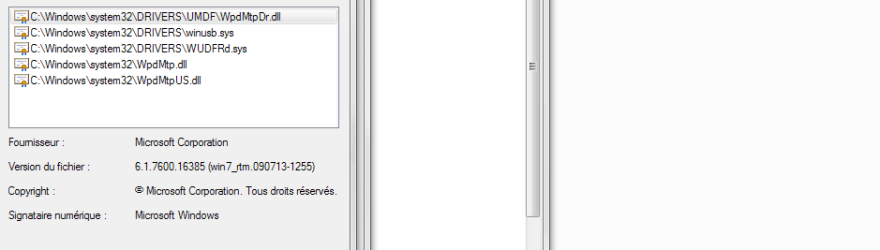
On the two screen shots, those are the drivers and most common .dll you should have to load your camera with MTP.

1st capture With only .dll refer to the folder C:\Windows\System32\drivers\UMDF

2nd capture is in the Device Manager.

alright so i found it put it in and rebooted and it did not work.

Does your camera have a setting to plug either USB Mass Storage or MTP Connection? If so choose the one appropriate for your needs.
 

My Computer

Computer type
PC/Desktop
Computer Manufacturer/Model Number
Custom Build
OS
Windows 7 Professional SP1 - x64 [Non-UEFI Boot]
CPU
Ivy Bridge Core i5 3570K (Delidded)
Motherboard
Asus P8Z77-V LE PLUS
Memory
G.Skill "Ares" DDR3 PC3-12800 - 1600MHz (16Gb)
Graphics Card(s)
Asus Dual-RX480-O4G
Sound Card
Creative Sound Blaster Z w/5.1 sound system
Monitor(s) Displays
Asus IPS 23"
Screen Resolution
16/9
Hard Drives
Internal:
500Go Sata 6Gb/s (x2)
500Go Sata 3Gb/s (x2)
SSD 60Go Sata 6Gb/s
PSU
In Win C 900W Series 80+ Platinum
Case
Thermaltake Chaser A71
Cooling
Custom Water Cooling Loop
Keyboard
Cooler Master QuickFire XTi
Mouse
Razer Imperator 2012 (4G)
Antivirus
MSE
Browser
IE 11.0.xxx Rtm
Other Info
"Raid0" with Intel Smart Response Technology (HDD/SSD)
Try to run a command from an Elevated Command Prompt to register the .dll and if its help.
Click on the Start, type cmd then right click on cmd.exe and select Run as Administrator.

Run it one by one:

Code:
regsvr32.exe /s C:\Windows\System32\drivers\UMDF\WUDFUsbccidDriver.dll
regsvr32.exe /s C:\Windows\System32\drivers\UMDF\WpdMtpDr.dll
regsvr32.exe /s C:\Windows\System32\drivers\UMDF\WpdFs.dll.

Check also if the drivers are well in place the System32\drivers folder
 

My Computer

Computer type
PC/Desktop
Computer Manufacturer/Model Number
Custom Build
OS
Windows 7 Professional SP1 - x64 [Non-UEFI Boot]
CPU
Ivy Bridge Core i5 3570K (Delidded)
Motherboard
Asus P8Z77-V LE PLUS
Memory
G.Skill "Ares" DDR3 PC3-12800 - 1600MHz (16Gb)
Graphics Card(s)
Asus Dual-RX480-O4G
Sound Card
Creative Sound Blaster Z w/5.1 sound system
Monitor(s) Displays
Asus IPS 23"
Screen Resolution
16/9
Hard Drives
Internal:
500Go Sata 6Gb/s (x2)
500Go Sata 3Gb/s (x2)
SSD 60Go Sata 6Gb/s
PSU
In Win C 900W Series 80+ Platinum
Case
Thermaltake Chaser A71
Cooling
Custom Water Cooling Loop
Keyboard
Cooler Master QuickFire XTi
Mouse
Razer Imperator 2012 (4G)
Antivirus
MSE
Browser
IE 11.0.xxx Rtm
Other Info
"Raid0" with Intel Smart Response Technology (HDD/SSD)
Try to run a command from an Elevated Command Prompt to register the .dll and if its help.
Click on the Start, type cmd then right click on cmd.exe and select Run as Administrator.

Run it one by one:

Code:
regsvr32.exe /s C:\Windows\System32\drivers\UMDF\WUDFUsbccidDriver.dll
regsvr32.exe /s C:\Windows\System32\drivers\UMDF\WpdMtpDr.dll
regsvr32.exe /s C:\Windows\System32\drivers\UMDF\WpdFs.dll.

Check also if the drivers are well in place the System32\drivers folder

That also did not work and my camera does not have a setting for it.
 

My Computer

OS
64bit windows 7
There might be some help found in this thread on MS Community.


The method that helped most folks seems to be
Scott Jung said:
win + R -> regedit

HEKY_LOCAL_MACHINE\SYSTEM\CurrentControlset\Control\Class\{EEC5AD98-8080-425F-922A-DABF3DE3F69A}

delete the upperFilter sub-key

The upperFilter sub-key for that control class might not exist on your machine.

Don't try to search for upperfilter, it is a sub-key on many keys.

Make sure that you have the correct key before you delete the sub-key.
 

My Computer

Computer type
Laptop
Computer Manufacturer/Model Number
HP Pavilion dv6-6c10us
OS
x64 (6.3.9600) Win8.1 Pro & soon dual boot x64 (6.1.7601) Win7_SP1 HomePrem
CPU
AMD A6-3420M APU with Radeon(tm) HD Graphics
Motherboard
Hewlett-Packard 1805
Memory
6.00 GB
Graphics Card(s)
AMD Radeon(TM) HD 6520G
Sound Card
(1) AMD High Definition Audio Device (2) IDT High Definiti
Monitor(s) Displays
HP W2072a 20" LCD (1600 x 900) @ 60 Hz
Screen Resolution
1366 x 768 x 32 bits (4294967296 colors) @ 60 Hz
Hard Drives
ST640LM0 00 HM641JI SATA Disk Device
Keyboard
Logitech k520 wireless KB
Mouse
Logitech m320 wireless mouse (bundled with KB)
Internet Speed
15/5 | 54 MB Wireless 'n'
Antivirus
Realtime: Defender or Avast | On-demand: Malwarebytes, ESET
Browser
IE 11 on Win8, IE 10 on win 7
Other Info
Media: [Gimp, Audacity, VLC] || Comm: [WEmail 2012, Skype] || Productivity: [OpenOffice,| Textpad] || Utils: [Sysinternals, cCleaner, Speccy, Defraggler]

My Computer

Computer type
PC/Desktop
Computer Manufacturer/Model Number
Custom Build
OS
Windows 7 Professional SP1 - x64 [Non-UEFI Boot]
CPU
Ivy Bridge Core i5 3570K (Delidded)
Motherboard
Asus P8Z77-V LE PLUS
Memory
G.Skill "Ares" DDR3 PC3-12800 - 1600MHz (16Gb)
Graphics Card(s)
Asus Dual-RX480-O4G
Sound Card
Creative Sound Blaster Z w/5.1 sound system
Monitor(s) Displays
Asus IPS 23"
Screen Resolution
16/9
Hard Drives
Internal:
500Go Sata 6Gb/s (x2)
500Go Sata 3Gb/s (x2)
SSD 60Go Sata 6Gb/s
PSU
In Win C 900W Series 80+ Platinum
Case
Thermaltake Chaser A71
Cooling
Custom Water Cooling Loop
Keyboard
Cooler Master QuickFire XTi
Mouse
Razer Imperator 2012 (4G)
Antivirus
MSE
Browser
IE 11.0.xxx Rtm
Other Info
"Raid0" with Intel Smart Response Technology (HDD/SSD)
Back
Top