Windows 7: Driver for MTP USB failed error 31 for Iphone & Kindle

aastek1962

New member
Local time
4:56 AM
Messages
4
Just in the last week I can no longer view my Iphone 4 or my Kindle threw my computer in Windows 7 32 bit Professional. I have been a computer technician for 19 years and have tried everything I can find in Microsoft, Apple and Amazon. Amazon phone support could not even fix it. I receive the MTP USB error. I even formatted my harddrive, reinstalled windows and it still did the same thing with only Windows installed. I also installed Itunes to see if that would make a difference and I can see the phone in Itunes but not in my computer. It allows me to connect my Free Agent external just fine. Both the Iphone and Kindle work on my brother's 64 bit Windows Professional and my old xp machine as a camera, but at least I can get the pictures off that way. I have even purchased name brand USB cords for both products. I need to make them work in this system as this is the one I use for everything. Any help would be wonderful.
 

My Computer My Computer

At a glance

Windows 7 32bit ProfessionalIntel4 gbIntel
Computer type
Laptop
Computer Manufacturer/Model Number
Dell
OS
Windows 7 32bit Professional
CPU
Intel
Motherboard
Intel
Memory
4 gb
Graphics Card(s)
Intel
Hard Drives
Hitachi ATA
Antivirus
Nortons Internet Security
Browser
Internet Explorer & Chrome
Locate the device in Device Manager.
> It will probably be listed under Portable or USB
> It will have a yellow icon
> If you right click->Properties on the General tab, Device Status should indicate code 31

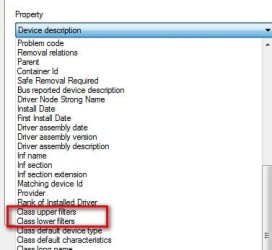
Now look at the device Details tab. Use the pull down menu to carefully look and see if any Class upper filters or Class lower filters are listed. If you find any, copy/paste what's listed into next post
 

Attachments

  • Filters.jpg
    Filters.jpg
    18.7 KB · Views: 15

My Computer My Computer

At a glance

Desk 1: Win 7 Pro x32; Desk 2: Windows 10 x64
Computer type
PC/Desktop
Computer Manufacturer/Model Number
Dell Optiplex 360 and Optiplex 755
OS
Desk 1: Win 7 Pro x32; Desk 2: Windows 10 x64
Hard Drives
500GB Crucial SSD in both Desktops
Other Info
Buffalo 6TB NAS, Raid 1
Filters

Neither my Kindle nor my IPhone have upper or lower filters. I have made progress as they are coming up as IPhone and Kindle under devices now. Now I have a separate listing for just MTP. Before they were both MTP USB. They still error out.
 

My Computer My Computer

At a glance

Windows 7 32bit ProfessionalIntel4 gbIntel
Computer type
Laptop
Computer Manufacturer/Model Number
Dell
OS
Windows 7 32bit Professional
CPU
Intel
Motherboard
Intel
Memory
4 gb
Graphics Card(s)
Intel
Hard Drives
Hitachi ATA
Antivirus
Nortons Internet Security
Browser
Internet Explorer & Chrome
Fixed

I found the fix for this by accident. I was trying to start the Diagnostic Policy Service as it would not run. It gave me 1079 error. I found the fix online by changing the login to local service instead of local system. As soon as I changed them and started all three Diagnostic services the IPhone and the Kindle both popped up as external drives on my computer. The Kindle still had an error and I went to Device Manager updated the drivers and both are now connected and working. Thanks for all your help.
 

My Computer My Computer

At a glance

Windows 7 32bit ProfessionalIntel4 gbIntel
Computer type
Laptop
Computer Manufacturer/Model Number
Dell
OS
Windows 7 32bit Professional
CPU
Intel
Motherboard
Intel
Memory
4 gb
Graphics Card(s)
Intel
Hard Drives
Hitachi ATA
Antivirus
Nortons Internet Security
Browser
Internet Explorer & Chrome
Back
Top