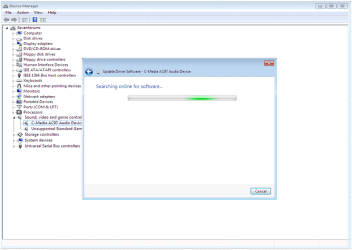
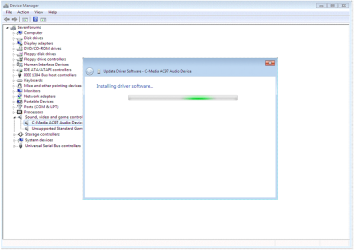
Driver Install - Device Manager

How to Install a Driver in Device Manager


   Information
   Note
NOTE: for this example, I am using Windows XP Drivers.
You can use Vista, Windows 7 drivers, or (Windows 8 drivers on Windows 8)


PART ONE

Using Windows XP drivers
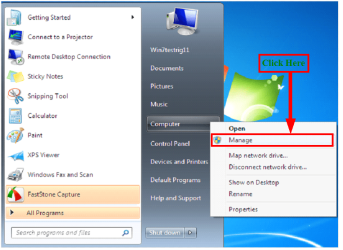


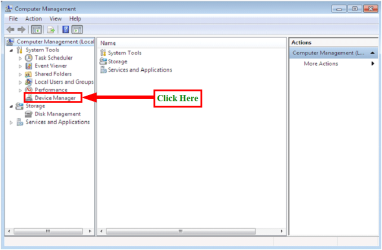
1.PNG 1) Click on Manage 2.PNG
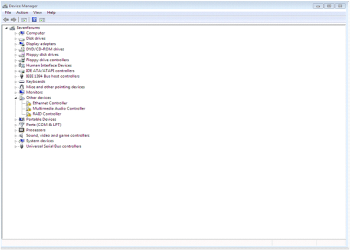
2) Click on Device Manager 3.PNG

4.PNG
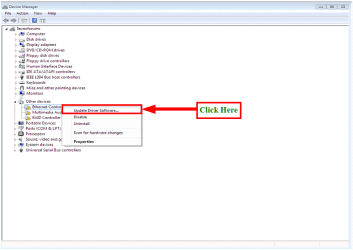
3) Click on Update Driver Software 5.PNG
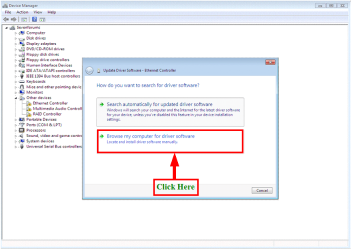
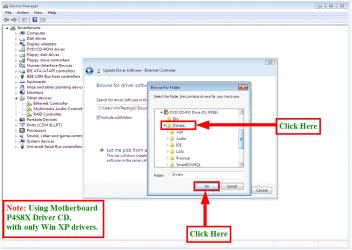
4) Click on Browse my computer for drivers software 6.PNG
5) Click on Browse 7.PNG
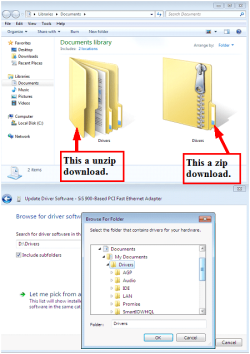
6) Click on Drivers & OK 12.PNG
7) From download, make sure you unzip the dowloaded file first.
NOTE: You can download 7zip from here: Download 8.PNG
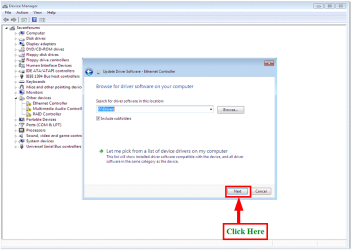
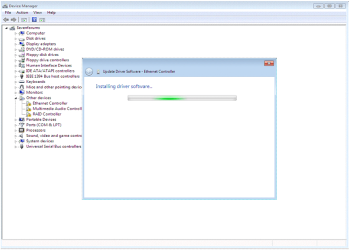
8) Click on next 9.PNG

10.PNG

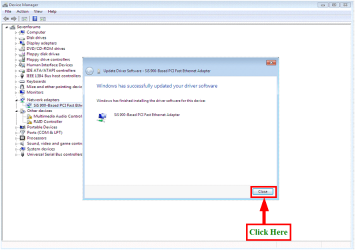
9) Click on Close. 11.PNG
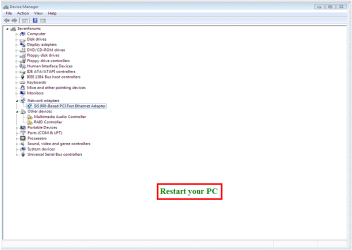
10) Restart your PC


13.PNG


PART TWO

Updating the Windows XP drivers to Windows 7
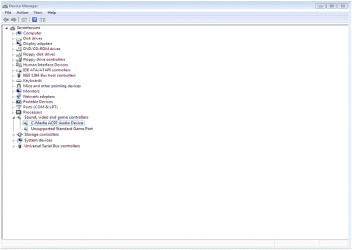


21.PNG

22.PNG
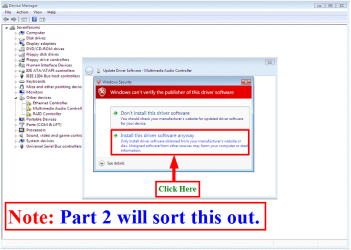
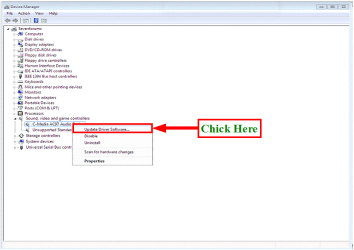
1) Click on Update Driver Software 23.PNG
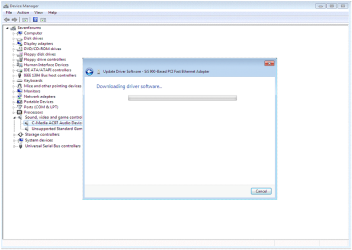
24.PNG

25.PNG

26.PNG


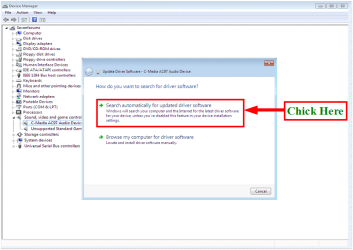
2) Click on Search automatically for update driver software 27.PNG
3) Click on Close.

4) Restart your PC

 
Last edited by a moderator:
Very nice work Ray, well done! :thumbsup:
 

My Computer My Computer

At a glance

W 7 64-bit UltimateIntel Q9550 Yorkfield8GB Dominator 8500C5DATI : XFX 5870
Computer Manufacturer/Model Number
* BFK Customs *
OS
W 7 64-bit Ultimate
CPU
Intel Q9550 Yorkfield
Motherboard
ASUS P5Q Pro
Memory
8GB Dominator 8500C5D
Graphics Card(s)
ATI : XFX 5870
Sound Card
Realtek HD Audio 7-1
Monitor(s) Displays
1x 47" LCD HDMI & 3x 26" LCD HDMI
Screen Resolution
1920x1080P & 1920x1200
Hard Drives
1x 80GB Intel X25-M G2 SSD : 1x 500GB & 1x 640GB WD Caviar Black(s)
PSU
Corsair 620HX
Case
Cooler Master RC-690
Cooling
Tuniq Tower 120, 2x 140mm and 3x 120mm case fans
Keyboard
Microsoft 500
Mouse
Razer Diamondback 3G
Internet Speed
14 Mb/s
Other Info
1x Koutech 3Gb/s SATA HDD Hot Swap Rack
Hey theog

thank you very much, but I think this not for all drivers will be fine
 
Last edited:

My Computer My Computer

At a glance

windows 7
OS
windows 7
Ray if you're motivated, perhaps this is the place to show how to use the other driver Update features, including Search from List for already installed drivers, Roll Back, Search from Hardware type list, etc.

As you add to it and others add suggestions, it could eventually cover every way to update driver in Device Manager, some of which are still obscure to me, e.g updating using the Hardware-type list, forcing driver using Browse disk rather than browse file choice, etc.
 
Hi Greg

I will look into that.
 

My Computer My Computer

At a glance

ME/XP/Vista/Win7
OS
ME/XP/Vista/Win7
Theog,

If you want, I can work with you to expand this to include searching for drivers using the Vendor IDs and the Windows Update Catalog site to download and install drivers.

I just went through this trying to install drivers for an unknown device on my system.

Basically, in the Device Manager, I had 2 unknown devices. Windows update was not picking up what these were. I went into the device properties and pulled the Hardware ID values. (They look like PCI\VEN_1180&DEV_0843&SUBSYS_C02F144D&REV_00). I did a web search and found out they were Ricoh codes. My laptop has a 8 in 1 card reader. I then searched the Update Catalog for the device info and was able to install the drivers.
 

My Computer My Computer

At a glance

Windows 7 x64 (RTM via MSDN)Intel Core 2 Duo T9300 (2.5 GHz)4 GB SODIMMS (System Max)nVidia 8600M GS 256MB
Computer Manufacturer/Model Number
MPC Transport T2500 Laptop
OS
Windows 7 x64 (RTM via MSDN)
CPU
Intel Core 2 Duo T9300 (2.5 GHz)
Motherboard
MPC
Memory
4 GB SODIMMS (System Max)
Graphics Card(s)
nVidia 8600M GS 256MB
Sound Card
Realtek On-Board
Monitor(s) Displays
15.4" LCD with a Dell 2005FPW 20" attached
Screen Resolution
1680x1050 (15.4") and 1680x1050 (20")
Hard Drives
Toshiba 2.5" 320 GB 7200 RPM
Theog,

If you want, I can work with you to expand this to include searching for drivers using the Vendor IDs and the Windows Update Catalog site to download and install drivers.

I just went through this trying to install drivers for an unknown device on my system.

Basically, in the Device Manager, I had 2 unknown devices. Windows update was not picking up what these were. I went into the device properties and pulled the Hardware ID values. (They look like PCI\VEN_1180&DEV_0843&SUBSYS_C02F144D&REV_00). I did a web search and found out they were Ricoh codes. My laptop has a 8 in 1 card reader. I then searched the Update Catalog for the device info and was able to install the drivers.

If look at bottom of the tutorial, I linked to tutorials all ready made.
 

My Computer My Computer

At a glance

ME/XP/Vista/Win7
OS
ME/XP/Vista/Win7
So what happened?

(Deleted-meant for another thread)
 

My Computer My Computer

At a glance

Wondows 7 Home Premium 64bitIntel4GBAMD
Computer type
PC/Desktop
Computer Manufacturer/Model Number
custom build
OS
Wondows 7 Home Premium 64bit
CPU
Intel
Motherboard
Gigabit
Memory
4GB
Graphics Card(s)
AMD
Hard Drives
SSD + HDD
Antivirus
MSE. MBAM PRO, Spybot
Browser
IE, FF
Back
Top