Driver installation and other issues...

Cr00zng

New member
Pro User
Local time
2:03 PM
Messages
568
Mods, please move this post if this is not the right forum...

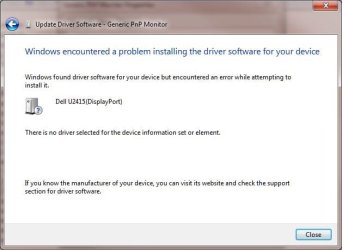
My W7 64-bits professional started to experience some issues, like the current one where a monitor driver installation fails with an error:
driver.jpg

It does not matter, if the driver installation is through device manager or the Dell provided setup DVD. The error message is pretty much the same. Updating the video and other drivers has the same error message. As a test, some of the software installations also have the same errors.

Running a "sfc /scannow" command has this result:

C:\Windows\system32>sfc /scannow

Beginning system scan. This process will take some time.

Beginning verification phase of system scan.
Verification 100% complete.
Windows Resource Protection found corrupt files but was unable to fix some of them.
Details are included in the CBS.Log windir\Logs\CBS\CBS.log.
For example C:\Windows\Logs\CBS\CBS.log

The actual log shows unrecognized package extenders, namely 15,100 of them, like this:

2015-04-06 18:25:21, Info CBS Failed to get next element [HRESULT = 0x800f080d - CBS_E_MANIFEST_INVALID_ITEM]
2015-04-06 18:25:21, Info CBS Warning: Unrecognized packageExtended attribute.

Booting with "F8" option and selecting "Repair my computer" finds problems, but not able to fix it either. Restoring a week old image backup didn't help either, the same error message remains for both "sfc" and installation in general.

Is there any way to cure this ailing, huffing and puffing W7 system?
TIA...
 

My Computer

Computer type
PC/Desktop
Computer Manufacturer/Model Number
Custom built at Home
OS
Windows 7 64-bit, Windows 8.1 64-bit, OSX El Capitan, Windows 10 (VMware)
CPU
Intel i5-3350P 3.1 GHz
Motherboard
Gigabyte GA-Z77X-UP5 TH
Memory
16 GBs GSkill Sniper
Graphics Card(s)
Radeon HD 7850
Sound Card
VIA HD Audio
Monitor(s) Displays
Dell U2410 24"
Screen Resolution
1920x1200
Hard Drives
1 x Intel 520 240 GBs
1 x Seagate 1TBs SATA 2.0,
1 x Seagate 1TBs eSATA 2.0
PSU
Thermaltake 850W
Case
Antec P183
Cooling
Noctua NH-D14 Heatsink 2 x 120mm fans, 4 x 120mm case fans
Keyboard
Dell Multimedia keyboard
Mouse
Logitech Trackball
Internet Speed
28.5 Mb/s
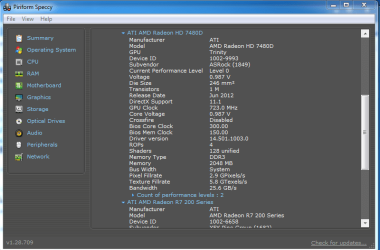
Looks like you're trying to use Windows update to solve the issue. Ha. There's your first issue. If you know the exact device I.E GTX 670Ti OC then look up the device drivers and make sure to download them straight from the manufacturers website. There are a lot of fakes out there that are just full of junk. If you do not know the model, you can open the computer and look for it manually or another option could be to try and use Piriform Speccy. Find the device, and google is your best friend.
 

Attachments

  • graphicsspeccy.PNG
    graphicsspeccy.PNG
    27 KB · Views: 1

My Computer

Computer type
PC/Desktop
Computer Manufacturer/Model Number
Custom Build
OS
Windows 7 Ultimate x64
CPU
AMD A4-5300 APU @ 3.4GHZ
Motherboard
Asrock - unknown model
Memory
4GB Kingston HyperX 1333Mhz
Graphics Card(s)
XFX R7 260X Double D Edition
Hard Drives
x1 Western Digital 1TB @ 5400RPM
Antivirus
Security Essentials
Browser
Chrome and FireFox
"My System Specs" lists the video card as "Radeon HD 7850". While installing the updated video driver is a issue, it's not the only issue.

Driver installation for the monitor (Dell U2415), the printer (Brother MFC-8480DN), and generally most driver updates fail. Windows update works for the most part, except when it comes to updated drivers that identified under "optional updates".

This not a Windows update issue per say, it's more of a systematic issue that I am trying to fix. Some of the steps had been taken to remediate this issues, such as "sfc' scan and restore the system from an image backup, that did not fix this problem.
 

My Computer

Computer type
PC/Desktop
Computer Manufacturer/Model Number
Custom built at Home
OS
Windows 7 64-bit, Windows 8.1 64-bit, OSX El Capitan, Windows 10 (VMware)
CPU
Intel i5-3350P 3.1 GHz
Motherboard
Gigabyte GA-Z77X-UP5 TH
Memory
16 GBs GSkill Sniper
Graphics Card(s)
Radeon HD 7850
Sound Card
VIA HD Audio
Monitor(s) Displays
Dell U2410 24"
Screen Resolution
1920x1200
Hard Drives
1 x Intel 520 240 GBs
1 x Seagate 1TBs SATA 2.0,
1 x Seagate 1TBs eSATA 2.0
PSU
Thermaltake 850W
Case
Antec P183
Cooling
Noctua NH-D14 Heatsink 2 x 120mm fans, 4 x 120mm case fans
Keyboard
Dell Multimedia keyboard
Mouse
Logitech Trackball
Internet Speed
28.5 Mb/s
try restoring back to a system restore point? you said that the computer just started having that issue..?
 

My Computer

Computer type
PC/Desktop
Computer Manufacturer/Model Number
Custom Build
OS
Windows 7 Ultimate x64
CPU
AMD A4-5300 APU @ 3.4GHZ
Motherboard
Asrock - unknown model
Memory
4GB Kingston HyperX 1333Mhz
Graphics Card(s)
XFX R7 260X Double D Edition
Hard Drives
x1 Western Digital 1TB @ 5400RPM
Antivirus
Security Essentials
Browser
Chrome and FireFox
try restoring back to a system restore point? you said that the computer just started having that issue..?
Thanks...

I don't really know when the system started to have this issue, adding a new monitor was the first time I've seen it. Adding other drivers as a test confirmed the same issue for other devices.

System restore did more harm than good and the problem didn't disappear. Recently, I've removed Vipre AV and installed Kaspersky; after the system restore finished, Vipre active and Kaspersky disappeared. Restoring the six weeks old a Macrium backup image didn't fix the issue either, probably it's been going on for awhile...

It irks me to no end since the system is working just fine otherwise...
 

My Computer

Computer type
PC/Desktop
Computer Manufacturer/Model Number
Custom built at Home
OS
Windows 7 64-bit, Windows 8.1 64-bit, OSX El Capitan, Windows 10 (VMware)
CPU
Intel i5-3350P 3.1 GHz
Motherboard
Gigabyte GA-Z77X-UP5 TH
Memory
16 GBs GSkill Sniper
Graphics Card(s)
Radeon HD 7850
Sound Card
VIA HD Audio
Monitor(s) Displays
Dell U2410 24"
Screen Resolution
1920x1200
Hard Drives
1 x Intel 520 240 GBs
1 x Seagate 1TBs SATA 2.0,
1 x Seagate 1TBs eSATA 2.0
PSU
Thermaltake 850W
Case
Antec P183
Cooling
Noctua NH-D14 Heatsink 2 x 120mm fans, 4 x 120mm case fans
Keyboard
Dell Multimedia keyboard
Mouse
Logitech Trackball
Internet Speed
28.5 Mb/s
Back
Top