Solved Drivers for Marvel 91xx Config ATA Device...

Anima

New member
Local time
10:10 PM
Messages
24
Location
Melbourne
Hello!

I need help installing the following drivers:

Drivers for Marvel 91xx Config ATA Device
Jmicron JMB36X Driver
marvel 91xx driver
Marvel Storage Utility V4

I recently formatted my computer and had these installed, the SATA drivers from my motherboards website do not work. I get the error "this computer does not meet the minimum requirements for installing the software sata".

Thanks :)
 

My Computer My Computer

OS
Windows 7 Ultimate x64
Motherboard
Asus Rampage III Formula
Memory
12 gigabytes
Graphics Card(s)
GTX 570
Screen Resolution
1920 x 1080
Case
NZXT Phantom
Keyboard
Razer Lycosa
Mouse
Razer Abyssus
Hello Anima mate I think are what you are after Marvell - Support - Driver Downloads the only thing I don't know is if the part number has to included.
More are Gigabyte Marvell Storage Utility 4.1.0.1921 Driver - TechSpot

JMicron JMB36X SATA Controller Driver 1.17.65 Driver - TechSpot

To find the part number you may need to run HE Info and get the deetails of that part number - if it will bring it up.
See my ditty

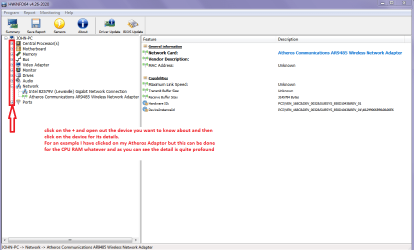
Using HW Info

You can test the volts on the PSU with HWInfo HWiNFO, HWiNFO32/64 -Download < download the right bit version andclose the right hand window select Sensors and scroll down to the power sectionwhere you will see what the volts are doing see my pic.

The original right hand window shows themachine running and is handy for that but for looking at the components in some detail close it and use themain left hand side panel

FOR OTHER COMPONENTS

Open each + down into the componentitself and then click on it - in theright hand side will appear all sorts of details including brands speeds andother essential info that device. See pic for example.
(I have included one for my GPU so you can see how it opens out in minute detail)
 

Attachments

  • HW INFO DEVICES.PNG
    HW INFO DEVICES.PNG
    30.7 KB · Views: 9
  • HW INFO GPU.PNG
    HW INFO GPU.PNG
    82 KB · Views: 9

My Computer My Computer

Computer type
PC/Desktop
Computer Manufacturer/Model Number
Own build (new) Desk1 / Asus ROG Win 7 / Desk2 1st build
OS
Desk1 7 Home Prem / Desk2 10 Pro / Main lap Asus ROG 10 Pro 2 laptop Toshiba 7 Pro Asus P2520 7 & 10
CPU
Desk1 i5 3750K / Laptop i7 GTX 860M / Desk2 i5 2500
Motherboard
Desk1 Asus P877-V / Desk2 Gigabyte H67 UD3H / Laptop ?
Memory
Desk1 8GB (1866) / Desk2 16GB (1333) / Laptop 8Gb DDR3
Graphics Card(s)
Desk 1& 2NVidia GTX 650 & Laptops on board Intel
Sound Card
Desk 1 & 2 -XONAR DG Realtek High Def audio Laptop
Monitor(s) Displays
Desk 1 Benq HD 2450 / Desk2 Philips 24" / Laptop 17.5"
Screen Resolution
1920x1080 D1 & D2 & Laptop 1
Hard Drives
Desk1 Samsung 120GB 830 SSD
Asus ROG 256GB 850 Pro SSD
Desk2 Samsung 840 256 SSD
Toshiba 120GB EVO
PSU
Desk 1 Corsair HX 1050/ Laptop ? / Desk 2 Corsair HX 650
Case
Desk 1 Cooler HAF XM ? Toshiba laptop / Desk2 Coolermaster
Cooling
Fans on all Desk1 -2 Desk2 - all Coolermasters 5 Laptop ?
Keyboard
Desk 1 MS Sidewinder X6 Desk 2 MS Sidewinder X 4
Mouse
Desk 1&2 - Gigabyte MS 900 gamer - laptop - Logitec wireless
Internet Speed
ADSL2+
Other Info
One other Desktop (tester) and spare Toshba laptop both with SSD's
Running Kaspersky 2016 ISS on all machines config'd identically
Logitec audio stereo systems on each machine (x3)
Canon MG5250MFC
Router/modem TP-Link running WPA2SK
Details

Hey mate!

Thanks for your reply and help so far, much appreciated, i got the other drivers out the way but the "marvell 91xx config" has still been a doozey to find. I've posted a picture of the details of it from that software you recommended in case it might help, I've scoured the internet and couldn't find anything.

Also on a similar note, how does one check whether all his drivers are updated? (in case I've missed something).

Thanks! :)
 

My Computer My Computer

OS
Windows 7 Ultimate x64
Motherboard
Asus Rampage III Formula
Memory
12 gigabytes
Graphics Card(s)
GTX 570
Screen Resolution
1920 x 1080
Case
NZXT Phantom
Keyboard
Razer Lycosa
Mouse
Razer Abyssus
Opps, forgot image!

Image
 

Attachments

  • Details..JPG
    Details..JPG
    155.4 KB · Views: 19

My Computer My Computer

OS
Windows 7 Ultimate x64
Motherboard
Asus Rampage III Formula
Memory
12 gigabytes
Graphics Card(s)
GTX 570
Screen Resolution
1920 x 1080
Case
NZXT Phantom
Keyboard
Razer Lycosa
Mouse
Razer Abyssus

My Computer My Computer

Computer type
PC/Desktop
Computer Manufacturer/Model Number
Own build (new) Desk1 / Asus ROG Win 7 / Desk2 1st build
OS
Desk1 7 Home Prem / Desk2 10 Pro / Main lap Asus ROG 10 Pro 2 laptop Toshiba 7 Pro Asus P2520 7 & 10
CPU
Desk1 i5 3750K / Laptop i7 GTX 860M / Desk2 i5 2500
Motherboard
Desk1 Asus P877-V / Desk2 Gigabyte H67 UD3H / Laptop ?
Memory
Desk1 8GB (1866) / Desk2 16GB (1333) / Laptop 8Gb DDR3
Graphics Card(s)
Desk 1& 2NVidia GTX 650 & Laptops on board Intel
Sound Card
Desk 1 & 2 -XONAR DG Realtek High Def audio Laptop
Monitor(s) Displays
Desk 1 Benq HD 2450 / Desk2 Philips 24" / Laptop 17.5"
Screen Resolution
1920x1080 D1 & D2 & Laptop 1
Hard Drives
Desk1 Samsung 120GB 830 SSD
Asus ROG 256GB 850 Pro SSD
Desk2 Samsung 840 256 SSD
Toshiba 120GB EVO
PSU
Desk 1 Corsair HX 1050/ Laptop ? / Desk 2 Corsair HX 650
Case
Desk 1 Cooler HAF XM ? Toshiba laptop / Desk2 Coolermaster
Cooling
Fans on all Desk1 -2 Desk2 - all Coolermasters 5 Laptop ?
Keyboard
Desk 1 MS Sidewinder X6 Desk 2 MS Sidewinder X 4
Mouse
Desk 1&2 - Gigabyte MS 900 gamer - laptop - Logitec wireless
Internet Speed
ADSL2+
Other Info
One other Desktop (tester) and spare Toshba laptop both with SSD's
Running Kaspersky 2016 ISS on all machines config'd identically
Logitec audio stereo systems on each machine (x3)
Canon MG5250MFC
Router/modem TP-Link running WPA2SK

My Computer My Computer

Computer type
PC/Desktop
Computer Manufacturer/Model Number
Own build (new) Desk1 / Asus ROG Win 7 / Desk2 1st build
OS
Desk1 7 Home Prem / Desk2 10 Pro / Main lap Asus ROG 10 Pro 2 laptop Toshiba 7 Pro Asus P2520 7 & 10
CPU
Desk1 i5 3750K / Laptop i7 GTX 860M / Desk2 i5 2500
Motherboard
Desk1 Asus P877-V / Desk2 Gigabyte H67 UD3H / Laptop ?
Memory
Desk1 8GB (1866) / Desk2 16GB (1333) / Laptop 8Gb DDR3
Graphics Card(s)
Desk 1& 2NVidia GTX 650 & Laptops on board Intel
Sound Card
Desk 1 & 2 -XONAR DG Realtek High Def audio Laptop
Monitor(s) Displays
Desk 1 Benq HD 2450 / Desk2 Philips 24" / Laptop 17.5"
Screen Resolution
1920x1080 D1 & D2 & Laptop 1
Hard Drives
Desk1 Samsung 120GB 830 SSD
Asus ROG 256GB 850 Pro SSD
Desk2 Samsung 840 256 SSD
Toshiba 120GB EVO
PSU
Desk 1 Corsair HX 1050/ Laptop ? / Desk 2 Corsair HX 650
Case
Desk 1 Cooler HAF XM ? Toshiba laptop / Desk2 Coolermaster
Cooling
Fans on all Desk1 -2 Desk2 - all Coolermasters 5 Laptop ?
Keyboard
Desk 1 MS Sidewinder X6 Desk 2 MS Sidewinder X 4
Mouse
Desk 1&2 - Gigabyte MS 900 gamer - laptop - Logitec wireless
Internet Speed
ADSL2+
Other Info
One other Desktop (tester) and spare Toshba laptop both with SSD's
Running Kaspersky 2016 ISS on all machines config'd identically
Logitec audio stereo systems on each machine (x3)
Canon MG5250MFC
Router/modem TP-Link running WPA2SK
Sata Error

I tried installing the Sata drivers from the asus website but i get the error message "this computer does not meet the minimum requirements for installing the software sata".

I read somewhere that it might be because i installed windows on a certain setting from BIOS or something, not sure, something along those lines, ring any bells?
 

My Computer My Computer

OS
Windows 7 Ultimate x64
Motherboard
Asus Rampage III Formula
Memory
12 gigabytes
Graphics Card(s)
GTX 570
Screen Resolution
1920 x 1080
Case
NZXT Phantom
Keyboard
Razer Lycosa
Mouse
Razer Abyssus
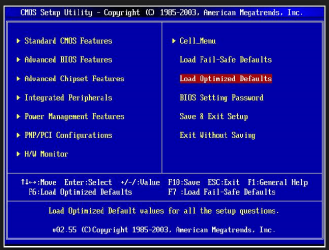
Dean mate what form of BIOS do you have on that board cos I have an idea that it is the older type as opposed to EUFI.

Now I have attached two pics of the different kinds of BIOS to show you what I mean by the older type. Boot and go into the BIOS let us know which it is please the blue screen one will be the older type the EUFI has a black screen and dials on and lot more on it .

Now again I have an idea that it is the older type and it needs to be set to ACHI and you need to set it to that. See this
http://www.sevenforums.com/tutorials/61869-ahci-enable-windows-7-vista.html
 

Attachments

  • EUFI PIC.PNG
    EUFI PIC.PNG
    106.2 KB · Views: 3
  • EUFI PIC2.PNG
    EUFI PIC2.PNG
    83.8 KB · Views: 56

My Computer My Computer

Computer type
PC/Desktop
Computer Manufacturer/Model Number
Own build (new) Desk1 / Asus ROG Win 7 / Desk2 1st build
OS
Desk1 7 Home Prem / Desk2 10 Pro / Main lap Asus ROG 10 Pro 2 laptop Toshiba 7 Pro Asus P2520 7 & 10
CPU
Desk1 i5 3750K / Laptop i7 GTX 860M / Desk2 i5 2500
Motherboard
Desk1 Asus P877-V / Desk2 Gigabyte H67 UD3H / Laptop ?
Memory
Desk1 8GB (1866) / Desk2 16GB (1333) / Laptop 8Gb DDR3
Graphics Card(s)
Desk 1& 2NVidia GTX 650 & Laptops on board Intel
Sound Card
Desk 1 & 2 -XONAR DG Realtek High Def audio Laptop
Monitor(s) Displays
Desk 1 Benq HD 2450 / Desk2 Philips 24" / Laptop 17.5"
Screen Resolution
1920x1080 D1 & D2 & Laptop 1
Hard Drives
Desk1 Samsung 120GB 830 SSD
Asus ROG 256GB 850 Pro SSD
Desk2 Samsung 840 256 SSD
Toshiba 120GB EVO
PSU
Desk 1 Corsair HX 1050/ Laptop ? / Desk 2 Corsair HX 650
Case
Desk 1 Cooler HAF XM ? Toshiba laptop / Desk2 Coolermaster
Cooling
Fans on all Desk1 -2 Desk2 - all Coolermasters 5 Laptop ?
Keyboard
Desk 1 MS Sidewinder X6 Desk 2 MS Sidewinder X 4
Mouse
Desk 1&2 - Gigabyte MS 900 gamer - laptop - Logitec wireless
Internet Speed
ADSL2+
Other Info
One other Desktop (tester) and spare Toshba laptop both with SSD's
Running Kaspersky 2016 ISS on all machines config'd identically
Logitec audio stereo systems on each machine (x3)
Canon MG5250MFC
Router/modem TP-Link running WPA2SK
It's definitely the older "blue screen" one however I don't understand why it would be any different.

When I formatted my computer the only thing in BIOS I changed was the "Hard Disk Drives" order and "Boot Device Priority" so that I could install Windows via U.S.B. Would that have any significant influence on the driver not being able to be installed?

Thanks :)
 

My Computer My Computer

OS
Windows 7 Ultimate x64
Motherboard
Asus Rampage III Formula
Memory
12 gigabytes
Graphics Card(s)
GTX 570
Screen Resolution
1920 x 1080
Case
NZXT Phantom
Keyboard
Razer Lycosa
Mouse
Razer Abyssus
Dean read the tutorial - having ACHI set is an advantage and it maybe why the system is refusing to do what you want.

Have a read of this before you make any decisions though. AHCI vs IDE - Difference and Comparison | Diffen

Myself I am ACHI all the way
 

My Computer My Computer

Computer type
PC/Desktop
Computer Manufacturer/Model Number
Own build (new) Desk1 / Asus ROG Win 7 / Desk2 1st build
OS
Desk1 7 Home Prem / Desk2 10 Pro / Main lap Asus ROG 10 Pro 2 laptop Toshiba 7 Pro Asus P2520 7 & 10
CPU
Desk1 i5 3750K / Laptop i7 GTX 860M / Desk2 i5 2500
Motherboard
Desk1 Asus P877-V / Desk2 Gigabyte H67 UD3H / Laptop ?
Memory
Desk1 8GB (1866) / Desk2 16GB (1333) / Laptop 8Gb DDR3
Graphics Card(s)
Desk 1& 2NVidia GTX 650 & Laptops on board Intel
Sound Card
Desk 1 & 2 -XONAR DG Realtek High Def audio Laptop
Monitor(s) Displays
Desk 1 Benq HD 2450 / Desk2 Philips 24" / Laptop 17.5"
Screen Resolution
1920x1080 D1 & D2 & Laptop 1
Hard Drives
Desk1 Samsung 120GB 830 SSD
Asus ROG 256GB 850 Pro SSD
Desk2 Samsung 840 256 SSD
Toshiba 120GB EVO
PSU
Desk 1 Corsair HX 1050/ Laptop ? / Desk 2 Corsair HX 650
Case
Desk 1 Cooler HAF XM ? Toshiba laptop / Desk2 Coolermaster
Cooling
Fans on all Desk1 -2 Desk2 - all Coolermasters 5 Laptop ?
Keyboard
Desk 1 MS Sidewinder X6 Desk 2 MS Sidewinder X 4
Mouse
Desk 1&2 - Gigabyte MS 900 gamer - laptop - Logitec wireless
Internet Speed
ADSL2+
Other Info
One other Desktop (tester) and spare Toshba laptop both with SSD's
Running Kaspersky 2016 ISS on all machines config'd identically
Logitec audio stereo systems on each machine (x3)
Canon MG5250MFC
Router/modem TP-Link running WPA2SK
Can I switch to AHCI in bios and just reformat again? I don't mind.

If so how would I do that?

Also are their any repercussions or risks to changing from IDE to AHCI? I've never done this sort of thing before and am worried ill stuff up my computer further.

P.S I've already got all my important data backed up on a external. :D
 

My Computer My Computer

OS
Windows 7 Ultimate x64
Motherboard
Asus Rampage III Formula
Memory
12 gigabytes
Graphics Card(s)
GTX 570
Screen Resolution
1920 x 1080
Case
NZXT Phantom
Keyboard
Razer Lycosa
Mouse
Razer Abyssus

My Computer My Computer

Computer type
PC/Desktop
Computer Manufacturer/Model Number
Own build (new) Desk1 / Asus ROG Win 7 / Desk2 1st build
OS
Desk1 7 Home Prem / Desk2 10 Pro / Main lap Asus ROG 10 Pro 2 laptop Toshiba 7 Pro Asus P2520 7 & 10
CPU
Desk1 i5 3750K / Laptop i7 GTX 860M / Desk2 i5 2500
Motherboard
Desk1 Asus P877-V / Desk2 Gigabyte H67 UD3H / Laptop ?
Memory
Desk1 8GB (1866) / Desk2 16GB (1333) / Laptop 8Gb DDR3
Graphics Card(s)
Desk 1& 2NVidia GTX 650 & Laptops on board Intel
Sound Card
Desk 1 & 2 -XONAR DG Realtek High Def audio Laptop
Monitor(s) Displays
Desk 1 Benq HD 2450 / Desk2 Philips 24" / Laptop 17.5"
Screen Resolution
1920x1080 D1 & D2 & Laptop 1
Hard Drives
Desk1 Samsung 120GB 830 SSD
Asus ROG 256GB 850 Pro SSD
Desk2 Samsung 840 256 SSD
Toshiba 120GB EVO
PSU
Desk 1 Corsair HX 1050/ Laptop ? / Desk 2 Corsair HX 650
Case
Desk 1 Cooler HAF XM ? Toshiba laptop / Desk2 Coolermaster
Cooling
Fans on all Desk1 -2 Desk2 - all Coolermasters 5 Laptop ?
Keyboard
Desk 1 MS Sidewinder X6 Desk 2 MS Sidewinder X 4
Mouse
Desk 1&2 - Gigabyte MS 900 gamer - laptop - Logitec wireless
Internet Speed
ADSL2+
Other Info
One other Desktop (tester) and spare Toshba laptop both with SSD's
Running Kaspersky 2016 ISS on all machines config'd identically
Logitec audio stereo systems on each machine (x3)
Canon MG5250MFC
Router/modem TP-Link running WPA2SK
Success!

Thanks mate, the driver installed this time!

Will the settings be set to AHCI in the future when I reformat again?

Also I still don't have the Marvel 91xx driver in my control panel.

And for some odd reason there are no devices in the "Devices and Printers" tab.
AND....my secondary hard drive is not showing up in My Computer.

Aha sorry for being so pesty!, appreciate help so far. :D
 

My Computer My Computer

OS
Windows 7 Ultimate x64
Motherboard
Asus Rampage III Formula
Memory
12 gigabytes
Graphics Card(s)
GTX 570
Screen Resolution
1920 x 1080
Case
NZXT Phantom
Keyboard
Razer Lycosa
Mouse
Razer Abyssus

My Computer My Computer

Computer type
PC/Desktop
Computer Manufacturer/Model Number
Own build (new) Desk1 / Asus ROG Win 7 / Desk2 1st build
OS
Desk1 7 Home Prem / Desk2 10 Pro / Main lap Asus ROG 10 Pro 2 laptop Toshiba 7 Pro Asus P2520 7 & 10
CPU
Desk1 i5 3750K / Laptop i7 GTX 860M / Desk2 i5 2500
Motherboard
Desk1 Asus P877-V / Desk2 Gigabyte H67 UD3H / Laptop ?
Memory
Desk1 8GB (1866) / Desk2 16GB (1333) / Laptop 8Gb DDR3
Graphics Card(s)
Desk 1& 2NVidia GTX 650 & Laptops on board Intel
Sound Card
Desk 1 & 2 -XONAR DG Realtek High Def audio Laptop
Monitor(s) Displays
Desk 1 Benq HD 2450 / Desk2 Philips 24" / Laptop 17.5"
Screen Resolution
1920x1080 D1 & D2 & Laptop 1
Hard Drives
Desk1 Samsung 120GB 830 SSD
Asus ROG 256GB 850 Pro SSD
Desk2 Samsung 840 256 SSD
Toshiba 120GB EVO
PSU
Desk 1 Corsair HX 1050/ Laptop ? / Desk 2 Corsair HX 650
Case
Desk 1 Cooler HAF XM ? Toshiba laptop / Desk2 Coolermaster
Cooling
Fans on all Desk1 -2 Desk2 - all Coolermasters 5 Laptop ?
Keyboard
Desk 1 MS Sidewinder X6 Desk 2 MS Sidewinder X 4
Mouse
Desk 1&2 - Gigabyte MS 900 gamer - laptop - Logitec wireless
Internet Speed
ADSL2+
Other Info
One other Desktop (tester) and spare Toshba laptop both with SSD's
Running Kaspersky 2016 ISS on all machines config'd identically
Logitec audio stereo systems on each machine (x3)
Canon MG5250MFC
Router/modem TP-Link running WPA2SK
Thanks buddy, I appreciate that, really do :)

The sfc scannow fixed my devices and printers problem so yey to that 1.

But I am still missing the driver and my other hard drive is not appearing in my computer.

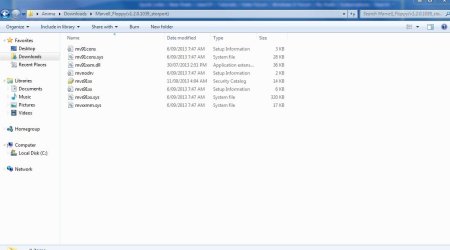
With the "Marvel 91xx driver" I went looking for the download from a previous sevenforum post ages ago (i had BSOD issues and that driver fixed it) and only come across these files, don't know what to do with them.
 

Attachments

  • Capture.JPG
    Capture.JPG
    51.9 KB · Views: 3

My Computer My Computer

OS
Windows 7 Ultimate x64
Motherboard
Asus Rampage III Formula
Memory
12 gigabytes
Graphics Card(s)
GTX 570
Screen Resolution
1920 x 1080
Case
NZXT Phantom
Keyboard
Razer Lycosa
Mouse
Razer Abyssus
Thanks buddy, I appreciate that, really do :)

The sfc scannow fixed my devices and printers problem so yey to that 1.

But I am still missing the driver and my other hard drive is not appearing in my computer.

With the "Marvel 91xx driver" I went looking for the download from a previous sevenforum post ages ago (i had BSOD issues and that driver fixed it) and only come across these files, don't know what to do with them.

Those drivers Marvel "mvs91xx.sys" you picked up V1.2.0.1039 are know by having dropped support of some Sata devices.

I'll pick up Marvell 88SE9xxx Sata 6G Controller drivers 1.2.0.1035 instead for your board. Run the "drvSetup.exe"

Try HERE if you can find it. The latest one is the V1.2.0.1041 but i'm unsure of the version history.

In the folder you've got on screenshot is missing the installer "drvSetup.exe". You have the pre-OS F6 "floppy" install.
 

My Computer My Computer

Computer type
PC/Desktop
Computer Manufacturer/Model Number
Custom Build
OS
Windows 7 Professional SP1 - x64 [Non-UEFI Boot]
CPU
Ivy Bridge Core i5 3570K (Delidded)
Motherboard
Asus P8Z77-V LE PLUS
Memory
G.Skill "Ares" DDR3 PC3-12800 - 1600MHz (16Gb)
Graphics Card(s)
Asus Dual-RX480-O4G
Sound Card
Creative Sound Blaster Z w/5.1 sound system
Monitor(s) Displays
Asus IPS 23"
Screen Resolution
16/9
Hard Drives
Internal:
500Go Sata 6Gb/s (x2)
500Go Sata 3Gb/s (x2)
SSD 60Go Sata 6Gb/s
PSU
In Win C 900W Series 80+ Platinum
Case
Thermaltake Chaser A71
Cooling
Custom Water Cooling Loop
Keyboard
Cooler Master QuickFire XTi
Mouse
Razer Imperator 2012 (4G)
Antivirus
MSE
Browser
IE 11.0.xxx Rtm
Other Info
"Raid0" with Intel Smart Response Technology (HDD/SSD)
Thanks buddy, I appreciate that, really do :)

The sfc scannow fixed my devices and printers problem so yey to that 1.

But I am still missing the driver and my other hard drive is not appearing in my computer.

With the "Marvel 91xx driver" I went looking for the download from a previous sevenforum post ages ago (i had BSOD issues and that driver fixed it) and only come across these files, don't know what to do with them.

Those drivers Marvel "mvs91xx.sys" you picked up V1.2.0.1039 are know by having dropped support of some Sata devices.

I'll pick up Marvell 88SE9xxx Sata 6G Controller drivers 1.2.0.1035 instead for your board. Run the "drvSetup.exe"

Try HERE if you can find it. The latest one is the V1.2.0.1041 but i'm unsure of the version history.

In the folder you've got on screenshot is missing the installer "drvSetup.exe". You have the pre-OS F6 "floppy" install.

Hmm Thanks Non the ones I picked up needed machine numbers which was throwing me a bit i fyou loom at the link I found:confused:
 

My Computer My Computer

Computer type
PC/Desktop
Computer Manufacturer/Model Number
Own build (new) Desk1 / Asus ROG Win 7 / Desk2 1st build
OS
Desk1 7 Home Prem / Desk2 10 Pro / Main lap Asus ROG 10 Pro 2 laptop Toshiba 7 Pro Asus P2520 7 & 10
CPU
Desk1 i5 3750K / Laptop i7 GTX 860M / Desk2 i5 2500
Motherboard
Desk1 Asus P877-V / Desk2 Gigabyte H67 UD3H / Laptop ?
Memory
Desk1 8GB (1866) / Desk2 16GB (1333) / Laptop 8Gb DDR3
Graphics Card(s)
Desk 1& 2NVidia GTX 650 & Laptops on board Intel
Sound Card
Desk 1 & 2 -XONAR DG Realtek High Def audio Laptop
Monitor(s) Displays
Desk 1 Benq HD 2450 / Desk2 Philips 24" / Laptop 17.5"
Screen Resolution
1920x1080 D1 & D2 & Laptop 1
Hard Drives
Desk1 Samsung 120GB 830 SSD
Asus ROG 256GB 850 Pro SSD
Desk2 Samsung 840 256 SSD
Toshiba 120GB EVO
PSU
Desk 1 Corsair HX 1050/ Laptop ? / Desk 2 Corsair HX 650
Case
Desk 1 Cooler HAF XM ? Toshiba laptop / Desk2 Coolermaster
Cooling
Fans on all Desk1 -2 Desk2 - all Coolermasters 5 Laptop ?
Keyboard
Desk 1 MS Sidewinder X6 Desk 2 MS Sidewinder X 4
Mouse
Desk 1&2 - Gigabyte MS 900 gamer - laptop - Logitec wireless
Internet Speed
ADSL2+
Other Info
One other Desktop (tester) and spare Toshba laptop both with SSD's
Running Kaspersky 2016 ISS on all machines config'd identically
Logitec audio stereo systems on each machine (x3)
Canon MG5250MFC
Router/modem TP-Link running WPA2SK
Victory!

Thanks for all your help guys, I'm all good now. Learn't quite a bit thanks to you guys. Now I'm on the road to setting up my computer.
:)
 

My Computer My Computer

OS
Windows 7 Ultimate x64
Motherboard
Asus Rampage III Formula
Memory
12 gigabytes
Graphics Card(s)
GTX 570
Screen Resolution
1920 x 1080
Case
NZXT Phantom
Keyboard
Razer Lycosa
Mouse
Razer Abyssus

My Computer My Computer

Computer type
PC/Desktop
Computer Manufacturer/Model Number
Own build (new) Desk1 / Asus ROG Win 7 / Desk2 1st build
OS
Desk1 7 Home Prem / Desk2 10 Pro / Main lap Asus ROG 10 Pro 2 laptop Toshiba 7 Pro Asus P2520 7 & 10
CPU
Desk1 i5 3750K / Laptop i7 GTX 860M / Desk2 i5 2500
Motherboard
Desk1 Asus P877-V / Desk2 Gigabyte H67 UD3H / Laptop ?
Memory
Desk1 8GB (1866) / Desk2 16GB (1333) / Laptop 8Gb DDR3
Graphics Card(s)
Desk 1& 2NVidia GTX 650 & Laptops on board Intel
Sound Card
Desk 1 & 2 -XONAR DG Realtek High Def audio Laptop
Monitor(s) Displays
Desk 1 Benq HD 2450 / Desk2 Philips 24" / Laptop 17.5"
Screen Resolution
1920x1080 D1 & D2 & Laptop 1
Hard Drives
Desk1 Samsung 120GB 830 SSD
Asus ROG 256GB 850 Pro SSD
Desk2 Samsung 840 256 SSD
Toshiba 120GB EVO
PSU
Desk 1 Corsair HX 1050/ Laptop ? / Desk 2 Corsair HX 650
Case
Desk 1 Cooler HAF XM ? Toshiba laptop / Desk2 Coolermaster
Cooling
Fans on all Desk1 -2 Desk2 - all Coolermasters 5 Laptop ?
Keyboard
Desk 1 MS Sidewinder X6 Desk 2 MS Sidewinder X 4
Mouse
Desk 1&2 - Gigabyte MS 900 gamer - laptop - Logitec wireless
Internet Speed
ADSL2+
Other Info
One other Desktop (tester) and spare Toshba laptop both with SSD's
Running Kaspersky 2016 ISS on all machines config'd identically
Logitec audio stereo systems on each machine (x3)
Canon MG5250MFC
Router/modem TP-Link running WPA2SK
Thanks buddy, I appreciate that, really do :)

The sfc scannow fixed my devices and printers problem so yey to that 1.

But I am still missing the driver and my other hard drive is not appearing in my computer.

With the "Marvel 91xx driver" I went looking for the download from a previous sevenforum post ages ago (i had BSOD issues and that driver fixed it) and only come across these files, don't know what to do with them.

Those drivers Marvel "mvs91xx.sys" you picked up V1.2.0.1039 are know by having dropped support of some Sata devices.

I'll pick up Marvell 88SE9xxx Sata 6G Controller drivers 1.2.0.1035 instead for your board. Run the "drvSetup.exe"

Try HERE if you can find it. The latest one is the V1.2.0.1041 but i'm unsure of the version history.

In the folder you've got on screenshot is missing the installer "drvSetup.exe". You have the pre-OS F6 "floppy" install.

Hmm Thanks Non the ones I picked up needed machine numbers which was throwing me a bit i fyou loom at the link I found:confused:

No worries...the Marvel link you provided does mention for the "Yukon" and not the "Magni" drivers. Haven't deeply such on the link but on its first approach it tolds me that. Anyway always good to have an official link somewhere bookmarked! ;)

@Anima, glad you solved that install.
 

My Computer My Computer

Computer type
PC/Desktop
Computer Manufacturer/Model Number
Custom Build
OS
Windows 7 Professional SP1 - x64 [Non-UEFI Boot]
CPU
Ivy Bridge Core i5 3570K (Delidded)
Motherboard
Asus P8Z77-V LE PLUS
Memory
G.Skill "Ares" DDR3 PC3-12800 - 1600MHz (16Gb)
Graphics Card(s)
Asus Dual-RX480-O4G
Sound Card
Creative Sound Blaster Z w/5.1 sound system
Monitor(s) Displays
Asus IPS 23"
Screen Resolution
16/9
Hard Drives
Internal:
500Go Sata 6Gb/s (x2)
500Go Sata 3Gb/s (x2)
SSD 60Go Sata 6Gb/s
PSU
In Win C 900W Series 80+ Platinum
Case
Thermaltake Chaser A71
Cooling
Custom Water Cooling Loop
Keyboard
Cooler Master QuickFire XTi
Mouse
Razer Imperator 2012 (4G)
Antivirus
MSE
Browser
IE 11.0.xxx Rtm
Other Info
"Raid0" with Intel Smart Response Technology (HDD/SSD)
Back
Top