Solved Droped Dell laptop, will not boot, removed HDD but

notsmartenough

New member
Local time
12:20 PM
Messages
3
Start up disks will not boot computer. After removing HDD I put it in a external HDD case, plugged the usb into another computer running win 7 also. It reads the 3 partitions I had on the disk, but I can't see anything but the drive letters on the disk. chkdidk will not work, it says can not access disk. There is only one document that I need on the drive, rest is backed up Darn, Hope you can help. Thanks
 

My Computer My Computer

At a glance

Windows 7 Home Premium 32bit.
OS
Windows 7 Home Premium 32bit.
Hello nse and welcome to Seven Forums.

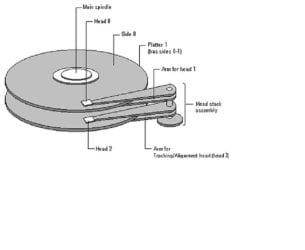
Sorry to hear about your misfortune. From what you've described it sounds like the read/write heads have been rendered inoperable. It could be the heads themselves or something else that controls the movement of the heads across the platters. (The actuator arms, the motor that powers the arms, the spindle that spins the platters or its motor, or even something in the electronics of the printed circuit board that contains the power and data cable connections, etc.)

hard drive.JPG

You could try a free program called Recuva but I'm not very optimistic. If the read/write heads aren't working it may take a professional recovery service (that usually charges hundreds of dollars) to get your document off the hard drive.

Recuva - Undelete, Unerase, File and Disk Recovery - Free Download
 

My Computer My Computer

At a glance

Win 7 Pro 64-bitIntel i5 2.4 Ghz8GB DDR3Intel HD 3000
Computer type
Laptop
Computer Manufacturer/Model Number
Sony Vaio VPCEB47GM Laptop
OS
Win 7 Pro 64-bit
CPU
Intel i5 2.4 Ghz
Memory
8GB DDR3
Graphics Card(s)
Intel HD 3000
Sound Card
IDT High Definition
Monitor(s) Displays
15.6 WGXA Anti-Glare LED
Screen Resolution
1280x800
Hard Drives
640Gb 7200rpm
Antivirus
MSE
Browser
Opera (primary) with IE9 backup
All I can add to what marsmimar has said is to try a HDD diagnostic to see what it says about the drive, good/bad. There are several here, find one for your brand, or use Seatools.
Hard Drive Diagnostic Procedure

If the laptop was running when you dropped it the HDD is most likely not recoverable.:(
A drive can sustain a 1000G non-cycling shock for1-2 micro seconds when off. When running this figure is 300G-350G. Info from Seagate Momentus page.
 

My Computer My Computer

At a glance

Windows 7 Ultimate X64 SP1Intel i5-2550K, Differing ~4.4-4.8GHz No buil...16GB G.Skill Sniper 1866MHz @ 2133MHz 2x8GBASUS GTX650TIB-DC2OC-2GD5, (650TI Boost)
Computer type
PC/Desktop
Computer Manufacturer/Model Number
Home Built Desktop By DataTech
OS
Windows 7 Ultimate X64 SP1
CPU
Intel i5-2550K, Differing ~4.4-4.8GHz No built in GPU
Motherboard
ASUS P8Z68-V PRO/GEN3
Memory
16GB G.Skill Sniper 1866MHz @ 2133MHz 2x8GB
Graphics Card(s)
ASUS GTX650TIB-DC2OC-2GD5, (650TI Boost)
Sound Card
Onboard Realtek 5-1
Monitor(s) Displays
Samsung P2570HD
Screen Resolution
1920x1080
Hard Drives
Samsung 840 Pro 256GB SSD for OS, 500GB Seagate Constellation (Enterprise drive) for Data
PSU
Corsair HX650W
Case
Inwin Dragon Rider
Cooling
Hyper 212 EVO w/two Noctua fans, push-pull, @1300 RPM
Keyboard
E-Z Eyes, bright yellow keys with large characters
Mouse
steelseries SENSEI Laser Pro Gaming
Internet Speed
48-51Mbs Mbs down, 11 Mbs up Xfinity Cable
Antivirus
Norton Internet Security 2013
Browser
IE 10, Opera, Pale Moon if needed
Other Info
4 case fans, LG BluRay-RE, ASUS DVD-RW, Mr. Fusion power supply, 1.21 gigawatts.
Simple fact is the drive is Damaged and Dead. You will not get that one document unless you send the drive to a Data Recovery Service. Which is very expensive and it will take a few weeks or a month or more to get that one file.
 

My Computer My Computer

At a glance

7 x64
OS
7 x64
Hi Thanks for the advice. I finally got time to download the 2 programs, one from Sea Gate the manufacture of the HDD. Neither was able to get me any info. What is frustrating is the HDD is running and the partitions come up, but no info. As a last resort can you disassemble the HDD and do any thing to make it work?
 

My Computer My Computer

At a glance

Windows 7 Home Premium 32bit.
OS
Windows 7 Home Premium 32bit.
Hi Thanks for the advice. I finally got time to download the 2 programs, one from Sea Gate the manufacture of the HDD. Neither was able to get me any info. What is frustrating is the HDD is running and the partitions come up, but no info. As a last resort can you disassemble the HDD and do any thing to make it work?

Hi notsmartenough, You cannot dissasemble a HDD as they are hermatically sealed ,One grain of dust can render them useless , I have heard you can freeze a HDD and sometimes this will allow you to get data off Don't know personnally if it does work :shock:
 

My Computer My Computer

At a glance

win 7 ultimate32bit, Win8.1pro wmc 32bitamd phenom x4 9600corsair twinxs 2x2gb2x nvidia 1gb 8500gt
Computer type
PC/Desktop
Computer Manufacturer/Model Number
self build
OS
win 7 ultimate32bit, Win8.1pro wmc 32bit
CPU
amd phenom x4 9600
Motherboard
asus m2n32-sli deluxe
Memory
corsair twinxs 2x2gb
Graphics Card(s)
2x nvidia 1gb 8500gt
Sound Card
onboard
Monitor(s) Displays
23" PB Viseo 233d
Screen Resolution
1920x1080
Hard Drives
maxtor sata 500gb
maxtor sata 320gb
fujitsu sata200gb
PSU
oryxx tornado 750w
Case
thermaltake xaser lll
Cooling
artic freezer64 pro + 7 case fans
Simple fact is that in the drop the HDD was damaged. If there is any data on it the HDD heads, the things that READ the DATA, can't READ any of it. It can only be retrieved by a data recovery service. And I would NOT trust that drive anymore. You Need to Replace it.
 

My Computer My Computer

At a glance

7 x64
OS
7 x64
Thanks all
 

My Computer My Computer

At a glance

Windows 7 Home Premium 32bit.
OS
Windows 7 Home Premium 32bit.
You're welcome, let us know how it goes. :)
 

My Computer My Computer

At a glance

Windows 7 Ultimate X64 SP1Intel i5-2550K, Differing ~4.4-4.8GHz No buil...16GB G.Skill Sniper 1866MHz @ 2133MHz 2x8GBASUS GTX650TIB-DC2OC-2GD5, (650TI Boost)
Computer type
PC/Desktop
Computer Manufacturer/Model Number
Home Built Desktop By DataTech
OS
Windows 7 Ultimate X64 SP1
CPU
Intel i5-2550K, Differing ~4.4-4.8GHz No built in GPU
Motherboard
ASUS P8Z68-V PRO/GEN3
Memory
16GB G.Skill Sniper 1866MHz @ 2133MHz 2x8GB
Graphics Card(s)
ASUS GTX650TIB-DC2OC-2GD5, (650TI Boost)
Sound Card
Onboard Realtek 5-1
Monitor(s) Displays
Samsung P2570HD
Screen Resolution
1920x1080
Hard Drives
Samsung 840 Pro 256GB SSD for OS, 500GB Seagate Constellation (Enterprise drive) for Data
PSU
Corsair HX650W
Case
Inwin Dragon Rider
Cooling
Hyper 212 EVO w/two Noctua fans, push-pull, @1300 RPM
Keyboard
E-Z Eyes, bright yellow keys with large characters
Mouse
steelseries SENSEI Laser Pro Gaming
Internet Speed
48-51Mbs Mbs down, 11 Mbs up Xfinity Cable
Antivirus
Norton Internet Security 2013
Browser
IE 10, Opera, Pale Moon if needed
Other Info
4 case fans, LG BluRay-RE, ASUS DVD-RW, Mr. Fusion power supply, 1.21 gigawatts.
Back
Top