
DSL Connection fails, Error 638

Vertex

New member
Guru
Local time
3:59 AM
Messages
477
Location
Philippines
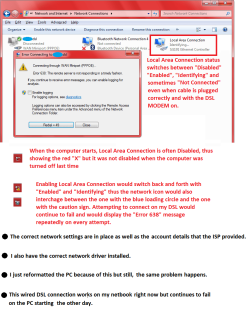
Hello, since the other day, my DSL connection continues to fail on my desktop PC but it is working on my netbook which I'm using right now, hooked towards my monitor.

I have tried everything I could to fix it. I ran the troubleshooter, unplugged my network cable, reset the adapter, deleted and recreated my connection and it fails. It would show up ERROR 638. I even reformatted my PC and the network continues to fail. It did manage to connect for a few minutes earlier today and would just automatically disconnect a few moments later. It continues to fail in connecting right now. Could it be a physical hardware problem with my built-in LAN adapter?

I have a screenshot to help explain the situation and also a zipped diagnostic log which I have initiated after running the "diagnostics" link on the ERROR 638 message. Any ideas?
 

Attachments
My Computer My Computer

At a glance

Windows 7 Ultimate 32 Bit, Windows Developer ...Intel Pentium Dual CPU E2180@2GHzNVIDIA GeForce 7200 GS
Computer Manufacturer/Model Number
Custom Built
OS
Windows 7 Ultimate 32 Bit, Windows Developer Preview, Linux Mint 9 Gnome 32 Bit
CPU
Intel Pentium Dual CPU E2180@2GHz
Motherboard
Elitegroup 671T-M3
Graphics Card(s)
NVIDIA GeForce 7200 GS
Monitor(s) Displays
AOC TFT1560 15" LCD Monitor
Screen Resolution
1024x768
Keyboard
Logitech USB Keyboard
When this connection fails, the first thing that I would do is to go into Device Manager, expand Network Adapters, right-click on your LAN adapter, and check its status.

Is it still Installed? Working? Disabled? Any error condition? It does sound to me as if the motherboard's LAN adapter itself is intermittent or failing, as you suggest, or perhaps the cable is faulty.

I would also check the rear panel LAN socket indicator lights to see if they're lit and flashing like they should be, according to your mobo manual.
 

My Computer My Computer

At a glance

Win10 Pro 64-bitAMD Ryzen 7 3800X32 GB Kingston DDR4-2666MSI nVidia GT 710 (2GB)
Computer type
PC/Desktop
Computer Manufacturer/Model Number
Self-Built
OS
Win10 Pro 64-bit
CPU
AMD Ryzen 7 3800X
Motherboard
Gigabyte X570 UD
Memory
32 GB Kingston DDR4-2666
Graphics Card(s)
MSI nVidia GT 710 (2GB)
Sound Card
Creative Audigy FX 5.1
Monitor(s) Displays
ViewSonic VG2439Smh 24"
Screen Resolution
1920x1080
Hard Drives
3xWD1TB; 1xSeagate 1TB... all spinning rust
PSU
EVGA 100-W1-0500-KR (500w)
Case
SilverStone PS10 (modified)
Cooling
CPU:AMD Wraith Prism. Case:3x Noctua 120mm
Keyboard
Compaq Professional PS/2
Mouse
Microsoft Basic Optical Mouse 2.0
Internet Speed
Fiber 1Gbit/sec down/up
Antivirus
Avast Free
Browser
FF, Chrome
Other Info
2x LG GH24NSC0 DVD burners, Mackie CR3 monitor speakers
I have checked the Device Manager many times and the LAN adapter's driver is installed. I even uninstalled it and clicked on Scan for hardware changes so that the computer will reinstall the LAN. I also disabled and enabled it but still, it has no avail.

The lights are flashing when I plug the cable on the PC and I'm it now on my netbook, the connection is working here with no problems. I even cleaned the port and the inside of my system unit and still it fails.

There's also another hardware issue besides the LAN adapter. Since I reformatted the PC yesterday, Windows Media Center won't detect my analog TV tuner even when I installed the correct driver and the needed components and the TV tuner was showing up on the device manager anyway. This PC rig is 5 years old by the way.
 

My Computer My Computer

At a glance

Windows 7 Ultimate 32 Bit, Windows Developer ...Intel Pentium Dual CPU E2180@2GHzNVIDIA GeForce 7200 GS
Computer Manufacturer/Model Number
Custom Built
OS
Windows 7 Ultimate 32 Bit, Windows Developer Preview, Linux Mint 9 Gnome 32 Bit
CPU
Intel Pentium Dual CPU E2180@2GHz
Motherboard
Elitegroup 671T-M3
Graphics Card(s)
NVIDIA GeForce 7200 GS
Monitor(s) Displays
AOC TFT1560 15" LCD Monitor
Screen Resolution
1024x768
Keyboard
Logitech USB Keyboard
Okay then, if you are moving the same cable between the netbook and the suspect desktop machine and it works fine only with the netbook, and you've reformatted and reinstalled Windows and your LAN drivers as you said in your original post, then the only logical conclusion that I can come up with is motherboard hardware failure, either the LAN adapter itself, or taking your tuner card into consideration, a northbridge or southbridge chip failure.

If I were in your shoes I'd be shopping for a new motherboard.
 

My Computer My Computer

At a glance

Win10 Pro 64-bitAMD Ryzen 7 3800X32 GB Kingston DDR4-2666MSI nVidia GT 710 (2GB)
Computer type
PC/Desktop
Computer Manufacturer/Model Number
Self-Built
OS
Win10 Pro 64-bit
CPU
AMD Ryzen 7 3800X
Motherboard
Gigabyte X570 UD
Memory
32 GB Kingston DDR4-2666
Graphics Card(s)
MSI nVidia GT 710 (2GB)
Sound Card
Creative Audigy FX 5.1
Monitor(s) Displays
ViewSonic VG2439Smh 24"
Screen Resolution
1920x1080
Hard Drives
3xWD1TB; 1xSeagate 1TB... all spinning rust
PSU
EVGA 100-W1-0500-KR (500w)
Case
SilverStone PS10 (modified)
Cooling
CPU:AMD Wraith Prism. Case:3x Noctua 120mm
Keyboard
Compaq Professional PS/2
Mouse
Microsoft Basic Optical Mouse 2.0
Internet Speed
Fiber 1Gbit/sec down/up
Antivirus
Avast Free
Browser
FF, Chrome
Other Info
2x LG GH24NSC0 DVD burners, Mackie CR3 monitor speakers
I really wish I do. Internet and cable TV make up the reason why I take my desktop for granted. Many times I have both of them running like watching TV while waiting for a download to complete. Its the only time I have had both of these issues at the same time. If I can't get the money for a new mobo, I might as well shop for a new LAN adapter and try to plug the TV tuner on another PCI slot and see if I'll be into any better luck.
 

My Computer My Computer

At a glance

Windows 7 Ultimate 32 Bit, Windows Developer ...Intel Pentium Dual CPU E2180@2GHzNVIDIA GeForce 7200 GS
Computer Manufacturer/Model Number
Custom Built
OS
Windows 7 Ultimate 32 Bit, Windows Developer Preview, Linux Mint 9 Gnome 32 Bit
CPU
Intel Pentium Dual CPU E2180@2GHz
Motherboard
Elitegroup 671T-M3
Graphics Card(s)
NVIDIA GeForce 7200 GS
Monitor(s) Displays
AOC TFT1560 15" LCD Monitor
Screen Resolution
1024x768
Keyboard
Logitech USB Keyboard
Back
Top