
Dual Boot - Delete a OS

How to Properly Delete a OS in a Dual Boot

   Information
Deleting a double booted OS may seem simple - you just delete the partition with the OS you want to get rid of and you are done. Well, it is not that easy. With said approach you may get yourself into a lot of trouble. This tutorial describes a safe way how to properly delete a double booted OS.


Step 1 - Check where the bootmgr resides
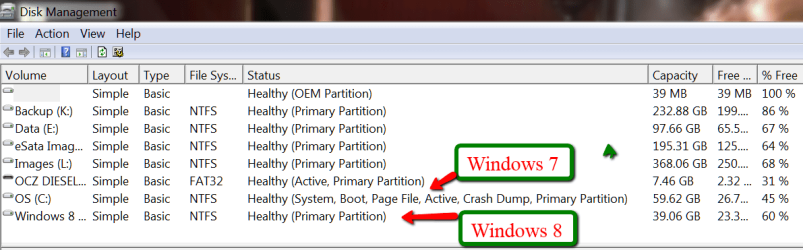
Open Disk Management and find the partition that is marked "active". That is the partition that contains the bootmgr. If there are several active partitions, you have to look for the system flag - best seen in Computer.

The active partition is usually from the OS that was on the system first - e.g. if you installed Windows 7 on an XP system, the XP system would be the active partition. But there are also other cases.

If Windows 7 was the first OS on the system, then your bootmgr resides most likely in a separate system partition which is usually small.

If you installed Windows 7 as first OS to a disk that was not attached to the Sata port0, it can very well be that the bootmgr resides on an arbitrary partition on the disk that is attached to port0.

If you have e.g. a Dell system, your bootmgr may be on the recovery partition. Other OEMs may do the same, but I was not able to verify that.

This is the example of my current system. Note the two last partitions which are Windows 7 and Windows 8. The Windows 7 partition is marked as active. You also see that I have no small system partition because I have eliminated that partition after I moved the bootmgr from that small system partition to the Windows 7 partition.

pic 1.png

If I would delete the Windows 7 partition, my Windows 8 would not boot any more because it would have lost it's bootmgr that is in cohabitation with the Windows7 bootmgr.

In order to avoid such an unfortunate situation, we launch the system that we want to retain and move the bootmgr to that system's OS partition. Here is how.
Step 2 - Delete the unwanted OS partition and reuse the space (Optional)
Stay in the OS that you want to keep and open Disk Management. Right click on the partition that contains the OS you want to delete and Delete Volume. Then right click on the deleted volume and Delete Partition. Now you should have "Freespace" where this partition originally was.

With Disk Management, you can define a new partition in that freespace or you can add it to the partition that shows to the left of that freespce. Just click on the partition which is to the left and Extend Volume.

If, however, you want to add that freespace to a partition that is to the right of the freespace, then you have to use an external tool. I suggest the bootable CD of Partition Wizard. Here is how.

A word of caution: before you manipulate partitions with Partition Wizard, make an image of all partitions on that disk. I once lost all my partitions on a disk because I made a small mistake manipulating one partition with Partition Wizard. For imaging I recommend Free Macrium. Here is how.
Step 3 - Cleanup the bootmgr
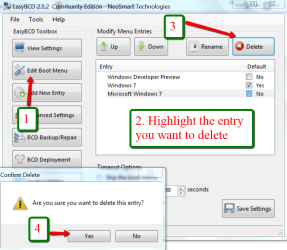
Now that we removed one OS, we have a surplus entry in the bootmgr. We will remove this entry with EasyBCD. As you can see in the picture, the operation takes only 4 clicks.

EasyBCD is a very handy tool for a variety of operations on the bootmgr. You should have that in your toolkit anyhow.

pic 2.png


If you stop at this step, the MBR is still in a double boot configuration and when you boot, the BIOS will present you the black screen where you have to choose the operating sytem - although only one operating system is present. This is not a disaster, but it is an unnecessary step that requires your intervention.

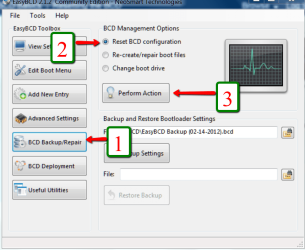
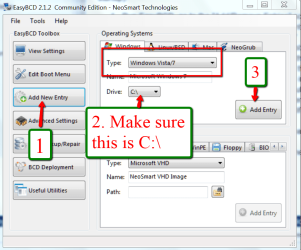
The next two steps will reset the MBR to your current OS and then your system will automatically boot into that.

Important: You absolutely have to execute both Steps 4 and Step 5. If you only do Step 4, your system will not boot any more.

Step 4 - Clean the MBR
Pic 3.png


Step 5 - Reset MBR with the entry of the current OS
Pic 4.png


Last edited:
First problem I see is that the Win7 partition is not 'active'. Use the PW CD to set it active. Highlight the Win7 partition > Partition tab > Modify. Then try again to boot.

If that does not work, Rebuild the MBR. Highlight the disk (not the partition) and the control is in the left pane.
 

My Computer My Computer

Computer Manufacturer/Model Number
HP, Dell, Gateway, Toshiba - 4 laptops and 2 desktops
OS
Vista, Windows7, Mint Mate, Zorin, Windows 8
CPU
from 1.6GHz Duo to i7
Monitor(s) Displays
2x HP w2207
Hard Drives
5x HDD, 7x SSD, 12x Externals
Keyboard
with trackball - no mices
Mouse
Trackball mice
Internet Speed
DSL 6000
Thats got me rebooted! Excellent! Strange though.

Next stages - excuse the caution but........ I'm cautious.
Step 2 - Delete the unwanted OS partition and reuse the space (Optional)
When I have deleted the volume and deleted the Partition, I must not reboot yet until I have carried out Steps 3,4,5 ??
Step 3 - Cleanup the bootmgr
Seems logical - should be straightforward
Step 4 - Clean the MBR
Step 5 - Reset MBR with the entry of the current OS
Unsure about the logic of these steps, but I will follow the instructions. BUT, Kimwu said something about the need to "Re-create boot files"??

Regards
Ian
 

My Computer My Computer

Computer type
PC/Desktop
Computer Manufacturer/Model Number
Dell
OS
Windows 7 - 64 bit
Steps 2 and 3 are OK. But I really don't know what you want to do with steps 4 and 5. If your Windows 7 boots, then the MBR is OK.

Working the MBR is no child's play. You would need to know the exact structure and work it with a hex editor.
 

My Computer My Computer

Computer Manufacturer/Model Number
HP, Dell, Gateway, Toshiba - 4 laptops and 2 desktops
OS
Vista, Windows7, Mint Mate, Zorin, Windows 8
CPU
from 1.6GHz Duo to i7
Monitor(s) Displays
2x HP w2207
Hard Drives
5x HDD, 7x SSD, 12x Externals
Keyboard
with trackball - no mices
Mouse
Trackball mice
Internet Speed
DSL 6000
Thanks for all your help whs.
Completed the task, all working perfectly - phew!

Ian
 

My Computer My Computer

Computer type
PC/Desktop
Computer Manufacturer/Model Number
Dell
OS
Windows 7 - 64 bit
You are welcome. I am glad it worked out OK.
 

My Computer My Computer

Computer Manufacturer/Model Number
HP, Dell, Gateway, Toshiba - 4 laptops and 2 desktops
OS
Vista, Windows7, Mint Mate, Zorin, Windows 8
CPU
from 1.6GHz Duo to i7
Monitor(s) Displays
2x HP w2207
Hard Drives
5x HDD, 7x SSD, 12x Externals
Keyboard
with trackball - no mices
Mouse
Trackball mice
Internet Speed
DSL 6000
Delete Windows 7 from dual boot

I want to remove the windows 7 from my dual boot os since i am fairly satisfied with windows 10. Now I have got a System Reserved partition which is marked active.
My question is can I simply delete the Windows 7 partition(Drive H) without having to copy the boot mgr to Drive C (Windows 10) by Easy BCD.
I would be glad to get your help in the issue.:D:D
My Windows 10 is on Drive 'C' & Windows 7 on Drive 'H'.Also Windows 10 was installed later on the PC.
Following is the screen shot of my disk mgmt. screen-
 

Attachments

  • Capture.JPG
    Capture.JPG
    88.5 KB · Views: 218

My Computer My Computer

Computer type
PC/Desktop
Computer Manufacturer/Model Number
Custom Build
OS
---Windows 10 Build 10051
CPU
Iball
Motherboard
Intel
Memory
Buffalo
Antivirus
Bitdefender Total security 2014
Browser
Google Chrome
You only need to keep the system reserved. But I would advise against deleting Windows 7. The Windows 10 test version is still too shaky.
 

My Computer My Computer

Computer Manufacturer/Model Number
HP, Dell, Gateway, Toshiba - 4 laptops and 2 desktops
OS
Vista, Windows7, Mint Mate, Zorin, Windows 8
CPU
from 1.6GHz Duo to i7
Monitor(s) Displays
2x HP w2207
Hard Drives
5x HDD, 7x SSD, 12x Externals
Keyboard
with trackball - no mices
Mouse
Trackball mice
Internet Speed
DSL 6000
That means I can go on with it.
Please,i want a final go signal:cool:
 

My Computer My Computer

Computer type
PC/Desktop
Computer Manufacturer/Model Number
Custom Build
OS
---Windows 10 Build 10051
CPU
Iball
Motherboard
Intel
Memory
Buffalo
Antivirus
Bitdefender Total security 2014
Browser
Google Chrome
If you want to run with Windows 10 only, you can delete the Windows 7 partition. I personally would not do that at this early stage of Windows 10, but it is an option.
 

My Computer My Computer

Computer Manufacturer/Model Number
HP, Dell, Gateway, Toshiba - 4 laptops and 2 desktops
OS
Vista, Windows7, Mint Mate, Zorin, Windows 8
CPU
from 1.6GHz Duo to i7
Monitor(s) Displays
2x HP w2207
Hard Drives
5x HDD, 7x SSD, 12x Externals
Keyboard
with trackball - no mices
Mouse
Trackball mice
Internet Speed
DSL 6000
One problem

ok, so iv tried everything but i cant delete my old windows 7 partition because it is labeled as system
 

Attachments

  • Screenshot (1).png
    Screenshot (1).png
    26.7 KB · Views: 207

My Computer My Computer

Computer type
PC/Desktop
OS
Windows 8 pro 64 bit
possible solution

did u get it in the end? I was in the same situation an hour ago and solved it
 

My Computer My Computer

Computer type
PC/Desktop
OS
win 10
Something went wrong

I had followed this tutorial: How to Dual-Boot Windows 10 with Windows 7 or 8 to dual-boot Windows 7, 10.
After a while I found out that I would like to revert back to 7 only and followed this tutorial: 'How to Properly Delete a OS in a Dual Boot' found here on sevenforums.
Everything went well until I attempted to exit EasyBCD when I got this error message:

bcd1.jpg


Now what?
 

My Computer My Computer

Computer type
PC/Desktop
Computer Manufacturer/Model Number
Dell OptiPlex 3040
OS
Windows 7 Pro 64-bit
CPU
AMD Athlon 64X2 Dual Core 5000+ @ 2611 Mhz
Motherboard
ASUS
Memory
4 GB Dual-Channel DDR2 @ 373 MHz
Graphics Card(s)
NVIDIA GeForce 6150SE nForce 430
Sound Card
Proprietary, I suppose
Monitor(s) Displays
19" LG Flatron L1910B
Screen Resolution
1280x1024
Hard Drives
Some 2,5 TB divided among one internal SATA, partitioned into C: and D:, and two USB 2.0-connected external drives, the latter for independent backups
PSU
Super Flower 500W
Case
Sure
Cooling
Yes
Keyboard
A year old Dell. The best so far, excluding the original IBM
Mouse
Logitech
Internet Speed
Wireless modem 2 MB/s and down; typically 0.5 to 1.3 MB/s
Antivirus
AVG free
Browser
Chrome
Actually UNINSTALLING an OS

Shawn,
I inadvertently did a WIN7 new install on a partition which has data. The data appears to have remained intact. So I was examining this tutorial about deleting an OS. I have already removed the unwanted OS from the MBR. However, this tutorial advocates deleting the partition to remove the unwanted OS. Since I have data I do not necessarily want to do that. Is there a tool that will actually UNINSTALL all of the components of an OS system while leaving everything else intact?

I think I know your answer already, but I thought I'd see.
 

My Computer My Computer

Computer type
PC/Desktop
OS
Windows 7 Home Prem 32 bit
where is the bootmgr located?
If nothing is listing that partition as having a bootable OS, then it's data and can be deleted with windows explorer without deleting or formatting the partition.
 

My Computer My Computer

Computer type
PC/Desktop
Computer Manufacturer/Model Number
self-built GA-MA785GM-US2H
OS
se7en x64 Enterprise
CPU
Athlon ll x3
Motherboard
GA-MA785GM-US2H rev 1.1
Memory
6 g/b's ddr2 - 6400-800mhz
Graphics Card(s)
AMD Radeon HD 6570
Sound Card
int. rtk alc889a
Monitor(s) Displays
acer x2223w lcd, nec 21" lcd
Screen Resolution
1280 x 1024
Hard Drives
wd caviar black - 640
wd blue caviar 500
wd green re 320
PSU
corsair 400 and a cooler master 460 wired together
Case
old and used
Cooling
artic cooler 64 w/4 120mm case fans
Keyboard
lite-on $9 tank
Mouse
m/s mobile 3000
Internet Speed
d/load - 24.75 MB's u/load - 2.1 MB's
Antivirus
the kind that is anti-viral
Browser
ffox
Other Info
what...
where is the bootmgr located?
If nothing is listing that partition as having a bootable OS, then it's data and can be deleted with windows explorer without deleting or formatting the partition.
That is partially true, but you will run into permission issues with the \Windows\System32 & other directories as well. You can try to take ownership of everything, but that can be a chore.

I was hoping there was a simple tool that would do the job.
 

My Computer My Computer

Computer type
PC/Desktop
OS
Windows 7 Home Prem 32 bit
right-click and left-click on "take ownership"

even though it's not recommended, I enable the big dog (real) administrator account (in the local security policy) being "an administrator" is different than being "the administrator", as soon as I install a system. I've never had trouble deleting anything that's offline
 

My Computer My Computer

Computer type
PC/Desktop
Computer Manufacturer/Model Number
self-built GA-MA785GM-US2H
OS
se7en x64 Enterprise
CPU
Athlon ll x3
Motherboard
GA-MA785GM-US2H rev 1.1
Memory
6 g/b's ddr2 - 6400-800mhz
Graphics Card(s)
AMD Radeon HD 6570
Sound Card
int. rtk alc889a
Monitor(s) Displays
acer x2223w lcd, nec 21" lcd
Screen Resolution
1280 x 1024
Hard Drives
wd caviar black - 640
wd blue caviar 500
wd green re 320
PSU
corsair 400 and a cooler master 460 wired together
Case
old and used
Cooling
artic cooler 64 w/4 120mm case fans
Keyboard
lite-on $9 tank
Mouse
m/s mobile 3000
Internet Speed
d/load - 24.75 MB's u/load - 2.1 MB's
Antivirus
the kind that is anti-viral
Browser
ffox
Other Info
what...
right-click and left-click on "take ownership"

even though it's not recommended, I enable the big dog (real) administrator account (in the local security policy) being "an administrator" is different than being "the administrator", as soon as I install a system. I've never had trouble deleting anything that's offline

I already did it by booting from a WIN7 disk so the CMD does not care about priviledges when executed in that fashion.
 

My Computer My Computer

Computer type
PC/Desktop
OS
Windows 7 Home Prem 32 bit
success
 

My Computer My Computer

Computer type
PC/Desktop
Computer Manufacturer/Model Number
self-built GA-MA785GM-US2H
OS
se7en x64 Enterprise
CPU
Athlon ll x3
Motherboard
GA-MA785GM-US2H rev 1.1
Memory
6 g/b's ddr2 - 6400-800mhz
Graphics Card(s)
AMD Radeon HD 6570
Sound Card
int. rtk alc889a
Monitor(s) Displays
acer x2223w lcd, nec 21" lcd
Screen Resolution
1280 x 1024
Hard Drives
wd caviar black - 640
wd blue caviar 500
wd green re 320
PSU
corsair 400 and a cooler master 460 wired together
Case
old and used
Cooling
artic cooler 64 w/4 120mm case fans
Keyboard
lite-on $9 tank
Mouse
m/s mobile 3000
Internet Speed
d/load - 24.75 MB's u/load - 2.1 MB's
Antivirus
the kind that is anti-viral
Browser
ffox
Other Info
what...
Cant move Bootmgr Win8 is Logical.

Hi, This is my situation, i will try to be clear.
I currently have a Dual-Boot system, with Windows 7 & 8.1. I want to remove the W7 installation, and be left with just W8.1, but I am running into Problems. Firstly my setup..
ONE HDD, currently with the following partitions (In this order in Disk Management, booted into Win8.1)...
DISK 0
* UNALLOCATED 107.79Gb
Win7 (D) 111.23Gb NTFS (System, Active, Primary Partition)
Win8 (C) 79.06Gb NTFS (Boot, Page File, Crash Dump, Logical Drive)

I understand that as the Win7 is "Active' then that means i need to copy the BootMgr info to the Win8 before deleting it, but when i try to do that with EasyBCD, it fails telling me i cannot move the boot info to a Logical Drive, and to convert the drive to Primary. So, I tried using Easus Partition Manager to convert, it tells me I cant convert the System or Boot partition.

I am currently at work and doing this remotely via TeamViewer (logged in to Win8), so I am looking for a way to do this WITHOUT having to boot into the Win7 as i cant do that from here.

I am assuming the answer is to boot into Win7, install Easus and then convert the Win8 partition, then boot back into Win8 and use EasyBCD to copy the boot info, is there another way, am i missing something?

Thank you in advance.
 

My Computer My Computer

OS
W7 Home Premium x64 / W7 Ultimate x86
got any 3rd party backup software? Image ei8ht and recover over the se7en installation.

Is ei8ht really installed on a Logical Drive in an extended partition and is the unallocated space really at the front of your drive? What caused the dump file?
 

My Computer My Computer

Computer type
PC/Desktop
Computer Manufacturer/Model Number
self-built GA-MA785GM-US2H
OS
se7en x64 Enterprise
CPU
Athlon ll x3
Motherboard
GA-MA785GM-US2H rev 1.1
Memory
6 g/b's ddr2 - 6400-800mhz
Graphics Card(s)
AMD Radeon HD 6570
Sound Card
int. rtk alc889a
Monitor(s) Displays
acer x2223w lcd, nec 21" lcd
Screen Resolution
1280 x 1024
Hard Drives
wd caviar black - 640
wd blue caviar 500
wd green re 320
PSU
corsair 400 and a cooler master 460 wired together
Case
old and used
Cooling
artic cooler 64 w/4 120mm case fans
Keyboard
lite-on $9 tank
Mouse
m/s mobile 3000
Internet Speed
d/load - 24.75 MB's u/load - 2.1 MB's
Antivirus
the kind that is anti-viral
Browser
ffox
Other Info
what...
Back
Top