
Dual Boot Installation with Windows 7 and Vista

How to Setup a Dual Boot Installation with Windows 7 and Vista

   Information
This will show you how to install Windows 7 and Vista to dual boot with when you already have either Windows 7 or Vista installed first.
   Note
With a dual boot installaton, you will have two operating systems (OS) installed. When you start the computer, you will have the choice to choose which OS you would like to start up to. This method is the easiest way of doing a dual boot with these two operating systems.
   Tip
When dual booting with another OS (ex: Vista or XP), you may not always have that OS partition show up in Computer with a driver letter in Windows 7. If this happens, then you will just need to add a drive letter to the OS (ex: Vista or XP) partition in Windows 7 Disk Management for it to show up in Computer with a driver letter.
   Warning
Windows 7 Minimum Hardware Requirements:

NOTE: For more iformation on this, see: Windows 7 system requirements
  • 1 GHz 32-bit or 64-bit processor
  • 1 GB RAM for 32-bit Windows 7 OR 2 GB RAM for 64-bit Windows 7
  • 16 GB available disk space 32-bit Windows 7 OR 20 GB for 64-bit Windows 7
  • Support for DirectX 9 graphics with 128 MB memory (in order to enable Aero theme)
  • DVD-R/W Drive
  • Internet or phone access to activate Windows 7.
Vista Minimum Hardware Requirements:
NOTE: For more information, see: Microsoft Windows Vista: Recommended System Requirements

Vista Home Basic
  • Processor: 1GHz (32 or 64 bit)
  • System Memory (RAM): 512MB
  • Hard Drive: 20GB with 15GB available for Vista
  • Video Card: 32MB Memory and DirectX 9 Support
  • DVD-ROM Drive
Vista Home Premium, Business, or Ultimate
  • Processor: 1GHz (32 or 64 bit)
  • System Memory (RAM): 1GB
  • Hard Drive: 40GB with 15GB available for Vista
  • Video Card: 128MB Memory, DirectX 9 Support with: WDDM Driver, Pixel Shader 2.0, 32bits per pixel
  • DVD-ROM Drive

EXAMPLE: Windows Boot Manager
NOTE: This is the boot screen where you select what operating system that you would like to start. By default, you have 30 seconds to choose another operating system before the default operating system will start automatically.
Boot_Manager.jpg


Here's How:
1. If Installing Second OS on a Separate Hard Drive
NOTE: This is if you are going to install the second OS (Windows 7 or Vista) on a separate hard drive than the first OS in installed on.
A) Go to step 3.
2. If Installing Second OS on another Partition on the Same Hard Drive
NOTE: This is if you are going to install the second OS (Windows 7 or Vista) on a different partition on the same hard drive than the first OS is installed on.
A) If Vista was installed first, then create a new partition for Windows 7 (second OS) to be installed on later if you do not already have one to use. (See screenshot below)
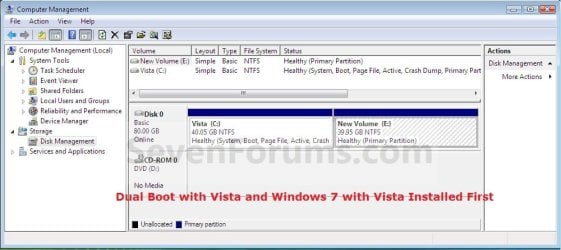
Create_Windows7_Partition_.jpg
B) If Windows 7 was installed first, then create a new partition for Vista (second OS) to be installed on later if you do not already have one to use. (See screenshot below)
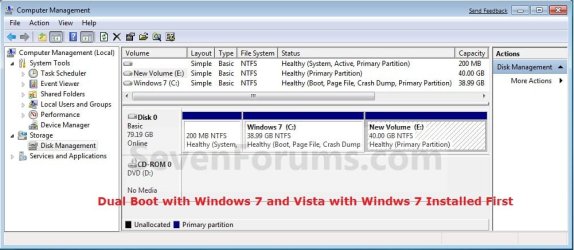
Create_Vista_Partition_.jpg
3. Insert the second OS (Windows 7 or Vista) installation DVD, and restart the computer to start installing it.
A) If Vista was installed first, then select the new partition (step 2A) or drive and do a clean install of Windows 7 (second OS) on it. (See screenshot below)
Windows7_Partition.jpg
B) If Windows 7 was installed first, then select the new partition (step 2B) or drive and do a clean install of Vista (second OS) on it. (See screenshot below)
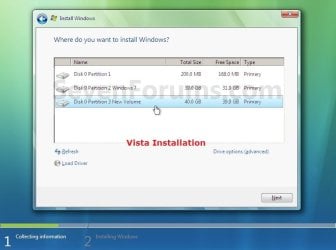
Vista_Partition.jpg
4. When the second OS is finished installing you will now have the option to select which OS to start to in the Windows Boot Manager screen at start up. (See example screenshot at the top of the tutorial)
NOTE: Whatever OS you install last will be the OS listed first in the Windows Boot Manager screen at startup.

5. This is what you will see in Disk Management below if you installed the second OS on another partition on the same hard drive (step 2).
A) If Vista was installed first. (See screenshot below)
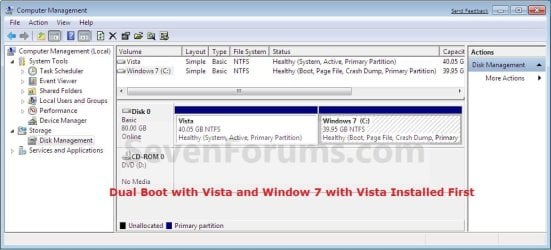
Disk_Management-Windows7.jpg
B) If Windows 7 was installed first. (See screenshot below)
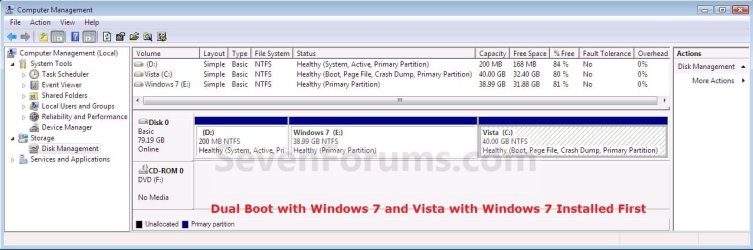
Disk_Management-Vista.jpg
That's it,
Shawn


Last edited:
Qosmio,

You can shrink D just fine if you like without losing anything. 70GB is fine for Windows 7 since it only needs 20GB at most plus space for whatever you want to install on it. :)
 

My Computer My Computer

At a glance

64-bit Windows 11 Pro for WorkstationsIntel i7-8700K OC'd to 5 GHz64 GB (4x16GB) G.SKILL TridentZ RGB DDR4 3600...ASUS ROG-STRIX-GTX1080TI-O11G-GAMING
Computer type
PC/Desktop
Computer Manufacturer/Model Number
Self built custom
OS
64-bit Windows 11 Pro for Workstations
CPU
Intel i7-8700K OC'd to 5 GHz
Motherboard
ASUS ROG Maximus XI Formula Z390
Memory
64 GB (4x16GB) G.SKILL TridentZ RGB DDR4 3600 MHz
Graphics Card(s)
ASUS ROG-STRIX-GTX1080TI-O11G-GAMING
Sound Card
Integrated
Monitor(s) Displays
2 x Samsung Odyssey G7 27"
Screen Resolution
2560x1440
Hard Drives
1TB Samsung 990 PRO M.2,
4TB Samsung 990 PRO PRO M.2,
TerraMaster F8 SSD Plus NAS
PSU
Seasonic Prime Titanium 850W
Case
Thermaltake Core P3
Cooling
Corsair Hydro H115i
Keyboard
Logitech wireless K800
Mouse
Logitech MX Master 4
Internet Speed
2 Gb/s Download and 100 Mb/s Upload
Antivirus
Malwarebyte Anti-Malware Premium
Browser
Google Chrome
Other Info
Logitech Z625 speaker system,
Logitech BRIO 4K Pro webcam,
HP Color LaserJet Pro MFP M477fdn,
APC SMART-UPS RT 1000 XL - SURT1000XLI,
Galaxy S23 Plus phone
Thakyou...

Cool thank you so much I will go ahead and see what will happen...:D


Best regards...........
 

My Computer My Computer

At a glance

windows 7 7600 64bit, vista 32bit
Computer Manufacturer/Model Number
Toshiba Qosmio F50
OS
windows 7 7600 64bit, vista 32bit
Finally WIN 7 & VISTA on the same PC....

I just want to say thanks for every one in this site (SEVEN FORUMS)and special thanx for SHAWN due to his assist in installing WIN7.
SHAWN every thing went as you described in your tutorial, it's really fast to install win 7 compare to other win OS, hope every thing will be okay....

Thank you so much
Best Regards
 

My Computer My Computer

At a glance

windows 7 7600 64bit, vista 32bit
Computer Manufacturer/Model Number
Toshiba Qosmio F50
OS
windows 7 7600 64bit, vista 32bit
You're most welcome Qosmio. I'm happy to hear all went well. :)
 

My Computer My Computer

At a glance

64-bit Windows 11 Pro for WorkstationsIntel i7-8700K OC'd to 5 GHz64 GB (4x16GB) G.SKILL TridentZ RGB DDR4 3600...ASUS ROG-STRIX-GTX1080TI-O11G-GAMING
Computer type
PC/Desktop
Computer Manufacturer/Model Number
Self built custom
OS
64-bit Windows 11 Pro for Workstations
CPU
Intel i7-8700K OC'd to 5 GHz
Motherboard
ASUS ROG Maximus XI Formula Z390
Memory
64 GB (4x16GB) G.SKILL TridentZ RGB DDR4 3600 MHz
Graphics Card(s)
ASUS ROG-STRIX-GTX1080TI-O11G-GAMING
Sound Card
Integrated
Monitor(s) Displays
2 x Samsung Odyssey G7 27"
Screen Resolution
2560x1440
Hard Drives
1TB Samsung 990 PRO M.2,
4TB Samsung 990 PRO PRO M.2,
TerraMaster F8 SSD Plus NAS
PSU
Seasonic Prime Titanium 850W
Case
Thermaltake Core P3
Cooling
Corsair Hydro H115i
Keyboard
Logitech wireless K800
Mouse
Logitech MX Master 4
Internet Speed
2 Gb/s Download and 100 Mb/s Upload
Antivirus
Malwarebyte Anti-Malware Premium
Browser
Google Chrome
Other Info
Logitech Z625 speaker system,
Logitech BRIO 4K Pro webcam,
HP Color LaserJet Pro MFP M477fdn,
APC SMART-UPS RT 1000 XL - SURT1000XLI,
Galaxy S23 Plus phone
Hi All!
1st time, 1st post here. Nice to see so many helping people!
My issue: I run a vista x64 SP2. I am satisfied with it, it's running flawlessly (more or less).
However I want to try Win 7 desperately. I have a lot of space, so I plan to install Windows 7 on my 2nd hard drive (not Sytem Drive), separately, where I create a partition for the new OS (Win 7). It's a 1 TB Samsung, so space is not an issue, really.

Question:

Do I have to set anything in my BIOS, to have my PC "see" this new booting-option?
Or does it simple detect the new OS on the 2nd HD (when booting)?
As I grasped it'll be an entirely new OS, with a separate boot-sequence.
As I understood, I won't be able to use my existing programs with this method (supposing Vista x64 is sitting on "C" system partition, and Win 7 is on "K" (separate HD): Is it correct?
I really look forward to getting Your reply, and appreciate Your time and dedication!
Thanx in advance!
 
Last edited:

My Computer My Computer

At a glance

Win 7 Ultimate X64QuadCore Intel Core 2 Quad66004096 MB (DDR2-800 DDR2 SDRAM)NVIDIA Geforce 9600GT
Computer Manufacturer/Model Number
Built
OS
Win 7 Ultimate X64
CPU
QuadCore Intel Core 2 Quad6600
Motherboard
ASUS P5K Pro
Memory
4096 MB (DDR2-800 DDR2 SDRAM)
Graphics Card(s)
NVIDIA Geforce 9600GT
Monitor(s) Displays
ASUS W222 U
Screen Resolution
1680 X 1050
Hard Drives
HD: SAMSUNG HD753LJ ATA Device (750 GB, 7200 RPM, SATA-II), 2. drive - SAMSUNG HD103UJ (931 GB),
External drives: 1 x 120 GB + 1 x 100 GB External WD - drives (WD + Samsung) + 2 x 250 GB External HDD (WD)
Cooling
Chieftek
Mouse
Logitech MX 450
Internet Speed
15 MB/s / 1 Mb/s
Hello Rozsomak, and welcome to Seven Forums.

Since you will be using a separate hard drive, then you would use step 1 in the tutorial. When done, your computer will start Windows 7 by default since it was the last OS installed. You can change the default OS to have startup anytime you like though.

When you are in Vista, Vista will show as the C: drive and Windows 7 as for example E:. When you are in Windows 7, Windows 7 will show as the C: drive and Vista as for example E:. The OS that you startup to will always show as the C: drive by default and cannot be changed.

You can access the files from each OS from within either OS, but you can only run programs that are installed on the current OS.

Hope this helps,
Shawn
 

My Computer My Computer

At a glance

64-bit Windows 11 Pro for WorkstationsIntel i7-8700K OC'd to 5 GHz64 GB (4x16GB) G.SKILL TridentZ RGB DDR4 3600...ASUS ROG-STRIX-GTX1080TI-O11G-GAMING
Computer type
PC/Desktop
Computer Manufacturer/Model Number
Self built custom
OS
64-bit Windows 11 Pro for Workstations
CPU
Intel i7-8700K OC'd to 5 GHz
Motherboard
ASUS ROG Maximus XI Formula Z390
Memory
64 GB (4x16GB) G.SKILL TridentZ RGB DDR4 3600 MHz
Graphics Card(s)
ASUS ROG-STRIX-GTX1080TI-O11G-GAMING
Sound Card
Integrated
Monitor(s) Displays
2 x Samsung Odyssey G7 27"
Screen Resolution
2560x1440
Hard Drives
1TB Samsung 990 PRO M.2,
4TB Samsung 990 PRO PRO M.2,
TerraMaster F8 SSD Plus NAS
PSU
Seasonic Prime Titanium 850W
Case
Thermaltake Core P3
Cooling
Corsair Hydro H115i
Keyboard
Logitech wireless K800
Mouse
Logitech MX Master 4
Internet Speed
2 Gb/s Download and 100 Mb/s Upload
Antivirus
Malwarebyte Anti-Malware Premium
Browser
Google Chrome
Other Info
Logitech Z625 speaker system,
Logitech BRIO 4K Pro webcam,
HP Color LaserJet Pro MFP M477fdn,
APC SMART-UPS RT 1000 XL - SURT1000XLI,
Galaxy S23 Plus phone
Thank You very much for Your answer. Indeed, that helps a great deal, and even strengthens my decision to give Win 7 a try!:)
 

My Computer My Computer

At a glance

Win 7 Ultimate X64QuadCore Intel Core 2 Quad66004096 MB (DDR2-800 DDR2 SDRAM)NVIDIA Geforce 9600GT
Computer Manufacturer/Model Number
Built
OS
Win 7 Ultimate X64
CPU
QuadCore Intel Core 2 Quad6600
Motherboard
ASUS P5K Pro
Memory
4096 MB (DDR2-800 DDR2 SDRAM)
Graphics Card(s)
NVIDIA Geforce 9600GT
Monitor(s) Displays
ASUS W222 U
Screen Resolution
1680 X 1050
Hard Drives
HD: SAMSUNG HD753LJ ATA Device (750 GB, 7200 RPM, SATA-II), 2. drive - SAMSUNG HD103UJ (931 GB),
External drives: 1 x 120 GB + 1 x 100 GB External WD - drives (WD + Samsung) + 2 x 250 GB External HDD (WD)
Cooling
Chieftek
Mouse
Logitech MX 450
Internet Speed
15 MB/s / 1 Mb/s
You're welcome Rozsomak. I hope that you find Windows 7 as great as I do. :)
 

My Computer My Computer

At a glance

64-bit Windows 11 Pro for WorkstationsIntel i7-8700K OC'd to 5 GHz64 GB (4x16GB) G.SKILL TridentZ RGB DDR4 3600...ASUS ROG-STRIX-GTX1080TI-O11G-GAMING
Computer type
PC/Desktop
Computer Manufacturer/Model Number
Self built custom
OS
64-bit Windows 11 Pro for Workstations
CPU
Intel i7-8700K OC'd to 5 GHz
Motherboard
ASUS ROG Maximus XI Formula Z390
Memory
64 GB (4x16GB) G.SKILL TridentZ RGB DDR4 3600 MHz
Graphics Card(s)
ASUS ROG-STRIX-GTX1080TI-O11G-GAMING
Sound Card
Integrated
Monitor(s) Displays
2 x Samsung Odyssey G7 27"
Screen Resolution
2560x1440
Hard Drives
1TB Samsung 990 PRO M.2,
4TB Samsung 990 PRO PRO M.2,
TerraMaster F8 SSD Plus NAS
PSU
Seasonic Prime Titanium 850W
Case
Thermaltake Core P3
Cooling
Corsair Hydro H115i
Keyboard
Logitech wireless K800
Mouse
Logitech MX Master 4
Internet Speed
2 Gb/s Download and 100 Mb/s Upload
Antivirus
Malwarebyte Anti-Malware Premium
Browser
Google Chrome
Other Info
Logitech Z625 speaker system,
Logitech BRIO 4K Pro webcam,
HP Color LaserJet Pro MFP M477fdn,
APC SMART-UPS RT 1000 XL - SURT1000XLI,
Galaxy S23 Plus phone
I think I will, although - as I claimed - I had no problem with Vista whatsoever. It's always us, people who make wrong decisions and give incorrect commands. Never blame the precious machine (I call mine Jessica Alba).
OFF
Rozsomak is the Hungarian word for Wolverine, btw. :)
 

My Computer My Computer

At a glance

Win 7 Ultimate X64QuadCore Intel Core 2 Quad66004096 MB (DDR2-800 DDR2 SDRAM)NVIDIA Geforce 9600GT
Computer Manufacturer/Model Number
Built
OS
Win 7 Ultimate X64
CPU
QuadCore Intel Core 2 Quad6600
Motherboard
ASUS P5K Pro
Memory
4096 MB (DDR2-800 DDR2 SDRAM)
Graphics Card(s)
NVIDIA Geforce 9600GT
Monitor(s) Displays
ASUS W222 U
Screen Resolution
1680 X 1050
Hard Drives
HD: SAMSUNG HD753LJ ATA Device (750 GB, 7200 RPM, SATA-II), 2. drive - SAMSUNG HD103UJ (931 GB),
External drives: 1 x 120 GB + 1 x 100 GB External WD - drives (WD + Samsung) + 2 x 250 GB External HDD (WD)
Cooling
Chieftek
Mouse
Logitech MX 450
Internet Speed
15 MB/s / 1 Mb/s
Ah, explains the avatar then. :)
 

My Computer My Computer

At a glance

64-bit Windows 11 Pro for WorkstationsIntel i7-8700K OC'd to 5 GHz64 GB (4x16GB) G.SKILL TridentZ RGB DDR4 3600...ASUS ROG-STRIX-GTX1080TI-O11G-GAMING
Computer type
PC/Desktop
Computer Manufacturer/Model Number
Self built custom
OS
64-bit Windows 11 Pro for Workstations
CPU
Intel i7-8700K OC'd to 5 GHz
Motherboard
ASUS ROG Maximus XI Formula Z390
Memory
64 GB (4x16GB) G.SKILL TridentZ RGB DDR4 3600 MHz
Graphics Card(s)
ASUS ROG-STRIX-GTX1080TI-O11G-GAMING
Sound Card
Integrated
Monitor(s) Displays
2 x Samsung Odyssey G7 27"
Screen Resolution
2560x1440
Hard Drives
1TB Samsung 990 PRO M.2,
4TB Samsung 990 PRO PRO M.2,
TerraMaster F8 SSD Plus NAS
PSU
Seasonic Prime Titanium 850W
Case
Thermaltake Core P3
Cooling
Corsair Hydro H115i
Keyboard
Logitech wireless K800
Mouse
Logitech MX Master 4
Internet Speed
2 Gb/s Download and 100 Mb/s Upload
Antivirus
Malwarebyte Anti-Malware Premium
Browser
Google Chrome
Other Info
Logitech Z625 speaker system,
Logitech BRIO 4K Pro webcam,
HP Color LaserJet Pro MFP M477fdn,
APC SMART-UPS RT 1000 XL - SURT1000XLI,
Galaxy S23 Plus phone
Hi All!
1st time, 1st post here. Nice to see so many helping people!
My issue: I run a vista x64 SP2. I am satisfied with it, it's running flawlessly (more or less).
However I want to try Win 7 desperately. I have a lot of space, so I plan to install Windows 7 on my 2nd hard drive (not Sytem Drive), separately, where I create a partition for the new OS (Win 7). It's a 1 TB Samsung, so space is not an issue, really.

Question:

Do I have to set anything in my BIOS, to have my PC "see" this new booting-option?
Or does it simple detect the new OS on the 2nd HD (when booting)?
As I grasped it'll be an entirely new OS, with a separate boot-sequence.
As I understood, I won't be able to use my existing programs with this method (supposing Vista x64 is sitting on "C" system partition, and Win 7 is on "K" (separate HD): Is it correct?
I really look forward to getting Your reply, and appreciate Your time and dedication!
Thanx in advance!
Hello, Rozsomak (torkosborz ?)
Welcome aboard.
Upon first reading your post, I was concerned that the Samsung 1 TB might be an external USB HDD
and considered a relevant caution.
I see now that it indeed is not, thanks to your detailed profile entries.

I also noticed that, from Hungary, your posting in English was surprisingly well-done,
much better than some college people I've read.

Since your interests seem akin to mine, and the fact that you are an educated man,
I would like to offer a few simple 'corrections' to your post.
This, I would never, ever do, under most ordinary circumstances.
Most people would misinterpret things and become highly offended, given
the internet's impersonal nature.

I gather your post is either:
1. Your native Hungarian, translated to English (Google, for example), or
2. You typed the post in English, as you understand it.

Assuming case 2,
I would like to offer a few 'corrections', intended to teach, not to insult or offend.
Simply to help, with what relevant knowledge I can offer.
English (American), as I understand it.
I believe these forums are about many things 'technical', not just w7...

Firstly, this is a "Google" translation of the above post, English --> Hungarian, to insure your "original" message.
Hi all!
1. idő, 1. post itt. Örülök, hogy ilyen sok segítő ember!
My issue: I run a vista x64 SP2. Elégedett vagyok vele, hibátlanul fut (többé-kevésbé).
Ugyanakkor szeretném próbálni Win 7 kétségbeesetten. Nekem van sok hely, ezért azt tervezem, hogy telepítse a Windows 7-én 2. merevlemez (nem Sytem Drive), külön-külön, ha létrehozok egy partíciót, hogy az új operációs rendszer (Win 7). Ez egy 1 TB Samsung, így a rendelkezésre álló hely nem probléma, tényleg.

Kérdés:

Kell-e meg valamit az én BIOS-t, hogy PC-m "lát" az új indítás-opció?
Vagy pedig egyszerűen megtaláljuk az új operációs rendszerét a 2. HD (indításakor)?
Amint megragadtam, hogy lesz egy teljesen új operációs rendszer, egy külön boot-sorrendben.
Ahogy értettem, nem fogom tudni használni a meglévő programokat ezzel a módszerrel (feltételezve Vista x64 ül "C" rendszer partíciót, a Win 7-én "K" (külön HD): Is it correct?
Nagyon várom, hogy egyre Ön válasza, és köszönjük idő és odaadással!
Thanx in advance!
I am not a linguist or anything of the sort.
I previously posted a message to an American, in Hungary, who has the language barrier to deal with,
now that his computer needs repair.
Therefore I appreciate the language difficulties in either direction.

If you're interested, and not offended, we could go to another thread,
and continue from there. Perhaps others will also read. Maybe some college students.

I've made no 'analysis' of Brink's post, since you're in excellent hands there.
My posting is only in reference to your quoted "English words"...

Hope I don't get 'banned' for this -- Mods can always 'delete', if improper.

Chuck R.
 

My Computer My Computer

At a glance

XP_Pro, W7_7201, W7RC.vhd, SciLinux5.3, Fedor...AMD 64x21 gigDunno
Computer Manufacturer/Model Number
Gateway GT5056
OS
XP_Pro, W7_7201, W7RC.vhd, SciLinux5.3, Fedora12, Fedora9_2x, OpenSolaris_09-06
CPU
AMD 64x2
Motherboard
Yes
Memory
1 gig
Graphics Card(s)
Dunno
Sound Card
Realtek something
Monitor(s) Displays
Samsung SyncMaster 940MW w/TV
Screen Resolution
1280x1024
Hard Drives
250 GB WD, USB Seagate Freedesk 1.5 T
Internet Speed
Cable modem
Other Info
1 + 1 = 10b,
7 + 7 = 16o,
a + b = 15h.
Wow, I simply can't believe that I just found this forum, and especially this thread:D
Now for a question:
I have Win 7 arriving from Amazon next week and hope to create a dual-boot system per this thread. I now have a brand new Western Digital Caviar Black 1 TB hard drive and am planning on a clean install. I currently have Vista Ultimate 64-bit installed on my C: drive According to this thread I think I should just push all my other drive letters down and install this new HD as D:.
Amazing, my original question I had was whether to just move my C: Vista HD to D: and do a clean install of Win 7 on my new HD as C:, but I "think" that this thread has educated me enough that I should just go ahead and install my new drive as D:, and the dual-boot process will take care of naming the Win 7 drive as C: whenever I'm using Win 7.

Sorry, I wish I could have organized my post as well as this Site seems to be organized. Absolutely wonderful site and I can say that after only a couple hours!
 
Last edited:

My Computer My Computer

At a glance

Windows 7 Professional and Vista Ultimate 64-bitIntel Core 2 Quad8GB DDR2 800MHZNVidia GeForce 9800 GT
Computer Manufacturer/Model Number
Gateway FX542X
OS
Windows 7 Professional and Vista Ultimate 64-bit
CPU
Intel Core 2 Quad
Motherboard
NVidia Nforce 680i SLI LT
Memory
8GB DDR2 800MHZ
Graphics Card(s)
NVidia GeForce 9800 GT
Sound Card
Creative Sound Blaster X-FI Xtreme Gamer PCI Sound Card
Monitor(s) Displays
Hannspree HW191DP
Hard Drives
WDC WD50 00AAKS-22A7B SCSI Disk Device (500.11 GB) -- drive 0, SMART Status: Healthy
WDC WD50 00AAKS-22A7B SCSI Disk Device (500.11 GB) -- drive 1, SMART Status: Healthy
PSU
700 Watt
Case
Gateway 7-bay BTX tower case
Cooling
?
Welcome to SevenForums!! You might want to browse through the extensive tutorial section maintained by our one man tutorial machine, Brink & co. See it -=> Here

If you have any questions, don't hesitate to ask!! ;)
 

My Computer My Computer

At a glance

64-bit Windows 8.1 ProCore(TM) i5 CPU 4330 Haswell @ 3.20GHz12.00 GBIntel(R) HD Graphics
Computer type
PC/Desktop
Computer Manufacturer/Model Number
LENOVO K450 @3.0GHZ
OS
64-bit Windows 8.1 Pro
CPU
Core(TM) i5 CPU 4330 Haswell @ 3.20GHz
Motherboard
LENOVO
Memory
12.00 GB
Graphics Card(s)
Intel(R) HD Graphics
Sound Card
Intel HD integtrated
Monitor(s) Displays
HP 25' ISP Monitor
Screen Resolution
1900/1020
Hard Drives
(1) ST1000DM003-1CH162 (2) Generic STORAGE DEVICE USB Device (3) Generic STORAGE DEVICE USB Device
Internet Speed
100mb down/10mb up
Welcome to SevenForums!! You might want to browse through the extensive tutorial section maintained by our one man tutorial machine, Brink & co. See it -=> Here

If you have any questions, don't hesitate to ask!! ;)
Thanks, but how do you think I arrived here?:D
 

My Computer My Computer

At a glance

Windows 7 Professional and Vista Ultimate 64-bitIntel Core 2 Quad8GB DDR2 800MHZNVidia GeForce 9800 GT
Computer Manufacturer/Model Number
Gateway FX542X
OS
Windows 7 Professional and Vista Ultimate 64-bit
CPU
Intel Core 2 Quad
Motherboard
NVidia Nforce 680i SLI LT
Memory
8GB DDR2 800MHZ
Graphics Card(s)
NVidia GeForce 9800 GT
Sound Card
Creative Sound Blaster X-FI Xtreme Gamer PCI Sound Card
Monitor(s) Displays
Hannspree HW191DP
Hard Drives
WDC WD50 00AAKS-22A7B SCSI Disk Device (500.11 GB) -- drive 0, SMART Status: Healthy
WDC WD50 00AAKS-22A7B SCSI Disk Device (500.11 GB) -- drive 1, SMART Status: Healthy
PSU
700 Watt
Case
Gateway 7-bay BTX tower case
Cooling
?
I want to post a pithy remark, but told myself to be good... :roflmao:
 

My Computer My Computer

At a glance

64-bit Windows 8.1 ProCore(TM) i5 CPU 4330 Haswell @ 3.20GHz12.00 GBIntel(R) HD Graphics
Computer type
PC/Desktop
Computer Manufacturer/Model Number
LENOVO K450 @3.0GHZ
OS
64-bit Windows 8.1 Pro
CPU
Core(TM) i5 CPU 4330 Haswell @ 3.20GHz
Motherboard
LENOVO
Memory
12.00 GB
Graphics Card(s)
Intel(R) HD Graphics
Sound Card
Intel HD integtrated
Monitor(s) Displays
HP 25' ISP Monitor
Screen Resolution
1900/1020
Hard Drives
(1) ST1000DM003-1CH162 (2) Generic STORAGE DEVICE USB Device (3) Generic STORAGE DEVICE USB Device
Internet Speed
100mb down/10mb up
Thanks for not destroying me on my first day!:D
It's nice to find a forum with a sense of humor.
And yes, I did fill out my system info. Thanks for the reminder, though.
 

My Computer My Computer

At a glance

Windows 7 Professional and Vista Ultimate 64-bitIntel Core 2 Quad8GB DDR2 800MHZNVidia GeForce 9800 GT
Computer Manufacturer/Model Number
Gateway FX542X
OS
Windows 7 Professional and Vista Ultimate 64-bit
CPU
Intel Core 2 Quad
Motherboard
NVidia Nforce 680i SLI LT
Memory
8GB DDR2 800MHZ
Graphics Card(s)
NVidia GeForce 9800 GT
Sound Card
Creative Sound Blaster X-FI Xtreme Gamer PCI Sound Card
Monitor(s) Displays
Hannspree HW191DP
Hard Drives
WDC WD50 00AAKS-22A7B SCSI Disk Device (500.11 GB) -- drive 0, SMART Status: Healthy
WDC WD50 00AAKS-22A7B SCSI Disk Device (500.11 GB) -- drive 1, SMART Status: Healthy
PSU
700 Watt
Case
Gateway 7-bay BTX tower case
Cooling
?

My Computer My Computer

At a glance

64-bit Windows 8.1 ProCore(TM) i5 CPU 4330 Haswell @ 3.20GHz12.00 GBIntel(R) HD Graphics
Computer type
PC/Desktop
Computer Manufacturer/Model Number
LENOVO K450 @3.0GHZ
OS
64-bit Windows 8.1 Pro
CPU
Core(TM) i5 CPU 4330 Haswell @ 3.20GHz
Motherboard
LENOVO
Memory
12.00 GB
Graphics Card(s)
Intel(R) HD Graphics
Sound Card
Intel HD integtrated
Monitor(s) Displays
HP 25' ISP Monitor
Screen Resolution
1900/1020
Hard Drives
(1) ST1000DM003-1CH162 (2) Generic STORAGE DEVICE USB Device (3) Generic STORAGE DEVICE USB Device
Internet Speed
100mb down/10mb up
I do not understand

Tip
If you are dual booting with another OS (ex: Vista), then that OS partition may not show up in Computer with a driver letter in Windows 7. You will need to add a drive letter to the OS (ex: Vista) partition in Windows 7 Disk Management for it to show up in Computer with a driver letter.

If I have a PC with Vista installed on the C drive and I create a partition, say, D, in which to install Win 7 (allowing Win 7 to format D), why would not the C drive show up when booted to Win 7?
 

My Computer My Computer

At a glance

Vista
OS
Vista
The most recent install will show up as the "C" drive. If you had Vista installed on the "C" drive and made a partition "D" for 7, after 7 is installed and booted, 7 would now be your "C" drive and the Vista partition would now show as the "D" drive.

If you booted to Vista, it would then show Vista as the "C" drive and 7 would then be the "D" drive.

It is all explained in the tutorial. It worked that way for me today when I installed 7 on a new drive. When booted to 7, I see the "E" drive as Vista, but when I boot to Vista, I see the "E" drive as 7 and I can access the files on the Vista drive from 7 and vise versa.

Hope this helps.
 

My Computer My Computer

At a glance

Dual boot to Vista and Windows 7 Home PremiumP86006Gnvidia
Computer Manufacturer/Model Number
HP pavillion dv7 1285dx Notebook
OS
Dual boot to Vista and Windows 7 Home Premium
CPU
P8600
Motherboard
HP
Memory
6G
Graphics Card(s)
nvidia
Monitor(s) Displays
laptop
Screen Resolution
Whatever I want.
Hard Drives
2X 500G WD Scorpio Blue
Mouse
Logitech Notebook
Internet Speed
+25 on a good day
The most recent install will show up as the "C" drive. If you had Vista installed on the "C" drive and made a partition "D" for 7, after 7 is installed and booted, 7 would now be your "C" drive and the Vista partition would now show as the "D" drive.

If you booted to Vista, it would then show Vista as the "C" drive and 7 would then be the "D" drive.

It is all explained in the tutorial. It worked that way for me today when I installed 7 on a new drive. When booted to 7, I see the "E" drive as Vista, but when I boot to Vista, I see the "E" drive as 7 and I can access the files on the Vista drive from 7 and vise versa.

Hope this helps.

If that is the way it works, that's unacceptable.

C must always be the Vista drive.
Many/most folkes have other than OS files on C.
Forcing a change in drive letters needlessly breaks references to those files, e.g., in shortcuts.

Stated in How to Fix the Missing Vista Hard Disk Partitio Letter in Windows 7:

If you install Windows 7 from within Vista to the other partition or drive instead, then Vista should show up in Windows 7 then. However, installing Windows 7 from within Vista instead of at boot may not always install properly if something in Vista interferes during installation,

If I am booted to Vista when I install Win 7 to, say, G, why would Vista not use G for Vista? Makes no sense to me.

Are not the boot files still located in C on the first hard drive?
 

My Computer My Computer

At a glance

Vista
OS
Vista
Back
Top