Dual Boot Installation with Windows 7 and XP

How to Setup a Dual Boot Installation with Windows 7 and XP


   Information
This will show you how to install Windows 7 and XP to dual boot with when you already have either Windows 7 or XP installed first.
   Note
With a dual boot installaton, you will have two operating systems (OS) installed. When you start the computer, you will have the choice to choose which OS you would like to start up to. This method is the easiest way of doing a dual boot with these two operating systems.
   Tip
When dual booting with another OS (ex: Vista or XP), you may not always have that OS partition show up in Computer with a driver letter in Windows 7. If this happens, then you will just need to add a drive letter to the OS (ex: Vista or XP) partition in Windows 7 Disk Management for it to show up in Computer with a driver letter.
   Warning
To stop XP from deleting your Windows 7 System Restore Points everytime XP is started, then see System Restore Points - Stop XP Dual Boot Delete to hide Windows 7 from XP.

Windows 7 Minimum Hardware Requirements


NOTE: For more information on this, see: Windows 7 system requirements
  • 1 GHz 32-bit or 64-bit processor
  • 1 GB RAM for 32-bit Windows 7 OR 2 GB RAM for 64-bit Windows 7
  • 16 GB available disk space 32-bit Windows 7 OR 20 GB for 64-bit Windows 7
  • Support for DirectX 9 graphics with 128 MB memory (in order to enable Aero theme)
  • DVD-R/W Drive
  • Internet or phone access to activate Windows 7.
Windows XP Minimum Hardware Requirements

NOTE: For more information on this, see: System requirements for Windows XP operating systems
  • PC with 300 megahertz (MHz) or higher processor clock speed recommended; 233-MHz minimum required;* Intel Pentium/Celeron family, AMD K6/Athlon/Duron family, or compatible processor recommended
  • 128 megabytes (MB) of RAM or higher recommended (64 MB minimum supported; may limit performance and some features)
  • 1.5 gigabyte (GB) of available hard disk space.*
  • Super VGA (800 × 600) or higher resolution video adapter and monitor
  • CD-ROM or DVD drive
  • Keyboard and Microsoft Mouse or compatible pointing device
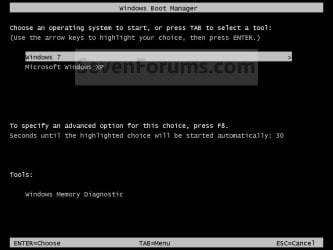
EXAMPLE: Windows Boot Manager
NOTE: This is the boot screen where you select what operating system that you would like to start. By default, you have 30 seconds to choose another operating system before the default operating system will start automatically.
Example.jpg


OPTION ONE

When XP is Installed First


NOTE: If you have a RAID setup, you will need to have the Windows 7 RAID drivers on a USB flash drive available to select and load while installing Windows 7.
1. Do step 2 or 3 below for where you wanted to install Windows 7 at.

2. To Create a New Partition from the XP Hard Disk Drive
A) With your Windows 7 installation disc boot into the Command Prompt from the System Recovery Options screen.
NOTE: Make sure that the CD/DVD drive is selected first in the boot order in the BIOS.

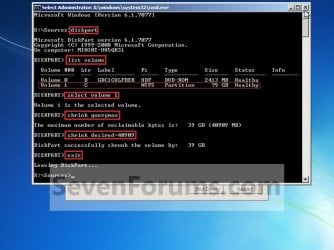
B) In the command prompt, select and shrink the XP volume by how many MB (1024 MB = 1 GB) you want to have for this Windows 7 partition. (See screenshot below)
NOTE: You would do steps 2 to 9 in METHOD TWO at that link. Windows 7 will need a minimum of 16 GB (16384 MB).
XP-W7_1.jpg
C) Click on the X at the top right corner to close the command prompt. (See screenshot above)

D) Click on the X at the top right corner to close System Recovery Options. (See screenshot below)
XP-W7_2.jpg
E) Go to step 4.
3. To Use a Separate Hard Disk Drive than the XP Drive
A) Boot from your Windows 7 installation disc.
NOTE: Make sure that the CD/DVD drive is selected first in the boot order in the BIOS.
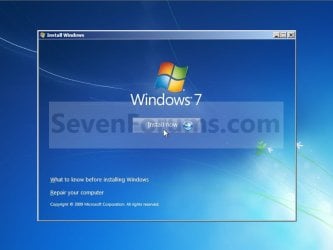
4. Click on the Install now button. (See screenshot below)
XP-W7_3.jpg
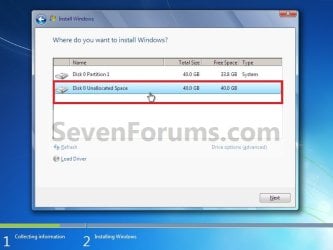
5. When you get to this point, select the partition (step 2) or hard drive to install Windows 7 on. (See screenshot below)
XP-W7_4.jpg
6. Finish installing Windows 7.
NOTE: You would start at step 9 in that link to finish installing Windows 7.

7. When finished, restart the computer to have the option to boot from XP (Earlier Verision of Windows) or Windows 7. (See screenshot below)

   Note
If you are only booting into Windows 7 and do not have XP listed in the Windows Boot Manager, then you can install only EasyBCD (step 8 Option Two below) to add XP (or Windows 7) while started in Windows 7 the same way to the boot list.

Example.jpg


OPTION TWO

When Windows 7 is Installed First


   Warning

1. To Create a New Partition from the Windows 7 Hard Disk Drive
NOTE: If you want to install XP on a separate internal hard drive instead, then skip this step and go to step 2.
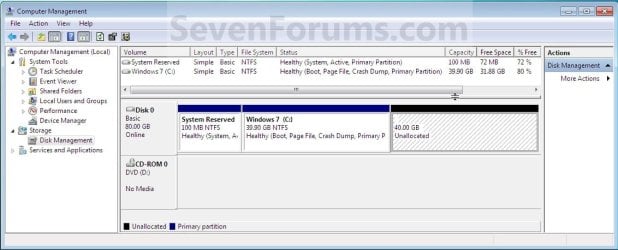
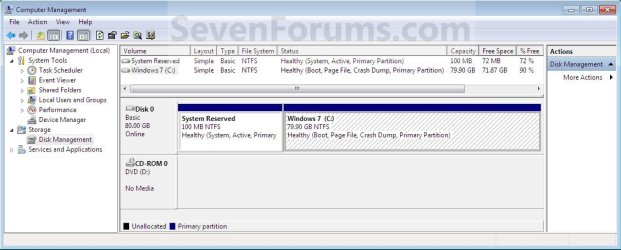
A) In Windows 7, select and shrink the Windows 7 volume in Disk Management by how many MB (1024 MB = 1 GB) you want to have for this XP partition. (See screenshots below)
NOTE: You would do all of Method One at that link.
W7-XP-1.jpg

W7-XP-2.jpg

W7-XP-3.jpg
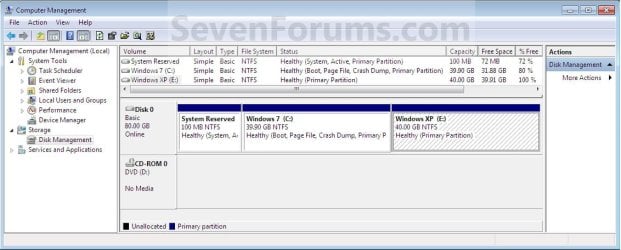
2. Insert your XP installation disc, then restart the computer and press any key to boot from it when prompted. (See screenshot below)
NOTE: Make sure that the CD/DVD drive is selected first in the boot order in the BIOS.

Step1.jpg
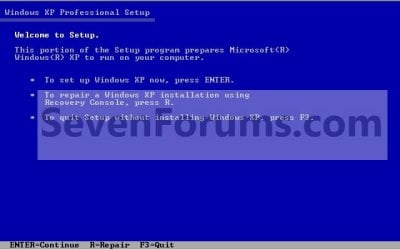
3. From XP Setup, Press Enter. (See screenshot below)


   Warning

W7-XP-4.jpg
4. Press F8. (See screenshot below)
NOTE: On some multimedia keyboards, you may need to press the F-Lock or Function key before pressing F8.
W7-XP-5.jpg
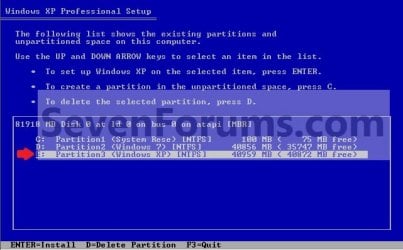
5. Select the partition (step 1) or hard drive that you want to install XP on using the arrow keys and press Enter.
W7-XP-6.jpg
6. Finish installing XP.


   Tip
If you get Error loading Operating System after XP restarts:
  • Using your Windows 7 installation disc, boot to the command prompt at startup.
  • Type in these comands below, and press enter after each one.
    • bootrec /FixMbr
    • bootrec /FixBoot
    • bootrec /RebuildBcd
  • Exit the command prompt and restart the computer.
  • At this point, Windows 7 should boot up the same way before trying to install XP.
  • Continue to step 8 below and run EasyBCD from Windows 7 instead.

7. In XP, download and install .Net Framework 2.0 (32-bit) version or .Net Framework 2.0 (64-bit) version first, and EasyBCD (free version) for your 32-bit (x86) or 64-bit (x86) XP.
NOTE: In XP, Net Framework is required to be installed to run EasyBCD. After you click on Register (at bottom of link) for the free EasyBCD, registration is not required to download it.

8. Run EasyBCD (free version).
NOTE: This is required to repair the Windows 7 boot file and add XP to the Windows Boot Manager list.

9. On the left side of EasyBCD, click on the Add New Entry button. (See screenshot below)
A) In the top section under Operating Systems, click on the Windows tab. (See screenshot below)
B) To the right of Type, select Windows NT/2k/XP/2k3 from the drop down menu. (See screenshot below)
:warn:WARNING: Be sure to leave the Automatically detect correct drive box checked.

C) To the right of Name, you can leave the default Microsoft Windows XP as the name to be displayed in the Windows Boot Manager, or you can type whatever name you would like to have instead. (See screenshot below)
D) Click on the Add Entry button. (See screenshot below)
W7-XP-7.jpg
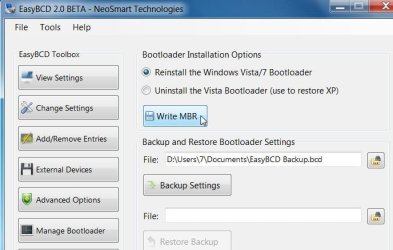
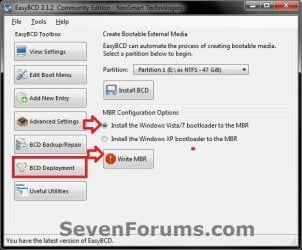
10. On the left side of EasyBCD, click on the BCD Deployment button, select (dot) the Install the Windows Vista/7 bootloader to the MBR option, and click on the Write MBR button. (See screenshot below)
W7-XP-9.jpg
11. Close EasyBCD.

12. Restart the computer to have the option to boot from Microsoft Windows XP or Windows 7. (See screenshot below)
Example2.jpg
   Tip
If Windows 7 will not start up when selected, then use your Windows 7 installation DVD to do a Startup Repair.

That's it,
Shawn


Last edited:
You may need to run this from within Windows XP instead since it was installed first and will have the boot file. Plus XP is now hidden from Windows 7, so this may be why it's not finding it.

That was the problem! Everything working just as I'd like, now - many thanks for all your help :D
 

My Computer My Computer

At a glance

Win7 Pro 64Bit
OS
Win7 Pro 64Bit
You're most welcome John. I'm happy to hear that you got it the way you wanted now. :)
 

My Computer My Computer

At a glance

64-bit Windows 11 Pro for WorkstationsIntel i7-8700K OC'd to 5 GHz64 GB (4x16GB) G.SKILL TridentZ RGB DDR4 3600...ASUS ROG-STRIX-GTX1080TI-O11G-GAMING
Computer type
PC/Desktop
Computer Manufacturer/Model Number
Self built custom
OS
64-bit Windows 11 Pro for Workstations
CPU
Intel i7-8700K OC'd to 5 GHz
Motherboard
ASUS ROG Maximus XI Formula Z390
Memory
64 GB (4x16GB) G.SKILL TridentZ RGB DDR4 3600 MHz
Graphics Card(s)
ASUS ROG-STRIX-GTX1080TI-O11G-GAMING
Sound Card
Integrated
Monitor(s) Displays
2 x Samsung Odyssey G7 27"
Screen Resolution
2560x1440
Hard Drives
1TB Samsung 990 PRO M.2,
4TB Samsung 990 PRO PRO M.2,
TerraMaster F8 SSD Plus NAS
PSU
Seasonic Prime Titanium 850W
Case
Thermaltake Core P3
Cooling
Corsair Hydro H115i
Keyboard
Logitech wireless K800
Mouse
Logitech MX Master 4
Internet Speed
2 Gb/s Download and 100 Mb/s Upload
Antivirus
Malwarebyte Anti-Malware Premium
Browser
Google Chrome
Other Info
Logitech Z625 speaker system,
Logitech BRIO 4K Pro webcam,
HP Color LaserJet Pro MFP M477fdn,
APC SMART-UPS RT 1000 XL - SURT1000XLI,
Galaxy S23 Plus phone
Hello,
I am new to this forum and have been reading this thread with great interest.
I am going to try to dual boot with xp. I have a new pc with win7ex 64bit installed.
I have been through this thread and I think I will give it a go. I am very nervous!!
 

My Computer My Computer

At a glance

windows 7 ultimate 64 bitintel i7 950 3.07ghz6gbgforce GTX 295
Computer Manufacturer/Model Number
Power computing
OS
windows 7 ultimate 64 bit
CPU
intel i7 950 3.07ghz
Motherboard
gigabyte EX58-UD5
Memory
6gb
Graphics Card(s)
gforce GTX 295
Sound Card
sound blaster X-Fi titanium
Monitor(s) Displays
22" wide screen
Hard Drives
2x 1t
Case
coolermaster quiet case
Hello Arty, and welcome to Seven Forums.

Just let us know if you have any questions or run into any problems. We'll be happy to try and help you through it. :)
 

My Computer My Computer

At a glance

64-bit Windows 11 Pro for WorkstationsIntel i7-8700K OC'd to 5 GHz64 GB (4x16GB) G.SKILL TridentZ RGB DDR4 3600...ASUS ROG-STRIX-GTX1080TI-O11G-GAMING
Computer type
PC/Desktop
Computer Manufacturer/Model Number
Self built custom
OS
64-bit Windows 11 Pro for Workstations
CPU
Intel i7-8700K OC'd to 5 GHz
Motherboard
ASUS ROG Maximus XI Formula Z390
Memory
64 GB (4x16GB) G.SKILL TridentZ RGB DDR4 3600 MHz
Graphics Card(s)
ASUS ROG-STRIX-GTX1080TI-O11G-GAMING
Sound Card
Integrated
Monitor(s) Displays
2 x Samsung Odyssey G7 27"
Screen Resolution
2560x1440
Hard Drives
1TB Samsung 990 PRO M.2,
4TB Samsung 990 PRO PRO M.2,
TerraMaster F8 SSD Plus NAS
PSU
Seasonic Prime Titanium 850W
Case
Thermaltake Core P3
Cooling
Corsair Hydro H115i
Keyboard
Logitech wireless K800
Mouse
Logitech MX Master 4
Internet Speed
2 Gb/s Download and 100 Mb/s Upload
Antivirus
Malwarebyte Anti-Malware Premium
Browser
Google Chrome
Other Info
Logitech Z625 speaker system,
Logitech BRIO 4K Pro webcam,
HP Color LaserJet Pro MFP M477fdn,
APC SMART-UPS RT 1000 XL - SURT1000XLI,
Galaxy S23 Plus phone
I have windows 7 ultimate 64bit. I am going to try to dual boot with xp but I am wondering if it will matter that my xp is only 32 bit?
If it does matter then I will have to get a 64bit version of xp.

Thanks
 

My Computer My Computer

At a glance

windows 7 ultimate 64 bitintel i7 950 3.07ghz6gbgforce GTX 295
Computer Manufacturer/Model Number
Power computing
OS
windows 7 ultimate 64 bit
CPU
intel i7 950 3.07ghz
Motherboard
gigabyte EX58-UD5
Memory
6gb
Graphics Card(s)
gforce GTX 295
Sound Card
sound blaster X-Fi titanium
Monitor(s) Displays
22" wide screen
Hard Drives
2x 1t
Case
coolermaster quiet case
Hi Arty,

You will fine to dual boot XP 32 bit and 7 64 bit.
 

My Computers My Computers

  • At a glance

    7 X64i5 84002x8gb 3200mhz
    Computer type
    PC/Desktop
    OS
    7 X64
    CPU
    i5 8400
    Motherboard
    gigabyte b365m ds3h
    Memory
    2x8gb 3200mhz
    Hard Drives
    various
    PSU
    pure power 11 400w cm
    Case
    Coolermaster
    Cooling
    cryorig m9i
  • At a glance

    7x64g54008gb ddr4 2400
    Computer type
    PC/Desktop
    OS
    7x64
    CPU
    g5400
    Motherboard
    ga b365m ds3h
    Memory
    8gb ddr4 2400
    PSU
    xfx pro 450w
Dual Boot Problems

Hi there,

I have recently bought a new pc with windows 7 pre-installed. Everything works fine. I then decided to have a dual OS system and followed your excellent tutorial and initiated the installation of XP onto a separate hard drive "D" up until step 6. When this step finishes the pc restarts but instead of booting into XP it gives me the following message -

"Disk error press ctl / alt / del to restart" ............. and thats it - nothing from then on in.

I had to use the Windows 7 DVD to "repair" the OS and then get it back on.

So for some reason I can not create a dual boot from within this OS.

Do you have any idea how to boot into XP using drive "D" so that I can continue the tutorial from Step 7.

Many Thanks:)
 

My Computer My Computer

At a glance

Windows 7 Pro
OS
Windows 7 Pro
This guide was exactly what I needed. Now if only I could boot both OS's at the same time.
 

My Computer My Computer

At a glance

Windows 7 64 biti5 2500k overclocked to 4.3 GHz12 GB DDR3 1066MHzRadeon HD 5870
Computer Manufacturer/Model Number
I built it myself
OS
Windows 7 64 bit
CPU
i5 2500k overclocked to 4.3 GHz
Motherboard
Asus something, I don't feel like finding the model number.
Memory
12 GB DDR3 1066MHz
Graphics Card(s)
Radeon HD 5870
Sound Card
whatever realtek 8 channel thing is built into the mobo
Monitor(s) Displays
emachines and acer
Screen Resolution
both are 1080p
Hard Drives
Internal desktop hard drives:
WD Black 2 TB (7200 rpm)
Samsung spinpoint 1 TB (7200 rpm)
External hard drive (usb 3.0!):
Samsung spinpoint eco green 2 TB (5400 rpm)
Spare unused hard drives:
WD black 1 TB (7200 rpm)
WD green 500 GB (idk rpm)
PSU
1080 watts
Case
Xclio (can't find model number)
Cooling
see other info
Keyboard
el cheapo basic keyboard; I hate fancy keyboards.
Mouse
R.A.T. 7 (it's friggin awesome)
Internet Speed
12 Mb/s (usually hovers around 11.5 Mb/s for speed tests)
Other Info
Case fans:
2 x 180mm top fans (256 color led)
1 x 250mm front fan (256 color led)
1 x 120mm rear fan
Cpu cooler: Scythe Yasya (massive thing with a 120mm fan)
Psu fan: 180mm (blue led)
gpu fan: idk, at least it's not loud.
Hello Holydevil,

Two computers and two monitors should do the trick, or have one run with Windows Virtual PC as a virtual machine. ;)
 

My Computer My Computer

At a glance

64-bit Windows 11 Pro for WorkstationsIntel i7-8700K OC'd to 5 GHz64 GB (4x16GB) G.SKILL TridentZ RGB DDR4 3600...ASUS ROG-STRIX-GTX1080TI-O11G-GAMING
Computer type
PC/Desktop
Computer Manufacturer/Model Number
Self built custom
OS
64-bit Windows 11 Pro for Workstations
CPU
Intel i7-8700K OC'd to 5 GHz
Motherboard
ASUS ROG Maximus XI Formula Z390
Memory
64 GB (4x16GB) G.SKILL TridentZ RGB DDR4 3600 MHz
Graphics Card(s)
ASUS ROG-STRIX-GTX1080TI-O11G-GAMING
Sound Card
Integrated
Monitor(s) Displays
2 x Samsung Odyssey G7 27"
Screen Resolution
2560x1440
Hard Drives
1TB Samsung 990 PRO M.2,
4TB Samsung 990 PRO PRO M.2,
TerraMaster F8 SSD Plus NAS
PSU
Seasonic Prime Titanium 850W
Case
Thermaltake Core P3
Cooling
Corsair Hydro H115i
Keyboard
Logitech wireless K800
Mouse
Logitech MX Master 4
Internet Speed
2 Gb/s Download and 100 Mb/s Upload
Antivirus
Malwarebyte Anti-Malware Premium
Browser
Google Chrome
Other Info
Logitech Z625 speaker system,
Logitech BRIO 4K Pro webcam,
HP Color LaserJet Pro MFP M477fdn,
APC SMART-UPS RT 1000 XL - SURT1000XLI,
Galaxy S23 Plus phone
Okay!...

This is the easiest tutorial I've found so far. However, I'm encountering a problem during XP installation.

Most likely because I'm not using my CD drive as it is busted. I've made a bootable USB flash drive with a copy of my XP.iso on it. It boots fine, almost identical to the CD.

Here's the problem:

1. My computer doesn't like booting from USB drives unless either
A) In the BIOS, in disk priorities, you move USB-HDD first in line.
B) Target HD is set to first, but it completely blank.

The problem with A is if I move USB-HDD to first in the boot HD priorities list, none of my other hard drives are detected during the XP installation. (I also had this problem installing windows 7 from usb). I don't think the system bothers loading them.

The problem with B is if I keep my target HD as priority 1 in HD boot list, and select my USB-HDD as #1 in the normal boot section, the computer just loads up my windows 7 install as usual. Unless the Target HD is completely blank and set as boot first, the bootable usb drive won't load.

This may sound confusing, but my bios has two "boot" sections.

There's hard drive boot priority, and the normal section where you get to choose which device boots first, second, third, etc.


I must be missing something painfully obvious, as I am sure nobody else has this happen to them. It's not just this time, either. Whenever I want to install another OS, I've got to erase the previous HD completely just so it'll load up during PC boot...

:sarc:


Just in case that explanation didn't make sense, I'll try to explain again....lol..

I can't boot from USB unless I disable my hard drive and move usb-hdd to boot first in bios. Since i have to disable my HD just for the usb to boot, when the step for Windows XP Target Hard Drive comes (the part where it asks what HD you want to install XP on), no hard drives are listed. And this is because I have to disable them in order for the USB to boot.
 

My Computer My Computer

At a glance

Windows 7Intel Core i7 920 Nehalem 2.66GHzOCZ Gold 6GB (3 x 2GB) 240-Pin DDR3 SDRAM DDR...SAPPHIRE 100259L Radeon HD 4870
OS
Windows 7
CPU
Intel Core i7 920 Nehalem 2.66GHz
Motherboard
GIGABYTE GA-EX58-UD3R LGA 1366 Intel X58 ATX
Memory
OCZ Gold 6GB (3 x 2GB) 240-Pin DDR3 SDRAM DDR3 1600
Graphics Card(s)
SAPPHIRE 100259L Radeon HD 4870
Monitor(s) Displays
Acer X233Hbid Black 23" 5ms HDMI Full 1080P
Screen Resolution
1920 x 1080
Hard Drives
Seagate Barracuda 7200.12 ST3500418AS 500GB
PSU
PC&Power Cooling 750
Case
Antec Nine Hundred Black Steel ATX
Did you try using PLOP bootmanager? It has it's own drivers to enable boot from usb.

Easiest is to d/l and install the free Easybcd 2.0. build 76 on windows 7.

http://neosmart.net/forums/showthread.php?t=642


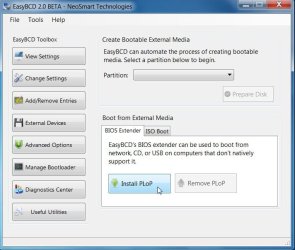
Click External Devices, then Click Install Plop.

EASY-INSTALL-PLOP-2009-12-19_215418.jpg

Reboot - you will have a boot menu with Windows 7 and Easybcd boot extender.

Select Easybcd Boot extender and Plop will start - select usb and you should boot from the attached usb stick.

You will be fine to install XP after 7.

When completed you will only be able to boot into XP.

Run startup repair from the 7 dvd 3 times - then you can boot into 7 and use Easybcd to add XP to the 7 boot menu.
 

My Computers My Computers

  • At a glance

    7 X64i5 84002x8gb 3200mhz
    Computer type
    PC/Desktop
    OS
    7 X64
    CPU
    i5 8400
    Motherboard
    gigabyte b365m ds3h
    Memory
    2x8gb 3200mhz
    Hard Drives
    various
    PSU
    pure power 11 400w cm
    Case
    Coolermaster
    Cooling
    cryorig m9i
  • At a glance

    7x64g54008gb ddr4 2400
    Computer type
    PC/Desktop
    OS
    7x64
    CPU
    g5400
    Motherboard
    ga b365m ds3h
    Memory
    8gb ddr4 2400
    PSU
    xfx pro 450w
Did you try using PLOP bootmanager? It has it's own drivers to enable boot from usb.

Easiest is to d/l and install the free Easybcd 2.0. build 76 on windows 7.

Click Eternal Devices, then Click Install Plop.

Reboot - you will have a boot menu with Windows 7 and Easybcd boot extender.

Select Easybcd Boot extender and plop will start - select usb and you should boot from the attached usb stick.

You will be fine to install XP after 7.

When completed you will only be able to boot into XP.

Run startup repair from the 7 dvd 3 times - then you can boot into 7 and use Easybcd to add XP to the 7 boot menu.

No, I didn't try PLOP. Never heard of it till now.

That sounds kind of troublesome... If I were to use that method, after all was said and done, how would my computer boot up?

Would it be like,
1. booting...
2. OS selection
a. Windows 7
b. PLOP
C. (Click plop)
d. Win 7
e. WinXP
?

The thing is, I wouldn't be able to do use my Win7 DVD to repair as my DVD drive is dead.
 

My Computer My Computer

At a glance

Windows 7Intel Core i7 920 Nehalem 2.66GHzOCZ Gold 6GB (3 x 2GB) 240-Pin DDR3 SDRAM DDR...SAPPHIRE 100259L Radeon HD 4870
OS
Windows 7
CPU
Intel Core i7 920 Nehalem 2.66GHz
Motherboard
GIGABYTE GA-EX58-UD3R LGA 1366 Intel X58 ATX
Memory
OCZ Gold 6GB (3 x 2GB) 240-Pin DDR3 SDRAM DDR3 1600
Graphics Card(s)
SAPPHIRE 100259L Radeon HD 4870
Monitor(s) Displays
Acer X233Hbid Black 23" 5ms HDMI Full 1080P
Screen Resolution
1920 x 1080
Hard Drives
Seagate Barracuda 7200.12 ST3500418AS 500GB
PSU
PC&Power Cooling 750
Case
Antec Nine Hundred Black Steel ATX
Forget my previous problem! Something worse has happened. I was able to figure out the problem (forgot to enable the SATA as IDE rather than ACHI). I was able to install XP fine.

I'm on it right now. However, EeasyBCD is NOT working.

"EasyBCD has detected that your BCD boot data and MBR are either not from the latest version of Vista, or do not yet exist".

Clicking yes will try and have it repaired, but the repair fails because it can not detect the drive. So I manually select the the drives, etc. Everything fails.

Restarting doesn't help, as I can't even boot into an OS. I have to get into XP by starting up my usb drive....

:/


EDIT:

I reinstalled the the "vista" boot mgr using VistaBootPro. Now my computer logs straight into Windows 7. I guess I'll eventually figure out how to choose which one I log into...


LAST EDIT!: Was able to make everything work perfectly thanks to EasyBCD and VistaBootPro. I can finally choose either Win7 or WinXP at startup. Thank you so much for the excellent guide.
 
Last edited:

My Computer My Computer

At a glance

Windows 7Intel Core i7 920 Nehalem 2.66GHzOCZ Gold 6GB (3 x 2GB) 240-Pin DDR3 SDRAM DDR...SAPPHIRE 100259L Radeon HD 4870
OS
Windows 7
CPU
Intel Core i7 920 Nehalem 2.66GHz
Motherboard
GIGABYTE GA-EX58-UD3R LGA 1366 Intel X58 ATX
Memory
OCZ Gold 6GB (3 x 2GB) 240-Pin DDR3 SDRAM DDR3 1600
Graphics Card(s)
SAPPHIRE 100259L Radeon HD 4870
Monitor(s) Displays
Acer X233Hbid Black 23" 5ms HDMI Full 1080P
Screen Resolution
1920 x 1080
Hard Drives
Seagate Barracuda 7200.12 ST3500418AS 500GB
PSU
PC&Power Cooling 750
Case
Antec Nine Hundred Black Steel ATX
Glad it's working for you.

Happy dual booting.:D
 

Attachments

  • ESAY-REinstall-NT6 BOOT-2009-12-20_020828.jpg
    ESAY-REinstall-NT6 BOOT-2009-12-20_020828.jpg
    39.7 KB · Views: 389

My Computers My Computers

  • At a glance

    7 X64i5 84002x8gb 3200mhz
    Computer type
    PC/Desktop
    OS
    7 X64
    CPU
    i5 8400
    Motherboard
    gigabyte b365m ds3h
    Memory
    2x8gb 3200mhz
    Hard Drives
    various
    PSU
    pure power 11 400w cm
    Case
    Coolermaster
    Cooling
    cryorig m9i
  • At a glance

    7x64g54008gb ddr4 2400
    Computer type
    PC/Desktop
    OS
    7x64
    CPU
    g5400
    Motherboard
    ga b365m ds3h
    Memory
    8gb ddr4 2400
    PSU
    xfx pro 450w
can i install windows XP 32 bit, on a computer running windows 7 ultimate x64?
 

My Computer My Computer

At a glance

Windows 7 Ultimate x64Intel Core 2 Qaud Q82004 GB DDR2Zotac Geforce GTS 250
OS
Windows 7 Ultimate x64
CPU
Intel Core 2 Qaud Q8200
Motherboard
Asus P53 Neo
Memory
4 GB DDR2
Graphics Card(s)
Zotac Geforce GTS 250
PSU
Cooler Master 400W
Case
Cooler Master Elite 550
Yes.
 

My Computers My Computers

  • At a glance

    7 X64i5 84002x8gb 3200mhz
    Computer type
    PC/Desktop
    OS
    7 X64
    CPU
    i5 8400
    Motherboard
    gigabyte b365m ds3h
    Memory
    2x8gb 3200mhz
    Hard Drives
    various
    PSU
    pure power 11 400w cm
    Case
    Coolermaster
    Cooling
    cryorig m9i
  • At a glance

    7x64g54008gb ddr4 2400
    Computer type
    PC/Desktop
    OS
    7x64
    CPU
    g5400
    Motherboard
    ga b365m ds3h
    Memory
    8gb ddr4 2400
    PSU
    xfx pro 450w
Please help. I have win 7 64 bit installed and am trying to install xp professional. Have done partition as per guide. Reboot with disc in and it wont install. Get blue screen error. I have 2 copies of xp and does it with both. Need help
 

My Computer My Computer

At a glance

windows 7i76gigatix2
Computer Manufacturer/Model Number
gateway fx6000
OS
windows 7
CPU
i7
Motherboard
56
Memory
6gig
Graphics Card(s)
atix2
Please Help!!! Win7/XP no boot disc error

I have a serious problem with this dual boot. I attempted to create a WinXP partition onto my pre-installed Win7 computer. I shrank my 7 partition creating about 75GB of space for XP (I have another drive I use for data). After doing that I installed XP on the 75GB partition which XP had no problem seeing.
When XP went to reboot (which is does during install) the computer never came back up in any OS. The last message on the bottom of the POST screen is...."Disk error press ctl + alt + del to restart" It boots no where. I tried changed the boot order, it was already on HD so no good. Looked in BIOS for something....anything and found nothing. Tried hitting F8 natta. So I am at a loss as to what I can do here. I would rather not have to reinstall the Windows 7 since I have that already configured how I want and have all my programs installed. To have to redo both OSes would really suck. Any ideas???????? :mad::cry::cry::o:sick:
 

My Computer My Computer

At a glance

Windows Pro 7 64-bitIntel Core 2 Duo8 GB DDR2Onboard; Intel(R) Q35 chipset
Computer Manufacturer/Model Number
Lenovo 9979A11
OS
Windows Pro 7 64-bit
CPU
Intel Core 2 Duo
Motherboard
Lenovo
Memory
8 GB DDR2
Graphics Card(s)
Onboard; Intel(R) Q35 chipset
Sound Card
onboard... High Def Audio
Monitor(s) Displays
Acer V173
Screen Resolution
1280 X 1024
Hard Drives
160 GB WD (XP)
320 GB Samsung (7)
500 GB Samsung (storage)
320 Iomega External (backup & storage)
PSU
N/A onboard vid; Intel Q35 Chipset
Case
Mini
Cooling
Native Intel Core 2 Duo fan & Heatsink; 2 case fans
Keyboard
general
Mouse
general
Internet Speed
Cable
Other Info
Windows 7 Pro 64-bit
Please Help!!! Win7/XP no boot disc error

I have a serious problem with this dual boot. I attempted to create a WinXP partition onto my pre-installed Windows 7 computer. I shrank my 7 partition creating about 75GB of space for XP (I have another drive I use for data). After doing that I installed XP on the 75GB partition which XP had no problem seeing.
When XP went to reboot (which is does during install) the computer never came back up in any OS. The last message on the bottom of the POST screen is...."Disk error press ctl + alt + del to restart" It boots no where. I tried changed the boot order, it was already on HD so no good. Looked in BIOS for something....anything and found nothing. Tried hitting F8 natta. So I am at a loss as to what I can do here. I would rather not have to reinstall the Windows 7 since I have that already configured how I want and have all my programs installed. To have to redo both OSes would really suck. Any ideas???????? :mad::cry::cry::o:sick:
 

My Computer My Computer

At a glance

Windows Pro 7 64-bitIntel Core 2 Duo8 GB DDR2Onboard; Intel(R) Q35 chipset
Computer Manufacturer/Model Number
Lenovo 9979A11
OS
Windows Pro 7 64-bit
CPU
Intel Core 2 Duo
Motherboard
Lenovo
Memory
8 GB DDR2
Graphics Card(s)
Onboard; Intel(R) Q35 chipset
Sound Card
onboard... High Def Audio
Monitor(s) Displays
Acer V173
Screen Resolution
1280 X 1024
Hard Drives
160 GB WD (XP)
320 GB Samsung (7)
500 GB Samsung (storage)
320 Iomega External (backup & storage)
PSU
N/A onboard vid; Intel Q35 Chipset
Case
Mini
Cooling
Native Intel Core 2 Duo fan & Heatsink; 2 case fans
Keyboard
general
Mouse
general
Internet Speed
Cable
Other Info
Windows 7 Pro 64-bit
Hi,

Boot the 7 dvd and run startup repair - it will probably take 3 runs.
 

My Computers My Computers

  • At a glance

    7 X64i5 84002x8gb 3200mhz
    Computer type
    PC/Desktop
    OS
    7 X64
    CPU
    i5 8400
    Motherboard
    gigabyte b365m ds3h
    Memory
    2x8gb 3200mhz
    Hard Drives
    various
    PSU
    pure power 11 400w cm
    Case
    Coolermaster
    Cooling
    cryorig m9i
  • At a glance

    7x64g54008gb ddr4 2400
    Computer type
    PC/Desktop
    OS
    7x64
    CPU
    g5400
    Motherboard
    ga b365m ds3h
    Memory
    8gb ddr4 2400
    PSU
    xfx pro 450w
Back
Top