Dual Boot Installation with Windows 7 and XP

How to Setup a Dual Boot Installation with Windows 7 and XP


   Information
This will show you how to install Windows 7 and XP to dual boot with when you already have either Windows 7 or XP installed first.
   Note
With a dual boot installaton, you will have two operating systems (OS) installed. When you start the computer, you will have the choice to choose which OS you would like to start up to. This method is the easiest way of doing a dual boot with these two operating systems.
   Tip
When dual booting with another OS (ex: Vista or XP), you may not always have that OS partition show up in Computer with a driver letter in Windows 7. If this happens, then you will just need to add a drive letter to the OS (ex: Vista or XP) partition in Windows 7 Disk Management for it to show up in Computer with a driver letter.
   Warning
To stop XP from deleting your Windows 7 System Restore Points everytime XP is started, then see System Restore Points - Stop XP Dual Boot Delete to hide Windows 7 from XP.

Windows 7 Minimum Hardware Requirements


NOTE: For more information on this, see: Windows 7 system requirements
  • 1 GHz 32-bit or 64-bit processor
  • 1 GB RAM for 32-bit Windows 7 OR 2 GB RAM for 64-bit Windows 7
  • 16 GB available disk space 32-bit Windows 7 OR 20 GB for 64-bit Windows 7
  • Support for DirectX 9 graphics with 128 MB memory (in order to enable Aero theme)
  • DVD-R/W Drive
  • Internet or phone access to activate Windows 7.
Windows XP Minimum Hardware Requirements

NOTE: For more information on this, see: System requirements for Windows XP operating systems
  • PC with 300 megahertz (MHz) or higher processor clock speed recommended; 233-MHz minimum required;* Intel Pentium/Celeron family, AMD K6/Athlon/Duron family, or compatible processor recommended
  • 128 megabytes (MB) of RAM or higher recommended (64 MB minimum supported; may limit performance and some features)
  • 1.5 gigabyte (GB) of available hard disk space.*
  • Super VGA (800 × 600) or higher resolution video adapter and monitor
  • CD-ROM or DVD drive
  • Keyboard and Microsoft Mouse or compatible pointing device
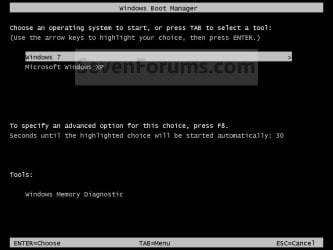
EXAMPLE: Windows Boot Manager
NOTE: This is the boot screen where you select what operating system that you would like to start. By default, you have 30 seconds to choose another operating system before the default operating system will start automatically.
Example.jpg


OPTION ONE

When XP is Installed First


NOTE: If you have a RAID setup, you will need to have the Windows 7 RAID drivers on a USB flash drive available to select and load while installing Windows 7.
1. Do step 2 or 3 below for where you wanted to install Windows 7 at.

2. To Create a New Partition from the XP Hard Disk Drive
A) With your Windows 7 installation disc boot into the Command Prompt from the System Recovery Options screen.
NOTE: Make sure that the CD/DVD drive is selected first in the boot order in the BIOS.

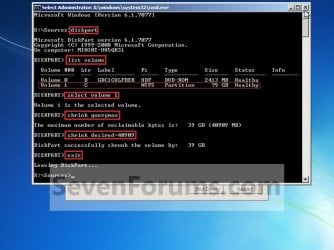
B) In the command prompt, select and shrink the XP volume by how many MB (1024 MB = 1 GB) you want to have for this Windows 7 partition. (See screenshot below)
NOTE: You would do steps 2 to 9 in METHOD TWO at that link. Windows 7 will need a minimum of 16 GB (16384 MB).
XP-W7_1.jpg
C) Click on the X at the top right corner to close the command prompt. (See screenshot above)

D) Click on the X at the top right corner to close System Recovery Options. (See screenshot below)
XP-W7_2.jpg
E) Go to step 4.
3. To Use a Separate Hard Disk Drive than the XP Drive
A) Boot from your Windows 7 installation disc.
NOTE: Make sure that the CD/DVD drive is selected first in the boot order in the BIOS.
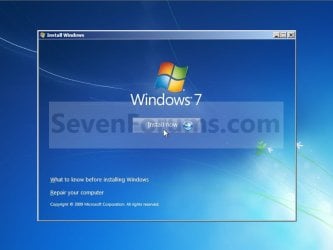
4. Click on the Install now button. (See screenshot below)
XP-W7_3.jpg
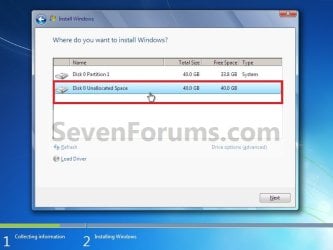
5. When you get to this point, select the partition (step 2) or hard drive to install Windows 7 on. (See screenshot below)
XP-W7_4.jpg
6. Finish installing Windows 7.
NOTE: You would start at step 9 in that link to finish installing Windows 7.

7. When finished, restart the computer to have the option to boot from XP (Earlier Verision of Windows) or Windows 7. (See screenshot below)

   Note
If you are only booting into Windows 7 and do not have XP listed in the Windows Boot Manager, then you can install only EasyBCD (step 8 Option Two below) to add XP (or Windows 7) while started in Windows 7 the same way to the boot list.

Example.jpg


OPTION TWO

When Windows 7 is Installed First


   Warning

1. To Create a New Partition from the Windows 7 Hard Disk Drive
NOTE: If you want to install XP on a separate internal hard drive instead, then skip this step and go to step 2.
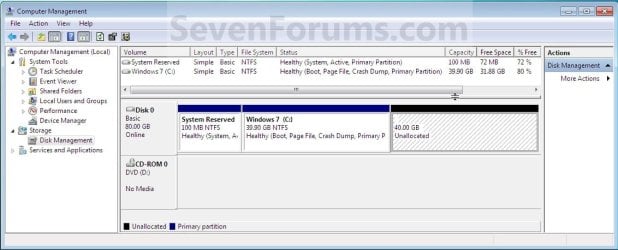
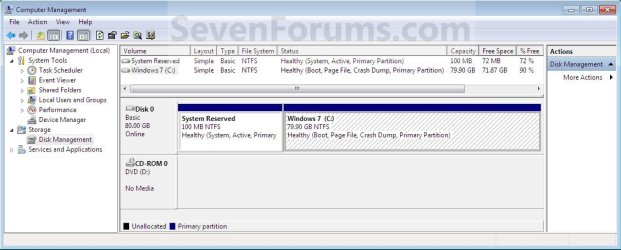
A) In Windows 7, select and shrink the Windows 7 volume in Disk Management by how many MB (1024 MB = 1 GB) you want to have for this XP partition. (See screenshots below)
NOTE: You would do all of Method One at that link.
W7-XP-1.jpg

W7-XP-2.jpg

W7-XP-3.jpg
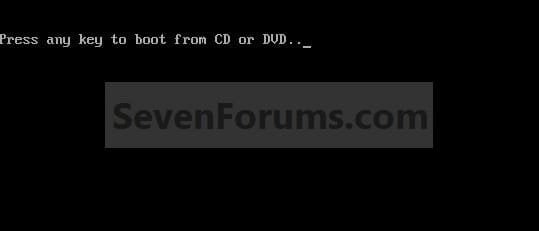
2. Insert your XP installation disc, then restart the computer and press any key to boot from it when prompted. (See screenshot below)
NOTE: Make sure that the CD/DVD drive is selected first in the boot order in the BIOS.
Step1.jpg
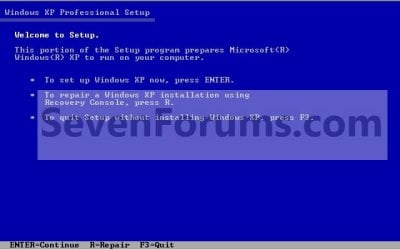
3. From XP Setup, Press Enter. (See screenshot below)


   Warning

W7-XP-4.jpg
4. Press F8. (See screenshot below)
NOTE: On some multimedia keyboards, you may need to press the F-Lock or Function key before pressing F8.
W7-XP-5.jpg
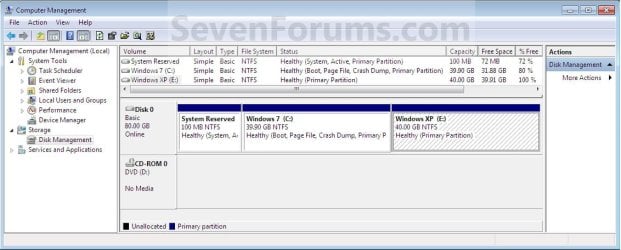
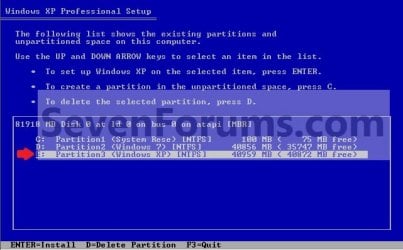
5. Select the partition (step 1) or hard drive that you want to install XP on using the arrow keys and press Enter.
W7-XP-6.jpg
6. Finish installing XP.


   Tip
If you get Error loading Operating System after XP restarts:
  • Using your Windows 7 installation disc, boot to the command prompt at startup.
  • Type in these comands below, and press enter after each one.
    • bootrec /FixMbr
    • bootrec /FixBoot
    • bootrec /RebuildBcd
  • Exit the command prompt and restart the computer.
  • At this point, Windows 7 should boot up the same way before trying to install XP.
  • Continue to step 8 below and run EasyBCD from Windows 7 instead.

7. In XP, download and install .Net Framework 2.0 (32-bit) version or .Net Framework 2.0 (64-bit) version first, and EasyBCD (free version) for your 32-bit (x86) or 64-bit (x86) XP.
NOTE: In XP, Net Framework is required to be installed to run EasyBCD. After you click on Register (at bottom of link) for the free EasyBCD, registration is not required to download it.

8. Run EasyBCD (free version).
NOTE: This is required to repair the Windows 7 boot file and add XP to the Windows Boot Manager list.

9. On the left side of EasyBCD, click on the Add New Entry button. (See screenshot below)
A) In the top section under Operating Systems, click on the Windows tab. (See screenshot below)
B) To the right of Type, select Windows NT/2k/XP/2k3 from the drop down menu. (See screenshot below)
:warn:WARNING: Be sure to leave the Automatically detect correct drive box checked.

C) To the right of Name, you can leave the default Microsoft Windows XP as the name to be displayed in the Windows Boot Manager, or you can type whatever name you would like to have instead. (See screenshot below)
D) Click on the Add Entry button. (See screenshot below)
W7-XP-7.jpg
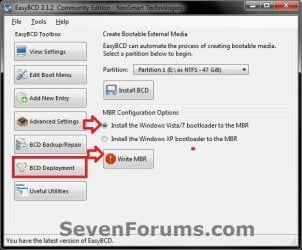
10. On the left side of EasyBCD, click on the BCD Deployment button, select (dot) the Install the Windows Vista/7 bootloader to the MBR option, and click on the Write MBR button. (See screenshot below)
W7-XP-9.jpg
11. Close EasyBCD.

12. Restart the computer to have the option to boot from Microsoft Windows XP or Windows 7. (See screenshot below)
Example2.jpg
   Tip
If Windows 7 will not start up when selected, then use your Windows 7 installation DVD to do a Startup Repair.

That's it,
Shawn


Last edited:
Prolax,

I'm happy to hear that you got that one issue sorted. Thank you for posting back. :)
 

My Computer My Computer

At a glance

64-bit Windows 11 Pro for WorkstationsIntel i7-8700K OC'd to 5 GHz64 GB (4x16GB) G.SKILL TridentZ RGB DDR4 3600...ASUS ROG-STRIX-GTX1080TI-O11G-GAMING
Computer type
PC/Desktop
Computer Manufacturer/Model Number
Self built custom
OS
64-bit Windows 11 Pro for Workstations
CPU
Intel i7-8700K OC'd to 5 GHz
Motherboard
ASUS ROG Maximus XI Formula Z390
Memory
64 GB (4x16GB) G.SKILL TridentZ RGB DDR4 3600 MHz
Graphics Card(s)
ASUS ROG-STRIX-GTX1080TI-O11G-GAMING
Sound Card
Integrated
Monitor(s) Displays
2 x Samsung Odyssey G7 27"
Screen Resolution
2560x1440
Hard Drives
1TB Samsung 990 PRO M.2,
4TB Samsung 990 PRO PRO M.2,
TerraMaster F8 SSD Plus NAS
PSU
Seasonic Prime Titanium 850W
Case
Thermaltake Core P3
Cooling
Corsair Hydro H115i
Keyboard
Logitech wireless K800
Mouse
Logitech MX Master 4
Internet Speed
2 Gb/s Download and 100 Mb/s Upload
Antivirus
Malwarebyte Anti-Malware Premium
Browser
Google Chrome
Other Info
Logitech Z625 speaker system,
Logitech BRIO 4K Pro webcam,
HP Color LaserJet Pro MFP M477fdn,
APC SMART-UPS RT 1000 XL - SURT1000XLI,
Galaxy S23 Plus phone
Thanks Brink! Works great!

Now I can play my Steam games in XP and still have Win 7 as my #1 OS.
 

My Computer My Computer

At a glance

Windows 7 X64 RTMAthlon 64 X2 Dual Core 48004 Gigs Kingston Hyper XATI X1650 XT
OS
Windows 7 X64 RTM
CPU
Athlon 64 X2 Dual Core 4800
Motherboard
MSI - K9N SLI Platinum
Memory
4 Gigs Kingston Hyper X
Graphics Card(s)
ATI X1650 XT
Sound Card
SB Audigy
Monitor(s) Displays
ViewSonic VX924 LCD
Screen Resolution
1280 X 1024
PSU
Ultra XFinity 600W ATX
Case
Antec
Keyboard
MS Natural Ergonomic KB 4000
Mouse
X7 Optical Mouse
Internet Speed
Fios Fiber Optics
You're welcome Rook. :)
 

My Computer My Computer

At a glance

64-bit Windows 11 Pro for WorkstationsIntel i7-8700K OC'd to 5 GHz64 GB (4x16GB) G.SKILL TridentZ RGB DDR4 3600...ASUS ROG-STRIX-GTX1080TI-O11G-GAMING
Computer type
PC/Desktop
Computer Manufacturer/Model Number
Self built custom
OS
64-bit Windows 11 Pro for Workstations
CPU
Intel i7-8700K OC'd to 5 GHz
Motherboard
ASUS ROG Maximus XI Formula Z390
Memory
64 GB (4x16GB) G.SKILL TridentZ RGB DDR4 3600 MHz
Graphics Card(s)
ASUS ROG-STRIX-GTX1080TI-O11G-GAMING
Sound Card
Integrated
Monitor(s) Displays
2 x Samsung Odyssey G7 27"
Screen Resolution
2560x1440
Hard Drives
1TB Samsung 990 PRO M.2,
4TB Samsung 990 PRO PRO M.2,
TerraMaster F8 SSD Plus NAS
PSU
Seasonic Prime Titanium 850W
Case
Thermaltake Core P3
Cooling
Corsair Hydro H115i
Keyboard
Logitech wireless K800
Mouse
Logitech MX Master 4
Internet Speed
2 Gb/s Download and 100 Mb/s Upload
Antivirus
Malwarebyte Anti-Malware Premium
Browser
Google Chrome
Other Info
Logitech Z625 speaker system,
Logitech BRIO 4K Pro webcam,
HP Color LaserJet Pro MFP M477fdn,
APC SMART-UPS RT 1000 XL - SURT1000XLI,
Galaxy S23 Plus phone
What do I do if on step 5 of method two the XP setup sees my HD as unpartitioned and empty? I can access everything while inside Windows 7 and while using an Ubuntu LiveCD.
 

My Computer My Computer

At a glance

Windows 7 RC1Intel Pentium D CPU 3.00GHz (Dual Core)2GB DDR2 800Dual NVIDIA GeForce 7300 GT in SLI Mode
OS
Windows 7 RC1
CPU
Intel Pentium D CPU 3.00GHz (Dual Core)
Motherboard
XFX nForce 680i LT SLI
Memory
2GB DDR2 800
Graphics Card(s)
Dual NVIDIA GeForce 7300 GT in SLI Mode
Monitor(s) Displays
Envision H19W 19" Wide Screen LCD Monitor
Screen Resolution
1440x900
Hard Drives
Maxtor 200GB
PSU
Ultra 400w
Case
Ultra Aluminus Mid Tower ATX Case Black
Hello MattCatt, and welcome to Seven Forums.

Did you do step 1 of METHOD TWO to create the partition from the Windows 7 drive for XP?

If this is a separate hard drive than the one Windows 7 is on, then you can just select it to start installing XP on it.

Hope this helps,
Shawn
 

My Computer My Computer

At a glance

64-bit Windows 11 Pro for WorkstationsIntel i7-8700K OC'd to 5 GHz64 GB (4x16GB) G.SKILL TridentZ RGB DDR4 3600...ASUS ROG-STRIX-GTX1080TI-O11G-GAMING
Computer type
PC/Desktop
Computer Manufacturer/Model Number
Self built custom
OS
64-bit Windows 11 Pro for Workstations
CPU
Intel i7-8700K OC'd to 5 GHz
Motherboard
ASUS ROG Maximus XI Formula Z390
Memory
64 GB (4x16GB) G.SKILL TridentZ RGB DDR4 3600 MHz
Graphics Card(s)
ASUS ROG-STRIX-GTX1080TI-O11G-GAMING
Sound Card
Integrated
Monitor(s) Displays
2 x Samsung Odyssey G7 27"
Screen Resolution
2560x1440
Hard Drives
1TB Samsung 990 PRO M.2,
4TB Samsung 990 PRO PRO M.2,
TerraMaster F8 SSD Plus NAS
PSU
Seasonic Prime Titanium 850W
Case
Thermaltake Core P3
Cooling
Corsair Hydro H115i
Keyboard
Logitech wireless K800
Mouse
Logitech MX Master 4
Internet Speed
2 Gb/s Download and 100 Mb/s Upload
Antivirus
Malwarebyte Anti-Malware Premium
Browser
Google Chrome
Other Info
Logitech Z625 speaker system,
Logitech BRIO 4K Pro webcam,
HP Color LaserJet Pro MFP M477fdn,
APC SMART-UPS RT 1000 XL - SURT1000XLI,
Galaxy S23 Plus phone
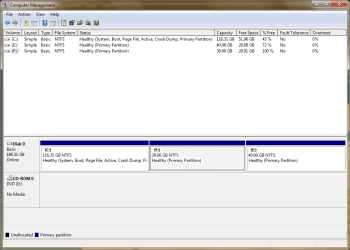
I have only the one drive, and I have 3 partitions on it. I want to install it on the F: partition.
 

Attachments

  • screen001.PNG
    screen001.PNG
    21.8 KB · Views: 790

My Computer My Computer

At a glance

Windows 7 RC1Intel Pentium D CPU 3.00GHz (Dual Core)2GB DDR2 800Dual NVIDIA GeForce 7300 GT in SLI Mode
OS
Windows 7 RC1
CPU
Intel Pentium D CPU 3.00GHz (Dual Core)
Motherboard
XFX nForce 680i LT SLI
Memory
2GB DDR2 800
Graphics Card(s)
Dual NVIDIA GeForce 7300 GT in SLI Mode
Monitor(s) Displays
Envision H19W 19" Wide Screen LCD Monitor
Screen Resolution
1440x900
Hard Drives
Maxtor 200GB
PSU
Ultra 400w
Case
Ultra Aluminus Mid Tower ATX Case Black
Not sure why, but what options does it give you to prepare the drive in XP?
 

My Computer My Computer

At a glance

64-bit Windows 11 Pro for WorkstationsIntel i7-8700K OC'd to 5 GHz64 GB (4x16GB) G.SKILL TridentZ RGB DDR4 3600...ASUS ROG-STRIX-GTX1080TI-O11G-GAMING
Computer type
PC/Desktop
Computer Manufacturer/Model Number
Self built custom
OS
64-bit Windows 11 Pro for Workstations
CPU
Intel i7-8700K OC'd to 5 GHz
Motherboard
ASUS ROG Maximus XI Formula Z390
Memory
64 GB (4x16GB) G.SKILL TridentZ RGB DDR4 3600 MHz
Graphics Card(s)
ASUS ROG-STRIX-GTX1080TI-O11G-GAMING
Sound Card
Integrated
Monitor(s) Displays
2 x Samsung Odyssey G7 27"
Screen Resolution
2560x1440
Hard Drives
1TB Samsung 990 PRO M.2,
4TB Samsung 990 PRO PRO M.2,
TerraMaster F8 SSD Plus NAS
PSU
Seasonic Prime Titanium 850W
Case
Thermaltake Core P3
Cooling
Corsair Hydro H115i
Keyboard
Logitech wireless K800
Mouse
Logitech MX Master 4
Internet Speed
2 Gb/s Download and 100 Mb/s Upload
Antivirus
Malwarebyte Anti-Malware Premium
Browser
Google Chrome
Other Info
Logitech Z625 speaker system,
Logitech BRIO 4K Pro webcam,
HP Color LaserJet Pro MFP M477fdn,
APC SMART-UPS RT 1000 XL - SURT1000XLI,
Galaxy S23 Plus phone
Not sure why, but what options does it give you to prepare the drive in XP?
When it asks me to choose a partition, it only shows:

C: Partition1 [Unknown] 181070 MB (181070 MB free)
 

My Computer My Computer

At a glance

Windows 7 RC1Intel Pentium D CPU 3.00GHz (Dual Core)2GB DDR2 800Dual NVIDIA GeForce 7300 GT in SLI Mode
OS
Windows 7 RC1
CPU
Intel Pentium D CPU 3.00GHz (Dual Core)
Motherboard
XFX nForce 680i LT SLI
Memory
2GB DDR2 800
Graphics Card(s)
Dual NVIDIA GeForce 7300 GT in SLI Mode
Monitor(s) Displays
Envision H19W 19" Wide Screen LCD Monitor
Screen Resolution
1440x900
Hard Drives
Maxtor 200GB
PSU
Ultra 400w
Case
Ultra Aluminus Mid Tower ATX Case Black
I am now trying to extend my existing XP partition, and add some memory to that partition, but when i right click the partition, the extend option is in grey, aswell as the mirror option... I do have several gigs of unallocated space, so I don't know what's wrong. Help would be great :)
 

My Computer My Computer

At a glance

Windows 7 build 7100
OS
Windows 7 build 7100

My Computers My Computers

  • At a glance

    7 X64i5 84002x8gb 3200mhz
    Computer type
    PC/Desktop
    OS
    7 X64
    CPU
    i5 8400
    Motherboard
    gigabyte b365m ds3h
    Memory
    2x8gb 3200mhz
    Hard Drives
    various
    PSU
    pure power 11 400w cm
    Case
    Coolermaster
    Cooling
    cryorig m9i
  • At a glance

    7x64g54008gb ddr4 2400
    Computer type
    PC/Desktop
    OS
    7x64
    CPU
    g5400
    Motherboard
    ga b365m ds3h
    Memory
    8gb ddr4 2400
    PSU
    xfx pro 450w
that does help, but if the unallocated volume is currently to the left, is there a was to move it to the right?

thanks
 

My Computer My Computer

At a glance

Windows 7 build 7100
OS
Windows 7 build 7100
Yes, but the method depends on your current partition set up.

You would also need to use a 3rd party partition manager - there are good free ones easily available.

Need to see the screenshot
 

My Computers My Computers

  • At a glance

    7 X64i5 84002x8gb 3200mhz
    Computer type
    PC/Desktop
    OS
    7 X64
    CPU
    i5 8400
    Motherboard
    gigabyte b365m ds3h
    Memory
    2x8gb 3200mhz
    Hard Drives
    various
    PSU
    pure power 11 400w cm
    Case
    Coolermaster
    Cooling
    cryorig m9i
  • At a glance

    7x64g54008gb ddr4 2400
    Computer type
    PC/Desktop
    OS
    7x64
    CPU
    g5400
    Motherboard
    ga b365m ds3h
    Memory
    8gb ddr4 2400
    PSU
    xfx pro 450w
Heres the shot:
 

Attachments

  • Screenshot - Disk Management.png
    Screenshot - Disk Management.png
    43.2 KB · Views: 486

My Computer My Computer

At a glance

Windows 7 build 7100
OS
Windows 7 build 7100
That looks like it will be fine.

You can use the free GParted - d/l the .iso, burn it to cd - boot the cd and incorporate the unallocated space into XP partition.

SourceForge.net: GParted: Files

GParted -- Download

You have to click the Apply button in GParted for it to actually do the changes you have asked it to do.

It will probably take a while.


Do not do anything to the C partition.
 

My Computers My Computers

  • At a glance

    7 X64i5 84002x8gb 3200mhz
    Computer type
    PC/Desktop
    OS
    7 X64
    CPU
    i5 8400
    Motherboard
    gigabyte b365m ds3h
    Memory
    2x8gb 3200mhz
    Hard Drives
    various
    PSU
    pure power 11 400w cm
    Case
    Coolermaster
    Cooling
    cryorig m9i
  • At a glance

    7x64g54008gb ddr4 2400
    Computer type
    PC/Desktop
    OS
    7x64
    CPU
    g5400
    Motherboard
    ga b365m ds3h
    Memory
    8gb ddr4 2400
    PSU
    xfx pro 450w
Alright thanks!

one last thing :P what are some potential risks of changing the Letter's of the hardrives. I want to make the XP partition into drive C: and before I do that, this would be great to know

thanks a bunch
 

My Computer My Computer

At a glance

Windows 7 build 7100
OS
Windows 7 build 7100
A couple weeks back my dual boot system went bad. I have had WinXP on my computer for many years. I then decided to try Win7 RC. I took another hard drive, and made a fresh install of Win7 and installed it as Hard Drive #2.

After a few weeks of successful dual booting (using either WinXP or Win7 by selecting which one I wanted to use upon booting the computer), the computer though a tantrum and the Boot Loader got corrupted during a dual boot load of WinXP.

Long story short, I finally got it running again, I took my WinXP disc and loaded it over my original install. Yes, I know you can get into boot load files and check the code and chage it, if need be, but I chose just to rewrite and re-install WinXP over gain, no harm done to any of my other files, it worked fine.

I have no idea how the boot loader got screwed so bad. I have since retired the Win7 Hard Drive. But, I will probably buy Win7 when it comes out, right now I am low on funds, so I may not be able to take advantage of pre-order prices. I have done upgrade Windows version int he past but was always much happier if I just bought the full version. Besides, if you just buy the upgrade, then you nee dot keep the other version, and cannot sell it, because it will be needed for installs and re-installs for the upgrade version. I want Win7 because I want higher performance in my games and sims I fly.
 

My Computer My Computer

At a glance

WinXP
OS
WinXP
Wanna ask one thing.
Is it possible to make Windows XP use the programs that are currently installed in Windows 7?
And if possible to import the settings from 7 to XP.

PROpane
 

My Computer My Computer

At a glance

Windows 7 Ultimate 32-Bit, Windows XP SP3 Pro...Intel Core2Duo T55002GB DDR2 @ 667MHzIntel Graphics Media Accelerator 965 - X3100
OS
Windows 7 Ultimate 32-Bit, Windows XP SP3 Professional 32-Bit
CPU
Intel Core2Duo T5500
Memory
2GB DDR2 @ 667MHz
Graphics Card(s)
Intel Graphics Media Accelerator 965 - X3100
Sound Card
Realtek HD Sound
Monitor(s) Displays
15.4 Inch Display
Screen Resolution
1280x800
Hard Drives
320GB Samsung
Keyboard
Built-in Laptop Keyboard
Mouse
Razor DeathAdder
Internet Speed
10Mbit
Hello PROpane, and welcome to Seven Forums.

Not that I'm aware of. :(

Sorry,
Shawn
 

My Computer My Computer

At a glance

64-bit Windows 11 Pro for WorkstationsIntel i7-8700K OC'd to 5 GHz64 GB (4x16GB) G.SKILL TridentZ RGB DDR4 3600...ASUS ROG-STRIX-GTX1080TI-O11G-GAMING
Computer type
PC/Desktop
Computer Manufacturer/Model Number
Self built custom
OS
64-bit Windows 11 Pro for Workstations
CPU
Intel i7-8700K OC'd to 5 GHz
Motherboard
ASUS ROG Maximus XI Formula Z390
Memory
64 GB (4x16GB) G.SKILL TridentZ RGB DDR4 3600 MHz
Graphics Card(s)
ASUS ROG-STRIX-GTX1080TI-O11G-GAMING
Sound Card
Integrated
Monitor(s) Displays
2 x Samsung Odyssey G7 27"
Screen Resolution
2560x1440
Hard Drives
1TB Samsung 990 PRO M.2,
4TB Samsung 990 PRO PRO M.2,
TerraMaster F8 SSD Plus NAS
PSU
Seasonic Prime Titanium 850W
Case
Thermaltake Core P3
Cooling
Corsair Hydro H115i
Keyboard
Logitech wireless K800
Mouse
Logitech MX Master 4
Internet Speed
2 Gb/s Download and 100 Mb/s Upload
Antivirus
Malwarebyte Anti-Malware Premium
Browser
Google Chrome
Other Info
Logitech Z625 speaker system,
Logitech BRIO 4K Pro webcam,
HP Color LaserJet Pro MFP M477fdn,
APC SMART-UPS RT 1000 XL - SURT1000XLI,
Galaxy S23 Plus phone
Thanks for the welcome and help.
Even if it didn't help. Well I'll just rewrite some of them.
Because Photoshop doesn't even care what Windows you're using is dual-boot compatible. Works with both, without the need to reinstall.
Also music, video players usually work as well.
And don't you think I could copy the content from regedit\HKEY_LOCAL_MACHINE\Software to the new XP installation and see if the programs would recreate the other content?
 

My Computer My Computer

At a glance

Windows 7 Ultimate 32-Bit, Windows XP SP3 Pro...Intel Core2Duo T55002GB DDR2 @ 667MHzIntel Graphics Media Accelerator 965 - X3100
OS
Windows 7 Ultimate 32-Bit, Windows XP SP3 Professional 32-Bit
CPU
Intel Core2Duo T5500
Memory
2GB DDR2 @ 667MHz
Graphics Card(s)
Intel Graphics Media Accelerator 965 - X3100
Sound Card
Realtek HD Sound
Monitor(s) Displays
15.4 Inch Display
Screen Resolution
1280x800
Hard Drives
320GB Samsung
Keyboard
Built-in Laptop Keyboard
Mouse
Razor DeathAdder
Internet Speed
10Mbit
PROpane,

Usually you will need to reinstall the program since files could be installed all over the system, making it hard or impossible to copy over to a different OS. The settings are not always stored in the same location for programs as well. You can try that to see of it may transfer, but I would recommend backing up XP in case it had adverse effects.
 

My Computer My Computer

At a glance

64-bit Windows 11 Pro for WorkstationsIntel i7-8700K OC'd to 5 GHz64 GB (4x16GB) G.SKILL TridentZ RGB DDR4 3600...ASUS ROG-STRIX-GTX1080TI-O11G-GAMING
Computer type
PC/Desktop
Computer Manufacturer/Model Number
Self built custom
OS
64-bit Windows 11 Pro for Workstations
CPU
Intel i7-8700K OC'd to 5 GHz
Motherboard
ASUS ROG Maximus XI Formula Z390
Memory
64 GB (4x16GB) G.SKILL TridentZ RGB DDR4 3600 MHz
Graphics Card(s)
ASUS ROG-STRIX-GTX1080TI-O11G-GAMING
Sound Card
Integrated
Monitor(s) Displays
2 x Samsung Odyssey G7 27"
Screen Resolution
2560x1440
Hard Drives
1TB Samsung 990 PRO M.2,
4TB Samsung 990 PRO PRO M.2,
TerraMaster F8 SSD Plus NAS
PSU
Seasonic Prime Titanium 850W
Case
Thermaltake Core P3
Cooling
Corsair Hydro H115i
Keyboard
Logitech wireless K800
Mouse
Logitech MX Master 4
Internet Speed
2 Gb/s Download and 100 Mb/s Upload
Antivirus
Malwarebyte Anti-Malware Premium
Browser
Google Chrome
Other Info
Logitech Z625 speaker system,
Logitech BRIO 4K Pro webcam,
HP Color LaserJet Pro MFP M477fdn,
APC SMART-UPS RT 1000 XL - SURT1000XLI,
Galaxy S23 Plus phone
Back
Top