Dual Boot - remove one option

Zolwik

New member
Local time
3:20 PM
Messages
6
I received a Dell laptop with a dual XP boot on it -
on startup, it displayed two options, both of them XP.
One worked, the other one didn't.
I did a fresh install (not an upgrade) of Windows 7, which apparently landed on top of the working XP boot.

So now when I boot up, I see two options - Windows 7 and "earlier operating system".
The Windows 7 boot works fine, but if I try the other, I get
"Windows could not start because of a computer disk hardware configuration problem."

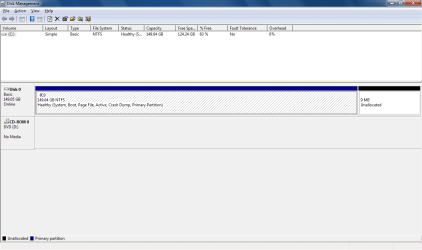
I looked in the Disk Manager; all I could see was one disk (C),
with two partitions - one huge one, and one 9 MB one.

I'd really like to remove the XP ("earlier operating system") option,
so that it would boot directly to Windows 7.

How can I do this?
 

My Computer

Computer type
PC/Desktop
Computer Manufacturer/Model Number
Dell
OS
Windows 7 Pro 32 bit

My Computer

Computer Manufacturer/Model Number
HP, Dell, Gateway, Toshiba - 4 laptops and 2 desktops
OS
Vista, Windows7, Mint Mate, Zorin, Windows 8
CPU
from 1.6GHz Duo to i7
Monitor(s) Displays
2x HP w2207
Hard Drives
5x HDD, 7x SSD, 12x Externals
Keyboard
with trackball - no mices
Mouse
Trackball mice
Internet Speed
DSL 6000
Yes, I've seen that. However, the top part of my Disk Management window shows only one Volume - C.
I don't see any evidence of where the XP boot might be installed.
 

My Computer

Computer type
PC/Desktop
Computer Manufacturer/Model Number
Dell
OS
Windows 7 Pro 32 bit
There is always only one C partition and that is the active OS.
 

My Computer

Computer Manufacturer/Model Number
HP, Dell, Gateway, Toshiba - 4 laptops and 2 desktops
OS
Vista, Windows7, Mint Mate, Zorin, Windows 8
CPU
from 1.6GHz Duo to i7
Monitor(s) Displays
2x HP w2207
Hard Drives
5x HDD, 7x SSD, 12x Externals
Keyboard
with trackball - no mices
Mouse
Trackball mice
Internet Speed
DSL 6000
On the page you sent me to, there is a screen shot of a Disk Management window.
Red circles and arrows show where the Windows 7 part is,
and where the Windows 8 part is.

On my system, there is only one entry in the Disk Management window.
Not surprisingly, its name is C.
It is healthy, and is marked "boot".

So where is Win XP installed?
How can I delete this boot option?
 

My Computer

Computer type
PC/Desktop
Computer Manufacturer/Model Number
Dell
OS
Windows 7 Pro 32 bit
Can you post a picture of your disk management.
 

My Computer

Computer Manufacturer/Model Number
HP, Dell, Gateway, Toshiba - 4 laptops and 2 desktops
OS
Vista, Windows7, Mint Mate, Zorin, Windows 8
CPU
from 1.6GHz Duo to i7
Monitor(s) Displays
2x HP w2207
Hard Drives
5x HDD, 7x SSD, 12x Externals
Keyboard
with trackball - no mices
Mouse
Trackball mice
Internet Speed
DSL 6000
If you're booting Windows 7, the boot options are stored in the boot configuration database (bcd). You could use bcdedit from an elevated command prompt to delete the obsolete options, or perhaps Visual BCD Editor if you'd prefer.
 

My Computer

Computer type
PC/Desktop
Computer Manufacturer/Model Number
Custom
OS
Windows 10 Pro x64
CPU
Intel Core i7 4790K @ 4.5GHz
Motherboard
Asus Maximus Hero VII
Memory
32GB DDR3
Graphics Card(s)
Nvidia GeForce GTX970
Sound Card
Realtek HD Audio
Screen Resolution
1920x1200
Hard Drives
1x Samsung 250GB SSD
4x WD RE 2TB (RAIDZ)
PSU
Corsair AX760i
Case
Fractal Design Define R4
Cooling
Noctua NH-D15
If you're booting Windows 7, the boot options are stored in the boot configuration database (bcd). You could use bcdedit from an elevated command prompt to delete the obsolete options, or perhaps Visual BCD Editor if you'd prefer.

Carl, that's all explained in the tutorial I gave him in my first post. But there is more to it. E.g. the XP partition could very well be his active partition and if he deletes it the system does not boot any more. But we will only know that after looking at his disk management.
 

My Computer

Computer Manufacturer/Model Number
HP, Dell, Gateway, Toshiba - 4 laptops and 2 desktops
OS
Vista, Windows7, Mint Mate, Zorin, Windows 8
CPU
from 1.6GHz Duo to i7
Monitor(s) Displays
2x HP w2207
Hard Drives
5x HDD, 7x SSD, 12x Externals
Keyboard
with trackball - no mices
Mouse
Trackball mice
Internet Speed
DSL 6000
Thanks, Cluberti - I'll try that in the morning (when I'm fresher). And for those who asked, here's a screen shot of my Disk Management.
 

Attachments

  • Disk Management.png
    Disk Management.png
    17.1 KB · Views: 1

My Computer

Computer type
PC/Desktop
Computer Manufacturer/Model Number
Dell
OS
Windows 7 Pro 32 bit
There is no more XP. All you need to do is to clean up the bootmgr - start with step 3 of my tutorial.
 

My Computer

Computer Manufacturer/Model Number
HP, Dell, Gateway, Toshiba - 4 laptops and 2 desktops
OS
Vista, Windows7, Mint Mate, Zorin, Windows 8
CPU
from 1.6GHz Duo to i7
Monitor(s) Displays
2x HP w2207
Hard Drives
5x HDD, 7x SSD, 12x Externals
Keyboard
with trackball - no mices
Mouse
Trackball mice
Internet Speed
DSL 6000
Easiest is to first look in msconfig>Boot tab to see if there is an XP listing there to delete.
 
:):):)
Many thanks to WHS, cluberti, and gregrocker for looking at this problem with me.

Without your help, I would not have come to understand enough about what was going on to ask the right question.

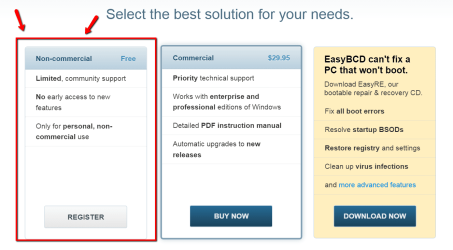
I'm helping out in a non-profit organization, so I didn't feel I qualified for the Free edition of EasyBCD (personal use only), nor did I really want to shell out the $30 for what would likely be a one-time use. So I tried using bcdedit from an elevated command prompt.
Ask-Leo.com got me started, and the help file helped me figure out the rest.

Viola! Problem solved.

Thanks!
- Turtle
 

My Computer

Computer type
PC/Desktop
Computer Manufacturer/Model Number
Dell
OS
Windows 7 Pro 32 bit
From the link in my tutorial you should have been able to get a free EasyBCD (see picture). Else you can also get a free version from here: (this is a trouble free direct link from MajorGeeks)

Download EasyBCD 2.2


2015-02-11_1519.png
 

My Computer

Computer Manufacturer/Model Number
HP, Dell, Gateway, Toshiba - 4 laptops and 2 desktops
OS
Vista, Windows7, Mint Mate, Zorin, Windows 8
CPU
from 1.6GHz Duo to i7
Monitor(s) Displays
2x HP w2207
Hard Drives
5x HDD, 7x SSD, 12x Externals
Keyboard
with trackball - no mices
Mouse
Trackball mice
Internet Speed
DSL 6000
Thanks again for continuing to help.

I just had scruples about using the free EasyBCD when my usage is not totally personal.
It's still great that you put that link out there for those it applies to.
Doubtless it's easier than the command-line option, which I ended up using.

I'm ready to close this thread.
 

My Computer

Computer type
PC/Desktop
Computer Manufacturer/Model Number
Dell
OS
Windows 7 Pro 32 bit
Understand. The MajorGeeks download has no strings attached. EasyBCD used to be free until recently. Most of us have a free copy on their systems.
 

My Computer

Computer Manufacturer/Model Number
HP, Dell, Gateway, Toshiba - 4 laptops and 2 desktops
OS
Vista, Windows7, Mint Mate, Zorin, Windows 8
CPU
from 1.6GHz Duo to i7
Monitor(s) Displays
2x HP w2207
Hard Drives
5x HDD, 7x SSD, 12x Externals
Keyboard
with trackball - no mices
Mouse
Trackball mice
Internet Speed
DSL 6000
Back
Top