Dual Boot screen doesn't appear

Could you please explain what options you have in your post bios screen ? Ta, Steve
 

My Computer My Computer

At a glance

8.1AMD Bulldozer FX-8 8150 8 Core 4.2Ghz Socket ...Dominator® Platinum 16GB X2GeForce 9800 GTX
Computer type
PC/Desktop
Computer Manufacturer/Model Number
Own Build
OS
8.1
CPU
AMD Bulldozer FX-8 8150 8 Core 4.2Ghz Socket AM3+ 8MB L3 Cac
Motherboard
ASrock 990FX Extreme9
Memory
Dominator® Platinum 16GB X2
Graphics Card(s)
GeForce 9800 GTX
Hard Drives
Seagate 500GB Barracuda Internal Hard Drive
Seagate 500GB Barracuda Internal Hard Drive RAID
Seagate 500GB Barracuda Internal Hard Drive 0
Seagate 500GB Barracuda Internal Hard Drive
Antivirus
ESET
Browser
CHROME
Hey Steve,

I have F2 for BIOS and F4 for Recovery. That's it!
 

My Computer My Computer

At a glance

Windows 7 home premium x64intel core i78GB
Computer type
Laptop
Computer Manufacturer/Model Number
Samsung UltraBook 5 Series
OS
Windows 7 home premium x64
CPU
intel core i7
Memory
8GB
Hard Drives
500GB HDD
16GB SSD
Internet Speed
100Mb/s
Follow the advice from gregrocker and Anak.
They are the experienced experts and can give you the best help.

Having said that
- You should update your System Specs as I suggested in post #11
- This thread is marked as "Solved" - you should mark it as "Un-Solved".

I didn't find a "One-Time Boot Option key" for the Samsung NP530U3C, but I did find a note about "Fast BIOS Mode" in the User Manual.
If you have this enabled, maybe it's causing problems for you now...
You can try disabling it to see if it helps, or wait for advice from gregrocker or Anak about this.

SSMSP01.PNG

I got the English User Win 7 Manual from this page:
http://www.samsung.com/us/support/downloads/global
 

My Computer My Computer

At a glance

Multi-Boot W7_Pro_x64 W8.1_Pro_x64 W10_Pro_x6...AMD Athlon II x4 6206GB GSkill DDR2 800AMD 4670 GPU + AMD 4200 IGP
Computer type
PC/Desktop
Computer Manufacturer/Model Number
home built
OS
Multi-Boot W7_Pro_x64 W8.1_Pro_x64 W10_Pro_x64 +Linux_VMs +Chromium_VM
CPU
AMD Athlon II x4 620
Motherboard
Gigabyte GA-MA785G-UD3H
Memory
6GB GSkill DDR2 800
Graphics Card(s)
AMD 4670 GPU + AMD 4200 IGP
Sound Card
on board Realtek ALC889A
Monitor(s) Displays
RCA 40" LCD TV, Insignia 32" LCD TV, HP 15" LCD monitor
Screen Resolution
1680 x 1050
Hard Drives
OCZ Vertex 3 120GB,
Samsung F3 1TB (3),
Several others - WD, Seagate, Hitachi, ...
PSU
Corsair 500 W
Case
Rosewill mid tower
Cooling
CM 90mm rifle
Keyboard
Gyration wireless, Logitech wireless, Dell USB wired
Mouse
Gyration wireless, Logitech wireless, V7 USB wired
Internet Speed
Spectrum - 100Mbps D / 10Mbps U
Antivirus
Avast, MBAM3, EMET, WinPatrol
Browser
Pale Moon, Firefox, IE
Other Info
2 multi-boot PC's
Mainly HTPC/Office/Gen purpose (no gaming).
Trendnet USB KVM.
LG DVD burner/Blue Ray Player.
Tray system for removable SATA backup drives.

Not currently OCd, under-volted.
I use Hybrid sleep, rarely re-boot or shutdown.

Hauppauge HD-PVR, Avermedia PCIe TV Tuner, Hauppauge PCI TV Tuner.
OK, could you tell me the exact model of your computer/laptop ? This should be on a tag somewhere on the side if a desktop or the bottom if a laptop, As well is it UEFI bios or not ?
 

My Computer My Computer

At a glance

8.1AMD Bulldozer FX-8 8150 8 Core 4.2Ghz Socket ...Dominator® Platinum 16GB X2GeForce 9800 GTX
Computer type
PC/Desktop
Computer Manufacturer/Model Number
Own Build
OS
8.1
CPU
AMD Bulldozer FX-8 8150 8 Core 4.2Ghz Socket AM3+ 8MB L3 Cac
Motherboard
ASrock 990FX Extreme9
Memory
Dominator® Platinum 16GB X2
Graphics Card(s)
GeForce 9800 GTX
Hard Drives
Seagate 500GB Barracuda Internal Hard Drive
Seagate 500GB Barracuda Internal Hard Drive RAID
Seagate 500GB Barracuda Internal Hard Drive 0
Seagate 500GB Barracuda Internal Hard Drive
Antivirus
ESET
Browser
CHROME
Ok David, thanks one more time! I will follow all the advices no doubt but right now I'm not around the computer so there's not much I can do. I marked the topic as unsolved, sorry about that.

Steve, the computer is the one I said on thread #16: "If it helps, my laptop is a Samsung Ultrabook 5 Series - model: NP530U3C."
I don't know what's a UEFI Bios, sorry. But you can check what BIOS I have if you watch the final seconds of the youtube clip I posted.
Thanks again!
 

My Computer My Computer

At a glance

Windows 7 home premium x64intel core i78GB
Computer type
Laptop
Computer Manufacturer/Model Number
Samsung UltraBook 5 Series
OS
Windows 7 home premium x64
CPU
intel core i7
Memory
8GB
Hard Drives
500GB HDD
16GB SSD
Internet Speed
100Mb/s
Samsung often uses F12 for boot menu.

Disable Fast Boot in BIOS per David.
 
Pedro, Greg,
Both of you are correct about the video, I didn't give it enough time to process. :o

David,
Pedro can fill in his "specs", but the problem here is, it sounds like we are dealing, again, with a member that is asking for help with a machine other than his "main desktop or workstation".
To me Pedro has made references that infer that the Ultra is an extra machine that he is working with, but he isn't clear about it.

Pedro can you clear this up?


David, Pedro, from Amazon about "Fast Boot":
After several hours of troubleshooting and reviewing information available online, I figured out that the culprit was a special BIOS setting, apparently unique to Samsung ultrabooks, called "Fast BIOS Mode." This mode causes the BIOS to completely skip over USB devices when booting, no matter what boot priority they're set to. This is apparently to speed up the boot process, but when I figured this out and disabled Fast BIOS mode, I saw no appreciable difference in boot speed. My USB DVD drive was, however, finally recognized when booting, after which the installation went smoothly. I will say that I have an older USB DVD drive, so maybe those of you with newer ones won't have this problem.

Source: Amazon.com: P. Gordon's review of Samsung Series 5 NP530U3C-A01US 13.3-Inch ...


David
, do you have a better link to the Manual, I don't see it listed in the drill-down menu.


Hi stemar, welcome to 7F! :)
Try to keep up, and thank you for filling out your System Specs.

It looks like Pedro's BIOS is UEFI capable but is disabled for now. See 06:54 of the video. Can you research the options for Pedro's NP530U3C and get back to us with your findings?


Pedro,
Having to change the boot order in the BIOS seems like a backward step in the evolution of computer design, especially since it does sound like you have some type of "boot manager" Post#20

As for the one-time BIOS Boot Menu, try touching the Escape key when you see the BIOS screen.

Still waiting for those screenshots.


I have chores to do, will try to get back around 19:00UTC.

Anak...aka...Also known as Steve.
 

My Computer My Computer

At a glance

Originally Win 7 Hm Prem x64 Ver 6.1.7600 Bui...Intel i3 530 2.93GHz, 2933MHz 2 Cores 4 Logic...6GB of 1,333MHz DDR3 SDRAM32MB Intel Graphics Media Accelerator HD IGChip
Computer type
PC/Desktop
Computer Manufacturer/Model Number
Gateway DX4831-01e (Mid-Tower Desktop)
OS
Originally Win 7 Hm Prem x64 Ver 6.1.7600 Build 7601-SP1 | Upgraded to Windows 10 December 14, 2019
CPU
Intel i3 530 2.93GHz, 2933MHz 2 Cores 4 Logical Processors
Motherboard
Gateway H57M01 133 megahertz
Memory
6GB of 1,333MHz DDR3 SDRAM
Graphics Card(s)
32MB Intel Graphics Media Accelerator HD IGChip
Sound Card
Realtek High Definition Audio
Monitor(s) Displays
Gateway HX2000 20inch TFT active matrix TN
Screen Resolution
1600 x 900 x 59 hertz
Hard Drives
WDC WD10EADS-00M2B0 [HDD] (1000.20 GB) -- drive 0,
HL-DT-ST DVDRAM GH41N [CD-ROM dr]
Four card readers, and Four USB 2.0
PSU
300watts.
Case
Mid-Tower Desktop
Cooling
Stock from Gateway
Keyboard
Natural Ergonomic Keyboard 4000, see Other Info
Mouse
Orig. Gateway wore out now using Insignia USB wired optical
Internet Speed
Vz FIOS 10ms png 57.64Mbps down 65.53Mbps up Speedtest.org
Antivirus
Zamana Anti-logger with Anti-malware, MSE, Windows Firewall,
Browser
IE11.0.9600.19399-Upd ver11.0.135, Firefox 68.0.1 x64
Other Info
System Specs by Belarc.

BIOS: American Megatrends Inc. P01-A0 11/17/2009

Replaced the MS 'Natural' Standard PS/2 Enhanced 101-102 Keyboard with a new Natural Ergonomic Keyboard 4000 on August 1st 2014.

Canon Pixma MG3222 Printer.

Updated to IE11 on 12102015 | Fios Quantum Router g1100

Additional AV: SpywareBlaster, manual Mbam, SAS
Steve,
Nice find on that article about Fast Boot.
I don't have another link to the manual, but if I find one I'll post it.
It was difficult for me to find the NP530U3C in the drop down because there is a LOT of data in that list...

SSMSP02.PNG
 

My Computer My Computer

At a glance

Multi-Boot W7_Pro_x64 W8.1_Pro_x64 W10_Pro_x6...AMD Athlon II x4 6206GB GSkill DDR2 800AMD 4670 GPU + AMD 4200 IGP
Computer type
PC/Desktop
Computer Manufacturer/Model Number
home built
OS
Multi-Boot W7_Pro_x64 W8.1_Pro_x64 W10_Pro_x64 +Linux_VMs +Chromium_VM
CPU
AMD Athlon II x4 620
Motherboard
Gigabyte GA-MA785G-UD3H
Memory
6GB GSkill DDR2 800
Graphics Card(s)
AMD 4670 GPU + AMD 4200 IGP
Sound Card
on board Realtek ALC889A
Monitor(s) Displays
RCA 40" LCD TV, Insignia 32" LCD TV, HP 15" LCD monitor
Screen Resolution
1680 x 1050
Hard Drives
OCZ Vertex 3 120GB,
Samsung F3 1TB (3),
Several others - WD, Seagate, Hitachi, ...
PSU
Corsair 500 W
Case
Rosewill mid tower
Cooling
CM 90mm rifle
Keyboard
Gyration wireless, Logitech wireless, Dell USB wired
Mouse
Gyration wireless, Logitech wireless, V7 USB wired
Internet Speed
Spectrum - 100Mbps D / 10Mbps U
Antivirus
Avast, MBAM3, EMET, WinPatrol
Browser
Pale Moon, Firefox, IE
Other Info
2 multi-boot PC's
Mainly HTPC/Office/Gen purpose (no gaming).
Trendnet USB KVM.
LG DVD burner/Blue Ray Player.
Tray system for removable SATA backup drives.

Not currently OCd, under-volted.
I use Hybrid sleep, rarely re-boot or shutdown.

Hauppauge HD-PVR, Avermedia PCIe TV Tuner, Hauppauge PCI TV Tuner.
Hey guys and thanks one more time for all the time you guys are spending trying to help me, I really appreciate.

David,
I didn't know about "Fast BIOS mode" prior to your post but I went to check on it and turns out it was disabled all along, so I guess the problem was not there.

Anak,
I consider this my main workstation and I'll fill up the specs right away. I actually do own a desktop but I use it only for gaming, this is the computer I user for university, developing and work in general.
About the boot manager, I tried it but since it was doing no good I uninstalled it.
About the 'escape key' on the BIOS screen to see what other options are hiding under there, it loads a boot menu but only gives me the Windows 7 option.

About the screenshots you asked, do you want me to take screenshots from my BIOS?
If not, I'll take it anyway, can't hurt right? :) I'll post them in 5 minutes.

EDIT:

My BIOS:


What I found when I press the ESC key:


Give them a second to process please :)
 
Last edited:

My Computer My Computer

At a glance

Windows 7 home premium x64intel core i78GB
Computer type
Laptop
Computer Manufacturer/Model Number
Samsung UltraBook 5 Series
OS
Windows 7 home premium x64
CPU
intel core i7
Memory
8GB
Hard Drives
500GB HDD
16GB SSD
Internet Speed
100Mb/s

My Computer My Computer

At a glance

Multi-Boot W7_Pro_x64 W8.1_Pro_x64 W10_Pro_x6...AMD Athlon II x4 6206GB GSkill DDR2 800AMD 4670 GPU + AMD 4200 IGP
Computer type
PC/Desktop
Computer Manufacturer/Model Number
home built
OS
Multi-Boot W7_Pro_x64 W8.1_Pro_x64 W10_Pro_x64 +Linux_VMs +Chromium_VM
CPU
AMD Athlon II x4 620
Motherboard
Gigabyte GA-MA785G-UD3H
Memory
6GB GSkill DDR2 800
Graphics Card(s)
AMD 4670 GPU + AMD 4200 IGP
Sound Card
on board Realtek ALC889A
Monitor(s) Displays
RCA 40" LCD TV, Insignia 32" LCD TV, HP 15" LCD monitor
Screen Resolution
1680 x 1050
Hard Drives
OCZ Vertex 3 120GB,
Samsung F3 1TB (3),
Several others - WD, Seagate, Hitachi, ...
PSU
Corsair 500 W
Case
Rosewill mid tower
Cooling
CM 90mm rifle
Keyboard
Gyration wireless, Logitech wireless, Dell USB wired
Mouse
Gyration wireless, Logitech wireless, V7 USB wired
Internet Speed
Spectrum - 100Mbps D / 10Mbps U
Antivirus
Avast, MBAM3, EMET, WinPatrol
Browser
Pale Moon, Firefox, IE
Other Info
2 multi-boot PC's
Mainly HTPC/Office/Gen purpose (no gaming).
Trendnet USB KVM.
LG DVD burner/Blue Ray Player.
Tray system for removable SATA backup drives.

Not currently OCd, under-volted.
I use Hybrid sleep, rarely re-boot or shutdown.

Hauppauge HD-PVR, Avermedia PCIe TV Tuner, Hauppauge PCI TV Tuner.
Sorry Greg, I meant to say on my previous post that F12 didn't work. When I press it nothing happens and Windows 7 starts booting normally.
 

My Computer My Computer

At a glance

Windows 7 home premium x64intel core i78GB
Computer type
Laptop
Computer Manufacturer/Model Number
Samsung UltraBook 5 Series
OS
Windows 7 home premium x64
CPU
intel core i7
Memory
8GB
Hard Drives
500GB HDD
16GB SSD
Internet Speed
100Mb/s
Then I would set flash stick to boot first in BIOS setup, when the install reboots unplug it and keep it unplugged unless it prompts to reinsert it.
 
That's exactly what I do.
I choose to boot from USB device, install Windows 8 and then when it restarts I remove the USB flash disk.
I remove it because if I don't the whole Windows 8 installer starts again like I never installed it before.
 

My Computer My Computer

At a glance

Windows 7 home premium x64intel core i78GB
Computer type
Laptop
Computer Manufacturer/Model Number
Samsung UltraBook 5 Series
OS
Windows 7 home premium x64
CPU
intel core i7
Memory
8GB
Hard Drives
500GB HDD
16GB SSD
Internet Speed
100Mb/s
David, thank you for the link. I had the same first two settings as you in the drill-down snip, but I couldn't find a match to Pedro's Ultra #.

Pedro,
1.) About the 'escape key' on the BIOS screen to see what other options are hiding under there, it loads a boot menu but only gives me the Windows 7 option.

1a.) About the screenshots you asked, do you want me to take screenshots from my BIOS?
1.) I'm leaning towards; you do not have Win8 installed properly. The quickness near the end of the Win8 in-stall that you explained earlier has me concerned about the completeness of the in-stall.

1a.)

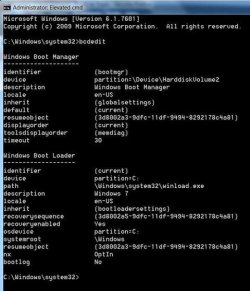
  • Open an elevated CMD prompt.
  • The prompt line should read C:\Windows\system32>_
  • At the end of the blinking cursor type in bcdedit, touch Enter or return.
  • You should see something like this:
p3.JPG


Use your snipping tool to crop, save, and post in your next reply, I save mine in a 640x480 .jpeg size. You can also go up to the tiny CMD prompt in the upper left corner; right click >edit >copy >into notepad, then post that into a code box, its the # in the menu bar of this Reply Editor.


   Note
I see there has been further instruction from Greg with a re-install. Try that, but I would still like to see a screenshot of the bcdedit, whether the re-install was successful or not.

If it isn't I would suspect:

  • Something wrong with the USB Stick.
  • Something wrong with the installation/procedures process.
  • You may have to go into your BIOS and turn the UEFI feature on and then try a re-install.

About the UEFI or MBR BIOS, I don't know what you mean sorry. Can you please explain?
Advantages:
The interface defined by the EFI specification includes data tables that contain platform information, and boot and runtime services that are available to the OS loader and OS. UEFI firmware provides several technical advantages over a traditional BIOS system:[11]

  • Ability to boot from large disks (over 2 TiB) with a GUID Partition Table, GPT.[12][13]
  • CPU-independent architecture[12]
  • CPU-independent drivers[12]
  • Flexible pre-OS environment, including network capability
  • Modular design

Source: wiki/Unified_Extensible_Firmware_Interface
 
Last edited:

My Computer My Computer

At a glance

Originally Win 7 Hm Prem x64 Ver 6.1.7600 Bui...Intel i3 530 2.93GHz, 2933MHz 2 Cores 4 Logic...6GB of 1,333MHz DDR3 SDRAM32MB Intel Graphics Media Accelerator HD IGChip
Computer type
PC/Desktop
Computer Manufacturer/Model Number
Gateway DX4831-01e (Mid-Tower Desktop)
OS
Originally Win 7 Hm Prem x64 Ver 6.1.7600 Build 7601-SP1 | Upgraded to Windows 10 December 14, 2019
CPU
Intel i3 530 2.93GHz, 2933MHz 2 Cores 4 Logical Processors
Motherboard
Gateway H57M01 133 megahertz
Memory
6GB of 1,333MHz DDR3 SDRAM
Graphics Card(s)
32MB Intel Graphics Media Accelerator HD IGChip
Sound Card
Realtek High Definition Audio
Monitor(s) Displays
Gateway HX2000 20inch TFT active matrix TN
Screen Resolution
1600 x 900 x 59 hertz
Hard Drives
WDC WD10EADS-00M2B0 [HDD] (1000.20 GB) -- drive 0,
HL-DT-ST DVDRAM GH41N [CD-ROM dr]
Four card readers, and Four USB 2.0
PSU
300watts.
Case
Mid-Tower Desktop
Cooling
Stock from Gateway
Keyboard
Natural Ergonomic Keyboard 4000, see Other Info
Mouse
Orig. Gateway wore out now using Insignia USB wired optical
Internet Speed
Vz FIOS 10ms png 57.64Mbps down 65.53Mbps up Speedtest.org
Antivirus
Zamana Anti-logger with Anti-malware, MSE, Windows Firewall,
Browser
IE11.0.9600.19399-Upd ver11.0.135, Firefox 68.0.1 x64
Other Info
System Specs by Belarc.

BIOS: American Megatrends Inc. P01-A0 11/17/2009

Replaced the MS 'Natural' Standard PS/2 Enhanced 101-102 Keyboard with a new Natural Ergonomic Keyboard 4000 on August 1st 2014.

Canon Pixma MG3222 Printer.

Updated to IE11 on 12102015 | Fios Quantum Router g1100

Additional AV: SpywareBlaster, manual Mbam, SAS
Pedro, but also for the other responders of this thread.

I came across this interesting thread while researching Samsung's HDD/iSSD configurations: GUIDE: How to install Windows 7 or 8 via USB on NP700Z*, although, the title may be a little misleading it may work for your Series5 NP530U3C
This guide may work with other Samsung Series 3, 5, 7, and 9 laptops with iSSD/ExpressCache as well. Give it a try and report back. I will add to this list:

- NP700Z5C-S01US
- NP530U3C

Source from the Guide Link above.
There are also three alternative methods.


David suggested earlier that the usual method when installing a new OS, is the user (Pedro) should disconnect any drives that do not have the original boot or operating systems, and it should be the one you want the new OS installed to.

Pedro's reply was:
Yes I had the two connected just because I can't take them off because computer is still covered by warranty and I can't unplug the drivers, the HDD or the SSD.
After reading up on Samsung's iSSD configuration I understand why. It is designed to be an integrated and hidden adjunct to the HDD and it ends up getting in the way of any "clean" re-install because of the System Reserve.
There are no problems if the user needs to use Samsung's Recovery/Restore Functions because it is designed to do that seamlessly.

So Pedro
, I would suggest you go over the methods in the Guide for installing Win8. You will see after reading though it that you are experiencing some of the symptoms described in the Guide i.e. Endless loops, and perceived problems with the USB Drive.

There is so much there I felt it would be better if I sent you there rather than to try and explain it here and have a step lost in the translation.
Take your time and absorb what is in the Guide and the responses from the users in that Forum, from what I see the suggestions of the other users are incorporated into the three alternative methods and it would help if you printed out the methods when you are ready to try one of them.

GUIDE: How to install Windows 7 or 8 via USB on NP700Z*

Please keep us apprised of your progress. If this works I'd still be interested in a bcdedit report.


Greg
,
It is a moot point now, but thank you for adding those UEFI Tutorials after I suggested turning it on to try the install in my last post.
I realized after the fact that if I'm going to suggest something, I should have added guidance.

 

My Computer My Computer

At a glance

Originally Win 7 Hm Prem x64 Ver 6.1.7600 Bui...Intel i3 530 2.93GHz, 2933MHz 2 Cores 4 Logic...6GB of 1,333MHz DDR3 SDRAM32MB Intel Graphics Media Accelerator HD IGChip
Computer type
PC/Desktop
Computer Manufacturer/Model Number
Gateway DX4831-01e (Mid-Tower Desktop)
OS
Originally Win 7 Hm Prem x64 Ver 6.1.7600 Build 7601-SP1 | Upgraded to Windows 10 December 14, 2019
CPU
Intel i3 530 2.93GHz, 2933MHz 2 Cores 4 Logical Processors
Motherboard
Gateway H57M01 133 megahertz
Memory
6GB of 1,333MHz DDR3 SDRAM
Graphics Card(s)
32MB Intel Graphics Media Accelerator HD IGChip
Sound Card
Realtek High Definition Audio
Monitor(s) Displays
Gateway HX2000 20inch TFT active matrix TN
Screen Resolution
1600 x 900 x 59 hertz
Hard Drives
WDC WD10EADS-00M2B0 [HDD] (1000.20 GB) -- drive 0,
HL-DT-ST DVDRAM GH41N [CD-ROM dr]
Four card readers, and Four USB 2.0
PSU
300watts.
Case
Mid-Tower Desktop
Cooling
Stock from Gateway
Keyboard
Natural Ergonomic Keyboard 4000, see Other Info
Mouse
Orig. Gateway wore out now using Insignia USB wired optical
Internet Speed
Vz FIOS 10ms png 57.64Mbps down 65.53Mbps up Speedtest.org
Antivirus
Zamana Anti-logger with Anti-malware, MSE, Windows Firewall,
Browser
IE11.0.9600.19399-Upd ver11.0.135, Firefox 68.0.1 x64
Other Info
System Specs by Belarc.

BIOS: American Megatrends Inc. P01-A0 11/17/2009

Replaced the MS 'Natural' Standard PS/2 Enhanced 101-102 Keyboard with a new Natural Ergonomic Keyboard 4000 on August 1st 2014.

Canon Pixma MG3222 Printer.

Updated to IE11 on 12102015 | Fios Quantum Router g1100

Additional AV: SpywareBlaster, manual Mbam, SAS
Hey guys, sorry for the delay, it's been a long weekend.
As for installing it through Windows, it only gives me the option of wiping the whole local drive and install Windows 8. It doesn't let me choose the partition :confused:

Anak,

As for your #35 post, here is the print screen:

snGih.jpg


As for your #36 post, I'm going to read the guide right now and I'll give some news after I read it.

EDIT: Well I read it and there's just one thing - The guide is for windows 8 install if you want windows 8 as your only installation. This is a problem because they tell me to format my iSSD and if I do that, it might cause trouble with my Windows 7 installation so I can't do that :(

EDIT2: Tried installing with UEFI Bios on and no good. Just a FYI :)
 
Last edited:

My Computer My Computer

At a glance

Windows 7 home premium x64intel core i78GB
Computer type
Laptop
Computer Manufacturer/Model Number
Samsung UltraBook 5 Series
OS
Windows 7 home premium x64
CPU
intel core i7
Memory
8GB
Hard Drives
500GB HDD
16GB SSD
Internet Speed
100Mb/s
These are my suggestions for your joint consideration:

Unplug or disable all other HD's and peripherals except the target HD, reset the BIOS to defaults, enable Legacy BIOS or CSM, boot the installer, at first screen press Shift + F10 to Open A command Line, wipe the HD and format an Active Primary partition for Win7 as shown in Step 2.2 of SSD - HDD Optimize for Windows Reinstallation.

Close the CMD box, Install Win7, then Win8 in space you leave for it.

Afterwards we can help you move the paging and Hibernation file to the SSD. Unless Samsung can help you include it it likely will only continue to block install otherwise.

Another idea is to install either OS to the SSD which we have helped others do, by wiping and then partitioning it. There would only be enough room for the OS and your programs, but you can keep your files on the other OS linked via Libraries. When users asked us to help them do this several times before it seemed wild at first but all were happy with it.

Finally Samsung must have a Recovery solution which would set it back to Factory condition after which we could try to shrink C to add the Dual Boot, if you think changes which have been made are blocking progress. Surely the SSD is not in its proper configuration now.
 
Thanks Greg !
Well after all this trouble I'm ready to give up. I think I'm probably better off installing my Windows 8 in my Desktop computer.
I spent all Sunday searching online for this and the only people that made it possible made it using Hirens Boot, where they kept moving files between SSD and HDD to make it work.

So my conclusion is that Samsung messed up this laptop when they didn't think about this kind of situation (On Ubuntu forums you can see a lot of people complaining also about Dual Boot on this computer).

Well, anyways, before giving up I'm going to call Samsung and ask if they have a tool or any advice on how to do this and I'll let you know when I have the answer. If after that the problem continues, I think I'll just give up :confused:
 

My Computer My Computer

At a glance

Windows 7 home premium x64intel core i78GB
Computer type
Laptop
Computer Manufacturer/Model Number
Samsung UltraBook 5 Series
OS
Windows 7 home premium x64
CPU
intel core i7
Memory
8GB
Hard Drives
500GB HDD
16GB SSD
Internet Speed
100Mb/s
Greg,

I was hoping we could do as you suggested, and there should be a way to disconnect the iSSD from the HDD, but Pedro mentioned earlier that he was informed by the Samsung rep that he couldn't physically do that, and I also got the impression that it would void Pedro's warranty. Post #7

The recovery partition is on the HHD as an unmarked partition. Post #4


Pedro,

I apologize, that this isn't working out for you. When I first read the GUIDE I thought maybe we could put win8 in your D:\drive, but after reading more, I can understand your hesitation.

I believe Samsung's mindset about the drives was to give the Ultra better response time in returning to the desktop, and agree they were a little narrow minded in this configuration, but that doesn't help you and all the other users that desire a multi-boot system.
It'd be a little tight, and you might have to change some partition sizes, but the room is there.

Thank you for the BCEDIT screenshot. Oops! I mean bcdedit. :p :zip:

Please let us know the verdict after the Samsung call.
 

My Computer My Computer

At a glance

Originally Win 7 Hm Prem x64 Ver 6.1.7600 Bui...Intel i3 530 2.93GHz, 2933MHz 2 Cores 4 Logic...6GB of 1,333MHz DDR3 SDRAM32MB Intel Graphics Media Accelerator HD IGChip
Computer type
PC/Desktop
Computer Manufacturer/Model Number
Gateway DX4831-01e (Mid-Tower Desktop)
OS
Originally Win 7 Hm Prem x64 Ver 6.1.7600 Build 7601-SP1 | Upgraded to Windows 10 December 14, 2019
CPU
Intel i3 530 2.93GHz, 2933MHz 2 Cores 4 Logical Processors
Motherboard
Gateway H57M01 133 megahertz
Memory
6GB of 1,333MHz DDR3 SDRAM
Graphics Card(s)
32MB Intel Graphics Media Accelerator HD IGChip
Sound Card
Realtek High Definition Audio
Monitor(s) Displays
Gateway HX2000 20inch TFT active matrix TN
Screen Resolution
1600 x 900 x 59 hertz
Hard Drives
WDC WD10EADS-00M2B0 [HDD] (1000.20 GB) -- drive 0,
HL-DT-ST DVDRAM GH41N [CD-ROM dr]
Four card readers, and Four USB 2.0
PSU
300watts.
Case
Mid-Tower Desktop
Cooling
Stock from Gateway
Keyboard
Natural Ergonomic Keyboard 4000, see Other Info
Mouse
Orig. Gateway wore out now using Insignia USB wired optical
Internet Speed
Vz FIOS 10ms png 57.64Mbps down 65.53Mbps up Speedtest.org
Antivirus
Zamana Anti-logger with Anti-malware, MSE, Windows Firewall,
Browser
IE11.0.9600.19399-Upd ver11.0.135, Firefox 68.0.1 x64
Other Info
System Specs by Belarc.

BIOS: American Megatrends Inc. P01-A0 11/17/2009

Replaced the MS 'Natural' Standard PS/2 Enhanced 101-102 Keyboard with a new Natural Ergonomic Keyboard 4000 on August 1st 2014.

Canon Pixma MG3222 Printer.

Updated to IE11 on 12102015 | Fios Quantum Router g1100

Additional AV: SpywareBlaster, manual Mbam, SAS
Back
Top