dual boot vistax64 and win7 doesnt work on sep hdd's

decoythegreat

New member
Local time
1:13 AM
Messages
6
Hi, i seem to be having a problem. I installed win 7 on vistax64 bit but i did a partition on the same hdd well that worked fine but i wanted my space back for vista so i formatted the partition and extended back now my vista is all on one hdd. i then installed a 100gb hdd so that i could clean install 7 on it well it installed fine but when my pc restarted i noticed my boot for vista was gone. i then took out my vista disc and did startup repair well now my vista is back but my win 7boot is missing. any help with this would be appreciated a lot. i really hope ms gets this one perfect.
 

My Computer My Computer

At a glance

vistax64
OS
vistax64
EasyBCD is your friend, that will allow you to recreate your boot options.
 

My Computer My Computer

At a glance

Windows 7 Ultimate Vista Ultimate x64Core 2 Duo E8500 3.16Ghz @ 3.8Ghz2x2Gigs Patriot PC2-6400 LLInno3D GeForce GTX260 216 SP
Computer Manufacturer/Model Number
Home Brew
OS
Windows 7 Ultimate Vista Ultimate x64
CPU
Core 2 Duo E8500 3.16Ghz @ 3.8Ghz
Motherboard
eVGA 750i FTW
Memory
2x2Gigs Patriot PC2-6400 LL
Graphics Card(s)
Inno3D GeForce GTX260 216 SP
Monitor(s) Displays
ASUS VW222U 22" 2ms Response time
Screen Resolution
1680x1050
Hard Drives
SATA 150GB
SATA II 250GB
USB IDE 750GB Ext.
PSU
HYTEC 600W & Thermaltake 650W Toughpower Power Exp
Case
Thermaltake Armor LCS (Liquid Cooling System)
Cooling
Liquid Cooling System
Keyboard
Logitech G15 Gaming Keyboard
Mouse
Logitech G9 Gaming Mouse
i got the bcd 1.7.2 but i dont know how to recreate them i tried doing recreate missing /deleted boot files but it says boot files already on vista and the only one is the vista one.
 

My Computer My Computer

At a glance

vistax64
OS
vistax64
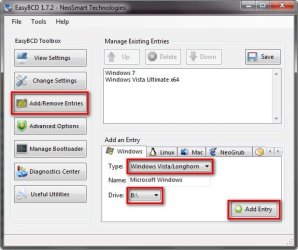
This is what you need to do

2009-01-12_024501.jpg

1. Add/Remove Entries

2. Select Type

3. Select the drive you have your other OS on

4. Add Entry

If you cant see your other drive then go to disk management and select your drive containing the other OS and assign a drive letter.
 

My Computer My Computer

At a glance

Windows 7 Ultimate Vista Ultimate x64Core 2 Duo E8500 3.16Ghz @ 3.8Ghz2x2Gigs Patriot PC2-6400 LLInno3D GeForce GTX260 216 SP
Computer Manufacturer/Model Number
Home Brew
OS
Windows 7 Ultimate Vista Ultimate x64
CPU
Core 2 Duo E8500 3.16Ghz @ 3.8Ghz
Motherboard
eVGA 750i FTW
Memory
2x2Gigs Patriot PC2-6400 LL
Graphics Card(s)
Inno3D GeForce GTX260 216 SP
Monitor(s) Displays
ASUS VW222U 22" 2ms Response time
Screen Resolution
1680x1050
Hard Drives
SATA 150GB
SATA II 250GB
USB IDE 750GB Ext.
PSU
HYTEC 600W & Thermaltake 650W Toughpower Power Exp
Case
Thermaltake Armor LCS (Liquid Cooling System)
Cooling
Liquid Cooling System
Keyboard
Logitech G15 Gaming Keyboard
Mouse
Logitech G9 Gaming Mouse
ok i just did that ill reboot and see if it fixed it then reply back with ty or another help lol
 

My Computer My Computer

At a glance

vistax64
OS
vistax64
ok it didnt fix it im thinking about doing a clean install of the win 7 again cuz now my vista boot is like really really slow where it used to be fast.
im doing something wrong but i did it just like you had it except for my drive letter was e: and i typed the name windows 7 in manually it didnt have an option
 

My Computer My Computer

At a glance

vistax64
OS
vistax64
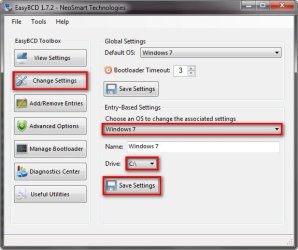
Have you checked again to see if your drive letters are still correct for each OS?

2009-01-12_030855.jpg

1. change settings

2. Choose an OS to change

3. drive

4. save settings

Also go to start orb and in the search bar type msconfig and check that you have booth your boot options and check to see which one is default.
 

My Computer My Computer

At a glance

Windows 7 Ultimate Vista Ultimate x64Core 2 Duo E8500 3.16Ghz @ 3.8Ghz2x2Gigs Patriot PC2-6400 LLInno3D GeForce GTX260 216 SP
Computer Manufacturer/Model Number
Home Brew
OS
Windows 7 Ultimate Vista Ultimate x64
CPU
Core 2 Duo E8500 3.16Ghz @ 3.8Ghz
Motherboard
eVGA 750i FTW
Memory
2x2Gigs Patriot PC2-6400 LL
Graphics Card(s)
Inno3D GeForce GTX260 216 SP
Monitor(s) Displays
ASUS VW222U 22" 2ms Response time
Screen Resolution
1680x1050
Hard Drives
SATA 150GB
SATA II 250GB
USB IDE 750GB Ext.
PSU
HYTEC 600W & Thermaltake 650W Toughpower Power Exp
Case
Thermaltake Armor LCS (Liquid Cooling System)
Cooling
Liquid Cooling System
Keyboard
Logitech G15 Gaming Keyboard
Mouse
Logitech G9 Gaming Mouse
Back
Top