
Dual Boot Windows 7 and Ubuntu

How to Dual Boot Windows 7 and Ubuntu

This tutorial is a simple guide that will explain the two easiest ways to setup and install Ubuntu to dual-boot with your current installation of Windows. One option describes how to do this via WUBI. Another describes how to do this as a native dual-boot.

   Warning
Neither Designer Media Ltd (Sevenforums) nor myself are responsible for any problems that occur from the following tutorial.
   Note
Please bear in mind that the WUBI installation method installs Ubuntu as if it is an application on Windows. It does NOT use its own partitions.


OPTION ONE

Using Wubi Installer


Step 1: Go to this website, download and run the Wubi installer.


Step 2: Select the hard drive you wish to install it on. Keep in mind it will NOT erase Windows.
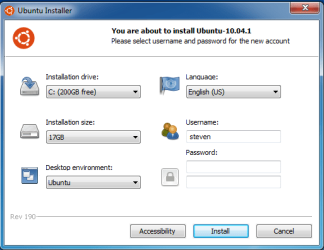
WUBI.png
Step 3: Select the amount of space you want to give tos Ubuntu to use. I recommend 3GB.


Step 4: Select your desktop enviornment. This is personal prefernce, if you are new to Linux I suggest sticking with Ubuntu.


Step 5: Select your language.


Step 6: Set your screenname. Note that this cannot contain capitalized letters of any kind.


Step 7: Set your password. When you have completed that hit the install button and wait!


Step 8: When it finishes downloading and installing Ubuntu, just restart to boot into Ubuntu!


OPTION TWO

Native Install


Step 1: Burn a CD/DVD with the Ubuntu ISO through Windows.


Step 2: Boot from the CD/DVD when you start up your computer.


Step 3:
Press the up button the moment something appears on that screen and select a language.
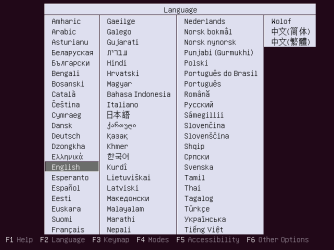
Ubunt0.png
Step 4: Select the option 'Try ubuntu without installing'.
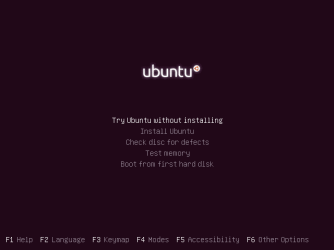
Ubuntu1.png
Step 5: When the desktop appears double click the icon on the desktop called 'Install Ubuntu'.
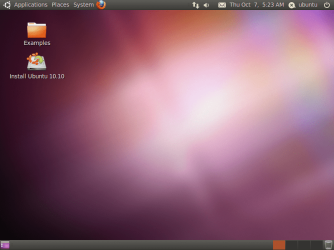
Ubuntu2.png
Step 6: When the installer launches fully, select your language and hit the foward button.
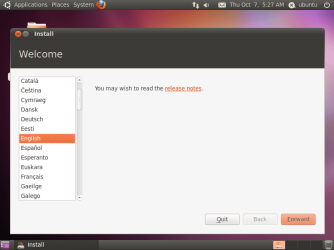
Ubuntu3.png
Step 7: On this screen you'll want to choose that options you want. I suggest selecting them both. Hit the foward button again after you select what you want.
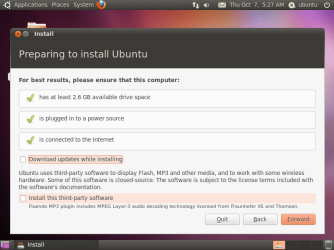
Ubuntu4.png
Step 8: On this screen you'll want to select the 'specify partitions' option and click foward.
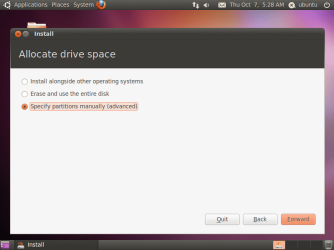
Ubuntu5.png
Step 9: Here as you can see we already have some unallocated space, click it and select the 'Add' button. (Note: You can select an already created partition, make sure not to overwrite your Windows partition!)
Ubuntu6.png
Step 10: A window should pop up, you should make the mount point '/' and the 'Use as' EXT4 filesystem. Click Ok when done.
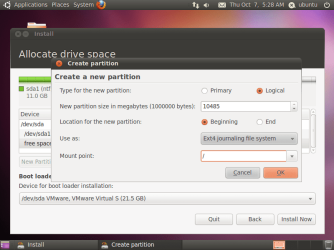
Ubuntu7.png
Step 11: After that click the 'Install Now' button and follow the onscreen instructions.


Step 12: You'll be prompted to reboot after its finished, reboot and select the top option in the Grub 2 Boot Loader and you're now in Ubuntu!


Last edited by a moderator:
Installing Ubuntu or many other Linux distros via the CD usually come with this Grub Boot Loader but removing the Ubuntu or some other Linux installation removes the Grub Boot Loader as well and makes Windows 7 undetectable at startup and your choice would be to install the Linux distro again so that when this Grub Boot Loader gets installed, it will again detect Windows 7. I've gone through this problem and for a few minutes or so, I thought I killed my Windows 7.
 

My Computer My Computer

At a glance

Windows 7 Ultimate 32 Bit, Windows Developer ...Intel Pentium Dual CPU E2180@2GHzNVIDIA GeForce 7200 GS
Computer Manufacturer/Model Number
Custom Built
OS
Windows 7 Ultimate 32 Bit, Windows Developer Preview, Linux Mint 9 Gnome 32 Bit
CPU
Intel Pentium Dual CPU E2180@2GHz
Motherboard
Elitegroup 671T-M3
Graphics Card(s)
NVIDIA GeForce 7200 GS
Monitor(s) Displays
AOC TFT1560 15" LCD Monitor
Screen Resolution
1024x768
Keyboard
Logitech USB Keyboard
newbie ask:
i have 2 drive, c & d. can i install ubuntu using wubi installer? on first boot, is there choice betwen win7 or ubuntu for OS?
 

My Computer My Computer

At a glance

windows 7 profesional 32bit2048MBATI Radeon 4350
Computer Manufacturer/Model Number
HP Probook 4421s
OS
windows 7 profesional 32bit
Memory
2048MB
Graphics Card(s)
ATI Radeon 4350
Screen Resolution
1366x768
newbie ask:
i have 2 drive, c & d. can i install ubuntu using wubi installer? on first boot, is there choice betwen win7 or ubuntu for OS?
Yes you can install Ubuntu with Wubi installer and you can choose which drive to install the operating system. Once installed it will offer you a choice at startup to choose between Ubuntu and Windows 7 but the Wubi install will not always be successful on some cases. I tried to install my Linux using Wubi but I got some kind of error so it never got installed using Wubi, however you can still install Ubuntu by burning its ISO file into a CD, then booting from that to install the operating system.

Using a program called Universal USB Installer, you can install Ubuntu on a USB flash drive which can also be used to install Ubuntu on the machine.

Universal USB Installer – Easy as 1 2 3 | USB Pen Drive Linux
 

My Computer My Computer

At a glance

Windows 7 Ultimate 32 Bit, Windows Developer ...Intel Pentium Dual CPU E2180@2GHzNVIDIA GeForce 7200 GS
Computer Manufacturer/Model Number
Custom Built
OS
Windows 7 Ultimate 32 Bit, Windows Developer Preview, Linux Mint 9 Gnome 32 Bit
CPU
Intel Pentium Dual CPU E2180@2GHz
Motherboard
Elitegroup 671T-M3
Graphics Card(s)
NVIDIA GeForce 7200 GS
Monitor(s) Displays
AOC TFT1560 15" LCD Monitor
Screen Resolution
1024x768
Keyboard
Logitech USB Keyboard
Thanks again great stuff
 

My Computer My Computer

At a glance

MS Windows 7 Home Premium 64-bit SP1Intel Core i7 2670QM @ 2.20GHZ8.00 GB Dual-Channel DDR3 @ 665MHz2047MB GeForce GT 540M (ASUStek Computer Inc)
Computer type
PC/Desktop
Computer Manufacturer/Model Number
ASUS K53S
OS
MS Windows 7 Home Premium 64-bit SP1
CPU
Intel Core i7 2670QM @ 2.20GHZ
Motherboard
ASUSTeK Computer Inc. K53SV (CPU 1)
Memory
8.00 GB Dual-Channel DDR3 @ 665MHz
Graphics Card(s)
2047MB GeForce GT 540M (ASUStek Computer Inc)
Sound Card
Realtek High Definition Audio
Monitor(s) Displays
1
Hard Drives
596GB Hitachi HTS547564A9E384 (SATA)
Internet Speed
29,5 MBPS DOWNL AND 6 UPLOAD
Antivirus
Microsoft Security Essentials, SUPERANTISPYWARE
Browser
CHROME,IE
Other Info
i love to travel also
i have lived in Hungary & Ireland & Germany and Belgium
and worked in the Netherlands as i used to live in a bordertown.....
Hi all
God bless
Peace
With ubuntu one thing many are not aware of is the other option available for adding a new boot entry into the 7 BCD using the EasyBCD program. The "Grub is not installed in bootsector" box needs to be checked off however to avoid seeing Grub installed on the 7 drive.

The custom install of the distro first sees the root/file system partition made the "/ mount point" when installing ubuntu onto a separate drive. That's also where you point the Grub installer. Note if 7 is already installed first on let's say the host/boot and Linux is going to a second drive the 7 drive would be left unplugged during the install to avoid seeing the 7 mbr effected by the Grub installer.

Once ubuntu or other is running you then run EasyBCD to see the new entry added into the 7 boot options. This works using the NeoGrub loader option with that program which then will load the distro when selected. The Neosmart guide for this is seen at Ubuntu - EasyBCD - NeoSmart Technologies Wiki
 

My Computers My Computers

  • At a glance

    W7 Ultimate x64/W10 Pro x64/W11 Pro Triple Bo...AMD Phenom II X4 975 Deneb 3.6ghz - 965 2nd r...Kingston Hyper X DDR3 1600 1.5v 16gb - Hyper ...MSI HD Radeon 5750 1gb - MSI HD Radeon 6450 o...
    Computer type
    PC/Desktop
    Computer Manufacturer/Model Number
    Custom builds = 2
    OS
    W7 Ultimate x64/W10 Pro x64/W11 Pro Triple Boot - Main PC W7 Remote PC Micro ATX W7 Pro x64/W11 Pro
    CPU
    AMD Phenom II X4 975 Deneb 3.6ghz - 965 2nd remote pc
    Motherboard
    Gigabyte GA-790XTA-UD4-Gigabyte GA-880GM-D2H remote pc
    Memory
    Kingston Hyper X DDR3 1600 1.5v 16gb - Hyper X Fury 8gb 2nd
    Graphics Card(s)
    MSI HD Radeon 5750 1gb - MSI HD Radeon 6450 on mini tower
    Sound Card
    Creative Labs X-Fi Xtreme Audio P - Realtek onooard 2nd case
    Monitor(s) Displays
    ASUS VW199T-P 19" HP 2082a Main-HP 2082a 20" remote pc
    Screen Resolution
    Asus 1440x900 - HP 1600x900
    Hard Drives
    WD Black 1TB HD per OS W7, W10, and pending W11 presently on 500gb OS Drive - Pending Triple 1TB HDs for Spanned Storage/backup volume
    Single 2TB external USB enclosure, single 1TB System 7 Host/Boot drive, Pending 8TB external HD for system image b
    PSU
    Corsair 750TX - primary / Corsair CX600 - second
    Case
    Antec 900-2 - SSD compatible / NZXT Vulcan mini tower
    Cooling
    Zalman CNPS9900A
    Keyboard
    AZIO L70 Backlit Letters Gaming - ONN Cordless/USB
    Mouse
    MSI DS200 Programmable, Logitech Cordless
    Internet Speed
    30mbps upgrade - primary hard wired - mini tower usb WiFi
    Antivirus
    GFI VIPRE Internet Security 2014 on W7 2016 beta on W10,
    Browser
    Cyberfox, WaterFox 64bit FF variants, FireFox x64, Pale Moon
    Other Info
    Accomdata fan cooled usb 2.0 PIDE/Sata II, III external enclosure.
    Sambient usb/eSata PATA/Sata II, III external enclosure.
  • At a glance

    W7 Pro x64/W11 ProAMD Deneb 3.6ghz - 965Kingston Hyper X Fury 8gbMSI HD Radeon 6450 DVI Output
    Computer type
    PC/Desktop
    System Manufacturer/Model Number
    CUSTOM ASSEMBLY
    OS
    W7 Pro x64/W11 Pro
    CPU
    AMD Deneb 3.6ghz - 965
    Motherboard
    Gigabyte GA-880GM-D2H remote pc
    Memory
    Kingston Hyper X Fury 8gb
    Graphics Card(s)
    MSI HD Radeon 6450 DVI Output
    Sound Card
    Realtek onooard Creative or Other separate PENDING
    Monitor(s) Displays
    VIZIO 32" LCD TV Separate LCD Pending
    Screen Resolution
    1600x1080
    Hard Drives
    WD 500GB OS Host/Boot WD Green 1TB Storage/Backup
    PSU
    Corsair 600W - THERMALTAKE 600W spare case
    Case
    NZXT Vulcan mini tower
    Cooling
    Twin 120mm Top Fans - 240mm Side Cover
    Keyboard
    ONN Cordless/USB Logitech Cordless
    Mouse
    ONN USB/Cordless - Logitech Cordless
    Internet Speed
    DSL 5G
    Browser
    MS Edge, FireFox, WaterFox x64, FireFox Nightly
    Other Info
    OS Testing-Remote Access to Main TeamViewer
I already have Windows 7 installed in my system but would like to install Ubuntu. Can I create the partition when I install using the ubuntu cd or do I have to do it from Windows 7? And it will not remove windows 7 right? I know Ubuntu gives an option to install Ubuntu alongside with Windows 7 but is that a good option? If Ubuntu somehow later on gets messed up, will it affect the windows 7 partition also?
 

My Computer My Computer

At a glance

Windows 7 Professional 32 BitGenuine Intel(R) CPU T2080 @ 1.73GHz 1.73 GHz2GBATI Mobility Radeon X1400
Computer Manufacturer/Model Number
Dell Inspiron E 1505
OS
Windows 7 Professional 32 Bit
CPU
Genuine Intel(R) CPU T2080 @ 1.73GHz 1.73 GHz
Motherboard
DELL
Memory
2GB
Graphics Card(s)
ATI Mobility Radeon X1400
Sound Card
High Definition Audio Device
Screen Resolution
1280 by 800
Hard Drives
136 GB
Recovery 10 GB
I tried the Wubi installer but didn't care for that much here. Thatt's because I still have to find a way to see Linux Mint Debian added as a boot option. For a fast non geek install of ubuntu the Wubi works great for that however.

The NeoGrub option won't work on anything Debian based for use of the EasyBCD program as the alternative there for some reason. With ubuntu previously installed to the second OS drive on the last whiile 7 was still in beta form the Grub loader was replaced by the NeoGrub option while Grub was targeted at the second drive with the first unplugged after the initial mishap with the 7 mbr. But that again was dual booting across two separate drives not having a single split.

Now for simply booting live from the ubuntu cd live and seeing a custom install to a separate partition get used to the idea of running the Startup repair tool since Grub will overwrite the existing 7 mbr entry in favor of the GNU OS's boot loader. It would add 7 in as a boot option instead of seeing ubuntu added into the 7 boot options as the end result same as what was seen when installing ubuntu on a second drive and not pointing Grub correctly at the second drive.

Now you see why many will automatically prefer the Wubi option over trashing the existing boot information in case they later decided to dump a distro they put on.
 

My Computers My Computers

  • At a glance

    W7 Ultimate x64/W10 Pro x64/W11 Pro Triple Bo...AMD Phenom II X4 975 Deneb 3.6ghz - 965 2nd r...Kingston Hyper X DDR3 1600 1.5v 16gb - Hyper ...MSI HD Radeon 5750 1gb - MSI HD Radeon 6450 o...
    Computer type
    PC/Desktop
    Computer Manufacturer/Model Number
    Custom builds = 2
    OS
    W7 Ultimate x64/W10 Pro x64/W11 Pro Triple Boot - Main PC W7 Remote PC Micro ATX W7 Pro x64/W11 Pro
    CPU
    AMD Phenom II X4 975 Deneb 3.6ghz - 965 2nd remote pc
    Motherboard
    Gigabyte GA-790XTA-UD4-Gigabyte GA-880GM-D2H remote pc
    Memory
    Kingston Hyper X DDR3 1600 1.5v 16gb - Hyper X Fury 8gb 2nd
    Graphics Card(s)
    MSI HD Radeon 5750 1gb - MSI HD Radeon 6450 on mini tower
    Sound Card
    Creative Labs X-Fi Xtreme Audio P - Realtek onooard 2nd case
    Monitor(s) Displays
    ASUS VW199T-P 19" HP 2082a Main-HP 2082a 20" remote pc
    Screen Resolution
    Asus 1440x900 - HP 1600x900
    Hard Drives
    WD Black 1TB HD per OS W7, W10, and pending W11 presently on 500gb OS Drive - Pending Triple 1TB HDs for Spanned Storage/backup volume
    Single 2TB external USB enclosure, single 1TB System 7 Host/Boot drive, Pending 8TB external HD for system image b
    PSU
    Corsair 750TX - primary / Corsair CX600 - second
    Case
    Antec 900-2 - SSD compatible / NZXT Vulcan mini tower
    Cooling
    Zalman CNPS9900A
    Keyboard
    AZIO L70 Backlit Letters Gaming - ONN Cordless/USB
    Mouse
    MSI DS200 Programmable, Logitech Cordless
    Internet Speed
    30mbps upgrade - primary hard wired - mini tower usb WiFi
    Antivirus
    GFI VIPRE Internet Security 2014 on W7 2016 beta on W10,
    Browser
    Cyberfox, WaterFox 64bit FF variants, FireFox x64, Pale Moon
    Other Info
    Accomdata fan cooled usb 2.0 PIDE/Sata II, III external enclosure.
    Sambient usb/eSata PATA/Sata II, III external enclosure.
  • At a glance

    W7 Pro x64/W11 ProAMD Deneb 3.6ghz - 965Kingston Hyper X Fury 8gbMSI HD Radeon 6450 DVI Output
    Computer type
    PC/Desktop
    System Manufacturer/Model Number
    CUSTOM ASSEMBLY
    OS
    W7 Pro x64/W11 Pro
    CPU
    AMD Deneb 3.6ghz - 965
    Motherboard
    Gigabyte GA-880GM-D2H remote pc
    Memory
    Kingston Hyper X Fury 8gb
    Graphics Card(s)
    MSI HD Radeon 6450 DVI Output
    Sound Card
    Realtek onooard Creative or Other separate PENDING
    Monitor(s) Displays
    VIZIO 32" LCD TV Separate LCD Pending
    Screen Resolution
    1600x1080
    Hard Drives
    WD 500GB OS Host/Boot WD Green 1TB Storage/Backup
    PSU
    Corsair 600W - THERMALTAKE 600W spare case
    Case
    NZXT Vulcan mini tower
    Cooling
    Twin 120mm Top Fans - 240mm Side Cover
    Keyboard
    ONN Cordless/USB Logitech Cordless
    Mouse
    ONN USB/Cordless - Logitech Cordless
    Internet Speed
    DSL 5G
    Browser
    MS Edge, FireFox, WaterFox x64, FireFox Nightly
    Other Info
    OS Testing-Remote Access to Main TeamViewer
I have used a wubi installer previously and the whole Ubuntu OS became corrupt and so I had to remove it. I am currently using Ubuntu using VirtualBox and it's not really great. It works and all but I would prefer a full fledged OS as well. Are you saying that it's a bad idea to install Ubuntu along with Windows 7 since it overwrites the boot record?
 

My Computer My Computer

At a glance

Windows 7 Professional 32 BitGenuine Intel(R) CPU T2080 @ 1.73GHz 1.73 GHz2GBATI Mobility Radeon X1400
Computer Manufacturer/Model Number
Dell Inspiron E 1505
OS
Windows 7 Professional 32 Bit
CPU
Genuine Intel(R) CPU T2080 @ 1.73GHz 1.73 GHz
Motherboard
DELL
Memory
2GB
Graphics Card(s)
ATI Mobility Radeon X1400
Sound Card
High Definition Audio Device
Screen Resolution
1280 by 800
Hard Drives
136 GB
Recovery 10 GB
One option you haven't thought of is how to custom install any distro on a usb flash drive without trashing your Windows installation in any way! Here I have either ubuntu or even a much larger Linux Mint Debian based flavor installed on root partition while the front end is a large data recovery partition I can carry on a key holder.

If you don't have a second drive to install Linux on separately and then use the NeoGrub form of Grub(included in EasyBCD) or use the Grub option to boot into 7 this is one way to have a full install without any effect on the main drive. It also makes for a portable OS.

A good sized flash drive of course is always the recommendation. Ubuntu for example was able to fit on a 2.25gb root partition when looked at as the smallest amount of space you could get by with. That would be a 4gb flash drive over trying to fit the entire thing on a 2gb model.

For data recovery purposes a good 16gb while an 8gb can pass is the recommended to see a flash drive split up as illustrated in an old thread on how to use ubuntu as the distro selected for this seen at http://www.sevenforums.com/chillout-room/11844-using-other-os-usb-rescue-device.html

For use of the entire flash drive simply to install it for OS only use while still able to boot then a 16gb is the place to start for the smaller distros like ubuntu or Puppy Linux while the larger releases like Linux Mint Debian(Debian based LMint release) not capatable with ubuntu would see a 32gb model used. That come prepackaged with install option for some 200 apps and why it was considered while the regular LM 13 cinnamon and other for some reason would not install directly. Those had to see the iso written to flash drive for live only.

For ubuntu and having a second hard drive a 3rd party solution namely EasyBCD made it possible to see a boot entry for that particular distro added into the 7 BCD. When trying this out back in 2009 the ubuntu install on the second drive here went off without a hitch. You first have to unplug the 7 host drive to prevent any accidental overwrite of the 7 mbr by the substitute form of Grub(NeoGrub) and then once the second drive sees Grub installed there making that a stand alone drive by the way you check off the "Grub isn't installed in bootsector" box when using the EasyBCD option to add the new entry in.

It seems a bit complicated at first until you see that where you point the Grub installer will be what makes the difference as far as the 7 boot information. Since then I have custom installed distros onto flash drives and seen a boot entry for 7 added each time in the Grub loader but haven't trashed the 7 mbr. You simply point Grub at the flash drive as where that will be installed since installing Grub is a mandatory function seen with the distro's installer.

Actually the distro installer for many Linux flavors will want to take over the entire drive. The VM alternative on the other hand is the convenient no fuss option to look over but not full experience the other OS and why another program called Bochs is being looked at for not only running distros but possibly 98SE or the Win 8 Enterprise 90day trial.

With the Wubi option the ubuntu install ran without problems but left a lot to be desired and was later removed. It's a fast way to get a dual boot going but as you found out not the preferred. Without a second drive one other option does still come to mind being a custom install to VHD.

That would be a Virtual Hard Disk you could attach in the DM in order to try dual booting by that means. http://www.sevenforums.com/tutorials/566-virtual-hard-disk-create-attach-vhd.html You would still need some way to configure the boot entry however since this was originally intended for being able to dual boot let's say Vista with 7 having Vista on the VHD or vice versa.

Then there's always a choice of opting for an entirely different ubuntu compatible distro you may find a bit more to your liking while somewhat larger in size. A good one for Linux Mint 13 still ubuntu compatible unlike the LMDebian release is definitely a more flavorable distro with more option. http://www.sevenforums.com/tutorials/257048-dual-boot-windows-7-linux.html

LM is of course one you would see on dvd not cd. But the guide indicates it will work for ubuntu as well as Linux Mint looking back at the ubuntu 12.07 release at the time that was posted. Here I simply ended up finally getting around to installing LMD on the second drive when running into dual boot problems with the 8 RPreview where both Windows installations were simply put trashed with disk errors from booting into 7 from the RP's own boot options. The stand alone provides a chance to have a complete lookover at that distro for the time being.
 

My Computers My Computers

  • At a glance

    W7 Ultimate x64/W10 Pro x64/W11 Pro Triple Bo...AMD Phenom II X4 975 Deneb 3.6ghz - 965 2nd r...Kingston Hyper X DDR3 1600 1.5v 16gb - Hyper ...MSI HD Radeon 5750 1gb - MSI HD Radeon 6450 o...
    Computer type
    PC/Desktop
    Computer Manufacturer/Model Number
    Custom builds = 2
    OS
    W7 Ultimate x64/W10 Pro x64/W11 Pro Triple Boot - Main PC W7 Remote PC Micro ATX W7 Pro x64/W11 Pro
    CPU
    AMD Phenom II X4 975 Deneb 3.6ghz - 965 2nd remote pc
    Motherboard
    Gigabyte GA-790XTA-UD4-Gigabyte GA-880GM-D2H remote pc
    Memory
    Kingston Hyper X DDR3 1600 1.5v 16gb - Hyper X Fury 8gb 2nd
    Graphics Card(s)
    MSI HD Radeon 5750 1gb - MSI HD Radeon 6450 on mini tower
    Sound Card
    Creative Labs X-Fi Xtreme Audio P - Realtek onooard 2nd case
    Monitor(s) Displays
    ASUS VW199T-P 19" HP 2082a Main-HP 2082a 20" remote pc
    Screen Resolution
    Asus 1440x900 - HP 1600x900
    Hard Drives
    WD Black 1TB HD per OS W7, W10, and pending W11 presently on 500gb OS Drive - Pending Triple 1TB HDs for Spanned Storage/backup volume
    Single 2TB external USB enclosure, single 1TB System 7 Host/Boot drive, Pending 8TB external HD for system image b
    PSU
    Corsair 750TX - primary / Corsair CX600 - second
    Case
    Antec 900-2 - SSD compatible / NZXT Vulcan mini tower
    Cooling
    Zalman CNPS9900A
    Keyboard
    AZIO L70 Backlit Letters Gaming - ONN Cordless/USB
    Mouse
    MSI DS200 Programmable, Logitech Cordless
    Internet Speed
    30mbps upgrade - primary hard wired - mini tower usb WiFi
    Antivirus
    GFI VIPRE Internet Security 2014 on W7 2016 beta on W10,
    Browser
    Cyberfox, WaterFox 64bit FF variants, FireFox x64, Pale Moon
    Other Info
    Accomdata fan cooled usb 2.0 PIDE/Sata II, III external enclosure.
    Sambient usb/eSata PATA/Sata II, III external enclosure.
  • At a glance

    W7 Pro x64/W11 ProAMD Deneb 3.6ghz - 965Kingston Hyper X Fury 8gbMSI HD Radeon 6450 DVI Output
    Computer type
    PC/Desktop
    System Manufacturer/Model Number
    CUSTOM ASSEMBLY
    OS
    W7 Pro x64/W11 Pro
    CPU
    AMD Deneb 3.6ghz - 965
    Motherboard
    Gigabyte GA-880GM-D2H remote pc
    Memory
    Kingston Hyper X Fury 8gb
    Graphics Card(s)
    MSI HD Radeon 6450 DVI Output
    Sound Card
    Realtek onooard Creative or Other separate PENDING
    Monitor(s) Displays
    VIZIO 32" LCD TV Separate LCD Pending
    Screen Resolution
    1600x1080
    Hard Drives
    WD 500GB OS Host/Boot WD Green 1TB Storage/Backup
    PSU
    Corsair 600W - THERMALTAKE 600W spare case
    Case
    NZXT Vulcan mini tower
    Cooling
    Twin 120mm Top Fans - 240mm Side Cover
    Keyboard
    ONN Cordless/USB Logitech Cordless
    Mouse
    ONN USB/Cordless - Logitech Cordless
    Internet Speed
    DSL 5G
    Browser
    MS Edge, FireFox, WaterFox x64, FireFox Nightly
    Other Info
    OS Testing-Remote Access to Main TeamViewer
How is the stability and performance of Ubuntu on flash drives? I would like to install Ubuntu 12.10 on it. Is 16gb ( 12 gb usable) enough?
 

My Computer My Computer

At a glance

Windows 7 Professional 32 BitGenuine Intel(R) CPU T2080 @ 1.73GHz 1.73 GHz2GBATI Mobility Radeon X1400
Computer Manufacturer/Model Number
Dell Inspiron E 1505
OS
Windows 7 Professional 32 Bit
CPU
Genuine Intel(R) CPU T2080 @ 1.73GHz 1.73 GHz
Motherboard
DELL
Memory
2GB
Graphics Card(s)
ATI Mobility Radeon X1400
Sound Card
High Definition Audio Device
Screen Resolution
1280 by 800
Hard Drives
136 GB
Recovery 10 GB
First iyou have to learn how to install it correctly to avoid seeing Grub(mandatory part of installation) be installed to the flash drive directly. You can partition and format the flash drive either during or before the actual install in case you plan to use a larger portion for data recovery or see a swap partition.

Once you have any Linux distro like ubuntu installed the drive will unavailable in Windows when plugged since Windows will automatically want to reformat the flash drive. Generally the distro will run as normal as if you had installed it on an internal drive as far as detecting all hardwares and connecting through a Lan or nic card without issue.

For a usb connection you may have a problem there however since a Linux equivalent driver may be required. The particular release number of ubuntu didn't make much of a difference however as far as going on and running. The problem I ran into was with the old dsl usb adapter nightmare for both the 64bit Windows and never getting any distro online until changing ISPs entirely. The long outdated RJ-11 dsl to usb went "out the door"! while the updated XFinity came in! :D

The Zorin OS 6.1 was just looked over recently is also a ubuntu LTS type release to consider as well as another like Puppy Linux for anything 16gb or smaller to be a via install. http://ostatic.com/blog/is-zorin-os-really-easier-than-ubuntu

For the larger more feature packed and Debian based form of Linux Mint a 32gb flash drive still saw a 4gb root without any swap partition note and a large NTFS data recovery partition. The prepackaged options to install some 200 apps made that a choice for seeing the entire flash drive that size turned into a Linux stick.

For you a 1gb swap with the rest set up for the root for the 12 or 16gb flash drive would work out easily for ubuntu there. Just follow the warnings in the guide about how the Grub install needs to be pointed at the flash drive however if not unplugging your main drive.
 

My Computers My Computers

  • At a glance

    W7 Ultimate x64/W10 Pro x64/W11 Pro Triple Bo...AMD Phenom II X4 975 Deneb 3.6ghz - 965 2nd r...Kingston Hyper X DDR3 1600 1.5v 16gb - Hyper ...MSI HD Radeon 5750 1gb - MSI HD Radeon 6450 o...
    Computer type
    PC/Desktop
    Computer Manufacturer/Model Number
    Custom builds = 2
    OS
    W7 Ultimate x64/W10 Pro x64/W11 Pro Triple Boot - Main PC W7 Remote PC Micro ATX W7 Pro x64/W11 Pro
    CPU
    AMD Phenom II X4 975 Deneb 3.6ghz - 965 2nd remote pc
    Motherboard
    Gigabyte GA-790XTA-UD4-Gigabyte GA-880GM-D2H remote pc
    Memory
    Kingston Hyper X DDR3 1600 1.5v 16gb - Hyper X Fury 8gb 2nd
    Graphics Card(s)
    MSI HD Radeon 5750 1gb - MSI HD Radeon 6450 on mini tower
    Sound Card
    Creative Labs X-Fi Xtreme Audio P - Realtek onooard 2nd case
    Monitor(s) Displays
    ASUS VW199T-P 19" HP 2082a Main-HP 2082a 20" remote pc
    Screen Resolution
    Asus 1440x900 - HP 1600x900
    Hard Drives
    WD Black 1TB HD per OS W7, W10, and pending W11 presently on 500gb OS Drive - Pending Triple 1TB HDs for Spanned Storage/backup volume
    Single 2TB external USB enclosure, single 1TB System 7 Host/Boot drive, Pending 8TB external HD for system image b
    PSU
    Corsair 750TX - primary / Corsair CX600 - second
    Case
    Antec 900-2 - SSD compatible / NZXT Vulcan mini tower
    Cooling
    Zalman CNPS9900A
    Keyboard
    AZIO L70 Backlit Letters Gaming - ONN Cordless/USB
    Mouse
    MSI DS200 Programmable, Logitech Cordless
    Internet Speed
    30mbps upgrade - primary hard wired - mini tower usb WiFi
    Antivirus
    GFI VIPRE Internet Security 2014 on W7 2016 beta on W10,
    Browser
    Cyberfox, WaterFox 64bit FF variants, FireFox x64, Pale Moon
    Other Info
    Accomdata fan cooled usb 2.0 PIDE/Sata II, III external enclosure.
    Sambient usb/eSata PATA/Sata II, III external enclosure.
  • At a glance

    W7 Pro x64/W11 ProAMD Deneb 3.6ghz - 965Kingston Hyper X Fury 8gbMSI HD Radeon 6450 DVI Output
    Computer type
    PC/Desktop
    System Manufacturer/Model Number
    CUSTOM ASSEMBLY
    OS
    W7 Pro x64/W11 Pro
    CPU
    AMD Deneb 3.6ghz - 965
    Motherboard
    Gigabyte GA-880GM-D2H remote pc
    Memory
    Kingston Hyper X Fury 8gb
    Graphics Card(s)
    MSI HD Radeon 6450 DVI Output
    Sound Card
    Realtek onooard Creative or Other separate PENDING
    Monitor(s) Displays
    VIZIO 32" LCD TV Separate LCD Pending
    Screen Resolution
    1600x1080
    Hard Drives
    WD 500GB OS Host/Boot WD Green 1TB Storage/Backup
    PSU
    Corsair 600W - THERMALTAKE 600W spare case
    Case
    NZXT Vulcan mini tower
    Cooling
    Twin 120mm Top Fans - 240mm Side Cover
    Keyboard
    ONN Cordless/USB Logitech Cordless
    Mouse
    ONN USB/Cordless - Logitech Cordless
    Internet Speed
    DSL 5G
    Browser
    MS Edge, FireFox, WaterFox x64, FireFox Nightly
    Other Info
    OS Testing-Remote Access to Main TeamViewer
Hello Dark Nova am looking to do this on a 120GB SSD in one of my laptops for researching Ubuntu now if I want to install software either from Ubuntu or from the net what would you suggest as a useful size partition on the SSD - half to a quarter as I am not real sure of how much I shall see to put onto the Ubuntu partition?

Having said that I suppose I can increase the Ubuntu partition size with Partition Wizard in a Windows boot or can I?

John
 

My Computer My Computer

At a glance

Desk1 7 Home Prem / Desk2 10 Pro / Main lap A...Desk1 i5 3750K / Laptop i7 GTX 860M / Desk2 i...Desk1 8GB (1866) / Desk2 16GB (1333) / Laptop...Desk 1& 2NVidia GTX 650 & Laptops on board Intel
Computer type
PC/Desktop
Computer Manufacturer/Model Number
Own build (new) Desk1 / Asus ROG Win 7 / Desk2 1st build
OS
Desk1 7 Home Prem / Desk2 10 Pro / Main lap Asus ROG 10 Pro 2 laptop Toshiba 7 Pro Asus P2520 7 & 10
CPU
Desk1 i5 3750K / Laptop i7 GTX 860M / Desk2 i5 2500
Motherboard
Desk1 Asus P877-V / Desk2 Gigabyte H67 UD3H / Laptop ?
Memory
Desk1 8GB (1866) / Desk2 16GB (1333) / Laptop 8Gb DDR3
Graphics Card(s)
Desk 1& 2NVidia GTX 650 & Laptops on board Intel
Sound Card
Desk 1 & 2 -XONAR DG Realtek High Def audio Laptop
Monitor(s) Displays
Desk 1 Benq HD 2450 / Desk2 Philips 24" / Laptop 17.5"
Screen Resolution
1920x1080 D1 & D2 & Laptop 1
Hard Drives
Desk1 Samsung 120GB 830 SSD
Asus ROG 256GB 850 Pro SSD
Desk2 Samsung 840 256 SSD
Toshiba 120GB EVO
PSU
Desk 1 Corsair HX 1050/ Laptop ? / Desk 2 Corsair HX 650
Case
Desk 1 Cooler HAF XM ? Toshiba laptop / Desk2 Coolermaster
Cooling
Fans on all Desk1 -2 Desk2 - all Coolermasters 5 Laptop ?
Keyboard
Desk 1 MS Sidewinder X6 Desk 2 MS Sidewinder X 4
Mouse
Desk 1&2 - Gigabyte MS 900 gamer - laptop - Logitec wireless
Internet Speed
ADSL2+
Other Info
One other Desktop (tester) and spare Toshba laptop both with SSD's
Running Kaspersky 2016 ISS on all machines config'd identically
Logitec audio stereo systems on each machine (x3)
Canon MG5250MFC
Router/modem TP-Link running WPA2SK
I custom installed ubuntu 11.04 originally and later a few newer releases on 4gb and 16gb flash drives without any complex issues since that's a relatively small distro compared to others. The server distros tend to chew up more drive space then your typical live to install type smaller desktop flavors.

For seeing a small to medium install on your 120gb SSD a small 15gb - 20gb root partition(main file system) should provide you adequate play space for adding on Linux apps as you go along. That would also allow you to add a small swap partition while not actually needed in most cases.
 

My Computers My Computers

  • At a glance

    W7 Ultimate x64/W10 Pro x64/W11 Pro Triple Bo...AMD Phenom II X4 975 Deneb 3.6ghz - 965 2nd r...Kingston Hyper X DDR3 1600 1.5v 16gb - Hyper ...MSI HD Radeon 5750 1gb - MSI HD Radeon 6450 o...
    Computer type
    PC/Desktop
    Computer Manufacturer/Model Number
    Custom builds = 2
    OS
    W7 Ultimate x64/W10 Pro x64/W11 Pro Triple Boot - Main PC W7 Remote PC Micro ATX W7 Pro x64/W11 Pro
    CPU
    AMD Phenom II X4 975 Deneb 3.6ghz - 965 2nd remote pc
    Motherboard
    Gigabyte GA-790XTA-UD4-Gigabyte GA-880GM-D2H remote pc
    Memory
    Kingston Hyper X DDR3 1600 1.5v 16gb - Hyper X Fury 8gb 2nd
    Graphics Card(s)
    MSI HD Radeon 5750 1gb - MSI HD Radeon 6450 on mini tower
    Sound Card
    Creative Labs X-Fi Xtreme Audio P - Realtek onooard 2nd case
    Monitor(s) Displays
    ASUS VW199T-P 19" HP 2082a Main-HP 2082a 20" remote pc
    Screen Resolution
    Asus 1440x900 - HP 1600x900
    Hard Drives
    WD Black 1TB HD per OS W7, W10, and pending W11 presently on 500gb OS Drive - Pending Triple 1TB HDs for Spanned Storage/backup volume
    Single 2TB external USB enclosure, single 1TB System 7 Host/Boot drive, Pending 8TB external HD for system image b
    PSU
    Corsair 750TX - primary / Corsair CX600 - second
    Case
    Antec 900-2 - SSD compatible / NZXT Vulcan mini tower
    Cooling
    Zalman CNPS9900A
    Keyboard
    AZIO L70 Backlit Letters Gaming - ONN Cordless/USB
    Mouse
    MSI DS200 Programmable, Logitech Cordless
    Internet Speed
    30mbps upgrade - primary hard wired - mini tower usb WiFi
    Antivirus
    GFI VIPRE Internet Security 2014 on W7 2016 beta on W10,
    Browser
    Cyberfox, WaterFox 64bit FF variants, FireFox x64, Pale Moon
    Other Info
    Accomdata fan cooled usb 2.0 PIDE/Sata II, III external enclosure.
    Sambient usb/eSata PATA/Sata II, III external enclosure.
  • At a glance

    W7 Pro x64/W11 ProAMD Deneb 3.6ghz - 965Kingston Hyper X Fury 8gbMSI HD Radeon 6450 DVI Output
    Computer type
    PC/Desktop
    System Manufacturer/Model Number
    CUSTOM ASSEMBLY
    OS
    W7 Pro x64/W11 Pro
    CPU
    AMD Deneb 3.6ghz - 965
    Motherboard
    Gigabyte GA-880GM-D2H remote pc
    Memory
    Kingston Hyper X Fury 8gb
    Graphics Card(s)
    MSI HD Radeon 6450 DVI Output
    Sound Card
    Realtek onooard Creative or Other separate PENDING
    Monitor(s) Displays
    VIZIO 32" LCD TV Separate LCD Pending
    Screen Resolution
    1600x1080
    Hard Drives
    WD 500GB OS Host/Boot WD Green 1TB Storage/Backup
    PSU
    Corsair 600W - THERMALTAKE 600W spare case
    Case
    NZXT Vulcan mini tower
    Cooling
    Twin 120mm Top Fans - 240mm Side Cover
    Keyboard
    ONN Cordless/USB Logitech Cordless
    Mouse
    ONN USB/Cordless - Logitech Cordless
    Internet Speed
    DSL 5G
    Browser
    MS Edge, FireFox, WaterFox x64, FireFox Nightly
    Other Info
    OS Testing-Remote Access to Main TeamViewer
I custom installed ubuntu 11.04 originally and later a few newer releases on 4gb and 16gb flash drives without any complex issues since that's a relatively small distro compared to others. The server distros tend to chew up more drive space then your typical live to install type smaller desktop flavors.

For seeing a small to medium install on your 120gb SSD a small 15gb - 20gb root partition(main file system) should provide you adequate play space for adding on Linux apps as you go along. That would also allow you to add a small swap partition while not actually needed in most cases.
Thanks Night Hawk I'll just make up a say 30GB partition for the Ubuntu as the machine is only for testing anyway. :)
 

My Computer My Computer

At a glance

Desk1 7 Home Prem / Desk2 10 Pro / Main lap A...Desk1 i5 3750K / Laptop i7 GTX 860M / Desk2 i...Desk1 8GB (1866) / Desk2 16GB (1333) / Laptop...Desk 1& 2NVidia GTX 650 & Laptops on board Intel
Computer type
PC/Desktop
Computer Manufacturer/Model Number
Own build (new) Desk1 / Asus ROG Win 7 / Desk2 1st build
OS
Desk1 7 Home Prem / Desk2 10 Pro / Main lap Asus ROG 10 Pro 2 laptop Toshiba 7 Pro Asus P2520 7 & 10
CPU
Desk1 i5 3750K / Laptop i7 GTX 860M / Desk2 i5 2500
Motherboard
Desk1 Asus P877-V / Desk2 Gigabyte H67 UD3H / Laptop ?
Memory
Desk1 8GB (1866) / Desk2 16GB (1333) / Laptop 8Gb DDR3
Graphics Card(s)
Desk 1& 2NVidia GTX 650 & Laptops on board Intel
Sound Card
Desk 1 & 2 -XONAR DG Realtek High Def audio Laptop
Monitor(s) Displays
Desk 1 Benq HD 2450 / Desk2 Philips 24" / Laptop 17.5"
Screen Resolution
1920x1080 D1 & D2 & Laptop 1
Hard Drives
Desk1 Samsung 120GB 830 SSD
Asus ROG 256GB 850 Pro SSD
Desk2 Samsung 840 256 SSD
Toshiba 120GB EVO
PSU
Desk 1 Corsair HX 1050/ Laptop ? / Desk 2 Corsair HX 650
Case
Desk 1 Cooler HAF XM ? Toshiba laptop / Desk2 Coolermaster
Cooling
Fans on all Desk1 -2 Desk2 - all Coolermasters 5 Laptop ?
Keyboard
Desk 1 MS Sidewinder X6 Desk 2 MS Sidewinder X 4
Mouse
Desk 1&2 - Gigabyte MS 900 gamer - laptop - Logitec wireless
Internet Speed
ADSL2+
Other Info
One other Desktop (tester) and spare Toshba laptop both with SSD's
Running Kaspersky 2016 ISS on all machines config'd identically
Logitec audio stereo systems on each machine (x3)
Canon MG5250MFC
Router/modem TP-Link running WPA2SK
That would suffix! You really don't want one too big if you are not loading a ton of things since ubuntu is relatively small to start with but not the smallest distro at the same time. You'll generally find a Windows volume will fill up much faster over time and why you would want to leave more drive space for that.
 

My Computers My Computers

  • At a glance

    W7 Ultimate x64/W10 Pro x64/W11 Pro Triple Bo...AMD Phenom II X4 975 Deneb 3.6ghz - 965 2nd r...Kingston Hyper X DDR3 1600 1.5v 16gb - Hyper ...MSI HD Radeon 5750 1gb - MSI HD Radeon 6450 o...
    Computer type
    PC/Desktop
    Computer Manufacturer/Model Number
    Custom builds = 2
    OS
    W7 Ultimate x64/W10 Pro x64/W11 Pro Triple Boot - Main PC W7 Remote PC Micro ATX W7 Pro x64/W11 Pro
    CPU
    AMD Phenom II X4 975 Deneb 3.6ghz - 965 2nd remote pc
    Motherboard
    Gigabyte GA-790XTA-UD4-Gigabyte GA-880GM-D2H remote pc
    Memory
    Kingston Hyper X DDR3 1600 1.5v 16gb - Hyper X Fury 8gb 2nd
    Graphics Card(s)
    MSI HD Radeon 5750 1gb - MSI HD Radeon 6450 on mini tower
    Sound Card
    Creative Labs X-Fi Xtreme Audio P - Realtek onooard 2nd case
    Monitor(s) Displays
    ASUS VW199T-P 19" HP 2082a Main-HP 2082a 20" remote pc
    Screen Resolution
    Asus 1440x900 - HP 1600x900
    Hard Drives
    WD Black 1TB HD per OS W7, W10, and pending W11 presently on 500gb OS Drive - Pending Triple 1TB HDs for Spanned Storage/backup volume
    Single 2TB external USB enclosure, single 1TB System 7 Host/Boot drive, Pending 8TB external HD for system image b
    PSU
    Corsair 750TX - primary / Corsair CX600 - second
    Case
    Antec 900-2 - SSD compatible / NZXT Vulcan mini tower
    Cooling
    Zalman CNPS9900A
    Keyboard
    AZIO L70 Backlit Letters Gaming - ONN Cordless/USB
    Mouse
    MSI DS200 Programmable, Logitech Cordless
    Internet Speed
    30mbps upgrade - primary hard wired - mini tower usb WiFi
    Antivirus
    GFI VIPRE Internet Security 2014 on W7 2016 beta on W10,
    Browser
    Cyberfox, WaterFox 64bit FF variants, FireFox x64, Pale Moon
    Other Info
    Accomdata fan cooled usb 2.0 PIDE/Sata II, III external enclosure.
    Sambient usb/eSata PATA/Sata II, III external enclosure.
  • At a glance

    W7 Pro x64/W11 ProAMD Deneb 3.6ghz - 965Kingston Hyper X Fury 8gbMSI HD Radeon 6450 DVI Output
    Computer type
    PC/Desktop
    System Manufacturer/Model Number
    CUSTOM ASSEMBLY
    OS
    W7 Pro x64/W11 Pro
    CPU
    AMD Deneb 3.6ghz - 965
    Motherboard
    Gigabyte GA-880GM-D2H remote pc
    Memory
    Kingston Hyper X Fury 8gb
    Graphics Card(s)
    MSI HD Radeon 6450 DVI Output
    Sound Card
    Realtek onooard Creative or Other separate PENDING
    Monitor(s) Displays
    VIZIO 32" LCD TV Separate LCD Pending
    Screen Resolution
    1600x1080
    Hard Drives
    WD 500GB OS Host/Boot WD Green 1TB Storage/Backup
    PSU
    Corsair 600W - THERMALTAKE 600W spare case
    Case
    NZXT Vulcan mini tower
    Cooling
    Twin 120mm Top Fans - 240mm Side Cover
    Keyboard
    ONN Cordless/USB Logitech Cordless
    Mouse
    ONN USB/Cordless - Logitech Cordless
    Internet Speed
    DSL 5G
    Browser
    MS Edge, FireFox, WaterFox x64, FireFox Nightly
    Other Info
    OS Testing-Remote Access to Main TeamViewer
That would suffix! You really don't want one too big if you are not loading a ton of things since ubuntu is relatively small to start with but not the smallest distro at the same time. You'll generally find a Windows volume will fill up much faster over time and why you would want to leave more drive space for that.
Ok amte I might just downgrade that to say 20GB or even 15GB as I don't intend using it on a regular basis just that I am working on a little project now that involves Ubuntu and am wondering just what I can do with it in emergency situations like a Windows crash / non boot.
 

My Computer My Computer

At a glance

Desk1 7 Home Prem / Desk2 10 Pro / Main lap A...Desk1 i5 3750K / Laptop i7 GTX 860M / Desk2 i...Desk1 8GB (1866) / Desk2 16GB (1333) / Laptop...Desk 1& 2NVidia GTX 650 & Laptops on board Intel
Computer type
PC/Desktop
Computer Manufacturer/Model Number
Own build (new) Desk1 / Asus ROG Win 7 / Desk2 1st build
OS
Desk1 7 Home Prem / Desk2 10 Pro / Main lap Asus ROG 10 Pro 2 laptop Toshiba 7 Pro Asus P2520 7 & 10
CPU
Desk1 i5 3750K / Laptop i7 GTX 860M / Desk2 i5 2500
Motherboard
Desk1 Asus P877-V / Desk2 Gigabyte H67 UD3H / Laptop ?
Memory
Desk1 8GB (1866) / Desk2 16GB (1333) / Laptop 8Gb DDR3
Graphics Card(s)
Desk 1& 2NVidia GTX 650 & Laptops on board Intel
Sound Card
Desk 1 & 2 -XONAR DG Realtek High Def audio Laptop
Monitor(s) Displays
Desk 1 Benq HD 2450 / Desk2 Philips 24" / Laptop 17.5"
Screen Resolution
1920x1080 D1 & D2 & Laptop 1
Hard Drives
Desk1 Samsung 120GB 830 SSD
Asus ROG 256GB 850 Pro SSD
Desk2 Samsung 840 256 SSD
Toshiba 120GB EVO
PSU
Desk 1 Corsair HX 1050/ Laptop ? / Desk 2 Corsair HX 650
Case
Desk 1 Cooler HAF XM ? Toshiba laptop / Desk2 Coolermaster
Cooling
Fans on all Desk1 -2 Desk2 - all Coolermasters 5 Laptop ?
Keyboard
Desk 1 MS Sidewinder X6 Desk 2 MS Sidewinder X 4
Mouse
Desk 1&2 - Gigabyte MS 900 gamer - laptop - Logitec wireless
Internet Speed
ADSL2+
Other Info
One other Desktop (tester) and spare Toshba laptop both with SSD's
Running Kaspersky 2016 ISS on all machines config'd identically
Logitec audio stereo systems on each machine (x3)
Canon MG5250MFC
Router/modem TP-Link running WPA2SK
You can always run ubuntu on a VM as well as looking over other distros as well. When you have any concern about splitting up a drive this allows a preview of another OS before proceeding.

One thing I found was a dislike for the Wubi and found ubuntu could be added into the 7 BCD using EasyBCD and the NeoGrub options. This works out well when seeing ubuntu installed on a separate drive however and then making sure to check off the "Grub isn't installed in boot sector" box to prevent the 7 mbr from being overwritten when dual booting across separate drives.

When custom installing distros, ubuntu first tried, Linux Mint, Linux Mint Debian presently, and other like Puppy Linux to flash drives the Grub installer always seems to pick up on the host drive's 7 and adds an entry seen when booting live from the data recovery stick being made up. There you may see Grub takeover if not using the Wubi option.
 

My Computers My Computers

  • At a glance

    W7 Ultimate x64/W10 Pro x64/W11 Pro Triple Bo...AMD Phenom II X4 975 Deneb 3.6ghz - 965 2nd r...Kingston Hyper X DDR3 1600 1.5v 16gb - Hyper ...MSI HD Radeon 5750 1gb - MSI HD Radeon 6450 o...
    Computer type
    PC/Desktop
    Computer Manufacturer/Model Number
    Custom builds = 2
    OS
    W7 Ultimate x64/W10 Pro x64/W11 Pro Triple Boot - Main PC W7 Remote PC Micro ATX W7 Pro x64/W11 Pro
    CPU
    AMD Phenom II X4 975 Deneb 3.6ghz - 965 2nd remote pc
    Motherboard
    Gigabyte GA-790XTA-UD4-Gigabyte GA-880GM-D2H remote pc
    Memory
    Kingston Hyper X DDR3 1600 1.5v 16gb - Hyper X Fury 8gb 2nd
    Graphics Card(s)
    MSI HD Radeon 5750 1gb - MSI HD Radeon 6450 on mini tower
    Sound Card
    Creative Labs X-Fi Xtreme Audio P - Realtek onooard 2nd case
    Monitor(s) Displays
    ASUS VW199T-P 19" HP 2082a Main-HP 2082a 20" remote pc
    Screen Resolution
    Asus 1440x900 - HP 1600x900
    Hard Drives
    WD Black 1TB HD per OS W7, W10, and pending W11 presently on 500gb OS Drive - Pending Triple 1TB HDs for Spanned Storage/backup volume
    Single 2TB external USB enclosure, single 1TB System 7 Host/Boot drive, Pending 8TB external HD for system image b
    PSU
    Corsair 750TX - primary / Corsair CX600 - second
    Case
    Antec 900-2 - SSD compatible / NZXT Vulcan mini tower
    Cooling
    Zalman CNPS9900A
    Keyboard
    AZIO L70 Backlit Letters Gaming - ONN Cordless/USB
    Mouse
    MSI DS200 Programmable, Logitech Cordless
    Internet Speed
    30mbps upgrade - primary hard wired - mini tower usb WiFi
    Antivirus
    GFI VIPRE Internet Security 2014 on W7 2016 beta on W10,
    Browser
    Cyberfox, WaterFox 64bit FF variants, FireFox x64, Pale Moon
    Other Info
    Accomdata fan cooled usb 2.0 PIDE/Sata II, III external enclosure.
    Sambient usb/eSata PATA/Sata II, III external enclosure.
  • At a glance

    W7 Pro x64/W11 ProAMD Deneb 3.6ghz - 965Kingston Hyper X Fury 8gbMSI HD Radeon 6450 DVI Output
    Computer type
    PC/Desktop
    System Manufacturer/Model Number
    CUSTOM ASSEMBLY
    OS
    W7 Pro x64/W11 Pro
    CPU
    AMD Deneb 3.6ghz - 965
    Motherboard
    Gigabyte GA-880GM-D2H remote pc
    Memory
    Kingston Hyper X Fury 8gb
    Graphics Card(s)
    MSI HD Radeon 6450 DVI Output
    Sound Card
    Realtek onooard Creative or Other separate PENDING
    Monitor(s) Displays
    VIZIO 32" LCD TV Separate LCD Pending
    Screen Resolution
    1600x1080
    Hard Drives
    WD 500GB OS Host/Boot WD Green 1TB Storage/Backup
    PSU
    Corsair 600W - THERMALTAKE 600W spare case
    Case
    NZXT Vulcan mini tower
    Cooling
    Twin 120mm Top Fans - 240mm Side Cover
    Keyboard
    ONN Cordless/USB Logitech Cordless
    Mouse
    ONN USB/Cordless - Logitech Cordless
    Internet Speed
    DSL 5G
    Browser
    MS Edge, FireFox, WaterFox x64, FireFox Nightly
    Other Info
    OS Testing-Remote Access to Main TeamViewer
VM now this is getting me all confused I'll have to look that one up. Have seen it mentioned bt haven't really taken much notice of it. Will get here in the end I guess:)
 

My Computer My Computer

At a glance

Desk1 7 Home Prem / Desk2 10 Pro / Main lap A...Desk1 i5 3750K / Laptop i7 GTX 860M / Desk2 i...Desk1 8GB (1866) / Desk2 16GB (1333) / Laptop...Desk 1& 2NVidia GTX 650 & Laptops on board Intel
Computer type
PC/Desktop
Computer Manufacturer/Model Number
Own build (new) Desk1 / Asus ROG Win 7 / Desk2 1st build
OS
Desk1 7 Home Prem / Desk2 10 Pro / Main lap Asus ROG 10 Pro 2 laptop Toshiba 7 Pro Asus P2520 7 & 10
CPU
Desk1 i5 3750K / Laptop i7 GTX 860M / Desk2 i5 2500
Motherboard
Desk1 Asus P877-V / Desk2 Gigabyte H67 UD3H / Laptop ?
Memory
Desk1 8GB (1866) / Desk2 16GB (1333) / Laptop 8Gb DDR3
Graphics Card(s)
Desk 1& 2NVidia GTX 650 & Laptops on board Intel
Sound Card
Desk 1 & 2 -XONAR DG Realtek High Def audio Laptop
Monitor(s) Displays
Desk 1 Benq HD 2450 / Desk2 Philips 24" / Laptop 17.5"
Screen Resolution
1920x1080 D1 & D2 & Laptop 1
Hard Drives
Desk1 Samsung 120GB 830 SSD
Asus ROG 256GB 850 Pro SSD
Desk2 Samsung 840 256 SSD
Toshiba 120GB EVO
PSU
Desk 1 Corsair HX 1050/ Laptop ? / Desk 2 Corsair HX 650
Case
Desk 1 Cooler HAF XM ? Toshiba laptop / Desk2 Coolermaster
Cooling
Fans on all Desk1 -2 Desk2 - all Coolermasters 5 Laptop ?
Keyboard
Desk 1 MS Sidewinder X6 Desk 2 MS Sidewinder X 4
Mouse
Desk 1&2 - Gigabyte MS 900 gamer - laptop - Logitec wireless
Internet Speed
ADSL2+
Other Info
One other Desktop (tester) and spare Toshba laptop both with SSD's
Running Kaspersky 2016 ISS on all machines config'd identically
Logitec audio stereo systems on each machine (x3)
Canon MG5250MFC
Router/modem TP-Link running WPA2SK

My Computer My Computer

At a glance

Windows 10 Pro x64 ; Xubuntu x64Intel i7 860 @ 2.80 GHz O/C'ed to 4.0GHz16GB Corsair Vengance DDR3 @ 661 MHz Dual Cha...EVGA NVidia GTX 560 1024MB
Computer type
PC/Desktop
Computer Manufacturer/Model Number
Golden Mk. I.4
OS
Windows 10 Pro x64 ; Xubuntu x64
CPU
Intel i7 860 @ 2.80 GHz O/C'ed to 4.0GHz
Motherboard
Gigabyte P55A-UD3R Rev.1. Award BIOS F13
Memory
16GB Corsair Vengance DDR3 @ 661 MHz Dual Channel (9-9-9-24)
Graphics Card(s)
EVGA NVidia GTX 560 1024MB
Sound Card
Realtek Integrated
Monitor(s) Displays
Dual Samsung SyncMaster 2494HS
Screen Resolution
1920*1080 and 1920*1080
Hard Drives
1*Samsung 840 EVO 120GB SSD;
1*OCZ Vertex 2 60GB SSD;
2*Samsung F3 SpinPoint 1TB in RAID0;
1*Samsung F1 SpinPoint 1TB;
2*Western Digital 1TB External USB 3.0
1*Western Digital 500GB External USB 3.0
1*Seagate 500GB External USB 2.0
PSU
Thermaltake ToughPower QFan 750W
Case
Thermaltake Element S VK60001W2Z
Cooling
Corsair H60 Water Cooling, 2*230mm and 2*80mm case fans
Keyboard
Logitech G110
Mouse
Logitech MX518

My Computer My Computer

At a glance

Desk1 7 Home Prem / Desk2 10 Pro / Main lap A...Desk1 i5 3750K / Laptop i7 GTX 860M / Desk2 i...Desk1 8GB (1866) / Desk2 16GB (1333) / Laptop...Desk 1& 2NVidia GTX 650 & Laptops on board Intel
Computer type
PC/Desktop
Computer Manufacturer/Model Number
Own build (new) Desk1 / Asus ROG Win 7 / Desk2 1st build
OS
Desk1 7 Home Prem / Desk2 10 Pro / Main lap Asus ROG 10 Pro 2 laptop Toshiba 7 Pro Asus P2520 7 & 10
CPU
Desk1 i5 3750K / Laptop i7 GTX 860M / Desk2 i5 2500
Motherboard
Desk1 Asus P877-V / Desk2 Gigabyte H67 UD3H / Laptop ?
Memory
Desk1 8GB (1866) / Desk2 16GB (1333) / Laptop 8Gb DDR3
Graphics Card(s)
Desk 1& 2NVidia GTX 650 & Laptops on board Intel
Sound Card
Desk 1 & 2 -XONAR DG Realtek High Def audio Laptop
Monitor(s) Displays
Desk 1 Benq HD 2450 / Desk2 Philips 24" / Laptop 17.5"
Screen Resolution
1920x1080 D1 & D2 & Laptop 1
Hard Drives
Desk1 Samsung 120GB 830 SSD
Asus ROG 256GB 850 Pro SSD
Desk2 Samsung 840 256 SSD
Toshiba 120GB EVO
PSU
Desk 1 Corsair HX 1050/ Laptop ? / Desk 2 Corsair HX 650
Case
Desk 1 Cooler HAF XM ? Toshiba laptop / Desk2 Coolermaster
Cooling
Fans on all Desk1 -2 Desk2 - all Coolermasters 5 Laptop ?
Keyboard
Desk 1 MS Sidewinder X6 Desk 2 MS Sidewinder X 4
Mouse
Desk 1&2 - Gigabyte MS 900 gamer - laptop - Logitec wireless
Internet Speed
ADSL2+
Other Info
One other Desktop (tester) and spare Toshba laptop both with SSD's
Running Kaspersky 2016 ISS on all machines config'd identically
Logitec audio stereo systems on each machine (x3)
Canon MG5250MFC
Router/modem TP-Link running WPA2SK
Back
Top