
Dual Boot Windows 7 and Ubuntu

How to Dual Boot Windows 7 and Ubuntu

This tutorial is a simple guide that will explain the two easiest ways to setup and install Ubuntu to dual-boot with your current installation of Windows. One option describes how to do this via WUBI. Another describes how to do this as a native dual-boot.

   Warning
Neither Designer Media Ltd (Sevenforums) nor myself are responsible for any problems that occur from the following tutorial.
   Note
Please bear in mind that the WUBI installation method installs Ubuntu as if it is an application on Windows. It does NOT use its own partitions.


OPTION ONE

Using Wubi Installer


Step 1: Go to this website, download and run the Wubi installer.


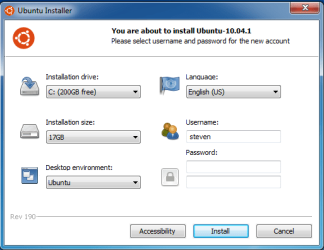
Step 2: Select the hard drive you wish to install it on. Keep in mind it will NOT erase Windows.
WUBI.png
Step 3: Select the amount of space you want to give tos Ubuntu to use. I recommend 3GB.


Step 4: Select your desktop enviornment. This is personal prefernce, if you are new to Linux I suggest sticking with Ubuntu.


Step 5: Select your language.


Step 6: Set your screenname. Note that this cannot contain capitalized letters of any kind.


Step 7: Set your password. When you have completed that hit the install button and wait!


Step 8: When it finishes downloading and installing Ubuntu, just restart to boot into Ubuntu!


OPTION TWO

Native Install


Step 1: Burn a CD/DVD with the Ubuntu ISO through Windows.


Step 2: Boot from the CD/DVD when you start up your computer.


Step 3:
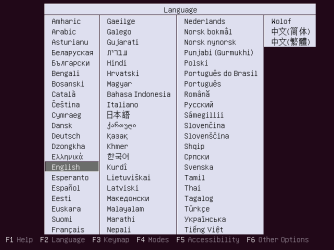
Press the up button the moment something appears on that screen and select a language.
Ubunt0.png
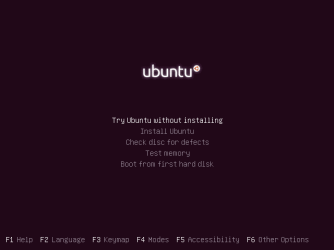
Step 4: Select the option 'Try ubuntu without installing'.
Ubuntu1.png
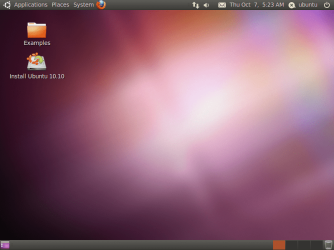
Step 5: When the desktop appears double click the icon on the desktop called 'Install Ubuntu'.
Ubuntu2.png
Step 6: When the installer launches fully, select your language and hit the foward button.
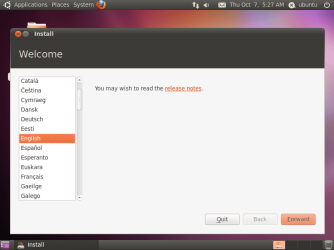
Ubuntu3.png
Step 7: On this screen you'll want to choose that options you want. I suggest selecting them both. Hit the foward button again after you select what you want.
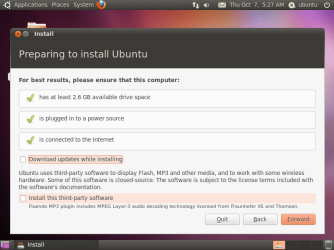
Ubuntu4.png
Step 8: On this screen you'll want to select the 'specify partitions' option and click foward.
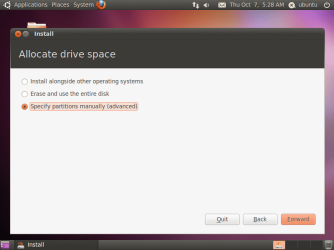
Ubuntu5.png
Step 9: Here as you can see we already have some unallocated space, click it and select the 'Add' button. (Note: You can select an already created partition, make sure not to overwrite your Windows partition!)
Ubuntu6.png
Step 10: A window should pop up, you should make the mount point '/' and the 'Use as' EXT4 filesystem. Click Ok when done.
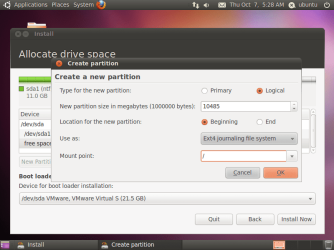
Ubuntu7.png
Step 11: After that click the 'Install Now' button and follow the onscreen instructions.


Step 12: You'll be prompted to reboot after its finished, reboot and select the top option in the Grub 2 Boot Loader and you're now in Ubuntu!


Last edited by a moderator:
Thanks for the tutorial. :)
Looking forward to part two.

Regards
 

My Computer My Computer

Computer Manufacturer/Model Number
Custom
OS
Win7 HP (x64)/Win7 Ultimate (x64)
CPU
Core i7 920
Motherboard
Intel X58
Memory
6 x 2GB Corsair XMS3
Graphics Card(s)
CF HD4890
Sound Card
Asus Xonar
Monitor(s) Displays
Dell 2408WFP
Screen Resolution
1920 x 1200
Hard Drives
2 x 150GB WDC Velociraptors (Raid 0)
1 x 1TB Seagate
1 x 1.5TB Seagate
PSU
Corsair HX1000W
Case
Antec 1200
Keyboard
Razer Lycosa/N52te
Mouse
Razer Lachesis
Added the second Option. :)
 

My Computer My Computer

Computer Manufacturer/Model Number
Custom | Whitebox
OS
Windows 7 Ultimate, OS X 10.7, Ubuntu 11.04
CPU
Intel E6750 @ 3.80GHz
Motherboard
Gigabyte GA-EP45-UD3L (Revision 1.1)
Memory
2x2GB & 2x1GB (6GB) OCZ Reaper 1066MHz @ 1080MHz
Graphics Card(s)
EVGA nVidia GTX 260 896mb (216 Core) FTW Edition
Sound Card
Realtek ALC888
Monitor(s) Displays
21" VIZIO TV
Screen Resolution
1680x1050 @ 60Hz
Hard Drives
Western Digital WD6401AALS - 640GB
Hitachi HDP725016GLA380 - 160GB
PSU
Corsair 750W
Case
NZXT Nemesis Elite
Cooling
Thermaltake SpinQ
Keyboard
Logitech Wireless S520
Mouse
Logitech Wireless S520 - Microsoft Wireless Arc Mouse
Internet Speed
Download: 20mbps, Upload: 3mbps
Thanks for the work done.:)
Will give this a go.

Regards
 

My Computer My Computer

Computer Manufacturer/Model Number
Custom
OS
Win7 HP (x64)/Win7 Ultimate (x64)
CPU
Core i7 920
Motherboard
Intel X58
Memory
6 x 2GB Corsair XMS3
Graphics Card(s)
CF HD4890
Sound Card
Asus Xonar
Monitor(s) Displays
Dell 2408WFP
Screen Resolution
1920 x 1200
Hard Drives
2 x 150GB WDC Velociraptors (Raid 0)
1 x 1TB Seagate
1 x 1.5TB Seagate
PSU
Corsair HX1000W
Case
Antec 1200
Keyboard
Razer Lycosa/N52te
Mouse
Razer Lachesis
Good tutorial. Two recommendations I would make for people doing a full native installation... if you don't establish an internet connection before before beginning the install, the average first time user will not be able to get drivers for hardware that wasn't included in the cd... this includes some wireless adapters adapters and hardware that is very old, very new, or isn't commonly used

Also Ubuntu installs much more quickly from a flash drive than from a cd/dvd and the process is no more difficult than burning a CD in windows 7

if you just want to try it for a few days, I would recommend using one of the other tutorials to make a bootable flash drive, rather than using wubi..on the average system, it works better as a portable OS booted from a flash drive than when installed inside windows as a program
 
Good tutorial. Two recommendations I would make for people doing a full native installation... if you don't establish an internet connection before before beginning the install, the average first time user will not be able to get drivers for hardware that wasn't included in the cd... this includes some wireless adapters adapters and hardware that is very old, very new, or isn't commonly used

Also Ubuntu installs much more quickly from a flash drive than from a cd/dvd and the process is no more difficult than burning a CD in windows 7

if you just want to try it for a few days, I would recommend using one of the other tutorials to make a bootable flash drive, rather than using wubi..on the average system, it works better as a portable OS booted from a flash drive than when installed inside windows as a program


Thanks for the info

Regards
 

My Computer My Computer

Computer Manufacturer/Model Number
Custom
OS
Win7 HP (x64)/Win7 Ultimate (x64)
CPU
Core i7 920
Motherboard
Intel X58
Memory
6 x 2GB Corsair XMS3
Graphics Card(s)
CF HD4890
Sound Card
Asus Xonar
Monitor(s) Displays
Dell 2408WFP
Screen Resolution
1920 x 1200
Hard Drives
2 x 150GB WDC Velociraptors (Raid 0)
1 x 1TB Seagate
1 x 1.5TB Seagate
PSU
Corsair HX1000W
Case
Antec 1200
Keyboard
Razer Lycosa/N52te
Mouse
Razer Lachesis
Whats the maximum number of partitions in Windows 7 for one drive?
I have Ubuntu as a virtual machine on vmworkstation and I have a backup of the two drive partitions using paragon drive manager 2010 this includes the swap partition. I want to create this on my current installation but I am not sure if you can create a logical partition with the two partitions within or if you have to create two seperate partitions? I already have four partitions so can I create one more partition?
Paragon drive manager allows the set up of dual boot configurations so I think that this will work but I need some advice on the current situation.
 
Last edited:

My Computer My Computer

Computer Manufacturer/Model Number
Sony Z series
OS
Windows 7 64 bit
CPU
intel i7
Motherboard
Sony custom model
Memory
8 GB
Graphics Card(s)
nvidia
Sound Card
n/a
Monitor(s) Displays
lcd
Hard Drives
256 GB solid state
You get 3 primary partitions and a logical partition..

however, the best way I've found to dual boot ubuntu (or any other current free version of linux) with any version of windows since xp is with a clean install of both operating systems on their own primary partitions

use the windows install disk to:
Create a windows system partition of at least 40GB but no more than 20% of the HDD
Create a 2nd NTFS media partition that leaves 10-20% of the end of the HDD unformatted and unpartitioned, for sharing files between windows and linux
Delete the system reserved partition before installing windows 7

After windows is installed.. boot the linux install cd/dvd/usb key drive and install using the "use the largest contiguous free space" option.. and let linux determine the size of the SWAP partition.

any attempts to prepare the linux portion of the HDD using a windows utility or with a third party partition tool, other than just creating free unpartitioned space at the end of the drive, is doomed to fail miserably if you are someone who needs to ask how to do it
 
Looks like it doomed to fail so I've created a new install with the original Windows 7 now on a logical partition the same size in total as my original which had two primary partitions for the C and D drives. I use the paragon dual boot software to boot up between the two os's. I've deleted the windows 100 Mb partition and installed the paragon os bootup software and so far it boots up Winows ok.
The rest is free space so now doing a fresh install of ubuntu, but because I want to have a existing ubuntu install which I backed up as a partition which 30 Gb is it ok to specify the same size partition for the new install and then over write this with the previous backup partition? If I create a swap partition of the same size as the original then will this configuration work ok?
 

My Computer My Computer

Computer Manufacturer/Model Number
Sony Z series
OS
Windows 7 64 bit
CPU
intel i7
Motherboard
Sony custom model
Memory
8 GB
Graphics Card(s)
nvidia
Sound Card
n/a
Monitor(s) Displays
lcd
Hard Drives
256 GB solid state
You may want to add Part #3 in sometime as well. The "install in Windows" option is seen when first placing the live cd in the drive or when browsing to the wubi.exe on the cd you burn.

The other option for setting a dual boot with ubuntu is assigning the mount point "/" to the main root parition and then seeing a new entry added in the 7 BCD using the EasyBCD program's form of NeoGrub which also works quite well. The advantage of the wubi installer however is seeing the latest release installed while in Windows to another partition(root), another hard drive, or even a usb flash drive.

These are a few other options to mention here. Still looks good however! :D
 

My Computers My Computers

System One System Two

  • Computer type
    PC/Desktop
    Computer Manufacturer/Model Number
    Custom builds = 2
    OS
    W7 Ultimate x64/W10 Pro x64/W11 Pro Triple Boot - Main PC W7 Remote PC Micro ATX W7 Pro x64/W11 Pro
    CPU
    AMD Phenom II X4 975 Deneb 3.6ghz - 965 2nd remote pc
    Motherboard
    Gigabyte GA-790XTA-UD4-Gigabyte GA-880GM-D2H remote pc
    Memory
    Kingston Hyper X DDR3 1600 1.5v 16gb - Hyper X Fury 8gb 2nd
    Graphics Card(s)
    MSI HD Radeon 5750 1gb - MSI HD Radeon 6450 on mini tower
    Sound Card
    Creative Labs X-Fi Xtreme Audio P - Realtek onooard 2nd case
    Monitor(s) Displays
    ASUS VW199T-P 19" HP 2082a Main-HP 2082a 20" remote pc
    Screen Resolution
    Asus 1440x900 - HP 1600x900
    Hard Drives
    WD Black 1TB HD per OS W7, W10, and pending W11 presently on 500gb OS Drive - Pending Triple 1TB HDs for Spanned Storage/backup volume
    Single 2TB external USB enclosure, single 1TB System 7 Host/Boot drive, Pending 8TB external HD for system image b
    PSU
    Corsair 750TX - primary / Corsair CX600 - second
    Case
    Antec 900-2 - SSD compatible / NZXT Vulcan mini tower
    Cooling
    Zalman CNPS9900A
    Keyboard
    AZIO L70 Backlit Letters Gaming - ONN Cordless/USB
    Mouse
    MSI DS200 Programmable, Logitech Cordless
    Internet Speed
    30mbps upgrade - primary hard wired - mini tower usb WiFi
    Antivirus
    GFI VIPRE Internet Security 2014 on W7 2016 beta on W10,
    Browser
    Cyberfox, WaterFox 64bit FF variants, FireFox x64, Pale Moon
    Other Info
    Accomdata fan cooled usb 2.0 PIDE/Sata II, III external enclosure.
    Sambient usb/eSata PATA/Sata II, III external enclosure.
  • Computer type
    PC/Desktop
    System Manufacturer/Model Number
    CUSTOM ASSEMBLY
    OS
    W7 Pro x64/W11 Pro
    CPU
    AMD Deneb 3.6ghz - 965
    Motherboard
    Gigabyte GA-880GM-D2H remote pc
    Memory
    Kingston Hyper X Fury 8gb
    Graphics Card(s)
    MSI HD Radeon 6450 DVI Output
    Sound Card
    Realtek onooard Creative or Other separate PENDING
    Monitor(s) Displays
    VIZIO 32" LCD TV Separate LCD Pending
    Screen Resolution
    1600x1080
    Hard Drives
    WD 500GB OS Host/Boot WD Green 1TB Storage/Backup
    PSU
    Corsair 600W - THERMALTAKE 600W spare case
    Case
    NZXT Vulcan mini tower
    Cooling
    Twin 120mm Top Fans - 240mm Side Cover
    Keyboard
    ONN Cordless/USB Logitech Cordless
    Mouse
    ONN USB/Cordless - Logitech Cordless
    Internet Speed
    DSL 5G
    Browser
    MS Edge, FireFox, WaterFox x64, FireFox Nightly
    Other Info
    OS Testing-Remote Access to Main TeamViewer
Thank for the advise. I had to go with the Ubuntu live cd method since the paragon os boot software only seems to work with Windows os's. Anyway I set the size of the partition to be the same as the one I backed up ie 30Gb did I new install and got the clean install to boot up ok. So I can now boot up Windows 7 or Ubuntu. The only now to do is to try overwriting this new partition with the backed up partition (after backing up the clean install in case it won't work) and seeing if this boots up ok. The swap partition does not need changing so it should work.
I do this with a Windows XP vmware virtual machine ie backing up the virtual drive/s using drive backup software booted up from within the virtual os and restoring to a small laptop with the same size hard drive as the virtual machines. It works fine but you always need to uninstall the vmware tools on the virtual machine pior to backing it up otherwise the vmware tools uninstaller will not work once yor have restored it to the real computer. This also works the opposite way by restoring the real os to a virtual os. So you have have the best of both worlds with the same setup on both the virtual and the real machine!
 

My Computer My Computer

Computer Manufacturer/Model Number
Sony Z series
OS
Windows 7 64 bit
CPU
intel i7
Motherboard
Sony custom model
Memory
8 GB
Graphics Card(s)
nvidia
Sound Card
n/a
Monitor(s) Displays
lcd
Hard Drives
256 GB solid state
Thanks you very much this information really helped me out

Thanks you very much this information really helped me out
 

My Computer My Computer

Computer type
PC/Desktop
Computer Manufacturer/Model Number
ASUS K53S
OS
MS Windows 7 Home Premium 64-bit SP1
CPU
Intel Core i7 2670QM @ 2.20GHZ
Motherboard
ASUSTeK Computer Inc. K53SV (CPU 1)
Memory
8.00 GB Dual-Channel DDR3 @ 665MHz
Graphics Card(s)
2047MB GeForce GT 540M (ASUStek Computer Inc)
Sound Card
Realtek High Definition Audio
Monitor(s) Displays
1
Hard Drives
596GB Hitachi HTS547564A9E384 (SATA)
Internet Speed
29,5 MBPS DOWNL AND 6 UPLOAD
Antivirus
Microsoft Security Essentials, SUPERANTISPYWARE
Browser
CHROME,IE
Other Info
i love to travel also
i have lived in Hungary & Ireland & Germany and Belgium
and worked in the Netherlands as i used to live in a bordertown.....
Hi all
God bless
Peace
No signal - Dectect drive done, no any drives found

Hi everybody, Good day to all of you...
I just bought a new desktop brand Acer - Model - Aspire M7721
Intel (R) core (TM) i7CPU 920@2,67ghz 2,67ghz - 6 gig ram
64 Bits. WINDOWS 7 BASED OFFCOURSE....
WHEN STARTING UP I GET A BLACK SCREEN FOR A SECOND SHOWING THE ERROR MESSAGE - Dectect drive done, no any drives found
WHEN I TURN on the machine i get a black screen a second before power turns off SHOWING THE ERROR message - No signal
So i get two errors -
in boot mode the error - Dectect drive done, no any drives found
Before turning off black screen error - No signal

I just reinstalled windows 7 on this desktop using the ALT + F10 shortcut and i did a full format.

Can anybody help me fix these erors?
Thank you very much for your assistance and guidelines.
Your help is much appreciated.
 

My Computer My Computer

Computer type
PC/Desktop
Computer Manufacturer/Model Number
ASUS K53S
OS
MS Windows 7 Home Premium 64-bit SP1
CPU
Intel Core i7 2670QM @ 2.20GHZ
Motherboard
ASUSTeK Computer Inc. K53SV (CPU 1)
Memory
8.00 GB Dual-Channel DDR3 @ 665MHz
Graphics Card(s)
2047MB GeForce GT 540M (ASUStek Computer Inc)
Sound Card
Realtek High Definition Audio
Monitor(s) Displays
1
Hard Drives
596GB Hitachi HTS547564A9E384 (SATA)
Internet Speed
29,5 MBPS DOWNL AND 6 UPLOAD
Antivirus
Microsoft Security Essentials, SUPERANTISPYWARE
Browser
CHROME,IE
Other Info
i love to travel also
i have lived in Hungary & Ireland & Germany and Belgium
and worked in the Netherlands as i used to live in a bordertown.....
Hi all
God bless
Peace
Thanks for the interesting information

Hey thank you very much for the interesting information


These are a few other options to mention here. Still looks good however! :D[/QUOTE]
 

My Computer My Computer

Computer type
PC/Desktop
Computer Manufacturer/Model Number
ASUS K53S
OS
MS Windows 7 Home Premium 64-bit SP1
CPU
Intel Core i7 2670QM @ 2.20GHZ
Motherboard
ASUSTeK Computer Inc. K53SV (CPU 1)
Memory
8.00 GB Dual-Channel DDR3 @ 665MHz
Graphics Card(s)
2047MB GeForce GT 540M (ASUStek Computer Inc)
Sound Card
Realtek High Definition Audio
Monitor(s) Displays
1
Hard Drives
596GB Hitachi HTS547564A9E384 (SATA)
Internet Speed
29,5 MBPS DOWNL AND 6 UPLOAD
Antivirus
Microsoft Security Essentials, SUPERANTISPYWARE
Browser
CHROME,IE
Other Info
i love to travel also
i have lived in Hungary & Ireland & Germany and Belgium
and worked in the Netherlands as i used to live in a bordertown.....
Hi all
God bless
Peace
I've installed the installer without any problems. When booting into dual boot I can let the system boot normally or choose from the 5 options that you have. Every option I have tried I just get a blank black screen and that's it. Has anyone experienced that or have any information on how to fix it? I think it might be my video card but not sure. Any information is appreciated.

Thank you.
 

My Computer My Computer

Computer Manufacturer/Model Number
Sony VPCZ112GX
OS
Windows 7 Ultimate x64
CPU
Intel® Core™ i5 - 520M - 2.40GHz
Memory
4GB DDR3/1066MHz
Graphics Card(s)
NVIDIA GeForce GT 330M GPU
Sound Card
Intel High Definition Audio
Hard Drives
Solid State Drive - 128GB (64GB+64GB)
any way to get win7 as default??

i installed linux side by side now i get option on start up which os to login.
linux is on the top and logs on to it automatically if i dont press any key for 10 seconds.
but i want win7 to be on top, i mean the default one if i dont press anything i want it to start win7, how can i do that?? please let me know:confused:
 
Ubuntu Freezing ^^

I used WUBI install method...

Ubuntu 10.10 froze 3 times during 1st usage!? I had to manually reboot system each time.

Windows seems to be running ok (after 30 mins or so) I used Ubuntu for an hour maybe...

Any fixes??

i.e. can I move what's installed to another HD?? -=or=- is there a setting that needs changing somewhere?

T.I.A
 

My Computer My Computer

Computer type
PC/Desktop
Computer Manufacturer/Model Number
Desktop: Prebuilt & Laptop: Toshiba Notebook
OS
Windows 7 - Home Premium - 64bit (x2)
CPU
Pentium (Dual) E6600 @ 3.06GHz & Intel i5-2410M @ 2.3GHz
Motherboard
ASUS P5G41C-M LX & Toshiba L750
Memory
4GB & 4GB
Graphics Card(s)
GeForce 210 & Intel HD Graphics Family
Sound Card
Integrated (x2)
Monitor(s) Displays
AOC 2051 & Generic PnP
Screen Resolution
1280 x 1024 & 1366 x 768
Hard Drives
ST3500418AS ATA - 500GB,

Toshiba MK6465GSXN - 600GB
PSU
520 WATT & 120 WATT
Case
Unknown (x2)
Cooling
Unknown (x2)
Keyboard
Standard PS/2 (x2)
Mouse
Microsoft USB Intellimouse & Touchpad
Internet Speed
11 Mbps (DL) 1 Mbps (UL)
Antivirus
F-Secure (ISP provided) & Kapersky
Browser
Google Chrome (x2)
Other Info
Modem: Dynalink RTA1025W
Could you show How to dual boot Windows 7 and Ubuntu that installing Windows 7 after Ubuntu Installed? :D
 

My Computer My Computer

OS
Windows 7 Ultimate 64bit
CPU
AMD Phenom 8450 Triple-Core 2.10GHz
Motherboard
Gigabyte
Memory
2GB DDR2

My Computer My Computer

Computer type
PC/Desktop
Computer Manufacturer/Model Number
Medion Erazer (note to self: insert model number) - with custom additions
OS
Windows 10 Pro x64
CPU
Intel Core i5 7400 @ 3.00GHz
Motherboard
OEM supllied with PC
Memory
8GB 2133Mhz DDR4 (OEM supplied)
Graphics Card(s)
Gygabyte Windforce GTX 1050Ti (Factory Overclocked)
Sound Card
Realtek
Monitor(s) Displays
Acer Al1980 + HKC
Screen Resolution
1360*768(HKC) / 1280*1024(Acer)
Hard Drives
1TB Toshiba
1TB WD Caviar Green
120GB Samsung Evo 840
PSU
OEM supplied (no power rating on case)
Case
OEM Supplied
Cooling
Stock
Keyboard
Logitech Wireless
Mouse
Logitect Wireless
Internet Speed
40Mb/s Down 10Mb/s Up
Antivirus
Defender
Browser
Firefox
Thanks very much for this
This is very interesting
 

My Computer My Computer

Computer type
PC/Desktop
Computer Manufacturer/Model Number
ASUS K53S
OS
MS Windows 7 Home Premium 64-bit SP1
CPU
Intel Core i7 2670QM @ 2.20GHZ
Motherboard
ASUSTeK Computer Inc. K53SV (CPU 1)
Memory
8.00 GB Dual-Channel DDR3 @ 665MHz
Graphics Card(s)
2047MB GeForce GT 540M (ASUStek Computer Inc)
Sound Card
Realtek High Definition Audio
Monitor(s) Displays
1
Hard Drives
596GB Hitachi HTS547564A9E384 (SATA)
Internet Speed
29,5 MBPS DOWNL AND 6 UPLOAD
Antivirus
Microsoft Security Essentials, SUPERANTISPYWARE
Browser
CHROME,IE
Other Info
i love to travel also
i have lived in Hungary & Ireland & Germany and Belgium
and worked in the Netherlands as i used to live in a bordertown.....
Hi all
God bless
Peace
Back
Top