Dual Boot Windows XP(Primary) and Windows 7 (Logical Partition)

bigalw

New member
Local time
1:11 PM
Messages
7
I have disk with 3 partitions, XP (C) is primary, Win 7 (D) is Logical and (E) is Logical and a data drive. I used a dual boot program to choose which OS to use at start up. I did this to preserve XP apps in case they wouldn't work on Win 7. Now I want to delete XP and have Win 7 as the primary partition (C) and data as Drive D. I cannot change the current Win 7 D drive to a primary partition or change the current C to a logical partition.
I tried using EasUS Partition and it won't let me do what I want. I hope someone can understand what I am trying to do and help me out. Thank you
 

My Computer My Computer

At a glance

Windows 7 Premium
OS
Windows 7 Premium
I would do a complete reinstall. Get your data off ( backed up ) wipe everything, make 2 partitions and install 7. All your partitions should be primary.
 

My Computer My Computer

At a glance

Windows 10 Pro x64Intel Core i7 6700KGSkill TridentZ RGB 16GB 3600 16-16-16-36EVGA GTX 980 Ti SC x2
Computer type
PC/Desktop
Computer Manufacturer/Model Number
Skylake Special #666
OS
Windows 10 Pro x64
CPU
Intel Core i7 6700K
Motherboard
Asus Sabertooth Z170 Mark 1
Memory
GSkill TridentZ RGB 16GB 3600 16-16-16-36
Graphics Card(s)
EVGA GTX 980 Ti SC x2
Sound Card
Realtek High Definition
Monitor(s) Displays
AOC G2460PG
Screen Resolution
1920 x 1080 144Hz
Hard Drives
Samsung 860 Pro 256GB, Seagate Barracuda 4TB x2
PSU
EVGA 1000 P2, EVGA White Custom Braided Cables
Case
Corsair Vengeance C70 Gunmetal Black
Cooling
Corsair H100i v2, Corsair ML120 x2, Thermal Grizzly Kryonaut
Keyboard
Logitech G910 Orion Spectrum
Mouse
Logitech G700s
Internet Speed
Verizon Fios Quantum Gateway 75/75
Antivirus
Windows Defender, Malwarebytes Free 3.8.3
Browser
Chrome
Other Info
Corsair SP120 x4, LG Blu-ray Drive, Durabrand HT-395 100 Watt Dolby Digital Amp, Corsair H2100 Wireless 7.1 Headset
That's what I was afraid of
 

My Computer My Computer

At a glance

Windows 7 Premium
OS
Windows 7 Premium
The problem is that your bootmgr is in the XP partition. You have to make the Win7 partition a primary partition and then you can try this - but chose the partition letter for the current Win7 partition
 

My Computer My Computer

At a glance

Vista, Windows7, Mint Mate, Zorin, Windows 8from 1.6GHz Duo to i7
Computer Manufacturer/Model Number
HP, Dell, Gateway, Toshiba - 4 laptops and 2 desktops
OS
Vista, Windows7, Mint Mate, Zorin, Windows 8
CPU
from 1.6GHz Duo to i7
Monitor(s) Displays
2x HP w2207
Hard Drives
5x HDD, 7x SSD, 12x Externals
Keyboard
with trackball - no mices
Mouse
Trackball mice
Internet Speed
DSL 6000
Thanks for the info. Before I press the button on EasyBCD, could you look at the boot info I have to make sure what I want is correct (Make D my boot drive then delete C)

EasyBCD info screen
There are a total of 2 entries listed in the bootloader.

Default: Windows 7
Timeout: 30 seconds
Boot Drive: C:\

Entry #1
Name: Earlier Version of Windows
BCD ID: {ntldr}
Drive: C:\
Bootloader Path: \ntldr
 

Attachments

My Computer My Computer

At a glance

Windows 7 Premium
OS
Windows 7 Premium
You want to move the Windows 7 one to D.
 

My Computer My Computer

At a glance

Vista, Windows7, Mint Mate, Zorin, Windows 8from 1.6GHz Duo to i7
Computer Manufacturer/Model Number
HP, Dell, Gateway, Toshiba - 4 laptops and 2 desktops
OS
Vista, Windows7, Mint Mate, Zorin, Windows 8
CPU
from 1.6GHz Duo to i7
Monitor(s) Displays
2x HP w2207
Hard Drives
5x HDD, 7x SSD, 12x Externals
Keyboard
with trackball - no mices
Mouse
Trackball mice
Internet Speed
DSL 6000
Won't let me do it - D is a logical drive
 

My Computer My Computer

At a glance

Windows 7 Premium
OS
Windows 7 Premium
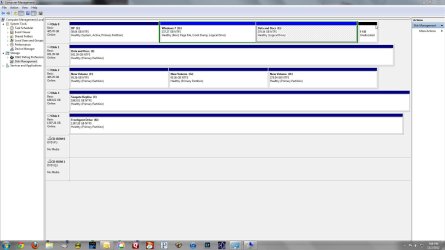
Can you post a picture of your Disk Management so that we can advise you further. I hate to tell you to change D to primary and then you have a problem with dynamics.
 

My Computer My Computer

At a glance

Vista, Windows7, Mint Mate, Zorin, Windows 8from 1.6GHz Duo to i7
Computer Manufacturer/Model Number
HP, Dell, Gateway, Toshiba - 4 laptops and 2 desktops
OS
Vista, Windows7, Mint Mate, Zorin, Windows 8
CPU
from 1.6GHz Duo to i7
Monitor(s) Displays
2x HP w2207
Hard Drives
5x HDD, 7x SSD, 12x Externals
Keyboard
with trackball - no mices
Mouse
Trackball mice
Internet Speed
DSL 6000
Attached is a pic of my disk management (attached file)
 

Attachments

  • Disk Mgmt.jpg
    Disk Mgmt.jpg
    150.2 KB · Views: 65

My Computer My Computer

At a glance

Windows 7 Premium
OS
Windows 7 Premium
change win7 partition to primary!! Do it with partition wizard. Post disk management afterwards. Then I give you more instructions
 

My Computer My Computer

At a glance

Microsoft Windows 7 Home Premium 64-bits 7601...Intel(R) Core(TM) i3 CPU M 370 @ 2.40GHz4,00 GBATI Mobility Radeon HD 5400 Series
Computer type
Laptop
Computer Manufacturer/Model Number
ACER ASPIRE 5742G
OS
Microsoft Windows 7 Home Premium 64-bits 7601 Multiprocessor Free Service Pack 1
CPU
Intel(R) Core(TM) i3 CPU M 370 @ 2.40GHz
Motherboard
Acer Aspire 5742G
Memory
4,00 GB
Graphics Card(s)
ATI Mobility Radeon HD 5400 Series
Sound Card
(1) AMD High Definition Audio Device (2) Realtek High Defi
Screen Resolution
1366 x 768 x 32 bits (4294967296 colors) @ 60 Hz
Hard Drives
WDC WD5000BEVT-22ZAT0
Here are the steps which work best to recover to Win7 its boot files and the disk space from XP, based on having given them countless times in almost four years. Feel free to bookmark them.

As suggested boot free Partition Wizard bootable CD to rightclick D to Modify>Set to Primary, click OK.

Now rightclick D again to Modify>Set Active, click OK.

Next click on the Win7 HD to highlight it, from Disk tab above click on Rebuild MBR, OK, Apply all steps.

Reboot to see if WIn7 will start. If not boot into the Win7 DVD or System Repair Disk to run Startup Repair - Run up to 3 Separate Times until Win7 starts and holds the System Active flags.

Now that we know Win7 will start on its own from its own partition, you can boot again into PW CD, rightclick on XP to Delete, OK. Then rightclick on C to Resize, slide left border all the way to the left to take up the deleted XP space, OK, Apply both steps. Have your Win7 DVD or REpair CD standing by since sometimes resizing on the boot sector requires repairs.
 
Last edited:
Thanks - your instructions look like they are setting C as the primary. My Windows 7 is on D. Should I follow your instructions using D instead of C?
 

My Computer My Computer

At a glance

Windows 7 Premium
OS
Windows 7 Premium
You must have incorrectly run the Win7 installer from XP which locked out C from being available. Otherwise when the Win7 installer is correctly booted Win7 will always be on C when booted.

So you can follow the steps I've given converting D to Primary and marking Active to recover the boot files and XP drive space into it, although it will be on D.

Or you can back up your files and boot the Win7 installer to delete both of those partitions and create a new one to correctly install Win7 on C from boot. Your choice.
 
Kaktussoft is right. There is no problem turning the D partition into a primary. Best is to use the bootable CD of Partition Wizard (last entry on that webpage). Burn that to CD and boot with that CD. Then highlight the D partition, click the Partition tab. The controls are under "Modify".
 

My Computer My Computer

At a glance

Vista, Windows7, Mint Mate, Zorin, Windows 8from 1.6GHz Duo to i7
Computer Manufacturer/Model Number
HP, Dell, Gateway, Toshiba - 4 laptops and 2 desktops
OS
Vista, Windows7, Mint Mate, Zorin, Windows 8
CPU
from 1.6GHz Duo to i7
Monitor(s) Displays
2x HP w2207
Hard Drives
5x HDD, 7x SSD, 12x Externals
Keyboard
with trackball - no mices
Mouse
Trackball mice
Internet Speed
DSL 6000
I'll give that a shot, thanks
 

My Computer My Computer

At a glance

Windows 7 Premium
OS
Windows 7 Premium
Back
Top