Dual boot XP and 7 : Uninstall of 7

Fritz Fraghof

New member
Member
Local time
3:42 AM
Messages
25
I've been using the RC of 7 for a while on my notebook. While it's a great OS for my desktop, my notebook doesn't quite have the horsepower to run it as well as it runs XP. Therefore I am looking to uninstall 7RC. I am hoping someone can give me the correct method since I know the PC can become unbootable if borked up.

I found a few guides here for uninstalling XP in a dual boot, but not for uninstalling 7.

Notebook PC info:

- One physical drive, 3 partitions.
- XP installed first on partition C (which is basic, 'boot' partition)
- 7RC installed on partition E (basic partition)
- my stuff on partition D (basic, 'system' partition)

I don't mind if the partitions are left as is. I just want to auto boot into XP and be able to delete the Windows 7 stuff on partition E.

BTW I used Easy BCD to get the boot choice thing going originally, and Acronis Disk Director Suite 10 for the partitioning.

Thanks for any help.
 

My Computer My Computer

At a glance

Windows 7 Home BasicAMD Athlon 6000+ x22GBPowercolor Radeon 5770 1GB
OS
Windows 7 Home Basic
CPU
AMD Athlon 6000+ x2
Memory
2GB
Graphics Card(s)
Powercolor Radeon 5770 1GB
Sound Card
Audigy 2 Value
Monitor(s) Displays
19"
Mouse
Furry

My Computer My Computer

At a glance

W7 Ult. x64 | OS XIntel Mobile Core 2 Duo 2.93Ghz [T9800 Penryn]4096MB Samsung DDR3 Dual Channel [PC3-8500F 1...NVIDIA GeForce 9600M GT 512MB [G96M Rev. C1]
Computer Manufacturer/Model Number
Apple Macbook Pro (April 2009)
OS
W7 Ult. x64 | OS X
CPU
Intel Mobile Core 2 Duo 2.93Ghz [T9800 Penryn]
Motherboard
NVIDIA nForce 730i Rev. B1 [Mac-F2268EC8 (U2E1)]
Memory
4096MB Samsung DDR3 Dual Channel [PC3-8500F 1066Mhz]
Graphics Card(s)
NVIDIA GeForce 9600M GT 512MB [G96M Rev. C1]
Sound Card
SB X-Fi Surround 5.1 USB | Onboard Realtek (Disabled)
Monitor(s) Displays
Acer x223wbd 22" | Apple Anti-Glare 17" (Disabled)
Screen Resolution
{Current} 1440x900 {Acer} 1680x1050 {Apple} 1920x1200
Hard Drives
{Internal}
Seagate Momentus 320GB 2.5" 7200RPM [ST9320421AS]

{Externals}
LaCie 320GB USB 2.0 HDD [301284UR]
LaCie 750GB USB 2.0 FW400 eSATA HDD [301314U]
LaCie 1TB USB 2.0 HDD [301304UR]
PSU
Magsafe
Case
Aluminum/Unibody (MBP52)
Cooling
2 x 6000 RPM Fans
Keyboard
Logitech G-15v2 [PN 920-000379]
Mouse
Logitech G-9 [PN 910-000338]
Internet Speed
12Mbps/2.5Mbps w/ 24Mbps Speed Boost [Comcast]
Other Info
Logitech X-540 Speakers [PN 970223-0122]
Sennheiser PC-151 Headset
I wonder why your data drive holds the System MBR? This is unusual. It should be on an OS drive.

Please post back a screenshot of your full Disk Management drive map, using SNipping Tool in Start Menu - attach file using paper clip in Reply Box.

Tell us to where you want to recover RC HD space.
 
I wonder why your data drive holds the System MBR? This is unusual. It should be on an OS drive.

Tell us to where you want to recover RC HD space.

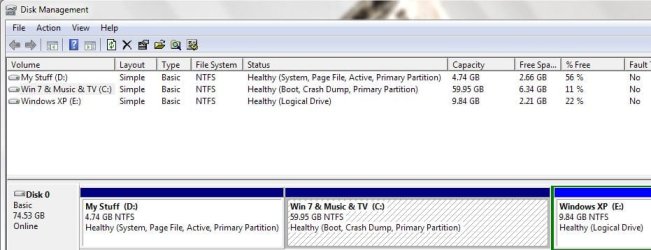
Is this what you wanted to see?

Yes it may be unusual. It's an Acer notebook and I think the D partition was used for the Acer system restore originally. At least until I started using it for my stuff.

I'd like to recover the space used by the Win 7 program files. Forgive any confusion with the first post. In Win XP partition C is the XP OS, and in Win 7 partition C is the Win 7 OS.

Thanks for your time and help.

Google is my friend :)
Normally Google is my friend too. However I have followed a generic guide for doing this before and my system ended up not starting. I don't know enough about MBRs etc to trust myself, and the stakes are so high. Thus my turn to the trusted and knowledgeable folks here.
 

Attachments

  • disk.JPG
    disk.JPG
    56.8 KB · Views: 18
Last edited:

My Computer My Computer

At a glance

Windows 7 Home BasicAMD Athlon 6000+ x22GBPowercolor Radeon 5770 1GB
OS
Windows 7 Home Basic
CPU
AMD Athlon 6000+ x2
Memory
2GB
Graphics Card(s)
Powercolor Radeon 5770 1GB
Sound Card
Audigy 2 Value
Monitor(s) Displays
19"
Mouse
Furry

Since there was a week without a reply I took the plunge and followed the guide above. It's back to booting into just XP. Great. Now the only problem is that I am trying to delete the Windows 7 'Program Files, ProgramData and Windows' folders to free up space and I am getting this message:

Error Deleting File or Folder. Cannot delete xxxx. Access is denied.

Can anyone give me a tip of what to do next? I realize this is an XP thing but perhaps someone here might know.
 

My Computer My Computer

At a glance

Windows 7 Home BasicAMD Athlon 6000+ x22GBPowercolor Radeon 5770 1GB
OS
Windows 7 Home Basic
CPU
AMD Athlon 6000+ x2
Memory
2GB
Graphics Card(s)
Powercolor Radeon 5770 1GB
Sound Card
Audigy 2 Value
Monitor(s) Displays
19"
Mouse
Furry
what does your disk manager look like now. post img

not like above i hope. boot is on c:?
 

My Computer My Computer

At a glance

W7, Xp ProAMD Sempron 2600+1GBRadeon HD3650
Computer Manufacturer/Model Number
Self
OS
W7, Xp Pro
CPU
AMD Sempron 2600+
Motherboard
K8V-MX
Memory
1GB
Graphics Card(s)
Radeon HD3650
Sound Card
Soundmax
Monitor(s) Displays
17" HP CRT
Screen Resolution
1024x768
Hard Drives
1x WDC WD800BB
1x HDS728080
PSU
? 460W
Case
Coolermaster
Cooling
enough
Keyboard
M$S
Mouse
Optical
Internet Speed
1500kbs
Other Info
OLD!!! does the job i need.
This is what Windows XP Disk Management reports. Forgive the lack of a screenshot.

Windows XP C: Healthy (Boot)
My Stuff D: Healthy (System)
Windows 7 E: Healthy

All NTFS Basic partitions. Note that in the screenshot a few posts above (from Windows 7 Disk Management) the C partition was the Windows 7 drive, whereas in XP the C partition is the Windows XP drive. I just liked the OS always on the C drive, at least according to the OS lettering system.

I guess if there is no easy solution I shall just transfer everything I want to save from the old Windows 7 partition (40GB) before formatting it.
 

My Computer My Computer

At a glance

Windows 7 Home BasicAMD Athlon 6000+ x22GBPowercolor Radeon 5770 1GB
OS
Windows 7 Home Basic
CPU
AMD Athlon 6000+ x2
Memory
2GB
Graphics Card(s)
Powercolor Radeon 5770 1GB
Sound Card
Audigy 2 Value
Monitor(s) Displays
19"
Mouse
Furry
This is what Windows XP Disk Management reports. Forgive the lack of a screenshot.

Windows XP C: Healthy (Boot)
My Stuff D: Healthy (System)
Windows 7 E: Healthy

All NTFS Basic partitions. Note that in the screenshot a few posts above (from Windows 7 Disk Management) the C partition was the Windows 7 drive, whereas in XP the C partition is the Windows XP drive. I just liked the OS always on the C drive, at least according to the OS lettering system.

I guess if there is no easy solution I shall just transfer everything I want to save from the old Windows 7 partition (40GB) before formatting it.

I had to do the same a few times, :(

Hope you end up happy:cool:
 

My Computer My Computer

At a glance

W7, Xp ProAMD Sempron 2600+1GBRadeon HD3650
Computer Manufacturer/Model Number
Self
OS
W7, Xp Pro
CPU
AMD Sempron 2600+
Motherboard
K8V-MX
Memory
1GB
Graphics Card(s)
Radeon HD3650
Sound Card
Soundmax
Monitor(s) Displays
17" HP CRT
Screen Resolution
1024x768
Hard Drives
1x WDC WD800BB
1x HDS728080
PSU
? 460W
Case
Coolermaster
Cooling
enough
Keyboard
M$S
Mouse
Optical
Internet Speed
1500kbs
Other Info
OLD!!! does the job i need.
You do not want to delete the folders in the Win7 partition, you want to delete the partition itself in Disk Management.

I asked to where you want to recover the HD space. Using a partition manager, you can both delete Win7 partition and Resize XP into the deleted space if you want.

You have a less desirable situation there with XP way out in right field where it is furthest from laser. Much better to have OS on first partition, or closer to the center as it would be if you Resize it into deleted Win7 space.

I suggest free Partition Wizard bootable CD to do this. Back up your files as Resizing operations can fail, although you shouldn't have to worry about repairing the MBR since it remains on D partition. To recover/repair it into XP partition, you would run an XP repair install from boot.
 
You have a less desirable situation there with XP way out in right field where it is furthest from laser. Much better to have OS on first partition, or closer to the center as it would be if you Resize it into deleted Win7 space.

Thanks for your tips. So you are saying that performance suffers if the OS is not on the left most partition? I had no idea about this. I am far from being an expert in working with partitions.

When you say "Back up your files as Resizing operations can fail,", did you mean with the free Partition Wizard bootable CD? I normally use Acronis Disk Director Suite 10 for the partitioning. Is there always a risk of data loss with partitioning? If so, I shall avoid it whenever possible. I don't have an easy way to back up my data at the moment.
 

My Computer My Computer

At a glance

Windows 7 Home BasicAMD Athlon 6000+ x22GBPowercolor Radeon 5770 1GB
OS
Windows 7 Home Basic
CPU
AMD Athlon 6000+ x2
Memory
2GB
Graphics Card(s)
Powercolor Radeon 5770 1GB
Sound Card
Audigy 2 Value
Monitor(s) Displays
19"
Mouse
Furry
The only fully safe partitioning function I've found is Windows Disk Mgmt to Shrink Volume.

Any 3rd party resizing operation can fail, but in 100+ we have helped with here using the best WIn7 manager, free Partition Wizard bootable CD, none have failed so far to my knowledge. But you should always back up your files anyway - and a Win7 system image if you can't stand to lose your install.

The performance difference due to HD position is fractional but enough that I would not have my OS way out in right field. The laser docks on the other side of the HD, so it is extra work for it that's unnecessary.

Others may know more about this and be able to comment on it more authoritatively.
 
Back
Top