Dual boot: xp won't recognize 2nd harddisk.

gerd78

New member
Local time
10:48 AM
Messages
5
Hi,

I setup my pc with 2 harddisk. I dual boot xp 32-bit and windows 7 64-bit on 1 harddisk and other harddisk is for my data storage for xp and 7. The problem is that windows 7 recognize the 2 harddisk and I can access the data but xp won't. Xp can see the harddisk on 'my computer' but it was listed RAW.

Anyone know how to fix it so that xp and 7 can access the 2nd harddisk?

Thanks!
 

My Computer My Computer

OS
windows 7
Any chance it was set up as a GUID drive and not MBR?
 

My Computer My Computer

Computer Manufacturer/Model Number
Homebuilt
OS
Windows 7 x64
CPU
i7-2600K
Motherboard
Asus P8Z77-v Pro
Memory
8 G
Graphics Card(s)
GTX 480
Sound Card
Onboard
Monitor(s) Displays
LG W2753V
Screen Resolution
1920x1080
Hard Drives
Crucial M4 128 G SSD
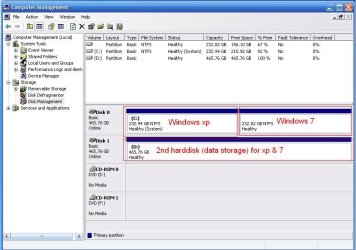
Here is my disk management from xp

XP DM.JPG

I hide the windows 7 partition from xp, so that xp won't disturb windows 7

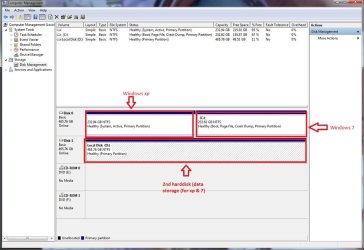
Here is my disk management from windows 7

windows 7 DM.jpg

I hide the windows xp partition from windows 7, so that windows 7 won't disturb windows xp.

Am I doing it correctly? or can you help me set it up so that the 2nd harddisk can be used by both xp & windows 7. I'm dual-boot windows xp 32-bit & windows 7 home premium 64-bit.

Thanks!
 
Last edited:

My Computer My Computer

OS
windows 7
From within XP, have you tried any partition options for the D: partition?

Which OS did you use to format the drive?
 

My Computer My Computer

Computer Manufacturer/Model Number
Homebuilt
OS
Windows 7 x64
CPU
i7-2600K
Motherboard
Asus P8Z77-v Pro
Memory
8 G
Graphics Card(s)
GTX 480
Sound Card
Onboard
Monitor(s) Displays
LG W2753V
Screen Resolution
1920x1080
Hard Drives
Crucial M4 128 G SSD
How would WIndows 7 disturb XP if you didn't hide it?

How did you accomplish hiding it?

I have never seen an OS without a letter before. I would retrieve the letter it was originally assigned (D?) and replace it in Disk Management

or run an XP repair install to correct this, freeing up D: in Disk Mgmt first.

After a repair install, you'll need to run one also from the Win7 desktop to reconfigure the dual boot correctly.
 
I follow this instructions to dual boot xp & windows 7, I didn't do step 4 (except that I rename the "Earlier version of Windows" to "microsoft windows xp".

How to dual boot Windows XP and Windows 7 (XP installed first)

My previous pc setup is 320 gb (xp) & 500 gb for data storage. then I buy a new 500 gb harddisk for the dual boot. I installed xp first, then a few days later I installed windows 7. I use windows 7 "diskpart" to create the partition for the windows 7 os. I disabled the 2nd harddisk from bios before I do the installation. After the OS were installed, then I enabled the 2nd harddisk from bios. And also each OS can see each other from "my computer", so I use disk management to remove the drive letter.

Am I doing it wrong?
 

My Computer My Computer

OS
windows 7
Why would you remove an OS drive letter in Disk Management? I have never heard of this.

Is the letter still available to be returned to XP in Disk Management on the OS you removed it from?

So are you still booting from the BIOS into the OS of your choice? Which HD is set to boot first in HD? THen you use the shortcut key to BIOS Boot Menu to boot the other one, correct?
 
What do System restore points have to do with removing the letter from your XP drive in Disk Management?

This is what you did, correct?

If so, then you need to replace it.

I cannot understand why you would do such a thing. Where is it recommended?

Maybe I am missing something. Please fill me in.
 
I will tried to restore the drive letter and see what happens after i finished work. Anyway thanks for your help!
 

My Computer My Computer

OS
windows 7
I read some mumbo jumbo about not being able to see a volume made with one OS if the other OS was hidden. If you hid the OS to keep XP from wiping out your restore points, this may be the situation.

That is why I asked which OS you used to make the volume.
 

My Computer My Computer

Computer Manufacturer/Model Number
Homebuilt
OS
Windows 7 x64
CPU
i7-2600K
Motherboard
Asus P8Z77-v Pro
Memory
8 G
Graphics Card(s)
GTX 480
Sound Card
Onboard
Monitor(s) Displays
LG W2753V
Screen Resolution
1920x1080
Hard Drives
Crucial M4 128 G SSD
If you have a major failure when reinstating the Drive letter, boot into XP CD to do a Repair Install.

Repair Windows XP - How to Perform a Repair Installation of Windows XP - Part 1 of 2

Then boot into Win7 DVD Repair console to run Startup Repair 3 separate times until Win7 starts up. Run a http://www.sevenforums.com/tutorials/3413-repair-install.html?ltr=R to reconfigure the Dual Boot correctly.

Or you can unplug XP once you get it repaired, then use Win7 DVD Repair to Startup Win7 and choose which OS to enter via BIOS boot menu rather than Windows Dual Boot Menu.
 
Back
Top