
So what I want is to dual boot windows 8 and 7, but I have a little problem. First some info about my laptop: It came with windows 8 pre installed.
Specs:
Laptop manufacturer : Toshiba
Operating System
Windows 8 64-bit
CPU
Intel Core i5 3320M @ 2.60GHz 61 °C
Ivy Bridge 22nm Technology
RAM
8.00GB Dual-Channel DDR3 @ 798MHz (11-11-11-28)
Motherboard
Intel PLCSF8 (U3E1) 63 °C
Graphics
Generic PnP Monitor (1366x768@60Hz)
1024MB ATI AMD Radeon HD 7500/7600 Series (Toshiba) 51 °C
Radeon HD 7610M 1GB
Storage
698GB TOSHIBA MQ01ABD075 (SATA) 37 °C
Optical Drives
TSSTcorp CDDVDW SN-208DN
Audio
Realtek High Definition Audio
Video driver: Catalyst control center 13.11 beta
I also have a window 8 recovery stick just in case
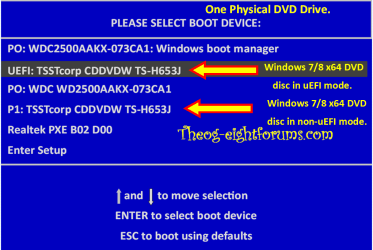
I made a second partition for windows 7 and gave it 150GB. When I made a windows 7 usb stick it was for some reason not bootable so I decided to install it into the partition from within windows 8. After it was done copying files the second option (I don't remember what it was) got to around 20-30% and it restarted my laptop, and it took a while at the starting windows screen, after that it got to updating registry files and back to starting windows. I waited a hour for it load but it just didn't want to load. It was stuck at Starting Windows. I shutdown my laptop and tried to go into windows 7 with safe mode but it got stuck on safe mode loading screen too. What am I doing wrong?
Specs:
Laptop manufacturer : Toshiba
Operating System
Windows 8 64-bit
CPU
Intel Core i5 3320M @ 2.60GHz 61 °C
Ivy Bridge 22nm Technology
RAM
8.00GB Dual-Channel DDR3 @ 798MHz (11-11-11-28)
Motherboard
Intel PLCSF8 (U3E1) 63 °C
Graphics
Generic PnP Monitor (1366x768@60Hz)
1024MB ATI AMD Radeon HD 7500/7600 Series (Toshiba) 51 °C
Radeon HD 7610M 1GB
Storage
698GB TOSHIBA MQ01ABD075 (SATA) 37 °C
Optical Drives
TSSTcorp CDDVDW SN-208DN
Audio
Realtek High Definition Audio
Video driver: Catalyst control center 13.11 beta
I also have a window 8 recovery stick just in case
I made a second partition for windows 7 and gave it 150GB. When I made a windows 7 usb stick it was for some reason not bootable so I decided to install it into the partition from within windows 8. After it was done copying files the second option (I don't remember what it was) got to around 20-30% and it restarted my laptop, and it took a while at the starting windows screen, after that it got to updating registry files and back to starting windows. I waited a hour for it load but it just didn't want to load. It was stuck at Starting Windows. I shutdown my laptop and tried to go into windows 7 with safe mode but it got stuck on safe mode loading screen too. What am I doing wrong?
My Computer
At a glance
Windows 8 x64Intel Core i5 3320M @ 2.60GHz8.00GB Dual-Channel DDR3 @ 798MHz (11-11-11-28)1024MB ATI AMD Radeon HD 7500/7600 Series (To...
- Computer type
- Laptop
- Computer Manufacturer/Model Number
- Toshiba
- OS
- Windows 8 x64
- CPU
- Intel Core i5 3320M @ 2.60GHz
- Motherboard
- Intel PLCSF8 (U3E1)
- Memory
- 8.00GB Dual-Channel DDR3 @ 798MHz (11-11-11-28)
- Graphics Card(s)
- 1024MB ATI AMD Radeon HD 7500/7600 Series (Toshiba)
- Sound Card
- AMD High Definition Audio Device
- Monitor(s) Displays
- Generic PnP Monitor
- Screen Resolution
- 1366x768 @ 60Hz
- Hard Drives
- 698GB TOSHIBA MQ01ABD075 (SATA)
- Mouse
- Rapoo 7100P
- Antivirus
- Windows 8 defender
- Browser
- Google Chrome




 I hope you guys will keep helping me!
