Dual booting windows 8 and 7, stuck on starting up screen.

Inenting

New member
Local time
7:54 PM
Messages
7
So what I want is to dual boot windows 8 and 7, but I have a little problem. First some info about my laptop: It came with windows 8 pre installed.
Specs:

Laptop manufacturer : Toshiba
Operating System
Windows 8 64-bit
CPU
Intel Core i5 3320M @ 2.60GHz 61 °C
Ivy Bridge 22nm Technology
RAM
8.00GB Dual-Channel DDR3 @ 798MHz (11-11-11-28)
Motherboard
Intel PLCSF8 (U3E1) 63 °C
Graphics
Generic PnP Monitor (1366x768@60Hz)
1024MB ATI AMD Radeon HD 7500/7600 Series (Toshiba) 51 °C
Radeon HD 7610M 1GB
Storage
698GB TOSHIBA MQ01ABD075 (SATA) 37 °C
Optical Drives
TSSTcorp CDDVDW SN-208DN
Audio
Realtek High Definition Audio

Video driver: Catalyst control center 13.11 beta
I also have a window 8 recovery stick just in case

I made a second partition for windows 7 and gave it 150GB. When I made a windows 7 usb stick it was for some reason not bootable so I decided to install it into the partition from within windows 8. After it was done copying files the second option (I don't remember what it was) got to around 20-30% and it restarted my laptop, and it took a while at the starting windows screen, after that it got to updating registry files and back to starting windows. I waited a hour for it load but it just didn't want to load. It was stuck at Starting Windows. I shutdown my laptop and tried to go into windows 7 with safe mode but it got stuck on safe mode loading screen too. What am I doing wrong?
 

My Computer My Computer

At a glance

Windows 8 x64Intel Core i5 3320M @ 2.60GHz8.00GB Dual-Channel DDR3 @ 798MHz (11-11-11-28)1024MB ATI AMD Radeon HD 7500/7600 Series (To...
Computer type
Laptop
Computer Manufacturer/Model Number
Toshiba
OS
Windows 8 x64
CPU
Intel Core i5 3320M @ 2.60GHz
Motherboard
Intel PLCSF8 (U3E1)
Memory
8.00GB Dual-Channel DDR3 @ 798MHz (11-11-11-28)
Graphics Card(s)
1024MB ATI AMD Radeon HD 7500/7600 Series (Toshiba)
Sound Card
AMD High Definition Audio Device
Monitor(s) Displays
Generic PnP Monitor
Screen Resolution
1366x768 @ 60Hz
Hard Drives
698GB TOSHIBA MQ01ABD075 (SATA)
Mouse
Rapoo 7100P
Antivirus
Windows 8 defender
Browser
Google Chrome
So what I want is to dual boot windows 8 and 7, but I have a little problem.

YES & NO, down to your UEFI/BIOS firmware setting.

As this a OEM manufacturer's PC with Pre-installed Windows 8.

1) Downgrade to Windows 7.
Downgrade Windows 8 to Windows 7
Warning you must have the UEFI/BIOS firmware setting in Step Three set.

Make sure you read the NOTE at Step three.

2) If Using a USB Pen drive on a PC with a UEFI BIOS.
USB Pen drive need to be formatted to FAT32 as in
UEFI Bootable USB Flash Drive - Create in Windows
Take note of Step 11 for Windows 7.
Also you will need to use a USB 2.0 port, as there are no USB 3.0 drivers in Windows 7.


You will need to buy Windows 7.
 

My Computer My Computer

At a glance

ME/XP/Vista/Win7
OS
ME/XP/Vista/Win7
Hi,

The proper way to install is using a bootable media either dvd/usb. Make your USB stick bootable first and try doing a fresh install. it should work.

But from your comments i see the second step is "Expanding your files " which ran for 20-30%. may be the OS is corrupt
 

My Computer My Computer

At a glance

Windows 7Intel Core 2 Duo4 gb ddr2ATI Radeon Sapphire 4350
Computer Manufacturer/Model Number
Intel
OS
Windows 7
CPU
Intel Core 2 Duo
Motherboard
Intel DV Mobo
Memory
4 gb ddr2
Graphics Card(s)
ATI Radeon Sapphire 4350
Sound Card
Intel Audio Card
Monitor(s) Displays
Samsung 19"
Screen Resolution
1920*1024
Hard Drives
Seagate 500 GB
PSU
Corsair PSU
Case
Intex
Keyboard
Logitech
Mouse
Logitech
Internet Speed
4 MBPS
So I followed the tips you guys gave me and I managed to make the usb bootable, but when I booted from the usb it showed me loading windows files and then Starting Windows. It got stuck on that screen again, yet when I do the same in virtualbox after starting windows screen it immediately goes to the installation page. So the problem is not the windows 7 iso I got from my dvd a long time ago. I would like to try it with the dvd but I can't find and also I really don't want to buy it again.

My BIOS settings:

2q1tk5y.jpg


208bna0.jpg


f53fyw.jpg


qr0sgx.jpg
 

My Computer My Computer

At a glance

Windows 8 x64Intel Core i5 3320M @ 2.60GHz8.00GB Dual-Channel DDR3 @ 798MHz (11-11-11-28)1024MB ATI AMD Radeon HD 7500/7600 Series (To...
Computer type
Laptop
Computer Manufacturer/Model Number
Toshiba
OS
Windows 8 x64
CPU
Intel Core i5 3320M @ 2.60GHz
Motherboard
Intel PLCSF8 (U3E1)
Memory
8.00GB Dual-Channel DDR3 @ 798MHz (11-11-11-28)
Graphics Card(s)
1024MB ATI AMD Radeon HD 7500/7600 Series (Toshiba)
Sound Card
AMD High Definition Audio Device
Monitor(s) Displays
Generic PnP Monitor
Screen Resolution
1366x768 @ 60Hz
Hard Drives
698GB TOSHIBA MQ01ABD075 (SATA)
Mouse
Rapoo 7100P
Antivirus
Windows 8 defender
Browser
Google Chrome
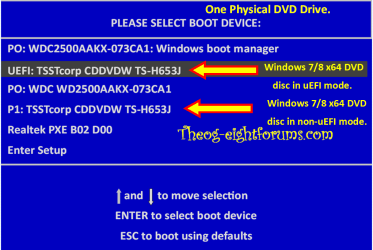
Are you booting in UEFI mode?

Windows 8 Downgrade-006 SB for posting.PNG
 

My Computer My Computer

At a glance

ME/XP/Vista/Win7
OS
ME/XP/Vista/Win7
You never have to buy the DVD again if you have the license. YOu can use the latest official ISO in Step 1 of Clean Reinstall - Factory OEM Windows 7 burned to DVD or written to flash stick with the tool in Step 2. The other steps also apply to retail and will assure you get and keep a perfect install, based on what's worked best in tens of thousands we've helped with here.

Try disabling Turbo Boost until after install, and enabling USB 3.0. Then be sure to use the correct port for whichever flash stick you have 2.0 or 3.0.

As Ray points out above you must boot the installer as a UEFI device to install in UEFI (Unified Extensible Firmware Interface) - Install Windows 7 with - Windows 7 Forums.

If this fails what always works is to Bypass UEFI to Install WIn7
 
This is the boot menu I get:
2aets4.jpg


And this is what my hdd looks like with all the partitions and stuff:
vENdKgM.png


I don't want to get rid of windows 8 because I don't have a dvd or serial key or whatever for that. On my dads windows 7 laptop there is a little label with the serial key for his windows 7 but on my laptop there is only a label with the windows 8 logo on it. I would like to keep my windows 8 installation because ill probably need it somewhere in the future and this way I wont have to buy it.
 

My Computer My Computer

At a glance

Windows 8 x64Intel Core i5 3320M @ 2.60GHz8.00GB Dual-Channel DDR3 @ 798MHz (11-11-11-28)1024MB ATI AMD Radeon HD 7500/7600 Series (To...
Computer type
Laptop
Computer Manufacturer/Model Number
Toshiba
OS
Windows 8 x64
CPU
Intel Core i5 3320M @ 2.60GHz
Motherboard
Intel PLCSF8 (U3E1)
Memory
8.00GB Dual-Channel DDR3 @ 798MHz (11-11-11-28)
Graphics Card(s)
1024MB ATI AMD Radeon HD 7500/7600 Series (Toshiba)
Sound Card
AMD High Definition Audio Device
Monitor(s) Displays
Generic PnP Monitor
Screen Resolution
1366x768 @ 60Hz
Hard Drives
698GB TOSHIBA MQ01ABD075 (SATA)
Mouse
Rapoo 7100P
Antivirus
Windows 8 defender
Browser
Google Chrome
   Warning

THE BELOW WILL NOT WORK, IF YOU HAVE NOT SET THE UEFI/BIOS firmware CORRECTLY.


If you have not done the above, Windows 7 x64 will not boot to finish the install.

Use the Windows 7 x64 SETUP.EXE from the DVD, from the Windows 8 desktop.
 

My Computer My Computer

At a glance

ME/XP/Vista/Win7
OS
ME/XP/Vista/Win7
I don't want to get rid of windows 8 because I don't have a dvd or serial key or whatever for that. On my dads windows 7 laptop there is a little label with the serial key for his windows 7 but on my laptop there is only a label with the windows 8 logo on it. I would like to keep my windows 8 installation because ill probably need it somewhere in the future and this way I wont have to buy it.


Instead of spinning mythology about Windows 8 why not ask us so we can explain it to you?

Win8 is coded to your BIOS so that it will reactivate on that machine whether it's reinstalled from an installer which can be provided for Clean Install - Windows 8. You can also always run Factory Recovery from its hotkey at boot, or use Recovery media you make now for such a reinstall - although it's not as good as the Clean REinstall it saves a lot of time if you're not picky.

So if you cannot get it to install in UEFI then once you make the bootable Recovery media as a backup you can also choose to Bypass UEFI to Install WIn7 which always works.

I have installed Win7 in a Dual Boot on many Win8 machines in order to keep 8 on the HD until I decide if I want to keep the PC. In every case I had to Disable Secure boot, then boot the installer as a UEFI device. You have no UEFI devices showing in the boot menu, which makes it appear you have disabled it in the BIOS, most often done by enabling Legacy Mode or changing the setting for Compatibility Support Module (CSM). So check those settings now, expand them to take a camera snap if possible and post it back so we can help you choose.

In addition if you're using a flash stick use Option One in to make it a UEFI Bootable USB Flash Drive - Create in Windows . It will not boot otherwise.

So let us see the choices in BIOS setup for UEFI, Legacy BIOS, or CSM. You may have to dig through each tab to find them.
 
I don't want to get rid of windows 8 because I don't have a dvd or serial key or whatever for that. On my dads windows 7 laptop there is a little label with the serial key for his windows 7 but on my laptop there is only a label with the windows 8 logo on it. I would like to keep my windows 8 installation because ill probably need it somewhere in the future and this way I wont have to buy it.


Instead of spinning mythology about Windows 8 why not ask us so we can explain it to you?

Win8 is coded to your BIOS so that it will reactivate on that machine whether it's reinstalled from an installer which can be provided for Clean Install - Windows 8. You can also always run Factory Recovery from its hotkey at boot, or use Recovery media you make now for such a reinstall - although it's not as good as the Clean REinstall it saves a lot of time if you're not picky.

So if you cannot get it to install in UEFI then once you make the bootable Recovery media as a backup you can also choose to Bypass UEFI to Install WIn7 which always works.

I have installed Win7 in a Dual Boot on many Win8 machines in order to keep 8 on the HD until I decide if I want to keep the PC. In every case I had to Disable Secure boot, then boot the installer as a UEFI device. You have no UEFI devices showing in the boot menu, which makes it appear you have disabled it in the BIOS, most often done by enabling Legacy Mode or changing the setting for Compatibility Support Module (CSM). So check those settings now, expand them to take a camera snap if possible and post it back so we can help you choose.

In addition if you're using a flash stick use Option One in to make it a UEFI Bootable USB Flash Drive - Create in Windows . It will not boot otherwise.

So let us see the choices in BIOS setup for UEFI, Legacy BIOS, or CSM. You may have to dig through each tab to find them.

So let me get this straight: If I somehow format my drive and I somehow get a windows 8 dvd or iso I can install it without needing a serial?

And also the pictures above is almost everything that I think is necessary because the other tabs are: Boot witch shows the boot order and main tab wich shows just the general info. I can change the boot mode to CSM. That pretty much all the options the bios has.

And the bypass UEFI mode thingy, do I have to change the boot mode to CSM? Because with linux I have to change it to csm to boot from usb, is that the same? I also disabled secure boot and boot speed is on normal. Also do I have to remove the supervisor and user password or is that not necessary. And the only thing I see that has Legacy in it is: USB Legacy Mode but from the info I get the impression its not the right one.

Also I didn't think it would be this hard so thank you very much for putting up with me :) I hope you guys will keep helping me!
 

My Computer My Computer

At a glance

Windows 8 x64Intel Core i5 3320M @ 2.60GHz8.00GB Dual-Channel DDR3 @ 798MHz (11-11-11-28)1024MB ATI AMD Radeon HD 7500/7600 Series (To...
Computer type
Laptop
Computer Manufacturer/Model Number
Toshiba
OS
Windows 8 x64
CPU
Intel Core i5 3320M @ 2.60GHz
Motherboard
Intel PLCSF8 (U3E1)
Memory
8.00GB Dual-Channel DDR3 @ 798MHz (11-11-11-28)
Graphics Card(s)
1024MB ATI AMD Radeon HD 7500/7600 Series (Toshiba)
Sound Card
AMD High Definition Audio Device
Monitor(s) Displays
Generic PnP Monitor
Screen Resolution
1366x768 @ 60Hz
Hard Drives
698GB TOSHIBA MQ01ABD075 (SATA)
Mouse
Rapoo 7100P
Antivirus
Windows 8 defender
Browser
Google Chrome
No problem, we are always here to help.

I personally will always forgo UEFI because I've never seen it improve anything including boot times as advertised, but it complicates all of the reinstall/repair regimens and workarounds which were mostly developed here during Win7 BETA. Not enough bang for the UEFI buck.

So if you want to get free of it then make your Recovery disks if you want a path back to factory preinstall (I never do) then enable CSM, boot the WIn7 installer normally to Clean Install Windows 7 making sure to delete all partitions during Steps 7/8 so that the installer will convert the hard drive to MBR install.

However if you want to compare UEFI then there is something wrong with the settings since it shows no UEFI devices as it should in the Boot Menu. Is Windows 8 still booting? If so then it should have UEFI WIndows Boot Manager in there at the least. And once you create your flash stick correctly or burn a DVD from the downloads provided, either of those should show up as UEFI devices to boot.

I don't work with Windows 8 so don't know which official downloads they use over at Eight Forums but there should be help available there if/when you're ever ready to Clean Install - Windows 8. You shouldn't worry about whether it will reactivate since we do know for sure it will, and they can explain it fully over there.
 
Thank you guys for helping me, I successfully managed to get to the install screen but it seems I have to convert my hdd to mbr first so ill be doing that later when I buy a external hdd and make a full backup on it.

Thank you so much for helping me!
 

My Computer My Computer

At a glance

Windows 8 x64Intel Core i5 3320M @ 2.60GHz8.00GB Dual-Channel DDR3 @ 798MHz (11-11-11-28)1024MB ATI AMD Radeon HD 7500/7600 Series (To...
Computer type
Laptop
Computer Manufacturer/Model Number
Toshiba
OS
Windows 8 x64
CPU
Intel Core i5 3320M @ 2.60GHz
Motherboard
Intel PLCSF8 (U3E1)
Memory
8.00GB Dual-Channel DDR3 @ 798MHz (11-11-11-28)
Graphics Card(s)
1024MB ATI AMD Radeon HD 7500/7600 Series (Toshiba)
Sound Card
AMD High Definition Audio Device
Monitor(s) Displays
Generic PnP Monitor
Screen Resolution
1366x768 @ 60Hz
Hard Drives
698GB TOSHIBA MQ01ABD075 (SATA)
Mouse
Rapoo 7100P
Antivirus
Windows 8 defender
Browser
Google Chrome
I successfully managed to get to the install screen but it seems I have to convert my hdd to mbr first

You are not booting the Windows 7 x64 DVD in UEFI mode.
 

My Computer My Computer

At a glance

ME/XP/Vista/Win7
OS
ME/XP/Vista/Win7
I successfully managed to get to the install screen but it seems I have to convert my hdd to mbr first

You are not booting the Windows 7 x64 DVD in UEFI mode.

When I booted it in UEFI mode it didnt get past the starting windows screen
 

My Computer My Computer

At a glance

Windows 8 x64Intel Core i5 3320M @ 2.60GHz8.00GB Dual-Channel DDR3 @ 798MHz (11-11-11-28)1024MB ATI AMD Radeon HD 7500/7600 Series (To...
Computer type
Laptop
Computer Manufacturer/Model Number
Toshiba
OS
Windows 8 x64
CPU
Intel Core i5 3320M @ 2.60GHz
Motherboard
Intel PLCSF8 (U3E1)
Memory
8.00GB Dual-Channel DDR3 @ 798MHz (11-11-11-28)
Graphics Card(s)
1024MB ATI AMD Radeon HD 7500/7600 Series (Toshiba)
Sound Card
AMD High Definition Audio Device
Monitor(s) Displays
Generic PnP Monitor
Screen Resolution
1366x768 @ 60Hz
Hard Drives
698GB TOSHIBA MQ01ABD075 (SATA)
Mouse
Rapoo 7100P
Antivirus
Windows 8 defender
Browser
Google Chrome
What exactly are the CSM or Legacy BIOS settings available in BIOS? Let us see screenshots with them expanded fully.

If there are no other CSM or Legacy Mode settings than what you showed in the screenshots earlier, the problem must be with the installer. Burn another DVD from the official ISO for your version from Clean Reinstall - Factory OEM Windows 7 or write to flash stick using only Option One from UEFI Bootable USB Flash Drive - Create in Windows.
 
What exactly are the CSM or Legacy BIOS settings available in BIOS? Let us see screenshots with them expanded fully.

If there are no other CSM or Legacy Mode settings than what you showed in the screenshots earlier, the problem must be with the installer. Burn another DVD from the official ISO for your version from Clean Reinstall - Factory OEM Windows 7 or write to flash stick using only Option One from UEFI Bootable USB Flash Drive - Create in Windows.

When I change it to CSM boot mode it only gets 1 extra option:

2mysxmu.jpg
 

My Computer My Computer

At a glance

Windows 8 x64Intel Core i5 3320M @ 2.60GHz8.00GB Dual-Channel DDR3 @ 798MHz (11-11-11-28)1024MB ATI AMD Radeon HD 7500/7600 Series (To...
Computer type
Laptop
Computer Manufacturer/Model Number
Toshiba
OS
Windows 8 x64
CPU
Intel Core i5 3320M @ 2.60GHz
Motherboard
Intel PLCSF8 (U3E1)
Memory
8.00GB Dual-Channel DDR3 @ 798MHz (11-11-11-28)
Graphics Card(s)
1024MB ATI AMD Radeon HD 7500/7600 Series (Toshiba)
Sound Card
AMD High Definition Audio Device
Monitor(s) Displays
Generic PnP Monitor
Screen Resolution
1366x768 @ 60Hz
Hard Drives
698GB TOSHIBA MQ01ABD075 (SATA)
Mouse
Rapoo 7100P
Antivirus
Windows 8 defender
Browser
Google Chrome
Back
Top