
You are using an out of date browser. It may not display this or other websites correctly.
You should upgrade or use an alternative browser.
You should upgrade or use an alternative browser.
Dual boots
- Thread starter mickrg123
- Start date

- Local time
- 12:37 PM
- Messages
- 16,784
Odd it should do that - would you be good enough to post a screenshot of Disk Management, so we can hopefully learn from it ?
Thanks
SIW2
Thanks
SIW2
My Computers
System One System Two
-
- Computer type
- PC/Desktop
- OS
- 7 X64
- CPU
- i5 8400
- Motherboard
- gigabyte b365m ds3h
- Memory
- 2x8gb 3200mhz
- Hard Drives
- various
- PSU
- pure power 11 400w cm
- Case
- Coolermaster
- Cooling
- cryorig m9i
-
- Computer type
- PC/Desktop
- OS
- 7x64
- CPU
- g5400
- Motherboard
- ga b365m ds3h
- Memory
- 8gb ddr4 2400
- PSU
- xfx pro 450w
- Local time
- 12:37 PM
- Messages
- 16,784
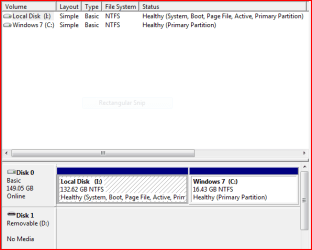
I assume you took that screenshot while booted into Vista?
If that's the case, it looks ok.
You would expect the first partition ( on the left ) to be the first o/s you installed (Vista ).
Since that was the partition marked active, it contains bootmgr - this is why it is called the System partition.
The partition you are currently booted into will be shown as Boot.
If you boot into Win7 and look again , you will see the first partition still showing as System , but now the second will show as Boot.
Strange what happened to the drive letters.
Normally when you boot into Vista - it will assign itself C , then when you boot into 7 , that assigns itself C.
What does bcdedit show now?
SIW2
If that's the case, it looks ok.
You would expect the first partition ( on the left ) to be the first o/s you installed (Vista ).
Since that was the partition marked active, it contains bootmgr - this is why it is called the System partition.
The partition you are currently booted into will be shown as Boot.
If you boot into Win7 and look again , you will see the first partition still showing as System , but now the second will show as Boot.
Strange what happened to the drive letters.
Normally when you boot into Vista - it will assign itself C , then when you boot into 7 , that assigns itself C.
What does bcdedit show now?
SIW2
My Computers
System One System Two
-
- Computer type
- PC/Desktop
- OS
- 7 X64
- CPU
- i5 8400
- Motherboard
- gigabyte b365m ds3h
- Memory
- 2x8gb 3200mhz
- Hard Drives
- various
- PSU
- pure power 11 400w cm
- Case
- Coolermaster
- Cooling
- cryorig m9i
-
- Computer type
- PC/Desktop
- OS
- 7x64
- CPU
- g5400
- Motherboard
- ga b365m ds3h
- Memory
- 8gb ddr4 2400
- PSU
- xfx pro 450w
I think it is working. When I reboot I get screen asking which one to start. I hightlight Vista but my screen is still the new 7 screen with large icons at bottom. How do I know that any work I am doing and saving is going to my Vista drive. When I open in Vista should I have my vista desktop?
My Computer
- OS
- vista 7
- Local time
- 12:37 PM
- Messages
- 16,784
Yes, you should have your Vista desktop when you are booted into Vista.
You will get the 7 desktop when booted into 7.
From what you are saying, it is possible you installed Win7 onto your first partition.
I can't be sure exactly what has gone on until you highlight Vista in the Boot options and press Enter. Then post another screenshot of bcdedit , while booted into that Vista choice.
Also, while booted into the Vista choice, right click Computer on the start menu, click Open , double click on the C drive and post a screenshot of that window - it will show what is on your C drive.
SIW2
You will get the 7 desktop when booted into 7.
From what you are saying, it is possible you installed Win7 onto your first partition.
I can't be sure exactly what has gone on until you highlight Vista in the Boot options and press Enter. Then post another screenshot of bcdedit , while booted into that Vista choice.
Also, while booted into the Vista choice, right click Computer on the start menu, click Open , double click on the C drive and post a screenshot of that window - it will show what is on your C drive.
SIW2
My Computers
System One System Two
-
- Computer type
- PC/Desktop
- OS
- 7 X64
- CPU
- i5 8400
- Motherboard
- gigabyte b365m ds3h
- Memory
- 2x8gb 3200mhz
- Hard Drives
- various
- PSU
- pure power 11 400w cm
- Case
- Coolermaster
- Cooling
- cryorig m9i
-
- Computer type
- PC/Desktop
- OS
- 7x64
- CPU
- g5400
- Motherboard
- ga b365m ds3h
- Memory
- 8gb ddr4 2400
- PSU
- xfx pro 450w
- Local time
- 12:37 PM
- Messages
- 16,784
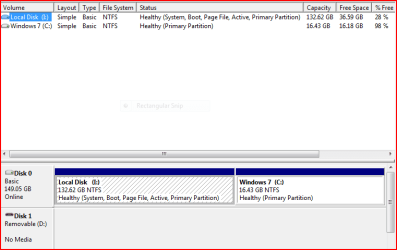
UH OH.
You installed 7 on your fist partition.
I can see from the amount of used space on that 1st partition that all your Vista o/s files and your personal data are still there.
Type Windows.Old into the start search box and if it pops up, click it and you will find all that in there.
The second partition (C) is empty.
if you want to roll that first partition back to your Vista installation, it is possible, but not all that easy.
SIW2
You installed 7 on your fist partition.
I can see from the amount of used space on that 1st partition that all your Vista o/s files and your personal data are still there.
Type Windows.Old into the start search box and if it pops up, click it and you will find all that in there.
The second partition (C) is empty.
if you want to roll that first partition back to your Vista installation, it is possible, but not all that easy.
SIW2
My Computers
System One System Two
-
- Computer type
- PC/Desktop
- OS
- 7 X64
- CPU
- i5 8400
- Motherboard
- gigabyte b365m ds3h
- Memory
- 2x8gb 3200mhz
- Hard Drives
- various
- PSU
- pure power 11 400w cm
- Case
- Coolermaster
- Cooling
- cryorig m9i
-
- Computer type
- PC/Desktop
- OS
- 7x64
- CPU
- g5400
- Motherboard
- ga b365m ds3h
- Memory
- 8gb ddr4 2400
- PSU
- xfx pro 450w
- Local time
- 12:37 PM
- Messages
- 16,784
This is the link if you want to try that - says after you install Vista , but the same applies to 7 (at least I believe so - you may be the first to try it. )
How to restore a computer to a previous Windows installation after you install Windows Vista.
When you get a choice as to which commands to use, use the ones that say "When the previous Windows installation was a different version of Windows Vista". You may not have enough free space to do it.
Otherwise, you could just keep your 7 installation and copy any files , data, etc you need from the Windows.Old folder and use them in your current installation .
I assume you have the media to reinstall Vista when 7 reaches the end of it's trial period?
i just remembered you have an upgrade dvd - you can do a clean install of Vista with that :
http://www.vistax64.com/tutorials/68767-clean-install-upgrade-vista.html
If you are going to use the upgrade to do a Vista reinstall now , make sure you save all your docs., data, etc. out of the Windows.old folder before hand.
Ideally you would copy what you want to save onto an external hd. If you do not have one, copy the really essential stuff to your empty 2nd partition and be careful not to format it while reinstalling Vista.
Hope it helps
SIW2
How to restore a computer to a previous Windows installation after you install Windows Vista.
When you get a choice as to which commands to use, use the ones that say "When the previous Windows installation was a different version of Windows Vista". You may not have enough free space to do it.
Otherwise, you could just keep your 7 installation and copy any files , data, etc you need from the Windows.Old folder and use them in your current installation .
I assume you have the media to reinstall Vista when 7 reaches the end of it's trial period?
i just remembered you have an upgrade dvd - you can do a clean install of Vista with that :
http://www.vistax64.com/tutorials/68767-clean-install-upgrade-vista.html
If you are going to use the upgrade to do a Vista reinstall now , make sure you save all your docs., data, etc. out of the Windows.old folder before hand.
Ideally you would copy what you want to save onto an external hd. If you do not have one, copy the really essential stuff to your empty 2nd partition and be careful not to format it while reinstalling Vista.
Hope it helps
SIW2
Last edited:
My Computers
System One System Two
-
- Computer type
- PC/Desktop
- OS
- 7 X64
- CPU
- i5 8400
- Motherboard
- gigabyte b365m ds3h
- Memory
- 2x8gb 3200mhz
- Hard Drives
- various
- PSU
- pure power 11 400w cm
- Case
- Coolermaster
- Cooling
- cryorig m9i
-
- Computer type
- PC/Desktop
- OS
- 7x64
- CPU
- g5400
- Motherboard
- ga b365m ds3h
- Memory
- 8gb ddr4 2400
- PSU
- xfx pro 450w
- Local time
- 12:37 PM
- Messages
- 16,784
HI,
I take it you have decided to do a clean Vista reinstall after 7 beta has ended ?
Seems sensible to me.
SIW2
I take it you have decided to do a clean Vista reinstall after 7 beta has ended ?
Seems sensible to me.
SIW2
My Computers
System One System Two
-
- Computer type
- PC/Desktop
- OS
- 7 X64
- CPU
- i5 8400
- Motherboard
- gigabyte b365m ds3h
- Memory
- 2x8gb 3200mhz
- Hard Drives
- various
- PSU
- pure power 11 400w cm
- Case
- Coolermaster
- Cooling
- cryorig m9i
-
- Computer type
- PC/Desktop
- OS
- 7x64
- CPU
- g5400
- Motherboard
- ga b365m ds3h
- Memory
- 8gb ddr4 2400
- PSU
- xfx pro 450w
- Local time
- 12:37 PM
- Messages
- 16,784
Good Luck with it and have fun with 7 while it lasts.
SIW2
SIW2
My Computers
System One System Two
-
- Computer type
- PC/Desktop
- OS
- 7 X64
- CPU
- i5 8400
- Motherboard
- gigabyte b365m ds3h
- Memory
- 2x8gb 3200mhz
- Hard Drives
- various
- PSU
- pure power 11 400w cm
- Case
- Coolermaster
- Cooling
- cryorig m9i
-
- Computer type
- PC/Desktop
- OS
- 7x64
- CPU
- g5400
- Motherboard
- ga b365m ds3h
- Memory
- 8gb ddr4 2400
- PSU
- xfx pro 450w
Similar threads

- Replies
- 6
- Views
- 3K
- Replies
- 6
- Views
- 4K
- Replies
- 0
- Views
- 2K
- Replies
- 11
- Views
- 3K