Solved Dual core cpu setting

Davy

New member
Member
Local time
5:49 PM
Messages
69
I'm using a A6-5400K dual core cpu, just wondering about setting in msconfig. When advance boot setting is set to 2 processors I get a split active screen in task manager both showing activity, when set to 1 processor I just get one long one in task manager..... which sitting is right?


Does the Processor setting refer to one dual boot cpu.... or two independent cpu's?


No matter which config. I use in boot setting I still get two cpu's in Device Manager, I assume this is one for each core.


Thanks, Dave
 

My Computer

Computer type
PC/Desktop
Computer Manufacturer/Model Number
custom build
OS
win7 x64
CPU
Trinity A6-5600K
Motherboard
Gigabyte GA-F2A88X-D3H
Memory
8Gb
Graphics Card(s)
APU
Hard Drives
Western Digital
Antivirus
NoD32
Browser
Firefox
Hello Davy

The Processor setting in msconfig can refer to number of cpus in the one computer, or it can refer to number of cores and hyper-threads available on one cpu.

Device Manager displays the installed device drivers, and does not necessarily imply the device is Enabled.

Hope that helps.
 

My Computer

Computer type
PC/Desktop
OS
Windows 7 x64, Vista x64, 8.1 smartphone
CPU
Intel E8400 65W 64-bit
Motherboard
Gigabyte EP45-UD3LR
Memory
DDR2 2 x 2GB, 1GB x 2
Graphics Card(s)
XFX Radeon HD5750
Sound Card
AMD High Definition Audio; Realtek High Definition Audio
Monitor(s) Displays
iiyama prolite X2377HDS
Screen Resolution
1920 x 1080
Hard Drives
500GB 7200 rpm Seagate ST3500413AS 16MB, 500GB 5400 rpm Toshiba MQ02ABF050H 32MB, 200GB 7200 rpm Seagate ST3200820AS 8MB, 2TB 7200 rpm Western Digital WD20EZRX 64MB
PSU
Enermax Liberty Modular
Case
Antec P193 Midi Tower
Keyboard
Mionix ZIBAL 60
Mouse
Razer USB 2.0 Diamondback Mouse or Huion Graphics Tablet
Browser
Internet Explorer, Lunascape, Firefox, Opera, Avast Safezone
Hi iko22, thank you for prompt reply.
So, I'll set it to the highest number available.... that seems be the obvious thing to do.


It was stuck on 1 so I tried deleting the check mark, rebooted and it allowed me to adjust to 2 so I'll leave it at the two setting.


Thank you again. Dave
 

My Computer

Computer type
PC/Desktop
Computer Manufacturer/Model Number
custom build
OS
win7 x64
CPU
Trinity A6-5600K
Motherboard
Gigabyte GA-F2A88X-D3H
Memory
8Gb
Graphics Card(s)
APU
Hard Drives
Western Digital
Antivirus
NoD32
Browser
Firefox
In this context, and just about everywhere in Windows, a processor refers to the number of logical cores. Terms aren't always used consistently. That might be 2 physical CPUs, 1 physical CPU with multiple cores, or 1 core with hyperthreading (I don't know the term used by AMD). It makes no difference. Your CPU does not support the latter. The only time the number of physical CPUs matters is for licensing purposes. Only Windows 7 Professional or higher editions support 2 physical CPUs. That would be high end hardware.

The purpose of the msconfig "number of processors" CPU option is to limit the number of cores used, primarily for testing and diagnostic purposes. Most people will have no need for this option That is why it is an advanced option.

The default and optimum setting is for the checkbox to be unchecked. In this state all available cores will be used. The actual number of cores shown will make no difference if the checkbox is not checked. Setting the actual number of cores does no harm but serves no useful purpose. Much misinformation has been written about this.

And as mentioned by iko22 these settings will not effect what is shown in Device manager.
 

My Computer

Computer type
PC/Desktop
Computer Manufacturer/Model Number
HP
OS
Windows 7 Pro 64 bit
CPU
Xeon W3520
Memory
8 GB
Graphics Card(s)
Nvidia Geforce 210
Thanks LMiller7 for the reply, just that I was curious I if I'd thought about it was a silly question I asked and the answer standing out like a sore thumb... especially after I tried it, panic and curiosity alleviated.


Dave
 

My Computer

Computer type
PC/Desktop
Computer Manufacturer/Model Number
custom build
OS
win7 x64
CPU
Trinity A6-5600K
Motherboard
Gigabyte GA-F2A88X-D3H
Memory
8Gb
Graphics Card(s)
APU
Hard Drives
Western Digital
Antivirus
NoD32
Browser
Firefox
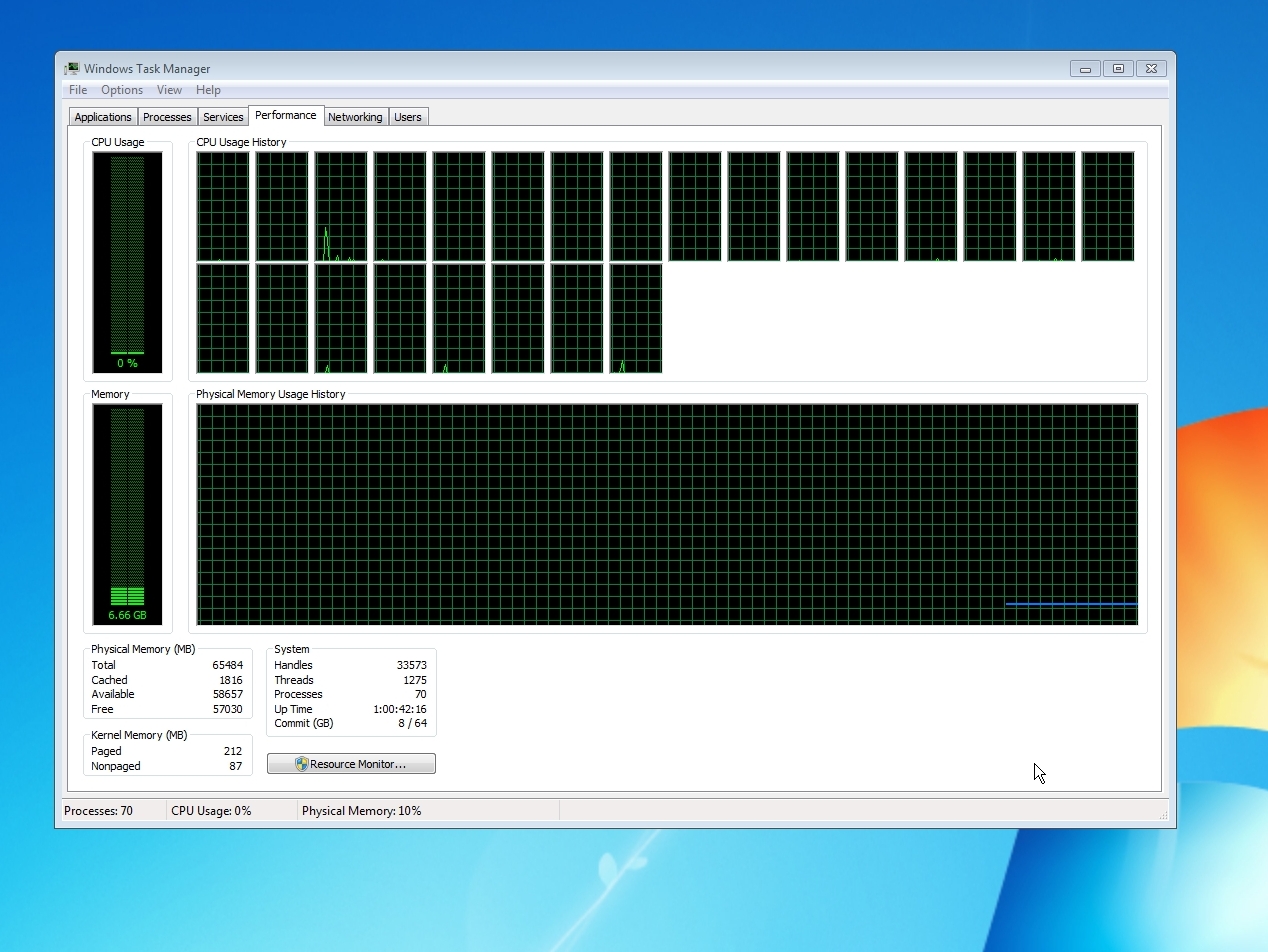
Mine worked out of the gate.

hHomSZN.jpg
 

My Computer

Computer type
PC/Desktop
Computer Manufacturer/Model Number
Self-build
OS
Windows 7 Premium 64bit
CPU
Ryzen 3900x
Motherboard
MSA x570 Gaming Plus
Memory
64gigs G.SKILL Trident ddr4 3200
Graphics Card(s)
Radeon R9 290a
Hard Drives
240 gig SSD, 2 tb nvme
Antivirus
hah
Browser
Opera
Back
Top