Dual Monitors reset when S.Saver/sleep/reboot/hibernate

dexter09

New member
Local time
3:52 AM
Messages
6
Location
Australia
Dual Monitors reset when Screensaver/sleep/reboot/hibernate
&
Returning to single monitor cause a hissy fit tantrum by win 7

I have a problem with Win7 and my dual monitors setup. I have 2 SyncMaster 245T monitors, connected via DVI cable to a NVIDIA GeForce 7900 GTX card. I have downloaded the latest drivers from Nvidia for the card, but I am experiencing a fairly regular issue with regards to running Dual monitor setup.

When ever the system goes in to sleep/hivernation mode for more than a few minutes, upon restarting, the second monitor is no longer on. I have to physically go into settings and extend my monitor again. Simply rebooting the computer reboots it back up on only the one monitor. I have noticed twice now that this also has occurred when the computer went into screen saver mode too.

Additionally a freakish thing I found happens when I was trying to isolate the trigger of this problem is that, when I turn off the power to the 2 monitor (Not mains, just the switch on the second monitor. So mains power is still supplied) windows 7 has a major hissy fit. It repeatedly sound the audio cue for disconnecting hardware, while the one monitor left on, constantly flickers, in what seams an attempt to return to one monitor. Only returning the monitor back on would stop the unsuccessfully attempt to return to the one monitor.

I have tried to look for anyone else with similar problems on the net, and apologize if a similar problem has already been posted here, but my search revealed nothing. I was wondering if anyone knew of a fix, or has had similar issue that they resolved.
 
Last edited:

My Computer My Computer

At a glance

WIn 7 64bitIntel (R) Pentium (R) D CPU 3.46GHz Extreme chip8GigsNVIDIA 7900 GTX
Computer Manufacturer/Model Number
Intel
OS
WIn 7 64bit
CPU
Intel (R) Pentium (R) D CPU 3.46GHz Extreme chip
Motherboard
INtel BX975
Memory
8Gigs
Graphics Card(s)
NVIDIA 7900 GTX
Monitor(s) Displays
Samsung SyncMaster 245T X2
Screen Resolution
1600x1200
Hard Drives
4.5T in Total
PSU
500Watts
Am I alone with this problem then. :cry:

My luck I am LOL
 

My Computer My Computer

At a glance

WIn 7 64bitIntel (R) Pentium (R) D CPU 3.46GHz Extreme chip8GigsNVIDIA 7900 GTX
Computer Manufacturer/Model Number
Intel
OS
WIn 7 64bit
CPU
Intel (R) Pentium (R) D CPU 3.46GHz Extreme chip
Motherboard
INtel BX975
Memory
8Gigs
Graphics Card(s)
NVIDIA 7900 GTX
Monitor(s) Displays
Samsung SyncMaster 245T X2
Screen Resolution
1600x1200
Hard Drives
4.5T in Total
PSU
500Watts
No, I'm having a similar problem with the external monitor I use with my laptop. I usually run with just the external monitor and the laptop screen off but it frequently but intermittently resets when it comes out of sleep or on reboot so that both of them are on. So when that happens, I have to manually turn the laptop display off. Win key plus P brings up the menu for that, btw.
 

My Computer My Computer

At a glance

Windows 7 Ultimate x64 (Retail)i7-Q 7206 GBnVidia GeForce GT 230M (1GB)
Computer Manufacturer/Model Number
HP DV8t quad
OS
Windows 7 Ultimate x64 (Retail)
CPU
i7-Q 720
Motherboard
Motherboard Chipset Intel Ibex Peak-M PM55, Intel Lynnfield
Memory
6 GB
Graphics Card(s)
nVidia GeForce GT 230M (1GB)
Sound Card
IDT High Definition Audio CODEC
Monitor(s) Displays
18.4 inch HP Infinity FHD (Samsung 184HT03-001)
Screen Resolution
1920 x 1080
Hard Drives
Hitachi 500GB 7200 rpm (x2)
Seagate FreeAgent 1.5 TB External USB (x2)
Thermaltake BlacX eSATA/USB 2.0 3.5/2.5 HD dock
Cooling
Zalman NC-2000 notebook cooling pad
Keyboard
laptop
Mouse
Logitech VX Revolution
Other Info
Backup Unit: Lenovo T61p

My Computer My Computer

At a glance

WIn 7 64bitIntel (R) Pentium (R) D CPU 3.46GHz Extreme chip8GigsNVIDIA 7900 GTX
Computer Manufacturer/Model Number
Intel
OS
WIn 7 64bit
CPU
Intel (R) Pentium (R) D CPU 3.46GHz Extreme chip
Motherboard
INtel BX975
Memory
8Gigs
Graphics Card(s)
NVIDIA 7900 GTX
Monitor(s) Displays
Samsung SyncMaster 245T X2
Screen Resolution
1600x1200
Hard Drives
4.5T in Total
PSU
500Watts
Hello !

I'm having the same problem as Dexter09.

I connected a secondary monitor to my computer a few days ago. Since then, I've been experiencing the same issue again and again. (Note that my screensaver starts after 5 min and the monitors go off after 20.)
When I move the mouse, the monitors are supposed to go on again, but only one of them does. The secondary one by the way => taskbar behind the blank monitor => I'm screwed.

The only way I've found so far to make the primary monitor leave its hibernate state is unplug both DVI-cables from the computer, then plug them back on.

My question is: Dexter09, are you still around here since last november? And have you found any solution to this problem?

Thanks!
 

My Computer My Computer

At a glance

Windows Seven Professional 64-bits
OS
Windows Seven Professional 64-bits
Sorry to bring back an old thread but I just recently bought a second monitor to use and whenever I restart my computer I have to go back in to my settings and set it to extend to my second monitor again. Has anyone figured out how to fix this problem?
 

My Computer My Computer

At a glance

Windows 7 Professional x64 6.1 Build 7600Intel Core 2 Quad Q9400 2.66Ghz8GB DDR3 PC3-10700H (1333Mhz)Visiontek ATI Radeon HD4850
Computer Manufacturer/Model Number
Dell XPS 430
OS
Windows 7 Professional x64 6.1 Build 7600
CPU
Intel Core 2 Quad Q9400 2.66Ghz
Motherboard
Dell Inc. 0G254H
Memory
8GB DDR3 PC3-10700H (1333Mhz)
Graphics Card(s)
Visiontek ATI Radeon HD4850
Sound Card
Intel® 7.1 channel High Definition Audio
Monitor(s) Displays
Asus VH222H 22"
Screen Resolution
1920x1080
Hard Drives
OS: Kingston SSDNow V Series SNV425-S2BD/64GB

Data: Western Digital Caviar Blue 320GB, 7200 RPM
PSU
Dell 425watt PSU
Case
Dell XPS 430
Cooling
Stock
Keyboard
Microsoft Wireless Keyboard 1000
Mouse
Microsoft Wireless Optical Mouse 2000
Internet Speed
20Mb/s Down 5Mb/s Up
Other Info
Logitech X-540 5.1 Channel Surround Sound System
Hello !

I have created a Task Manager task to be run automatically at any user's logon. It runs hidden and extends the displays in the very same way the Win key + P does extend displays, only it does this automagically !

The command it triggers is : "C:\Windows\System32\DisplaySwitch.exe" /extend
It is set up to start after logon because on some systems Windows switches to single display mode at the logon screen, as it seems to forget settings.

How to make this work:
1. Open Computer management via right click on Computer icon on the Start Menu.
2. If prompted give consent/administrator password at UAC prompt
3. In the console window, go to Computer Management (Local) -> System Tools -> Task Scheduler.
4. Extract the task file from the attached zip archive to a folder of your choice.
5. From the Task Scheduler Windows, open the Action menu on the top menu bar.
6. Click "Import Task", then browse to the folder where you previously extracted the file from the zip archive.
7. Select the file, then click Open and then OK
8. Windows will now go automatically to extend mode every time a user logs on.


Cosmin Tataru
http://windowsfaralimite.ro
Windows Unlimited
Everything about Windows and software running on Windows
 

Attachments

My Computer My Computer

At a glance

Windows 7 Ultimate 64 BitPentium(R) Dual-Core CPU E6600 @ 3.06GHz4 GB DDRAM II @1066NVIDIA GeForce 8600 GT
Computer Manufacturer/Model Number
Gigabyte Technology Co., Ltd P31-DS3L
OS
Windows 7 Ultimate 64 Bit
CPU
Pentium(R) Dual-Core CPU E6600 @ 3.06GHz
Motherboard
Gigabyte P31-DS3L
Memory
4 GB DDRAM II @1066
Graphics Card(s)
NVIDIA GeForce 8600 GT
Sound Card
ASUS XONAR DS
Monitor(s) Displays
2 x Philips 232EL2SB 23" LED 250cd/m2, 20000000:1
Screen Resolution
Dual DVI - 1920*1080 px
Hard Drives
Main drive - 1 TB WD1002FAEX - 64 GB cache - Western Digital Caviar Black @7200 RPM
Secondary - 320 GB WDC320AAKS - 16 GB cache - Western Digital Caviar Blue @7200 RPM
PSU
Thermaltake TR2 470W PSU
Case
ThermalTake
Keyboard
Microsoft Natural Ergonomic Wireless Keyboard 7000
Mouse
Microsoft Natural Ergonomic Wireless Laser Mouse 7000
Internet Speed
100 Gb/s down, 50 Gb/s up
I have been using a display unit to my laptop. The experience of other user described foregoing I had them too. But the display unit would usually wake up after some guggling, but this time Display unit gone to sleep & would not wake up since yesterday. I tried unplugging and the steps that I knew, but to no avail.

This morning I serfed & found the above answer posted by Cosmin.

As I am not a computer literate, it took me a long time to reach step 7. When I clicked "Open" and "OK", I got the following error message generated by the Task Scheduler box:

"An error has occurred for task Switch to dual display. Error message: The specified account name is not valid"


I am only an end-user.

What should I do to overcome this?

Help. Please.


BinBin
 

My Computer My Computer

At a glance

Window 7 Home Premium .. 64-bit Operating Systemintel(R) Core (TM) i7-3520 CPU @2.90GHz 2.90 GHzInstalled memory (RAM): 8.00GB
Computer type
Laptop
Computer Manufacturer/Model Number
MacBook Pro
OS
Window 7 Home Premium .. 64-bit Operating System
CPU
intel(R) Core (TM) i7-3520 CPU @2.90GHz 2.90 GHz
Memory
Installed memory (RAM): 8.00GB
Antivirus
Norton
Browser
Internet Explorer 11
Sorry for my ignorance ... :)

Hi binbinchan,

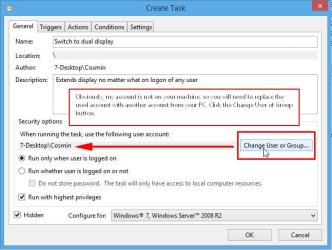
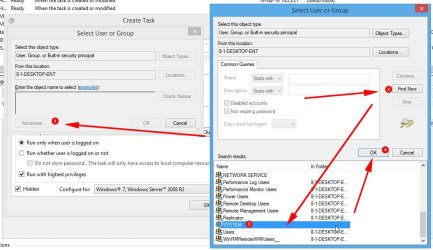
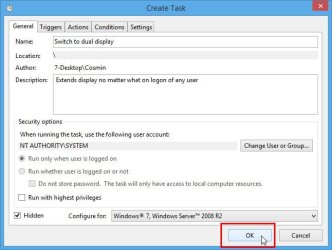
Sorry for my ignorance. You will need to change the user as shown in the next three images. Then it should work at logon.
Please let me know if any issues persist.

Cheers !
 

Attachments

  • change user 1.jpg
    change user 1.jpg
    48.1 KB · Views: 72
  • change user 2.jpg
    change user 2.jpg
    83.7 KB · Views: 14
  • change user 3.jpg
    change user 3.jpg
    38 KB · Views: 71

My Computer My Computer

At a glance

Windows 7 Ultimate 64 BitPentium(R) Dual-Core CPU E6600 @ 3.06GHz4 GB DDRAM II @1066NVIDIA GeForce 8600 GT
Computer Manufacturer/Model Number
Gigabyte Technology Co., Ltd P31-DS3L
OS
Windows 7 Ultimate 64 Bit
CPU
Pentium(R) Dual-Core CPU E6600 @ 3.06GHz
Motherboard
Gigabyte P31-DS3L
Memory
4 GB DDRAM II @1066
Graphics Card(s)
NVIDIA GeForce 8600 GT
Sound Card
ASUS XONAR DS
Monitor(s) Displays
2 x Philips 232EL2SB 23" LED 250cd/m2, 20000000:1
Screen Resolution
Dual DVI - 1920*1080 px
Hard Drives
Main drive - 1 TB WD1002FAEX - 64 GB cache - Western Digital Caviar Black @7200 RPM
Secondary - 320 GB WDC320AAKS - 16 GB cache - Western Digital Caviar Blue @7200 RPM
PSU
Thermaltake TR2 470W PSU
Case
ThermalTake
Keyboard
Microsoft Natural Ergonomic Wireless Keyboard 7000
Mouse
Microsoft Natural Ergonomic Wireless Laser Mouse 7000
Internet Speed
100 Gb/s down, 50 Gb/s up
Thanks, this thread helped my issue with the second monitor not coming on
 

My Computer My Computer

At a glance

64bit winbdows
Computer type
PC/Desktop
Computer Manufacturer/Model Number
custom build
OS
64bit winbdows
Back
Top