
Dual Monitors shut down

cfourkays

New member
Member
Local time
12:11 AM
Messages
62
Location
Jensen Beach FL
I have dual monitors with Windows 7 Pro.
AMD Radeon HD 6550d
Both monitors shut off in about 2 minutes and resume with mouse click.
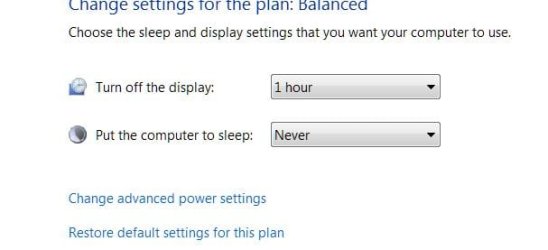
Settings are for Turn Off Displays 1 hour, Sleep, Never.
No Screensavers, Nothing different in Advanced Settings.
AMD Vision Control Center, Balanced, Turn Off Display, 1 Hour.

This just started, everything had been OK.
Changed Themes, no difference.
 

My Computer My Computer

Computer Manufacturer/Model Number
Home Built
OS
Windows 7 Professional
CPU
AMD 64 Athlon X2 Dual Core
Motherboard
Asus M3A
Memory
6 Gig
Graphics Card(s)
Nvidia GeForce 8800GTS
Hard Drives
500GB Seagate (2)
Other Info
Laptop is Gateway NV52 with Windows 7 Home Premium
Unclear as to what your actual settings are for your monitors. Is it set to turn off in one hour, set to sleep or is it set to never. Very confusing. Any how, in power options change the setting from what ever it is now to anything, then save. Next, pick the one you want and click save and reboot. See if problem still occurs after reboot.
 

My Computer My Computer

Computer Manufacturer/Model Number
Custom built
OS
Windows 7 Ultimate 64 bit
CPU
AMD Phenom II X4 965 Black Edition
Motherboard
Gigabyte GA-MA790X-DS4
Memory
GSkill 4 X 2 GB PC 8500
Graphics Card(s)
XFX Radeon HD 6790 D
Sound Card
On board RealTek HD
Monitor(s) Displays
Dual monitors:Samsung SyncMaster S20B300
Screen Resolution
1600 X 900
Hard Drives
Seagate Barracuda 1TB (primary)
Seagate Barracuda 2 X 320 GB
PSU
Ultra X4 750 watt fully modular
Case
Thermaltake Overseer RX 1 full tower
Cooling
Core-Contact 92 mm CPU Cooler
Keyboard
Logitech G510
Mouse
Razor DeathAdder
Internet Speed
50/5 Mbps UL/DL
Other Info
Optical: Super Muliti DVD burner w/lightscribe, Hauppauge WinTV HVR-1800
Sorry,
Nothing fancy:
preferred Plans: Balanced
Turn off Display: 1 Hour
Put the Computer to sleep: Never.

Same settings are in the AMD Control Center.
 

Attachments

  • Monitor.JPG
    Monitor.JPG
    22.8 KB · Views: 4

My Computer My Computer

Computer Manufacturer/Model Number
Home Built
OS
Windows 7 Professional
CPU
AMD 64 Athlon X2 Dual Core
Motherboard
Asus M3A
Memory
6 Gig
Graphics Card(s)
Nvidia GeForce 8800GTS
Hard Drives
500GB Seagate (2)
Other Info
Laptop is Gateway NV52 with Windows 7 Home Premium
Tried this:
Next, pick the one you want and click save and reboot. See if problem still occurs after reboot.

No change.
 

My Computer My Computer

Computer Manufacturer/Model Number
Home Built
OS
Windows 7 Professional
CPU
AMD 64 Athlon X2 Dual Core
Motherboard
Asus M3A
Memory
6 Gig
Graphics Card(s)
Nvidia GeForce 8800GTS
Hard Drives
500GB Seagate (2)
Other Info
Laptop is Gateway NV52 with Windows 7 Home Premium
Since the settings don't seem to bee the issue it could be do to some sort of bug lurking around in your system some where. Check your system for any malware, spyware or Virus's. Some forms of malware and spyware to mess with and change system settings.
 

My Computer My Computer

Computer Manufacturer/Model Number
Custom built
OS
Windows 7 Ultimate 64 bit
CPU
AMD Phenom II X4 965 Black Edition
Motherboard
Gigabyte GA-MA790X-DS4
Memory
GSkill 4 X 2 GB PC 8500
Graphics Card(s)
XFX Radeon HD 6790 D
Sound Card
On board RealTek HD
Monitor(s) Displays
Dual monitors:Samsung SyncMaster S20B300
Screen Resolution
1600 X 900
Hard Drives
Seagate Barracuda 1TB (primary)
Seagate Barracuda 2 X 320 GB
PSU
Ultra X4 750 watt fully modular
Case
Thermaltake Overseer RX 1 full tower
Cooling
Core-Contact 92 mm CPU Cooler
Keyboard
Logitech G510
Mouse
Razor DeathAdder
Internet Speed
50/5 Mbps UL/DL
Other Info
Optical: Super Muliti DVD burner w/lightscribe, Hauppauge WinTV HVR-1800
Thanks for the reply.
I have Microsoft Security Essentials and the Consumer License Malwarebytes Anti-Malware.
Taking your advise, ran a deep scan with both and found nothing.

When I set the "Turn off display" to 1 minute, at the mark, the HP monitor shows a "No Signal" and the AOC "Monitor going to sleep". It than takes a full 2 seconds to restore with a mouse shake.

With the setting to "Never", both monitors shut off instantaneously (Whew) with no indicators at 65 seconds and restore immediatly with a mouse shake.
 

My Computer My Computer

Computer Manufacturer/Model Number
Home Built
OS
Windows 7 Professional
CPU
AMD 64 Athlon X2 Dual Core
Motherboard
Asus M3A
Memory
6 Gig
Graphics Card(s)
Nvidia GeForce 8800GTS
Hard Drives
500GB Seagate (2)
Other Info
Laptop is Gateway NV52 with Windows 7 Home Premium
Are both monitors the same make and model? How are both monitors connected to GPU? What are the refresh rates of each monitor?
 

My Computer My Computer

Computer Manufacturer/Model Number
Custom built
OS
Windows 7 Ultimate 64 bit
CPU
AMD Phenom II X4 965 Black Edition
Motherboard
Gigabyte GA-MA790X-DS4
Memory
GSkill 4 X 2 GB PC 8500
Graphics Card(s)
XFX Radeon HD 6790 D
Sound Card
On board RealTek HD
Monitor(s) Displays
Dual monitors:Samsung SyncMaster S20B300
Screen Resolution
1600 X 900
Hard Drives
Seagate Barracuda 1TB (primary)
Seagate Barracuda 2 X 320 GB
PSU
Ultra X4 750 watt fully modular
Case
Thermaltake Overseer RX 1 full tower
Cooling
Core-Contact 92 mm CPU Cooler
Keyboard
Logitech G510
Mouse
Razor DeathAdder
Internet Speed
50/5 Mbps UL/DL
Other Info
Optical: Super Muliti DVD burner w/lightscribe, Hauppauge WinTV HVR-1800
I have dual monitors with Windows 7 Pro.
AMD Radeon HD 6550d
Both monitors shut off in about 2 minutes and resume with mouse click.
Settings are for Turn Off Displays 1 hour, Sleep, Never.
No Screensavers, Nothing different in Advanced Settings.
AMD Vision Control Center, Balanced, Turn Off Display, 1 Hour.

This just started, everything had been OK.
Changed Themes, no difference.

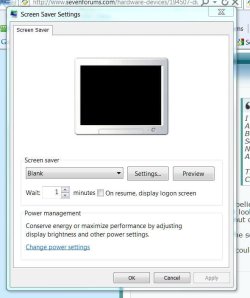
I believe that you have your screensaver set to 2 minutes, Blank.
It looks like the monitor is shutting down, but actually the blank screensaver is kicking in. The monitors won't shut down until 58 minutes later.

The solution...set the screen saver to (None). After 1 hour, the monitors should shut off.

I could be wrong, though.
 

My Computer My Computer

Computer type
PC/Desktop
Computer Manufacturer/Model Number
Custom Build
OS
Windows 7 Home Premium 64 bit
CPU
Intel Core i7-4790
Motherboard
GA-Z87X-D3H
Memory
G.SKILL 8GB (2 x 4GB) DDR3 F3-10666CL9D-8GBNT
Graphics Card(s)
AMD Radeon R7 250
Sound Card
Realtek ALC892
Monitor(s) Displays
Samsung UN32EH5000, Dell 1703FPT
Screen Resolution
1920 x 1080, 1280 x 1024
Hard Drives
WD5003AZEX
WD10EZEX
Samsung HD103SJ
Samsung 128 GB 840 PRO
PSU
SeaSonic M12II SS-500GM
Case
Fractal Design Define R4
Cooling
Zalman CNPS9900ALED
Keyboard
Logitech K800
Mouse
Logitech M705
Internet Speed
16 Mbps
Antivirus
Avast
Browser
Firefox
Other Info
Bose Companion 2 Multimedia Speakers
I'm embarrassed! :o
Thanks both of you.

I don't recall changing that.
I was screwing around with the AMD Vision Control Center and obviously made the change. I was just going to post that when the screens turned off, they really didn't and were backlit.
Blank, as it were.

Pete
 

Attachments

  • Screensaver.JPG
    Screensaver.JPG
    48.5 KB · Views: 5

My Computer My Computer

Computer Manufacturer/Model Number
Home Built
OS
Windows 7 Professional
CPU
AMD 64 Athlon X2 Dual Core
Motherboard
Asus M3A
Memory
6 Gig
Graphics Card(s)
Nvidia GeForce 8800GTS
Hard Drives
500GB Seagate (2)
Other Info
Laptop is Gateway NV52 with Windows 7 Home Premium
No problem!!;)
 

My Computer My Computer

Computer type
PC/Desktop
Computer Manufacturer/Model Number
Custom Build
OS
Windows 7 Home Premium 64 bit
CPU
Intel Core i7-4790
Motherboard
GA-Z87X-D3H
Memory
G.SKILL 8GB (2 x 4GB) DDR3 F3-10666CL9D-8GBNT
Graphics Card(s)
AMD Radeon R7 250
Sound Card
Realtek ALC892
Monitor(s) Displays
Samsung UN32EH5000, Dell 1703FPT
Screen Resolution
1920 x 1080, 1280 x 1024
Hard Drives
WD5003AZEX
WD10EZEX
Samsung HD103SJ
Samsung 128 GB 840 PRO
PSU
SeaSonic M12II SS-500GM
Case
Fractal Design Define R4
Cooling
Zalman CNPS9900ALED
Keyboard
Logitech K800
Mouse
Logitech M705
Internet Speed
16 Mbps
Antivirus
Avast
Browser
Firefox
Other Info
Bose Companion 2 Multimedia Speakers
Good call p5bdkw....that one got by me as well. I knew it was something obvious just didn't think it would be smacking me in the face...LOL:o

Glad you got it fixed cfourkays....
 

My Computer My Computer

Computer Manufacturer/Model Number
Custom built
OS
Windows 7 Ultimate 64 bit
CPU
AMD Phenom II X4 965 Black Edition
Motherboard
Gigabyte GA-MA790X-DS4
Memory
GSkill 4 X 2 GB PC 8500
Graphics Card(s)
XFX Radeon HD 6790 D
Sound Card
On board RealTek HD
Monitor(s) Displays
Dual monitors:Samsung SyncMaster S20B300
Screen Resolution
1600 X 900
Hard Drives
Seagate Barracuda 1TB (primary)
Seagate Barracuda 2 X 320 GB
PSU
Ultra X4 750 watt fully modular
Case
Thermaltake Overseer RX 1 full tower
Cooling
Core-Contact 92 mm CPU Cooler
Keyboard
Logitech G510
Mouse
Razor DeathAdder
Internet Speed
50/5 Mbps UL/DL
Other Info
Optical: Super Muliti DVD burner w/lightscribe, Hauppauge WinTV HVR-1800
Back
Top