Dual system problem

Novel8

New member
Member
VIP
Local time
7:11 PM
Messages
182
I have dual system, Win 7 and recently what i thought was a complete installation of win 10 via Media tool.Each OS on separate hard drives. Both were initiated via my BCD utility. When I was doing the installation of win 10, it arrived at the point where it warns the user that it was going to turn off the pc and reboot. That was the prob[em...after it turned off, it never rebooted, and in this situation I was able to hear the audible part of the woman instructing the user by welcoming me to win 10 and to continue listen to her or turn her off. I never got the 'video' part of win 10, and in this process, my BCD is screwed up and now the only way i can view win 7 is by using my Bios F8 button and still don't know if i actually have Win 10. I just don't know what next step to take.
 

My Computer

Computer type
PC/Desktop
Computer Manufacturer/Model Number
Build OEM Desktop
OS
Win 7 x64.Win 10
CPU
AMD A10 7850K
Motherboard
Asus A88X-Pro
Memory
8 gb
Graphics Card(s)
Nil
Sound Card
Nil
Monitor(s) Displays
Insignia
Screen Resolution
1376 x
Hard Drives
500 gb
Case
ABS
Keyboard
Sony
Mouse
OEM
Antivirus
Windows defender, Windows essential, Malware, autospyware
Browser
Firefox,Vivaldi
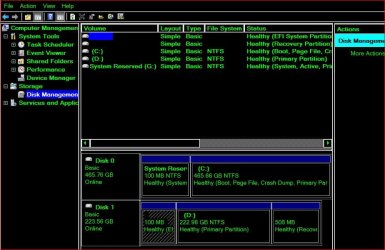
Can you post a screenshot from disk manager showing all the details at the top so we can see. If you install 10 with more than one drive it often puts boot files on the wrong drive
 

My Computer

Computer type
PC/Desktop
OS
win 8 32 bit
Can you post a screenshot from disk manager showing all the details at the top so we can see. If you install 10 with more than one drive it often puts boot files on the wrong drive
Yes, i can do a screenshot of DM from win 7.DM.JPG
 

My Computer

Computer type
PC/Desktop
Computer Manufacturer/Model Number
Build OEM Desktop
OS
Win 7 x64.Win 10
CPU
AMD A10 7850K
Motherboard
Asus A88X-Pro
Memory
8 gb
Graphics Card(s)
Nil
Sound Card
Nil
Monitor(s) Displays
Insignia
Screen Resolution
1376 x
Hard Drives
500 gb
Case
ABS
Keyboard
Sony
Mouse
OEM
Antivirus
Windows defender, Windows essential, Malware, autospyware
Browser
Firefox,Vivaldi
I assume drive c in the screen shot id win 7 its booting from the first parition shown as g. Win 10 is a uefi partion is the bios set to boot uefi?
Just pull the power off disk 0 and see if it boots win 10 ok.
Can you in the bios decide which disk to boot from?
 

My Computer

Computer type
PC/Desktop
OS
win 8 32 bit
It looks like your win7 installation on disk0 is bios mode and your win10 installation on disk1 is efi mode.

Probably the simplest way to select which you want to boot into is by pressing the one time boot menu key at post.

It is f12 on my motherboard, it might be different on yours.

Likely F8 according to the link below.

List of PC brands with their corresponding hot-keys
 

My Computers

System One System Two

  • Computer type
    PC/Desktop
    OS
    7 X64
    CPU
    i5 8400
    Motherboard
    gigabyte b365m ds3h
    Memory
    2x8gb 3200mhz
    Hard Drives
    various
    PSU
    pure power 11 400w cm
    Case
    Coolermaster
    Cooling
    cryorig m9i
  • Computer type
    PC/Desktop
    OS
    7x64
    CPU
    g5400
    Motherboard
    ga b365m ds3h
    Memory
    8gb ddr4 2400
    PSU
    xfx pro 450w
I assume drive c in the screen shot id win 7 its booting from the first parition shown as g. Win 10 is a uefi partion is the bios set to boot uefi?
Just pull the power off disk 0 and see if it boots win 10 ok.
Can you in the bios decide which disk to boot from?
Correct C is win 7 and D is win 10. My MB uses F8 and I have to use it daily now to use Win 7. When I pull the power off ( win 7 ) and choose win 10 all I get is the audio of the 'woman's voice congradulating of installing win 10....Never am able to see system as normal viewing...desktop and etc. BTW, on a whim, i replaced my BCD utility with a later version and still no progress on that score. What puzzles me is hearing that virgin woman voice that is common after opening win 10 for the first time, but only her voice and no view of system...akin to Videos that have only the audio. I also tried again in installing win 10 with the same results. It was recommended that when i arrive at the moment when windows informs me that it is going to reboot, that i should remove the usb tool. I did and still windows did not continue or what ever its suppose to do after the rebooting.
 
Last edited:

My Computer

Computer type
PC/Desktop
Computer Manufacturer/Model Number
Build OEM Desktop
OS
Win 7 x64.Win 10
CPU
AMD A10 7850K
Motherboard
Asus A88X-Pro
Memory
8 gb
Graphics Card(s)
Nil
Sound Card
Nil
Monitor(s) Displays
Insignia
Screen Resolution
1376 x
Hard Drives
500 gb
Case
ABS
Keyboard
Sony
Mouse
OEM
Antivirus
Windows defender, Windows essential, Malware, autospyware
Browser
Firefox,Vivaldi
It may be worth try MR to fix boot its free Fix Boot Problems
I t may be too late for that....I installed a new version of BCD and still have tthe same problem, thinking it might fix the problem...but still i don't know why I only have the audio of win 10.
 

My Computer

Computer type
PC/Desktop
Computer Manufacturer/Model Number
Build OEM Desktop
OS
Win 7 x64.Win 10
CPU
AMD A10 7850K
Motherboard
Asus A88X-Pro
Memory
8 gb
Graphics Card(s)
Nil
Sound Card
Nil
Monitor(s) Displays
Insignia
Screen Resolution
1376 x
Hard Drives
500 gb
Case
ABS
Keyboard
Sony
Mouse
OEM
Antivirus
Windows defender, Windows essential, Malware, autospyware
Browser
Firefox,Vivaldi
Back
Top