
I have a folder, called "HG", full of various folder shortcuts which I use as a custom toolbar on my taskbar, system is W7Pro@x64. (The very purpose of that toolbar is to let me access HG repositories on various folders). Recently, the folder shortcuts started misbehaving: on the context menu, there are duplicated some entries (7-zip and antivirus), and some entries are missing (by Murphy's law, one is the "HG Repository explorer", which is the very reason that toolbar exists).
However, when I open the Windows Explorer and navigate to the same folder, the context menu on these same items works just fine.
(Bizarrely, if I click on the taskbar toolbar and select "Open Folder", the context menu is wrong even from Explorer).
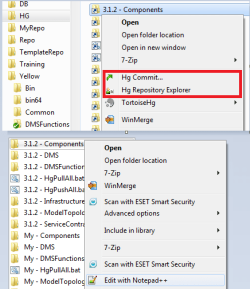
See the image below: on the top is the "Good" menu, on the bottom the "Bad" one. Note that on "bad" one, I have some entries which are appropriate for a regular file, but not for a folder (Edit with Notepad++, 7-zip:Open archive...).
I've done the homework and searched the net and this Forum, and a similar problem is described here:
Duplicate context entries when you right-click a shortcut
The catch is, I do have the IsShortcut entry on the lnkfile key:
A similar problem is described in this thread:
http://www.sevenforums.com/general-discussion/24423-duplicate-context-menu-entries-start-menu.html
but, apparently, was not solved.
My guess is that there is an additional key in HKCR, which covers only the taskbar toolbar shortcuts, which got broken by... something (I installed a lot of stuff recently), probably missing the IsShortcut entry... but which one would that be?
However, when I open the Windows Explorer and navigate to the same folder, the context menu on these same items works just fine.
(Bizarrely, if I click on the taskbar toolbar and select "Open Folder", the context menu is wrong even from Explorer).
See the image below: on the top is the "Good" menu, on the bottom the "Bad" one. Note that on "bad" one, I have some entries which are appropriate for a regular file, but not for a folder (Edit with Notepad++, 7-zip:Open archive...).
I've done the homework and searched the net and this Forum, and a similar problem is described here:
Duplicate context entries when you right-click a shortcut
The catch is, I do have the IsShortcut entry on the lnkfile key:
Code:
[HKEY_CLASSES_ROOT\lnkfile]
@="Shortcut"
"EditFlags"=dword:00000001
"FriendlyTypeName"="@shell32.dll,-4153"
"IsShortcut"=""
"NeverShowExt"=""http://www.sevenforums.com/general-discussion/24423-duplicate-context-menu-entries-start-menu.html
but, apparently, was not solved.
My guess is that there is an additional key in HKCR, which covers only the taskbar toolbar shortcuts, which got broken by... something (I installed a lot of stuff recently), probably missing the IsShortcut entry... but which one would that be?
My Computer
At a glance
Windows 7 Professional x64
- OS
- Windows 7 Professional x64
 Guess we'll never find out...
