DVD drive Ownership and Permissions problem.

Thelifeofthomas

New member
Local time
10:05 AM
Messages
10
I have had this problem for a while and i have tried many different solutions but none seem to fix the fault.

when i put a disk in the DVD drive it give Unknown icon on the drive and when i try to enter it says
"f:\ is not accessible. Access is denied"
but when i start the pc in safe mode or use the default Administrator account, the Drive works perfectly.

when I go to the owner tab under advanced security it says
"current owner: Unable to display current owner."
and when i try and set the owners it never changes.

In the permissions window it says
"No permissions have been assigned for this object."
and when i try to add my user to the permission it says
"unable to save permission changes on ( f: ). access is denied"

I have removed the device and drivers completely and reinstalled them but the problem continues.
 

My Computer My Computer

At a glance

Windows 7 Home Premium 64bitAMD Fx8350Corsair Vengeance 16gb 1600mhzEVGA GTX560ti 448
Computer type
PC/Desktop
Computer Manufacturer/Model Number
custom build
OS
Windows 7 Home Premium 64bit
CPU
AMD Fx8350
Motherboard
Asus Cross-hair V Formula
Memory
Corsair Vengeance 16gb 1600mhz
Graphics Card(s)
EVGA GTX560ti 448
Monitor(s) Displays
Benq xl2410t + HP 2159m
Screen Resolution
1920x1080
Hard Drives
500gb Seagate Baracuda
Case
NZXT Phantom
Cooling
Antec Hh620
Keyboard
Cyborg Statik v.7
Mouse
Cyborg rat 9
Antivirus
Avast
Browser
Google Chrome
Have you tried to create a new administrators account and see if it works then? It could be a matter of corruption in your account. If a new admin account solves the problem, transfer everything over to the new account and delete the old account.
 

My Computers My Computers

  • At a glance

    Windows 11 ProRyzen 9 5900X32GB G Skill DDR4-3600EVGA RTX 3080 FTW 3 Ultra
    Computer type
    PC/Desktop
    Computer Manufacturer/Model Number
    ALWAYS UNDER CONSTRUCTION
    OS
    Windows 11 Pro
    CPU
    Ryzen 9 5900X
    Motherboard
    Asus X570 Crosshair Viii Hero
    Memory
    32GB G Skill DDR4-3600
    Graphics Card(s)
    EVGA RTX 3080 FTW 3 Ultra
    Sound Card
    On Board/Sennheiser PC37X Headset
    Monitor(s) Displays
    3 X Asus 27"
    Screen Resolution
    2560x1440
    Hard Drives
    2 X 1 TB NVME drives
    PSU
    EVGA 850
    Case
    Phanteks Eclipse P400A
    Cooling
    EVGA 280 AIO
    Keyboard
    Logitech G510s/ Logitech G13
    Mouse
    Logitech G502
    Internet Speed
    24/1
    Antivirus
    ESET/MBAM Pro/SAS Pro
    Browser
    Chrome/ Firefox/ Edge
  • At a glance

    Windows 11 ProIntel Ultra 9 288V32 GB LPDDR5X 8533
    Computer type
    Laptop
    System Manufacturer/Model Number
    Dell 16 Plus
    OS
    Windows 11 Pro
    CPU
    Intel Ultra 9 288V
    Memory
    32 GB LPDDR5X 8533
    Monitor(s) Displays
    16" Mini-LED HDR600 Touch 90 Hz
    Screen Resolution
    2560X1600
    Hard Drives
    1 TB NVME
I tried a new admin account and it has the same problem as my main account.
i tried to set the ownership in the systems Administrator account but it does not have a security tab in the properties of the Disk Drive.
 

My Computer My Computer

At a glance

Windows 7 Home Premium 64bitAMD Fx8350Corsair Vengeance 16gb 1600mhzEVGA GTX560ti 448
Computer type
PC/Desktop
Computer Manufacturer/Model Number
custom build
OS
Windows 7 Home Premium 64bit
CPU
AMD Fx8350
Motherboard
Asus Cross-hair V Formula
Memory
Corsair Vengeance 16gb 1600mhz
Graphics Card(s)
EVGA GTX560ti 448
Monitor(s) Displays
Benq xl2410t + HP 2159m
Screen Resolution
1920x1080
Hard Drives
500gb Seagate Baracuda
Case
NZXT Phantom
Cooling
Antec Hh620
Keyboard
Cyborg Statik v.7
Mouse
Cyborg rat 9
Antivirus
Avast
Browser
Google Chrome
It should have a sharing tab. Click the sharing tab, click advanced sharing and check the box 'share this folder'. See if that helps.

You can also try Take Ownership, but read the warnings at the top of the page.
 

My Computers My Computers

  • At a glance

    Windows 11 ProRyzen 9 5900X32GB G Skill DDR4-3600EVGA RTX 3080 FTW 3 Ultra
    Computer type
    PC/Desktop
    Computer Manufacturer/Model Number
    ALWAYS UNDER CONSTRUCTION
    OS
    Windows 11 Pro
    CPU
    Ryzen 9 5900X
    Motherboard
    Asus X570 Crosshair Viii Hero
    Memory
    32GB G Skill DDR4-3600
    Graphics Card(s)
    EVGA RTX 3080 FTW 3 Ultra
    Sound Card
    On Board/Sennheiser PC37X Headset
    Monitor(s) Displays
    3 X Asus 27"
    Screen Resolution
    2560x1440
    Hard Drives
    2 X 1 TB NVME drives
    PSU
    EVGA 850
    Case
    Phanteks Eclipse P400A
    Cooling
    EVGA 280 AIO
    Keyboard
    Logitech G510s/ Logitech G13
    Mouse
    Logitech G502
    Internet Speed
    24/1
    Antivirus
    ESET/MBAM Pro/SAS Pro
    Browser
    Chrome/ Firefox/ Edge
  • At a glance

    Windows 11 ProIntel Ultra 9 288V32 GB LPDDR5X 8533
    Computer type
    Laptop
    System Manufacturer/Model Number
    Dell 16 Plus
    OS
    Windows 11 Pro
    CPU
    Intel Ultra 9 288V
    Memory
    32 GB LPDDR5X 8533
    Monitor(s) Displays
    16" Mini-LED HDR600 Touch 90 Hz
    Screen Resolution
    2560X1600
    Hard Drives
    1 TB NVME
Just a thought. Your security programs might cause such a problem.
Your specs are confusing.
Antivirus United Kingdom
OS Windows 7 (Windows 7 What)
 

My Computer My Computer

At a glance

Windows 10 Pro. 64/ version 1709 Windows 7 Pr...Intel i7-6800K @ 4.3Corsair Platinum 16 gig @2400EVGA GTX 1070 OC
Computer type
PC/Desktop
Computer Manufacturer/Model Number
Home made Desktop
OS
Windows 10 Pro. 64/ version 1709 Windows 7 Pro/64
CPU
Intel i7-6800K @ 4.3
Motherboard
ASUS X-99 Deluxe II
Memory
Corsair Platinum 16 gig @2400
Graphics Card(s)
EVGA GTX 1070 OC
Monitor(s) Displays
Asus 27" LED LCD/VE278Q
Screen Resolution
1920-1080 or 1280-720 HDMI
Hard Drives
INTEL SSD 730-240 Gb Sata 3.0/
PSU
EVGA Platium 1200W
Case
Phanteks Luxe Tempered Glass 8 fans/ one radiator
Cooling
XSPC/ Water Cooled CPU
Keyboard
Das 4 Professional
Mouse
Logitech M705/MX Anywhere 2-S
Internet Speed
100 mbits
Antivirus
Microsoft Security Essentials/ Malwarebytes Premium 3.0/ SAS
Browser
I.E. 11 default/Firefox/ ISP Time Warner Cable/Spectrum
Other Info
LG BluRay Burner/
Sound system-KLipsch-THX/
Icy Dock ssd Hot Swap bays.
I was thinking that too, Jack. That's a new AV on me too.
 

My Computers My Computers

  • At a glance

    Windows 11 ProRyzen 9 5900X32GB G Skill DDR4-3600EVGA RTX 3080 FTW 3 Ultra
    Computer type
    PC/Desktop
    Computer Manufacturer/Model Number
    ALWAYS UNDER CONSTRUCTION
    OS
    Windows 11 Pro
    CPU
    Ryzen 9 5900X
    Motherboard
    Asus X570 Crosshair Viii Hero
    Memory
    32GB G Skill DDR4-3600
    Graphics Card(s)
    EVGA RTX 3080 FTW 3 Ultra
    Sound Card
    On Board/Sennheiser PC37X Headset
    Monitor(s) Displays
    3 X Asus 27"
    Screen Resolution
    2560x1440
    Hard Drives
    2 X 1 TB NVME drives
    PSU
    EVGA 850
    Case
    Phanteks Eclipse P400A
    Cooling
    EVGA 280 AIO
    Keyboard
    Logitech G510s/ Logitech G13
    Mouse
    Logitech G502
    Internet Speed
    24/1
    Antivirus
    ESET/MBAM Pro/SAS Pro
    Browser
    Chrome/ Firefox/ Edge
  • At a glance

    Windows 11 ProIntel Ultra 9 288V32 GB LPDDR5X 8533
    Computer type
    Laptop
    System Manufacturer/Model Number
    Dell 16 Plus
    OS
    Windows 11 Pro
    CPU
    Intel Ultra 9 288V
    Memory
    32 GB LPDDR5X 8533
    Monitor(s) Displays
    16" Mini-LED HDR600 Touch 90 Hz
    Screen Resolution
    2560X1600
    Hard Drives
    1 TB NVME
Hi ThelifeofThomas,

If your OS is Windows 7 Professional or higher,

Go to Start > Run, type gpedit.msc and press OK.

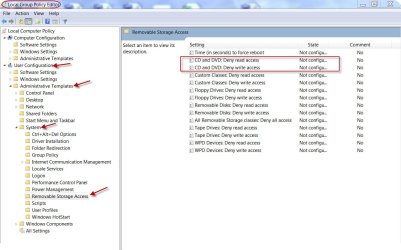
Go to User Configuration > Administrative templates > System > Removable Storage Access and check all states especially those pertaining to CD and DVD -Deny write access, Deny read access - are " Not configured" If not right click on those > Edit, change it to "Not Configured" > OK

Close the Local Group Policy Editor, reboot and then check your optical drive read / write access.

Good luck.:)

23-07-2013 09-46-25.jpg
 

My Computer My Computer

At a glance

Windows 7 Home Premium 32 bit
OS
Windows 7 Home Premium 32 bit
essenbe: I tied sharing the drive and it had no effect.
and I have tried taking ownership many times but it never takes account that i have done it and it continues
to say "Unable to display current owner".

Layback Bear: I've updated my specs they should make more sense now

jumanji: I have home premium but i have installed gpedit.msc and i do not have the Removable Storage Access section.
 

My Computer My Computer

At a glance

Windows 7 Home Premium 64bitAMD Fx8350Corsair Vengeance 16gb 1600mhzEVGA GTX560ti 448
Computer type
PC/Desktop
Computer Manufacturer/Model Number
custom build
OS
Windows 7 Home Premium 64bit
CPU
AMD Fx8350
Motherboard
Asus Cross-hair V Formula
Memory
Corsair Vengeance 16gb 1600mhz
Graphics Card(s)
EVGA GTX560ti 448
Monitor(s) Displays
Benq xl2410t + HP 2159m
Screen Resolution
1920x1080
Hard Drives
500gb Seagate Baracuda
Case
NZXT Phantom
Cooling
Antec Hh620
Keyboard
Cyborg Statik v.7
Mouse
Cyborg rat 9
Antivirus
Avast
Browser
Google Chrome
I have remove the Disk drive completely from the registry and it has reinstalled fine.
 

My Computer My Computer

At a glance

Windows 7 Home Premium 64bitAMD Fx8350Corsair Vengeance 16gb 1600mhzEVGA GTX560ti 448
Computer type
PC/Desktop
Computer Manufacturer/Model Number
custom build
OS
Windows 7 Home Premium 64bit
CPU
AMD Fx8350
Motherboard
Asus Cross-hair V Formula
Memory
Corsair Vengeance 16gb 1600mhz
Graphics Card(s)
EVGA GTX560ti 448
Monitor(s) Displays
Benq xl2410t + HP 2159m
Screen Resolution
1920x1080
Hard Drives
500gb Seagate Baracuda
Case
NZXT Phantom
Cooling
Antec Hh620
Keyboard
Cyborg Statik v.7
Mouse
Cyborg rat 9
Antivirus
Avast
Browser
Google Chrome
Do you mean removing the upper/lower filters from the registry?
 

My Computer My Computer

At a glance

Windows 7 Home Premium 32 bit
OS
Windows 7 Home Premium 32 bit
Back
Top