Solved DVD+RW not recognized as valid disc

superyutz

New member
Local time
11:05 AM
Messages
25
Location
Nottingham, Maryland
OK....This can't be seen as a hardware issue. I have one disc that I formatted with XP that works fine. My new computer runs Windows 7 and is an EMachine 1850....
Now the darn thing will not recognize an unformatted disc at all...I have about 20 DVD+RW discs that I need to use, but can't format them....I've been to many sites with the Microsoft Support site as most solutions.....That was a dead end.
I've had problems with the Windows Software from the beginning....Most minor...but the Restore Option does not work and some other probs have ocurred.....
I have had a lot of good times with Windows products until 7 hit my system...now only trouble.......If I don't get a solution I will go back to XP...and that is no solution....
Thanks for the help in advance....I need to format my DVD+RW discs...Thats All!
 

My Computer My Computer

Computer type
PC/Desktop
Computer Manufacturer/Model Number
Custom Build,
OS
Windows 7 Home 64bit
CPU
Intel DuoCore E8400 @ 3.0 Ghz
Motherboard
Intel DQ45EK motherboard
Memory
2.0 Gb
Graphics Card(s)
motherboard
Sound Card
motherboard
Monitor(s) Displays
ViewSonic 950
Screen Resolution
1280X1024
Hard Drives
500Gb HDD, Seagate Baracuda 7200rpm
PSU
factory
Case
Lian-Li mini tower
Cooling
factory
Keyboard
factory
Mouse
Microsoft wireless
Internet Speed
Xfinity Cable 21mb/sec
OK....This can't be seen as a hardware issue. I have one disc that I formatted with XP that works fine. My new computer runs Windows 7 and is an EMachine 1850....
Now the darn thing will not recognize an unformatted disc at all...I have about 20 DVD+RW discs that I need to use, but can't format them....I've been to many sites with the Microsoft Support site as most solutions.....That was a dead end.
I've had problems with the Windows Software from the beginning....Most minor...but the Restore Option does not work and some other probs have ocurred.....
I have had a lot of good times with Windows products until 7 hit my system...now only trouble.......If I don't get a solution I will go back to XP...and that is no solution....
Thanks for the help in advance....I need to format my DVD+RW discs...Thats All!

Try image burn The Official ImgBurn Website
If that cannot format the discs then you have a hardware problem and it will be the burner. These are easily replaced yourself and good drives can be got for $20
DVD Burners, DVD Media - Newegg.com
 

My Computer My Computer

Computer type
PC/Desktop
Computer Manufacturer/Model Number
Bluethunder II
OS
Windows 7 x64 Ultimate and numerous virtual machines
CPU
AMD FX-8350 Vishera 32nm Technology @ 4.2 GHz default
Motherboard
ASUSTeK COMPUTER INC. SABERTOOTH 990FX R2.0 (Socket 942)
Memory
G Skill 32.0GB Dual-Channel DDR3 @ 1204MHz (11-13-13-31)
Graphics Card(s)
EVGA GeForce GTX 960 4GB Super SC ACX 2.0+ with Back Plate
Sound Card
Creative X-Fi Titanium HD Audiophile PCIe
Monitor(s) Displays
LG L227WTG x 3
Screen Resolution
1680 x 1050 16:10
Hard Drives
238GB Samsung850 PRO SATA Disk Device (SSD)
1863GB Seagate ST2000DM 001-1CH164 (SATA)
1397GB Seagate ST1500DL 003-9VT16L(SATA)
466GB Western Digital WDC WD50 03AZEX-00K1GA0 (SATA) x 2
932GB Seagate ST310005 28AS SATA Disk Device (SATA)
PSU
Enermax Revolution87+ 1000 Watts Gold Certified Power Supply
Case
Rocketfish Full Tower
Cooling
Cooler Master Hyper 212 EVO Push Pull 120mm Fans
Keyboard
Logitech K740
Mouse
Logitech G100S Laser LED + Logitech Gamepad F310
Internet Speed
500 mbs down and 30mbs up
Antivirus
Malwarebytes Pro & Avast and MSE on certain Virtual Machines
Browser
Firefox (Main) Chrome, Internet Explorer (Back Up)
Other Info
Logitech X 230 2.1 Stereo System and 5.1 Yamaha RX V2090
B&W DM6 Monitor Speakers + Center and Surround Speakers
Using Mouse Without Borders (Google it)
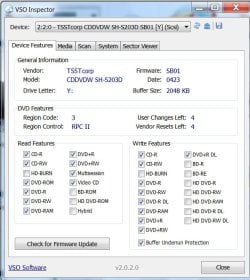
According to VSO Inspector my hardware supports DVD+RW yet my system does not recognize an unformatted disc.......Any other wild ideas?..........
 

My Computer My Computer

Computer type
PC/Desktop
Computer Manufacturer/Model Number
Custom Build,
OS
Windows 7 Home 64bit
CPU
Intel DuoCore E8400 @ 3.0 Ghz
Motherboard
Intel DQ45EK motherboard
Memory
2.0 Gb
Graphics Card(s)
motherboard
Sound Card
motherboard
Monitor(s) Displays
ViewSonic 950
Screen Resolution
1280X1024
Hard Drives
500Gb HDD, Seagate Baracuda 7200rpm
PSU
factory
Case
Lian-Li mini tower
Cooling
factory
Keyboard
factory
Mouse
Microsoft wireless
Internet Speed
Xfinity Cable 21mb/sec
I have seen a user comment that the machine only has a DVD ROM drive and not a writer. Does the VSO Inspector show that it can write DVD-RWs?

Also ascertain the exact model/manufacturer - which you can get from Device Manager/VSO Inspector and check its specs from the manufacturer's website.
 

My Computer My Computer

OS
Windows 7 Home Premium 32 bit
Of course its a writer. How can I burn a formatted DVD+RW.....and my DVD-R's :cry:
 

My Computer My Computer

Computer type
PC/Desktop
Computer Manufacturer/Model Number
Custom Build,
OS
Windows 7 Home 64bit
CPU
Intel DuoCore E8400 @ 3.0 Ghz
Motherboard
Intel DQ45EK motherboard
Memory
2.0 Gb
Graphics Card(s)
motherboard
Sound Card
motherboard
Monitor(s) Displays
ViewSonic 950
Screen Resolution
1280X1024
Hard Drives
500Gb HDD, Seagate Baracuda 7200rpm
PSU
factory
Case
Lian-Li mini tower
Cooling
factory
Keyboard
factory
Mouse
Microsoft wireless
Internet Speed
Xfinity Cable 21mb/sec
Interesting finding while using the VSO Inspector. Upper Filter driver GEARAspiWDM shows 'file not found'. Yet, I checked the 'System Information' drivers section and it shows this file present, started, and OK. Whats going on?
Also checked for the newest drivers and firmware for my model drive. All the latest are installed
 

My Computer My Computer

Computer type
PC/Desktop
Computer Manufacturer/Model Number
Custom Build,
OS
Windows 7 Home 64bit
CPU
Intel DuoCore E8400 @ 3.0 Ghz
Motherboard
Intel DQ45EK motherboard
Memory
2.0 Gb
Graphics Card(s)
motherboard
Sound Card
motherboard
Monitor(s) Displays
ViewSonic 950
Screen Resolution
1280X1024
Hard Drives
500Gb HDD, Seagate Baracuda 7200rpm
PSU
factory
Case
Lian-Li mini tower
Cooling
factory
Keyboard
factory
Mouse
Microsoft wireless
Internet Speed
Xfinity Cable 21mb/sec
Hey!!!! I'm a genius....I was browsing other posts in desperation and found one that suggested I use the disk management utility..... I typed 'diskmgmt.msc' in the Run prompt and inserted the unformatted DVD+RW. In the utility it showed 'NO DISK'...but I double clicked the drive and it prompted me to Format the disk....which I did....IT WORKED BY GOLLY!!!
Thanks to all who have replied!!!!!!
 

My Computer My Computer

Computer type
PC/Desktop
Computer Manufacturer/Model Number
Custom Build,
OS
Windows 7 Home 64bit
CPU
Intel DuoCore E8400 @ 3.0 Ghz
Motherboard
Intel DQ45EK motherboard
Memory
2.0 Gb
Graphics Card(s)
motherboard
Sound Card
motherboard
Monitor(s) Displays
ViewSonic 950
Screen Resolution
1280X1024
Hard Drives
500Gb HDD, Seagate Baracuda 7200rpm
PSU
factory
Case
Lian-Li mini tower
Cooling
factory
Keyboard
factory
Mouse
Microsoft wireless
Internet Speed
Xfinity Cable 21mb/sec
Good to know that your problem is resolved and with your own effort. Good going.:)
 

My Computer My Computer

OS
Windows 7 Home Premium 32 bit
Back
Top