DVD writer error

S3V3NSTAR

New member
Member
Local time
7:17 AM
Messages
73
I have ASUS DRW-24B1ST & its giving me problem from past few days.

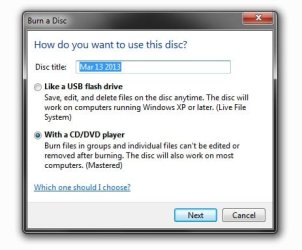
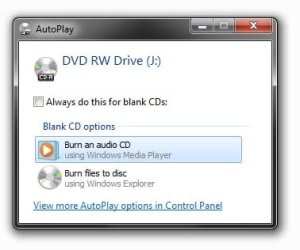
when i am inserting a cd into my drive cd shows the auto run window but there is no option to open cd in folder as well if try to open cd with double click its asking me that "How you want to use this disk ?" as well even if cd is full oor have some data its showing cd is empty.

I try many Cd's but same problem.

Check screenshots for more info.
 

Attachments
  • AutoRun Error.jpg
    AutoRun Error.jpg
    15.5 KB · Views: 5
  • Doublr Click Error.jpg
    Doublr Click Error.jpg
    25.8 KB · Views: 5
  • Empty Disk Error.jpg
    Empty Disk Error.jpg
    3.7 KB · Views: 64

My Computer

OS
Windows 7 Ultimate x64
I sometimes have an issue similar to this, so I never use the Windows burn software. Never could diagnose the problem because I have the worst luck with CD/DVD drives and don't use them anymore. I use Roxio or other programs designed for specific files likes ISO's.
 

My Computer

Computer Manufacturer/Model Number
Me
OS
Windows 7 Pro x64
CPU
Intel Core i7 920
Motherboard
ASUS P6T Deluxe V2
Memory
Corsair XMS3 12GB (3x2GB) DDR3 1333
Graphics Card(s)
EVGA GTX 470 1280MB GDDR5 DX11
Monitor(s) Displays
ASUS VW246H | ACER AL2216W
Screen Resolution
3600x1080
Hard Drives
1x Corsair Vertex 3 SSD (120GB)
1x Corsair Vertex 2 SSD (60GB)
2x Western Digital Black (500GB/1TB)
1x External WD Green eSATA (1TB)
PSU
Corsair 850HX
Case
Velocity Micro FullTower
Keyboard
Logitech G110
Mouse
Logitech G500
Internet Speed
http://www.speedtest.net/result/1226664359.png
Antivirus
MSE
Browser
Chrome
Other Info
Logitech Z-5500 5.1 Surround Sound
Logitech C260 Webcam
Creative Fatal1ty Headset
But how u r opening cd/dvd's then ??? without drive ?
 

My Computer

OS
Windows 7 Ultimate x64
I don't use CD/DVD's anymore. I use USB drives or hard drives for anything I need to store. If there is an occasion when I need to use a CD/DVD (for data) I plug it in my laptop and share it over the network.
 

My Computer

Computer Manufacturer/Model Number
Me
OS
Windows 7 Pro x64
CPU
Intel Core i7 920
Motherboard
ASUS P6T Deluxe V2
Memory
Corsair XMS3 12GB (3x2GB) DDR3 1333
Graphics Card(s)
EVGA GTX 470 1280MB GDDR5 DX11
Monitor(s) Displays
ASUS VW246H | ACER AL2216W
Screen Resolution
3600x1080
Hard Drives
1x Corsair Vertex 3 SSD (120GB)
1x Corsair Vertex 2 SSD (60GB)
2x Western Digital Black (500GB/1TB)
1x External WD Green eSATA (1TB)
PSU
Corsair 850HX
Case
Velocity Micro FullTower
Keyboard
Logitech G110
Mouse
Logitech G500
Internet Speed
http://www.speedtest.net/result/1226664359.png
Antivirus
MSE
Browser
Chrome
Other Info
Logitech Z-5500 5.1 Surround Sound
Logitech C260 Webcam
Creative Fatal1ty Headset
No one have any solution for my problem ???
 

My Computer

OS
Windows 7 Ultimate x64
Hi S3V3NSTAR,

My first thought is that your internal optical drive is faulty. It is unable to read anything and so sees any disc as a blank media.

Just put a blank CDRW into the drive and check whether you are able to burn a small file.

The easiest way to confirm whether your internal drive is faulty or not is to connect a working external optical drive and check. If everything is fine with it, then your internal drive is indeed faulty and requires to be replaced.
 

My Computer

OS
Windows 7 Home Premium 32 bit
What jumanji said, or you could try a 3rd party burner. Imgburn is highly recommended and the one I use. Lol..... I don't think I've ever used Windows built in burner to tell you the truth. Heres a link to Imgburn if you want to try it. Its free, but the page is full of ad's so be careful in choosing the right download.

The Official ImgBurn Website
 

My Computer

Computer type
Laptop
Computer Manufacturer/Model Number
MSI GE72VR Apache Pro-416
OS
Windows 10x64 Build 1709
CPU
Intel i7 7700HQ Kaby Lake
Motherboard
Micro-Star Intl. MS-179B (U3C1)
Memory
16 GB DDR4 @2400
Graphics Card(s)
Nvidia Geforce GTX 1060
Screen Resolution
1920x1080 120Hz
Hard Drives
256 GB Nvme M.2 SSD

1TB HDD@7200
Cooling
Cooler Blast 4
Keyboard
Steel Series
Antivirus
Bit Defender Free
Browser
Edge
Ohh sry for late reply... quite busy with other work.

@jumanji : Ok i will try that. Isn't there any other problem with Registry ? Drivers ? Any Other Cd/DVD Programs like daemon tools, iso buster ?? coz i am using this programs as well Nero too.

@indianacarnie : Thanks bro for that software but i am not facing burning problem my dvd writer is showing already burned cd/dvd as a empty disk. The problem is about reading. Its not reading my burned data,audio or any type of cd's & giving error which i attached in my 1st post.

Thanks both for help. I will try ur suggestion n soon going to reply the results.
 

My Computer

OS
Windows 7 Ultimate x64
Good that you spelt out some related programs.. Of that I would pick on Daemon Tools. From what I have read, many have experienced problems with their optical drives with Daemon Tools installed. iTunes also is known to interfere.

If an external drive also behaves in the same way as your internal drive then I would suggest that you completely uninstall Daemon Tools with Revo Uninstaller. Google search on how to uninstall Daemon Tools completely and if you find better suggestions from the ones who had actually done it, do it.

( I haven't seen any reports of ISOBuster and Nero causing problems plus I do have these in my kitty with no problems. And also a very very old version of iTunes.)

After uninstalling Daemon Tools, run MicrosoftFixit Fix problems with CD or DVD drives that can

Check whether that fixes the problem.
 

My Computer

OS
Windows 7 Home Premium 32 bit
actually i already done that coz when i try net to find the answer i got that same microsoft page where they mention about this all programs & MicrosoftFixit so i remove Daemon tools, Iso buster, Nero as well latest iTunes & i run MS Fixit but nope no use.

I try yo reinstall my Asus drive firmware version which is 1.03 [ i found os asus site ] still same problem.

I don't found drivers over net so i uninstall drivers by going drive properties n restart my pc so my win7 auto install same drivers again but that also not solve my problem.

Now just ur suggestion is still to do. cd store is quite far from my house n right now my scheduled is quite busy due to office work so i think i try that tomorrow [ on Sunday] n I will update u the results.

Thanks again for all help.
 

My Computer

OS
Windows 7 Ultimate x64
As no one has mentioned this yet:

Do you have any bootable CDs or DVDs (like a Windows installation disk)?

If yes, try booting the PC from it. I recommend using the one-time boot order hotkey. As I don't know what your system is, I can't check what the hotkey is.

If you can boot from the disk, you have a Windows problem. If not, you have a hardware problem, and no amount of messing about in Windows will fix it.
 

My Computer

Computer Manufacturer/Model Number
homegrown
OS
Windows 7 Pro X64 SP1
CPU
Intel Core I7-3930k
Motherboard
Asus P9X79 Pro
Memory
16 GB Gskill DDR3-2133
Graphics Card(s)
eVGA GTX680
Sound Card
Creative X-Fi Titanium
Monitor(s) Displays
As PA246Q
Screen Resolution
1920 X 1200
Hard Drives
Corsair Force GT, 120 GB
WDC 1.5TB Caviar Black
PSU
PCP&C Silencer 750 Crossfire
Case
Silverstone FT02
Cooling
Noctua NH-D14
Keyboard
cheap Logitech USB
Mouse
Microsoft Intellimouse Explorer (old optical) USB
Internet Speed
6Mb cable
Other Info
Pioneer BDR-205
Samsung SH-203B
Monsoon 5.1 speakers
Back
Top