Edit Task command-line of a Pinned Taskbar shortcut

marcosd2

New member
Local time
2:29 PM
Messages
7
Good morning.

Is it possible to edit the command-line used in a certain Task when I right-click an icon in Taskbar?

I want to customize the command-line from Firefox "Open new private window":

57a9c951bdc63.png


I tried right-clicking it but it only shows me "Open".

Thanks in advance.
 

My Computer My Computer

OS
Windows 7 Professional x64
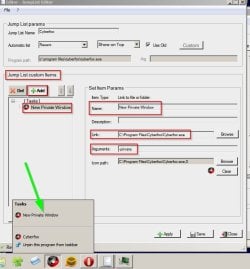
You can use JumpList Editor

Edit existing pinned taskbar shortcut jumplists or create your own. Here's my example. You can modify it to create your own Firefox jumplist and name "New Private Window" whatever you like.

Taskbar Pinned Shortcut.jpg

Taskbar Pinned Shortcut 2.jpg
 

My Computer My Computer

Computer type
Laptop
Computer Manufacturer/Model Number
ASUS
OS
Microsoft Windows 7 Home Premium 64-bit 7601 Multiprocessor Free Service Pack 1
CPU
AMD C-60 APU with Radeon(tm) HD Graphics
Motherboard
ASUSTeK COMPUTER INC. X501U
Memory
4.00 GB
Graphics Card(s)
AMD Radeon HD 6290 Graphics
Sound Card
(1) AMD High Definition Audio Device (2) Realtek High Defi
Screen Resolution
1366 x 768 x 32 bits (4294967296 colors) @ 60 Hz
Hard Drives
Hitachi HTS545050A7E380 SATA Disk Device
Antivirus
Comodo CIS & FW, SecureAplus App Whitelisting, Threatfire
Browser
Cyberfox 64bit, Opera 64bit, Airfox
Other Info
Spy-The-Spy, HitmanPro.Alert, Norton Connect Safe, MJRegWatcher, BitDefender TrafficLight, Voodoo Shield, Zemana AntiMalware
Thanks a lot, Callender!
 

My Computer My Computer

OS
Windows 7 Professional x64
Back
Top