editings "System" to show overclock

phyrexiancure

New member
Local time
8:55 AM
Messages
9
I recently began our clocking but found out that windows seven system could not read it. I found out this was caused by my cpu power saving features. Forums suggest turning off powering saving features, using cpu-z, or editing the registry. I chose to edit the registry but found out that hkey local machine/hardware/description/system/central processing/0/processor name string edits only @ frequency, but not the secondary frequency also. Is there a way to edit this frequency or remove it.
 

My Computer My Computer

At a glance

Windows 7 Ultimate x64Athlon II x2 215 @ 2700 MHzG. Skill 8 GB ddr3 @ 1600MSI R5670 PM1G
OS
Windows 7 Ultimate x64
CPU
Athlon II x2 215 @ 2700 MHz
Motherboard
MSI 870A G54
Memory
G. Skill 8 GB ddr3 @ 1600
Graphics Card(s)
MSI R5670 PM1G
Windows can't see what? Your O/C?

It's not meant too...and this editing registry to enable what?
 

My Computer My Computer

At a glance

Windows 7 Professional 64 bit930 i7 quad O/C 4ghzG Skill 3x2gb O/C to 1603mhz 1T timingEVGA 570
Computer Manufacturer/Model Number
home built
OS
Windows 7 Professional 64 bit
CPU
930 i7 quad O/C 4ghz
Motherboard
Asus P6X58D premium
Memory
G Skill 3x2gb O/C to 1603mhz 1T timing
Graphics Card(s)
EVGA 570
Sound Card
creative titanium
Monitor(s) Displays
samsung s23a950d..120hz 3D
Screen Resolution
1920x1080
Hard Drives
Western Digital 3X150 Velocoraptors in Raid 5
PSU
Antec Quattro 1000 watt
Case
Xigmatek Elysium
Cooling
Custom Loop..Kryos block.360rad..BP comp fittings etc
Keyboard
Razor arcosa
Mouse
Razer Diamondback
Internet Speed
Wireless so w/e I get at the time
Use CPUz to see your overclock. Don't mess with registry
 

My Computer My Computer

At a glance

Windows 7
OS
Windows 7
I recently began our clocking but found out that windows seven system could not read it. I found out this was caused by my cpu power saving features. Forums suggest turning off powering saving features, using cpu-z, or editing the registry. I chose to edit the registry but found out that hkey local machine/hardware/description/system/central processing/0/processor name string edits only @ frequency, but not the secondary frequency also. Is there a way to edit this frequency or remove it.

Not sure what you're saying but if you turn off SpeedStep/EIST in the BIOS your overclock speed will be shown on the information page of Windows 7. Again, this is done in the BIOS.

See this post BTW - http://www.sevenforums.com/hardware-devices/87564-wrong-clock-speed-3.html#post756696

Is this what you're talking about?
 

My Computer My Computer

At a glance

Windows 10 ProIntel Core i7-4770K (3.5Ghz)32 gig Corsair Dominator Platinum (4x8Gig)Sapphire Tri-X R9 Fury
Computer type
PC/Desktop
Computer Manufacturer/Model Number
Custom built by me.
OS
Windows 10 Pro
CPU
Intel Core i7-4770K (3.5Ghz)
Motherboard
Gigabyte G1 Sniper 5 (F10 Bios)
Memory
32 gig Corsair Dominator Platinum (4x8Gig)
Graphics Card(s)
Sapphire Tri-X R9 Fury
Sound Card
Soundblaster ZXR
Monitor(s) Displays
NEC PA242W 24" LCD Monitor
Screen Resolution
1920 x 1200
Hard Drives
Primary - Samsung 850 Pro (512gig), Samsung 840 Pro (256gig), 2TB WD Caviar Black.
PSU
EVGA Supernova 1000 G2
Case
Cooler Master HAF X
Cooling
Corsair H100i with Corsair Air Series SP120 Quiet Fans
Keyboard
Logitech Wireless Wave
Mouse
Logitech Performance MX
Internet Speed
High Speed Cable
Antivirus
Norton Security
Browser
IE11
Other Info
Memory Timings - 1866MHz @ 9-9-9-27-1T @ 1.5 volts
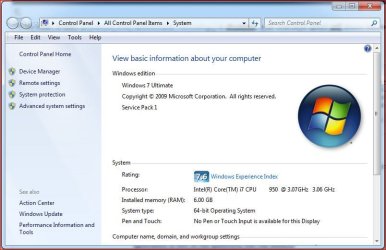
my system page in control panel shows my overclock:

oc.PNG

is this what you mean?

(i also have eist enabled)
 

My Computer My Computer

At a glance

ultimate 64 sp1i5 2500K [email protected]8 gigs GSkill Ripjaws 1600amd hd6950
Computer Manufacturer/Model Number
mickey megabyte 1234
OS
ultimate 64 sp1
CPU
i5 2500K [email protected]
Motherboard
MSI P67A-GD53
Memory
8 gigs GSkill Ripjaws 1600
Graphics Card(s)
amd hd6950
Sound Card
creative x-fi gamer
Monitor(s) Displays
samsung 24"
Screen Resolution
1920x1080
Hard Drives
ocz vertex 2e 60 gig, samsung f3 1tb, buffalo 2tb ext
PSU
antec 550
Case
antec three hundred
Cooling
i'm a cooling fan
Keyboard
saitek eclipse ii
Mouse
logitech g3
Internet Speed
about 4 Mbps
Other Info
i love win7
Yes, I am trying to change the second clock speed to show my overclock. I cannot do this by turning off the features that have been mentioned since my dell display those features. I was able to change the first clock speed which is part of the cpu's name, but I dont know how to do this for the second. Is there a way to turn off the second clock or edit it to show my overclock?
 

My Computer My Computer

At a glance

Windows 7 Ultimate x64Athlon II x2 215 @ 2700 MHzG. Skill 8 GB ddr3 @ 1600MSI R5670 PM1G
OS
Windows 7 Ultimate x64
CPU
Athlon II x2 215 @ 2700 MHz
Motherboard
MSI 870A G54
Memory
G. Skill 8 GB ddr3 @ 1600
Graphics Card(s)
MSI R5670 PM1G
To be clear: If EIST (Enhanced Intel SpeedStep® Technology) is disabled, your overclock speed will shown because the core frequency isn't reduced, thus the processor is running full speed all the time, even if overclocked.

EIST.....

Enhanced Intel SpeedStep Technology allows the system to dynamically adjust processor voltage and core frequency, which can result in decreased average power consumption and decreased average heat production. By decreasing power and heat on desktop PCs, system builders can (depending on system configurations) potentially lower acoustics, and even develop more innovative small form factor designs. Additionally, this feature can help address power concerns in companies with sites approaching the limits of bounded electrical infrastructures. Combined with existing power saving features, Enhanced Intel SpeedStep Technology can provide an excellent balance between providing power when you need it and conserving it when you don’t.

However if EIST is enabled, the frequency is adjusted to fit user demands.

Now, looking at how Windows displays the CPU speed under the Properties page, it won't go below the designed processor speed, but it will show the OC speed if EIST is disabled.

So.....

- Enabled - Default (No OC) speed displayed - Even if a load is put on the system!
- Disabled - OC Speed displayed - even if no load is on the system.

Why Windows does it this way? I can't explain.

Here's mine with EIST Enabled!

W7 Properties Page.JPG

My processor is actually overclocked to 3.8GHz, yet the Properties pages show the default speed of 3.07GHz!

With that said....

my system page in control panel shows my overclock:

View attachment 153612

is this what you mean?

(i also have eist enabled)

You might want to doublecheck your EIST settings in the BIOS.

My two cents.
 

My Computer My Computer

At a glance

Windows 10 ProIntel Core i7-4770K (3.5Ghz)32 gig Corsair Dominator Platinum (4x8Gig)Sapphire Tri-X R9 Fury
Computer type
PC/Desktop
Computer Manufacturer/Model Number
Custom built by me.
OS
Windows 10 Pro
CPU
Intel Core i7-4770K (3.5Ghz)
Motherboard
Gigabyte G1 Sniper 5 (F10 Bios)
Memory
32 gig Corsair Dominator Platinum (4x8Gig)
Graphics Card(s)
Sapphire Tri-X R9 Fury
Sound Card
Soundblaster ZXR
Monitor(s) Displays
NEC PA242W 24" LCD Monitor
Screen Resolution
1920 x 1200
Hard Drives
Primary - Samsung 850 Pro (512gig), Samsung 840 Pro (256gig), 2TB WD Caviar Black.
PSU
EVGA Supernova 1000 G2
Case
Cooler Master HAF X
Cooling
Corsair H100i with Corsair Air Series SP120 Quiet Fans
Keyboard
Logitech Wireless Wave
Mouse
Logitech Performance MX
Internet Speed
High Speed Cable
Antivirus
Norton Security
Browser
IE11
Other Info
Memory Timings - 1866MHz @ 9-9-9-27-1T @ 1.5 volts
Unfortunately my bios does not have these features, so wont be able to do it that way. When I was looking at a forum someone said that eist turns off clock readings due to potential confusions. During idle it would show an underclocked cpu, potentially causing a person to believe they have hardware issues.
 

My Computer My Computer

At a glance

Windows 7 Ultimate x64Athlon II x2 215 @ 2700 MHzG. Skill 8 GB ddr3 @ 1600MSI R5670 PM1G
OS
Windows 7 Ultimate x64
CPU
Athlon II x2 215 @ 2700 MHz
Motherboard
MSI 870A G54
Memory
G. Skill 8 GB ddr3 @ 1600
Graphics Card(s)
MSI R5670 PM1G
This is where a little reading is in order - (Enhanced Intel SpeedStep® Technology)

Unfortunately people say a lot of erroneous things when they don't have a proper understanding of how things work and don't take the time to find out. Not that we know everything, we don't (me included ;))

Anyway you did the right thing by checking here and asking the question again.

Anyway EIST is basically a power saving mode for processors to use.

If you take a good look at CPU-Z you'll notice the CPU frequency readings will be low during resting or no-load states, but read the full frequency when a load is applied. What you're seeing in CPU-Z is the processor rest and load states. - That is if EIST is enabled. If not, CPU-Z will show the full processor speed all the time.

You can also make CPU-Z show the full processor speed all the time though Processor Power Management....


http://www.sevenforums.com/performa...tually-affect-performance-lvl.html#post785679

If you set min and max to 100% CPU-Z will show the full frequency, but.... Ironically not in the Properties page of Windows 7. I guess this is linked to the BIOS (EIST to be specific)

Hope this helps.
 

My Computer My Computer

At a glance

Windows 10 ProIntel Core i7-4770K (3.5Ghz)32 gig Corsair Dominator Platinum (4x8Gig)Sapphire Tri-X R9 Fury
Computer type
PC/Desktop
Computer Manufacturer/Model Number
Custom built by me.
OS
Windows 10 Pro
CPU
Intel Core i7-4770K (3.5Ghz)
Motherboard
Gigabyte G1 Sniper 5 (F10 Bios)
Memory
32 gig Corsair Dominator Platinum (4x8Gig)
Graphics Card(s)
Sapphire Tri-X R9 Fury
Sound Card
Soundblaster ZXR
Monitor(s) Displays
NEC PA242W 24" LCD Monitor
Screen Resolution
1920 x 1200
Hard Drives
Primary - Samsung 850 Pro (512gig), Samsung 840 Pro (256gig), 2TB WD Caviar Black.
PSU
EVGA Supernova 1000 G2
Case
Cooler Master HAF X
Cooling
Corsair H100i with Corsair Air Series SP120 Quiet Fans
Keyboard
Logitech Wireless Wave
Mouse
Logitech Performance MX
Internet Speed
High Speed Cable
Antivirus
Norton Security
Browser
IE11
Other Info
Memory Timings - 1866MHz @ 9-9-9-27-1T @ 1.5 volts
my system page in control panel shows my overclock:

View attachment 153612

is this what you mean?

(i also have eist enabled)

You might want to doublecheck your EIST settings in the BIOS.

My two cents.

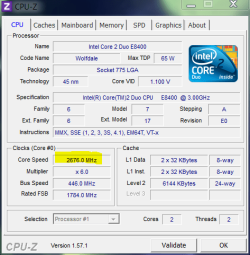
i do have eist enabled - no bios screen shots, but look at these:

computer 'at rest' - cpu speed = 2.676 GHz, multiplier=6

under.PNG

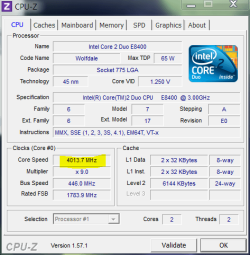
then i ran prime95, and cpu speed = 4.014 GHz, multiplier=9 - notice how volts have gone up too.

over.PNG

...but then again, our pc's seem to work differently :confused: - remember a coupla weeks ago, when shift-send-to moved files for me, but only copied for you? :)

my control panel/system page always shows 4.01 GHz when at rest, or under load.

------------------------------------------------------------------------

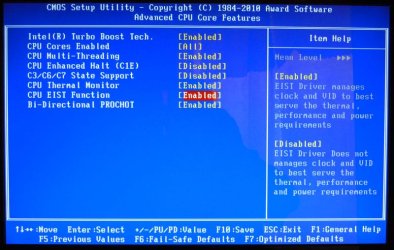
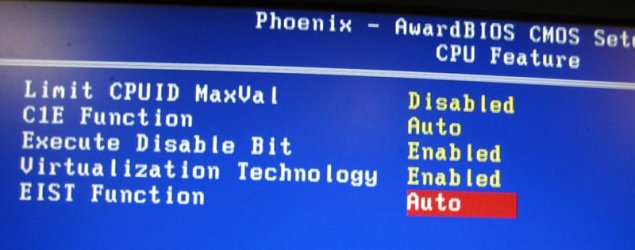
*edit* just for the hell of it, here's my bios settings: eist is set to 'auto' rather than 'disabled'

bioo.jpg
 

My Computer My Computer

At a glance

ultimate 64 sp1i5 2500K [email protected]8 gigs GSkill Ripjaws 1600amd hd6950
Computer Manufacturer/Model Number
mickey megabyte 1234
OS
ultimate 64 sp1
CPU
i5 2500K [email protected]
Motherboard
MSI P67A-GD53
Memory
8 gigs GSkill Ripjaws 1600
Graphics Card(s)
amd hd6950
Sound Card
creative x-fi gamer
Monitor(s) Displays
samsung 24"
Screen Resolution
1920x1080
Hard Drives
ocz vertex 2e 60 gig, samsung f3 1tb, buffalo 2tb ext
PSU
antec 550
Case
antec three hundred
Cooling
i'm a cooling fan
Keyboard
saitek eclipse ii
Mouse
logitech g3
Internet Speed
about 4 Mbps
Other Info
i love win7
...but then again, our pc's seem to work differently :confused: - remember a coupla weeks ago, when shift-send-to moved files for me, but only copied for you? :)
my control panel/system page always shows 4.01 GHz when at rest, or under load.

------------------------------------------------------------------------

*edit* just for the hell of it, here's my bios settings: eist is set to 'auto' rather than 'disabled'

View attachment 153657

Hehe..... EIST is still EIST, and your CPU, like mine, supports it ;)

Anyway move it from "Auto" to Enabled and see what happens.

BTW here's mine....

My-EIST-Setting.jpg
 

My Computer My Computer

At a glance

Windows 10 ProIntel Core i7-4770K (3.5Ghz)32 gig Corsair Dominator Platinum (4x8Gig)Sapphire Tri-X R9 Fury
Computer type
PC/Desktop
Computer Manufacturer/Model Number
Custom built by me.
OS
Windows 10 Pro
CPU
Intel Core i7-4770K (3.5Ghz)
Motherboard
Gigabyte G1 Sniper 5 (F10 Bios)
Memory
32 gig Corsair Dominator Platinum (4x8Gig)
Graphics Card(s)
Sapphire Tri-X R9 Fury
Sound Card
Soundblaster ZXR
Monitor(s) Displays
NEC PA242W 24" LCD Monitor
Screen Resolution
1920 x 1200
Hard Drives
Primary - Samsung 850 Pro (512gig), Samsung 840 Pro (256gig), 2TB WD Caviar Black.
PSU
EVGA Supernova 1000 G2
Case
Cooler Master HAF X
Cooling
Corsair H100i with Corsair Air Series SP120 Quiet Fans
Keyboard
Logitech Wireless Wave
Mouse
Logitech Performance MX
Internet Speed
High Speed Cable
Antivirus
Norton Security
Browser
IE11
Other Info
Memory Timings - 1866MHz @ 9-9-9-27-1T @ 1.5 volts
i've only got 'auto' and 'disabled' - no 'enabled' option in my bios. so i assume 'auto' means 'enabled'

auto.jpg

i included cpu-z screenshots in my above post to show that my clockspeeds and voltages are being changed on-the-fly - if that's not eist, then what is it? :)

most odd :confused:
 

My Computer My Computer

At a glance

ultimate 64 sp1i5 2500K [email protected]8 gigs GSkill Ripjaws 1600amd hd6950
Computer Manufacturer/Model Number
mickey megabyte 1234
OS
ultimate 64 sp1
CPU
i5 2500K [email protected]
Motherboard
MSI P67A-GD53
Memory
8 gigs GSkill Ripjaws 1600
Graphics Card(s)
amd hd6950
Sound Card
creative x-fi gamer
Monitor(s) Displays
samsung 24"
Screen Resolution
1920x1080
Hard Drives
ocz vertex 2e 60 gig, samsung f3 1tb, buffalo 2tb ext
PSU
antec 550
Case
antec three hundred
Cooling
i'm a cooling fan
Keyboard
saitek eclipse ii
Mouse
logitech g3
Internet Speed
about 4 Mbps
Other Info
i love win7
OK, like you said, our systems are different. I'll also conceed that I'm not an "expert" here so I can't answer all the why's and how's. I just know from reading, and experience, how EIST is working on mine, and most other systems.

In short.... why is your OC speed showing in your Windows 7 properties page when EIST is enabled is one I can't answer.... yet.

BTW what power plan are you using?
 

My Computer My Computer

At a glance

Windows 10 ProIntel Core i7-4770K (3.5Ghz)32 gig Corsair Dominator Platinum (4x8Gig)Sapphire Tri-X R9 Fury
Computer type
PC/Desktop
Computer Manufacturer/Model Number
Custom built by me.
OS
Windows 10 Pro
CPU
Intel Core i7-4770K (3.5Ghz)
Motherboard
Gigabyte G1 Sniper 5 (F10 Bios)
Memory
32 gig Corsair Dominator Platinum (4x8Gig)
Graphics Card(s)
Sapphire Tri-X R9 Fury
Sound Card
Soundblaster ZXR
Monitor(s) Displays
NEC PA242W 24" LCD Monitor
Screen Resolution
1920 x 1200
Hard Drives
Primary - Samsung 850 Pro (512gig), Samsung 840 Pro (256gig), 2TB WD Caviar Black.
PSU
EVGA Supernova 1000 G2
Case
Cooler Master HAF X
Cooling
Corsair H100i with Corsair Air Series SP120 Quiet Fans
Keyboard
Logitech Wireless Wave
Mouse
Logitech Performance MX
Internet Speed
High Speed Cable
Antivirus
Norton Security
Browser
IE11
Other Info
Memory Timings - 1866MHz @ 9-9-9-27-1T @ 1.5 volts
power plan?

er, balanced, but i may have tweaked it a long time ago...

balan.PNG
 

My Computer My Computer

At a glance

ultimate 64 sp1i5 2500K [email protected]8 gigs GSkill Ripjaws 1600amd hd6950
Computer Manufacturer/Model Number
mickey megabyte 1234
OS
ultimate 64 sp1
CPU
i5 2500K [email protected]
Motherboard
MSI P67A-GD53
Memory
8 gigs GSkill Ripjaws 1600
Graphics Card(s)
amd hd6950
Sound Card
creative x-fi gamer
Monitor(s) Displays
samsung 24"
Screen Resolution
1920x1080
Hard Drives
ocz vertex 2e 60 gig, samsung f3 1tb, buffalo 2tb ext
PSU
antec 550
Case
antec three hundred
Cooling
i'm a cooling fan
Keyboard
saitek eclipse ii
Mouse
logitech g3
Internet Speed
about 4 Mbps
Other Info
i love win7
just for fun, i've just disabled eist in bios, rebooted and my system page still shows the overclock.

but then again, cpuz still shows the diferent speeds when 'idle' and 'under load' - the only difference is that the core vid voltage stays at 1.25V in both states. so it wasn't eist changing the clocks originally - it was windows?, but eist did change the volts...

odder and odder - now i'm really confused. :confused:

my bios is a beta 'evaluation' bios though - as the original vanilla bios was faulty and showed really weird temps, which made overclocking difficult to gauge. then the mobo manufacturer (abit) went out of business, and didn't release a proper replacement bios, so i've been using this beta for years now, with no apparent ill effects. it might be that causing the oddness...:huh: only thing that i can think of right now.
 

My Computer My Computer

At a glance

ultimate 64 sp1i5 2500K [email protected]8 gigs GSkill Ripjaws 1600amd hd6950
Computer Manufacturer/Model Number
mickey megabyte 1234
OS
ultimate 64 sp1
CPU
i5 2500K [email protected]
Motherboard
MSI P67A-GD53
Memory
8 gigs GSkill Ripjaws 1600
Graphics Card(s)
amd hd6950
Sound Card
creative x-fi gamer
Monitor(s) Displays
samsung 24"
Screen Resolution
1920x1080
Hard Drives
ocz vertex 2e 60 gig, samsung f3 1tb, buffalo 2tb ext
PSU
antec 550
Case
antec three hundred
Cooling
i'm a cooling fan
Keyboard
saitek eclipse ii
Mouse
logitech g3
Internet Speed
about 4 Mbps
Other Info
i love win7
my bios is a beta 'evaluation' bios though - as the original vanilla bios was faulty and showed really weird temps, which made overclocking difficult to gauge. then the mobo manufacturer (abit) went out of business, and didn't release a proper replacement bios, so i've been using this beta for years now, with no apparent ill effects. it might be that causing the oddness...:huh: only thing that i can think of right now.

That could explain a lot as EIST is controlled by the BIOS.

BTW We have the same power plan with regards to CPU throttling settings - 5% Min, 100% Max. Also CPU-Z is working like your - shows resting and load state as well as variable voltage rates. So yeah, could be a BIOS issue.
 

My Computer My Computer

At a glance

Windows 10 ProIntel Core i7-4770K (3.5Ghz)32 gig Corsair Dominator Platinum (4x8Gig)Sapphire Tri-X R9 Fury
Computer type
PC/Desktop
Computer Manufacturer/Model Number
Custom built by me.
OS
Windows 10 Pro
CPU
Intel Core i7-4770K (3.5Ghz)
Motherboard
Gigabyte G1 Sniper 5 (F10 Bios)
Memory
32 gig Corsair Dominator Platinum (4x8Gig)
Graphics Card(s)
Sapphire Tri-X R9 Fury
Sound Card
Soundblaster ZXR
Monitor(s) Displays
NEC PA242W 24" LCD Monitor
Screen Resolution
1920 x 1200
Hard Drives
Primary - Samsung 850 Pro (512gig), Samsung 840 Pro (256gig), 2TB WD Caviar Black.
PSU
EVGA Supernova 1000 G2
Case
Cooler Master HAF X
Cooling
Corsair H100i with Corsair Air Series SP120 Quiet Fans
Keyboard
Logitech Wireless Wave
Mouse
Logitech Performance MX
Internet Speed
High Speed Cable
Antivirus
Norton Security
Browser
IE11
Other Info
Memory Timings - 1866MHz @ 9-9-9-27-1T @ 1.5 volts
OK here we go.....

Integration

Standard integration procedures should be followed for installing all the various system hardware components. Once all the hardware components have been installed correctly (or if the system is already functional), take the following recommended steps:
  1. Download and run the latest BIOS update for your motherboard. Check with your motherboard manufacturer to ensure their latest BIOS contains support for Enhanced Intel SpeedStep® Technology.
  2. Ensure Enhanced Intel SpeedStep Technology is enabled in your BIOS. For Intel desktop boards, the Intel SpeedStep Technology option is under the "Power" tab and labeled "EIST." Ensure it is set to "Enabled."
  3. Ensure your OS has support for Enhanced Intel SpeedStep Technology. For Windows XP SP2 operating systems, install Windows XP SP2 if you haven’t already done so.
  4. Finally, Enhanced Intel SpeedStep Technology must be turned on in the OS. Currently, for Windows XP SP2 operating systems, Enhanced Intel SpeedStep Technology by default is off. To turn it on, do the following:
    1. Under "Control Panel," open "Power Options."
    2. Under the "Power Schemes" pull down menu, choose one of the following:
      1. To turn Enhanced Intel SpeedStep Technology on, select "Minimal Power Management" power scheme.
      2. To turn Enhanced Intel SpeedStep Technology off, select "Always On" power scheme.
To verify that Enhanced Intel SpeedStep Technology is enabled, do the following:
  1. Close all applications and ensure that Windows OS is in idle mode. Press Ctrl + Alt + Delete and select the "Performance" tab. Verify that CPU usage is 0.
  2. Right click "My Computer" and select, "Properties."
  3. Under the "General" tab, examine the installed processor and speed. If Enhanced Intel SpeedStep Technology is enabled, two processor speeds will be listed. The first speed listed is the specified speed of the processor. The second speed is the current operating speed. The second speed will be less then the first speed. (See Figure 1.) This indicates that Enhanced Intel SpeedStep Technology has effectively lowered the processor voltage and core frequency, which can (depending on system usage and design) result in decreased average power consumption and decreased average heat production. If Enhanced Intel SpeedStep Technology is off, then both processor speeds will be equal. (See Figure 2.) If the processor is not in idle mode, Enhanced Intel SpeedStep Technology can be enabled and both processors speeds can be equal. If this happens, try steps 1-3 again.
Source: Enhanced Intel SpeedStep® Technology - How To Document

The article is a little dated but it basically explains my understanding of EIST ;)

Why yours is different I don't know.
 

My Computer My Computer

At a glance

Windows 10 ProIntel Core i7-4770K (3.5Ghz)32 gig Corsair Dominator Platinum (4x8Gig)Sapphire Tri-X R9 Fury
Computer type
PC/Desktop
Computer Manufacturer/Model Number
Custom built by me.
OS
Windows 10 Pro
CPU
Intel Core i7-4770K (3.5Ghz)
Motherboard
Gigabyte G1 Sniper 5 (F10 Bios)
Memory
32 gig Corsair Dominator Platinum (4x8Gig)
Graphics Card(s)
Sapphire Tri-X R9 Fury
Sound Card
Soundblaster ZXR
Monitor(s) Displays
NEC PA242W 24" LCD Monitor
Screen Resolution
1920 x 1200
Hard Drives
Primary - Samsung 850 Pro (512gig), Samsung 840 Pro (256gig), 2TB WD Caviar Black.
PSU
EVGA Supernova 1000 G2
Case
Cooler Master HAF X
Cooling
Corsair H100i with Corsair Air Series SP120 Quiet Fans
Keyboard
Logitech Wireless Wave
Mouse
Logitech Performance MX
Internet Speed
High Speed Cable
Antivirus
Norton Security
Browser
IE11
Other Info
Memory Timings - 1866MHz @ 9-9-9-27-1T @ 1.5 volts
<snip>

Why yours is different I don't know.

my machines take after their owner, and have always been different...i once caught an old laptop making toast!

seriously though, i've tweaked my pc to hell and beyond in a variety of ways - i just can't stop myself, nor always remember what i've done to it. i am semi-careful though, and make images pre-tweak, just in case of disasters.

i've been planning to do a clean install ever since sp1 came out - i wonder if it will continue to exhibit such anomalies after that?
 

My Computer My Computer

At a glance

ultimate 64 sp1i5 2500K [email protected]8 gigs GSkill Ripjaws 1600amd hd6950
Computer Manufacturer/Model Number
mickey megabyte 1234
OS
ultimate 64 sp1
CPU
i5 2500K [email protected]
Motherboard
MSI P67A-GD53
Memory
8 gigs GSkill Ripjaws 1600
Graphics Card(s)
amd hd6950
Sound Card
creative x-fi gamer
Monitor(s) Displays
samsung 24"
Screen Resolution
1920x1080
Hard Drives
ocz vertex 2e 60 gig, samsung f3 1tb, buffalo 2tb ext
PSU
antec 550
Case
antec three hundred
Cooling
i'm a cooling fan
Keyboard
saitek eclipse ii
Mouse
logitech g3
Internet Speed
about 4 Mbps
Other Info
i love win7
i wonder if it will continue to exhibit such anomalies after that?

I don't know.

Anyway I feel better knowing that EIST is working as advertised on my system.

Holla at cha later :)
 

My Computer My Computer

At a glance

Windows 10 ProIntel Core i7-4770K (3.5Ghz)32 gig Corsair Dominator Platinum (4x8Gig)Sapphire Tri-X R9 Fury
Computer type
PC/Desktop
Computer Manufacturer/Model Number
Custom built by me.
OS
Windows 10 Pro
CPU
Intel Core i7-4770K (3.5Ghz)
Motherboard
Gigabyte G1 Sniper 5 (F10 Bios)
Memory
32 gig Corsair Dominator Platinum (4x8Gig)
Graphics Card(s)
Sapphire Tri-X R9 Fury
Sound Card
Soundblaster ZXR
Monitor(s) Displays
NEC PA242W 24" LCD Monitor
Screen Resolution
1920 x 1200
Hard Drives
Primary - Samsung 850 Pro (512gig), Samsung 840 Pro (256gig), 2TB WD Caviar Black.
PSU
EVGA Supernova 1000 G2
Case
Cooler Master HAF X
Cooling
Corsair H100i with Corsair Air Series SP120 Quiet Fans
Keyboard
Logitech Wireless Wave
Mouse
Logitech Performance MX
Internet Speed
High Speed Cable
Antivirus
Norton Security
Browser
IE11
Other Info
Memory Timings - 1866MHz @ 9-9-9-27-1T @ 1.5 volts
My dell computer's bios does not give me access to power saving features, but appearently it has them since it will idle on cpu-z. So you guys dont no how to edit the registry that shows the overclock speed?
 

My Computer My Computer

At a glance

Windows 7 Ultimate x64Athlon II x2 215 @ 2700 MHzG. Skill 8 GB ddr3 @ 1600MSI R5670 PM1G
OS
Windows 7 Ultimate x64
CPU
Athlon II x2 215 @ 2700 MHz
Motherboard
MSI 870A G54
Memory
G. Skill 8 GB ddr3 @ 1600
Graphics Card(s)
MSI R5670 PM1G
Back
Top