
Elevated Program Shortcut - Create for Standard User

How to Create an Elevated Program Shortcut Any User is able to Run in Vista, Windows 7, and Windows 8

   Information
This will show you how to create an elevated program shortcut that allows any user (ex: Standard user) to be able to run a program that runs as administrator without being prompted to enter the administator's password each time in Vista, Windows 7, and Windows 8.

   Note
If the user you want to have this shortcut has been restricted with Parental Controls in Windows 7 with it set as Standard Account can only use the programs I allow, then they will not be able to use the shortcut in this tutorial since they will not be allowed to use the runas.exe file used by this shortcut. Windows 7 will not allow runas.exe to be added to the allowed to run list.


If the user you want to have this shortcut has been restricted with Family Safety in Windows 8 with it set as (user) can only use the apps I allow, then they will not be able to use the shortcut in this tutorial since they will not be allowed to use the runas.exe file used by this shortcut. Windows 8 will not allow runas.exe to be added to the allowed to run list.


You will not be able to do this in Vista Starter, Vista Home Basic, Vista Home Premium, Windows 7 Home Basic, and Windows 7 Starter editions since the runas /savecred switch option is not available and will be ignored in them.


If you disable the built-in Administrator account, the elevated shortcut will stop working until you enable the built-in Administrator again. This is because the elevated shortcut uses the password of the built-in Administrator to approve running it.


OPTION ONE

To Create Elevated Shortcut for User using RunasSPC Program


1. Download the free RunasSPC program in a .zip file at the site below.

Download


2. The link below can help show you how to use the program.
Runas Spc guidance and examples
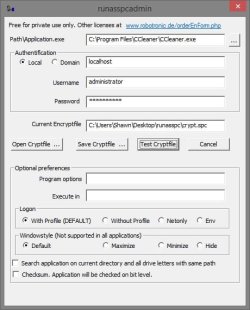

runasspcadmin.jpg


OPTION TWO

To Create Elevated Shortcut for User using runas Command


   Tip
This option uses the runas command included in Windows.

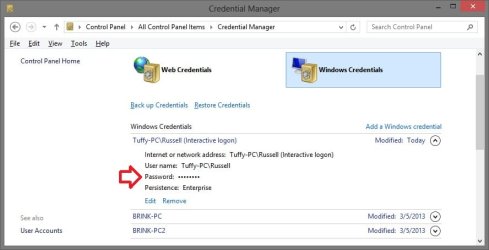
The Administrator's password (credential) used by the elevated shortcut is encrypted and stored in the Credential Manager (Control Panel (icons view)) as an "interactive logon" entry under Windows Credentials for only that user account like below.

The Administrator account's password cannot be viewed.

If you like, you can Remove (delete) this credential at anytime in Credential Manager to strip the password from the elevated shortcut to make it ask for the password again when opened like in step 18 below.

Credential_Manager.jpg

   Warning
This elevated shortcut creates a security hole.

It would be best to only do this with a trusted user.

Once you have created the elevated shortcut, the user can use the built-in Administrator's saved credentials in Credential Manager along with the command below to run and access anything they want on the computer with the same rights as the built-in Administrator.

RUNAS /savecred /user:administrator "command to run"


1. If you have not already, enable the built-in elevated "Administrator" account, and create a password for it.

   Warning
You must use the actual built-in Administrator account, and not just another administrator type user account. If you don't the shortcut will not work.


2. Log in to the built-in Administrator account, right click or press and hold on an empty space on the desktop, and click/tap on New and Shortcut.


3. Type the location below into the location area, and click/tap on the Next button. (see screenshot below)
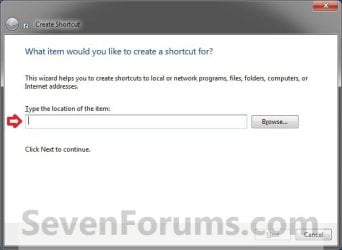
Step1.jpg

   Note

  • You would substitute ComputerName in the command below with the actual computer name.
  • If the Administrator account has been renamed, then you would also need to substitute Administrator in the command below with the new name.
  • You would substitute Full path to program's exe file in the command below with the actual full path of the elevated program's exe file within quotes that you want to have the standard user be able to run.
Code:
runas /user:[B][COLOR=red]ComputerName[/COLOR][/B]\[B]Administrator[/B] /savecred "[B][COLOR=red]Full path to program's exe file[/COLOR][/B]"
For example: I would like to have a standard user to be able to run CCleaner without me or them having to enter the Administrator's account password each time. For this, I would type this:
Code:
runas /user:[B][COLOR=red]Brink-PC[/COLOR][/B]\[B]Administrator[/B] /savecred "[B][COLOR=red]C:\Program Files\CCleaner\CCleaner.exe[/COLOR][/B]"
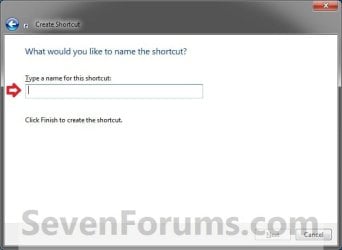
3. Type in the name of the program (ex: CCleaner), and click/tap on the Finish button. (see screenshot below)
Step2.jpg
4. Right click or press and hold on the new shortcut, click/tap on Properties, Shortcut tab, and on the Change Icon button. (see screenshot below)
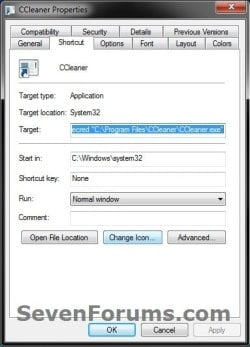
Step3.jpg
5. Click/tap on OK. (see screenshot below)
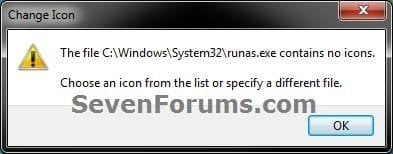
Step4.jpg
6. Click/tap on the Browse button, navigate to the location of the program's (ex: CCleaner) exe file, click on Open, select the program's icon, and click/tap on OK. (see screenshots below)
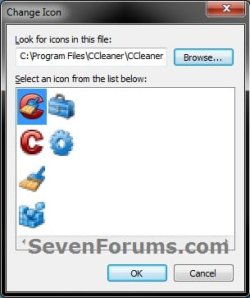
Step5A.jpg

Step5B.jpg

7. Click/tap on OK. (see screenshot below)
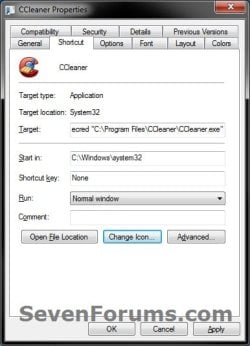
Step6.jpg
8. While still logged in to the "Administrator" account, copy the shortcut to the desktop folder of the user account (ex: Test) that you would like to be able to run this elevated program without getting a UAC prompt or having to provide the administrator's password for it.
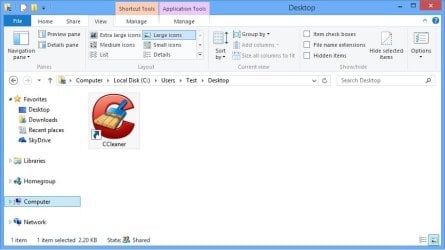
Desktop.jpg
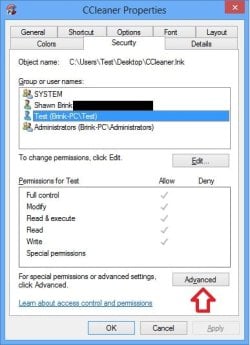
9. Right click or swipe down on the shortcut on the user's desktop that you just copied to, and click/tap on Properties. (see screenshot above)

10. Click/tap on the Security tab, and Advanced button. (see screenshot below)
Security-1.jpg
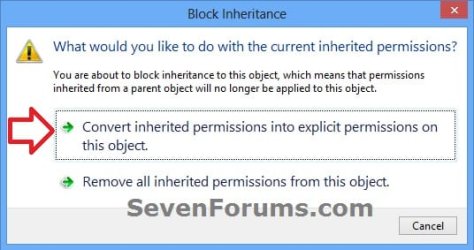
11. Select the user account (ex: Test) that the elevated shortcut is for, and click/tap on the Disable inheritance button. (see screenshot below)
Security-2.jpg
12. Click/tap on Convert inherited permissions into explicit permissions on this object. (see screenshot below)
Security-3.jpg
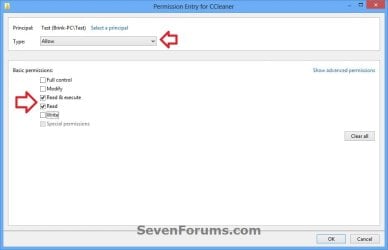
13. Select the user account (ex: Test), and click/tap on the Edit button. (see screenshot below)
security-4.jpg
14. Make sure that only the Read & execute and Read "Allow" permissions are checked, and click/tap on OK. (see screenshot below)
NOTE: This will prevent the user (ex: Test) from being able to change the target of the elevated shortcut, and only be able to run the program the elevated shortcut was created to run.
Security-5.jpg
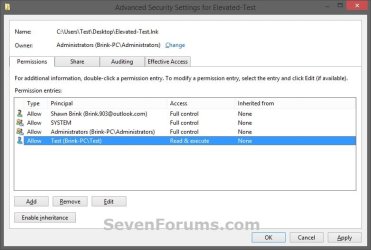
15. Click/tap on OK. (see screenshot below)
Read_Execute.jpg
16. Click/tap on OK. (see screenshot below)
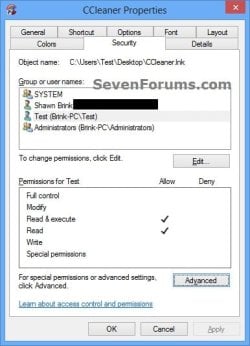
Security-7.jpg
17. Log on to the user account (ex: Test) that you made a copy of this shortcut to, and run the shortcut.

18. In the command prompt that opened, type in your built-in Administrator account's password and press Enter. You will not see the password while you are typing it in. (see screenshot below)

NOTE: You will only have to enter the Administrator's password for only the first time that this shortcut is ran in the user account (ex: Test). Afterwards, it will be remembered and entered automatically for the user when they run it without anyone being able to see the password.
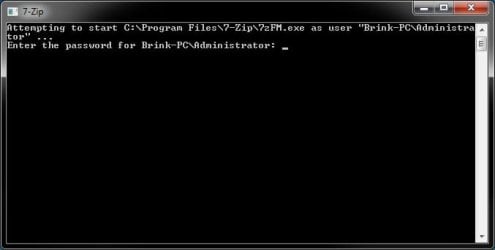
step7.jpg
19. In Vista and Windows 7, the user can now Pin to Taskbar (Windows 7 only) or Pin to Start Menu, add to Quick Launch, assign a keyboard shortcut to it, or move this shortcut to where you like for easy use.

20. In Windows 8 and 8.1, the user can Pin to Taskbar on desktop, Pin to Start screen, add to Quick Launch, assign a keyboard shortcut to it, or move this shortcut to where you like for easy use.


That's it,
Shawn


Last edited:
or is there a way to turn on UAC warnings for the built in Administrator without having prompts for std. user acc using the shortcut with admin privil. ?
Resumee: I want to use only ONE admin account which I use with UAC on and have shortcuts (with the privl. of this admin) for std. user acc. without prompts
 

My Computer

Computer Manufacturer/Model Number
hp-DV7 Notebook
OS
win7_home_64
CPU
i5
Motherboard
hp
Memory
6GB
Graphics Card(s)
HD6770
Ill give it a shot ... many THX .. but as I understand in both cases I loose all UAC warnings

or maybe this is what Ive been looking for :
3. To Have UAC Prompt Administrators for a Continue or Yes


but I expect a standard account using a shortcut with this elevated admin account will get the prompt as well
If you elevate your normal admin account, you will no longer get a UAC prompt just like the built-in Administrators.

The standard user will not get prompted by UAC when using the elevated shortcut since the shortcut uses the credentials of the elevated admin account instead of the standard user's.

or is there a way to turn on UAC warnings for the built in Administrator without having prompts for std. user acc using the shortcut with admin privil. ?
Resumee: I want to use only ONE admin account which I use with UAC on and have shortcuts (with the privl. of this admin) for std. user acc. without prompts
No. The key to this is an "elevated" administrator account so that the standard user will not be prompted by UAC using that account's credentials.

As a workaround, try elevating your normal admin account first to create the shortcut using your account's password instead of the built-in Admin to see if it'll work for the standard user or not.

If not, then you will be stuck having to use the built-in Administrator as per the tutorial instead of the workaround.
 

My Computer

Computer type
PC/Desktop
Computer Manufacturer/Model Number
Self built custom
OS
64-bit Windows 11 Pro for Workstations
CPU
Intel i7-8700K OC'd to 5 GHz
Motherboard
ASUS ROG Maximus XI Formula Z390
Memory
64 GB (4x16GB) G.SKILL TridentZ RGB DDR4 3600 MHz
Graphics Card(s)
ASUS ROG-STRIX-GTX1080TI-O11G-GAMING
Sound Card
Integrated
Monitor(s) Displays
2 x Samsung Odyssey G7 27"
Screen Resolution
2560x1440
Hard Drives
1TB Samsung 990 PRO M.2,
4TB Samsung 990 PRO PRO M.2,
TerraMaster F8 SSD Plus NAS
PSU
Seasonic Prime Titanium 850W
Case
Thermaltake Core P3
Cooling
Corsair Hydro H115i
Keyboard
Logitech wireless K800
Mouse
Logitech MX Master 4
Internet Speed
2 Gb/s Download and 100 Mb/s Upload
Antivirus
Malwarebyte Anti-Malware Premium
Browser
Google Chrome
Other Info
Logitech Z625 speaker system,
Logitech BRIO 4K Pro webcam,
HP Color LaserJet Pro MFP M477fdn,
APC SMART-UPS RT 1000 XL - SURT1000XLI,
Galaxy S23 Plus phone
just trying to elevate my normal admin under w7/8 ... I found,
ConsentPromptBehaviorAdmin=5 where the default is 2 in vista
ConsentPromptBehaviorUser=3

can you please interpret this for me
 
Last edited:

My Computer

Computer Manufacturer/Model Number
hp-DV7 Notebook
OS
win7_home_64
CPU
i5
Motherboard
hp
Memory
6GB
Graphics Card(s)
HD6770
I am logged into my normal admin account:
when I start the "runas shortcut" using my normal admin (in the runas) with elevated rights, I get the message "you are not allowed to write to the registry" which i also get when I start my program without saying "start as Administrator"
 

My Computer

Computer Manufacturer/Model Number
hp-DV7 Notebook
OS
win7_home_64
CPU
i5
Motherboard
hp
Memory
6GB
Graphics Card(s)
HD6770
if I use the built in Admin everything is fine under W8

On my W7 System I get
"runas unknown error -.... in hex: 80004005"

any idea very welcome
 

My Computer

Computer Manufacturer/Model Number
hp-DV7 Notebook
OS
win7_home_64
CPU
i5
Motherboard
hp
Memory
6GB
Graphics Card(s)
HD6770
5ggggg,

Did you create a separate shortcut in Windows 7, and not use the same one from Windows 8?

Is able to work in Windows 7 if you use the built-in Administrator in it?
 

My Computer

Computer type
PC/Desktop
Computer Manufacturer/Model Number
Self built custom
OS
64-bit Windows 11 Pro for Workstations
CPU
Intel i7-8700K OC'd to 5 GHz
Motherboard
ASUS ROG Maximus XI Formula Z390
Memory
64 GB (4x16GB) G.SKILL TridentZ RGB DDR4 3600 MHz
Graphics Card(s)
ASUS ROG-STRIX-GTX1080TI-O11G-GAMING
Sound Card
Integrated
Monitor(s) Displays
2 x Samsung Odyssey G7 27"
Screen Resolution
2560x1440
Hard Drives
1TB Samsung 990 PRO M.2,
4TB Samsung 990 PRO PRO M.2,
TerraMaster F8 SSD Plus NAS
PSU
Seasonic Prime Titanium 850W
Case
Thermaltake Core P3
Cooling
Corsair Hydro H115i
Keyboard
Logitech wireless K800
Mouse
Logitech MX Master 4
Internet Speed
2 Gb/s Download and 100 Mb/s Upload
Antivirus
Malwarebyte Anti-Malware Premium
Browser
Google Chrome
Other Info
Logitech Z625 speaker system,
Logitech BRIO 4K Pro webcam,
HP Color LaserJet Pro MFP M477fdn,
APC SMART-UPS RT 1000 XL - SURT1000XLI,
Galaxy S23 Plus phone
the prog runs in W7 if started an Admin

I took the w8 shortcut and changed the PC Name...and it didnt work ... so I tried the code
Code:
C:\Windows\System32\runas.exe /user:xxx\zadm /savecred "D:\sources\...exe"
in an Administrator CMD ... and there I could see the error from above
 

My Computer

Computer Manufacturer/Model Number
hp-DV7 Notebook
OS
win7_home_64
CPU
i5
Motherboard
hp
Memory
6GB
Graphics Card(s)
HD6770
It won't work if you just copied it over from Windows 8. Even if you modified it.

You have to start completely from scratch in Windows 7 using the built-in Administrator account from Windows 7. Since you already tried it, you will need to use a new name for the shortcut as well.
 

My Computer

Computer type
PC/Desktop
Computer Manufacturer/Model Number
Self built custom
OS
64-bit Windows 11 Pro for Workstations
CPU
Intel i7-8700K OC'd to 5 GHz
Motherboard
ASUS ROG Maximus XI Formula Z390
Memory
64 GB (4x16GB) G.SKILL TridentZ RGB DDR4 3600 MHz
Graphics Card(s)
ASUS ROG-STRIX-GTX1080TI-O11G-GAMING
Sound Card
Integrated
Monitor(s) Displays
2 x Samsung Odyssey G7 27"
Screen Resolution
2560x1440
Hard Drives
1TB Samsung 990 PRO M.2,
4TB Samsung 990 PRO PRO M.2,
TerraMaster F8 SSD Plus NAS
PSU
Seasonic Prime Titanium 850W
Case
Thermaltake Core P3
Cooling
Corsair Hydro H115i
Keyboard
Logitech wireless K800
Mouse
Logitech MX Master 4
Internet Speed
2 Gb/s Download and 100 Mb/s Upload
Antivirus
Malwarebyte Anti-Malware Premium
Browser
Google Chrome
Other Info
Logitech Z625 speaker system,
Logitech BRIO 4K Pro webcam,
HP Color LaserJet Pro MFP M477fdn,
APC SMART-UPS RT 1000 XL - SURT1000XLI,
Galaxy S23 Plus phone
new shortcut created from the built in Admin (which is renamed) ... not working ... when I take the code to a admin CMD window it asks me to enter the Builtin Admin PWD and then it shows the above error
 

My Computer

Computer Manufacturer/Model Number
hp-DV7 Notebook
OS
win7_home_64
CPU
i5
Motherboard
hp
Memory
6GB
Graphics Card(s)
HD6770
strange: I tried the runas not with the renamed name (zadm) but "Administrator" and it works ... how come ...
 

My Computer

Computer Manufacturer/Model Number
hp-DV7 Notebook
OS
win7_home_64
CPU
i5
Motherboard
hp
Memory
6GB
Graphics Card(s)
HD6770
Are you doing it while logged in to the built-in Administrator account?

The command should be using Administrator as the name of the account since it's for the built-in Administrator unless you changed it.


runas /user:ComputerName\Administrator /savecred "Full path to program's exe file"
 

My Computer

Computer type
PC/Desktop
Computer Manufacturer/Model Number
Self built custom
OS
64-bit Windows 11 Pro for Workstations
CPU
Intel i7-8700K OC'd to 5 GHz
Motherboard
ASUS ROG Maximus XI Formula Z390
Memory
64 GB (4x16GB) G.SKILL TridentZ RGB DDR4 3600 MHz
Graphics Card(s)
ASUS ROG-STRIX-GTX1080TI-O11G-GAMING
Sound Card
Integrated
Monitor(s) Displays
2 x Samsung Odyssey G7 27"
Screen Resolution
2560x1440
Hard Drives
1TB Samsung 990 PRO M.2,
4TB Samsung 990 PRO PRO M.2,
TerraMaster F8 SSD Plus NAS
PSU
Seasonic Prime Titanium 850W
Case
Thermaltake Core P3
Cooling
Corsair Hydro H115i
Keyboard
Logitech wireless K800
Mouse
Logitech MX Master 4
Internet Speed
2 Gb/s Download and 100 Mb/s Upload
Antivirus
Malwarebyte Anti-Malware Premium
Browser
Google Chrome
Other Info
Logitech Z625 speaker system,
Logitech BRIO 4K Pro webcam,
HP Color LaserJet Pro MFP M477fdn,
APC SMART-UPS RT 1000 XL - SURT1000XLI,
Galaxy S23 Plus phone
yes I was logged on as the built in Administrator whose Name is zadm like in my w8 System...

On the w8PRO I have to use "zadm" and on W7 "Administrator" as the username regardless from which account I start the shortcut

Maybe it is because in W8PRO I used the grouppolicies editor to change the Admins Name (I did not find a rename possibilty in the accounts Setup)

On the W7 I used the rename Option ....

(PS: Did you find a rename comand in the Administartors account Setup under W8PRO ?)
 

My Computer

Computer Manufacturer/Model Number
hp-DV7 Notebook
OS
win7_home_64
CPU
i5
Motherboard
hp
Memory
6GB
Graphics Card(s)
HD6770
Yeah, in Windows 8, you would have to use one of the other options below instead of in "User Accounts" to rename the built-in Administrator.
http://www.sevenforums.com/tutorials/7417-built-administrator-account-change-name.html
If you renamed it after you had already signed in to the account once before, then that's why you must continue to use "Administrator" instead of "zadm". Whatever name it has when you first sign in to it, is the name that will always be used for security permissions no matter how many times you rename the account.
 

My Computer

Computer type
PC/Desktop
Computer Manufacturer/Model Number
Self built custom
OS
64-bit Windows 11 Pro for Workstations
CPU
Intel i7-8700K OC'd to 5 GHz
Motherboard
ASUS ROG Maximus XI Formula Z390
Memory
64 GB (4x16GB) G.SKILL TridentZ RGB DDR4 3600 MHz
Graphics Card(s)
ASUS ROG-STRIX-GTX1080TI-O11G-GAMING
Sound Card
Integrated
Monitor(s) Displays
2 x Samsung Odyssey G7 27"
Screen Resolution
2560x1440
Hard Drives
1TB Samsung 990 PRO M.2,
4TB Samsung 990 PRO PRO M.2,
TerraMaster F8 SSD Plus NAS
PSU
Seasonic Prime Titanium 850W
Case
Thermaltake Core P3
Cooling
Corsair Hydro H115i
Keyboard
Logitech wireless K800
Mouse
Logitech MX Master 4
Internet Speed
2 Gb/s Download and 100 Mb/s Upload
Antivirus
Malwarebyte Anti-Malware Premium
Browser
Google Chrome
Other Info
Logitech Z625 speaker system,
Logitech BRIO 4K Pro webcam,
HP Color LaserJet Pro MFP M477fdn,
APC SMART-UPS RT 1000 XL - SURT1000XLI,
Galaxy S23 Plus phone
sorry still have a knot in my brain ;-) because on both systens the directory of the account is c:\users\Administrator because I used it before renaming it... and that is fine for me

I have no preference wether the username in the shortcut will be zadm or Administrator, but it should be the same on both Systems.
Which would you change ?
I read the different options for renaming, but still dont know which would lead to "Administrator" on W8 shortcut (and keep it renamed "zadm" on logon)
 
Last edited:

My Computer

Computer Manufacturer/Model Number
hp-DV7 Notebook
OS
win7_home_64
CPU
i5
Motherboard
hp
Memory
6GB
Graphics Card(s)
HD6770
I used C:\Windows\System32\Netplwiz.exe to Change the Username on my W7 from Administrator to zadm and deleted the Longname zadm. This way both System shortcuts work with zadm ...
many THX for your help ... stil would be interested in your opinion doing it this way
 

My Computer

Computer Manufacturer/Model Number
hp-DV7 Notebook
OS
win7_home_64
CPU
i5
Motherboard
hp
Memory
6GB
Graphics Card(s)
HD6770
Sorry, but it still would not work. It's only going to accept the name it had when you first logged in to it.

You do not have to rename the accountfrom "zadm" if you don't want to since both names are permanently tied to the account. The shortcut will still work with the account named "zadm". It's just that you must use "Administrator" in the command for the shortcut since "Administrator" was the name the account had when you first logged on to it.
 
Last edited:

My Computer

Computer type
PC/Desktop
Computer Manufacturer/Model Number
Self built custom
OS
64-bit Windows 11 Pro for Workstations
CPU
Intel i7-8700K OC'd to 5 GHz
Motherboard
ASUS ROG Maximus XI Formula Z390
Memory
64 GB (4x16GB) G.SKILL TridentZ RGB DDR4 3600 MHz
Graphics Card(s)
ASUS ROG-STRIX-GTX1080TI-O11G-GAMING
Sound Card
Integrated
Monitor(s) Displays
2 x Samsung Odyssey G7 27"
Screen Resolution
2560x1440
Hard Drives
1TB Samsung 990 PRO M.2,
4TB Samsung 990 PRO PRO M.2,
TerraMaster F8 SSD Plus NAS
PSU
Seasonic Prime Titanium 850W
Case
Thermaltake Core P3
Cooling
Corsair Hydro H115i
Keyboard
Logitech wireless K800
Mouse
Logitech MX Master 4
Internet Speed
2 Gb/s Download and 100 Mb/s Upload
Antivirus
Malwarebyte Anti-Malware Premium
Browser
Google Chrome
Other Info
Logitech Z625 speaker system,
Logitech BRIO 4K Pro webcam,
HP Color LaserJet Pro MFP M477fdn,
APC SMART-UPS RT 1000 XL - SURT1000XLI,
Galaxy S23 Plus phone
but it worked for me ... ?? .... w7=w8 zadm in the shortcut
 

My Computer

Computer Manufacturer/Model Number
hp-DV7 Notebook
OS
win7_home_64
CPU
i5
Motherboard
hp
Memory
6GB
Graphics Card(s)
HD6770
Ah, perfect then. :party:
 

My Computer

Computer type
PC/Desktop
Computer Manufacturer/Model Number
Self built custom
OS
64-bit Windows 11 Pro for Workstations
CPU
Intel i7-8700K OC'd to 5 GHz
Motherboard
ASUS ROG Maximus XI Formula Z390
Memory
64 GB (4x16GB) G.SKILL TridentZ RGB DDR4 3600 MHz
Graphics Card(s)
ASUS ROG-STRIX-GTX1080TI-O11G-GAMING
Sound Card
Integrated
Monitor(s) Displays
2 x Samsung Odyssey G7 27"
Screen Resolution
2560x1440
Hard Drives
1TB Samsung 990 PRO M.2,
4TB Samsung 990 PRO PRO M.2,
TerraMaster F8 SSD Plus NAS
PSU
Seasonic Prime Titanium 850W
Case
Thermaltake Core P3
Cooling
Corsair Hydro H115i
Keyboard
Logitech wireless K800
Mouse
Logitech MX Master 4
Internet Speed
2 Gb/s Download and 100 Mb/s Upload
Antivirus
Malwarebyte Anti-Malware Premium
Browser
Google Chrome
Other Info
Logitech Z625 speaker system,
Logitech BRIO 4K Pro webcam,
HP Color LaserJet Pro MFP M477fdn,
APC SMART-UPS RT 1000 XL - SURT1000XLI,
Galaxy S23 Plus phone
Hello, where are the credentials saved ? Is it crypted ?
 

My Computer

Computer type
PC/Desktop
OS
7x64 ultimate / 7x64 pro / Some linux x64 distro
CPU
i7-870
Motherboard
MSI P55-GD85
Memory
Kingston 4x2gb 1600 9-9-9
Graphics Card(s)
MSI GTX460 Cyclone 1GDDR5x2 + Gigabyte 285GTX 1GDDR5(PhysX)
Sound Card
Realtek alc 889
Monitor(s) Displays
Samsung syncmaster 2333sw + some old acer screen
Screen Resolution
3200x1024
Hard Drives
WDC WD1500HLFS-01G6U1 - System partition
WDC WD1500HLFS-01G6U1 -
WDC WD1500HLFS-01G6U1 | RAID
WDC WD1500HLFS-01G6U1 |
WDC WD1500HLFS-01G6U1-
PSU
LC Power "Arkangel" 850W
Case
Aerocool BX-500
Cooling
Noctua NH something
Keyboard
Razer Lycosa
Mouse
Razer Imperator
Antivirus
Kaspersky Pure/Kaspersky Small Office Security
Browser
Chrome+Chrominium & Internet Explorer
Other Info
Razer Nostromo (Because there's not enough buttons for all the shortcut on a keyboard)
Hello Magissia, and welcome to Seven Forums.

The password is encrypted and stored by the Credential Manager (Control Panel) as a "interactive logon" under Windows Credentials like below. If you like, you can delete it in Credential Manager at anytime to make the shortcut no longer valid or work.

password.jpg

Hope this helps, :)
Shawn
 

My Computer

Computer type
PC/Desktop
Computer Manufacturer/Model Number
Self built custom
OS
64-bit Windows 11 Pro for Workstations
CPU
Intel i7-8700K OC'd to 5 GHz
Motherboard
ASUS ROG Maximus XI Formula Z390
Memory
64 GB (4x16GB) G.SKILL TridentZ RGB DDR4 3600 MHz
Graphics Card(s)
ASUS ROG-STRIX-GTX1080TI-O11G-GAMING
Sound Card
Integrated
Monitor(s) Displays
2 x Samsung Odyssey G7 27"
Screen Resolution
2560x1440
Hard Drives
1TB Samsung 990 PRO M.2,
4TB Samsung 990 PRO PRO M.2,
TerraMaster F8 SSD Plus NAS
PSU
Seasonic Prime Titanium 850W
Case
Thermaltake Core P3
Cooling
Corsair Hydro H115i
Keyboard
Logitech wireless K800
Mouse
Logitech MX Master 4
Internet Speed
2 Gb/s Download and 100 Mb/s Upload
Antivirus
Malwarebyte Anti-Malware Premium
Browser
Google Chrome
Other Info
Logitech Z625 speaker system,
Logitech BRIO 4K Pro webcam,
HP Color LaserJet Pro MFP M477fdn,
APC SMART-UPS RT 1000 XL - SURT1000XLI,
Galaxy S23 Plus phone
Back
Top