Elevated Program Shortcut without UAC Prompt - Create

How to Create an Elevated Program Shortcut without a UAC Prompt in Windows


   Information
This will show you how to create an elevated "Run as administrator" shortcut of any installed program using Task Scheduler so that it will not give you a UAC prompt for permission when you start it while still having UAC turned on in Vista, Windows 7, and Windows 8.

In the tutorial, you will first create a new task, then a new shortcut to run the task. Afterwards, how to change the icon of the shortcut.

   Note
Special thanks to OEM for pointing this out, and the previous Vista version by DMEX.

   Warning


  • This shortcut and task can only be created and work while logged in as an administrator account.
  • This shortcut will not work in a standard user account.


Here's How:
1. Press the Windows + R keys to open the Run dialog, type taskschd.msc, and press Enter.
NOTE: This will open Task Scheduler. This file is located at:
C:\Windows\system32\taskschd.msc.

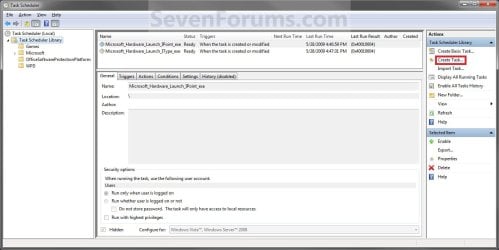
2. While having Task Scheduler Library selected in the left pane, click/tap on Create task in the far right pane. (see screenshot below)
Step1.jpg
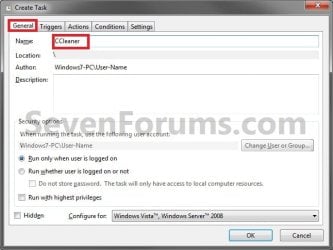
3. Under the General tab, type in the "Name" of the program you want to create this shortcut for. (see screenshot below)
NOTE: This will be the name of the task. As an example, I will use CCleaner for that program. Make note of this name, you will need it later in step 12 and 14 below.
Step2.jpg
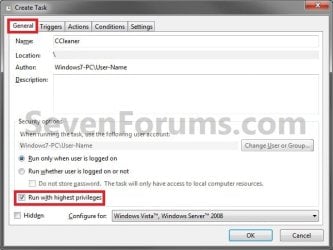
4. Check the Run with highest privileges box. (See screenshot below)
Step3.jpg
5. Click/tap on the Configure for drop down box to open it, and select Windows® 7, Windows Server™ 2008 R2 or the Windows you are currently in. (see screenshot above and below)
NOTE: This is like compatibility mode. If the program does not support running in Windows 7 normally, then you can select the OS that is does support running in instead to have it run in compatibility mode as if it was running in that OS instead of Windows 7.

Drop_Down_Box.jpg
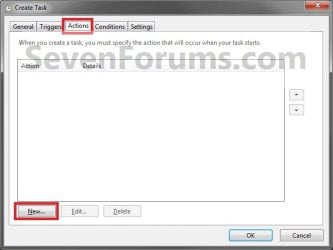
6. Click/tap on the Actions tab, then on the New button. (see screenshot below)
Step4.jpg
7. In the Program/script: box in the Actions tab, copy and paste the path below. (see screenshot below step 9)
NOTE: Thank you to chillz for the updated steps 7 and 8.
%windir%\System32\cmd.exe
8. In the Add arguments (optional): box in the Actions tab, type in the argument below. (see screenshot below step 9)

NOTE: Substitute Task Name in the argument below with the name you entered in step 3 (ex: CCleaner) within quotes, and substitute Full Path of Program in the argument below with the actual full path of the program's .exe file within quote.
/c start "Task Name" "Full Path of Program"


For example:

Code:
/c start "CCleaner" "C:\Program Files\CCleaner\CCleaner64.exe"
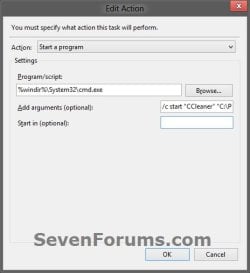
9. Click/tap on OK. (see screenshot below)
step7.jpg
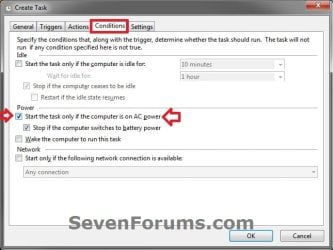
10. Click/tap on the Conditions tab, and uncheck the Stop if the computer switches to battery power box first, then uncheck the Start the task only if the computer is on AC power box. (see screenshots below)
NOTE: This step is mostly for laptops, so that you will be able to run the program when the laptop is running on battery power.
step8.jpg

Conditions.jpg

11. Click/tap on OK. (See screenshots above)

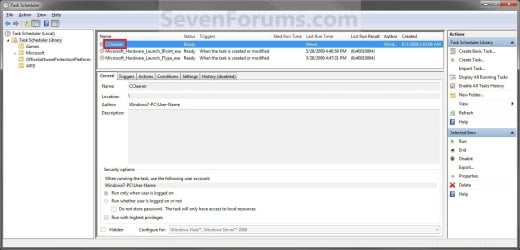
12. You will now see your new task created with the name (ex: CCleaner) you gave it in step 3. Close Task Scheduler. (see screenshot below)
Step9.jpg
13. Right click or press and hold on an empty area of your desktop, then click/tap on New and Shortcut.

14. Type in the target below for the location field, then click/tap on the Next button. (see screenshot below)
NOTE: Subsitute task-name in the target with the name (ex: CCleaner) within quotes that you used in step 3.
schtasks /run /tn "task-name"

For example: For my task name CCleaner I used from step 3, I would type:
schtasks /run /tn "CCleaner"
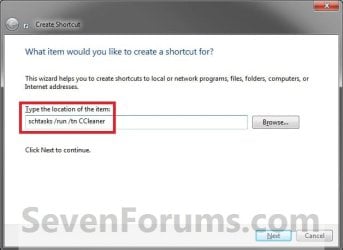
Step10.jpg
15. Type in a name you want for the shortcut (ex: CCleaner), then click/tap on the Finish button. (see screenshot below)
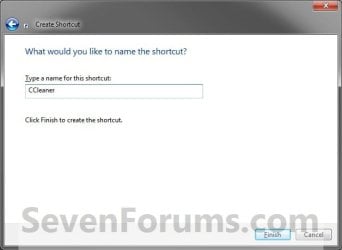
Step11.jpg
16. Right click on the new shortcut (ex: CCleaner) on the desktop, then click/tap on Properties.

17. Click/tap on the Shortcut tab, and on the Change Icon button. (see screenshot below)
Step12.jpg
18. Click/tap on OK. (see screenshot below)
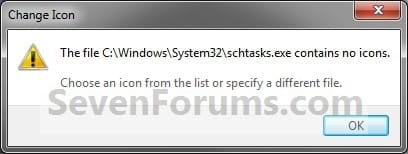
Step13.jpg
19. Click/tap on the Browse button. (see screenshot below)
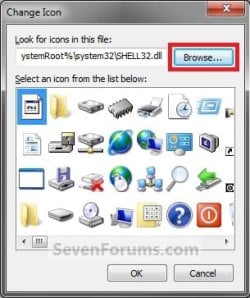
Step14.jpg
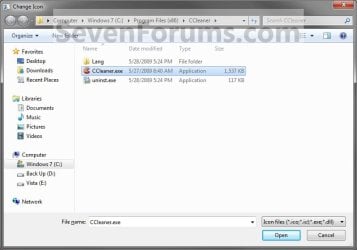
20. Navigate to the .exe file of the program that you have created this shortcut with, select it, and click/tap on Open. (see screenshot below)
NOTE: If you have a icon of your own that you would prefer to use instead, then navigate to where you have that icon saved at instead.
Step15.jpg
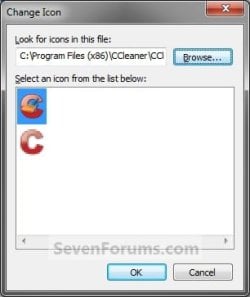
21. Select the icon you want for the shortcut, then click/tap on OK. (see screenshot below)
Step16.jpg
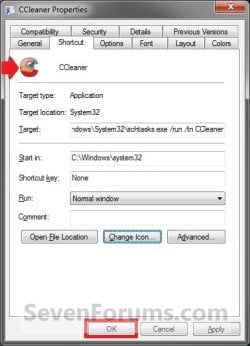
22. Click/tap on OK. (see screenshot below)
Step17.jpg
23. You can now use this elevated shortcut to run at startup in your "Startup" folder, run at startup as a task, Pin to Start Menu, Pin to Taskbar, assign a keyboard shortcut, or move to where you like for easy use.

24. When you run this new elevated shortcut, you will now no longer have to click/tap on YES to approve the UAC prompt to allow the program run as administrator.


   Tip
To Undo and Remove this Task:
  • While having Task Scheduler Library selected in the left pane, right click on the task in the right pane that you created in step 12, then click on Delete and Yes to approve.
  • Delete the shortcut.
That's it,
Shawn


Last edited:
With Avast, you are not opening the program from the system tray, you are bringing up a minimized program. When you drop the Avast window, it does not close, it minimizes to the system tray, so its a single click to maximize again.

That is also why the shortcut did not work. It cannot open up two sessions of Avast.

Thank you, mac, I appreciate your reply!

That seems logical enough. What confused me :confused: is that the tray icon would not load at startup, (which it did load @ startup on my XP machines, hence the ques. "is this new in 7")) only after I opened the UI w/ the shortcut & then minimzed to tray.

Unfortunately this shortcut "trick" for lack of a better term has opened a PLETHORA of problems using Avast in Win 7 x64, starting with this one (posted @ Avast forum) ...now I find that I cannot scan a singular file or folder (using the right-click "Scan with Avast... context menu) :mad: which is also explained by your reply: "...It cannot open up two sessions of Avast"

Looks like I have two choices:
1) abandon this elevated program shortcut & live with the UAC prompt at startup as described in my topic @ Avast. No one there has provided ANY assistance, I stumbled on a temporary registry hack to disable the UAC prompt @ startup & they told me to mark the thread as "resolved" so they could close it out.

WTF?????

2) abandon Avast & find another (FREE) AV---NOT AVG, M$$E OR ESPECIALLY NORTON that won't be such a hassle running in Win 7.

Any suggestions, anyone?
Thanks!!
 

My Computer

Computer type
Laptop
Computer Manufacturer/Model Number
MSI PE60 6QE
OS
Win 10 Pro x64, Win 7 Pro x64
CPU
Intel Core i7-6700HQ Skylake
Motherboard
MSI MS-16J5
Memory
16gb Crucial DDR4
Graphics Card(s)
NVIDIA GeForce GTX 960M 2 GB
Screen Resolution
1920 x 1080
Hard Drives
Samsung 850 EVO 250 GB M.2 SSD (MZ-N5E250BW)
HGST 1TB @7200 RPM HTS721010A9E630
Case
Plastic
Keyboard
Got one...
Mouse
Yep, one of those too.
Internet Speed
FIOS 75/75
Antivirus
Defender
Browser
Chrome/FFox/Ex-PLODE-r/(L)Edge
Other Info
Defender, Custom Hosts, uBlock, regular backups w/ Macrium (Free)
Last edited by a moderator:

My Computer

Computer type
Laptop
Computer Manufacturer/Model Number
MSI PE60 6QE
OS
Win 10 Pro x64, Win 7 Pro x64
CPU
Intel Core i7-6700HQ Skylake
Motherboard
MSI MS-16J5
Memory
16gb Crucial DDR4
Graphics Card(s)
NVIDIA GeForce GTX 960M 2 GB
Screen Resolution
1920 x 1080
Hard Drives
Samsung 850 EVO 250 GB M.2 SSD (MZ-N5E250BW)
HGST 1TB @7200 RPM HTS721010A9E630
Case
Plastic
Keyboard
Got one...
Mouse
Yep, one of those too.
Internet Speed
FIOS 75/75
Antivirus
Defender
Browser
Chrome/FFox/Ex-PLODE-r/(L)Edge
Other Info
Defender, Custom Hosts, uBlock, regular backups w/ Macrium (Free)
That's great news. Thank you for posting back with your solution. :)
 

My Computer

Computer type
PC/Desktop
Computer Manufacturer/Model Number
Self built custom
OS
64-bit Windows 11 Pro for Workstations
CPU
Intel i7-8700K OC'd to 5 GHz
Motherboard
ASUS ROG Maximus XI Formula Z390
Memory
64 GB (4x16GB) G.SKILL TridentZ RGB DDR4 3600 MHz
Graphics Card(s)
ASUS ROG-STRIX-GTX1080TI-O11G-GAMING
Sound Card
Integrated
Monitor(s) Displays
2 x Samsung Odyssey G7 27"
Screen Resolution
2560x1440
Hard Drives
1TB Samsung 990 PRO M.2,
4TB Samsung 990 PRO PRO M.2,
TerraMaster F8 SSD Plus NAS
PSU
Seasonic Prime Titanium 850W
Case
Thermaltake Core P3
Cooling
Corsair Hydro H115i
Keyboard
Logitech wireless K800
Mouse
Logitech MX Master 4
Internet Speed
2 Gb/s Download and 100 Mb/s Upload
Antivirus
Malwarebyte Anti-Malware Premium
Browser
Google Chrome
Other Info
Logitech Z625 speaker system,
Logitech BRIO 4K Pro webcam,
HP Color LaserJet Pro MFP M477fdn,
APC SMART-UPS RT 1000 XL - SURT1000XLI,
Galaxy S23 Plus phone
Another option

I just want to add this. I was having some problems on my laptop, and was advised to stop using Avast (some conflicts since resolved). On the advise of one of the people here, I installed Windows Security Essentials.

It works fine. I have had no problems, and when I did get an infected file it found it and blocked it with no problem. It even found a trojan that Avast had missed.

I am always skeptical of Microsoft, but MSE is working for me.

P.S. No UAC prompts from MSE.
 

My Computer

Computer Manufacturer/Model Number
Self Built
OS
Windows 7 Home Premium
CPU
Intel Core i7-3770 Ivy Bridge 3.4GHz
Motherboard
Asrock Z77 Extreme 4
Memory
CORSAIR Vengeance 16GB (4 x 4GB) DDR3 SDRAM DDR3 1600
Graphics Card(s)
EVGA GeForce GTX 660 FTW Signature 2
Sound Card
Onboard
Monitor(s) Displays
Samsung 24in LCD
Hard Drives
Samsung 840 EVO-Series 500GB 2.5-Inch SATA III Solid State Drive
HITACHI Deskstar 2TB 7200 RPM SATA 6.0Gb/s
PSU
Thermaltake Smart Series 850W PSU
Case
NZXT M59
Cooling
COOLER MASTER Hyper 212 EVO RR-212E and five 120mm case fans
Keyboard
Logitech G110 Gaming Keyboard
Mouse
Razer DeathAdder Mouse & Razer Destructor 2 Hard Mouse Mat
Internet Speed
Cable @ 18Gbps
Hello Greg,

Yes, at step 20 under the Shortcut tab in the shortcut's properties, you can select Minimized in the drop down menu to the left of Run and click OK to stop it.
Ah, but it's not a shortcut. The task name was added to Local Machine Run in the registry. HD Tune wouldn't auto start without it

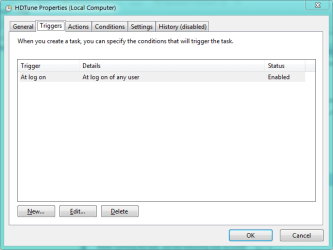
Figured this one out by accident. Anything that needs auto starting via HKLM run or HKCU run needs some tweaking done in the scheduled task. The trigger for the task has to be set for "At log on". When this is done, the elevated task runs at startup/logon and without the cmd popup window in addition too, no startup entry needed in the registry.

http://www.sevenforums.com/tutorials/67503-task-create-run-program-startup-log.html

Untitled.png
 

My Computer

Computer Manufacturer/Model Number
Averatec 6130HS-20
OS
Windows 7 Professional 32-bit (6.1, Build 7600)
CPU
Intel(R) Pentium(R) 4 3.00 GHz HT
Memory
2.0 GB
Graphics Card(s)
ATI Mobility Radeon 9600 64MB
Sound Card
Realtek AC'97 Audio
Screen Resolution
1280 x 800
Hard Drives
Seagate 96023A 60GB 7200RPM -
Seagate FreeAgentDesktop 250GB
Cooling
20 Inch Box Fan
Mouse
Targus PAWM10 Wireless Optical Laptop Mouse
At last UAC notice killer

Brink,

I just found this tutorial ("How to Create an Elevated Program Shortcut without a UAC Prompt" by accident. I have been chasing around through various threads, forums, websites, etc. looking for this solution since getting Windows 7 a few of months ago. The problem that I had in finding a solution was that I did not refer to the need to 'elevate' the program in order to avoid the dreaded UAC notice but rather by every other description, including shield on icon, UAC notice, etc.

Your solution is quite easy to follow. One would think that Microsoft would incorporate it into a 'single' step for users.

Thanks very much for your assistance.
 
Last edited:

My Computer

Computer Manufacturer/Model Number
Dell Studio XPS 9100
OS
windows 7 home premium 64 bit
CPU
i7920
Memory
9 GB
Graphics Card(s)
ATI
Monitor(s) Displays
Dell 24"
Hard Drives
Seagate 750 GB
You're most welcome Colion. :)
 

My Computer

Computer type
PC/Desktop
Computer Manufacturer/Model Number
Self built custom
OS
64-bit Windows 11 Pro for Workstations
CPU
Intel i7-8700K OC'd to 5 GHz
Motherboard
ASUS ROG Maximus XI Formula Z390
Memory
64 GB (4x16GB) G.SKILL TridentZ RGB DDR4 3600 MHz
Graphics Card(s)
ASUS ROG-STRIX-GTX1080TI-O11G-GAMING
Sound Card
Integrated
Monitor(s) Displays
2 x Samsung Odyssey G7 27"
Screen Resolution
2560x1440
Hard Drives
1TB Samsung 990 PRO M.2,
4TB Samsung 990 PRO PRO M.2,
TerraMaster F8 SSD Plus NAS
PSU
Seasonic Prime Titanium 850W
Case
Thermaltake Core P3
Cooling
Corsair Hydro H115i
Keyboard
Logitech wireless K800
Mouse
Logitech MX Master 4
Internet Speed
2 Gb/s Download and 100 Mb/s Upload
Antivirus
Malwarebyte Anti-Malware Premium
Browser
Google Chrome
Other Info
Logitech Z625 speaker system,
Logitech BRIO 4K Pro webcam,
HP Color LaserJet Pro MFP M477fdn,
APC SMART-UPS RT 1000 XL - SURT1000XLI,
Galaxy S23 Plus phone
Hi Brink,

I am trying to start 3 programs. Let me tel you the hiccups I face.

We are in a domain environment, and all users are generic users, meaning no admin rights. For our day to day chore of works, we need 3 programs to be started. They are,

1. Command prompt as a admin
2. Apache tomcats monitor tomcat as a admin
3. SQLPlus from Oracle as a admin

Now, when the generic users tries to start the program, it shows access denied. So, they right click and select run as admin. But it asks for a password. I personally go to their place and provide the password. Due to avoid this, I have tried to create the task scheduler, but it doesnt work. When checked the history, it says the program as started, but can be seen nowhere, even in the task manager.

I tried now on my 7 machine, both command prompt and Tomcat thingy did nothing rather than a command prompt flash for a second.

Help me out!!!
 

My Computer

Computer Manufacturer/Model Number
MacBook Pro
OS
Lion
CPU
i5
Memory
4GB
Graphics Card(s)
Intel
Screen Resolution
1200x800
Hard Drives
Seagate FreeAgent GO 250GB Ext. HDD
Hello Chan,

Unfortunately, I have not found a way to be able to run a elevated program in standard user account without getting a prompt to enter an administrator's password. :(
 

My Computer

Computer type
PC/Desktop
Computer Manufacturer/Model Number
Self built custom
OS
64-bit Windows 11 Pro for Workstations
CPU
Intel i7-8700K OC'd to 5 GHz
Motherboard
ASUS ROG Maximus XI Formula Z390
Memory
64 GB (4x16GB) G.SKILL TridentZ RGB DDR4 3600 MHz
Graphics Card(s)
ASUS ROG-STRIX-GTX1080TI-O11G-GAMING
Sound Card
Integrated
Monitor(s) Displays
2 x Samsung Odyssey G7 27"
Screen Resolution
2560x1440
Hard Drives
1TB Samsung 990 PRO M.2,
4TB Samsung 990 PRO PRO M.2,
TerraMaster F8 SSD Plus NAS
PSU
Seasonic Prime Titanium 850W
Case
Thermaltake Core P3
Cooling
Corsair Hydro H115i
Keyboard
Logitech wireless K800
Mouse
Logitech MX Master 4
Internet Speed
2 Gb/s Download and 100 Mb/s Upload
Antivirus
Malwarebyte Anti-Malware Premium
Browser
Google Chrome
Other Info
Logitech Z625 speaker system,
Logitech BRIO 4K Pro webcam,
HP Color LaserJet Pro MFP M477fdn,
APC SMART-UPS RT 1000 XL - SURT1000XLI,
Galaxy S23 Plus phone
Any other possible workarounds..
 

My Computer

Computer Manufacturer/Model Number
MacBook Pro
OS
Lion
CPU
i5
Memory
4GB
Graphics Card(s)
Intel
Screen Resolution
1200x800
Hard Drives
Seagate FreeAgent GO 250GB Ext. HDD
How can I get a "How to Create a Elevated Program Shortcut without a UAC Prompt" to work with a standard user. I get four UAC prompts each time any of the standard users log in. They are all safe UAC messages but they are not only frustrating and take up menu bar space. The standard user don't have the admin password.

New ASUS 64 bit running Windows 7 Home.

Thanks.
 

My Computer

Computer Manufacturer/Model Number
ASUS 5675
OS
windows 7 home 64bit
Memory
6BB
Hard Drives
1tb
Hello Cofeelvr, and welcome to Seven Forums.

Sorry, but this will not work with a standard user. :(
 

My Computer

Computer type
PC/Desktop
Computer Manufacturer/Model Number
Self built custom
OS
64-bit Windows 11 Pro for Workstations
CPU
Intel i7-8700K OC'd to 5 GHz
Motherboard
ASUS ROG Maximus XI Formula Z390
Memory
64 GB (4x16GB) G.SKILL TridentZ RGB DDR4 3600 MHz
Graphics Card(s)
ASUS ROG-STRIX-GTX1080TI-O11G-GAMING
Sound Card
Integrated
Monitor(s) Displays
2 x Samsung Odyssey G7 27"
Screen Resolution
2560x1440
Hard Drives
1TB Samsung 990 PRO M.2,
4TB Samsung 990 PRO PRO M.2,
TerraMaster F8 SSD Plus NAS
PSU
Seasonic Prime Titanium 850W
Case
Thermaltake Core P3
Cooling
Corsair Hydro H115i
Keyboard
Logitech wireless K800
Mouse
Logitech MX Master 4
Internet Speed
2 Gb/s Download and 100 Mb/s Upload
Antivirus
Malwarebyte Anti-Malware Premium
Browser
Google Chrome
Other Info
Logitech Z625 speaker system,
Logitech BRIO 4K Pro webcam,
HP Color LaserJet Pro MFP M477fdn,
APC SMART-UPS RT 1000 XL - SURT1000XLI,
Galaxy S23 Plus phone
Why do we have those messages if there is not way to deal with them?
 

My Computer

Computer Manufacturer/Model Number
ASUS 5675
OS
windows 7 home 64bit
Memory
6BB
Hard Drives
1tb
The purpose of a UAC prompt is to ask the administrator to allow or deny a program that wants to run elevated (run as administrator) first. This is a last line of defense security feature to help prevent elevated programs from running without the administrator knowing it. It cannot be changed.

Since it requires administrator approval, a standard user just does not have the authority to do it unless they enter the administrator's password in the UAC prompt. A standard user will always get a UAC prompt if UAC is turned on. If UAC is turned off, then the standard user will get a "access denied" message instead.
 

My Computer

Computer type
PC/Desktop
Computer Manufacturer/Model Number
Self built custom
OS
64-bit Windows 11 Pro for Workstations
CPU
Intel i7-8700K OC'd to 5 GHz
Motherboard
ASUS ROG Maximus XI Formula Z390
Memory
64 GB (4x16GB) G.SKILL TridentZ RGB DDR4 3600 MHz
Graphics Card(s)
ASUS ROG-STRIX-GTX1080TI-O11G-GAMING
Sound Card
Integrated
Monitor(s) Displays
2 x Samsung Odyssey G7 27"
Screen Resolution
2560x1440
Hard Drives
1TB Samsung 990 PRO M.2,
4TB Samsung 990 PRO PRO M.2,
TerraMaster F8 SSD Plus NAS
PSU
Seasonic Prime Titanium 850W
Case
Thermaltake Core P3
Cooling
Corsair Hydro H115i
Keyboard
Logitech wireless K800
Mouse
Logitech MX Master 4
Internet Speed
2 Gb/s Download and 100 Mb/s Upload
Antivirus
Malwarebyte Anti-Malware Premium
Browser
Google Chrome
Other Info
Logitech Z625 speaker system,
Logitech BRIO 4K Pro webcam,
HP Color LaserJet Pro MFP M477fdn,
APC SMART-UPS RT 1000 XL - SURT1000XLI,
Galaxy S23 Plus phone
The four messages that each standard user receives at login are:

Helper Tool for run ASUS Backup Wizard
AsLoader.exe
FourEngine.exe
UpdateChecker MFC Application

The standard users do not have the admin password so is there a way that these four can be excluded or bypass the message? If the standard users select no will that have an adverse affect on the system?

Also, are they even needed? If not, how to I take them out?
 

My Computer

Computer Manufacturer/Model Number
ASUS 5675
OS
windows 7 home 64bit
Memory
6BB
Hard Drives
1tb
Ah, I see. Yes, you can use METHOD FOUR in the tutorial below to remove these startup programs from the "All Users" section.

Before you do, be sure that you have a shortcut of the one's that you want to remove placed in each user's Startup Folder (METHOD ONE) that you still want to have running at startup for.

http://www.sevenforums.com/tutorials/1401-startup-programs-change.html

Hope this helps,
Shawn
 

My Computer

Computer type
PC/Desktop
Computer Manufacturer/Model Number
Self built custom
OS
64-bit Windows 11 Pro for Workstations
CPU
Intel i7-8700K OC'd to 5 GHz
Motherboard
ASUS ROG Maximus XI Formula Z390
Memory
64 GB (4x16GB) G.SKILL TridentZ RGB DDR4 3600 MHz
Graphics Card(s)
ASUS ROG-STRIX-GTX1080TI-O11G-GAMING
Sound Card
Integrated
Monitor(s) Displays
2 x Samsung Odyssey G7 27"
Screen Resolution
2560x1440
Hard Drives
1TB Samsung 990 PRO M.2,
4TB Samsung 990 PRO PRO M.2,
TerraMaster F8 SSD Plus NAS
PSU
Seasonic Prime Titanium 850W
Case
Thermaltake Core P3
Cooling
Corsair Hydro H115i
Keyboard
Logitech wireless K800
Mouse
Logitech MX Master 4
Internet Speed
2 Gb/s Download and 100 Mb/s Upload
Antivirus
Malwarebyte Anti-Malware Premium
Browser
Google Chrome
Other Info
Logitech Z625 speaker system,
Logitech BRIO 4K Pro webcam,
HP Color LaserJet Pro MFP M477fdn,
APC SMART-UPS RT 1000 XL - SURT1000XLI,
Galaxy S23 Plus phone
Thank you. I will try that.

One more question. What happens it these four do not run?
 

My Computer

Computer Manufacturer/Model Number
ASUS 5675
OS
windows 7 home 64bit
Memory
6BB
Hard Drives
1tb
You're welcome.

The processes for these programs will not run in the background for the standard user. After Googling them, it looks like the standard user will not need them anyway.
 

My Computer

Computer type
PC/Desktop
Computer Manufacturer/Model Number
Self built custom
OS
64-bit Windows 11 Pro for Workstations
CPU
Intel i7-8700K OC'd to 5 GHz
Motherboard
ASUS ROG Maximus XI Formula Z390
Memory
64 GB (4x16GB) G.SKILL TridentZ RGB DDR4 3600 MHz
Graphics Card(s)
ASUS ROG-STRIX-GTX1080TI-O11G-GAMING
Sound Card
Integrated
Monitor(s) Displays
2 x Samsung Odyssey G7 27"
Screen Resolution
2560x1440
Hard Drives
1TB Samsung 990 PRO M.2,
4TB Samsung 990 PRO PRO M.2,
TerraMaster F8 SSD Plus NAS
PSU
Seasonic Prime Titanium 850W
Case
Thermaltake Core P3
Cooling
Corsair Hydro H115i
Keyboard
Logitech wireless K800
Mouse
Logitech MX Master 4
Internet Speed
2 Gb/s Download and 100 Mb/s Upload
Antivirus
Malwarebyte Anti-Malware Premium
Browser
Google Chrome
Other Info
Logitech Z625 speaker system,
Logitech BRIO 4K Pro webcam,
HP Color LaserJet Pro MFP M477fdn,
APC SMART-UPS RT 1000 XL - SURT1000XLI,
Galaxy S23 Plus phone
The programs do not show up in the right panel so I cannot complete method four. Any suggestions?
 

My Computer

Computer Manufacturer/Model Number
ASUS 5675
OS
windows 7 home 64bit
Memory
6BB
Hard Drives
1tb
If the programs are not listed in either registry location in Method Four, then also check using the other methods (ex: Startup folder) to see if they may be listed there instead.
 

My Computer

Computer type
PC/Desktop
Computer Manufacturer/Model Number
Self built custom
OS
64-bit Windows 11 Pro for Workstations
CPU
Intel i7-8700K OC'd to 5 GHz
Motherboard
ASUS ROG Maximus XI Formula Z390
Memory
64 GB (4x16GB) G.SKILL TridentZ RGB DDR4 3600 MHz
Graphics Card(s)
ASUS ROG-STRIX-GTX1080TI-O11G-GAMING
Sound Card
Integrated
Monitor(s) Displays
2 x Samsung Odyssey G7 27"
Screen Resolution
2560x1440
Hard Drives
1TB Samsung 990 PRO M.2,
4TB Samsung 990 PRO PRO M.2,
TerraMaster F8 SSD Plus NAS
PSU
Seasonic Prime Titanium 850W
Case
Thermaltake Core P3
Cooling
Corsair Hydro H115i
Keyboard
Logitech wireless K800
Mouse
Logitech MX Master 4
Internet Speed
2 Gb/s Download and 100 Mb/s Upload
Antivirus
Malwarebyte Anti-Malware Premium
Browser
Google Chrome
Other Info
Logitech Z625 speaker system,
Logitech BRIO 4K Pro webcam,
HP Color LaserJet Pro MFP M477fdn,
APC SMART-UPS RT 1000 XL - SURT1000XLI,
Galaxy S23 Plus phone
Back
Top