Email lost after Vista to Windows 7 Upgrade

shaunohare

New member
Local time
2:02 PM
Messages
1
Hi
Hopefully someone out there can answer this simple question.

I upgraded from Vista to Win7 with no problem. A pop up did mention that I would not be able to use windows mail but did advise my setting and files would still be able to be used. I now have Outlook running but can find no way forward to find all my previous emails.

Question.....

Where are my files?

Many thanks for reading............even more thanks if you can pass comment or answer....Cheers
 

My Computer My Computer

At a glance

7
OS
7
If you have access to a PC running Vista, you can copy the Windows Mail files into a PC running Win7, which would let you open Windows Mail. The messages can be "exported", but the options are only for Windows Mail or Microsoft Exchange formats, which probably doesn't help much - http://www.sevenforums.com/tutorials/5481-windows-mail.html
 

My Computer My Computer

At a glance

Windows 7 & 8 64-bit, Mac OSX 10.8.2
OS
Windows 7 & 8 64-bit, Mac OSX 10.8.2
Hi,

I'm in the same position as shaunohare.

Prior to commencing the upgrade from Vista to W7 it stated;

Upgrading Windows will affect the following features:

  • [*]Windows Mail is no longer included in Windows; however your e-mail files and settings will still be available after the upgrade. To send and receive e-mail you will need to install a new e-mail program. You can get e-mail programs from other software manufacturers or from the Microsoft website.
I need to know where I can find my mail / contacts to be able to import to Outlook 2007.
 

My Computer My Computer

At a glance

Windows 7
OS
Windows 7
Your email and address book should be in the Windows.old folder somewhere. Probably Windows.old > Users > Your Name > Appdata > Local & Roaming.
 

My Computer My Computer

At a glance

windows 7 x64 Home Premiumintel q6600g.skill 8gb ddr2 1066 (pc2 8500)evga geforce 9800 gtx 512 mb
Computer Manufacturer/Model Number
me / #1
OS
windows 7 x64 Home Premium
CPU
intel q6600
Motherboard
gigbyte ga ep45 ud3l
Memory
g.skill 8gb ddr2 1066 (pc2 8500)
Graphics Card(s)
evga geforce 9800 gtx 512 mb
Screen Resolution
1680 x 1050
Hard Drives
wd caviar black 500 gb
wd caviar black 1tb
wd elements 1tb external hd x2
PSU
raidmax 500w
Case
smilodon (yes, t'was the pretty blue lites that got me!)
You may also be able to find them by typing .eml in the start search box.
 

My Computer My Computer

At a glance

Windows 7 Ultimate 32bit SP1Intel(R) Core(TM)2 Quad CPU @ 2.40GHz, 2400 MHz4 GBATI Radeon HD 2600 Pro
Computer type
PC/Desktop
Computer Manufacturer/Model Number
Bruce ... somewhere in his 40's
OS
Windows 7 Ultimate 32bit SP1
CPU
Intel(R) Core(TM)2 Quad CPU @ 2.40GHz, 2400 MHz
Motherboard
INTEL/D975XBX2
Memory
4 GB
Graphics Card(s)
ATI Radeon HD 2600 Pro
Monitor(s) Displays
Samsung SyncMaster 914v
Screen Resolution
1280 x 1024
Hard Drives
2/500GB each ... ST3500630AS ATA Device.
One is not connected
PSU
Rocketfish 700 W
Case
G.Skill Gigabyte Chassis
Keyboard
Standard PS/2 Keyboard
Mouse
Microsoft PS/2 Mouse
Internet Speed
DSL
Antivirus
Avira Internet Security
Browser
IE 11
Other Info
ATI HDMI Audio
"C:\Users\Username\AppData\Local\Microsoft\Windows Mail\WindowsMail.MSMessageStore"

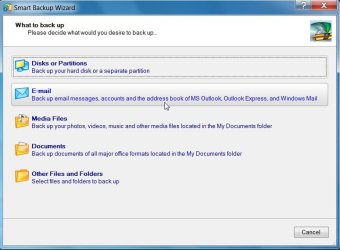
For future reference, the Paragon DB10 and B&R10 include a feature to backup emails from legacy email clients ( sadly, I don't think that feature is in the free version of B&R10).

PAR-SMARTBKUP-2009-12-19_011926.jpg


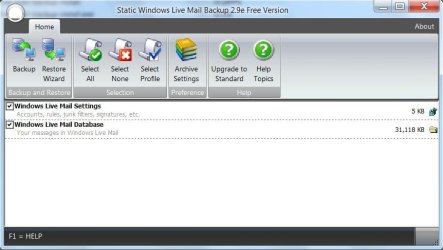
Static backup do a range of free email backup apps. - they are very good:

http://www.staticbackup.com/products.htm

STATIC-WLM-BKUP-2009-12-19_012929.jpg
 

My Computers My Computers

  • At a glance

    7 X64i5 84002x8gb 3200mhz
    Computer type
    PC/Desktop
    OS
    7 X64
    CPU
    i5 8400
    Motherboard
    gigabyte b365m ds3h
    Memory
    2x8gb 3200mhz
    Hard Drives
    various
    PSU
    pure power 11 400w cm
    Case
    Coolermaster
    Cooling
    cryorig m9i
  • At a glance

    7x64g54008gb ddr4 2400
    Computer type
    PC/Desktop
    OS
    7x64
    CPU
    g5400
    Motherboard
    ga b365m ds3h
    Memory
    8gb ddr4 2400
    PSU
    xfx pro 450w
I'm guessing when you go from Vista (or XP), your data is not saved. It does save some of the old OS files, but not your data. The HD is reformatted. Did you have a back up of your data? That's where you would find them if they were backed up.
 

My Computer My Computer

At a glance

Windows 7 / XP service pack 3AMD Turion / Athlon 64 (V) 3800+ 2.4 GHz2048MB DDR2 (2 Dimm) / PC-3200 184 p DDR SDRAMNVIDIA GeForce Go 6150 (UMA) / Integrated ?
Computer Manufacturer/Model Number
HP Pavilion laptop DV2312us AND Compaq Presario SR1950NX
OS
Windows 7 / XP service pack 3
CPU
AMD Turion / Athlon 64 (V) 3800+ 2.4 GHz
Motherboard
No idea what's on laptop / Presario - Asus A8N-LA
Memory
2048MB DDR2 (2 Dimm) / PC-3200 184 p DDR SDRAM
Graphics Card(s)
NVIDIA GeForce Go 6150 (UMA) / Integrated ?
Sound Card
Altec Lansing / Realtek ALC 883 chipset
Monitor(s) Displays
14.1" WXGA Widescreen / 22" AOC 2217
Screen Resolution
1280 x 800 / ?
Hard Drives
120GB (5400RPM) Hard Drive (SATA) / 250 GB SATA 7200 rpm
Keyboard
Integrated / out of the box Compaq
Mouse
same
Internet Speed
Verizon FIOS
Other Info
Out of the box HP notebook / out of the box Compaq - RAM upgraded to 3.5 max useable
I'm guessing when you go from Vista (or XP), your data is not saved. It does save some of the old OS files, but not your data. The HD is reformatted. Did you have a back up of your data? That's where you would find them if they were backed up.

All of your data is saved in the Windows.old folder, unless you reformat before you install 7, but Seven doesn't reformat and destroy your data on its own.
 

My Computer My Computer

At a glance

windows 7 x64 Home Premiumintel q6600g.skill 8gb ddr2 1066 (pc2 8500)evga geforce 9800 gtx 512 mb
Computer Manufacturer/Model Number
me / #1
OS
windows 7 x64 Home Premium
CPU
intel q6600
Motherboard
gigbyte ga ep45 ud3l
Memory
g.skill 8gb ddr2 1066 (pc2 8500)
Graphics Card(s)
evga geforce 9800 gtx 512 mb
Screen Resolution
1680 x 1050
Hard Drives
wd caviar black 500 gb
wd caviar black 1tb
wd elements 1tb external hd x2
PSU
raidmax 500w
Case
smilodon (yes, t'was the pretty blue lites that got me!)
I'm having problems finding the Windows.old folder. I've tried through "Search programs and files" with no luck.

Any assistance in advising where to find would be appreciated.
 

My Computer My Computer

At a glance

Windows 7
OS
Windows 7
Click on:
Start > Computer > C:drive (or the drive where Windows7 is installed) and you should see it there, unless you ran the post-install cleanup, which removes the installation related folders from your pc (and Windows.old is one of those).
 

My Computer My Computer

At a glance

windows 7 x64 Home Premiumintel q6600g.skill 8gb ddr2 1066 (pc2 8500)evga geforce 9800 gtx 512 mb
Computer Manufacturer/Model Number
me / #1
OS
windows 7 x64 Home Premium
CPU
intel q6600
Motherboard
gigbyte ga ep45 ud3l
Memory
g.skill 8gb ddr2 1066 (pc2 8500)
Graphics Card(s)
evga geforce 9800 gtx 512 mb
Screen Resolution
1680 x 1050
Hard Drives
wd caviar black 500 gb
wd caviar black 1tb
wd elements 1tb external hd x2
PSU
raidmax 500w
Case
smilodon (yes, t'was the pretty blue lites that got me!)
How to retrieve your emals and email folders.

After upgrade to Windows 7 you can still get your old emails and any email folders you created in Vista by selecting import, then Windows Mail, then select the folders you want to retrieve. Hope this helps.

Bronco
 

My Computer My Computer

At a glance

Windows 7
OS
Windows 7
You don't get a Windows .old folder if you did an in-place upgrade installation.

You only get it if you do a custom install without formatting.

Because you said you did an upgrade install - look where I posted earlier - that's where it should be - unless something went wrong during the upgrade.

"C:\Users\Username\AppData\Local\Microsoft\Windows Mail\WindowsMail.MSMessageStore"

Appdata is a Hidden folder - Go to Folder Options under the View Tab - select Show Hidden Files, Folders and Drives>Apply, OK.


I'm having problems finding the Windows.old folder. I've tried through "Search programs and files" with no luck.

Any assistance in advising where to find would be appreciated.
 

My Computers My Computers

  • At a glance

    7 X64i5 84002x8gb 3200mhz
    Computer type
    PC/Desktop
    OS
    7 X64
    CPU
    i5 8400
    Motherboard
    gigabyte b365m ds3h
    Memory
    2x8gb 3200mhz
    Hard Drives
    various
    PSU
    pure power 11 400w cm
    Case
    Coolermaster
    Cooling
    cryorig m9i
  • At a glance

    7x64g54008gb ddr4 2400
    Computer type
    PC/Desktop
    OS
    7x64
    CPU
    g5400
    Motherboard
    ga b365m ds3h
    Memory
    8gb ddr4 2400
    PSU
    xfx pro 450w
Can't import Email messages

I recently upgraded from Vista to 7 without saving my email messages. I did find them at :

C:\Users\Username\AppData\Local\Microsoft\Windows Mail\WindowsMail.MSMessageStore

But - when I try to import them to Windows Mail Live, it says they have been transferred to the storage folders - but there is nothing there. I have tried numerous times to do this import with no luck.

Any other suggestions?
 

My Computer My Computer

At a glance

Win 7
OS
Win 7
I have tried multiple times to import my windows.old folder into Windows Live Mail, but it keep showing empty. What do I need to do? Where are my emails from Windows Mail emails? :cry:
 

My Computer My Computer

At a glance

windows 7 home premium 32
OS
windows 7 home premium 32
Back
Top