Emerge as alternative desktop ?

Beowulf999

New member
Local time
2:28 PM
Messages
7

My Computer My Computer

Computer Manufacturer/Model Number
Self-built
OS
Windows 7 Ultimate 64 bit
CPU
AMD quad core
Memory
8GB
Graphics Card(s)
GeForce 7900
Sound Card
Soundblaster Titanium X-Fi
Monitor(s) Displays
Acer 19 inch 1600x900
Hard Drives
Two 500GB SATA, One 300MB PATA
Yeah. I downloaded it and installed, but could not figure out what to do. I saw that their forum is not very active, and I removed it without problems :-(
 

My Computer My Computer

Computer Manufacturer/Model Number
custom
OS
Windows 7 Home Premium 64 bit
CPU
3.40 gigahertz Intel Core i7-2600K
Motherboard
Gigabyte
Memory
2 TB
Monitor(s) Displays
Samsung SyncMaster 275T 27 inch
Hard Drives
2x 120GB AData SSDs
PSU
NotSure
Cooling
air
I use emerge and love it. It's reliable, flexible, has rt-click pop-up menu, task bar, system monitor, mutli-desktops, etc.

It IS a bit hard to get used to.

After install, check:
Start Menu > Programs > Emerge Desktop > Emerge Desktop Shell Changer
to switch Explorer and Emerge back and forth.

In Emerge it's under Menu > Emerge Settings. (also in Start menu which you can still get to).

Their initial setup look awful!

To fix it, try this:

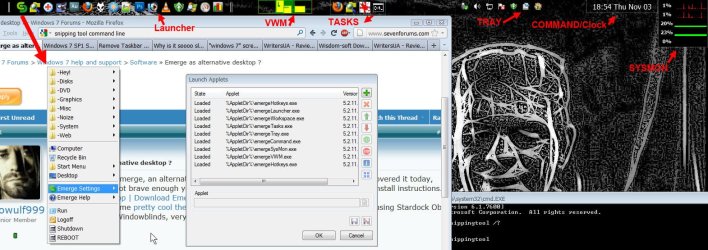
Menu (looks like two green "C"s intertwined) > Emerge Setting > Launch Applets
--> Turn on: ~Hotkeys, launcher, workspace, tasks, tray, command, sysmon, optionally VWM (multi-desktop).

These two things should get you started:

--->> To change something: CTRL-rightclick on it and select "Configure". This is how most things are set.

--->> To move it CTRL-Leftclick-drag; move borders is Alt-Leftclickdrag.

You can make easy custom (rt-click on desktop or Windows button) menus from shortcuts in folders by Menu > Emerge Settings > Configure > Menu Editor (tab).

Have fun!
 

My Computer My Computer

Computer Manufacturer/Model Number
eMachines ET1831-7
OS
Windows 7 Ultimate
CPU
Pentium Dual-Core CPU E5400 @ 2.70GHz
Motherboard
EMCP73VT-PM
Memory
4096M
Graphics Card(s)
nVidia 8400GS
Sound Card
built-in Realtek
Monitor(s) Displays
Acer 20"
Screen Resolution
1680x1050
Hard Drives
Seagate ST3750528AS ATA 500G
Other Info
Dual-boot with Linux.
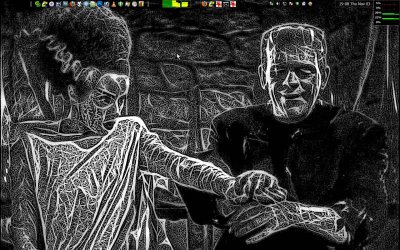
Some screen shots. (i hope...)
Edit: Hit the disk-icon to "save" changes or it'll throw them away after a slightly confusing message.
 

Attachments

  • Emerge_desktop3.jpg
    Emerge_desktop3.jpg
    193 KB · Views: 66
  • Emerge_desktop4.jpg
    Emerge_desktop4.jpg
    535.1 KB · Views: 39

My Computer My Computer

Computer Manufacturer/Model Number
eMachines ET1831-7
OS
Windows 7 Ultimate
CPU
Pentium Dual-Core CPU E5400 @ 2.70GHz
Motherboard
EMCP73VT-PM
Memory
4096M
Graphics Card(s)
nVidia 8400GS
Sound Card
built-in Realtek
Monitor(s) Displays
Acer 20"
Screen Resolution
1680x1050
Hard Drives
Seagate ST3750528AS ATA 500G
Other Info
Dual-boot with Linux.
Back
Top