Empty folders

gwatts

New member
Local time
5:49 AM
Messages
22
Hi
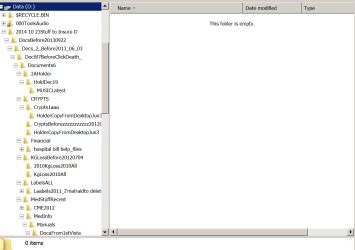
For some months I have noticed empty folders, particularly on several USB hard drives. This has occurred on both Windows 7 and Windows 8 laptops. It also occurs on the independent internal hard drive on this Windows 7 laptop that I am using now.


This always occurs with folders within folders, all of which are preserved but without any contents. I’m not aware of any folders themselves that are missing. Most of the contents are documents but all types of files are missing.


This occurs despite re installing images as well as after complete DVD Windows reinstallation.


The snipping tool images show the empty folders yet with properties revealing 52 GB of data which cannot be found. Recuva freeware reveals only 2 PDFs.


I will greatly appreciate advice.
 

Attachments

  • Empty folders 1.PNG
    Empty folders 1.PNG
    14.5 KB · Views: 1
  • empty folders 2.PNG
    empty folders 2.PNG
    25.3 KB · Views: 0
  • empty folders 3.PNG
    empty folders 3.PNG
    14 KB · Views: 0

My Computer

Computer type
Laptop
Computer Manufacturer/Model Number
Med Tech Clevo P151HM1
OS
Windows 7 64 bit
CPU
Intel I7
Motherboard
Am Megatrends
Memory
16 GB
Graphics Card(s)
Nvida
Sound Card
Realtec
Monitor(s) Displays
generic
Hard Drives
INTEL SSDSC2MH120A2 [Hard drive] (120.03 GB) -- drive 0, s/n LNEL115300F1120CGN, rev PPG4, SMART Status: Healthy
ST9500420AS [Hard drive] (500.11 GB) -- drive 1, s/n 5VJCJCSH, rev 0002SDM1
Internet Speed
6 MB
Antivirus
Microsoft
Browser
Windows Explorer, Firefox
Some of the folder names imply you are running encryption software. That would be the first thing I would check. Perhaps that software(assuming I'm correct) has a forum you can check for this type of issue.

Edit: another assumption.. you already tried in folder view options setting it to show hidden files?
 

My Computer

Computer Manufacturer/Model Number
HP Media Center
OS
Windows 7 32 bit
CPU
AMD 5200+ dual core
Memory
2 GB
Graphics Card(s)
NVidia GeForce 6150SE 128 MB
Monitor(s) Displays
CRT
Screen Resolution
1280x1024
Hard Drives
500 GB Sata internal :

SIIG USB 3.0 docking stations w/WD Caviar Black 6 Gb/s drives
Keyboard
PS/2
Mouse
PS/2 Wheel Mouse
Other Info
SIIG USB 3.0 PCIexpress card.
Thank you Miles. Nothing has ever been hidden, all has always been shown (first thing I do on reinstall or new computer) and never any encryption. Win 7 PW removed on 2nd day of this re-install last week done hoping to cure this problem.

Disorganized names is from over the years and copying from multiple USB HD devices. Athough I never searched on the HDs of Win 7 or 8 for missing files I was surprised to find missing files on the installed W7 HD.
 

My Computer

Computer type
Laptop
Computer Manufacturer/Model Number
Med Tech Clevo P151HM1
OS
Windows 7 64 bit
CPU
Intel I7
Motherboard
Am Megatrends
Memory
16 GB
Graphics Card(s)
Nvida
Sound Card
Realtec
Monitor(s) Displays
generic
Hard Drives
INTEL SSDSC2MH120A2 [Hard drive] (120.03 GB) -- drive 0, s/n LNEL115300F1120CGN, rev PPG4, SMART Status: Healthy
ST9500420AS [Hard drive] (500.11 GB) -- drive 1, s/n 5VJCJCSH, rev 0002SDM1
Internet Speed
6 MB
Antivirus
Microsoft
Browser
Windows Explorer, Firefox
I've seen a post now and then about missing files. I seem to remember one person saying it was related to bit defender, but I have no link to the post. Just a vague recollection.

Maybe someone else can chime in.
 

My Computer

Computer Manufacturer/Model Number
HP Media Center
OS
Windows 7 32 bit
CPU
AMD 5200+ dual core
Memory
2 GB
Graphics Card(s)
NVidia GeForce 6150SE 128 MB
Monitor(s) Displays
CRT
Screen Resolution
1280x1024
Hard Drives
500 GB Sata internal :

SIIG USB 3.0 docking stations w/WD Caviar Black 6 Gb/s drives
Keyboard
PS/2
Mouse
PS/2 Wheel Mouse
Other Info
SIIG USB 3.0 PCIexpress card.
Many programs place folders into Documents. That's why I have my own folders on another partition. That way I can keep easy control of the program or system generated folders.

I would just leave them alone. The fact that they may appear to be empty does not mean that they are really empty.
 

My Computer

Computer Manufacturer/Model Number
HP, Dell, Gateway, Toshiba - 4 laptops and 2 desktops
OS
Vista, Windows7, Mint Mate, Zorin, Windows 8
CPU
from 1.6GHz Duo to i7
Monitor(s) Displays
2x HP w2207
Hard Drives
5x HDD, 7x SSD, 12x Externals
Keyboard
with trackball - no mices
Mouse
Trackball mice
Internet Speed
DSL 6000
But how to access? Any paid programs worth try?
 

My Computer

Computer type
Laptop
Computer Manufacturer/Model Number
Med Tech Clevo P151HM1
OS
Windows 7 64 bit
CPU
Intel I7
Motherboard
Am Megatrends
Memory
16 GB
Graphics Card(s)
Nvida
Sound Card
Realtec
Monitor(s) Displays
generic
Hard Drives
INTEL SSDSC2MH120A2 [Hard drive] (120.03 GB) -- drive 0, s/n LNEL115300F1120CGN, rev PPG4, SMART Status: Healthy
ST9500420AS [Hard drive] (500.11 GB) -- drive 1, s/n 5VJCJCSH, rev 0002SDM1
Internet Speed
6 MB
Antivirus
Microsoft
Browser
Windows Explorer, Firefox
If those are folders that belong to programs, only those programs may be able to access them.
 

My Computer

Computer Manufacturer/Model Number
HP, Dell, Gateway, Toshiba - 4 laptops and 2 desktops
OS
Vista, Windows7, Mint Mate, Zorin, Windows 8
CPU
from 1.6GHz Duo to i7
Monitor(s) Displays
2x HP w2207
Hard Drives
5x HDD, 7x SSD, 12x Externals
Keyboard
with trackball - no mices
Mouse
Trackball mice
Internet Speed
DSL 6000
Thank you. I don't understand. What do I do with Word, Excel OO etc docs?
 

My Computer

Computer type
Laptop
Computer Manufacturer/Model Number
Med Tech Clevo P151HM1
OS
Windows 7 64 bit
CPU
Intel I7
Motherboard
Am Megatrends
Memory
16 GB
Graphics Card(s)
Nvida
Sound Card
Realtec
Monitor(s) Displays
generic
Hard Drives
INTEL SSDSC2MH120A2 [Hard drive] (120.03 GB) -- drive 0, s/n LNEL115300F1120CGN, rev PPG4, SMART Status: Healthy
ST9500420AS [Hard drive] (500.11 GB) -- drive 1, s/n 5VJCJCSH, rev 0002SDM1
Internet Speed
6 MB
Antivirus
Microsoft
Browser
Windows Explorer, Firefox
Do you have Windows Office on your syste,. Else you can get the free Word Viewer or the free Excel Viewer. And if you want to do some processing with the files, you can try Libre Office. That is somewhat compatible.
 

My Computer

Computer Manufacturer/Model Number
HP, Dell, Gateway, Toshiba - 4 laptops and 2 desktops
OS
Vista, Windows7, Mint Mate, Zorin, Windows 8
CPU
from 1.6GHz Duo to i7
Monitor(s) Displays
2x HP w2207
Hard Drives
5x HDD, 7x SSD, 12x Externals
Keyboard
with trackball - no mices
Mouse
Trackball mice
Internet Speed
DSL 6000
Have OpenOffice 3.3.0 and MS Office 2010. What do I do?
 

My Computer

Computer type
Laptop
Computer Manufacturer/Model Number
Med Tech Clevo P151HM1
OS
Windows 7 64 bit
CPU
Intel I7
Motherboard
Am Megatrends
Memory
16 GB
Graphics Card(s)
Nvida
Sound Card
Realtec
Monitor(s) Displays
generic
Hard Drives
INTEL SSDSC2MH120A2 [Hard drive] (120.03 GB) -- drive 0, s/n LNEL115300F1120CGN, rev PPG4, SMART Status: Healthy
ST9500420AS [Hard drive] (500.11 GB) -- drive 1, s/n 5VJCJCSH, rev 0002SDM1
Internet Speed
6 MB
Antivirus
Microsoft
Browser
Windows Explorer, Firefox
Then you should be able to open Word and Excel docs. Just double click on them and see what happens.
 

My Computer

Computer Manufacturer/Model Number
HP, Dell, Gateway, Toshiba - 4 laptops and 2 desktops
OS
Vista, Windows7, Mint Mate, Zorin, Windows 8
CPU
from 1.6GHz Duo to i7
Monitor(s) Displays
2x HP w2207
Hard Drives
5x HDD, 7x SSD, 12x Externals
Keyboard
with trackball - no mices
Mouse
Trackball mice
Internet Speed
DSL 6000
But the docs are absent.
 

My Computer

Computer type
Laptop
Computer Manufacturer/Model Number
Med Tech Clevo P151HM1
OS
Windows 7 64 bit
CPU
Intel I7
Motherboard
Am Megatrends
Memory
16 GB
Graphics Card(s)
Nvida
Sound Card
Realtec
Monitor(s) Displays
generic
Hard Drives
INTEL SSDSC2MH120A2 [Hard drive] (120.03 GB) -- drive 0, s/n LNEL115300F1120CGN, rev PPG4, SMART Status: Healthy
ST9500420AS [Hard drive] (500.11 GB) -- drive 1, s/n 5VJCJCSH, rev 0002SDM1
Internet Speed
6 MB
Antivirus
Microsoft
Browser
Windows Explorer, Firefox
I would run a scan with MBAM and see if it finds anything. Some nasty malware can survive a reinstall.
 

My Computer

Computer Manufacturer/Model Number
HP Media Center
OS
Windows 7 32 bit
CPU
AMD 5200+ dual core
Memory
2 GB
Graphics Card(s)
NVidia GeForce 6150SE 128 MB
Monitor(s) Displays
CRT
Screen Resolution
1280x1024
Hard Drives
500 GB Sata internal :

SIIG USB 3.0 docking stations w/WD Caviar Black 6 Gb/s drives
Keyboard
PS/2
Mouse
PS/2 Wheel Mouse
Other Info
SIIG USB 3.0 PCIexpress card.
Thank you. I have always used the paid MBAM for protection and have run several deep scans without finding anything.
 

My Computer

Computer type
Laptop
Computer Manufacturer/Model Number
Med Tech Clevo P151HM1
OS
Windows 7 64 bit
CPU
Intel I7
Motherboard
Am Megatrends
Memory
16 GB
Graphics Card(s)
Nvida
Sound Card
Realtec
Monitor(s) Displays
generic
Hard Drives
INTEL SSDSC2MH120A2 [Hard drive] (120.03 GB) -- drive 0, s/n LNEL115300F1120CGN, rev PPG4, SMART Status: Healthy
ST9500420AS [Hard drive] (500.11 GB) -- drive 1, s/n 5VJCJCSH, rev 0002SDM1
Internet Speed
6 MB
Antivirus
Microsoft
Browser
Windows Explorer, Firefox
Back
Top