Empty partition ..?

w7101

Banned
Local time
12:19 PM
Messages
52
Hi all .
Just checked disk manag..and found my Recovery P is empty ..
I thought i made a back-up a month ago ...
Should i do a new system back-up again ...?
Thanks .

21joajm.jpg
 

My Computer

Computer Manufacturer/Model Number
Sony fz model .
OS
Wds 7 32.bit Ultimate
CPU
Intel T7100 Core2Duo 1.8Ghz
Motherboard
Sony
Memory
3GB.
Graphics Card(s)
Mobile Intel 965 chipset.
Sound Card
SigmaTel HD
Screen Resolution
1280x800
Hard Drives
320GB Hitachi 7200Rpm
When you made the backup, where did you tell it to save?

The recovery partition that resides on most store bought and company bought pc's is for files that your computer manufacturer uses for recovery. I'm not completely certain but I believe it functions something like an internal recovery disc. It may read as empty but it is likely full.

If you're attempting to make backups, you'll need to save them to an external disc if you can. This is the best place to save them as they are safe in the event that your system is corrupted. The best backups to make are system images. These allow you to use your recovery discs (if you made them) to revert to the exact state of your hard drive when you made the system image.

System images have one draw back though, they'll usually the size of your hard disc at that moment unless you compress them (which causes recovery to take longer). This is why most people that use system images make a system image right after they've installed the basic elements and adjusted settings. This allows the user to revert to a clean disc which already has drivers, basic programs and settings installed and configured.
 

My Computer

Computer Manufacturer/Model Number
Apple Macbook Pro (April 2009)
OS
W7 Ult. x64 | OS X
CPU
Intel Mobile Core 2 Duo 2.93Ghz [T9800 Penryn]
Motherboard
NVIDIA nForce 730i Rev. B1 [Mac-F2268EC8 (U2E1)]
Memory
4096MB Samsung DDR3 Dual Channel [PC3-8500F 1066Mhz]
Graphics Card(s)
NVIDIA GeForce 9600M GT 512MB [G96M Rev. C1]
Sound Card
SB X-Fi Surround 5.1 USB | Onboard Realtek (Disabled)
Monitor(s) Displays
Acer x223wbd 22" | Apple Anti-Glare 17" (Disabled)
Screen Resolution
{Current} 1440x900 {Acer} 1680x1050 {Apple} 1920x1200
Hard Drives
{Internal}
Seagate Momentus 320GB 2.5" 7200RPM [ST9320421AS]

{Externals}
LaCie 320GB USB 2.0 HDD [301284UR]
LaCie 750GB USB 2.0 FW400 eSATA HDD [301314U]
LaCie 1TB USB 2.0 HDD [301304UR]
PSU
Magsafe
Case
Aluminum/Unibody (MBP52)
Cooling
2 x 6000 RPM Fans
Keyboard
Logitech G-15v2 [PN 920-000379]
Mouse
Logitech G-9 [PN 910-000338]
Internet Speed
12Mbps/2.5Mbps w/ 24Mbps Speed Boost [Comcast]
Other Info
Logitech X-540 Speakers [PN 970223-0122]
Sennheiser PC-151 Headset
When you made the backup, where did you tell it to save?

The recovery partition that resides on most store bought and company bought pc's is for files that your computer manufacturer uses for recovery. I'm not completely certain but I believe it functions something like an internal recovery disc. It may read as empty but it is likely full.

If you're attempting to make backups, you'll need to save them to an external disc if you can. This is the best place to save them as they are safe in the event that your system is corrupted. The best backups to make are system images. These allow you to use your recovery discs (if you made them) to revert to the exact state of your hard drive when you made the system image.

System images have one draw back though, they'll usually the size of your hard disc at that moment unless you compress them (which causes recovery to take longer). This is why most people that use system images make a system image right after they've installed the basic elements and adjusted settings. This allows the user to revert to a clean disc which already has drivers, basic programs and settings installed and configured.


So i should leave it alone ...
Follow your advice ..I just cloned the whole system to an external HDD ...
BTW ..when i try to do an image back up ...it does not give me the option to keep it within HDD ...but ask me to use cd/dvd disks ...don't know why ...?
Thanks NSGM .
 

My Computer

Computer Manufacturer/Model Number
Sony fz model .
OS
Wds 7 32.bit Ultimate
CPU
Intel T7100 Core2Duo 1.8Ghz
Motherboard
Sony
Memory
3GB.
Graphics Card(s)
Mobile Intel 965 chipset.
Sound Card
SigmaTel HD
Screen Resolution
1280x800
Hard Drives
320GB Hitachi 7200Rpm
Your recovery partition is not empty. Unfortunately some manufacturers have this bad habit of making it a hidden partition which shows as empty. Try to assign a drive letter (in Disk Management). Then you can see it in Computer and investigate the content. But in any case, it should not be written on.

And an image to the same drive is pretty useless when the physical disk fails. Some imaging programs allow that (e.g. Macrium) and I always use that to create an additional recovery partition after a complete OS installation on my laptops. But you also have to have images on external media in case the disk fails. DVDs are not a good option though because of the size of the images. Even a relatively modest system will require at least 2 DVD-R's.
 

My Computer

Computer Manufacturer/Model Number
HP, Dell, Gateway, Toshiba - 4 laptops and 2 desktops
OS
Vista, Windows7, Mint Mate, Zorin, Windows 8
CPU
from 1.6GHz Duo to i7
Monitor(s) Displays
2x HP w2207
Hard Drives
5x HDD, 7x SSD, 12x Externals
Keyboard
with trackball - no mices
Mouse
Trackball mice
Internet Speed
DSL 6000
Thank Whs .
The thing is ... I checked manufactor for upgrade from wds .."suck" vista home pre.
to wds 7 ..but they said that i my laptop can NOT be upgraded .? BOOOOOOS..:devil:
I bought wds7 with 3 licence keys anyway and did a clean install without any drivers from them ...It works great so far ....
so i doubted if there is anything in that recovery parition.
Anyway .. i 've already cloned the HDD to another internal HDD with enclosure .
if my system crashes i just replace it with a cloned one ... I'm OK right ..?
(BTW.incase if there is nothing in that R/partition ..can i delete it and how do i do it.?)
 

My Computer

Computer Manufacturer/Model Number
Sony fz model .
OS
Wds 7 32.bit Ultimate
CPU
Intel T7100 Core2Duo 1.8Ghz
Motherboard
Sony
Memory
3GB.
Graphics Card(s)
Mobile Intel 965 chipset.
Sound Card
SigmaTel HD
Screen Resolution
1280x800
Hard Drives
320GB Hitachi 7200Rpm
Sure, if the recovery partition is empty, you can delete it. Even if it is not empty, because you have the Win7 installation disks - unless you want to keep the option to reinstall Vista.
During the installation of Win7, the recovery partition should not have been touched and theoretically it should be intact.
 

My Computer

Computer Manufacturer/Model Number
HP, Dell, Gateway, Toshiba - 4 laptops and 2 desktops
OS
Vista, Windows7, Mint Mate, Zorin, Windows 8
CPU
from 1.6GHz Duo to i7
Monitor(s) Displays
2x HP w2207
Hard Drives
5x HDD, 7x SSD, 12x Externals
Keyboard
with trackball - no mices
Mouse
Trackball mice
Internet Speed
DSL 6000
Sure, if the recovery partition is empty, you can delete it. Even if it is not empty, because you have the Win7 installation disks - unless you want to keep the option to reinstall Vista.
During the installation of Win7, the recovery partition should not have been touched and theoretically it should be intact.


Oh....NOOOOOOO...NOOOOOOO
Never come back to vista .....M$ only fooled me once .....
"I got no choice when i bought my laptop with w.vista in it"
"Did alot of sesearch before i bought w7 and this is where i'm stay ..:D"
Now i have to find out how to go about to delete that R/partition ..
Thanks for your help.
 

My Computer

Computer Manufacturer/Model Number
Sony fz model .
OS
Wds 7 32.bit Ultimate
CPU
Intel T7100 Core2Duo 1.8Ghz
Motherboard
Sony
Memory
3GB.
Graphics Card(s)
Mobile Intel 965 chipset.
Sound Card
SigmaTel HD
Screen Resolution
1280x800
Hard Drives
320GB Hitachi 7200Rpm

My Computer

Computer Manufacturer/Model Number
HP, Dell, Gateway, Toshiba - 4 laptops and 2 desktops
OS
Vista, Windows7, Mint Mate, Zorin, Windows 8
CPU
from 1.6GHz Duo to i7
Monitor(s) Displays
2x HP w2207
Hard Drives
5x HDD, 7x SSD, 12x Externals
Keyboard
with trackball - no mices
Mouse
Trackball mice
Internet Speed
DSL 6000
You also may want to check out a program like Paragon Partition Manager. Will help you out a lot with backing up and managing partitions.

Bill
 

My Computer

Computer type
PC/Desktop
Computer Manufacturer/Model Number
Custom Built
OS
Windows 7 Enterprise x64
CPU
i7-5820K
Motherboard
Asus X99 A
Memory
16GB DDR4
Graphics Card(s)
ASUS 2GB Nvidia 960GTX OC'd
Monitor(s) Displays
24"
Screen Resolution
1920x1080
Hard Drives
Samsung 1TB 840 SSD
Western Digital 1TB Black Drive
Seagate 2TB NAS Drive
PSU
Antec Earthwatts 650w
Case
Antec DF-85

My Computer

Computer Manufacturer/Model Number
Sony fz model .
OS
Wds 7 32.bit Ultimate
CPU
Intel T7100 Core2Duo 1.8Ghz
Motherboard
Sony
Memory
3GB.
Graphics Card(s)
Mobile Intel 965 chipset.
Sound Card
SigmaTel HD
Screen Resolution
1280x800
Hard Drives
320GB Hitachi 7200Rpm
You also may want to check out a program like Paragon Partition Manager. Will help you out a lot with backing up and managing partitions.

Bill

OOPs...I forgot i have Acronis true image home ....
I'll find out if i can use it to delete that R/P ..
Thanks for reminding me bill .:geek:
 

My Computer

Computer Manufacturer/Model Number
Sony fz model .
OS
Wds 7 32.bit Ultimate
CPU
Intel T7100 Core2Duo 1.8Ghz
Motherboard
Sony
Memory
3GB.
Graphics Card(s)
Mobile Intel 965 chipset.
Sound Card
SigmaTel HD
Screen Resolution
1280x800
Hard Drives
320GB Hitachi 7200Rpm
Image backups

@W7101 - a suggestion:

I personally see no need for a "recovery" partition or so-called "system" backups (which are not complete image backups). Secondly, I wonder what is being stored in a partition that is only 7.8GB. Thirdly, I think most would agree that it is a good idea to create an image backup of the OS partition on a regular basis (full backup weekly with incremental daily - depending on the sensitivity of your data). So what to do?

I utilize a system that consists of three 750GB HDDs and a series of mem sticks. On one of my HDDs I create an OS partition on which I ONLY place the OS and "everyday" apps - NOTHING else! For my present needs, my OS partition happens to be 100GB. All of my other data (docs, MP3s, JPEGs, backup files, etc.) are placed in other partitions on the same or other disks (not the same partition). I place all of my backups on alternate disks and, in addition, my critical data on mem sticks (simply an alternative to external HDDs/CDs/DVDs). Why do this?

Malware rarely attacks JPEGs of your dog; often located within archives, it loads somewhere in the OS partition. In other words, it is almost exclusively that your OS partition is the one that will become infected or otherwise corrupt. By creating an OS-only partition, you avoid time-consuming backup/restore operations because you are backing up a relatively small partition. Secondly, manipulating an OS-only partition, for the most, avoids the possibility of trashing your data by inadvertently overwriting it in the process of restoring or reinstalling your OS. Thirdly, you avoid the necessity of having to frequently backup data that rarely changes - depending on how you structure your system.

For example, above, I noted that I store "everyday" apps (e.g., utilities) on my OS partition. I have a separate partition on which I install games rather than on the OS partition as is usually done. Why? Apart from very infrequent patches, the games do not change and do not become corrupted as a result of my incessant tweaking. My games presently occupy 335GBs on a 500GB partition. I don't want to make image backups of a 500GB partition on a regular basis (no need, takes a long time).

I store images from HDD 0 on HHD 1 or 2; HDD 1 images on HDD 0 or 2, HDD 2 images on HDD 0 or 1. By so doing, I have replicated all of my data on separate HDDs. As I also mentioned, I additionally store critical data (docs, JPEGs) off machine on mem sticks. By so doing, I feel confident that there is little possibility that I can simultaneously lose all of my data.

You did not mention what you use to accomplish backups. Acronis seems to be the standard that many emulate. Both Seagate a
t DiscWizard End User License Agreement | Seagate and WD at WD Support have a free image backup app based on the Acronis platform (both are Acronis that have some less useful features disabled). To employ one or the other, you must have at least one Seagate or one WD HDD in your system; if so, each will create image backups for any HDD. Paragon at Paragon Backup & Recovery Free Edition - Free Download also has a pretty good free backup app. I, personally, am not a friend of Macrium which I find takes longer and creates "normal" compression images that are larger than Acronis or Paragon. You can elect other than "normal" compression with any of the apps but the more you compress, the longer it takes.

Finally, please
forgive if I insulted your or anyone else's intelligence. I am new here and have yet to familiarize myself with the collective expertise of the group.

Monk
 

My Computer

Computer Manufacturer/Model Number
Custom
OS
Dual boot XP Pro SP3x86 and Win7 Pro x64
CPU
AMD Phenom II x3 720 BE OCed to 3.3 GHz
Motherboard
Asus M3A79T Deluxe
Memory
2x2GB OCZ OCZ2RPR10664GK PC2-8500 DDR2
Graphics Card(s)
Sapphire ATi Radeon 4830 HD x2 (XFire)
Sound Card
Integrated (SoundMax)
Monitor(s) Displays
Dual: LG L227WTG/LG M237WD
Screen Resolution
1680 x 1050; 1920 x1280
Hard Drives
3 WDC WD7501AALS-00J7B0
PSU
Zalman 750HD Modular
Case
Antec 900
Cooling
4 120mm, 1 200mm fans
Keyboard
Black with lots of keys
Mouse
Razer Lachesis, Logitech RumbePad2, Logitech Marble
Internet Speed
Who counts
Other Info
7:1 SS
Hmonk ...no need to apologize ....
Thanks for indepth ...long....advice ..
Although i only have afew programs to work on everyday ...
so one cloned HDD is OK for me now ... beside i already paid for acronis image home 10 ..i might as well to use it ..working so far for me..
(BTW .. i find out i can use acronis to delete the R/P)
Thanks .
 

My Computer

Computer Manufacturer/Model Number
Sony fz model .
OS
Wds 7 32.bit Ultimate
CPU
Intel T7100 Core2Duo 1.8Ghz
Motherboard
Sony
Memory
3GB.
Graphics Card(s)
Mobile Intel 965 chipset.
Sound Card
SigmaTel HD
Screen Resolution
1280x800
Hard Drives
320GB Hitachi 7200Rpm
This is the answer to your posting #10. I just realized that a few more postings were made whilst I was composing this one.

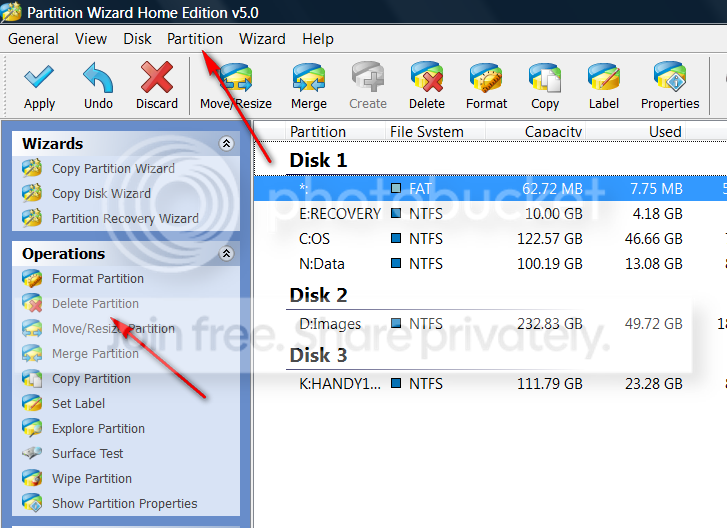
Yeah, that's a problem with the Windows facilities. Try the Partition Wizard Home Edition. Here you should be able to delete the partition.

Alternatively, if you want to assign a drive letter to the hidden partition, do this:

1. Click "Partition" in the top menu » Modify » Hide/Unhide Partition
2. Again to Partition on top and "Change letter" - that will allow you to assign a drive letter.

2010-05-14_195802.png
 
Last edited:

My Computer

Computer Manufacturer/Model Number
HP, Dell, Gateway, Toshiba - 4 laptops and 2 desktops
OS
Vista, Windows7, Mint Mate, Zorin, Windows 8
CPU
from 1.6GHz Duo to i7
Monitor(s) Displays
2x HP w2207
Hard Drives
5x HDD, 7x SSD, 12x Externals
Keyboard
with trackball - no mices
Mouse
Trackball mice
Internet Speed
DSL 6000
I didn't know there is a good free software to do this ...
Anyway ... I will try acronis tonight ...first ...then PWHE ..
Thanks whs .
 

My Computer

Computer Manufacturer/Model Number
Sony fz model .
OS
Wds 7 32.bit Ultimate
CPU
Intel T7100 Core2Duo 1.8Ghz
Motherboard
Sony
Memory
3GB.
Graphics Card(s)
Mobile Intel 965 chipset.
Sound Card
SigmaTel HD
Screen Resolution
1280x800
Hard Drives
320GB Hitachi 7200Rpm
I didn't know there is a good free software to do this ...
Anyway ... I will try acronis tonight ...first ...then PWHE ..
Thanks whs .
The Partition Wizard is a good and easy to use program. It is handy to have around. Their documentation (click the ?) is very good too.
 

My Computer

Computer Manufacturer/Model Number
HP, Dell, Gateway, Toshiba - 4 laptops and 2 desktops
OS
Vista, Windows7, Mint Mate, Zorin, Windows 8
CPU
from 1.6GHz Duo to i7
Monitor(s) Displays
2x HP w2207
Hard Drives
5x HDD, 7x SSD, 12x Externals
Keyboard
with trackball - no mices
Mouse
Trackball mice
Internet Speed
DSL 6000
I didn't know there is a good free software to do this ...
Anyway ... I will try acronis tonight ...first ...then PWHE ..
Thanks whs .
The Partition Wizard is a good and easy to use program. It is handy to have around. Their documentation (click the ?) is very good too.

Whs .
How do i check this thread is anwsered ....?
and give you some credits for helping me ..
 

My Computer

Computer Manufacturer/Model Number
Sony fz model .
OS
Wds 7 32.bit Ultimate
CPU
Intel T7100 Core2Duo 1.8Ghz
Motherboard
Sony
Memory
3GB.
Graphics Card(s)
Mobile Intel 965 chipset.
Sound Card
SigmaTel HD
Screen Resolution
1280x800
Hard Drives
320GB Hitachi 7200Rpm
1. For "Solved", you have to click the red triangle on the right top of any of your posts and tell the mods to mark it as closed/solved.
2. For credits you click on the icon to the left of the red triangle in any of my posts (the one that looks like a cloud) - but that is not really required. I am glad you made progress with your problem.
 

My Computer

Computer Manufacturer/Model Number
HP, Dell, Gateway, Toshiba - 4 laptops and 2 desktops
OS
Vista, Windows7, Mint Mate, Zorin, Windows 8
CPU
from 1.6GHz Duo to i7
Monitor(s) Displays
2x HP w2207
Hard Drives
5x HDD, 7x SSD, 12x Externals
Keyboard
with trackball - no mices
Mouse
Trackball mice
Internet Speed
DSL 6000
Got it .

Thanks for all your helps everybody .
 

My Computer

Computer Manufacturer/Model Number
Sony fz model .
OS
Wds 7 32.bit Ultimate
CPU
Intel T7100 Core2Duo 1.8Ghz
Motherboard
Sony
Memory
3GB.
Graphics Card(s)
Mobile Intel 965 chipset.
Sound Card
SigmaTel HD
Screen Resolution
1280x800
Hard Drives
320GB Hitachi 7200Rpm
Back
Top