
You are using an out of date browser. It may not display this or other websites correctly.
You should upgrade or use an alternative browser.
You should upgrade or use an alternative browser.
Empty Partitions without letters in Computer Management
- Thread starter alina
- Start date
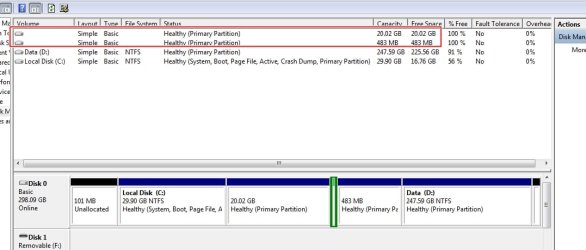

Hi,
It depends - I notice they dont have drive letters, so you wouldn't see them in Windows Explorer. They look like they could be Linux based partitions (primary and Linux swap). Have you ever installed a Linux distro to this PC?
Regards,
Golden
It depends - I notice they dont have drive letters, so you wouldn't see them in Windows Explorer. They look like they could be Linux based partitions (primary and Linux swap). Have you ever installed a Linux distro to this PC?
Regards,
Golden
My Computer
- Computer type
- PC/Desktop
- Computer Manufacturer/Model Number
- Golden Mk. I.4
- OS
- Windows 10 Pro x64 ; Xubuntu x64
- CPU
- Intel i7 860 @ 2.80 GHz O/C'ed to 4.0GHz
- Motherboard
- Gigabyte P55A-UD3R Rev.1. Award BIOS F13
- Memory
- 16GB Corsair Vengance DDR3 @ 661 MHz Dual Channel (9-9-9-24)
- Graphics Card(s)
- EVGA NVidia GTX 560 1024MB
- Sound Card
- Realtek Integrated
- Monitor(s) Displays
- Dual Samsung SyncMaster 2494HS
- Screen Resolution
- 1920*1080 and 1920*1080
- Hard Drives
- 1*Samsung 840 EVO 120GB SSD;
1*OCZ Vertex 2 60GB SSD;
2*Samsung F3 SpinPoint 1TB in RAID0;
1*Samsung F1 SpinPoint 1TB;
2*Western Digital 1TB External USB 3.0
1*Western Digital 500GB External USB 3.0
1*Seagate 500GB External USB 2.0
- PSU
- Thermaltake ToughPower QFan 750W
- Case
- Thermaltake Element S VK60001W2Z
- Cooling
- Corsair H60 Water Cooling, 2*230mm and 2*80mm case fans
- Keyboard
- Logitech G110
- Mouse
- Logitech MX518
Mmmm. Not necessarily. When you installed Windows 7, did you opt to format the entire disk?
My Computer
- Computer type
- PC/Desktop
- Computer Manufacturer/Model Number
- Golden Mk. I.4
- OS
- Windows 10 Pro x64 ; Xubuntu x64
- CPU
- Intel i7 860 @ 2.80 GHz O/C'ed to 4.0GHz
- Motherboard
- Gigabyte P55A-UD3R Rev.1. Award BIOS F13
- Memory
- 16GB Corsair Vengance DDR3 @ 661 MHz Dual Channel (9-9-9-24)
- Graphics Card(s)
- EVGA NVidia GTX 560 1024MB
- Sound Card
- Realtek Integrated
- Monitor(s) Displays
- Dual Samsung SyncMaster 2494HS
- Screen Resolution
- 1920*1080 and 1920*1080
- Hard Drives
- 1*Samsung 840 EVO 120GB SSD;
1*OCZ Vertex 2 60GB SSD;
2*Samsung F3 SpinPoint 1TB in RAID0;
1*Samsung F1 SpinPoint 1TB;
2*Western Digital 1TB External USB 3.0
1*Western Digital 500GB External USB 3.0
1*Seagate 500GB External USB 2.0
- PSU
- Thermaltake ToughPower QFan 750W
- Case
- Thermaltake Element S VK60001W2Z
- Cooling
- Corsair H60 Water Cooling, 2*230mm and 2*80mm case fans
- Keyboard
- Logitech G110
- Mouse
- Logitech MX518
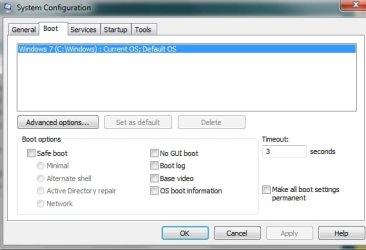
Well, I was reinstalling Win7 for the first time in my life, so I was affraid of losing the large and important amount of data that I have on partition D. I installed Win7 in D (and then I was having 2 Win7 at the same time). Then I formatted drive C to get rid of the first Win7, and then I deleted the entry from System Configuration-Boot, so it remains just one. I hope you'll understand my bad english.
My Computer
- OS
- Windows 7 Ultimate 32bit
My Computer
- Computer type
- PC/Desktop
- Computer Manufacturer/Model Number
- Golden Mk. I.4
- OS
- Windows 10 Pro x64 ; Xubuntu x64
- CPU
- Intel i7 860 @ 2.80 GHz O/C'ed to 4.0GHz
- Motherboard
- Gigabyte P55A-UD3R Rev.1. Award BIOS F13
- Memory
- 16GB Corsair Vengance DDR3 @ 661 MHz Dual Channel (9-9-9-24)
- Graphics Card(s)
- EVGA NVidia GTX 560 1024MB
- Sound Card
- Realtek Integrated
- Monitor(s) Displays
- Dual Samsung SyncMaster 2494HS
- Screen Resolution
- 1920*1080 and 1920*1080
- Hard Drives
- 1*Samsung 840 EVO 120GB SSD;
1*OCZ Vertex 2 60GB SSD;
2*Samsung F3 SpinPoint 1TB in RAID0;
1*Samsung F1 SpinPoint 1TB;
2*Western Digital 1TB External USB 3.0
1*Western Digital 500GB External USB 3.0
1*Seagate 500GB External USB 2.0
- PSU
- Thermaltake ToughPower QFan 750W
- Case
- Thermaltake Element S VK60001W2Z
- Cooling
- Corsair H60 Water Cooling, 2*230mm and 2*80mm case fans
- Keyboard
- Logitech G110
- Mouse
- Logitech MX518
I can't backup my data, I don't have where to store it somewhere else and if I lose something, I'm dead.
You need a backup plan!
My Computer
- Computer type
- PC/Desktop
- Computer Manufacturer/Model Number
- Golden Mk. I.4
- OS
- Windows 10 Pro x64 ; Xubuntu x64
- CPU
- Intel i7 860 @ 2.80 GHz O/C'ed to 4.0GHz
- Motherboard
- Gigabyte P55A-UD3R Rev.1. Award BIOS F13
- Memory
- 16GB Corsair Vengance DDR3 @ 661 MHz Dual Channel (9-9-9-24)
- Graphics Card(s)
- EVGA NVidia GTX 560 1024MB
- Sound Card
- Realtek Integrated
- Monitor(s) Displays
- Dual Samsung SyncMaster 2494HS
- Screen Resolution
- 1920*1080 and 1920*1080
- Hard Drives
- 1*Samsung 840 EVO 120GB SSD;
1*OCZ Vertex 2 60GB SSD;
2*Samsung F3 SpinPoint 1TB in RAID0;
1*Samsung F1 SpinPoint 1TB;
2*Western Digital 1TB External USB 3.0
1*Western Digital 500GB External USB 3.0
1*Seagate 500GB External USB 2.0
- PSU
- Thermaltake ToughPower QFan 750W
- Case
- Thermaltake Element S VK60001W2Z
- Cooling
- Corsair H60 Water Cooling, 2*230mm and 2*80mm case fans
- Keyboard
- Logitech G110
- Mouse
- Logitech MX518

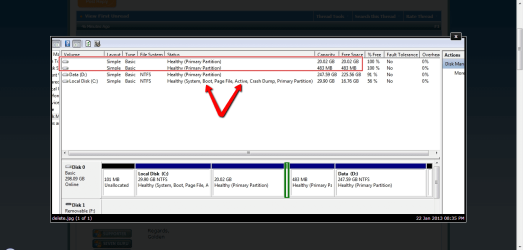
Hi Alina, first I would like to welcome you to the Seven Forums.
Your disk management looks a bit messy. That being said, yes you can delete those two partitions. First thing I would do after deleting them would then be to increase the size of your system partition C:, it looks terrible small for Windows 7, being only 30 GB.
The new increased unallocated space would be just after the C: partition so increasing should be OK.
Next step: please start making backups!
Kari
Your disk management looks a bit messy. That being said, yes you can delete those two partitions. First thing I would do after deleting them would then be to increase the size of your system partition C:, it looks terrible small for Windows 7, being only 30 GB.
The new increased unallocated space would be just after the C: partition so increasing should be OK.
Next step: please start making backups!
Kari
My Computer
- Computer type
- Laptop
- Computer Manufacturer/Model Number
- HP ENVY 17-1150eg
- OS
- Windows 10 Pro x64 EN-GB
- CPU
- 1.6 GHz Intel Core i7-720QM Processor
- Memory
- 6 GB
- Graphics Card(s)
- ATI Mobility Radeon HD 5850 Graphics
- Sound Card
- Beats sound system with integrated subwoofer
- Monitor(s) Displays
- 17" laptop display, 22" LED and 32" Full HD TV through HDMI
- Screen Resolution
- 1600*900 (1), 1920*1080 (2&3)
- Hard Drives
- Internal: 2 x 500 GB SATA Hard Disk Drive 7200 rpm
External: 2TB for backups, 3TB USB3 network drive for media
- Cooling
- As Envy runs a bit warm, I have it on a Cooler Master pad
- Keyboard
- Logitech diNovo Media Desktop Laser (bluetooth)
- Mouse
- Logitech Performance Mouse MX
- Internet Speed
- 50/10 Mbps VDSL
- Antivirus
- Windows Defender 4.3.9431.0
- Browser
- Maxthon 3.5.2., IE11
Similar threads
- Replies
- 12
- Views
- 4K

- Replies
- 10
- Views
- 12K
- Replies
- 17
- Views
- 10K
- Replies
- 4
- Views
- 5K
- Replies
- 7
- Views
- 14K
