Solved Partition Wizard shows 98% Empty partition as 100% Full

Trapper

New member
Power User
Local time
12:26 PM
Messages
207
Location
Hertfordshire UK.
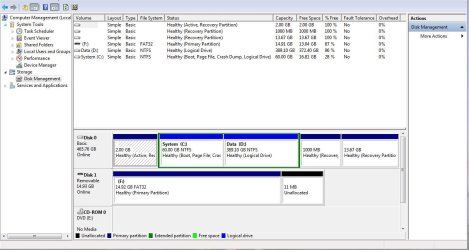
I am trying to reduce the partition of D drive on a laptop in order to increase the size of the C drive. In Win 7 Computer Management the D Drive is shown as 98% empty.
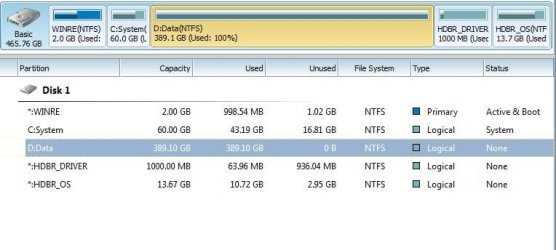
I booted from the Partition Wizard CD I made and found that in PW06 the drive was shown as 100% full and was unable to reduce the size. I then made a new PW07 CD and tried again with the same result :confused:.

I can load a large file to the D drive without any problems so there is still lots of room to enable the size adjustment.

The laptop manufacturer, Fujitsu, says the HD is not protected in any way and do not know why it should show as full.

Can anyone shed any light on what the cause and remedy might be?

Many thanks

Alan.
 

My Computer My Computer

At a glance

Windows 7 Professional 64biti5-2500K 3.30Hz 6MB Cache16GB DDR3ASUSGeforce GTX1050Ti 4GB
Computer type
PC/Desktop
Computer Manufacturer/Model Number
Home Build
OS
Windows 7 Professional 64bit
CPU
i5-2500K 3.30Hz 6MB Cache
Motherboard
ASUS P8P67 Pro B3 Revision
Memory
16GB DDR3
Graphics Card(s)
ASUSGeforce GTX1050Ti 4GB
Sound Card
On-Board
Monitor(s) Displays
LG23MP65HQ-P
Hard Drives
WD Caviar Green 500gb
Maxtor 300gb
WD External USB 120gb
WD My Passport USB 2TB
LUX3 External USB 1TB
PSU
Corsair 800W
Case
Antec
Cooling
Arctic 13 Cooler
Antivirus
Bitdefender Total Security 2017
Browser
FireFox

My Computer My Computer

At a glance

Windows 10 Pro x64Intel Core i7 6700KGSkill TridentZ RGB 16GB 3600 16-16-16-36EVGA GTX 980 Ti SC x2
Computer type
PC/Desktop
Computer Manufacturer/Model Number
Skylake Special #666
OS
Windows 10 Pro x64
CPU
Intel Core i7 6700K
Motherboard
Asus Sabertooth Z170 Mark 1
Memory
GSkill TridentZ RGB 16GB 3600 16-16-16-36
Graphics Card(s)
EVGA GTX 980 Ti SC x2
Sound Card
Realtek High Definition
Monitor(s) Displays
AOC G2460PG
Screen Resolution
1920 x 1080 144Hz
Hard Drives
Samsung 860 Pro 256GB, Seagate Barracuda 4TB x2
PSU
EVGA 1000 P2, EVGA White Custom Braided Cables
Case
Corsair Vengeance C70 Gunmetal Black
Cooling
Corsair H100i v2, Corsair ML120 x2, Thermal Grizzly Kryonaut
Keyboard
Logitech G910 Orion Spectrum
Mouse
Logitech G700s
Internet Speed
Verizon Fios Quantum Gateway 75/75
Antivirus
Windows Defender, Malwarebytes Free 3.8.3
Browser
Chrome
Other Info
Corsair SP120 x4, LG Blu-ray Drive, Durabrand HT-395 100 Watt Dolby Digital Amp, Corsair H2100 Wireless 7.1 Headset
Are you sure you are looking at the same partition? The drive letters may be different.
 

My Computer My Computer

At a glance

Microsoft Windows 7 Home Premium 64-bit Servi...Intel(R) Core(TM) i3 CPU M 330 @ 2.13GHz8 GB DDR3Intel(R) HD Graphics
Computer type
Laptop
Computer Manufacturer/Model Number
Hewlett-Packard/G62-107SA Notebook
OS
Microsoft Windows 7 Home Premium 64-bit Service Pack 1
CPU
Intel(R) Core(TM) i3 CPU M 330 @ 2.13GHz
Motherboard
Hewlett-Packard 1425
Memory
8 GB DDR3
Graphics Card(s)
Intel(R) HD Graphics
Sound Card
Realtek High Definition Audio
Monitor(s) Displays
Builtin
Screen Resolution
1366 x 768 x 32 bits (4294967296 colors) @ 60 Hz
Hard Drives
250 GB SATA Hard Disk Drive 7200 rpm
2TB Seagate GoFlex USB 2 Drive
1TB Iomega Prestige USB 2 Drive
1.5TB Iomega Prestige USB 2 Drive (Samsung)
2TB WD MyBook Live NAS.
Mouse
Logitech Anywhere MX
Internet Speed
152 Mbs download 10 Mbs upload
Antivirus
Norton 360
Browser
Chrome
I have used Partition Wizard on my old XP machine and my current Win 7 PC, successfully partitioning and re-sizing partitions on both PC's.
PW06 is Partition Wizard Version 6 and PW07 version 7 (As on the boot screen) as downloaded last night.

I have added the Windows 7 Screenshot of Disk Management, yes, it is Drive D I wish to reduce.

I have seen the video and have done nothing different that I can see!

As I only have a bootable version of PW07 I may need to install copy to Win7 in order to make a screenshot of the PW screen details.

Hope the above helps.

Regards
Alan.
 

Attachments

  • Win 7 2.JPG
    Win 7 2.JPG
    93 KB · Views: 26
Last edited:

My Computer My Computer

At a glance

Windows 7 Professional 64biti5-2500K 3.30Hz 6MB Cache16GB DDR3ASUSGeforce GTX1050Ti 4GB
Computer type
PC/Desktop
Computer Manufacturer/Model Number
Home Build
OS
Windows 7 Professional 64bit
CPU
i5-2500K 3.30Hz 6MB Cache
Motherboard
ASUS P8P67 Pro B3 Revision
Memory
16GB DDR3
Graphics Card(s)
ASUSGeforce GTX1050Ti 4GB
Sound Card
On-Board
Monitor(s) Displays
LG23MP65HQ-P
Hard Drives
WD Caviar Green 500gb
Maxtor 300gb
WD External USB 120gb
WD My Passport USB 2TB
LUX3 External USB 1TB
PSU
Corsair 800W
Case
Antec
Cooling
Arctic 13 Cooler
Antivirus
Bitdefender Total Security 2017
Browser
FireFox
It always a concern when there is no System flag as it means Disk mgmt does not know where the System boot files are located. We can only guess it's the Active partition but you'd need to look for sure after unhiding Hidden and System files in Control Panel>Folder Options>View. Either way its not correct labeling and tips us that something is awry.

PW CD is normally the authority when Disk Mgmt is incorrect as sometimes happens. I've not seen it be wrong yet. But something else might be affecting its readings. Be aware that it's meaning for System and Boot are reversed from disk Mgmt: in PW System means the booted partition, Boot means where the boot files are. Where are these flags in PW?

I've never seen so many Recovery partitions before. Do you rely on these for recovery if necessary? Have you made your Recovery disks? Most tech enthusiasts won't even run the factory preinstall or use Recovery but choose instead to Clean Reinstall - Factory OEM Windows 7. Now would be a great time to do that if you're ready to go completely clean, deleting all partitions during booted reinstall to create only the ones you want. Then rely on a backup image of your perfect setup for customized recovery.

Otherwise I'd try the newest cool PW feature to Extend C into D, report back what happens. How to extend partition easily with partition magic – Partition Wizard video help.
 
Thanks for the reply, this is not my laptop so do not know the history except to say its very new and the Recovery partitions appear to have been there from new.We have re-downloaded Partition Wizard 7.6.1, and as you will see from the attachment this reports drive D as 100% Full whereas Windows shows as 96% Free.
We have also installed the PW07.exe file and both programs -.iso and .exe - show the same and both do not allow changes to the partition.
Perhaps the best option would be to format and re-install? Or do you think that just formatting the D: partition might make any difference? Some knowledgeable advice here would be better than our best guess at a remedy ;).

Regards
Alan.
 

Attachments

  • PW Screenshot.JPG
    PW Screenshot.JPG
    42.5 KB · Views: 8

My Computer My Computer

At a glance

Windows 7 Professional 64biti5-2500K 3.30Hz 6MB Cache16GB DDR3ASUSGeforce GTX1050Ti 4GB
Computer type
PC/Desktop
Computer Manufacturer/Model Number
Home Build
OS
Windows 7 Professional 64bit
CPU
i5-2500K 3.30Hz 6MB Cache
Motherboard
ASUS P8P67 Pro B3 Revision
Memory
16GB DDR3
Graphics Card(s)
ASUSGeforce GTX1050Ti 4GB
Sound Card
On-Board
Monitor(s) Displays
LG23MP65HQ-P
Hard Drives
WD Caviar Green 500gb
Maxtor 300gb
WD External USB 120gb
WD My Passport USB 2TB
LUX3 External USB 1TB
PSU
Corsair 800W
Case
Antec
Cooling
Arctic 13 Cooler
Antivirus
Bitdefender Total Security 2017
Browser
FireFox
A format of partition D: worked fine, PW then re-sized the partitions without any problems. What was causing this I have no idea but it's now sorted.

Thank you for your inputs.

Regards
Alan.
 

My Computer My Computer

At a glance

Windows 7 Professional 64biti5-2500K 3.30Hz 6MB Cache16GB DDR3ASUSGeforce GTX1050Ti 4GB
Computer type
PC/Desktop
Computer Manufacturer/Model Number
Home Build
OS
Windows 7 Professional 64bit
CPU
i5-2500K 3.30Hz 6MB Cache
Motherboard
ASUS P8P67 Pro B3 Revision
Memory
16GB DDR3
Graphics Card(s)
ASUSGeforce GTX1050Ti 4GB
Sound Card
On-Board
Monitor(s) Displays
LG23MP65HQ-P
Hard Drives
WD Caviar Green 500gb
Maxtor 300gb
WD External USB 120gb
WD My Passport USB 2TB
LUX3 External USB 1TB
PSU
Corsair 800W
Case
Antec
Cooling
Arctic 13 Cooler
Antivirus
Bitdefender Total Security 2017
Browser
FireFox
Back
Top