Enable Aero Transperancy

sailornaruto39

New member
Member
Local time
6:24 PM
Messages
71
I am not sure what i did.But when i did something and put the mouse on an open program it does this. I don't know why this keeps happening to me but the aero's transparency turns off and then I can't turns it back on

windows.png


When i want this
windows2.png


How can i get the latter back?
 

My Computer

OS
Windows 7
What theme are you using currently?

Aero or Basic?
 

My Computer

Computer type
PC/Desktop
Computer Manufacturer/Model Number
Self assembled
OS
Windows 10 Home 64Bit
CPU
Intel Core i5 10400 @ 2.90GHz
Motherboard
Intel Corporation DG41WV (PROCESSOR)
Memory
8.00GB Single-Channel Unknown @ 1329MHz (16-20-20-38)
Sound Card
Realtek High Definition Audio
Monitor(s) Displays
DELL E170S
Screen Resolution
1280x1024 pixels
Hard Drives
931GB TOSHIBA DT01ACA100 (SATA)
238GB TEAM TM8PS7256G (SATA SSD)
Case
Nothing Fancy
Cooling
Fans
Keyboard
A4 Tech Co LTD
Mouse
A4 Tech Co Ltd/Logitech
Internet Speed
25 Mbps
What theme are you using currently?

Aero or Basic?
Aero. It was on basic then i switched to aero but the taskbar and top of windows are still opaque.
I have already:
Turned one themes
Turned on Desktop windows manager(whatever it's called)
And i am using home premium x64bit
 

My Computer

OS
Windows 7
Hello sailor,
  1. You will want to make sure your graphics card is updated. You haven't listed it in your specs so I can't help you find the right driver yet
  2. After you install the right driver, update your WEI score: Click here for a How-to
  3. If it doesn't automatically change to Aero - make sure you have all important windows updates installed, and make sure you have all drivers for your system installed (go to device manager and make sure nothing has a yellow exclaimation mark on it)
  4. Lastly, RIGHT-click your desktop and select "Personalize". Select any Aero theme and see if that fixes the problem. Post back with any questions or problems you encounter
 

My Computer

Computer type
PC/Desktop
Computer Manufacturer/Model Number
Custom Asus Build
OS
Microsoft Windows 8.1 Pro 64-bit
CPU
Intel(R) Core(TM) i3-4130 CPU @ 3.40GHz
Motherboard
B85M-E
Memory
8.00 GB
Graphics Card(s)
None
Sound Card
Realtek High Definition Audio
Monitor(s) Displays
Asus 23.6" Monitor
Screen Resolution
1920 x 1080 x 32 bits (4294967296 colors) @ 60 Hz
Hard Drives
INTEL SSDSC2BW180A4
Samsung SSD 840 PRO Series
PSU
Seasonic S12II-380Bronze
Case
Lian Li
Cooling
Fan, Passive
Keyboard
Logitech K120
Mouse
Microsoft Touch Mouse
Internet Speed
4ms Ping, 19.0 Mbps Download, 19.0 Mbps Upload
Antivirus
Eset Endpoint
Browser
Internet Explorer, Chrome
What theme are you using currently?

Aero or Basic?
Aero. It was on basic then i switched to aero but the taskbar and top of windows are still opaque.
I have already:
Turned one themes
Turned on Desktop windows manager(whatever it's called)
And i am using home premium x64bit

Alright.

Did you have any hardware changes recently?
Applied any custom themes?

Follow Dustys good advice and keep us posted.
 

My Computer

Computer type
PC/Desktop
Computer Manufacturer/Model Number
Self assembled
OS
Windows 10 Home 64Bit
CPU
Intel Core i5 10400 @ 2.90GHz
Motherboard
Intel Corporation DG41WV (PROCESSOR)
Memory
8.00GB Single-Channel Unknown @ 1329MHz (16-20-20-38)
Sound Card
Realtek High Definition Audio
Monitor(s) Displays
DELL E170S
Screen Resolution
1280x1024 pixels
Hard Drives
931GB TOSHIBA DT01ACA100 (SATA)
238GB TEAM TM8PS7256G (SATA SSD)
Case
Nothing Fancy
Cooling
Fans
Keyboard
A4 Tech Co LTD
Mouse
A4 Tech Co Ltd/Logitech
Internet Speed
25 Mbps
Hello sailor,
  1. You will want to make sure your graphics card is updated. You haven't listed it in your specs so I can't help you find the right driver yet
  2. After you install the right driver, update your WEI score: Click here for a How-to
  3. If it doesn't automatically change to Aero - make sure you have all important windows updates installed, and make sure you have all drivers for your system installed (go to device manager and make sure nothing has a yellow exclaimation mark on it)
  4. Lastly, RIGHT-click your desktop and select "Personalize". Select any Aero theme and see if that fixes the problem. Post back with any questions or problems you encounter
1.It is i've tried
2. the score is 4.1
3.Not sure about that one
4. tried it.
 

My Computer

OS
Windows 7
I have already:
Turned one themes
Turned on Desktop windows manager(whatever it's called)
And i am using home premium x64bit
you "turned on themes"? Please explain how. Was this a service in the Services control panel?
What do you mean "Desktop Windows Manager"? And how did you turn it on?

Was there any previous settings you changed that would cause this? Was it a program or setting?
 

My Computer

Computer type
PC/Desktop
Computer Manufacturer/Model Number
Custom Asus Build
OS
Microsoft Windows 8.1 Pro 64-bit
CPU
Intel(R) Core(TM) i3-4130 CPU @ 3.40GHz
Motherboard
B85M-E
Memory
8.00 GB
Graphics Card(s)
None
Sound Card
Realtek High Definition Audio
Monitor(s) Displays
Asus 23.6" Monitor
Screen Resolution
1920 x 1080 x 32 bits (4294967296 colors) @ 60 Hz
Hard Drives
INTEL SSDSC2BW180A4
Samsung SSD 840 PRO Series
PSU
Seasonic S12II-380Bronze
Case
Lian Li
Cooling
Fan, Passive
Keyboard
Logitech K120
Mouse
Microsoft Touch Mouse
Internet Speed
4ms Ping, 19.0 Mbps Download, 19.0 Mbps Upload
Antivirus
Eset Endpoint
Browser
Internet Explorer, Chrome
What theme are you using currently?

Aero or Basic?
Aero. It was on basic then i switched to aero but the taskbar and top of windows are still opaque.
I have already:
Turned one themes
Turned on Desktop windows manager(whatever it's called)
And i am using home premium x64bit

Alright.

Did you have any hardware changes recently?
Applied any custom themes?

Follow Dustys good advice and keep us posted.
I had AVG turn off themes and then everything went all ugly and old fashion looking. Then I uninstalled it and set my theme to an aero theme and now I'm in the current predicament
 

My Computer

OS
Windows 7
I have already:
Turned one themes
Turned on Desktop windows manager(whatever it's called)
And i am using home premium x64bit
you "turned on themes"? Please explain how. Was this a service in the Services control panel?
What do you mean "Desktop Windows Manager"? And how did you turn it on?

Was there any previous settings you changed that would cause this? Was it a program or setting?

In services there is a service called "Themes" and another called "Desktop Window Manager Session Manager"
I turned those both on by going into services.
 

My Computer

OS
Windows 7
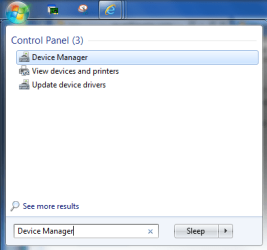
Type "Device Manager" without quotes into your start menu search bar and click the highlighted program, as in the picture:
12.png
Then See if there are yellow exclaimation marks of any kind anywhere, as in this picture:
Capture.PNG

To install windows updates, click through Control Panel\System and Security\Windows Update, and then click "Check for updates". Then click Install
 

My Computer

Computer type
PC/Desktop
Computer Manufacturer/Model Number
Custom Asus Build
OS
Microsoft Windows 8.1 Pro 64-bit
CPU
Intel(R) Core(TM) i3-4130 CPU @ 3.40GHz
Motherboard
B85M-E
Memory
8.00 GB
Graphics Card(s)
None
Sound Card
Realtek High Definition Audio
Monitor(s) Displays
Asus 23.6" Monitor
Screen Resolution
1920 x 1080 x 32 bits (4294967296 colors) @ 60 Hz
Hard Drives
INTEL SSDSC2BW180A4
Samsung SSD 840 PRO Series
PSU
Seasonic S12II-380Bronze
Case
Lian Li
Cooling
Fan, Passive
Keyboard
Logitech K120
Mouse
Microsoft Touch Mouse
Internet Speed
4ms Ping, 19.0 Mbps Download, 19.0 Mbps Upload
Antivirus
Eset Endpoint
Browser
Internet Explorer, Chrome
So AVG turned the services off, and you turned them back on, yes? Did you set them to their original settings? Try installing AVG again and see if it lets you "turn off themes", and then turn it back on (using AVG). Manually, you'll have to set them to automatic, AND start it back up again.

P.S. Hi Yussi ;)
 

My Computer

Computer type
PC/Desktop
Computer Manufacturer/Model Number
Custom Asus Build
OS
Microsoft Windows 8.1 Pro 64-bit
CPU
Intel(R) Core(TM) i3-4130 CPU @ 3.40GHz
Motherboard
B85M-E
Memory
8.00 GB
Graphics Card(s)
None
Sound Card
Realtek High Definition Audio
Monitor(s) Displays
Asus 23.6" Monitor
Screen Resolution
1920 x 1080 x 32 bits (4294967296 colors) @ 60 Hz
Hard Drives
INTEL SSDSC2BW180A4
Samsung SSD 840 PRO Series
PSU
Seasonic S12II-380Bronze
Case
Lian Li
Cooling
Fan, Passive
Keyboard
Logitech K120
Mouse
Microsoft Touch Mouse
Internet Speed
4ms Ping, 19.0 Mbps Download, 19.0 Mbps Upload
Antivirus
Eset Endpoint
Browser
Internet Explorer, Chrome
Ok I got it. I used the trouble shooter for "Display Quality"

Sorry for the trouble and thanks for the effort.

WARNING: This is Likely going to happen again in a year or so. So sorry in advanced
 

My Computer

OS
Windows 7
  • You uninstalled what? AVG?
  • If you're talking about a custom theme, did you first patch UXtheme patcher before applying the custom theme?
  • Can you post a link of the theme you tried to install?
  • Does the default windows theme work on your pc? (Pic attached) --> View attachment 219599
Edit: Hi Dusty :p. You may take over this thread for the time being ;)
Edit 2: You got it fixed already? GREAT! Mark the thread as solved :)
 
Last edited:

My Computer

Computer type
PC/Desktop
Computer Manufacturer/Model Number
Self assembled
OS
Windows 10 Home 64Bit
CPU
Intel Core i5 10400 @ 2.90GHz
Motherboard
Intel Corporation DG41WV (PROCESSOR)
Memory
8.00GB Single-Channel Unknown @ 1329MHz (16-20-20-38)
Sound Card
Realtek High Definition Audio
Monitor(s) Displays
DELL E170S
Screen Resolution
1280x1024 pixels
Hard Drives
931GB TOSHIBA DT01ACA100 (SATA)
238GB TEAM TM8PS7256G (SATA SSD)
Case
Nothing Fancy
Cooling
Fans
Keyboard
A4 Tech Co LTD
Mouse
A4 Tech Co Ltd/Logitech
Internet Speed
25 Mbps
Haha!

Glad you figured it out, sailor. And no problems, in a year or so, we'll probably still be here :D

I'll have to remember to have people use the built in troubleshooters to check for problems more often.

And sorry for hijacking your thread, Yussi! I posted before I could see your post :o Please forgive me
angel-smiley-face.JPG
 

My Computer

Computer type
PC/Desktop
Computer Manufacturer/Model Number
Custom Asus Build
OS
Microsoft Windows 8.1 Pro 64-bit
CPU
Intel(R) Core(TM) i3-4130 CPU @ 3.40GHz
Motherboard
B85M-E
Memory
8.00 GB
Graphics Card(s)
None
Sound Card
Realtek High Definition Audio
Monitor(s) Displays
Asus 23.6" Monitor
Screen Resolution
1920 x 1080 x 32 bits (4294967296 colors) @ 60 Hz
Hard Drives
INTEL SSDSC2BW180A4
Samsung SSD 840 PRO Series
PSU
Seasonic S12II-380Bronze
Case
Lian Li
Cooling
Fan, Passive
Keyboard
Logitech K120
Mouse
Microsoft Touch Mouse
Internet Speed
4ms Ping, 19.0 Mbps Download, 19.0 Mbps Upload
Antivirus
Eset Endpoint
Browser
Internet Explorer, Chrome
Haha!

Glad you figured it out, sailor. And no problems, in a year or so, we'll probably still be here :D

I'll have to remember to have people use the built in troubleshooters to check for problems more often.

And sorry for hijacking your thread, Yussi! I posted before I could see your post :o Please forgive me
View attachment 219600

Awwwww :). No problem. You helped the OP in getting the issue solved :D
 

My Computer

Computer type
PC/Desktop
Computer Manufacturer/Model Number
Self assembled
OS
Windows 10 Home 64Bit
CPU
Intel Core i5 10400 @ 2.90GHz
Motherboard
Intel Corporation DG41WV (PROCESSOR)
Memory
8.00GB Single-Channel Unknown @ 1329MHz (16-20-20-38)
Sound Card
Realtek High Definition Audio
Monitor(s) Displays
DELL E170S
Screen Resolution
1280x1024 pixels
Hard Drives
931GB TOSHIBA DT01ACA100 (SATA)
238GB TEAM TM8PS7256G (SATA SSD)
Case
Nothing Fancy
Cooling
Fans
Keyboard
A4 Tech Co LTD
Mouse
A4 Tech Co Ltd/Logitech
Internet Speed
25 Mbps
Back
Top