Encrypt and Decrypt - Add to Context Menu

How to Add Encrypt and Decrypt to Context Menu in Windows 7 and Windows 8

   Information
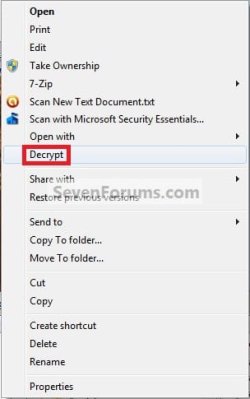
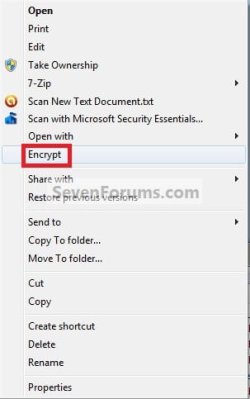
This will allow you to add Encrypt and Decrypt to the context menu so that you can encrypt or decrypt a file or folder by simply right clicking on the item and selecting Encrypt or Decrypt.
   Note
Encrypting folders and files is a way to protect them from unwanted access. Encrypting a file or folder will prevent other user accounts from being able to open it. Encrypting File System (EFS) is a feature of Windows that you can use to store information on your hard disk in an encrypted format. Encryption is the strongest protection that Windows provides to help you keep your information secure.

Encrypting File System (EFS) is only available in the Windows 7 Professional, Ultimate, Enterprise, and Windows 8 Pro and Enterprise editions.

   Tip
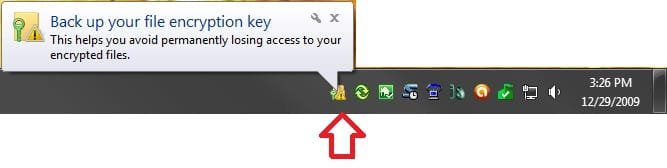
If this is the first time that you have encrypted a file or folder on your computer, then you will also see this in your notification area to let you know that you should Back up your file encryption key.
Step3-Encrypt.jpg


EXAMPLE: Context Menu after Adding Encrypt and Decrypt
NOTE: Only one will appear in the context menu at a time depending on if the file or folder is currently encrypted or not.
Encrypt.jpgDecrypt.jpg


OPTION ONE

Using a REG File Download


1. To Add Encrypt and Decrypt to the Context Menu
A) Click on the download button below to download the file below.
Add_Encrypt-Decrypt.reg

Download


B) Go to step 3.
2. To Remove Encrypt and Decrypt to the Context Menu
A) Click on the download button below to download the file below.
Remove_Encrypt-Decrypt.reg


Download


3. Save the .reg file to your Desktop.

4. Double click/tap on the downloaded .reg file to merge it.

5. Click/tap on the Run, Yes (UAC), Yes, and then OK when prompted.

6. When done, you can now delete the downloaded .reg file if you would like to.


OPTION TWO

Manually Using the Registry Editor


1. Press the Windows + R keys to open the Run dialog, the type regedit, and press Enter.

2. If prompted by UAC, then click/tap on Yes.

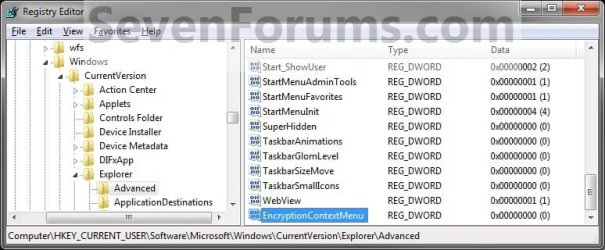
3. In regedit, go to: (see screenshot below)
HKEY_CURRENT_USER\Software\Microsoft\Windows\CurrentVersion\Explorer\Advanced
Step1.jpg
4. To Add Encrypt and Decrypt to the Context Menu
A) In the right pane of Advanced, right click on an empty space, and click on New and DWORD (32-bit) Value and type EncryptionContextMenu and press Enter. (see screenshot below)
Step2.jpg
B) In the right pane, double click/tap on EncryptionContextMenu to modify it. (see screenshot above)
C) Type 1 and click/tap on OK. (see screenshot below)
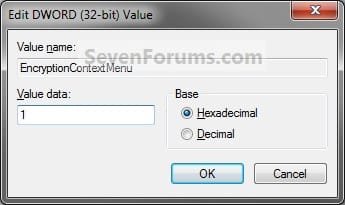
Step3.jpg
D) Go to step 6.
5. To Remove Encrypt and Decrypt
A) In the right pane of Advanced, right click on EncryptionContextMenu and click/tap on Delete. (see screenshot below step 4)

B) Click/tap on Yes to confirm deletion.
6. Close regedit.
That's it,
Shawn


Attachments

Last edited:
download was much easier Shawn thank you :)
ps- wonder why Windows didn't have this from the beginning?
very useful.
 

My Computer

Computer Manufacturer/Model Number
custom of course...built by grimreaper
OS
Windows 7 Ultimate X64
CPU
Intel Core 2 Quad Q9650 3.0GHz (3.6GHz 24/7) maxed 4.05GHz
Motherboard
EVGA 790i Ultra SLi Model#132-CK-NF79-A1 BIOS P10
Memory
8GB OCZ DDR3 PC3-14400 @ 1800MHz NVIDIA SLi-Ready
Graphics Card(s)
2XBFG GeForce GTX 280 OC Edition SLi'd
Sound Card
SoundBlaster X-Fi Titanium Fatal1ty Pro Series
Monitor(s) Displays
Samsung 52" 1080P LCD HDTV (LN52B550)
Screen Resolution
1920X1080 @ 60Hz
Hard Drives
3xWestern Digital WD1001FALS Caviar Black 1TB Hard Drive(s) RAID 0 x2 encased in 3xMasscool KuFormula SHF1 HDD Cooler(s)
PSU
ThermalTake ToughPower 1200W P/N:W0133RU Modularized
Case
ThermalTake P/N: VH6000BWS Armor Full-Tower
Cooling
ThermalTake SpinQ P/N: P0466 CPU Cooler
Keyboard
Logitech cordless Y-RAJ56A piece of ****
Mouse
Logitech G7 Laser Cordless mouse black
Internet Speed
10 Mbps DL-1Mbps UL wirelessly DWA-552 extreme N
Other Info
1XSamsung DVD burner SH-S223Q/BEBN SATA
1XSamsung DVD burner SH-S223L/BEBN SATA
1XLG GGW-H20L Blu-Ray burner
4XCooler Master 120mm Blue LED SickleFlow 2000 RPM
1XBelkin UPS F6C1500TWRK) backup power supply
You're welcome Grim. I'm not sure why they didn't inlcude it by default in the context menu. It sure makes it easier.
 

My Computer

Computer type
PC/Desktop
Computer Manufacturer/Model Number
Self built custom
OS
64-bit Windows 11 Pro for Workstations
CPU
Intel i7-8700K OC'd to 5 GHz
Motherboard
ASUS ROG Maximus XI Formula Z390
Memory
64 GB (4x16GB) G.SKILL TridentZ RGB DDR4 3600 MHz
Graphics Card(s)
ASUS ROG-STRIX-GTX1080TI-O11G-GAMING
Sound Card
Integrated
Monitor(s) Displays
2 x Samsung Odyssey G7 27"
Screen Resolution
2560x1440
Hard Drives
1TB Samsung 990 PRO M.2,
4TB Samsung 990 PRO PRO M.2,
TerraMaster F8 SSD Plus NAS
PSU
Seasonic Prime Titanium 850W
Case
Thermaltake Core P3
Cooling
Corsair Hydro H115i
Keyboard
Logitech wireless K800
Mouse
Logitech MX Master 4
Internet Speed
2 Gb/s Download and 100 Mb/s Upload
Antivirus
Malwarebyte Anti-Malware Premium
Browser
Google Chrome
Other Info
Logitech Z625 speaker system,
Logitech BRIO 4K Pro webcam,
HP Color LaserJet Pro MFP M477fdn,
APC SMART-UPS RT 1000 XL - SURT1000XLI,
Galaxy S23 Plus phone
Brink,

I downloaded the file and merged it. I have it on the context menu. I encrypted a folder with pictures, it says encrypted but I still can see the pictures. What I am doing wrong? I have win 7 Pro. By the way thanks, this is a great forum I have learned a lot here.
 

My Computer

Computer Manufacturer/Model Number
Home made
OS
Dual boot Windows 7 Pro and Windows XP Pro SP3
CPU
Interl Core 2 duo 2.20 GHz
Motherboard
Asus P5KC
Memory
Corsair DDR2 2 GB
Graphics Card(s)
Nvidia GeForce 8500 GT
Monitor(s) Displays
Samsung 24"
Screen Resolution
1920 x 1200
Hard Drives
4 internal Hard Drives , 2 500 Gb external drives
1 200 GB Maxtor
1 120 Gb WD
1 1 TB Seagate
1 500 GB seagate
Keyboard
Microsoft office Keyboard
Mouse
Microsoft intellimouse Explorer 2
Internet Speed
4MBPS
Hello Guareguao, and welcome to Seven Forums.

Yes, your user account would still be able to open and view your encrypted files just like your other unencrypted files. Encrypting a file or folder will prevent other user accounts from being able to open it instead. :)
 

My Computer

Computer type
PC/Desktop
Computer Manufacturer/Model Number
Self built custom
OS
64-bit Windows 11 Pro for Workstations
CPU
Intel i7-8700K OC'd to 5 GHz
Motherboard
ASUS ROG Maximus XI Formula Z390
Memory
64 GB (4x16GB) G.SKILL TridentZ RGB DDR4 3600 MHz
Graphics Card(s)
ASUS ROG-STRIX-GTX1080TI-O11G-GAMING
Sound Card
Integrated
Monitor(s) Displays
2 x Samsung Odyssey G7 27"
Screen Resolution
2560x1440
Hard Drives
1TB Samsung 990 PRO M.2,
4TB Samsung 990 PRO PRO M.2,
TerraMaster F8 SSD Plus NAS
PSU
Seasonic Prime Titanium 850W
Case
Thermaltake Core P3
Cooling
Corsair Hydro H115i
Keyboard
Logitech wireless K800
Mouse
Logitech MX Master 4
Internet Speed
2 Gb/s Download and 100 Mb/s Upload
Antivirus
Malwarebyte Anti-Malware Premium
Browser
Google Chrome
Other Info
Logitech Z625 speaker system,
Logitech BRIO 4K Pro webcam,
HP Color LaserJet Pro MFP M477fdn,
APC SMART-UPS RT 1000 XL - SURT1000XLI,
Galaxy S23 Plus phone
Thanks, that makes a lot of sense.
 

My Computer

Computer Manufacturer/Model Number
Home made
OS
Dual boot Windows 7 Pro and Windows XP Pro SP3
CPU
Interl Core 2 duo 2.20 GHz
Motherboard
Asus P5KC
Memory
Corsair DDR2 2 GB
Graphics Card(s)
Nvidia GeForce 8500 GT
Monitor(s) Displays
Samsung 24"
Screen Resolution
1920 x 1200
Hard Drives
4 internal Hard Drives , 2 500 Gb external drives
1 200 GB Maxtor
1 120 Gb WD
1 1 TB Seagate
1 500 GB seagate
Keyboard
Microsoft office Keyboard
Mouse
Microsoft intellimouse Explorer 2
Internet Speed
4MBPS
You're most welcome. :)
 

My Computer

Computer type
PC/Desktop
Computer Manufacturer/Model Number
Self built custom
OS
64-bit Windows 11 Pro for Workstations
CPU
Intel i7-8700K OC'd to 5 GHz
Motherboard
ASUS ROG Maximus XI Formula Z390
Memory
64 GB (4x16GB) G.SKILL TridentZ RGB DDR4 3600 MHz
Graphics Card(s)
ASUS ROG-STRIX-GTX1080TI-O11G-GAMING
Sound Card
Integrated
Monitor(s) Displays
2 x Samsung Odyssey G7 27"
Screen Resolution
2560x1440
Hard Drives
1TB Samsung 990 PRO M.2,
4TB Samsung 990 PRO PRO M.2,
TerraMaster F8 SSD Plus NAS
PSU
Seasonic Prime Titanium 850W
Case
Thermaltake Core P3
Cooling
Corsair Hydro H115i
Keyboard
Logitech wireless K800
Mouse
Logitech MX Master 4
Internet Speed
2 Gb/s Download and 100 Mb/s Upload
Antivirus
Malwarebyte Anti-Malware Premium
Browser
Google Chrome
Other Info
Logitech Z625 speaker system,
Logitech BRIO 4K Pro webcam,
HP Color LaserJet Pro MFP M477fdn,
APC SMART-UPS RT 1000 XL - SURT1000XLI,
Galaxy S23 Plus phone
When i encrypt a file, it doesnt prompt "Back up your file encryption key" like this picture:


45946d1262806961-encrypt-decrypt-add-context-menu-step3-encrypt.jpg


how to re-enable that?
 

My Computer

Computer Manufacturer/Model Number
Toshiba Satellite A100
OS
Windows 7 Ultimate x86
CPU
Intel® Core™ 2 Duo T5200 @1.60 GHz
Memory
1 GB
Graphics Card(s)
ATI Mobility Radeon X1400
Sound Card
Realtek Semiconductor Corp.
Monitor(s) Displays
15.4" CSV 1280 x 800
Hard Drives
120 GB
Mouse
e PRO
Internet Speed
1 Mbps down / 80 Kbps up
Hello Headshot,

You would only see that if it was the first time you encrypted a file. It will not show again afterwards. The tutorial below can show you how to back up your file encryption key though if needed. It's for Vista, but it's the same procedure.

Encrypted File System (EFS) Certificate Backup - Vista Forums

Hope this helps,
Shawn
 

My Computer

Computer type
PC/Desktop
Computer Manufacturer/Model Number
Self built custom
OS
64-bit Windows 11 Pro for Workstations
CPU
Intel i7-8700K OC'd to 5 GHz
Motherboard
ASUS ROG Maximus XI Formula Z390
Memory
64 GB (4x16GB) G.SKILL TridentZ RGB DDR4 3600 MHz
Graphics Card(s)
ASUS ROG-STRIX-GTX1080TI-O11G-GAMING
Sound Card
Integrated
Monitor(s) Displays
2 x Samsung Odyssey G7 27"
Screen Resolution
2560x1440
Hard Drives
1TB Samsung 990 PRO M.2,
4TB Samsung 990 PRO PRO M.2,
TerraMaster F8 SSD Plus NAS
PSU
Seasonic Prime Titanium 850W
Case
Thermaltake Core P3
Cooling
Corsair Hydro H115i
Keyboard
Logitech wireless K800
Mouse
Logitech MX Master 4
Internet Speed
2 Gb/s Download and 100 Mb/s Upload
Antivirus
Malwarebyte Anti-Malware Premium
Browser
Google Chrome
Other Info
Logitech Z625 speaker system,
Logitech BRIO 4K Pro webcam,
HP Color LaserJet Pro MFP M477fdn,
APC SMART-UPS RT 1000 XL - SURT1000XLI,
Galaxy S23 Plus phone
What program can I download that would take the place of this feature in Windows 7 Home Premium?
 

My Computer

Computer Manufacturer/Model Number
Presario CQ60-420US
OS
Windows 7 Home Premium 32bit
CPU
Pentium Dual-Core CPU T4200 @ 2.00GHz
Memory
3.00GB
Graphics Card(s)
Intel Graphics Media Accelerator 4500MHD
Hard Drives
500 GB WD MyBook (WD Caviar Green)
What program can I download that would take the place of this feature in Windows 7 Home Premium?

Hello dcwill,

The free program TrueCrypt is a good alternative.

Hope this helps,
Shawn
 
Last edited:

My Computer

Computer type
PC/Desktop
Computer Manufacturer/Model Number
Self built custom
OS
64-bit Windows 11 Pro for Workstations
CPU
Intel i7-8700K OC'd to 5 GHz
Motherboard
ASUS ROG Maximus XI Formula Z390
Memory
64 GB (4x16GB) G.SKILL TridentZ RGB DDR4 3600 MHz
Graphics Card(s)
ASUS ROG-STRIX-GTX1080TI-O11G-GAMING
Sound Card
Integrated
Monitor(s) Displays
2 x Samsung Odyssey G7 27"
Screen Resolution
2560x1440
Hard Drives
1TB Samsung 990 PRO M.2,
4TB Samsung 990 PRO PRO M.2,
TerraMaster F8 SSD Plus NAS
PSU
Seasonic Prime Titanium 850W
Case
Thermaltake Core P3
Cooling
Corsair Hydro H115i
Keyboard
Logitech wireless K800
Mouse
Logitech MX Master 4
Internet Speed
2 Gb/s Download and 100 Mb/s Upload
Antivirus
Malwarebyte Anti-Malware Premium
Browser
Google Chrome
Other Info
Logitech Z625 speaker system,
Logitech BRIO 4K Pro webcam,
HP Color LaserJet Pro MFP M477fdn,
APC SMART-UPS RT 1000 XL - SURT1000XLI,
Galaxy S23 Plus phone

My Computer

Computer type
PC/Desktop
Computer Manufacturer/Model Number
Self Built
OS
Windows 8.1 Pro x64
CPU
Intel Core i5-2500K @ 3.30GHz - S1155
Motherboard
Asus P8P67 LE Rev3, Intel P67, S115
Memory
8GB Corsair DDR3 XMS3, PC3-12800
Graphics Card(s)
NVIDIA GeForce GTX 650
Sound Card
On-Board
Monitor(s) Displays
3 x 24" {Extended Display}
Screen Resolution
1920 x 1080
Hard Drives
300GB Seagate Barracuda 7200
PSU
550W Coolermaster GX550
Case
Silverstone Precision PS04B
Cooling
Stock
Keyboard
Logitech K120
Mouse
World of Warcraft Cataclysm MMO Gaming Mouse
Internet Speed
80 MB
Antivirus
MSE / Windows Defender
Browser
Chrome
Advanced EFS recovery

A question... if using the 30 trial of Advanced EFS Recovery, as stated in the thread, helps in case you lose your certificate... can't anyone use that to gain access to my encrypted files or folder?
 

My Computer

Computer Manufacturer/Model Number
custom build
OS
Windows 7 64b Ultimate
CPU
I7-2600 3.40GHz - testing various OC levels..
Motherboard
ASUS Sabretooth
Memory
2x 4Gb DDR3/1333
Graphics Card(s)
GTX570 - testing OC levels
Sound Card
motherboard 7.1 DIG.
Monitor(s) Displays
2x Ilyama 24" E2409HDS-B1 2ms/DVI
Screen Resolution
1920 x 1080
Hard Drives
120 GB Intel Elmcrest SSD
1 TB SATAII 7200RPM/32MB
External 2TB USB3
PSU
Corsair Pro HX850W
Cooling
Coolermaster Hyper V8
Keyboard
Logitech G110
Mouse
Logitech G700
Internet Speed
25Mb
Other Info
CPU: 7,7 RAM: 7,7 GTX: 7,9 GTX 3D : 7,9 SSD 7,6
Overall 7,6 ...... now to speed up the SSD... ;)

Also use a Dell XPS M1710 on Vista 32b
Asus LT on Vista 32
3 older machines still doing fine on Linux/ubuntu but not used much anymore...
Hello Mark,

It is possible if they have access to your computer and are able to log in and install the program, or have a copy of your encrypted file or folder.
 

My Computer

Computer type
PC/Desktop
Computer Manufacturer/Model Number
Self built custom
OS
64-bit Windows 11 Pro for Workstations
CPU
Intel i7-8700K OC'd to 5 GHz
Motherboard
ASUS ROG Maximus XI Formula Z390
Memory
64 GB (4x16GB) G.SKILL TridentZ RGB DDR4 3600 MHz
Graphics Card(s)
ASUS ROG-STRIX-GTX1080TI-O11G-GAMING
Sound Card
Integrated
Monitor(s) Displays
2 x Samsung Odyssey G7 27"
Screen Resolution
2560x1440
Hard Drives
1TB Samsung 990 PRO M.2,
4TB Samsung 990 PRO PRO M.2,
TerraMaster F8 SSD Plus NAS
PSU
Seasonic Prime Titanium 850W
Case
Thermaltake Core P3
Cooling
Corsair Hydro H115i
Keyboard
Logitech wireless K800
Mouse
Logitech MX Master 4
Internet Speed
2 Gb/s Download and 100 Mb/s Upload
Antivirus
Malwarebyte Anti-Malware Premium
Browser
Google Chrome
Other Info
Logitech Z625 speaker system,
Logitech BRIO 4K Pro webcam,
HP Color LaserJet Pro MFP M477fdn,
APC SMART-UPS RT 1000 XL - SURT1000XLI,
Galaxy S23 Plus phone
Hello Mark,

It is possible if they have access to your computer and are able to log in and install the program, or have a copy of your encrypted file or folder.

Thx Shawn!

Ok... that means that ultimately, my UAC admin password covers it all...
Do you know of hacker instances that would be able to achieve access through w& firewall and install such a program to gain access? If that could happen, what's the use?
BTW, thx for your speedy response! Interesting last name .. you're just missing two small words: van and den :)
 

My Computer

Computer Manufacturer/Model Number
custom build
OS
Windows 7 64b Ultimate
CPU
I7-2600 3.40GHz - testing various OC levels..
Motherboard
ASUS Sabretooth
Memory
2x 4Gb DDR3/1333
Graphics Card(s)
GTX570 - testing OC levels
Sound Card
motherboard 7.1 DIG.
Monitor(s) Displays
2x Ilyama 24" E2409HDS-B1 2ms/DVI
Screen Resolution
1920 x 1080
Hard Drives
120 GB Intel Elmcrest SSD
1 TB SATAII 7200RPM/32MB
External 2TB USB3
PSU
Corsair Pro HX850W
Cooling
Coolermaster Hyper V8
Keyboard
Logitech G110
Mouse
Logitech G700
Internet Speed
25Mb
Other Info
CPU: 7,7 RAM: 7,7 GTX: 7,9 GTX 3D : 7,9 SSD 7,6
Overall 7,6 ...... now to speed up the SSD... ;)

Also use a Dell XPS M1710 on Vista 32b
Asus LT on Vista 32
3 older machines still doing fine on Linux/ubuntu but not used much anymore...
Well, I'm sure that a pro would be able to given enough time. However, for most probably not unless you were infected by malware or a virus that allowed them access.

Having multiple layers of security (ex: password, firewall, bitlocker drive encryption, AV program, etc.....) is best to help prevent unauthorized access.
 

My Computer

Computer type
PC/Desktop
Computer Manufacturer/Model Number
Self built custom
OS
64-bit Windows 11 Pro for Workstations
CPU
Intel i7-8700K OC'd to 5 GHz
Motherboard
ASUS ROG Maximus XI Formula Z390
Memory
64 GB (4x16GB) G.SKILL TridentZ RGB DDR4 3600 MHz
Graphics Card(s)
ASUS ROG-STRIX-GTX1080TI-O11G-GAMING
Sound Card
Integrated
Monitor(s) Displays
2 x Samsung Odyssey G7 27"
Screen Resolution
2560x1440
Hard Drives
1TB Samsung 990 PRO M.2,
4TB Samsung 990 PRO PRO M.2,
TerraMaster F8 SSD Plus NAS
PSU
Seasonic Prime Titanium 850W
Case
Thermaltake Core P3
Cooling
Corsair Hydro H115i
Keyboard
Logitech wireless K800
Mouse
Logitech MX Master 4
Internet Speed
2 Gb/s Download and 100 Mb/s Upload
Antivirus
Malwarebyte Anti-Malware Premium
Browser
Google Chrome
Other Info
Logitech Z625 speaker system,
Logitech BRIO 4K Pro webcam,
HP Color LaserJet Pro MFP M477fdn,
APC SMART-UPS RT 1000 XL - SURT1000XLI,
Galaxy S23 Plus phone
Back
Top