Solved Error 0x80004005 while extracting zip file

MirzaAsad

New member
Member
Local time
11:24 PM
Messages
25
Location
Islamabad
I'm trying to extract a zip folder that contains only one .exe file.Actually,I downloaded this zip file from Esri Downloads.

When the file is completely downloaded and i tries to extract it using standard windows extractor I receive an error saying "Error 0x80004005: Unspecified error".
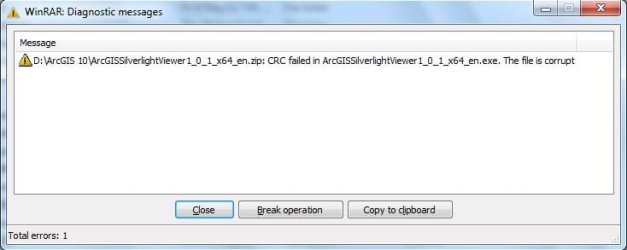
I've tried to extract it using winrar as well but again same error.
For better understanding I've attached two images.Please have a look at them and respond.

Thanks
 

Attachments

  • zipper.JPG
    zipper.JPG
    42.5 KB · Views: 106
  • winrar.JPG
    winrar.JPG
    27.6 KB · Views: 62

My Computer

Computer Manufacturer/Model Number
ACER Vpro 3900
OS
Windows 7 Ultimate x32
CPU
Core 2 Duo
Motherboard
Veriton 3900pro
Memory
4GB
Graphics Card(s)
Intel(R) GMA 3000(Intel(R) Q965/Q963 Express Chipset Family)
Sound Card
High Definition Audio Device
Monitor(s) Displays
LCD
Screen Resolution
1024 X 768
Hard Drives
Seagate ST3500418AS ATA Device 500gig hard drive
Internet Speed
4MB
Hello,

I researched the error code, and came up with this result:

1- go start->control panel->device manager open it
2- in view menu tick "view hidden devices"
3- open network adapters branch.
4- you will see many adapters named Microsoft 6to4. (i had over 150 number of them).
5- delete all.
6- restart your pc.

-From: Microsoft Answers - During unzip attempt

Please try this and post back results.

Thanks,
Gamer
 

My Computer

Computer type
PC/Desktop
Computer Manufacturer/Model Number
Custom
OS
Windows 8.1 Pro x64
CPU
Intel Core i5-4570 CPU @ 3.20GHz
Motherboard
Gigabyte Z87-D3HP-CF
Memory
8GB DDR3-1596 - Dual Channel
Graphics Card(s)
NVIDIA GeForce GTX 750 Ti SC
Sound Card
Onboard
Monitor(s) Displays
Samsung
Screen Resolution
1920x1080
Hard Drives
SSD - 120GB
Second - 1TB
Antivirus
MSE
Browser
Chrome
There is no delete option there.However,there two options uninstalling them or disable them.
I disabled all restarted my PC but no avail. :cry:
Any other solution?
 

My Computer

Computer Manufacturer/Model Number
ACER Vpro 3900
OS
Windows 7 Ultimate x32
CPU
Core 2 Duo
Motherboard
Veriton 3900pro
Memory
4GB
Graphics Card(s)
Intel(R) GMA 3000(Intel(R) Q965/Q963 Express Chipset Family)
Sound Card
High Definition Audio Device
Monitor(s) Displays
LCD
Screen Resolution
1024 X 768
Hard Drives
Seagate ST3500418AS ATA Device 500gig hard drive
Internet Speed
4MB
I'm afraid to say uninstall them because of them being network, but let me research this more.
 

My Computer

Computer type
PC/Desktop
Computer Manufacturer/Model Number
Custom
OS
Windows 8.1 Pro x64
CPU
Intel Core i5-4570 CPU @ 3.20GHz
Motherboard
Gigabyte Z87-D3HP-CF
Memory
8GB DDR3-1596 - Dual Channel
Graphics Card(s)
NVIDIA GeForce GTX 750 Ti SC
Sound Card
Onboard
Monitor(s) Displays
Samsung
Screen Resolution
1920x1080
Hard Drives
SSD - 120GB
Second - 1TB
Antivirus
MSE
Browser
Chrome
Have you tried using 7-Zip?
 

My Computer

Computer type
PC/Desktop
Computer Manufacturer/Model Number
Custom
OS
Windows 8.1 Pro x64
CPU
Intel Core i5-4570 CPU @ 3.20GHz
Motherboard
Gigabyte Z87-D3HP-CF
Memory
8GB DDR3-1596 - Dual Channel
Graphics Card(s)
NVIDIA GeForce GTX 750 Ti SC
Sound Card
Onboard
Monitor(s) Displays
Samsung
Screen Resolution
1920x1080
Hard Drives
SSD - 120GB
Second - 1TB
Antivirus
MSE
Browser
Chrome
Thanks for your quick and timely response.Yes i tried 7zip as well.Please look at the image to see the error.
 

Attachments

  • 7zip.JPG
    7zip.JPG
    31.7 KB · Views: 151

My Computer

Computer Manufacturer/Model Number
ACER Vpro 3900
OS
Windows 7 Ultimate x32
CPU
Core 2 Duo
Motherboard
Veriton 3900pro
Memory
4GB
Graphics Card(s)
Intel(R) GMA 3000(Intel(R) Q965/Q963 Express Chipset Family)
Sound Card
High Definition Audio Device
Monitor(s) Displays
LCD
Screen Resolution
1024 X 768
Hard Drives
Seagate ST3500418AS ATA Device 500gig hard drive
Internet Speed
4MB

My Computer

Computer type
PC/Desktop
Computer Manufacturer/Model Number
Custom
OS
Windows 8.1 Pro x64
CPU
Intel Core i5-4570 CPU @ 3.20GHz
Motherboard
Gigabyte Z87-D3HP-CF
Memory
8GB DDR3-1596 - Dual Channel
Graphics Card(s)
NVIDIA GeForce GTX 750 Ti SC
Sound Card
Onboard
Monitor(s) Displays
Samsung
Screen Resolution
1920x1080
Hard Drives
SSD - 120GB
Second - 1TB
Antivirus
MSE
Browser
Chrome
ok i'll update but the problem is extracting a .zip file.Installation is the second step where updating silverlight can help.To add to this this is the only zip file that i've been unable extract.However, all other .zip & .rar are being extracted easily and successfully.
 

My Computer

Computer Manufacturer/Model Number
ACER Vpro 3900
OS
Windows 7 Ultimate x32
CPU
Core 2 Duo
Motherboard
Veriton 3900pro
Memory
4GB
Graphics Card(s)
Intel(R) GMA 3000(Intel(R) Q965/Q963 Express Chipset Family)
Sound Card
High Definition Audio Device
Monitor(s) Displays
LCD
Screen Resolution
1024 X 768
Hard Drives
Seagate ST3500418AS ATA Device 500gig hard drive
Internet Speed
4MB
Then it is possible that this ZIP file is corrupt. Have you tried redownloading the ZIP file?
 

My Computer

Computer type
PC/Desktop
Computer Manufacturer/Model Number
Custom
OS
Windows 8.1 Pro x64
CPU
Intel Core i5-4570 CPU @ 3.20GHz
Motherboard
Gigabyte Z87-D3HP-CF
Memory
8GB DDR3-1596 - Dual Channel
Graphics Card(s)
NVIDIA GeForce GTX 750 Ti SC
Sound Card
Onboard
Monitor(s) Displays
Samsung
Screen Resolution
1920x1080
Hard Drives
SSD - 120GB
Second - 1TB
Antivirus
MSE
Browser
Chrome
Yep i tried re-downloaded it several times but same problem.I even downloaded French version, German version instead English but ended up with same problem.So how all the files be corrupt that they have uploaded?
What you can do is download this Esri Global Account file for me and if the you have the same issue or not.
 

My Computer

Computer Manufacturer/Model Number
ACER Vpro 3900
OS
Windows 7 Ultimate x32
CPU
Core 2 Duo
Motherboard
Veriton 3900pro
Memory
4GB
Graphics Card(s)
Intel(R) GMA 3000(Intel(R) Q965/Q963 Express Chipset Family)
Sound Card
High Definition Audio Device
Monitor(s) Displays
LCD
Screen Resolution
1024 X 768
Hard Drives
Seagate ST3500418AS ATA Device 500gig hard drive
Internet Speed
4MB

My Computer

Computer type
PC/Desktop
Computer Manufacturer/Model Number
Custom
OS
Windows 8.1 Pro x64
CPU
Intel Core i5-4570 CPU @ 3.20GHz
Motherboard
Gigabyte Z87-D3HP-CF
Memory
8GB DDR3-1596 - Dual Channel
Graphics Card(s)
NVIDIA GeForce GTX 750 Ti SC
Sound Card
Onboard
Monitor(s) Displays
Samsung
Screen Resolution
1920x1080
Hard Drives
SSD - 120GB
Second - 1TB
Antivirus
MSE
Browser
Chrome
Well,i got it was IDM that was causing problem.I don't know for somw odd reasons i turned off IDM and used default windows downloader.When the zip file
completely downloaded.I extracted it without any error.

In short, it was IDM :mad: the main cause of this prblem
 

My Computer

Computer Manufacturer/Model Number
ACER Vpro 3900
OS
Windows 7 Ultimate x32
CPU
Core 2 Duo
Motherboard
Veriton 3900pro
Memory
4GB
Graphics Card(s)
Intel(R) GMA 3000(Intel(R) Q965/Q963 Express Chipset Family)
Sound Card
High Definition Audio Device
Monitor(s) Displays
LCD
Screen Resolution
1024 X 768
Hard Drives
Seagate ST3500418AS ATA Device 500gig hard drive
Internet Speed
4MB
Well now i know one way of solving the problem lol.

Well I'm glad you figured it out. If you have any other problems, you know where you can come!
 

My Computer

Computer type
PC/Desktop
Computer Manufacturer/Model Number
Custom
OS
Windows 8.1 Pro x64
CPU
Intel Core i5-4570 CPU @ 3.20GHz
Motherboard
Gigabyte Z87-D3HP-CF
Memory
8GB DDR3-1596 - Dual Channel
Graphics Card(s)
NVIDIA GeForce GTX 750 Ti SC
Sound Card
Onboard
Monitor(s) Displays
Samsung
Screen Resolution
1920x1080
Hard Drives
SSD - 120GB
Second - 1TB
Antivirus
MSE
Browser
Chrome
0x80004005

I just had this issue on one of my clients computers.

Turns out it was corrupting the files upon download. It affecting any zip file that was downloaded to the computer. However, transferring a file from a thumb drive did not cause any issues.

The way we solved it was by running malwarebytes on it. We found 14 threats, mostly winsock. Once those were deleted and we rebooted the computer, everything worked perfectly.
 

My Computer

Computer type
PC/Desktop
OS
Windows 7 64-bit
Back
Top