error 0x800ccc19 download from POP3

unlive

New member
Local time
7:43 AM
Messages
5
When downloading email from POP3 server to Live Mail about 50% of the time I get the 0x800ccc19 error message after it downloads some of my messages. If I try again right away it asks me for my password and then tells me that it is wrong (which it isn't) If I wait for a few hours to ask for mail again, the same messages will be downloaded again with a few more and may or may not decide to "complete".

I can go into the servers mailbox and delete the messages that are supposidly causing the problem. The frustration is that there is no rhyme nor reason to what messages Live Mail does not like to download. Sometimes I will do nothing and Live Mail WILL download everything later.

I formerly had Outlook Express which worked just fine with my old XP computer. This is no longer available with Windows 7.

I have tried almost everything I guess except the elusive cure. eg turned off antivirus, tried program repair, reinstalling Live Mail.

I imagine this description is too long but I cannot imagine that I am the only one with this problem so I hope someone can help ... please.
 

My Computer

Computer Manufacturer/Model Number
Dell
OS
7 professional 64 bit
CPU
Intel Core i5
Memory
8GB
The error message means "A time-out occurred while communicating with the server 0x800ccc19": http://support.microsoft.com/kb/813518. They suggest it could be caused by some Norton antivirus products but if you are not using any, all I can think of is that the server is currently having problems. Have you tried setting up the account on another PC to see if you ever see that error? That would tell you if the problem is with your PC or with the server.
 

My Computer

Computer type
PC/Desktop
Computer Manufacturer/Model Number
OQO 2+
OS
Windows 8 Pro w/MC 32-bit
CPU
Intel Atom 1.86 GHz
Motherboard
OQO 2+
Memory
2 GB
Graphics Card(s)
Intel GMA 500
Sound Card
IDT
Monitor(s) Displays
LCD
Screen Resolution
800 x 480 (portable) 1280 x 1024 (docked)
Hard Drives
64 GB SSD
PSU
9 Ah Battery (portable) or OQO Brick (docked)
Case
Shirt Pocket Sized
Cooling
Tiny Fan
Keyboard
Slide out (portable) DiNovo Edge (docked)
Mouse
Eraser head (portable) Logitech Bluetooth (docked)
Internet Speed
WWAN or 802.11G (portable) T1 (docked)
Browser
IE 10
Other Info
DVD-RW OQO Docking Station
This is due to corruption of the pop3uidl file. Close your internet connection and all programs. Search for the file pop3uidl and delete it. Reconnect and it should work.
Reboot your PC and check your mail again.

Hope problem is fixed.
 

My Computer

OS
Windows 7 Ultimate x64
Thanks for responding alishathomaz and roncerr

I found the pop3uidl and deleted it. This was something I never tried before so I was quite grateful to hear a new fix. Alas, it was not to be because the crazy, unpredictible behaviour continues. Why, why, why can't I have good old Outlook Express back which worked just fine on my former XP machine. The new computer with Windows 7 only offers Live Mail.

My server suggested that I install a new non-microsoft POP mail program like Mozilla. This is a hassle of course but if I am the only one in the world with this Microsoft Live Mail frustrating experience I guess that is the only choice.

I sure would appreciate any other suggestions.
 

My Computer

Computer Manufacturer/Model Number
Dell
OS
7 professional 64 bit
CPU
Intel Core i5
Memory
8GB
...I sure would appreciate any other suggestions.
"Have you tried setting up the account on another PC to see if you ever see that error?"

In looking over your initial post, it looks like you have multiple problems:
1) the error message 0x800ccc19
2) asking for password
3) saying that it is wrong (which it isn't)
4) upon asking for mail again, the same messages will be downloaded again with a few more
5) may not decide to "complete".

If you have your password for the server set up properly in the Account Properties, it should never ask for it. If you have it set up as a pop3 account and did not check off "leave copy on server", a specific piece of email should not be downloaded again. If I experienced those problem, I would conclude either that the ISP/email provider was having problems and won't admit it or that my computer was messed up and needed maintenance or a reinstall of the OS. For maintenance you could try disk cleanup, check disk, and sfc /scannow. Microsoft, besides offering their "Security Essentials" antimalware, also offers a bootable disk utility called "Windows Offline Defender". The latter operates from a bootable CD to scan your hard disk without being installed on it.
 
Last edited:

My Computer

Computer type
PC/Desktop
Computer Manufacturer/Model Number
OQO 2+
OS
Windows 8 Pro w/MC 32-bit
CPU
Intel Atom 1.86 GHz
Motherboard
OQO 2+
Memory
2 GB
Graphics Card(s)
Intel GMA 500
Sound Card
IDT
Monitor(s) Displays
LCD
Screen Resolution
800 x 480 (portable) 1280 x 1024 (docked)
Hard Drives
64 GB SSD
PSU
9 Ah Battery (portable) or OQO Brick (docked)
Case
Shirt Pocket Sized
Cooling
Tiny Fan
Keyboard
Slide out (portable) DiNovo Edge (docked)
Mouse
Eraser head (portable) Logitech Bluetooth (docked)
Internet Speed
WWAN or 802.11G (portable) T1 (docked)
Browser
IE 10
Other Info
DVD-RW OQO Docking Station
Thanks Roncerr

I think the basic problem is that Windows Live finds a message that it does not want to download from the server and so it stops at that message and causes the time-out error. It does seem from my attempts to solve this previously, others have the same problem.

Yes, I can go online to the server and delete all of the messages remaining and the problem does not occur until Windows Live finds another message that it does not want to download. I can find no consistency in the problem messages.

Over the past year I have tried most of the fixes suggested. I think the problem is that some messages seem to annoy Live Mail. I wish it was more friendly. Previously, with XP and Outlook Express and the same server there were never any problems.

Should I give up or can someone out there help?
 

My Computer

Computer Manufacturer/Model Number
Dell
OS
7 professional 64 bit
CPU
Intel Core i5
Memory
8GB
You may have some security software installed that's intercepting mail before it is rendered in WLMail for display.

Try to disable the mail scanning part of whatever security software you're running. Now please check if the problem has gone away for new messages.

I hope this helps.
 

My Computer

Computer Manufacturer/Model Number
Custom Built
OS
Windows 7 Pro with SP1 32bit
Motherboard
Intel D845GVS1 X86-based PC
Memory
2 gigs of RAM
Graphics Card(s)
Intel(R) 82845G/GL/GE/PE/GV Graphics Controller
Sound Card
Realtek AC'97 Audio
Monitor(s) Displays
Samsung SyncMaster 931BF Black 19" LCD Monitor
Screen Resolution
1280X960
Hard Drives
1. SAMSUNG SP0822N ATA Device ~ 80 GigaBytes

2. Seagate FreeAgent Go USB Device ~ 500 GigaBytes
Keyboard
COMPAQ Standard PS/2 Keyboard
Mouse
iBall Laser Precise Speedster
Internet Speed
4 mb/sec
...Windows Live finds a message that it does not want to download...
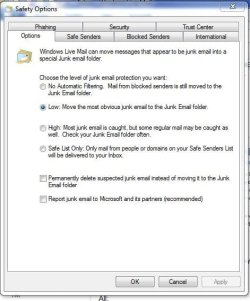
WLM (the email program on your pc) does not make decisions about whether or not to download something. If it finds something predefined as malicious or spam, it will download it, flag it, and put it in the junk mail folder or perform some other action as specified in the Safety Options. (So check how all 6 tabs are set up.) This may also help with troubleshooting:
1)Who is the email service provider?
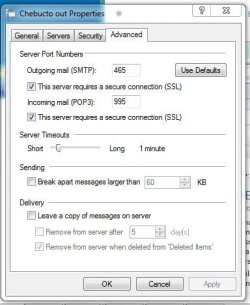
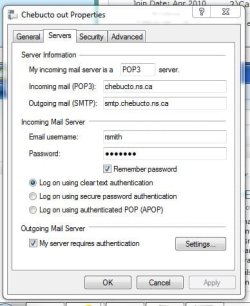
2)Can you post a screen shot of the "Server" and "Advanced" Tabs of the account properties.
 
Last edited:

My Computer

Computer type
PC/Desktop
Computer Manufacturer/Model Number
OQO 2+
OS
Windows 8 Pro w/MC 32-bit
CPU
Intel Atom 1.86 GHz
Motherboard
OQO 2+
Memory
2 GB
Graphics Card(s)
Intel GMA 500
Sound Card
IDT
Monitor(s) Displays
LCD
Screen Resolution
800 x 480 (portable) 1280 x 1024 (docked)
Hard Drives
64 GB SSD
PSU
9 Ah Battery (portable) or OQO Brick (docked)
Case
Shirt Pocket Sized
Cooling
Tiny Fan
Keyboard
Slide out (portable) DiNovo Edge (docked)
Mouse
Eraser head (portable) Logitech Bluetooth (docked)
Internet Speed
WWAN or 802.11G (portable) T1 (docked)
Browser
IE 10
Other Info
DVD-RW OQO Docking Station
...Windows Live finds a message that it does not want to download...

Thanks Roncerr and Wanchoo. I really look forward to responding with a problem fixed message. you guys seem to know what you are talking about because the only suggestions I got before were to reinstall the programs or something too general.

I have Trend Micro with the POP3 mailscan turned off. I have even disabled the real time scan completely but it did not fix the problem.

It's nice that Roncerr suggests taking screen shots which are attached.

This problem is truly wierd because the Live Mail will work for a week then gets cranky again.

Hope you can help.
 

Attachments

  • Advanced.JPG
    Advanced.JPG
    34 KB · Views: 36
  • Safety Options.JPG
    Safety Options.JPG
    44.9 KB · Views: 36
  • Servers.JPG
    Servers.JPG
    37.9 KB · Views: 35

My Computer

Computer Manufacturer/Model Number
Dell
OS
7 professional 64 bit
CPU
Intel Core i5
Memory
8GB
A few things to try
dbl check the ports with your provider - they look ok, but some providers don't use standard ports and make sure the provider wants SSL.
On the advanced tab - move the timeout slider to a bit longer.
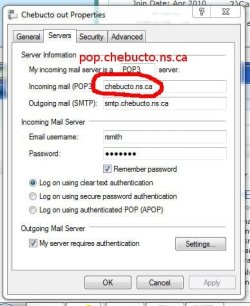
edit: Wait-a-minit should your incoming server have a 'pop' on it? Similar to your outgoing server has a 'smtp' on it?
Everything else looks good from this vantage point. I had some difficulties when I 1st used WL Mail - I liked the auto configure feature, but had to revert to manual configuration. I don't think this is the case with you, but if you let WL Mail set up the account, try manually configuring another account using values specified by your server. If it doesn't work - delete it.

Good luck.
 
Last edited:

My Computer

Computer type
Laptop
Computer Manufacturer/Model Number
HP Pavilion dv6-6c10us
OS
x64 (6.3.9600) Win8.1 Pro & soon dual boot x64 (6.1.7601) Win7_SP1 HomePrem
CPU
AMD A6-3420M APU with Radeon(tm) HD Graphics
Motherboard
Hewlett-Packard 1805
Memory
6.00 GB
Graphics Card(s)
AMD Radeon(TM) HD 6520G
Sound Card
(1) AMD High Definition Audio Device (2) IDT High Definiti
Monitor(s) Displays
HP W2072a 20" LCD (1600 x 900) @ 60 Hz
Screen Resolution
1366 x 768 x 32 bits (4294967296 colors) @ 60 Hz
Hard Drives
ST640LM0 00 HM641JI SATA Disk Device
Keyboard
Logitech k520 wireless KB
Mouse
Logitech m320 wireless mouse (bundled with KB)
Internet Speed
15/5 | 54 MB Wireless 'n'
Antivirus
Realtime: Defender or Avast | On-demand: Malwarebytes, ESET
Browser
IE 11 on Win8, IE 10 on win 7
Other Info
Media: [Gimp, Audacity, VLC] || Comm: [WEmail 2012, Skype] || Productivity: [OpenOffice,| Textpad] || Utils: [Sysinternals, cCleaner, Speccy, Defraggler]
[FONT=arial,helvetica]
MAIL SETTINGS:​
IMAP Server (Receive mail):
imap.chebucto.ns.ca

POP3 Server (Receive mail):
pop.chebucto.ns.ca
or
mail.chebucto.ns.ca

SMTP Server (Send mail):
smtp.chebucto.ns.ca
or
mail.chebucto.ns.ca

You might want to double check other settings, I was just curious about the incoming server. It's easy to miss, You don't know how many times I've scratched my head before I say "Better check the servers - you didn't put an at sign where a dot should be did you" and sometimes I have.


[/FONT]
 

Attachments

  • Servers.JPG
    Servers.JPG
    32.4 KB · Views: 8
Last edited:

My Computer

Computer type
Laptop
Computer Manufacturer/Model Number
HP Pavilion dv6-6c10us
OS
x64 (6.3.9600) Win8.1 Pro & soon dual boot x64 (6.1.7601) Win7_SP1 HomePrem
CPU
AMD A6-3420M APU with Radeon(tm) HD Graphics
Motherboard
Hewlett-Packard 1805
Memory
6.00 GB
Graphics Card(s)
AMD Radeon(TM) HD 6520G
Sound Card
(1) AMD High Definition Audio Device (2) IDT High Definiti
Monitor(s) Displays
HP W2072a 20" LCD (1600 x 900) @ 60 Hz
Screen Resolution
1366 x 768 x 32 bits (4294967296 colors) @ 60 Hz
Hard Drives
ST640LM0 00 HM641JI SATA Disk Device
Keyboard
Logitech k520 wireless KB
Mouse
Logitech m320 wireless mouse (bundled with KB)
Internet Speed
15/5 | 54 MB Wireless 'n'
Antivirus
Realtime: Defender or Avast | On-demand: Malwarebytes, ESET
Browser
IE 11 on Win8, IE 10 on win 7
Other Info
Media: [Gimp, Audacity, VLC] || Comm: [WEmail 2012, Skype] || Productivity: [OpenOffice,| Textpad] || Utils: [Sysinternals, cCleaner, Speccy, Defraggler]
Thanks Roncerr, Wanchoo and Slartybart for taking the time to try to help. I know I have taken too long to reply but I keep hoping a resolution will take place. During the month I have found that the messages Live Mail does not like to download (sometimes) to the POP server are large or have large attachments (over 1MB, which is not THAT large). I have to go into the server account and delete them and then the download will "complete".

This is really a nuisance and did not happen with Outlook Express. When I get time I will try Mozilla as suggested by others. I just wish I didn't have to go through the learning curve with a new program.

Hope to hear from anyone with some advice. Thanks

Ralph
 

My Computer

Computer Manufacturer/Model Number
Dell
OS
7 professional 64 bit
CPU
Intel Core i5
Memory
8GB
Back
Top