Error 0xc0000225 on boot

Telepot

New member
Local time
8:48 AM
Messages
7
Well I had Ubuntu AND Windows 7 duel booted on my Amilo Li 2727, I tried to get rid of the Ubuntu because to be honest, it was taking up most of my Laptop's space. I used a program to do it and when i restarted my laptop no OS would boot. I plugged in my Windows 7 Installation USB and it wouldn't boot up the install thing.
I put in the Ubuntu USB and had an option to install it, so I thought 'hey, maybe if I delete everything of my hdd like i do when i install win7 i can reinstall win7.', so i delete everything of hdd using ubuntu installer and install ubuntu (ubuntu is telling me I have a 120gb hard drive now idk why, that's beside the problem), so ubuntu is installed on my pc. I restart and put in my Win7 installation usb again and it says the same error.
The error says:
Windows failed to start. A recent hardware or software change might be the cause. To fix the problem:
1. Insert your Windows installation disc and restart your computer.
2. Choose your language settings and then click "next."
3. Click 'repair your computer'.

If you do not have the disc, contact your system administrator or computer manufacturer for assistance.
File: \Boot\BCD
Status: 0xc0000225
Info: An error occured while attempting to read the boot configuration data.

I can't do what it tells me because i do not have a windows installation disc, and can't make one! Any help? Please!
 

My Computer

OS
Windows Seven Home Premium x64
Remuve Linux from Dual Boot. (Base of)

Remuve Linux from Dual Boot. (Base of)

Boot up using the Startup disk CD or Windows 7 DVD. (not the OEM manufacturer's Recovery Disk) If you have a Netbook, you will need a CD/DVD drive.
Make sure no USB drives are plugged.

If you have not made your Startup Repair CD
http://www.sevenforums.com/tutorials/2083-system-repair-disc-create.html
Do you have a mate with Windows 7 & CD/DVD RW Drive, how could burn one off.

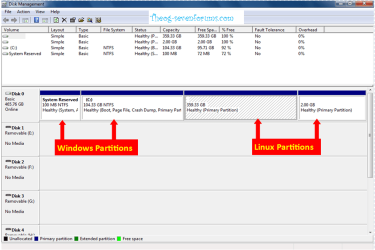
Remove Linux  1.PNG

1) Boot CD or DVD & open a command prompt.
http://www.sevenforums.com/tutorials/682-command-prompt-startup.html

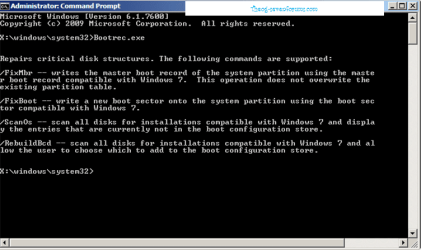
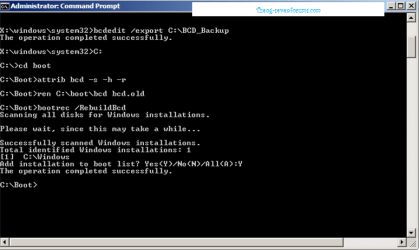
2) Use the Rebuild BCD in this tutorial:
How to use the Bootrec.exe tool in the Windows Recovery Environment to troubleshoot and repair startup issues in Windows

Remove Linux 2.PNG Remove Linux 3.PNG

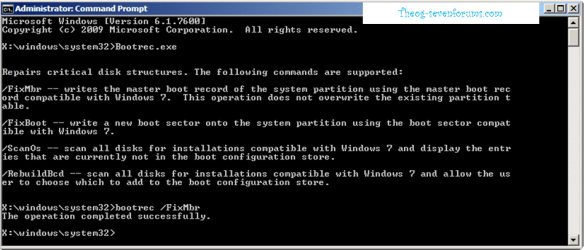
3) FIX MBR.

Remove Linux 4.PNG

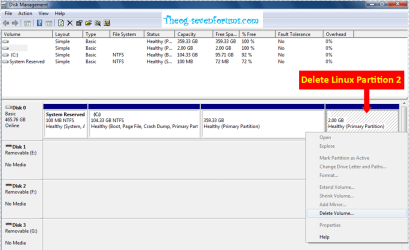
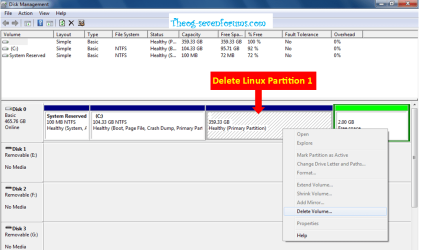
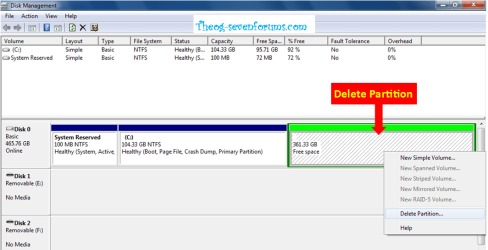
4) Delete Linux Partitions
http://www.sevenforums.com/tutorials/2668-partition-volume-delete.html?ltr=P

Remove Linux 5.PNG Remove Linux 6.PNG

Remove Linux 7.PNG

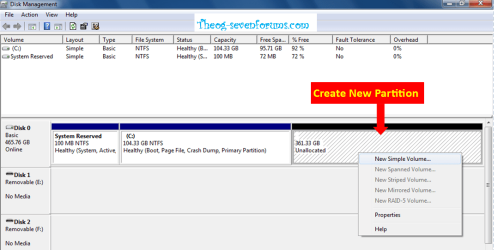
5) Create New Partition.
http://www.sevenforums.com/tutorials/2668-partition-volume-delete.html?ltr=P

Remove Linux 8.PNG Remove Linux 9.PNG

You may find the Fujitsu Recovery Partition has been made unusable by Linux.
 

My Computer

OS
ME/XP/Vista/Win7
Boot up using the Startup disk CD or Windows 7 DVD. (not the OEM manufacturer's Recovery Disk) If you have a Netbook, you will need a CD/DVD drive.
Make sure no USB drives are plugged.

If you have not made your Startup Repair CD
System Repair Disc - Create
Do you have a mate with Windows 7 & CD/DVD RW Drive, how could burn one off.

I get the error when i boot off the installation USB.
I cannot create a System Repair Disc because I can't get on Windows 7
And no I am unaware of anyone else using windows 7, if you could send me an iso or something I could try that.
 

My Computer

OS
Windows Seven Home Premium x64
Boot up using the Startup disk CD or Windows 7 DVD. (not the OEM manufacturer's Recovery Disk) If you have a Netbook, you will need a CD/DVD drive.
Make sure no USB drives are plugged in.

If you have not made your Startup Repair CD
System Repair Disc - Create
Do you have a mate with Windows 7 & CD/DVD RW Drive, how could burn one off.

I get the error when i boot off the installation USB.
I cannot create a System Repair Disc because I can't get on Windows 7
And no I am unaware of anyone else using windows 7, if you could send me an iso or something I could try that.

You can not use a USB Pendrive to do any repairs.
 

My Computer

OS
ME/XP/Vista/Win7
Boot up using the Startup disk CD or Windows 7 DVD. (not the OEM manufacturer's Recovery Disk) If you have a Netbook, you will need a CD/DVD drive.
Make sure no USB drives are plugged in.

If you have not made your Startup Repair CD
System Repair Disc - Create
Do you have a mate with Windows 7 & CD/DVD RW Drive, how could burn one off.

I get the error when i boot off the installation USB.
I cannot create a System Repair Disc because I can't get on Windows 7
And no I am unaware of anyone else using windows 7, if you could send me an iso or something I could try that.

You can not use a USB Pendrive to do any repairs.

What can I use then because I don't have any disks that have over 1gb capacity.

AND if I don't have the USB in it will boot to Ubuntu.
 

My Computer

OS
Windows Seven Home Premium x64
If you have not made your Startup Repair CD
System Repair Disc - Create
Do you have a mate with Windows 7 & CD/DVD RW Drive, how could burn one off.

The Startup Repair CD is only about 168mb.
 

My Computer

OS
ME/XP/Vista/Win7
If you have not made your Startup Repair CD
System Repair Disc - Create
Do you have a mate with Windows 7 & CD/DVD RW Drive, how could burn one off.

The Startup Repair CD is only about 168mb.

Thanks. I guess i'll have to find someone with Windows 7 x) I have someone in mind but idk if it's 64bit. Thanks for your help and i'll reply with the outcome after.
 

My Computer

OS
Windows Seven Home Premium x64
As you have x64, you need a Startup Repair CD x64.
 

My Computer

OS
ME/XP/Vista/Win7
Last edited:
There is no reason why a known-good Win7 64 bit Installation flash stick should not be able to boot to use it's Repair Console on second screen for these Repairs.

Try booting it again using one-time BIOS Boot Menu. If it fails, try writing the ISO to flash stick again using Universal USB Installer with Win7 in the dropdown menu, then boot under USB or HD's.

Once booted confirm Win7 is marked Active Partition - Mark as Active (Method Two) then run Startup Repair - Run 3 Separate Times.

If this fails, try again after deleting Ubuntu from HD using Diskpart Clean command from Repair console Command Prompt: Clean and Clean All with Diskpart Command

You can not use a USB Pendrive to do a startup Repair, as startup repair will find the MBR on the Pendrive & not the HD.
Therefore will not detect a problem.
 

My Computer

OS
ME/XP/Vista/Win7
Source?

I do most Startup Repairs with flash stick, and many we have helped here have written WinRE to stick using Win2Flash.
 
I've never had any problem using WinRE from flash stick. But thanks for the heads-up, Ray. Now I'll never trust it fully! :geek:

Thanks. The Diskpart command to delete Ubuntu is Delete Partition Override, or use free Partition Wizard bootable CD to do a partition-specific wipe of Ubuntu, or delete the partition using the booted Win7 installer>Custom>Drive Options..

The reason the step is included is that Ubuntu on the HD can make Win7 irreparable.
 
Remuve Linux from Dual Boot. (Base of)

Boot up using the Startup disk CD or Windows 7 DVD. (not the OEM manufacturer's Recovery Disk) If you have a Netbook, you will need a CD/DVD drive.
Make sure no USB drives are plugged.

If you have not made your Startup Repair CD
http://www.sevenforums.com/tutorials/2083-system-repair-disc-create.html
Do you have a mate with Windows 7 & CD/DVD RW Drive, how could burn one off.

View attachment 167861

1) Boot CD or DVD & open a command prompt.
http://www.sevenforums.com/tutorials/682-command-prompt-startup.html

2) Use the Rebuild BCD in this tutorial:
How to use the Bootrec.exe tool in the Windows Recovery Environment to troubleshoot and repair startup issues in Windows

View attachment 167862 View attachment 167863

3) FIX MBR.

View attachment 167864

4) Delete Linux Partitions
http://www.sevenforums.com/tutorials/2668-partition-volume-delete.html?ltr=P

View attachment 167865 View attachment 167866

View attachment 167867

5) Create New Partition.
http://www.sevenforums.com/tutorials/2668-partition-volume-delete.html?ltr=P

View attachment 167868 View attachment 167869

You may find the Fujitsu Recovery Partition has been made unusable by Linux.

All tested.

No need for 3rd party tools, Partitions can deleted in Disk Management, no need to do Startup Repair.
 

My Computer

OS
ME/XP/Vista/Win7
I downloaded a repair ISO from the internet. Windows 7 x64. It didn't load up.. It went to the GRUB.

Is there anything I can do?
 

My Computer

OS
Windows Seven Home Premium x64
The Fujitsu one-time BIOS Boot Menu key is F12
 

My Computer

OS
ME/XP/Vista/Win7
Will the DVD drive, boot any type disk?
 

My Computer

OS
ME/XP/Vista/Win7
It should. I put the disk in and tried booting it. It didn't work. So I went into the boot menu thing and put USB CDROM as first and it didn't boot. I went into the bios menu and the disk didn't show up.
 

My Computer

OS
Windows Seven Home Premium x64
Back
Top