Solved Error 800B0100 when updating windows

simonmason

New member
Local time
6:44 AM
Messages
11
I have tried a number of trouble shooting methods to attempt to solve this with no luck so I am posting here.

I am running Windows 7 64 Bit Enterprise SP1

I couldn't upload my cbs.zip as it gave me a 404 error each time so I have put it in dropbox:

https://db.tt/Q7JjJqRc

Thanks for the help.
 

My Computer

OS
Windows 7 Professional and Home
Hi Simon,
tried a couple of times, cant get the log.
Could you just copy/paste a copy of todays WindowsUpdate log.
The error code relates to a permissions problem.

note as your running an enterprise version, it might be that your companies server are denying access

Roy
 

My Computer

Computer type
PC/Desktop
Computer Manufacturer/Model Number
medionl/Aspire 6930G/acer x55a
OS
W7 home premium 32bit/W7HP 64bit/w10 tp insider ring
CPU
E5300 dual core
Motherboard
medion MS7366
Memory
3gb
Graphics Card(s)
Nvidia Geforce 7100 Nforce 630i
Monitor(s) Displays
avixc
Internet Speed
n (isp resticted to 72)
Antivirus
mse/pands
Browser
palemoon
Other Info
Belkin Fd7050 n USB using Railink RT2870 drivers, more upto date
Thanks for the reply. Sorry about the dropbox - don't know what the issue is there. I just requested a new link so hopefully this will work:

https://www.dropbox.com/s/llku18f2tc27es2/CBS.zip?dl=0

It is not a company installation - it's a church. We get the software through the microsoft donation program. Each machine is independently installed so no centralized server or rights and permissions.

I ran update a couple of times and didn't include all of the logs from today so hopefully this is everything from one session:

2016-04-17 08:51:15:008 472 8d0 Misc =========== Logging initialized (build: 7.6.7601.19161, tz: -0400) ===========
2016-04-17 08:51:15:008 472 8d0 Misc = Process: C:\Windows\system32\svchost.exe
2016-04-17 08:51:15:008 472 8d0 Misc = Module: c:\windows\system32\wuaueng.dll
2016-04-17 08:51:15:008 472 8d0 Service *************
2016-04-17 08:51:15:008 472 8d0 Service ** START ** Service: Service startup
2016-04-17 08:51:15:008 472 8d0 Service *********
2016-04-17 08:51:15:009 472 8d0 Agent * WU client version 7.6.7601.19161
2016-04-17 08:51:15:009 472 8d0 Agent * Base directory: C:\Windows\SoftwareDistribution
2016-04-17 08:51:15:009 472 8d0 Agent * Access type: No proxy
2016-04-17 08:51:15:009 472 8d0 Agent * Network state: Connected
2016-04-17 08:51:15:240 472 8d0 DtaStor Default service for AU is {00000000-0000-0000-0000-000000000000}
2016-04-17 08:51:15:250 472 8d0 DtaStor Default service for AU is {9482F4B4-E343-43B6-B170-9A65BC822C77}
2016-04-17 08:51:15:250 472 8d0 Agent WARNING: Failed to read the service id for re-registration 0x80070002
2016-04-17 08:51:15:250 472 8d0 Agent WARNING: Missing service entry in the backup data store; cleaning up
2016-04-17 08:51:17:278 472 8d0 Report CWERReporter::Init succeeded
2016-04-17 08:51:17:410 472 8d0 Report *********** Report: Initializing static reporting data ***********
2016-04-17 08:51:17:410 472 8d0 Report * OS Version = 6.1.7601.1.0.65792
2016-04-17 08:51:17:410 472 8d0 Report * OS Product Type = 0x00000004
2016-04-17 08:51:17:416 472 8d0 Report * Computer Brand = To Be Filled By O.E.M.
2016-04-17 08:51:17:416 472 8d0 Report * Computer Model = To Be Filled By O.E.M.
2016-04-17 08:51:17:417 472 8d0 Report * Bios Revision = P1.30
2016-04-17 08:51:17:417 472 8d0 Report * Bios Name = BIOS Date: 05/23/14 17:11:28 Ver: 04.06.05
2016-04-17 08:51:17:417 472 8d0 Report * Bios Release Date = 2014-05-23T00:00:00
2016-04-17 08:51:17:417 472 8d0 Report * Locale ID = 1033
2016-04-17 08:51:17:735 472 8d0 AU ########### AU: Uninitializing Automatic Updates ###########
2016-04-17 08:51:17:747 472 8d0 Service *********
2016-04-17 08:51:17:747 472 8d0 Service ** END ** Service: Service exit [Exit code = 0x240001]
2016-04-17 08:51:17:747 472 8d0 Service *************
2016-04-17 08:51:19:364 472 1b94 Misc =========== Logging initialized (build: 7.6.7601.19161, tz: -0400) ===========
2016-04-17 08:51:19:364 472 1b94 Misc = Process: C:\Windows\system32\svchost.exe
2016-04-17 08:51:19:364 472 1b94 Misc = Module: c:\windows\system32\wuaueng.dll
2016-04-17 08:51:19:364 472 1b94 Service *************
2016-04-17 08:51:19:364 472 1b94 Service ** START ** Service: Service startup
2016-04-17 08:51:19:364 472 1b94 Service *********
2016-04-17 08:51:19:365 472 1b94 Agent * WU client version 7.6.7601.19161
2016-04-17 08:51:19:365 472 1b94 Agent * Base directory: C:\Windows\SoftwareDistribution
2016-04-17 08:51:19:365 472 1b94 Agent * Access type: No proxy
2016-04-17 08:51:19:365 472 1b94 Agent * Network state: Connected
2016-04-17 08:51:21:206 472 1b94 Report CWERReporter::Init succeeded
2016-04-17 08:51:21:306 472 1b94 Report *********** Report: Initializing static reporting data ***********
2016-04-17 08:51:21:306 472 1b94 Report * OS Version = 6.1.7601.1.0.65792
2016-04-17 08:51:21:306 472 1b94 Report * OS Product Type = 0x00000004
2016-04-17 08:51:21:309 472 1b94 Report * Computer Brand = To Be Filled By O.E.M.
2016-04-17 08:51:21:309 472 1b94 Report * Computer Model = To Be Filled By O.E.M.
2016-04-17 08:51:21:310 472 1b94 Report * Bios Revision = P1.30
2016-04-17 08:51:21:310 472 1b94 Report * Bios Name = BIOS Date: 05/23/14 17:11:28 Ver: 04.06.05
2016-04-17 08:51:21:310 472 1b94 Report * Bios Release Date = 2014-05-23T00:00:00
2016-04-17 08:51:21:310 472 1b94 Report * Locale ID = 1033
2016-04-17 08:51:21:354 472 1b94 AU ########### AU: Uninitializing Automatic Updates ###########
2016-04-17 08:51:24:324 472 1b94 Service *********
2016-04-17 08:51:24:324 472 1b94 Service ** END ** Service: Service exit [Exit code = 0x240001]
2016-04-17 08:51:24:324 472 1b94 Service *************
2016-04-17 08:51:28:344 472 b30 Misc =========== Logging initialized (build: 7.6.7601.19161, tz: -0400) ===========
2016-04-17 08:51:28:344 472 b30 Misc = Process: C:\Windows\system32\svchost.exe
2016-04-17 08:51:28:344 472 b30 Misc = Module: c:\windows\system32\wuaueng.dll
2016-04-17 08:51:28:344 472 b30 Service *************
2016-04-17 08:51:28:344 472 b30 Service ** START ** Service: Service startup
2016-04-17 08:51:28:344 472 b30 Service *********
2016-04-17 08:51:28:352 472 b30 Agent * WU client version 7.6.7601.19161
2016-04-17 08:51:28:352 472 b30 Agent * Base directory: C:\Windows\SoftwareDistribution
2016-04-17 08:51:28:352 472 b30 Agent * Access type: No proxy
2016-04-17 08:51:28:352 472 b30 Agent * Network state: Connected
2016-04-17 08:51:31:516 472 1630 Report CWERReporter::Init succeeded
2016-04-17 08:51:31:516 472 1630 Agent *********** Agent: Initializing Windows Update Agent ***********
2016-04-17 08:51:31:516 472 1630 Agent * Prerequisite roots succeeded.
2016-04-17 08:51:31:516 472 1630 Agent *********** Agent: Initializing global settings cache ***********
2016-04-17 08:51:31:516 472 1630 Agent * WSUS server: <NULL>
2016-04-17 08:51:31:516 472 1630 Agent * WSUS status server: <NULL>
2016-04-17 08:51:31:516 472 1630 Agent * Target group: (Unassigned Computers)
2016-04-17 08:51:31:516 472 1630 Agent * Windows Update access disabled: No
2016-04-17 08:51:31:516 472 1630 DnldMgr Download manager restoring 0 downloads
2016-04-17 08:51:31:599 472 b30 Report *********** Report: Initializing static reporting data ***********
2016-04-17 08:51:31:599 472 b30 Report * OS Version = 6.1.7601.1.0.65792
2016-04-17 08:51:31:599 472 b30 Report * OS Product Type = 0x00000004
2016-04-17 08:51:31:603 472 b30 Report * Computer Brand = To Be Filled By O.E.M.
2016-04-17 08:51:31:603 472 b30 Report * Computer Model = To Be Filled By O.E.M.
2016-04-17 08:51:31:604 472 b30 Report * Bios Revision = P1.30
2016-04-17 08:51:31:604 472 b30 Report * Bios Name = BIOS Date: 05/23/14 17:11:28 Ver: 04.06.05
2016-04-17 08:51:31:604 472 b30 Report * Bios Release Date = 2014-05-23T00:00:00
2016-04-17 08:51:31:604 472 b30 Report * Locale ID = 1033
2016-04-17 08:51:38:506 472 b30 AU ########### AU: Uninitializing Automatic Updates ###########
2016-04-17 08:51:38:536 472 b30 Service *********
2016-04-17 08:51:38:536 472 b30 Service ** END ** Service: Service exit [Exit code = 0x240001]
2016-04-17 08:51:38:536 472 b30 Service *************
2016-04-17 08:51:41:896 472 1c24 Misc =========== Logging initialized (build: 7.6.7601.19161, tz: -0400) ===========
2016-04-17 08:51:41:896 472 1c24 Misc = Process: C:\Windows\system32\svchost.exe
2016-04-17 08:51:41:896 472 1c24 Misc = Module: c:\windows\system32\wuaueng.dll
2016-04-17 08:51:41:896 472 1c24 Service *************
2016-04-17 08:51:41:896 472 1c24 Service ** START ** Service: Service startup
2016-04-17 08:51:41:896 472 1c24 Service *********
2016-04-17 08:51:41:901 472 1c24 Agent * WU client version 7.6.7601.19161
2016-04-17 08:51:41:901 472 1c24 Agent * Base directory: C:\Windows\SoftwareDistribution
2016-04-17 08:51:41:901 472 1c24 Agent * Access type: No proxy
2016-04-17 08:51:41:901 472 1c24 Agent * Network state: Connected
2016-04-17 08:51:48:303 472 1154 Report CWERReporter::Init succeeded
2016-04-17 08:51:48:303 472 1154 Agent *********** Agent: Initializing Windows Update Agent ***********
2016-04-17 08:51:48:303 472 1154 Agent * Prerequisite roots succeeded.
2016-04-17 08:51:48:303 472 1154 Agent *********** Agent: Initializing global settings cache ***********
2016-04-17 08:51:48:303 472 1154 Agent * WSUS server: <NULL>
2016-04-17 08:51:48:303 472 1154 Agent * WSUS status server: <NULL>
2016-04-17 08:51:48:303 472 1154 Agent * Target group: (Unassigned Computers)
2016-04-17 08:51:48:303 472 1154 Agent * Windows Update access disabled: No
2016-04-17 08:51:48:303 472 1154 DnldMgr Download manager restoring 0 downloads
2016-04-17 08:51:48:390 472 1c24 Report *********** Report: Initializing static reporting data ***********
2016-04-17 08:51:48:390 472 1c24 Report * OS Version = 6.1.7601.1.0.65792
2016-04-17 08:51:48:390 472 1c24 Report * OS Product Type = 0x00000004
2016-04-17 08:51:48:395 472 1c24 Report * Computer Brand = To Be Filled By O.E.M.
2016-04-17 08:51:48:395 472 1c24 Report * Computer Model = To Be Filled By O.E.M.
2016-04-17 08:51:48:396 472 1c24 Report * Bios Revision = P1.30
2016-04-17 08:51:48:396 472 1c24 Report * Bios Name = BIOS Date: 05/23/14 17:11:28 Ver: 04.06.05
2016-04-17 08:51:48:396 472 1c24 Report * Bios Release Date = 2014-05-23T00:00:00
2016-04-17 08:51:48:396 472 1c24 Report * Locale ID = 1033
2016-04-17 08:52:26:911 472 1c24 AU ########### AU: Initializing Automatic Updates ###########
2016-04-17 08:52:26:911 472 1c24 AU # Approval type: Scheduled (User preference)
2016-04-17 08:52:26:911 472 1c24 AU # Scheduled install day/time: Every day at 3:00
2016-04-17 08:52:26:911 472 1c24 AU # Auto-install minor updates: Yes (User preference)
2016-04-17 08:52:26:911 472 1c24 AU # Will interact with non-admins (Non-admins are elevated (User preference))
2016-04-17 08:52:26:917 472 1c24 AU Setting AU scheduled install time to 2016-04-18 07:00:00
2016-04-17 08:52:26:917 472 1c24 AU Successfully wrote event for AU health state:0
2016-04-17 08:52:26:918 472 1c24 AU Initializing featured updates
2016-04-17 08:52:26:918 472 1c24 AU Found 0 cached featured updates
2016-04-17 08:52:26:918 472 1c24 AU Successfully wrote event for AU health state:0
2016-04-17 08:52:26:918 472 1c24 AU AU setting pending client directive to 'Install Approval'
2016-04-17 08:52:26:919 472 1c24 AU Successfully wrote event for AU health state:0
2016-04-17 08:52:26:920 472 1c24 AU AU finished delayed initialization
2016-04-17 08:52:31:916 472 76c Report REPORT EVENT: {5B31053F-3E12-41B9-B9A8-E17CF4414D7F} 2016-04-17 08:52:26:918-0400 1 188 102 {00000000-0000-0000-0000-000000000000} 0 0 AutomaticUpdates Success Content Install Installation Ready: The following updates are downloaded and ready for installation. This computer is currently scheduled to install these updates on ‎Monday, ‎April ‎18, ‎2016 at 3:00 AM: - Update for Windows 7 for x64-based Systems (KB3123862)
2016-04-17 08:52:41:920 472 1c24 AU Launched new AU client for directive 'Install Approval', session id = 0x1
2016-04-17 08:52:41:926 5564 b74 Misc =========== Logging initialized (build: 7.6.7601.19161, tz: -0400) ===========
2016-04-17 08:52:41:926 5564 b74 Misc = Process: C:\Windows\system32\wuauclt.exe
2016-04-17 08:52:41:926 5564 b74 AUClnt Launched Client UI process
2016-04-17 08:52:41:943 5564 b74 Misc =========== Logging initialized (build: 7.6.7601.19161, tz: -0400) ===========
2016-04-17 08:52:41:943 5564 b74 Misc = Process: C:\Windows\system32\wuauclt.exe
2016-04-17 08:52:41:943 5564 b74 Misc = Module: C:\Windows\system32\wucltux.dll
2016-04-17 08:52:41:943 5564 b74 CltUI AU client got new directive = 'Install Approval', serviceId = {9482F4B4-E343-43B6-B170-9A65BC822C77}, return = 0

 

My Computer

OS
Windows 7 Professional and Home
Hi Simon,
from your posted log
The following updates are downloaded and ready for installation. This computer is currently scheduled to install these updates on ‎Monday, ‎April ‎18, ‎2016 at 3:00 AM: - Update for Windows 7 for x64-based Systems (KB3123862)

Checking on the other error message

Roy
 

My Computer

Computer type
PC/Desktop
Computer Manufacturer/Model Number
medionl/Aspire 6930G/acer x55a
OS
W7 home premium 32bit/W7HP 64bit/w10 tp insider ring
CPU
E5300 dual core
Motherboard
medion MS7366
Memory
3gb
Graphics Card(s)
Nvidia Geforce 7100 Nforce 630i
Monitor(s) Displays
avixc
Internet Speed
n (isp resticted to 72)
Antivirus
mse/pands
Browser
palemoon
Other Info
Belkin Fd7050 n USB using Railink RT2870 drivers, more upto date

My Computer

Computer type
PC/Desktop
Computer Manufacturer/Model Number
medionl/Aspire 6930G/acer x55a
OS
W7 home premium 32bit/W7HP 64bit/w10 tp insider ring
CPU
E5300 dual core
Motherboard
medion MS7366
Memory
3gb
Graphics Card(s)
Nvidia Geforce 7100 Nforce 630i
Monitor(s) Displays
avixc
Internet Speed
n (isp resticted to 72)
Antivirus
mse/pands
Browser
palemoon
Other Info
Belkin Fd7050 n USB using Railink RT2870 drivers, more upto date
I have two other updates in queue - I think they have been held up for the last couple of months because of the first one that is causing errors.

The first link took me to a windows XP page which said support had ended. I googled MS Fixit separately and ran it. It told me that it found nothing wrong.

Here is the log from the second link:

Thanks.

Diagnostic Report (1.9.0027.0):
-----------------------------------------
Windows Validation Data-->

Validation Code: 0
Cached Online Validation Code: 0x0
Windows Product Key: *****-*****-*****-*****-72K3X
Windows Product Key Hash: Nxtg9D+2V+Tq1/nbFCZC8Led1CQ=
Windows Product ID: 55041-034-5842027-86894
Windows Product ID Type: 6
Windows License Type: Volume MAK
Windows OS version: 6.1.7601.2.00010100.1.0.004
ID: {1DB82A41-186B-4C51-BC2D-1A9B5B72A0A6}(1)
Is Admin: Yes
TestCab: 0x0
LegitcheckControl ActiveX: N/A, hr = 0x80070002
Signed By: N/A, hr = 0x80070002
Product Name: Windows 7 Enterprise
Architecture: 0x00000009
Build lab: 7601.win7sp1_ldr.160317-0600
TTS Error:
Validation Diagnostic:
Resolution Status: N/A

Vista WgaER Data-->
ThreatID(s): N/A, hr = 0x80070002
Version: N/A, hr = 0x80070002

Windows XP Notifications Data-->
Cached Result: N/A, hr = 0x80070002
File Exists: No
Version: N/A, hr = 0x80070002
WgaTray.exe Signed By: N/A, hr = 0x80070002
WgaLogon.dll Signed By: N/A, hr = 0x80070002

OGA Notifications Data-->
Cached Result: N/A, hr = 0x80070002
Version: N/A, hr = 0x80070002
OGAExec.exe Signed By: N/A, hr = 0x80070002
OGAAddin.dll Signed By: N/A, hr = 0x80070002

OGA Data-->
Office Status: 109 N/A
OGA Version: N/A, 0x80070002
Signed By: N/A, hr = 0x80070002
Office Diagnostics: 025D1FF3-364-80041010_025D1FF3-229-80041010_025D1FF3-230-1_025D1FF3-517-80040154_025D1FF3-237-80040154_025D1FF3-238-2_025D1FF3-244-80070002_025D1FF3-258-3

Browser Data-->
Proxy settings: N/A
User Agent: Mozilla/4.0 (compatible; MSIE 8.0; Win32)
Default Browser: C:\Program Files (x86)\Google\Chrome\Application\chrome.exe
Download signed ActiveX controls: Prompt
Download unsigned ActiveX controls: Disabled
Run ActiveX controls and plug-ins: Allowed
Initialize and script ActiveX controls not marked as safe: Disabled
Allow scripting of Internet Explorer Webbrowser control: Disabled
Active scripting: Allowed
Script ActiveX controls marked as safe for scripting: Allowed

File Scan Data-->

Other data-->
Office Details: <GenuineResults><MachineData><UGUID>{1DB82A41-186B-4C51-BC2D-1A9B5B72A0A6}</UGUID><Version>1.9.0027.0</Version><OS>6.1.7601.2.00010100.1.0.004</OS><Architecture>x64</Architecture><PKey>*****-*****-*****-*****-BBBBB</PKey><PID>55041-034-5842027-86894</PID><PIDType>6</PIDType><SID>S-1-5-21-2188763423-2755290724-752893383</SID><SYSTEM><Manufacturer>To Be Filled By O.E.M.</Manufacturer><Model>To Be Filled By O.E.M.</Model></SYSTEM><BIOS><Manufacturer>American Megatrends Inc.</Manufacturer><Version>P1.30</Version><SMBIOSVersion major="2" minor="8"/><Date>20140523000000.000000+000</Date></BIOS><HWID>19530D00018400F4</HWID><UserLCID>0409</UserLCID><SystemLCID>0409</SystemLCID><TimeZone>Eastern Standard Time(GMT-05:00)</TimeZone><iJoin>0</iJoin><SBID><stat>3</stat><msppid></msppid><name></name><model></model></SBID><OEM/><GANotification/></MachineData><Software><Office><Result>109</Result><Products/><Applications/></Office></Software></GenuineResults>

Spsys.log Content: 0x80070002

Licensing Data-->
Software licensing service version: 6.1.7601.17514

Name: Windows(R) 7, Enterprise edition
Description: Windows Operating System - Windows(R) 7, VOLUME_MAK channel
Activation ID: 9abf5984-9c16-46f2-ad1e-7fe15931a8dd
Application ID: 55c92734-d682-4d71-983e-d6ec3f16059f
Extended PID: 55041-00172-034-584202-03-1033-7601.0000-0012015
Installation ID: 013636393831047045144696478935551553553602587631231921
Processor Certificate URL: SpcService Web Service
Machine Certificate URL: RacService Web Service
Use License URL: UseLicenseService Web Service
Product Key Certificate URL: PkcService Web Service
Partial Product Key: 72K3X
License Status: Licensed
Remaining Windows rearm count: 3
Trusted time: 4/17/2016 3:16:38 PM

Windows Activation Technologies-->
HrOffline: 0x00000000
HrOnline: 0x80072EE7
HealthStatus: 0x0000000000000000
Event Time Stamp: 2:3:2016 01:42
ActiveX: Registered, Version: 7.1.7600.16395
Admin Service: Registered, Version: 7.1.7600.16395
HealthStatus Bitmask Output:


HWID Data-->
HWID Hash Current: LAAAAAAAAgABAAEAAQABAAAAAQABAAEAHKImUUbUBkSOk5R+ZAq0WUa/yPY=

OEM Activation 1.0 Data-->
N/A

OEM Activation 2.0 Data-->
BIOS valid for OA 2.0: yes, but no SLIC table
Windows marker version: N/A
OEMID and OEMTableID Consistent: N/A
BIOS Information:
ACPI Table Name OEMID Value OEMTableID Value
APIC ALASKA A M I
FACP ALASKA A M I
HPET ALASKA A M I
MCFG ALASKA A M I
FPDT ALASKA A M I
SSDT PmRef Cpu0Ist
SSDT PmRef Cpu0Ist
SSDT PmRef Cpu0Ist
SSDT PmRef Cpu0Ist
SSDT PmRef Cpu0Ist
AAFT ALASKA OEMAAFT
SSDT PmRef Cpu0Ist
 

My Computer

OS
Windows 7 Professional and Home

My Computer

Computer type
PC/Desktop
Computer Manufacturer/Model Number
medionl/Aspire 6930G/acer x55a
OS
W7 home premium 32bit/W7HP 64bit/w10 tp insider ring
CPU
E5300 dual core
Motherboard
medion MS7366
Memory
3gb
Graphics Card(s)
Nvidia Geforce 7100 Nforce 630i
Monitor(s) Displays
avixc
Internet Speed
n (isp resticted to 72)
Antivirus
mse/pands
Browser
palemoon
Other Info
Belkin Fd7050 n USB using Railink RT2870 drivers, more upto date
I can see that this is not going to be easy!

I cannot find a fix for [FONT=&quot]0x00000000 at the link you sent?

As for the second error - [/FONT][FONT=&quot]0x80072EE7 - the auto fix at that link said it didn't work on my version of windows. I then went for the manual fix - it gave instructions to remove any static IP address from my hosts file. I don't actually have any un-commented entries in my hosts file so there was nothing to do there.[/FONT]
 

My Computer

OS
Windows 7 Professional and Home
Hi Simon,
sorry about the delay
can you run this fixit.
http://go.microsoft.com/?linkid=9830262

and KB971033, note might allready be installed but will update anyway

and what are the 2 KB's (updates that are in limbo)

Roy
 

My Computer

Computer type
PC/Desktop
Computer Manufacturer/Model Number
medionl/Aspire 6930G/acer x55a
OS
W7 home premium 32bit/W7HP 64bit/w10 tp insider ring
CPU
E5300 dual core
Motherboard
medion MS7366
Memory
3gb
Graphics Card(s)
Nvidia Geforce 7100 Nforce 630i
Monitor(s) Displays
avixc
Internet Speed
n (isp resticted to 72)
Antivirus
mse/pands
Browser
palemoon
Other Info
Belkin Fd7050 n USB using Railink RT2870 drivers, more upto date
There are three updates held up right now:

3080446
3093513
3123862

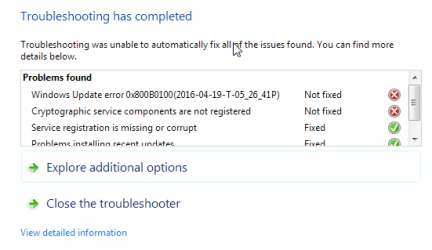
I tried outputting the detailed log of the utility you asked me to run but strangely it didn't show the errors that I saw on the screen, so I attached a screen shot.

Thanks.
 

Attachments

  • Screen Shot 2016-04-19 at 5.31.55 PM.png
    Screen Shot 2016-04-19 at 5.31.55 PM.png
    9 KB · Views: 8

My Computer

OS
Windows 7 Professional and Home
Hi Simon,
lets reregister the crypto files
from an elevated command prompt,

regsvr32 softpub.dll
regsvr32 wintrust.dll
regsvr32 dssenh.dll
regsvr32 rsaenh.dll
regsvr32 mssip32.dll
regsvr32 cryptdlg.dll

(all together will be ok)
then enter

REBOOT

run the Wu update troubleshooter again.

If the errors are still there
please run from an elevated command prompt

sfc /scannow

and

then SURT from here
Download System Update Readiness Tool for Windows 7 for x64-based Systems (KB947821) [October 2014] from Official Microsoft Download Center
(This could take quite a while)


Roy
 

My Computer

Computer type
PC/Desktop
Computer Manufacturer/Model Number
medionl/Aspire 6930G/acer x55a
OS
W7 home premium 32bit/W7HP 64bit/w10 tp insider ring
CPU
E5300 dual core
Motherboard
medion MS7366
Memory
3gb
Graphics Card(s)
Nvidia Geforce 7100 Nforce 630i
Monitor(s) Displays
avixc
Internet Speed
n (isp resticted to 72)
Antivirus
mse/pands
Browser
palemoon
Other Info
Belkin Fd7050 n USB using Railink RT2870 drivers, more upto date
OK, I tried everything as suggested. The errors were still there so I ran the sfc and then the SURT. Everything completed without errors so I tried the updates again and they failed - same error codes as before. Is it possible I can tell it to ignore these updates and move on or will I continue to have this issue? Thanks.
 

My Computer

OS
Windows 7 Professional and Home
Hi Simon,
Have you got the get Windows 10 flag, bottom right side of toolbar?

Those 3 updates are on the i dont want W10 watchout for list, DO not install, hide them.

So you can hide them without worrying about any other system issues

Roy
 

My Computer

Computer type
PC/Desktop
Computer Manufacturer/Model Number
medionl/Aspire 6930G/acer x55a
OS
W7 home premium 32bit/W7HP 64bit/w10 tp insider ring
CPU
E5300 dual core
Motherboard
medion MS7366
Memory
3gb
Graphics Card(s)
Nvidia Geforce 7100 Nforce 630i
Monitor(s) Displays
avixc
Internet Speed
n (isp resticted to 72)
Antivirus
mse/pands
Browser
palemoon
Other Info
Belkin Fd7050 n USB using Railink RT2870 drivers, more upto date
I do not see the Windows 10 update flag on the bottom right.
 

My Computer

OS
Windows 7 Professional and Home
Hi Simon,
Thats good.

I'd just hide those updates then.

As long as other updates are installing OK, I think it must be something to do with the fact your running an enterprise version.


Roy
 

My Computer

Computer type
PC/Desktop
Computer Manufacturer/Model Number
medionl/Aspire 6930G/acer x55a
OS
W7 home premium 32bit/W7HP 64bit/w10 tp insider ring
CPU
E5300 dual core
Motherboard
medion MS7366
Memory
3gb
Graphics Card(s)
Nvidia Geforce 7100 Nforce 630i
Monitor(s) Displays
avixc
Internet Speed
n (isp resticted to 72)
Antivirus
mse/pands
Browser
palemoon
Other Info
Belkin Fd7050 n USB using Railink RT2870 drivers, more upto date
OK, I just hid them and we will see if future updates work. Thanks.
 

My Computer

OS
Windows 7 Professional and Home
Back
Top