Error about USB3.0 on startup

oli2194

New member
Local time
11:44 PM
Messages
2
Hi guys,
Hopefully someone will be able to help me with a small issue I have. For the last couple of days, every time I switch on my laptop I am getting a small window appearing with Error at the top and the message says "usb3.0 monitor is already started".
Any idea why I am getting this message and how I can stop it? As far as I can tell it's not affecting anything in regards to using the laptop.
Any help would really be appreciated.
Thanks guys
 

My Computer My Computer

At a glance

windows 7 Home Premium 64bit
Computer type
Laptop
Computer Manufacturer/Model Number
HP
OS
windows 7 Home Premium 64bit
You have this file C:\Program Files\Renesas Electronics\USB 3.0 Host Controller Driver\Application\nusb3mon.exe ?
Or any other Renesas Electronics usb folder?
 

My Computer My Computer

At a glance

Microsoft Windows 7 Home Premium 64-bits 7601...Intel(R) Core(TM) i3 CPU M 370 @ 2.40GHz4,00 GBATI Mobility Radeon HD 5400 Series
Computer type
Laptop
Computer Manufacturer/Model Number
ACER ASPIRE 5742G
OS
Microsoft Windows 7 Home Premium 64-bits 7601 Multiprocessor Free Service Pack 1
CPU
Intel(R) Core(TM) i3 CPU M 370 @ 2.40GHz
Motherboard
Acer Aspire 5742G
Memory
4,00 GB
Graphics Card(s)
ATI Mobility Radeon HD 5400 Series
Sound Card
(1) AMD High Definition Audio Device (2) Realtek High Defi
Screen Resolution
1366 x 768 x 32 bits (4294967296 colors) @ 60 Hz
Hard Drives
WDC WD5000BEVT-22ZAT0
Do you have any programs like Renesas Electronics USB stuff listed in installed programs list?
 

My Computer My Computer

At a glance

Microsoft Windows 7 Home Premium 64-bits 7601...Intel(R) Core(TM) i3 CPU M 370 @ 2.40GHz4,00 GBATI Mobility Radeon HD 5400 Series
Computer type
Laptop
Computer Manufacturer/Model Number
ACER ASPIRE 5742G
OS
Microsoft Windows 7 Home Premium 64-bits 7601 Multiprocessor Free Service Pack 1
CPU
Intel(R) Core(TM) i3 CPU M 370 @ 2.40GHz
Motherboard
Acer Aspire 5742G
Memory
4,00 GB
Graphics Card(s)
ATI Mobility Radeon HD 5400 Series
Sound Card
(1) AMD High Definition Audio Device (2) Realtek High Defi
Screen Resolution
1366 x 768 x 32 bits (4294967296 colors) @ 60 Hz
Hard Drives
WDC WD5000BEVT-22ZAT0
Do you have any programs like Renesas Electronics USB stuff listed in installed programs list?

Thanks for the reply. There was nothing in the program files but there was a Renesas Electronics USB in the installed programs...but whist looking for it I accidentally uninstalled it! When I restarted my laptop it automatically installed some drivers for something to do with USB 3.0, but the Renesas thing hasn't come back to the programs list and the error is no longer appearing when I switch the laptop on. Was the Renesas programme important?
 

My Computer My Computer

At a glance

windows 7 Home Premium 64bit
Computer type
Laptop
Computer Manufacturer/Model Number
HP
OS
windows 7 Home Premium 64bit
Do you have any programs like Renesas Electronics USB stuff listed in installed programs list?

Thanks for the reply. There was nothing in the program files but there was a Renesas Electronics USB in the installed programs...but whist looking for it I accidentally uninstalled it! When I restarted my laptop it automatically installed some drivers for something to do with USB 3.0, but the Renesas thing hasn't come back to the programs list and the error is no longer appearing when I switch the laptop on. Was the Renesas programme important?
I think win7 uses built-in usb3.0 driver stuff now(?) Do you have any usb3.0 devices? Plug them in an usb3.0 port ...does device work?
 

My Computer My Computer

At a glance

Microsoft Windows 7 Home Premium 64-bits 7601...Intel(R) Core(TM) i3 CPU M 370 @ 2.40GHz4,00 GBATI Mobility Radeon HD 5400 Series
Computer type
Laptop
Computer Manufacturer/Model Number
ACER ASPIRE 5742G
OS
Microsoft Windows 7 Home Premium 64-bits 7601 Multiprocessor Free Service Pack 1
CPU
Intel(R) Core(TM) i3 CPU M 370 @ 2.40GHz
Motherboard
Acer Aspire 5742G
Memory
4,00 GB
Graphics Card(s)
ATI Mobility Radeon HD 5400 Series
Sound Card
(1) AMD High Definition Audio Device (2) Realtek High Defi
Screen Resolution
1366 x 768 x 32 bits (4294967296 colors) @ 60 Hz
Hard Drives
WDC WD5000BEVT-22ZAT0
Open "device manager". No "other devices" there? NO devices with question marks?
Expand branch "Universal Serial Bus-controllers"... do you see usb3.0 stuff there?
 

My Computer My Computer

At a glance

Microsoft Windows 7 Home Premium 64-bits 7601...Intel(R) Core(TM) i3 CPU M 370 @ 2.40GHz4,00 GBATI Mobility Radeon HD 5400 Series
Computer type
Laptop
Computer Manufacturer/Model Number
ACER ASPIRE 5742G
OS
Microsoft Windows 7 Home Premium 64-bits 7601 Multiprocessor Free Service Pack 1
CPU
Intel(R) Core(TM) i3 CPU M 370 @ 2.40GHz
Motherboard
Acer Aspire 5742G
Memory
4,00 GB
Graphics Card(s)
ATI Mobility Radeon HD 5400 Series
Sound Card
(1) AMD High Definition Audio Device (2) Realtek High Defi
Screen Resolution
1366 x 768 x 32 bits (4294967296 colors) @ 60 Hz
Hard Drives
WDC WD5000BEVT-22ZAT0
Do you have any programs like Renesas Electronics USB stuff listed in installed programs list?

Thanks for the reply. There was nothing in the program files but there was a Renesas Electronics USB in the installed programs...but whist looking for it I accidentally uninstalled it! When I restarted my laptop it automatically installed some drivers for something to do with USB 3.0, but the Renesas thing hasn't come back to the programs list and the error is no longer appearing when I switch the laptop on. Was the Renesas programme important?
I think win7 uses built-in usb3.0 driver stuff now(?) Do you have any usb3.0 devices? Plug them in an usb3.0 port ...does device work?

I have an issue with my usb 3.0. I have used the 3.0 port for transferring files,updates into USB 3.0 2.0 flash sticks and gps's,etc.
But I bought a external enclosure with 3.0 and a docking station with 3.0. The esata worked but I only got the 3.0 working just a little while.
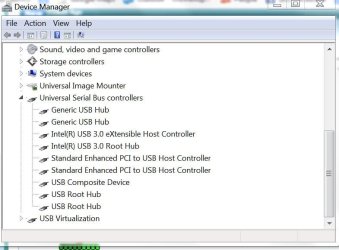
I have the Renesas in my program files but it may be from my old notebook that had the 3.0 in a media bay device. My new notebook has it built in. I attached a picture of my device manager showing the usb controlers. Maybe you can give me some tips if something is wrong. It may be those devices. They all claim win7 compatabile no drivers,etc. I've never had an issue with transferring 3.0 via to my flash drive or other 2.0 drives and devices.
 

Attachments

  • device manager.JPG
    device manager.JPG
    57.5 KB · Views: 0

My Computer My Computer

At a glance

Win7 64 BitI-58 GBIntel 4000
Computer type
Laptop
Computer Manufacturer/Model Number
Dell Latitude 6530 Notebook ( 15.6 screen)
OS
Win7 64 Bit
CPU
I-5
Memory
8 GB
Graphics Card(s)
Intel 4000
Monitor(s) Displays
FHD 1980 x 1080
Screen Resolution
1980x1280
Hard Drives
Samsung 840 Pro 256 GB for OS Samsung Pro 840 256 GB for Storage.
Keyboard
Backlit Key's
Internet Speed
DSL 1.5 mbps
Uninstall the Renesas stuff (if possible). It isn't used at all as far as I can see.
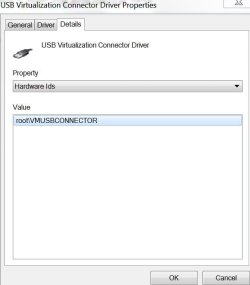
What is "usb virtualization" in that screenshot? Detach the docking station. "usb virtualization" is still there afterwards?

What exactly doesn't work? And what exact problems?
 

My Computer My Computer

At a glance

Microsoft Windows 7 Home Premium 64-bits 7601...Intel(R) Core(TM) i3 CPU M 370 @ 2.40GHz4,00 GBATI Mobility Radeon HD 5400 Series
Computer type
Laptop
Computer Manufacturer/Model Number
ACER ASPIRE 5742G
OS
Microsoft Windows 7 Home Premium 64-bits 7601 Multiprocessor Free Service Pack 1
CPU
Intel(R) Core(TM) i3 CPU M 370 @ 2.40GHz
Motherboard
Acer Aspire 5742G
Memory
4,00 GB
Graphics Card(s)
ATI Mobility Radeon HD 5400 Series
Sound Card
(1) AMD High Definition Audio Device (2) Realtek High Defi
Screen Resolution
1366 x 768 x 32 bits (4294967296 colors) @ 60 Hz
Hard Drives
WDC WD5000BEVT-22ZAT0
I don't know what the USB Virtualization is.. Here is a screen shot. I shall try to find out.
The problem is I bought 3 different 3.0 devices and they didn't work. Or should I say my win7 pro dell 6530 didn't pick them up. My 3.0 flash stick will work/show in explorer. 2 devices were external enclosures 1 was a HDD docking station.
 

Attachments

  • Capture.JPG
    Capture.JPG
    29.3 KB · Views: 16

My Computer My Computer

At a glance

Win7 64 BitI-58 GBIntel 4000
Computer type
Laptop
Computer Manufacturer/Model Number
Dell Latitude 6530 Notebook ( 15.6 screen)
OS
Win7 64 Bit
CPU
I-5
Memory
8 GB
Graphics Card(s)
Intel 4000
Monitor(s) Displays
FHD 1980 x 1080
Screen Resolution
1980x1280
Hard Drives
Samsung 840 Pro 256 GB for OS Samsung Pro 840 256 GB for Storage.
Keyboard
Backlit Key's
Internet Speed
DSL 1.5 mbps
I disabled it as I don't think it applies to my useage. Also I found that having both the esata and usb cable in this last device creates a conflict so I have it working now. Thanks..
Now I would like to extend the usb 3.0 cable 3 ft. I got a cheap usb 3.0 extension but the message comes up saying "this device could be faster with a super speed port" . It slows down the transfer by 50% it seems. Is it the extra 5 ft length or a bad or wrong cable? The OEM docking HDD device cable transfers similar speeds to the esata cable supplied as well. So I'm getting 3.0 speeds with the OEM cables supplied with the HDD docking device. I hope there is a cable that can extend a few feet with not a great amount of transfer speed.
 

My Computer My Computer

At a glance

Win7 64 BitI-58 GBIntel 4000
Computer type
Laptop
Computer Manufacturer/Model Number
Dell Latitude 6530 Notebook ( 15.6 screen)
OS
Win7 64 Bit
CPU
I-5
Memory
8 GB
Graphics Card(s)
Intel 4000
Monitor(s) Displays
FHD 1980 x 1080
Screen Resolution
1980x1280
Hard Drives
Samsung 840 Pro 256 GB for OS Samsung Pro 840 256 GB for Storage.
Keyboard
Backlit Key's
Internet Speed
DSL 1.5 mbps
I know noting aboout cable specs... sorry can't help you with that.
Do I comprehend correctly..... usb3.0 ports and devices work fine now (expect the long cable issue)?
 

My Computer My Computer

At a glance

Microsoft Windows 7 Home Premium 64-bits 7601...Intel(R) Core(TM) i3 CPU M 370 @ 2.40GHz4,00 GBATI Mobility Radeon HD 5400 Series
Computer type
Laptop
Computer Manufacturer/Model Number
ACER ASPIRE 5742G
OS
Microsoft Windows 7 Home Premium 64-bits 7601 Multiprocessor Free Service Pack 1
CPU
Intel(R) Core(TM) i3 CPU M 370 @ 2.40GHz
Motherboard
Acer Aspire 5742G
Memory
4,00 GB
Graphics Card(s)
ATI Mobility Radeon HD 5400 Series
Sound Card
(1) AMD High Definition Audio Device (2) Realtek High Defi
Screen Resolution
1366 x 768 x 32 bits (4294967296 colors) @ 60 Hz
Hard Drives
WDC WD5000BEVT-22ZAT0
Yes they work fine now. It was either the virtualization usb and or the fact I had both esata and usb 3.0 cable plugged into the docking station. The manual say's don't connect both. I thought it meant don't connect both to the PC at the same time. Even though the esata wasn't in the pc the fact of it plugged into the docking station with with usb plugged in made it conflcted. I tested this to be true.
Thanks for the replies again. By the way my SSD without ACHI is so fast and benchmarks show very good results.
 

My Computer My Computer

At a glance

Win7 64 BitI-58 GBIntel 4000
Computer type
Laptop
Computer Manufacturer/Model Number
Dell Latitude 6530 Notebook ( 15.6 screen)
OS
Win7 64 Bit
CPU
I-5
Memory
8 GB
Graphics Card(s)
Intel 4000
Monitor(s) Displays
FHD 1980 x 1080
Screen Resolution
1980x1280
Hard Drives
Samsung 840 Pro 256 GB for OS Samsung Pro 840 256 GB for Storage.
Keyboard
Backlit Key's
Internet Speed
DSL 1.5 mbps
Back
Top