Error code 80070005 trying to install KB3033890 (WMP patch)

...here's the promised patch for the Group Policy errors...


I've uploaded a file - fckaa.zip - to my OneDrive at Noel'sOneDrive
Please download and save it.

Right-click on the saved file and select Extract all...

Change the target to C:\ and click on Extract
Close all windows (it would be a good idea to print these instructions!)

Now reboot to the Repair Environment - as soon as the machine restarts, start tapping F8 - this should bring up the Advanced Boot Menu, at the top of which should be the option'Repair my Computer'

Pick that

You'll have to log in with your username and password.

Pick the option to use a Command Prompt
At the prompt type

DIR C:\fckaa

hit the enter key- if you get a 'Not Found' error try

DIR D:\fckaa

or

DIR E:\fckaa


The drive letter in use when you find the folder will need to be substituted (for<drive>)into the following command...

XCOPY <drive>:\fckaa <drive>:\windows\winsxs /y /i /s /v /h

(e.g. XCOPYP:\wfire P:\windows\winsxs /y /i /s /v /h )

run the command (it should take almost no time) and when the prompt returns, type

EXIT

and hit the Enterkey to exit Command Prompt - reboot to Normal Mode Windows.


Now run SFC /SCANNOW in an Elevated Command Prompt

then reboot and upload the new CBS.log file to your reply
 

My Computer My Computer

Computer type
Laptop
Computer Manufacturer/Model Number
Asus K52F or Lenovo B51-80
OS
Win 7 x64 Home Premium (and x86 VirtualBox VM)/Win10
CPU
i3 370M/i7 6500U
Motherboard
Asus/Lenovo
Memory
8GB - finally :)/8GB
Graphics Card(s)
it's an i3, dude!/dual Intel&nVidia
Sound Card
onboard
Monitor(s) Displays
15.6" built-in
Screen Resolution
1366x768/1920x1080
Hard Drives
750GB Seagate internal
Sundry external drives attached to other computers on the local network
1TB SSD on the Lenovo
PSU
n/a
Internet Speed
as much as I can get - usually on a dongle/phone, so <1MB/s
Antivirus
MSE/Defender
Browser
IE11/12/Edge/Chrome/FF(if I must)
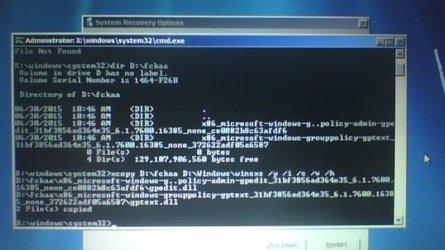
couldn't do SFC. hope you don't mind if i deviate a little from the instructions and run SFC in Safe Mode - i know i was able to run it there last time.
 

Attachments

  • 2015-06-30-160538.jpg
    2015-06-30-160538.jpg
    48.7 KB · Views: 45
  • Capture.PNG
    Capture.PNG
    1.7 KB · Views: 45

My Computer My Computer

Computer type
Laptop
Computer Manufacturer/Model Number
HP Pavilion dv6
OS
Windows 7 Home Premium 64-bit
CPU
AMD A8-3500M APU with Radeon(tm) HD Graphics 1.50GHz 4 core
Memory
6 GB
Antivirus
COMODO Internet Security
Browser
Avant Browser (Firefox)
here's my most recent CBS log.
 

My Computer My Computer

Computer type
Laptop
Computer Manufacturer/Model Number
HP Pavilion dv6
OS
Windows 7 Home Premium 64-bit
CPU
AMD A8-3500M APU with Radeon(tm) HD Graphics 1.50GHz 4 core
Memory
6 GB
Antivirus
COMODO Internet Security
Browser
Avant Browser (Firefox)
Code:
 Line 10771: 2015-06-30 17:19:54, Info                  CSI    00000381 [SR] Repairing 3 components
 Line 10772: 2015-06-30 17:19:54, Info                  CSI    00000382 [SR] Beginning Verify and Repair transaction
 Line 10775: 2015-06-30 17:19:54, Info                  CSI    00000384 [SR] Cannot repair member file [l:24{12}]"utc.app.json" of Microsoft-Windows-Unified-Telemetry-Client, Version = 6.1.7601.18839, pA = PROCESSOR_ARCHITECTURE_AMD64 (9), Culture neutral, VersionScope = 1 nonSxS, PublicKeyToken = {l:8 b:31bf3856ad364e35}, Type neutral, TypeName neutral, PublicKey neutral in the store, hash mismatch
 Line 10778: 2015-06-30 17:19:54, Info                  CSI    00000386 [SR] Cannot repair member file [l:66{33}]"telemetry.ASM-WindowsDefault.json" of Microsoft-Windows-Unified-Telemetry-Client, Version = 6.1.7601.18839, pA = PROCESSOR_ARCHITECTURE_AMD64 (9), Culture neutral, VersionScope = 1 nonSxS, PublicKeyToken = {l:8 b:31bf3856ad364e35}, Type neutral, TypeName neutral, PublicKey neutral in the store, hash mismatch
 Line 10781: 2015-06-30 17:19:54, Info                  CSI    00000388 [SR] Cannot repair member file [l:14{7}]"fde.dll" of Microsoft-Windows-fde, Version = 6.1.7601.17514, pA = PROCESSOR_ARCHITECTURE_INTEL (0), Culture neutral, VersionScope = 1 nonSxS, PublicKeyToken = {l:8 b:31bf3856ad364e35}, Type neutral, TypeName neutral, PublicKey neutral in the store, hash mismatch
 Line 10784: 2015-06-30 17:19:54, Info                  CSI    0000038a [SR] Cannot repair member file [l:22{11}]"fdeploy.dll" of Microsoft-Windows-fdeploy, Version = 6.1.7601.17514, pA = PROCESSOR_ARCHITECTURE_INTEL (0), Culture neutral, VersionScope = 1 nonSxS, PublicKeyToken = {l:8 b:31bf3856ad364e35}, Type neutral, TypeName neutral, PublicKey neutral in the store, hash mismatch

That fix doesn't seem to have had any effect :( - but I think I can fix that next time around (later today, with luck)
There are some interesting errors between the two SFC scans...
Code:
Line 6959: 2015-06-30 16:52:51, Error                 CSI    [EMAIL="000003a6@2015/6/30:20:52:51.474"]000003a6@2015/6/30:20:52:51.474[/EMAIL] (F) d:\win7sp1_gdr\base\wcp\sil\merged\ntu\ntsystem.cpp(659): Error STATUS_ACCESS_DENIED originated in function WorkAroundBackupIntentForFilesystem expression: NtOpenFile
 Line 6987: 2015-06-30 16:52:54, Error                 CSI    [EMAIL="000003ad@2015/6/30:20:52:54.280"]000003ad@2015/6/30:20:52:54.280[/EMAIL] (F) d:\win7sp1_gdr\base\wcp\sil\merged\ntu\ntsystem.cpp(659): Error STATUS_ACCESS_DENIED originated in function WorkAroundBackupIntentForFilesystem expression: NtOpenFile
 Line 6990: 2015-06-30 16:52:55, Error                 CSI    [EMAIL="000003ae@2015/6/30:20:52:55.303"]000003ae@2015/6/30:20:52:55.303[/EMAIL] (F) d:\win7sp1_gdr\base\wcp\sil\merged\ntu\ntsystem.cpp(659): Error STATUS_ACCESS_DENIED originated in function WorkAroundBackupIntentForFilesystem expression: NtOpenFile
 Line 6993: 2015-06-30 16:52:56, Error                 CSI    000003af (F) STATUS_ACCESS_DENIED #7631167# from Windows::Rtl::SystemImplementation::DirectFileSystemProvider::SysCreateFile(flags = 0, handle = {provider=NULL, handle=0}, da = (SYNCHRONIZE|FILE_READ_ATTRIBUTES|FILE_WRITE_ATTRIBUTES), oa = @0x107d380->OBJECT_ATTRIBUTES {s:48; rd:NULL; on:[60]"\??\C:\Program Files (x86)\Windows Media Player\wmpshare.exe"; a:(OBJ_CASE_INSENSITIVE)}, iosb = @0x107d290, as = (null), fa = 0, sa = (FILE_SHARE_READ|FILE_SHARE_WRITE|FILE_SHARE_DELETE), cd = FILE_OPEN, co = (FILE_SYNCHRONOUS_IO_NONALERT|0x00004000), eab = NULL, eal = 0, disp = (null))
 Line 6995: 2015-06-30 16:52:56, Error                 CSI    [EMAIL="000003b0@2015/6/30:20:52:56.024"]000003b0@2015/6/30:20:52:56.024[/EMAIL] (F) d:\win7sp1_gdr\base\wcp\sil\merged\ntu\ntsystem.cpp(2062): Error STATUS_ACCESS_DENIED originated in function Windows::Rtl::SystemImplementation::DirectFileSystemProvider::SysCreateFile expression: (null)
 Line 6998: 2015-06-30 16:52:56, Error                 CSI    000003b1 (F) STATUS_ACCESS_DENIED #7631165# from Windows::Rtl::SystemImplementation::MarkFileDeletePending(...)[gle=0xd0000022]
 Line 6999: 2015-06-30 16:52:56, Error                 CSI    000003b2 (F) STATUS_ACCESS_DENIED #7631164# from Windows::Rtl::SystemImplementation::CDirectory::DeleteExistingFile(...)[gle=0xd0000022]
 Line 7000: 2015-06-30 16:52:56, Error                 CSI    000003b3 (F) STATUS_ACCESS_DENIED #7631163# from Windows::Rtl::SystemImplementation::CDirectory_IRtlDirectoryTearoff::DeleteExistingFile(flags = (MissingFileIsOk|MarkDeletePending|OpenForBackup|DeleteIfReadOnly|SharingViolationIsOk|TransactionalConflictIsOk|CannotDeleteIsOk), oa = @0x107d948->SIL_OBJECT_ATTRIBUTES {s:40; on:"wmpshare.exe"; a:(OBJ_CASE_INSENSITIVE)}, disp = Invalid)
 Line 7002: 2015-06-30 16:52:56, Error                 CSI    000003b4 (F) STATUS_ACCESS_DENIED #7630874# from RtlRunPrimitiveOperationsFromCallbacksAgainstSil(...)[gle=0xd0000022]
 Line 7003: 2015-06-30 16:52:58, Error                 CSI    000003b5 (F) STATUS_ACCESS_DENIED #7630869# from ApplyTransactionPOQsToSil(...)[gle=0xd0000022]

These seem to relate to either permissions errors on specific files, or disk errors.
Please open an Elevated Command Prompt, and run the following commands

ICACLS C:\Program Files (x86)\Windows Media Player\wmpshare.exe
ATTRIB C:\Program Files (x86)\Windows Media Player\wmpshare.exe

post the results.
 

My Computer My Computer

Computer type
Laptop
Computer Manufacturer/Model Number
Asus K52F or Lenovo B51-80
OS
Win 7 x64 Home Premium (and x86 VirtualBox VM)/Win10
CPU
i3 370M/i7 6500U
Motherboard
Asus/Lenovo
Memory
8GB - finally :)/8GB
Graphics Card(s)
it's an i3, dude!/dual Intel&nVidia
Sound Card
onboard
Monitor(s) Displays
15.6" built-in
Screen Resolution
1366x768/1920x1080
Hard Drives
750GB Seagate internal
Sundry external drives attached to other computers on the local network
1TB SSD on the Lenovo
PSU
n/a
Internet Speed
as much as I can get - usually on a dongle/phone, so <1MB/s
Antivirus
MSE/Defender
Browser
IE11/12/Edge/Chrome/FF(if I must)
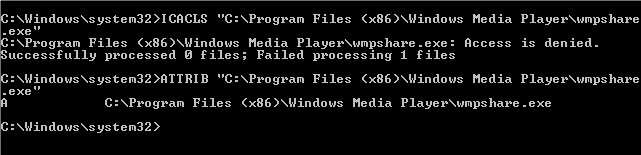
here you go.
 

Attachments

  • icacls and attrib.PNG
    icacls and attrib.PNG
    1.5 KB · Views: 38

My Computer My Computer

Computer type
Laptop
Computer Manufacturer/Model Number
HP Pavilion dv6
OS
Windows 7 Home Premium 64-bit
CPU
AMD A8-3500M APU with Radeon(tm) HD Graphics 1.50GHz 4 core
Memory
6 GB
Antivirus
COMODO Internet Security
Browser
Avant Browser (Firefox)
That looks like a blanket 'deny' permission to me.
I'll tryto create a fix and post it tomorrow.
 

My Computer My Computer

Computer type
Laptop
Computer Manufacturer/Model Number
Asus K52F or Lenovo B51-80
OS
Win 7 x64 Home Premium (and x86 VirtualBox VM)/Win10
CPU
i3 370M/i7 6500U
Motherboard
Asus/Lenovo
Memory
8GB - finally :)/8GB
Graphics Card(s)
it's an i3, dude!/dual Intel&nVidia
Sound Card
onboard
Monitor(s) Displays
15.6" built-in
Screen Resolution
1366x768/1920x1080
Hard Drives
750GB Seagate internal
Sundry external drives attached to other computers on the local network
1TB SSD on the Lenovo
PSU
n/a
Internet Speed
as much as I can get - usually on a dongle/phone, so <1MB/s
Antivirus
MSE/Defender
Browser
IE11/12/Edge/Chrome/FF(if I must)
alright cool. thanks for all the help so far, really appreciate it.
 

My Computer My Computer

Computer type
Laptop
Computer Manufacturer/Model Number
HP Pavilion dv6
OS
Windows 7 Home Premium 64-bit
CPU
AMD A8-3500M APU with Radeon(tm) HD Graphics 1.50GHz 4 core
Memory
6 GB
Antivirus
COMODO Internet Security
Browser
Avant Browser (Firefox)
Please open an Elevated Command Prompt and run the following commands:

Code:
TAKEOWN /F "C:\Program Files (x86)\Windows Media Player\wmpshare.exe" /A
ICACLS "C:\Program Files (x86)\Windows Media Player\wmpshare.exe"
ICACLS "C:\Program Files (x86)\Windows Media Player\wmpshare.exe" /remove:d Everyone
ICACLS "C:\Program Files (x86)\Windows Media Player\wmpshare.exe" /grant:r "NT Service\TrustedInstaller":(F)
ICACLS "C:\Program Files (x86)\Windows Media Player\wmpshare.exe" /grant:r "Administrators":(RX)
ICACLS "C:\Program Files (x86)\Windows Media Player\wmpshare.exe" /grant:r "Users":(RX)
 
.
Post the results, and then reboot.


Here are some instructions to make lifeeasier :)

1) To open anElevated Command Prompt Window (the ECP window), click on Start, All Programs,Accessories – then right-click on Command Prompt, and select Run asAdministrator. Accept the UAC prompt.

2) To run thecommands easier, highlight the block of commands, and right-click on thehighlight – select Copy. In the CP Window, click on the black/white icon at topleft – select Paste. The commands will run but may not complete the lastcommand, so hit the Enter Key once.

3) To copy theresults... click on the Black/White icon in the top left, and select Edit...'Select All', and hit the Enter key - then use Ctrl+V or r-click+Paste to pasteit into your response.
 

My Computer My Computer

Computer type
Laptop
Computer Manufacturer/Model Number
Asus K52F or Lenovo B51-80
OS
Win 7 x64 Home Premium (and x86 VirtualBox VM)/Win10
CPU
i3 370M/i7 6500U
Motherboard
Asus/Lenovo
Memory
8GB - finally :)/8GB
Graphics Card(s)
it's an i3, dude!/dual Intel&nVidia
Sound Card
onboard
Monitor(s) Displays
15.6" built-in
Screen Resolution
1366x768/1920x1080
Hard Drives
750GB Seagate internal
Sundry external drives attached to other computers on the local network
1TB SSD on the Lenovo
PSU
n/a
Internet Speed
as much as I can get - usually on a dongle/phone, so <1MB/s
Antivirus
MSE/Defender
Browser
IE11/12/Edge/Chrome/FF(if I must)
i thought it was obvious i was in superuser mode in the command prompt given i was starting out on C:\Windows\System32 instead of C:\Users\(currently logged in user). but anyways...

Code:
Microsoft Windows [Version 6.1.7601]
Copyright (c) 2009 Microsoft Corporation.  All rights reserved.

C:\Windows\system32>TAKEOWN /F "C:\Program Files (x86)\Windows Media Player\wmps
hare.exe" /A
ERROR: Access is denied.

C:\Windows\system32>ICACLS "C:\Program Files (x86)\Windows Media Player\wmpshare
.exe"
C:\Program Files (x86)\Windows Media Player\wmpshare.exe: Access is denied.
Successfully processed 0 files; Failed processing 1 files

C:\Windows\system32>ICACLS "C:\Program Files (x86)\Windows Media Player\wmpshare
.exe" /remove:d Everyone
C:\Program Files (x86)\Windows Media Player\wmpshare.exe: Access is denied.
Successfully processed 0 files; Failed processing 1 files

C:\Windows\system32>ICACLS "C:\Program Files (x86)\Windows Media Player\wmpshare
.exe" /grant:r "NT Service\TrustedInstaller":(F)
C:\Program Files (x86)\Windows Media Player\wmpshare.exe: Access is denied.
Successfully processed 0 files; Failed processing 1 files

C:\Windows\system32>ICACLS "C:\Program Files (x86)\Windows Media Player\wmpshare
.exe" /grant:r "Administrators":(RX)
C:\Program Files (x86)\Windows Media Player\wmpshare.exe: Access is denied.
Successfully processed 0 files; Failed processing 1 files

C:\Windows\system32>ICACLS "C:\Program Files (x86)\Windows Media Player\wmpshare
.exe" /grant:r "Users":(RX)
 

My Computer My Computer

Computer type
Laptop
Computer Manufacturer/Model Number
HP Pavilion dv6
OS
Windows 7 Home Premium 64-bit
CPU
AMD A8-3500M APU with Radeon(tm) HD Graphics 1.50GHz 4 core
Memory
6 GB
Antivirus
COMODO Internet Security
Browser
Avant Browser (Firefox)
Bummer! :(
Perhaps there's disk corruption?

Click on Start > All Programs > Accessories

Right-click onthe Command Prompt entry

Select Run as Administrator and accept the UAC prompt- the Elevated Command Prompt window should pop up.

At the Commandprompt, type

CHKDSK C: /R

and hit the Enter key.

You will be toldthat the drive is locked, and the CHKDSK will run at the next boot - hit the Ykey, and then reboot.

The CHKDSK willtake a few hours depending on the size of the drive, so be patient!

After the CHKDSK has run, Windows should bootnormally (possibly after a secondauto-reboot) - then run the SFC, and see what happens.


Open Event Viewer

click on theWindows logs entry in the left pane to expand it.

Now click on theApplication entry - wait while it loads.

Click on 'File'in the menu bar and select Save...

Save the file asAppevt.evtx

Repeat for theSystem log

then zip both,and upload them.


My Computer My Computer

Computer type
Laptop
Computer Manufacturer/Model Number
Asus K52F or Lenovo B51-80
OS
Win 7 x64 Home Premium (and x86 VirtualBox VM)/Win10
CPU
i3 370M/i7 6500U
Motherboard
Asus/Lenovo
Memory
8GB - finally :)/8GB
Graphics Card(s)
it's an i3, dude!/dual Intel&nVidia
Sound Card
onboard
Monitor(s) Displays
15.6" built-in
Screen Resolution
1366x768/1920x1080
Hard Drives
750GB Seagate internal
Sundry external drives attached to other computers on the local network
1TB SSD on the Lenovo
PSU
n/a
Internet Speed
as much as I can get - usually on a dongle/phone, so <1MB/s
Antivirus
MSE/Defender
Browser
IE11/12/Edge/Chrome/FF(if I must)
alright well i guess ill be back in 12 or so hours (thats how long it takes for me to do a virus scan, at any rate)
 

My Computer My Computer

Computer type
Laptop
Computer Manufacturer/Model Number
HP Pavilion dv6
OS
Windows 7 Home Premium 64-bit
CPU
AMD A8-3500M APU with Radeon(tm) HD Graphics 1.50GHz 4 core
Memory
6 GB
Antivirus
COMODO Internet Security
Browser
Avant Browser (Firefox)
CHKDSK just finished, said the volume was clean.

gonna boot into safe mode so i can run SFC, ill be back with the files you asked for in a few minutes.
 

My Computer My Computer

Computer type
Laptop
Computer Manufacturer/Model Number
HP Pavilion dv6
OS
Windows 7 Home Premium 64-bit
CPU
AMD A8-3500M APU with Radeon(tm) HD Graphics 1.50GHz 4 core
Memory
6 GB
Antivirus
COMODO Internet Security
Browser
Avant Browser (Firefox)
sfc scannow saying the same thing it's been saying the past times i've ran it - there's corrupt files but can't fix them.

Code:
Microsoft Windows [Version 6.1.7601]
Copyright (c) 2009 Microsoft Corporation.  All rights reserved.

C:\Windows\system32>sfc /scannow

Beginning system scan.  This process will take some time.

Beginning verification phase of system scan.
Verification 100% complete.
Windows Resource Protection found corrupt files but was unable to fix some of th
em.
Details are included in the CBS.Log windir\Logs\CBS\CBS.log. For example
C:\Windows\Logs\CBS\CBS.log

C:\Windows\system32>
 

My Computer My Computer

Computer type
Laptop
Computer Manufacturer/Model Number
HP Pavilion dv6
OS
Windows 7 Home Premium 64-bit
CPU
AMD A8-3500M APU with Radeon(tm) HD Graphics 1.50GHz 4 core
Memory
6 GB
Antivirus
COMODO Internet Security
Browser
Avant Browser (Firefox)
Here's the SFC errors...
Code:
 Line 29870: 2015-07-04 09:38:54, Info                  CSI    00000381 [SR] Repairing 3 components
 Line 29871: 2015-07-04 09:38:54, Info                  CSI    00000382 [SR] Beginning Verify and Repair transaction
 Line 29874: 2015-07-04 09:38:54, Info                  CSI    00000384 [SR] Cannot repair member file [l:24{12}]"utc.app.json" of Microsoft-Windows-Unified-Telemetry-Client, Version = 6.1.7601.18839, pA = PROCESSOR_ARCHITECTURE_AMD64 (9), Culture neutral, VersionScope = 1 nonSxS, PublicKeyToken = {l:8 b:31bf3856ad364e35}, Type neutral, TypeName neutral, PublicKey neutral in the store, hash mismatch
 Line 29877: 2015-07-04 09:38:54, Info                  CSI    00000386 [SR] Cannot repair member file [l:66{33}]"telemetry.ASM-WindowsDefault.json" of Microsoft-Windows-Unified-Telemetry-Client, Version = 6.1.7601.18839, pA = PROCESSOR_ARCHITECTURE_AMD64 (9), Culture neutral, VersionScope = 1 nonSxS, PublicKeyToken = {l:8 b:31bf3856ad364e35}, Type neutral, TypeName neutral, PublicKey neutral in the store, hash mismatch
 Line 29880: 2015-07-04 09:38:55, Info                  CSI    00000388 [SR] Cannot repair member file [l:14{7}]"fde.dll" of Microsoft-Windows-fde, Version = 6.1.7601.17514, pA = PROCESSOR_ARCHITECTURE_INTEL (0), Culture neutral, VersionScope = 1 nonSxS, PublicKeyToken = {l:8 b:31bf3856ad364e35}, Type neutral, TypeName neutral, PublicKey neutral in the store, hash mismatch
 Line 29883: 2015-07-04 09:38:55, Info                  CSI    0000038a [SR] Cannot repair member file [l:22{11}]"fdeploy.dll" of Microsoft-Windows-fdeploy, Version = 6.1.7601.17514, pA = PROCESSOR_ARCHITECTURE_INTEL (0), Culture neutral, VersionScope = 1 nonSxS, PublicKeyToken = {l:8 b:31bf3856ad364e35}, Type neutral, TypeName neutral, PublicKey neutral in the store, hash mismatch

There are a few odd entries in the event logs - which I'll come to later.
I'll post a fix protocol for these error later (prolly tomorrow, now)
 

My Computer My Computer

Computer type
Laptop
Computer Manufacturer/Model Number
Asus K52F or Lenovo B51-80
OS
Win 7 x64 Home Premium (and x86 VirtualBox VM)/Win10
CPU
i3 370M/i7 6500U
Motherboard
Asus/Lenovo
Memory
8GB - finally :)/8GB
Graphics Card(s)
it's an i3, dude!/dual Intel&nVidia
Sound Card
onboard
Monitor(s) Displays
15.6" built-in
Screen Resolution
1366x768/1920x1080
Hard Drives
750GB Seagate internal
Sundry external drives attached to other computers on the local network
1TB SSD on the Lenovo
PSU
n/a
Internet Speed
as much as I can get - usually on a dongle/phone, so <1MB/s
Antivirus
MSE/Defender
Browser
IE11/12/Edge/Chrome/FF(if I must)
hey, sorry for not checking back on this thread in a while - real life things to attend to... any news on that fix you were working on?
 

My Computer My Computer

Computer type
Laptop
Computer Manufacturer/Model Number
HP Pavilion dv6
OS
Windows 7 Home Premium 64-bit
CPU
AMD A8-3500M APU with Radeon(tm) HD Graphics 1.50GHz 4 core
Memory
6 GB
Antivirus
COMODO Internet Security
Browser
Avant Browser (Firefox)
Sorry about that - I've had my own frustrations as well!

I've uploaded a file - fcfaa.zip - to my OneDrive at Noel's OneDrive
Please download and save it.

Right-click on the saved file and select Extract all...
Change the target to C:\ and click on Extract
Close all windows (it would be a good idea to print these instructions!)

Now reboot to the Repair Environment - as soon as the machine restarts, start tapping F8 - this should bring up the Advanced Boot Menu, at the top of which should be the option 'Repair my Computer'
Pick that
You'll have to log in with your username and password.

Pick the option to use a Command Prompt
At the prompt type
DIR C:\fcfaa
hit the enter key - if you get a 'Not Found' error try
DIR D:\fcfaa
or
DIR E:\fcfaa

The drive letter in use when you find the folder will need to be substituted (for<drive>) into the following command...

XCOPY <drive>:\fcfaa <drive>:\windows\winsxs /y /i /s /v /h

(e.g. XCOPY P:\wfire P:\windows\winsxs /y /i /s /v /h )

run the command (it should take almost no time) and when the prompt returns, type
EXIT
and hit the Enter key to exit Command Prompt - reboot to Normal Mode Windows.

Now run SFC /SCANNOW in an Elevated Command Prompt
then reboot and upload the new CBS.log file to your reply
 
Last edited:

My Computer My Computer

Computer type
Laptop
Computer Manufacturer/Model Number
Asus K52F or Lenovo B51-80
OS
Win 7 x64 Home Premium (and x86 VirtualBox VM)/Win10
CPU
i3 370M/i7 6500U
Motherboard
Asus/Lenovo
Memory
8GB - finally :)/8GB
Graphics Card(s)
it's an i3, dude!/dual Intel&nVidia
Sound Card
onboard
Monitor(s) Displays
15.6" built-in
Screen Resolution
1366x768/1920x1080
Hard Drives
750GB Seagate internal
Sundry external drives attached to other computers on the local network
1TB SSD on the Lenovo
PSU
n/a
Internet Speed
as much as I can get - usually on a dongle/phone, so <1MB/s
Antivirus
MSE/Defender
Browser
IE11/12/Edge/Chrome/FF(if I must)
here's the log.
 

My Computer My Computer

Computer type
Laptop
Computer Manufacturer/Model Number
HP Pavilion dv6
OS
Windows 7 Home Premium 64-bit
CPU
AMD A8-3500M APU with Radeon(tm) HD Graphics 1.50GHz 4 core
Memory
6 GB
Antivirus
COMODO Internet Security
Browser
Avant Browser (Firefox)
Great! the only remaining errors are from KB3022345, which can be ignored.

Do a check for updates, and attempt to install only the oldest found update.
If it goes in OK, try the rest
If it fails, post the C:\Windows\windowsupdate.log file.
 

My Computer My Computer

Computer type
Laptop
Computer Manufacturer/Model Number
Asus K52F or Lenovo B51-80
OS
Win 7 x64 Home Premium (and x86 VirtualBox VM)/Win10
CPU
i3 370M/i7 6500U
Motherboard
Asus/Lenovo
Memory
8GB - finally :)/8GB
Graphics Card(s)
it's an i3, dude!/dual Intel&nVidia
Sound Card
onboard
Monitor(s) Displays
15.6" built-in
Screen Resolution
1366x768/1920x1080
Hard Drives
750GB Seagate internal
Sundry external drives attached to other computers on the local network
1TB SSD on the Lenovo
PSU
n/a
Internet Speed
as much as I can get - usually on a dongle/phone, so <1MB/s
Antivirus
MSE/Defender
Browser
IE11/12/Edge/Chrome/FF(if I must)
KB3033890 already borked, and i didn't even restart my computer yet - it gave me error 80246007. here's the log.

still got 2 other hidden ones i haven't tried yet, from the topic i mentioned way back in OP.
 

My Computer My Computer

Computer type
Laptop
Computer Manufacturer/Model Number
HP Pavilion dv6
OS
Windows 7 Home Premium 64-bit
CPU
AMD A8-3500M APU with Radeon(tm) HD Graphics 1.50GHz 4 core
Memory
6 GB
Antivirus
COMODO Internet Security
Browser
Avant Browser (Firefox)
Reboot and try again - if you get the same error message, try this...

Open an Elevated Command Prompt, and run the following commands


Code:
REG LOAD HKLM\COMPONENTS C:\Windows\System32\config\COMPONENTS
REG DELETE HKLM\COMPONENTS /V PendingRequired
 
.
then reboot, and try Windows Update again.
 

My Computer My Computer

Computer type
Laptop
Computer Manufacturer/Model Number
Asus K52F or Lenovo B51-80
OS
Win 7 x64 Home Premium (and x86 VirtualBox VM)/Win10
CPU
i3 370M/i7 6500U
Motherboard
Asus/Lenovo
Memory
8GB - finally :)/8GB
Graphics Card(s)
it's an i3, dude!/dual Intel&nVidia
Sound Card
onboard
Monitor(s) Displays
15.6" built-in
Screen Resolution
1366x768/1920x1080
Hard Drives
750GB Seagate internal
Sundry external drives attached to other computers on the local network
1TB SSD on the Lenovo
PSU
n/a
Internet Speed
as much as I can get - usually on a dongle/phone, so <1MB/s
Antivirus
MSE/Defender
Browser
IE11/12/Edge/Chrome/FF(if I must)
Back
Top