Error code 80070005 trying to install KB3033890 (WMP patch)

freecomkcf

New member
Local time
2:28 AM
Messages
72
doing the same song and dance from the last time i had this problem with a pair of patches a few months ago, just with a different update this time around. here's the last thread, pretty much all of it applies to my situation now except with windows update KB3033890: http://www.sevenforums.com/windows-...-updates-giving-unknown-error-80070005-a.html

this time around the updater doesn't throw my laptop into a restart loop, instead "only" getting stuck at 35% when configuring updates, then reverting the changes, making my startup time a few minutes longer than usual.

as usual subinacl.exe didn't do anything to bypass this problem. for now i'm just going to hide this update.

update information: https://support.microsoft.com/kb/3033890
 

My Computer

Computer type
Laptop
Computer Manufacturer/Model Number
HP Pavilion dv6
OS
Windows 7 Home Premium 64-bit
CPU
AMD A8-3500M APU with Radeon(tm) HD Graphics 1.50GHz 4 core
Memory
6 GB
Antivirus
COMODO Internet Security
Browser
Avant Browser (Firefox)
Please follow the Windows Update Posting Instructions and post the requested data

If the file is too large (8MB compressed), remove the older CBSPersist cab files until the final file is below the limit - you can always post them separately after zipping them. (the forum doesn't allow the upload of bare CAB files, for a number of reasons)

Please also post the C:\Windows\windowsudpate.log file
 

My Computer

Computer type
Laptop
Computer Manufacturer/Model Number
Asus K52F or Lenovo B51-80
OS
Win 7 x64 Home Premium (and x86 VirtualBox VM)/Win10
CPU
i3 370M/i7 6500U
Motherboard
Asus/Lenovo
Memory
8GB - finally :)/8GB
Graphics Card(s)
it's an i3, dude!/dual Intel&nVidia
Sound Card
onboard
Monitor(s) Displays
15.6" built-in
Screen Resolution
1366x768/1920x1080
Hard Drives
750GB Seagate internal
Sundry external drives attached to other computers on the local network
1TB SSD on the Lenovo
PSU
n/a
Internet Speed
as much as I can get - usually on a dongle/phone, so <1MB/s
Antivirus
MSE/Defender
Browser
IE11/12/Edge/Chrome/FF(if I must)
downloaded the installer and i'm installing SURT now. i could've sworn it was already installed from the last time i had this problem but the installer's doing it's thing anyway.

what am i supposed to do after it's installed? the last time i did this i was at a loss as to where to find SURT exactly and ended up just skipping to the sfc /scannow part, which incidentally still gives the same exact error it did in my previous thread.
 

My Computer

Computer type
Laptop
Computer Manufacturer/Model Number
HP Pavilion dv6
OS
Windows 7 Home Premium 64-bit
CPU
AMD A8-3500M APU with Radeon(tm) HD Graphics 1.50GHz 4 core
Memory
6 GB
Antivirus
COMODO Internet Security
Browser
Avant Browser (Firefox)
i just looked in my CBS folder and the CBS.log file alone is 1.52 GB (screenshots in attachments), and i can't put it into a zip file because access is denied.

also included in screenshots is the error i get running sfc /scannow, and proof that the modules service is indeed running.

lastly my Windows Update log is included.
 

Attachments

  • kb3033890 sfc scannow.png
    kb3033890 sfc scannow.png
    183.4 KB · Views: 5
  • WindowsUpdate.rar
    WindowsUpdate.rar
    70.8 KB · Views: 2

My Computer

Computer type
Laptop
Computer Manufacturer/Model Number
HP Pavilion dv6
OS
Windows 7 Home Premium 64-bit
CPU
AMD A8-3500M APU with Radeon(tm) HD Graphics 1.50GHz 4 core
Memory
6 GB
Antivirus
COMODO Internet Security
Browser
Avant Browser (Firefox)
Please post the CheckSUR.log and CheckSUR.Persist.log files.
 

My Computer

Computer type
Laptop
Computer Manufacturer/Model Number
Asus K52F or Lenovo B51-80
OS
Win 7 x64 Home Premium (and x86 VirtualBox VM)/Win10
CPU
i3 370M/i7 6500U
Motherboard
Asus/Lenovo
Memory
8GB - finally :)/8GB
Graphics Card(s)
it's an i3, dude!/dual Intel&nVidia
Sound Card
onboard
Monitor(s) Displays
15.6" built-in
Screen Resolution
1366x768/1920x1080
Hard Drives
750GB Seagate internal
Sundry external drives attached to other computers on the local network
1TB SSD on the Lenovo
PSU
n/a
Internet Speed
as much as I can get - usually on a dongle/phone, so <1MB/s
Antivirus
MSE/Defender
Browser
IE11/12/Edge/Chrome/FF(if I must)
got it, here you go.
 

Attachments

My Computer

Computer type
Laptop
Computer Manufacturer/Model Number
HP Pavilion dv6
OS
Windows 7 Home Premium 64-bit
CPU
AMD A8-3500M APU with Radeon(tm) HD Graphics 1.50GHz 4 core
Memory
6 GB
Antivirus
COMODO Internet Security
Browser
Avant Browser (Firefox)
That's surprisingly clear.
It's the second time this week I've seen a Persist file that unpacks to 800MB - it may take me a while to decipher it as I can't use 'normal' methods to read it.

Back when I can...
 

My Computer

Computer type
Laptop
Computer Manufacturer/Model Number
Asus K52F or Lenovo B51-80
OS
Win 7 x64 Home Premium (and x86 VirtualBox VM)/Win10
CPU
i3 370M/i7 6500U
Motherboard
Asus/Lenovo
Memory
8GB - finally :)/8GB
Graphics Card(s)
it's an i3, dude!/dual Intel&nVidia
Sound Card
onboard
Monitor(s) Displays
15.6" built-in
Screen Resolution
1366x768/1920x1080
Hard Drives
750GB Seagate internal
Sundry external drives attached to other computers on the local network
1TB SSD on the Lenovo
PSU
n/a
Internet Speed
as much as I can get - usually on a dongle/phone, so <1MB/s
Antivirus
MSE/Defender
Browser
IE11/12/Edge/Chrome/FF(if I must)
thank you. take your time, no need to rush.
 

My Computer

Computer type
Laptop
Computer Manufacturer/Model Number
HP Pavilion dv6
OS
Windows 7 Home Premium 64-bit
CPU
AMD A8-3500M APU with Radeon(tm) HD Graphics 1.50GHz 4 core
Memory
6 GB
Antivirus
COMODO Internet Security
Browser
Avant Browser (Firefox)
Let's try this...
This is the command to run when booted offline at arecovery command prompt


dism.exe /image:C:\ /cleanup-image/revertpendingactions


This is supposed to revert all pended updates, howeverif System Restore is not working, then there may be other issues as well

Note that you may need to change the drive letter to the correct one for your Windows install - which may not be C: in the Repair environment.
 

My Computer

Computer type
Laptop
Computer Manufacturer/Model Number
Asus K52F or Lenovo B51-80
OS
Win 7 x64 Home Premium (and x86 VirtualBox VM)/Win10
CPU
i3 370M/i7 6500U
Motherboard
Asus/Lenovo
Memory
8GB - finally :)/8GB
Graphics Card(s)
it's an i3, dude!/dual Intel&nVidia
Sound Card
onboard
Monitor(s) Displays
15.6" built-in
Screen Resolution
1366x768/1920x1080
Hard Drives
750GB Seagate internal
Sundry external drives attached to other computers on the local network
1TB SSD on the Lenovo
PSU
n/a
Internet Speed
as much as I can get - usually on a dongle/phone, so <1MB/s
Antivirus
MSE/Defender
Browser
IE11/12/Edge/Chrome/FF(if I must)
can i just run this normally or do i need to boot into Safe Mode or anything like that?
 

My Computer

Computer type
Laptop
Computer Manufacturer/Model Number
HP Pavilion dv6
OS
Windows 7 Home Premium 64-bit
CPU
AMD A8-3500M APU with Radeon(tm) HD Graphics 1.50GHz 4 core
Memory
6 GB
Antivirus
COMODO Internet Security
Browser
Avant Browser (Firefox)
You can try running it normally - it won't hurt anything if it fails.
If it does fail, you'll nee to run it from the Repair Environment. (Repair My computer in the boot menu)
 

My Computer

Computer type
Laptop
Computer Manufacturer/Model Number
Asus K52F or Lenovo B51-80
OS
Win 7 x64 Home Premium (and x86 VirtualBox VM)/Win10
CPU
i3 370M/i7 6500U
Motherboard
Asus/Lenovo
Memory
8GB - finally :)/8GB
Graphics Card(s)
it's an i3, dude!/dual Intel&nVidia
Sound Card
onboard
Monitor(s) Displays
15.6" built-in
Screen Resolution
1366x768/1920x1080
Hard Drives
750GB Seagate internal
Sundry external drives attached to other computers on the local network
1TB SSD on the Lenovo
PSU
n/a
Internet Speed
as much as I can get - usually on a dongle/phone, so <1MB/s
Antivirus
MSE/Defender
Browser
IE11/12/Edge/Chrome/FF(if I must)
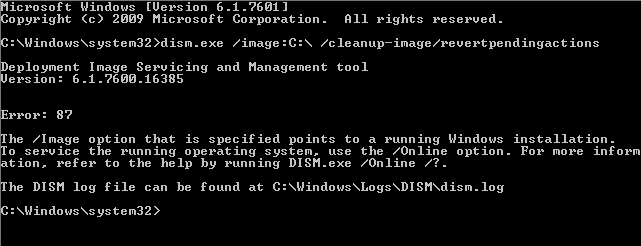
took a screenshot of what happens when i use the command.

just for clarification, Repair My Computer is basically Safe Mode right? because i don't think i've ever seen a Repair My Computer in the boot menu before.
 

Attachments

  • kb3033890 dism.png
    kb3033890 dism.png
    10.1 KB · Views: 49

My Computer

Computer type
Laptop
Computer Manufacturer/Model Number
HP Pavilion dv6
OS
Windows 7 Home Premium 64-bit
CPU
AMD A8-3500M APU with Radeon(tm) HD Graphics 1.50GHz 4 core
Memory
6 GB
Antivirus
COMODO Internet Security
Browser
Avant Browser (Firefox)
No - 'Repair my Computer' is a very different beast to Safe Mode.

If you're not offered the option on an F8 boot which offers Safe Mode, it usually means that your OEM install is cheapskate (NOT counterfeit, merely inept).
It was/is all too common - but I thought HP was better than most.


I'll see what I can work out and get back to you.
 

My Computer

Computer type
Laptop
Computer Manufacturer/Model Number
Asus K52F or Lenovo B51-80
OS
Win 7 x64 Home Premium (and x86 VirtualBox VM)/Win10
CPU
i3 370M/i7 6500U
Motherboard
Asus/Lenovo
Memory
8GB - finally :)/8GB
Graphics Card(s)
it's an i3, dude!/dual Intel&nVidia
Sound Card
onboard
Monitor(s) Displays
15.6" built-in
Screen Resolution
1366x768/1920x1080
Hard Drives
750GB Seagate internal
Sundry external drives attached to other computers on the local network
1TB SSD on the Lenovo
PSU
n/a
Internet Speed
as much as I can get - usually on a dongle/phone, so <1MB/s
Antivirus
MSE/Defender
Browser
IE11/12/Edge/Chrome/FF(if I must)
well crap... in hindsight i did get this laptop as part of a student discount 3 or 4 years ago. thanks again for the help so far.
 

My Computer

Computer type
Laptop
Computer Manufacturer/Model Number
HP Pavilion dv6
OS
Windows 7 Home Premium 64-bit
CPU
AMD A8-3500M APU with Radeon(tm) HD Graphics 1.50GHz 4 core
Memory
6 GB
Antivirus
COMODO Internet Security
Browser
Avant Browser (Firefox)

My Computer

Computer type
Laptop
Computer Manufacturer/Model Number
Asus K52F or Lenovo B51-80
OS
Win 7 x64 Home Premium (and x86 VirtualBox VM)/Win10
CPU
i3 370M/i7 6500U
Motherboard
Asus/Lenovo
Memory
8GB - finally :)/8GB
Graphics Card(s)
it's an i3, dude!/dual Intel&nVidia
Sound Card
onboard
Monitor(s) Displays
15.6" built-in
Screen Resolution
1366x768/1920x1080
Hard Drives
750GB Seagate internal
Sundry external drives attached to other computers on the local network
1TB SSD on the Lenovo
PSU
n/a
Internet Speed
as much as I can get - usually on a dongle/phone, so <1MB/s
Antivirus
MSE/Defender
Browser
IE11/12/Edge/Chrome/FF(if I must)
i know i have a few blank DVDs lying around, if i can find one of them i'll get right on that.

is there more to the repair disc menus than in the "EXAMPLE: System Recovery Options" picture? i just want to make sure i get the right option when i boot from the repair disc.
 

My Computer

Computer type
Laptop
Computer Manufacturer/Model Number
HP Pavilion dv6
OS
Windows 7 Home Premium 64-bit
CPU
AMD A8-3500M APU with Radeon(tm) HD Graphics 1.50GHz 4 core
Memory
6 GB
Antivirus
COMODO Internet Security
Browser
Avant Browser (Firefox)
The only thing you're really looing to use at the moment is the Command Prompt.
 

My Computer

Computer type
Laptop
Computer Manufacturer/Model Number
Asus K52F or Lenovo B51-80
OS
Win 7 x64 Home Premium (and x86 VirtualBox VM)/Win10
CPU
i3 370M/i7 6500U
Motherboard
Asus/Lenovo
Memory
8GB - finally :)/8GB
Graphics Card(s)
it's an i3, dude!/dual Intel&nVidia
Sound Card
onboard
Monitor(s) Displays
15.6" built-in
Screen Resolution
1366x768/1920x1080
Hard Drives
750GB Seagate internal
Sundry external drives attached to other computers on the local network
1TB SSD on the Lenovo
PSU
n/a
Internet Speed
as much as I can get - usually on a dongle/phone, so <1MB/s
Antivirus
MSE/Defender
Browser
IE11/12/Edge/Chrome/FF(if I must)
so i just looked into the boot options once more and there actually is a Repair My Computer option, i just didnt look hard enough. lol.

another dumb question, the command prompt has X:\Windows\system32, does that mean i run dism.exe with X instead of C? while im here, this is what it looks like when ran with C, it's basically the same.
 

Attachments

  • 2015-06-15-123023.jpg
    2015-06-15-123023.jpg
    70.7 KB · Views: 47

My Computer

Computer type
Laptop
Computer Manufacturer/Model Number
HP Pavilion dv6
OS
Windows 7 Home Premium 64-bit
CPU
AMD A8-3500M APU with Radeon(tm) HD Graphics 1.50GHz 4 core
Memory
6 GB
Antivirus
COMODO Internet Security
Browser
Avant Browser (Firefox)
No - you run DISM with the C: drive as a first try ...or do this...

In Normal Windows, create a new folder in the root of the C: drive called 'itsme' on that folder save a Notepad file called 'here.txt'

Now in the Repair environment, at the prompt run the following commands

DIR C:\itsme
DIR D:\itsme
DIR E:\itsme
DIR F:\itsme

whichever shows you the 'here.txt' file is the drive letter you need to use :)
 

My Computer

Computer type
Laptop
Computer Manufacturer/Model Number
Asus K52F or Lenovo B51-80
OS
Win 7 x64 Home Premium (and x86 VirtualBox VM)/Win10
CPU
i3 370M/i7 6500U
Motherboard
Asus/Lenovo
Memory
8GB - finally :)/8GB
Graphics Card(s)
it's an i3, dude!/dual Intel&nVidia
Sound Card
onboard
Monitor(s) Displays
15.6" built-in
Screen Resolution
1366x768/1920x1080
Hard Drives
750GB Seagate internal
Sundry external drives attached to other computers on the local network
1TB SSD on the Lenovo
PSU
n/a
Internet Speed
as much as I can get - usually on a dongle/phone, so <1MB/s
Antivirus
MSE/Defender
Browser
IE11/12/Edge/Chrome/FF(if I must)
as you can see in my last screenshot, i did run dism.exe on the C drive first. clearly that's not the right one, if that error is any indication... whenever i get around to restarting my computer again, i'll do that DIR trick you mentioned to find the right one.
 

My Computer

Computer type
Laptop
Computer Manufacturer/Model Number
HP Pavilion dv6
OS
Windows 7 Home Premium 64-bit
CPU
AMD A8-3500M APU with Radeon(tm) HD Graphics 1.50GHz 4 core
Memory
6 GB
Antivirus
COMODO Internet Security
Browser
Avant Browser (Firefox)
Back
Top